Best free AI app builders: Tested and reviewed in 2026
.webp)


Many free AI app builders do a stellar job of building a sleek interface. Far fewer let you publish it as a working app with a database and a way for users to log in. Of the 12 free AI app builder plans I tested this week, 6 can get you an app live for $0. The other 6 are free while you build, but you have to pay to launch.
Best free AI app builders at a glance
Free plan information verified on October 14, 2026.
Best AI app builder overall, free or paid
The best AI app builder largely depends on what you're building. If you're still working out what an AI app builder does, start there. Otherwise, here's the short version:
- A full-stack app from a prompt: Lovable builds the front end, database, and login together, and syncs the code to GitHub.
- Fast prototyping in the browser: Bolt.new runs the build in your browser and hosts the result.
- A full coding environment: Replit gives you an AI agent and a codebase you own and can take over at any point.
- Polished user interfaces: v0 provides deep visual control through Design Mode.
- Business apps with logins and permissions: Softr builds the database, pages, and user access for you, and non-technical teams can keep editing without code.
What each free plan actually lets you publish
This is what you get for $0 on each plan. Note that "Paid only" means the feature exists, just not on the free plan.
Not every app builder's free plan lets you keep your app private. On Base44, Bolt.new, v0, and Google AI Studio, free builds are open to anyone with the link until you upgrade. Only Softr, Lovable, and Zite let you publish a lasting app with logins, a database, and access control without subscribing.
Where each tool asks you to pay
Every free plan has a point where "free" stops. Here's where each tool draws that line, plus what the cheapest paid plan unlocks.
- Softr: When you need more than 5 app users or your own domain. Basic ($19/month billed annually) adds a custom domain and room for 5 Team and 5 Client users, and Pro ($99/month) lets you add more.
- Base44: When you want a private app, a custom domain, or no Base44 badge. Starter ($16/month billed annually) unlocks all three.
- Lovable: When you want your own domain or more than 30 credits a month. Pro ($25/month) unlocks both.
- Bolt.new: When you need a private site or a custom domain, or your site passes the monthly hosting cap. Pro ($25/month) covers all three.
- Zite: When you use up your 50 monthly credits or need a custom domain. Pro ($20/month billed annually) removes the daily limit and adds 1 custom domain.
- Google AI Studio: When you publish a third app, or if you use a Google Workspace account. From there, you pay as you go on Google Cloud.
- v0: When your $5 of credits run out, since free users can’t buy more. Plus ($30/user/month) adds $30 in monthly credits.
- Replit: On day 31, when your free app goes offline. Core ($20/month) keeps apps live.
- Figma Make: When you want to publish without making your file public. Professional ($16/month billed annually) adds custom domains and more credits.
- Bubble: When you want to put your app live. Starter starts at $32/month billed annually for web apps.
- Glide: When you want to publish anything. Basic ($25/month) publishes apps for your team, and public apps need Plus ($50/month).
- FlutterFlow: When you want your code or an app store listing. Basic ($39/month) unlocks both.
How we tested
We built the same small business app on every free plan: a request tracker where users sign up, log in, and see only the requests they created. For each tool, we recorded the AI credits, tokens, or messages the build used, where we got stuck, and whether we could push the app live without upgrading to a paid plan.
All apps tested by Dylan Reber between October 9 and October 14, 2026.
Free AI app builders you can publish with
These six tools are for users who want to build a live app without paying a dime.
Softr — best for business apps with logins and permissions
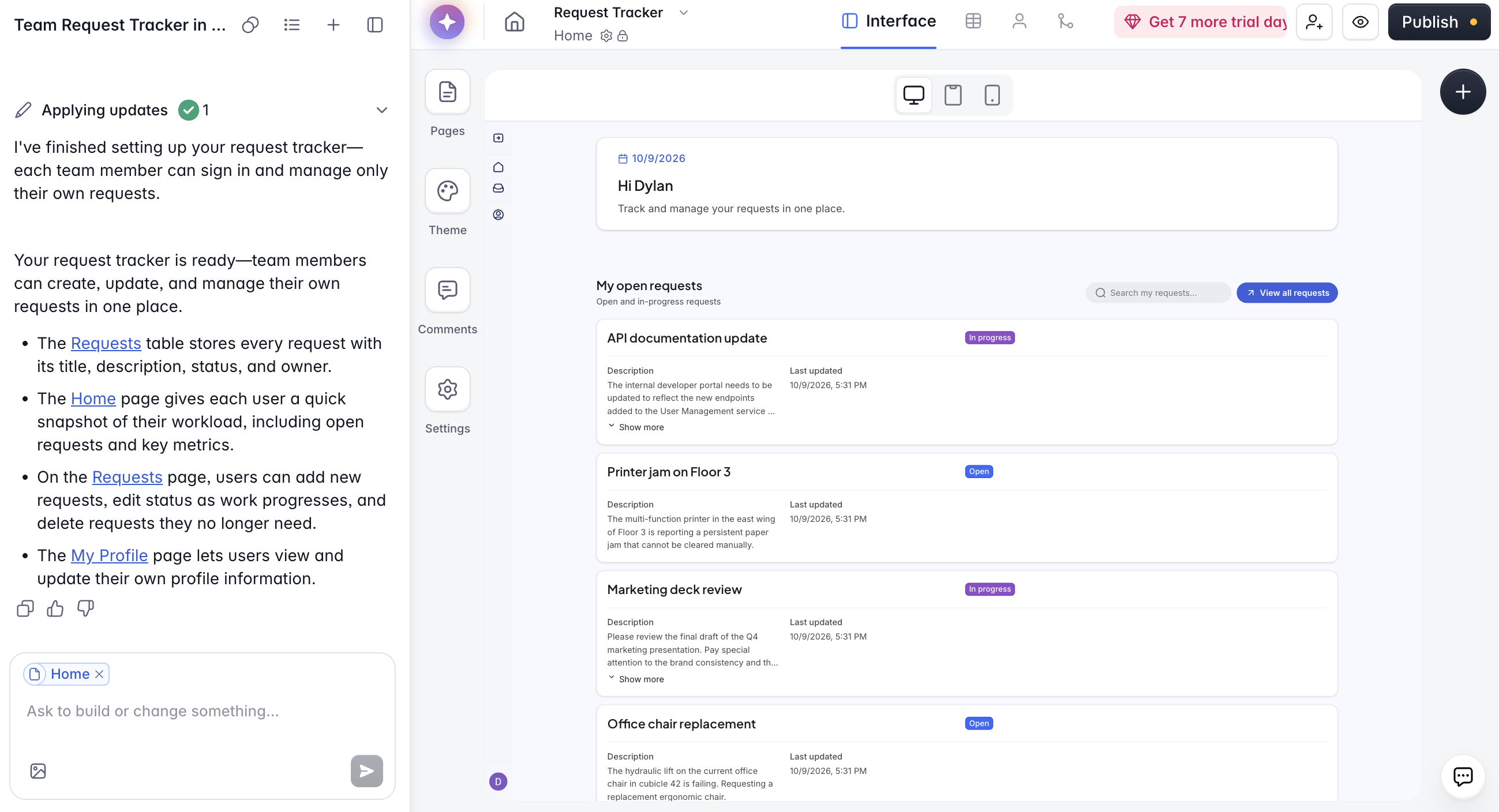
Softr is an AI app builder non-technical teams use to create real business software without touching code. Describe the app you want to the AI Co-Builder, whether that's a client portal, CRM, internal tool, onboarding platform, or project tracker. Your data lives in Softr Databases, and you can also connect to 21+ external data sources, like Airtable and Google Sheets.
What's free: Unlimited apps, databases, workflows, agents, and forms. 5 AI credits a month, up to 3 builders, 5 app users, 5,000 records per workspace (1,000 per database), and 500 workflow actions a month. The Softr API and MCP are included. See Softr pricing for every plan.
Where free stops: When you need more than 5 app users or your own domain. Basic ($19/month billed annually) adds a custom domain and room for 5 Team and 5 Client users, and Pro ($99/month) removes Softr branding and lets you add more app users.
Features:
- AI Co-Builder: Tell the AI Co-Builder what kind of app you need, and it generates the UI, database, and user permissions for you.
- Vibe Coding block: Generate custom UI elements and tools with vibe coding built directly into Softr. Anything you vibe code inherits your app's permissions, data sources, and theme.
- Built-in authentication: Every Softr app (even on the Free plan) comes with login and utility pages, and you can preview the app as any user before you publish. It supports email and password sign-in, with Google sign-in on Pro and SSO on Enterprise.
Pros:
- The Free plan delivers production-ready apps: Unlike most free AI app builders, Softr's Free plan includes built-in authentication, unlimited apps, and a database. Launch real business software to real users without upgrading.
- A reliable infrastructure and the speed of AI: The AI Co-Builder generates the app, database, and business logic instantly, without coding. And with SOC 2 Type II and GDPR baked in, the app you build is secure by default.
- Switch between prompting and visual editing: Want to fine-tune? Prompt the Co-Builder or use the intuitive visual editor. Softr lets you switch between modes as often as you like.
- A single platform for apps, data, and workflows: Manage business data in a relational database, build customer portals or internal tools, and automate workflows across your stack in one platform. No more patchworking separate tools.
Cons:
- Free plan only includes 5 AI credits per month: While that's enough to get your app off the ground, heavy AI users may burn through them quickly. Visual editing stays unlimited and free, however.
- Built for business apps, not consumer apps: Softr isn't built for native mobile apps or consumer products, and there's no code export.
What users say: Softr has a 4.7 rating on G2 from 748 reviews.
Test result: Softr built the most complete free app (by far) from a single prompt, and it was the fastest full app build on this list. It was the only tool to add a home dashboard, a profile page for users, and sample data, alongside a database and login where each user sees only their own requests. The build used 3.6 of the 5 monthly AI credits.
Bottom line: Choose Softr if you need a private business app with logins and a database, live for $0.
👉 Want to build an AI-powered business app that works in production? Try Softr's AI Co-Builder for free.
Base44 — for free MVPs with a built-in backend
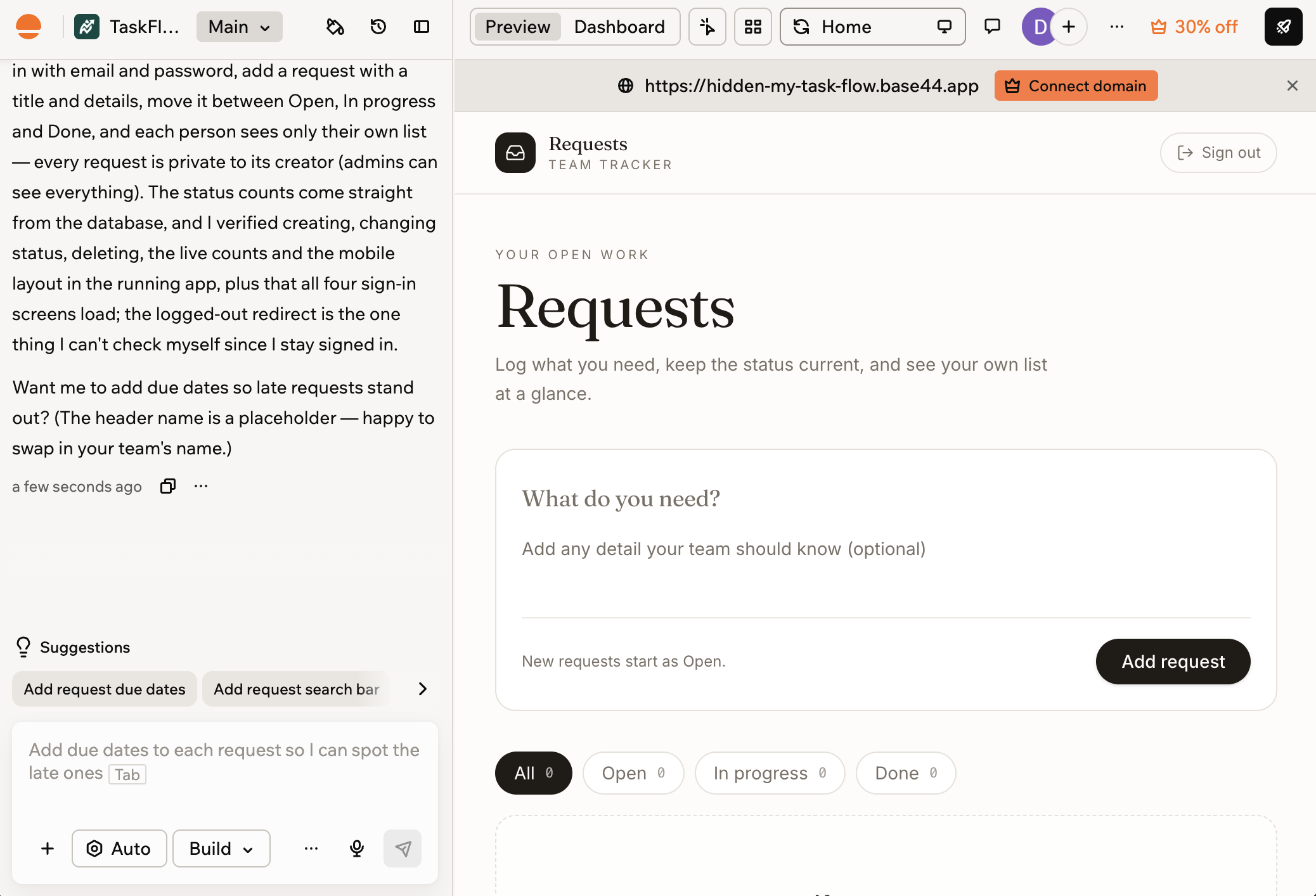
Base44 is an AI-powered platform that turns conversational prompts into fully functional apps or websites in minutes. Tell its AI assistant what you want (a productivity app or back-office tool), and Base44 generates the app with the backend already in place. You can then iterate by chatting with AI until you're happy with it.
What's free: 25 message credits a month (up to 5 a day, though our test account showed a daily limit of 6, which may be a promotion), 100 integration credits a month, up to 5 apps, and login and a database for every app. See Base44 pricing for more info.
Where free stops: When you want a private app, a custom domain, or no Base44 badge. Starter ($16/month billed annually, $20 monthly) unlocks all three, plus 100 message credits a month.
Features:
- Auto-generated API endpoints: Base44 automatically creates APIs for your app's data, so you can connect other tools and services to your app without manual setup.
- Built-in database functionality: Every Base44 app comes with database functionality built in, so you get a working backend from day one without much extra setup.
- Responsive visual editor: Prefer to edit without coding? Base44 lets you adjust design and layout visually, and you can preview changes as you make them.
- Multi-user editing and collaboration: Collaborate with your team simultaneously on the same app. Version control means every change is tracked, and you can restore previous versions as needed.
Pros:
- Built-in backend on every plan, including Free: Authentication, database functionality, and analytics are part of every Base44 app. No need for multiple tools to get a working app off the ground.
- Generate apps from a single prompt: Tell the AI what you want, and it takes care of the code, design, and backend. Iterate by re-prompting the AI.
Cons:
- Free plan caps at 5 messages/day: With a daily and monthly credit cap (5 and 25, respectively), you'll burn through your free allowance quickly if you're building something beyond a prototype.
- Free apps are public: Private apps start on Starter, so anyone with the link can open a Free app and sign up.
- No code editing on the Free plan: Want to fix a line of code? On the Free plan, you have to keep prompting until the AI gets it right. In-app code edits require a paid plan.
What users say: Base44 has a 3.8 rating on G2 from only 4 reviews. One reviewer found the free allowance too small to explore the tool, since simple and complex prompts cost the same.
Test result: Base44 built the request tracker from a single message, with email login, a database, and rules that keep each request private to its creator. It used 1 of the 25 monthly message credits, and the app went live on a public base44.app URL right away. Switching it to private needs the Starter plan.
Bottom line: Choose Base44 for a quick public prototype with the backend already built in.
Lovable — for free prompt-to-prototype apps
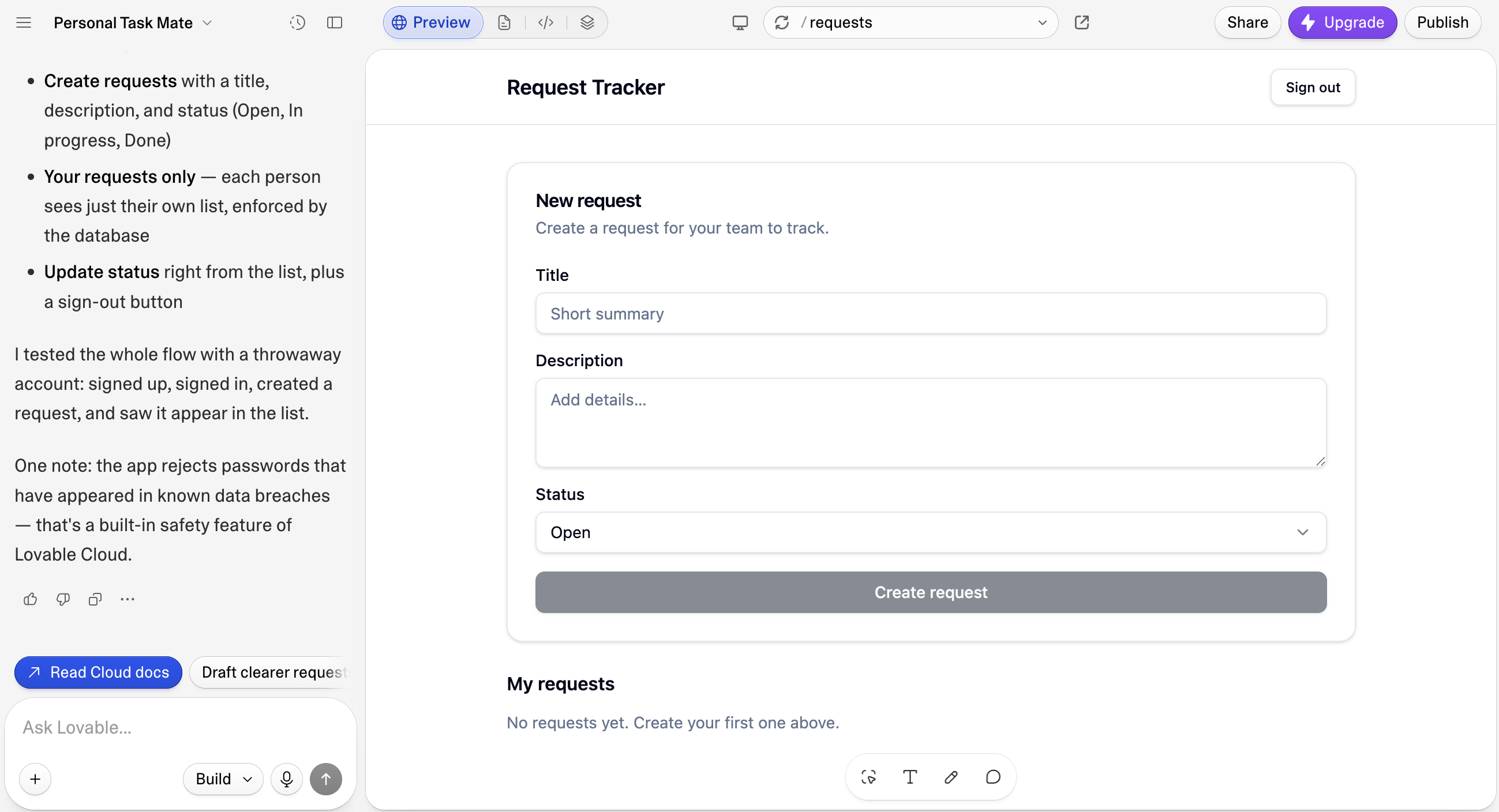
Lovable is a solid choice for founders or early-stage product teams wanting to build prototypes fast. It's a vibe coding platform that turns your chat with AI into mini apps and landing pages quickly.
What's free: 5 build credits a day (up to 30 a month), 20 Cloud credits a month for hosting and backend, private projects, 5 lovable.app domains, and GitHub sync. See Lovable pricing.
Where free stops: When you want your own domain, no badge, or more than 30 credits a month. Pro ($25/month, or $21/month billed annually) unlocks all three. Invite-only access works on Free, but opening the app to your whole workspace takes Business ($50/month).
Features:
- Real-time prototype previews: See your prototype come together visually as you prompt the AI. Feedback loops are immediate.
- Drop in screenshots and design files: Have an idea of what you want your app to look like? Upload a screenshot, sketch, or Figma file, and Lovable turns those visual references into a working app.
- Lovable Cloud: A built-in backend with a database, user login, file storage, and functions, paid for with Cloud credits.
- Knowledge files for custom context: Upload reference documents AI can pull from when building. It keeps product specs, brand guidelines, and technical requirements consistent as you iterate.
Pros:
- Real production tech stack: Lovable builds apps on React, Supabase, and Tailwind CSS, so you get a modern, well-documented codebase that any developer can extend or maintain. No proprietary platform code.
- Dozens of native connectors: Connect Stripe for payments, Notion for docs, Shopify for ecommerce, Slack for notifications, and more. Lovable also supports custom APIs and MCP servers for extending beyond the defaults.
- SOC 2 Type II and ISO 27001 certified: Lovable meets enterprise-grade security and compliance standards, which is especially important if you're prototyping with sensitive data. (However, a recent security issue did expose project data for over a month.)
Cons:
- Free plan caps at 5 daily credits: With a daily allowance of 5 credits (monthly cap of 30), you'll burn through the Free plan within a week of active building. Complex iterations cost more credits.
- Workspace-wide access is paywalled: On Free, you invite people to the app one by one. Opening it to everyone in your workspace needs the Business plan.
What users say: Lovable has a 4.6 rating on G2 from 451 reviews. Reviewers praise how fast it turns an idea into a working product, and the most common complaint is unpredictable credit use.
Test result: Lovable built the request tracker from a prompt, then tested the login flow with a throwaway account. The build used 2.1 credits, about 42% of the daily allowance. We published it as invite-only on the Free plan, and signed-out visitors were blocked automatically.
Bottom line: Choose Lovable for a full-stack prototype whose code you can take to GitHub.
Bolt.new — for free vibe coding with full code ownership
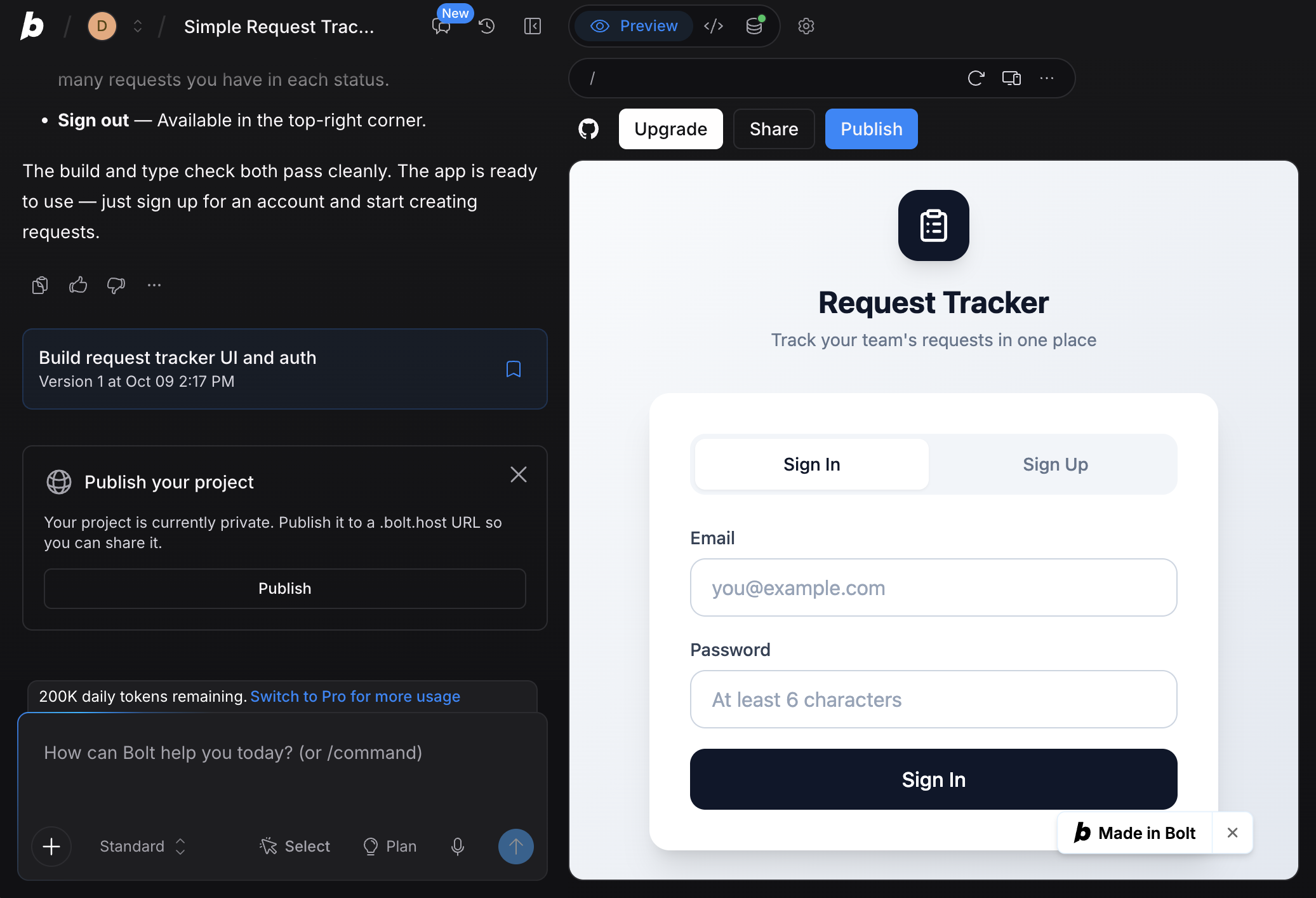
Bolt is one of the top free AI app builders for vibe coding, helping you spin up websites, apps, and prototypes from natural-language prompts. It integrates frontier coding agents within a visual interface, so you can chat with AI and watch it build, refactor, and iterate without swapping tools.
What's free: 1M tokens a month (300K a day), hosting up to 333,333 web requests and 10 GB of bandwidth a month, unlimited databases, and Bolt branding. See Bolt pricing.
Where free stops: When you need a private site, a custom domain, or no "Made in Bolt" badge. Pro ($25/month, or $18/month billed annually) unlocks all three. Free sites that pass the monthly hosting cap go offline for the rest of the month.
Features:
- Bolt Cloud: Bolt's hosted backend includes databases, user authentication, custom domains, and hosting with analytics, all in one place.
- Real-time collaboration: Multiple people can prompt and edit the same project simultaneously. Bolt processes one prompt at a time to prevent conflicts, and each prompter uses their own token allowance.
- Auto-fix for errors: When Bolt encounters errors in its builds, it automatically fixes them, tracking each fix as a separate item in your chat history, so you can see what changed and why.
- Mobile app builds with Expo: Want to build a mobile app? Connect to Expo to build both iOS and Android apps from your Bolt project.
Pros:
- Version history and rollback: Every change is tracked, so you can preview previous versions and restore any of them easily.
- Multiple ways to import your work: Bring designs in from Figma or Google Stitch, import an existing GitHub repository, or migrate a Lovable project into Bolt with a guided flow.
Cons:
- 300K daily token cap limits long sessions: The 1M monthly token allowance is relatively generous, but the daily cap can interrupt extended iteration sessions. Plus, daily tokens don't roll over from day to day.
- A hard monthly hosting cap: If your free site passes 333,333 requests or 10 GB of bandwidth, it goes offline until the next month, and there's no way to buy more on Free.
What users say: Bolt.new has a 4.3 rating on G2 from 97 reviews. Reviewers like it for fast prototypes, but say token use is hard to predict and larger projects get less reliable.
Test result: Bolt built the request tracker with email login, a database, and access rules. The build used ~100K tokens, which is roughly 10% of the monthly free allowance. Publishing it to a public link worked for free, but switching it to private requires a paid plan.
Bottom line: Choose Bolt.new to own your code and host a public app for free.
Zite — for simple internal tools you won’t change often
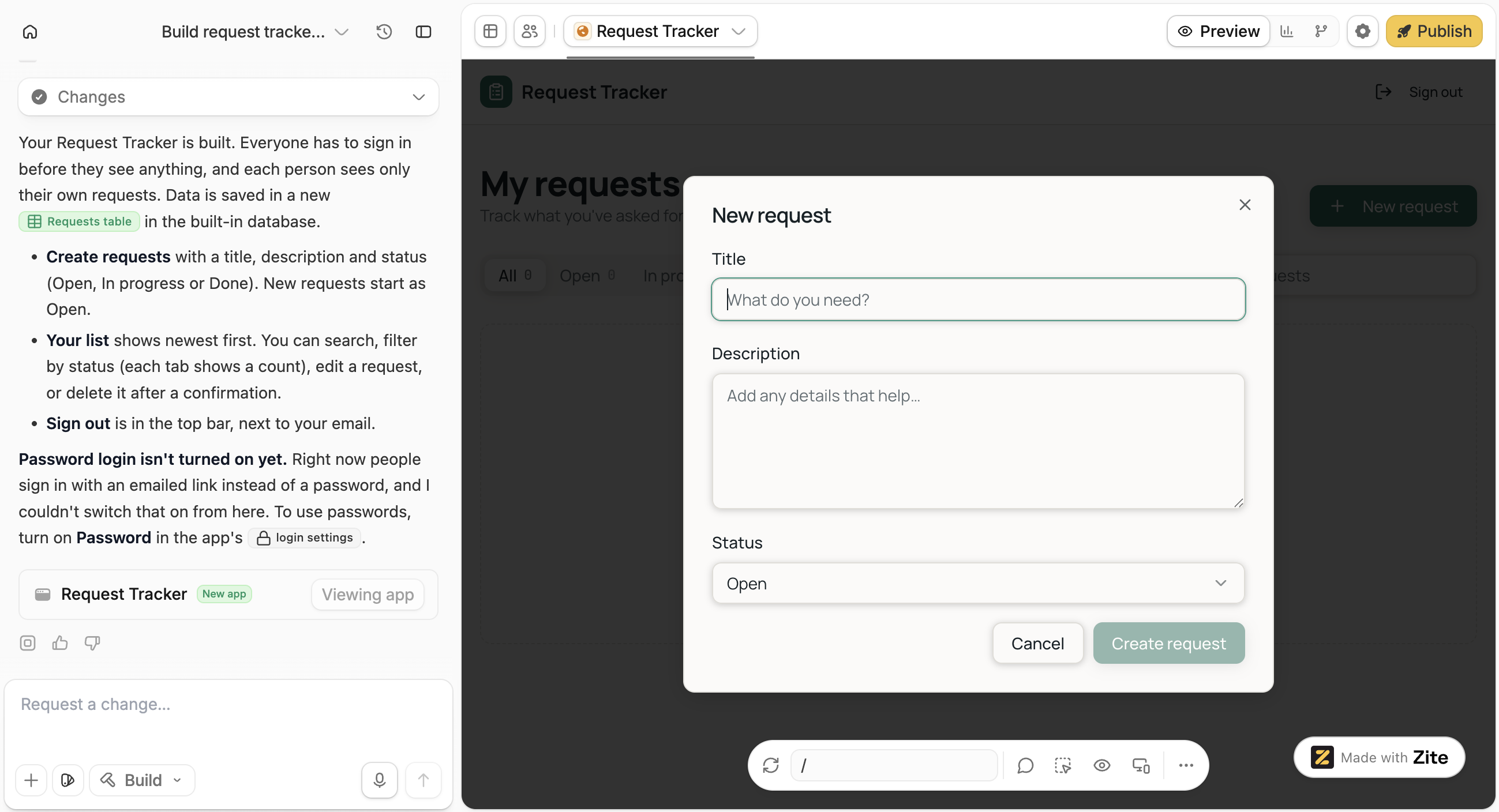
Zite turns plain-English prompts into business software, with a database, user logins, and workflows included from the first build. Describe the tool you need, like an inventory tracker or a client portal, and Zite generates it on a zite.so subdomain.
What's free: 50 credits a month (up to 10 messages a day), unlimited apps, users, and editors, 5,000 records, 1,000 workflow runs a month, 1 GB of file storage, and Zite branding. See Zite pricing.
Where free stops: When you run out of credits, need a custom domain, or no Zite branding. Pro ($20/month billed annually) adds 100+ credits with no daily message limit, 100,000 records, and 1 custom domain.
Features:
- Built-in database: The Zite Database supports 27 field types, including AI fields.
- Flexible sign-in: Magic link and Google login, with invite-only or domain-restricted sign-up.
- Code view: Browse and edit the code behind your app, even on the Free plan.
Pros:
- Unlimited users on Free: Inviting a teammate or a client doesn't count against a user limit, though usage limits always apply.
- No time limit: Zite keeps hosting your Free app as long as you don't connect a custom domain.
Cons:
- Credits stop your build cold: Once you use all 50 monthly credits, a new day doesn't bring any back. You either wait until the 1st or upgrade.
- No AI in your app on Free: Zite's own AI keys, which power AI features inside your app, aren't included on the Free plan.
- No unpublish button: Once an app is live, you can restrict who can open it or delete it, but you can't take it offline.
What users say: Zite has only one review on G2 so far, from a team that uses it for website forms connected to their ERP.
Test result: Zite built the request tracker after we approved its database table, with search, status filters, and a list that shows each user only their own requests. The build used 3.3 of the 50 monthly credits, and making the app private and invite-only took one more message and a settings change.
Bottom line: Choose Zite for a free internal tool, as long as you’re comfortable with AI-written permissions.
Google AI Studio — for developers building on Gemini
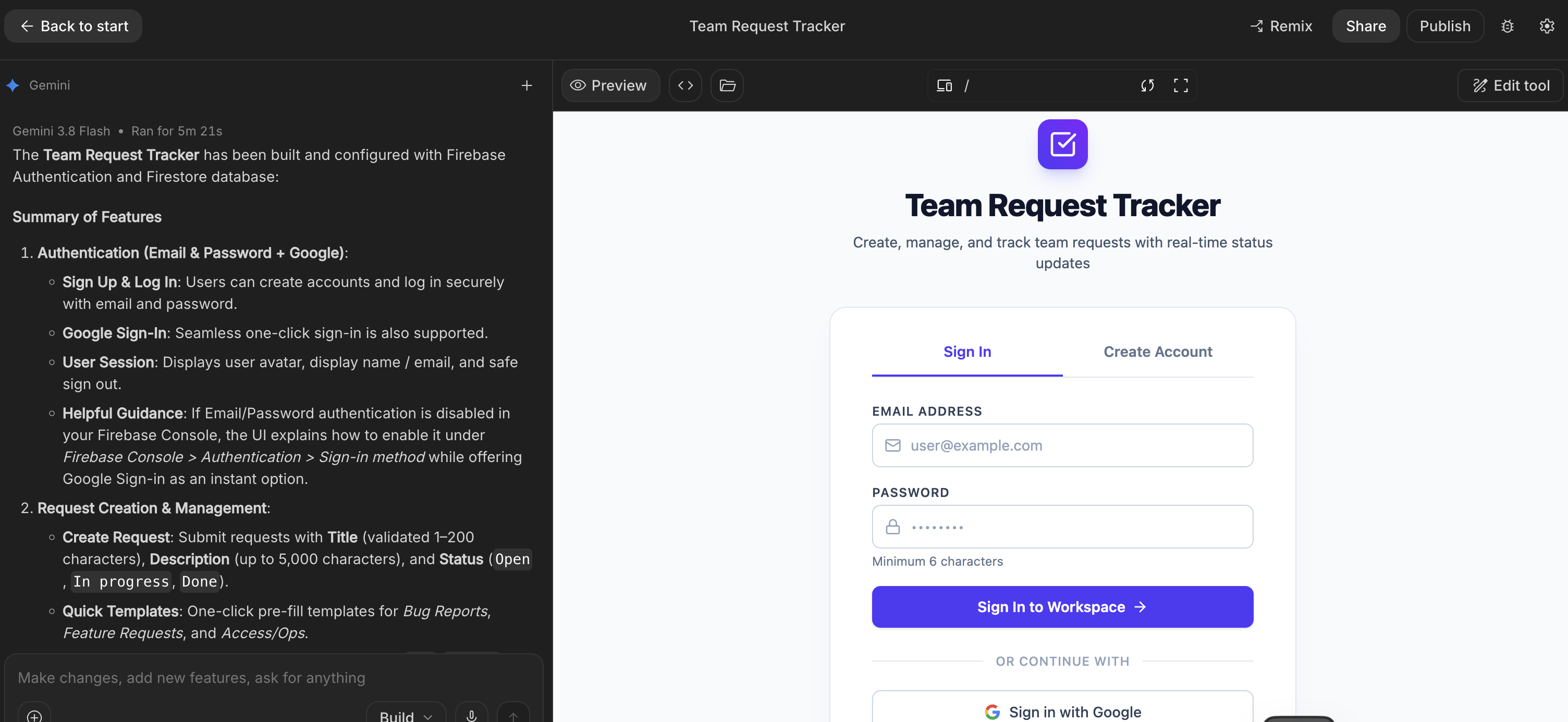
Google AI Studio is Google's browser-based workspace for building with Gemini. Its Build mode turns a prompt into an app with a React front end and a Node.js server. The agent can also set up Firebase Authentication for logins and a Firestore database for you.
What's free: Building with a daily quota (Google doesn't publish the amount), publishing up to 2 apps to Cloud Run, and Firebase login and a Firestore database within Google's free daily limits.
Where free stops: When you publish a third app, or if you use a Google Workspace account. From there, you pay as you go on Google Cloud. Google AI Pro ($19.99/month) raises your building limits.
Features:
- Login and database set up for you: The agent configures Firebase Authentication (Google Sign-In by default) and Firestore.
- Google Workspace integrations: Connect Gmail, Sheets, and Drive, with sign-in permissions set up for you.
- GitHub sync: Download your code as a ZIP file or sync it with GitHub in both directions.
- Native Android apps: Build Android apps and test them in a browser emulator.
Pros:
- Login and a database on Free: Few free plans set up both for you at no cost.
- Your code is yours: Export the full project whenever you want.
Cons:
- Most business accounts are excluded: Free publishing doesn't work with Google Workspace accounts.
- Daily database limits: When your app passes Firestore's free daily quota, every database returns errors until about midnight Pacific time.
What users say: On Product Hunt, users praise how Build mode detects and sets up login, APIs, and libraries on its own, while some worry about being tied to Firebase.
Test result: Build mode created the request tracker on Gemini 3.8 Flash, with Firebase login (email and password, plus Google) and a Firestore database. At 5 minutes 21 seconds, it was one of the slower builds we tested. Also, Google Workspace accounts can’t publish on the free tier.
Bottom line: Choose Google AI Studio if you code and want Gemini inside your app, using a personal Google account.
Free AI app builders for trying ideas
These six tools are free while you build, but you'll pay (or hit a hard limit) once you want to give users access to a live app. Still, they can be a good fit if you want to test an idea or a design.
v0 — for free, design-first AI apps and UIs
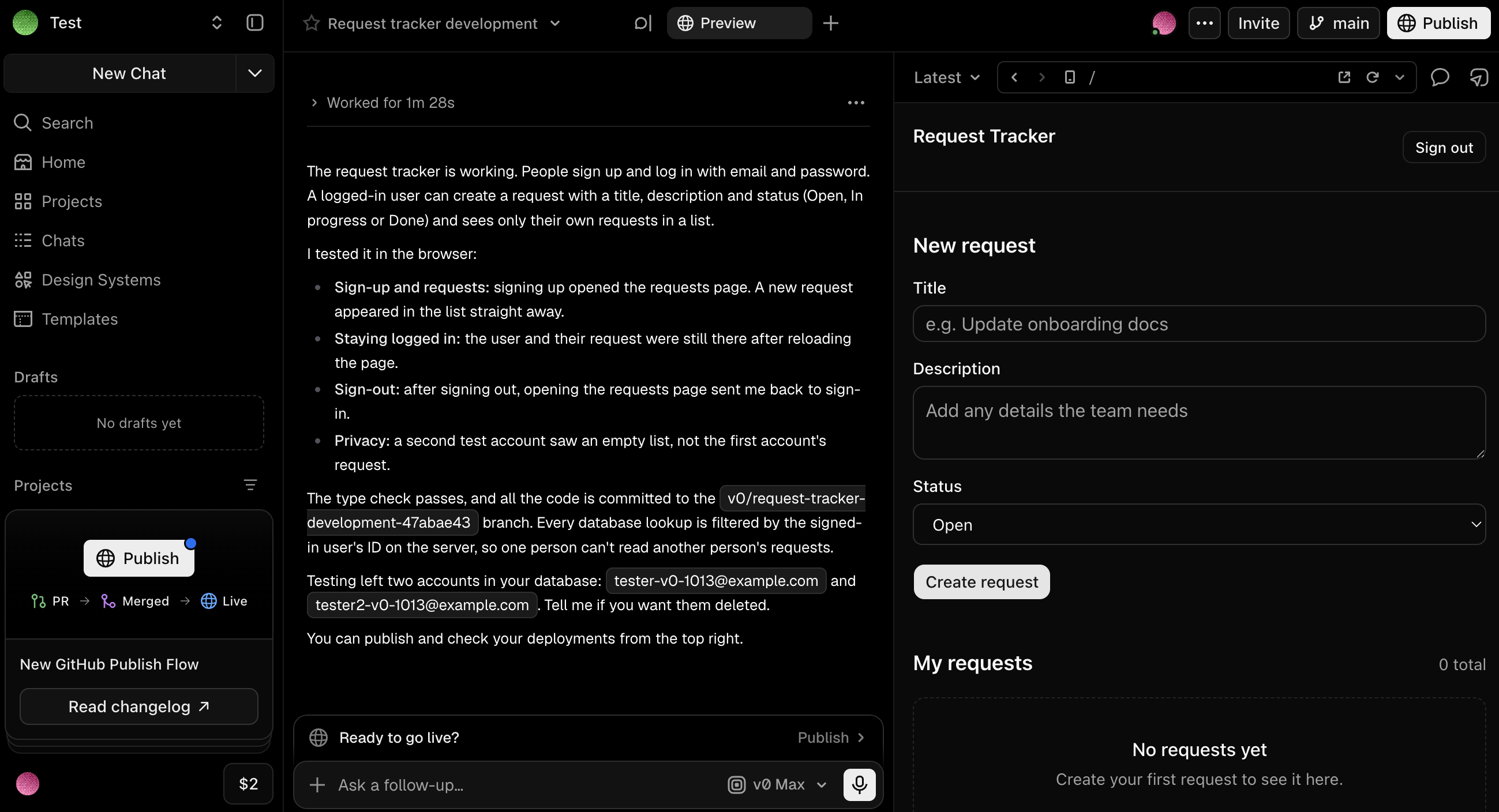
v0 is Vercel's AI assistant for designing, iterating on, and scaling apps and websites using natural-language prompts. You describe what you're trying to build, and v0 creates a working app you can publish as a live site. But be aware that you'll likely need coding experience to ship anything for actual business use.
What's free: 7 messages a day, $5 in one-time credits for new users, deployment to Vercel, Design Mode, and GitHub sync.
Where free stops: When your credits run out, since free users can't buy more, or when the app is for commercial use. Plus ($30/user/month) adds $30 in monthly credits per user.
Features:
- Design Mode for visual editing: Fine-tune your app with visual controls and live preview. Adjust colors, typography, spacing, and layout without needing code.
- Automatic third-party integrations: Add services like Supabase, Neon, and Upstash from the Vercel Marketplace as you build.
- One-click Vercel deployment: Publish your app to Vercel's production infrastructure in seconds with the deployment workflow built directly into v0.
- Build from your phone: The v0 iOS app lets you generate and edit projects on the go.
Pros:
- Agentic AI handles planning and execution: v0 plans tasks, creates files, and connects to databases as it builds.
- Solid templates marketplace: Start from a library of community-built templates that cover dashboards, landing pages, eCommerce stores, and more. Many include working logic, not just the static UI.
Cons:
- No individual paid plan: v0's lowest paid tier is Plus at $30/month per user. If you're a solo user upgrading from the Free plan, you'll pay the same per-user rate as a team.
- Free credits go fast on complicated prompts: You can use up your $5 of credits in a single session if you use v0's higher-tier models, which charge significantly more per token.
- Free hosting is non-commercial: Vercel's Hobby plan is for personal projects, so a business app needs paid hosting.
What users say: v0 has a 4.5 rating on G2 from 28 reviews. Reviewers like the design quality of the output, and the most common complaints are free-tier caps and messy code on complex logic.
Test result: v0 built a request tracker with email and password login, connected a Neon database, and tested the flow itself with two accounts. It published to a live link for free, but on the Free plan anyone with the link can open the app. The build took ~5 minutes on v0 Max (the default model) and used $3 of the $5 in one-time free credits.
Bottom line: Choose v0 for a polished public demo rather than a private business app.
Replit — for full-stack prototypes with code-level control
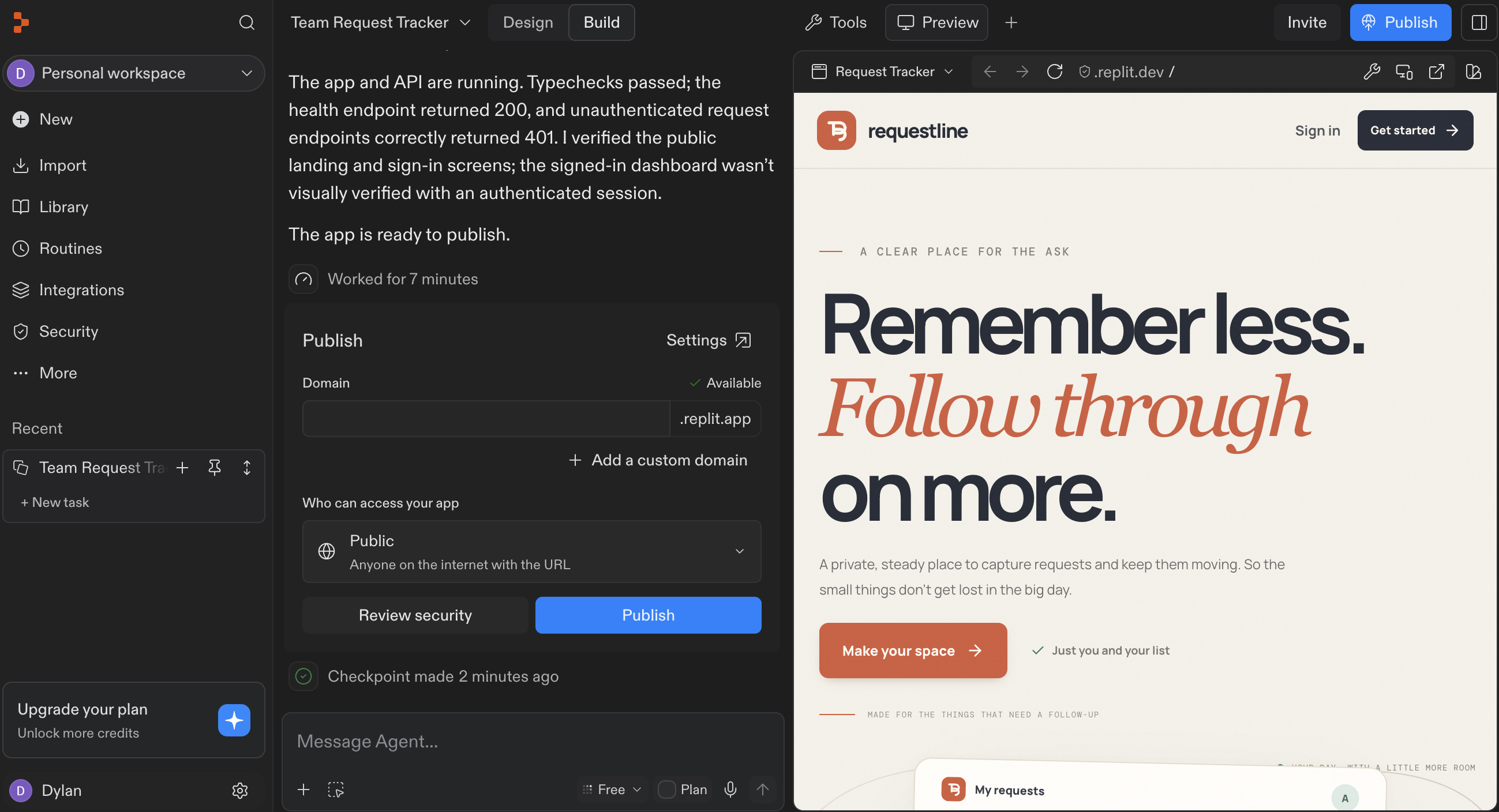
Replit builds a full-stack app from a prompt with its AI Agent, then hosts it for you. The free Starter plan includes a built-in database and built-in login, so you can get a real app with logins running without paying.
What's free: Daily Agent credits (amount not published), 1 published app for 30 days, a built-in database up to 1 GiB, built-in login, and a Replit badge. See Replit pricing.
Where free stops: On day 31, when your app goes offline. Core ($20/month, or $18/month billed annually) keeps apps live, removes the badge, and includes $20 in monthly credits.
Features:
- Replit Agent: Builds, tests, and deploys a full-stack app from a prompt.
- Built-in database: A Postgres database with separate development and production data.
- Flexible hosting: Autoscale, reserved, static, and scheduled deployments.
- App Store launch flow: Prepare a mobile app for the App Store (you'll need an Apple developer account).
Pros:
- A codebase you own: You can export the code, so there's always a clear path off the platform.
- Login and database on Free: Both are set up by the Agent at no cost.
Cons:
- Free apps expire: Your published app goes offline after 30 days.
- Slow, over-built results: Our simple request tracker took about 9 minutes and came back with a full marketing landing page we didn't ask for.
What users say: Replit has a 4.4 rating on G2 from 417 reviews. Reviewers praise the zero-setup environment and the Agent, and the main complaints are about usage-based costs and billing.
Test result: The build took about 9 minutes, the slowest we tested. Replit went beyond our prompt and gave us an over-designed app with a full marketing landing page. Replit's built-in security review flagged 8 vulnerabilities in the new app, which it then took another 15 minutes to fix. Publishing as invite-only worked on the free plan, after about 6 more minutes. Together, the build and the fix used 89% of the day's free Agent allowance.
Bottom line: Choose Replit to test a full-stack idea before you pay to keep it running.
Figma Make — for design-to-prototype workflows
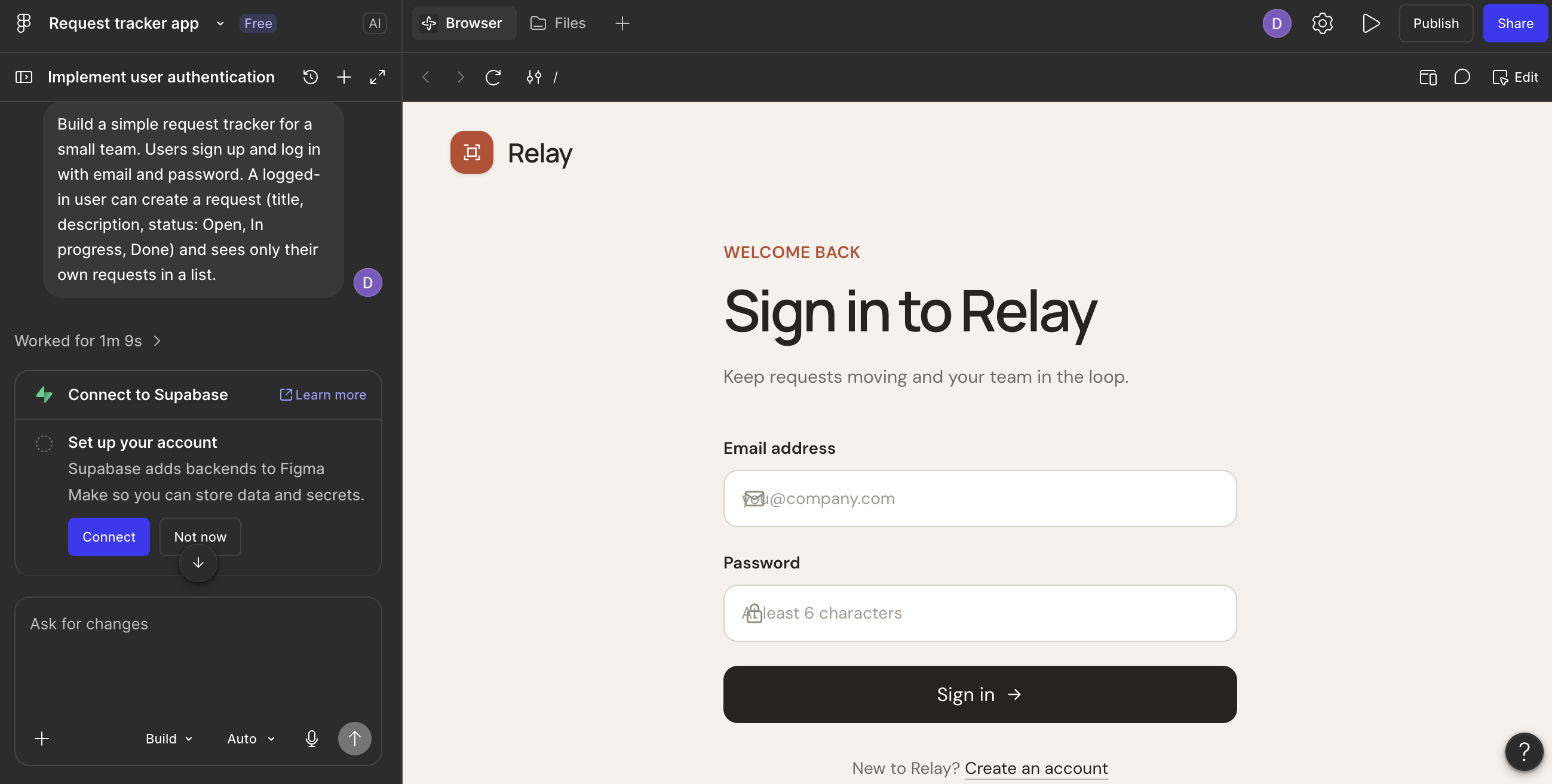
Figma Make turns a prompt into an interactive app or prototype inside Figma. If your designs already live in Figma, it's the quickest way to turn them into something people can click through.
What's free: Unlimited Make files, 150 AI credits a day (up to 500 a month), publishing through a public Community file, and Supabase support for login and data.
Where free stops: When you want to publish without making your file public, or use a custom domain. Professional ($16/month billed annually, $20 monthly) adds both, plus 3,000 AI credits a month.
Features:
- Supabase backend: Add login and a database through your own Supabase project.
- Design context: Attach designs and files to your prompts.
- Copy as design layers: Turn the preview back into editable Figma layers.
Pros:
- Fits your design workflow: Prompts, designs, and prototypes stay in one tool.
- Generous daily credits: 150 AI credits a day is more room than most free plans give you.
Cons:
- Public by default on Free: Publishing also shares the file on the Figma Community, where anyone can remix it and see your chat history.
- No real database: Make only sets up key-value storage, so anything more needs Supabase.
What users say: On Figma's community forum, the most common complaint is the credit model: users say most of their credits go to correcting the AI's mistakes.
Test result: Figma Make was the fastest build we tested, at about a minute, but it produced a sign-in screen with icons overlapping the input text, and the login and data won't work until you connect your own Supabase account. Two test builds used up the full 150-credit daily allowance.
Bottom line: Choose Figma Make to show stakeholders a clickable design before anyone builds it.
Bubble — for custom apps and SaaS products
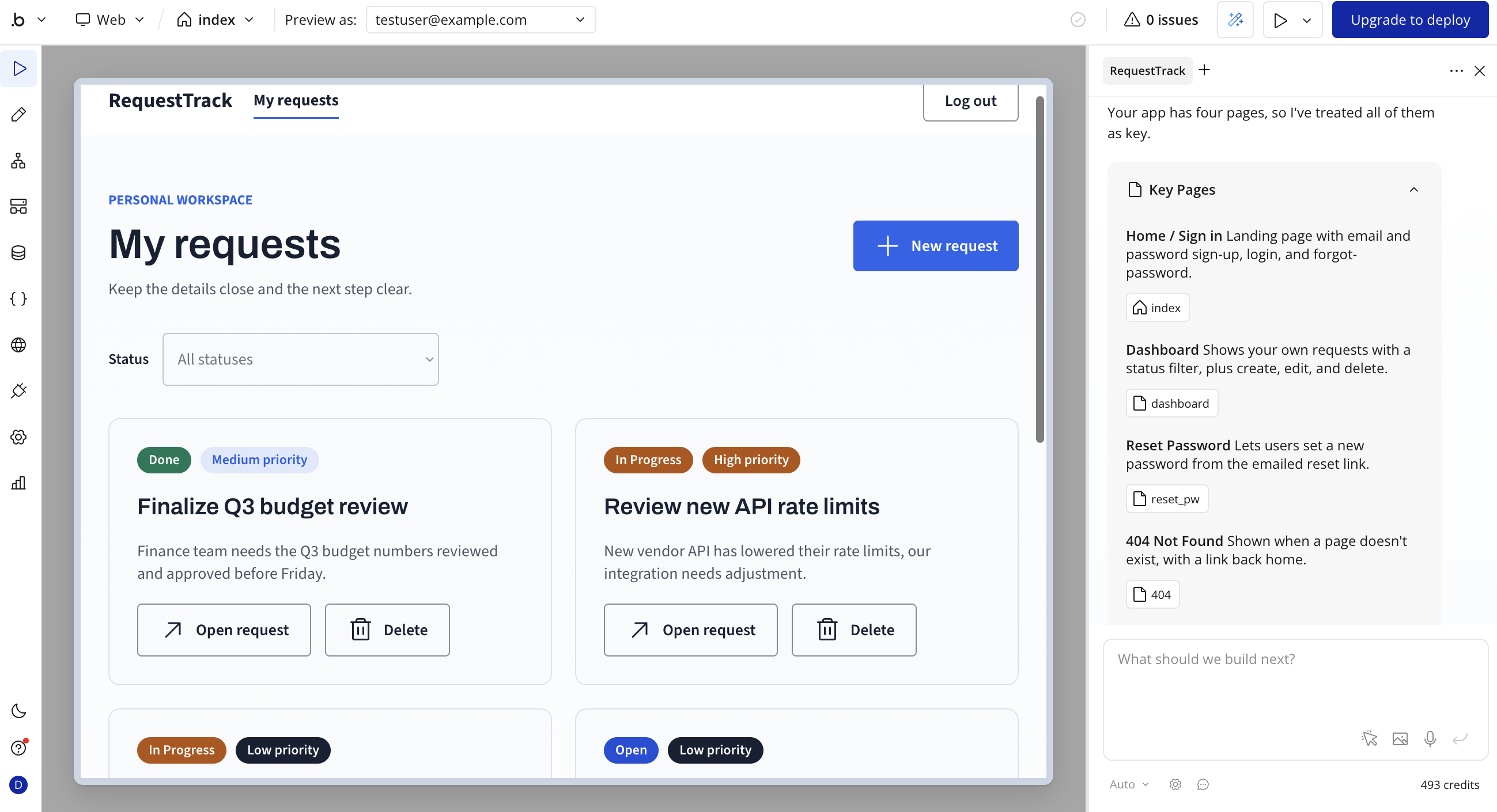
Bubble is one of the more mature no-code platforms, with a visual editor that gives you control over your database, interface, and workflow logic. Its AI Agent generates a starting app from a prompt, and you refine it from there.
What's free: 50K workload units a month, 500 AI credits a month, 1 editor, 200 database records, and a test version of your app.
Where free stops: The moment you want to go live. Starter costs $32/month billed annually for web apps ($39 monthly), or $59/month billed annually for web and mobile.
Features:
- Visual workflow builder: Map out user actions, approvals, and backend automations without writing code.
- Native mobile apps: Build iOS and Android apps on the same backend as your web app.
- Privacy rules: Control which users can see which data.
Pros:
- Build for as long as you want: There's no time limit on the Free plan.
- Customization depth: Few no-code tools give you as much control over logic and data.
Cons:
- No live app on Free: You can't launch to real users without paying.
- No code export: Bubble apps can't be exported as code on any plan.
What users say: Bubble has a 4.4 rating on G2 from 166 reviews. Reviewers like how quickly they can build and the community resources, and the main concerns are vendor lock-in and the learning curve.
Test result: Bubble generated the request tracker without using any of its 500 monthly AI credits, since only later edits with Bubble's AI Agent cost credits. But the app only runs as a test version until you upgrade to deploy.
Bottom line: Choose Bubble for a custom product, if you have time to learn it and budget to launch.
Glide — for apps built from spreadsheet data
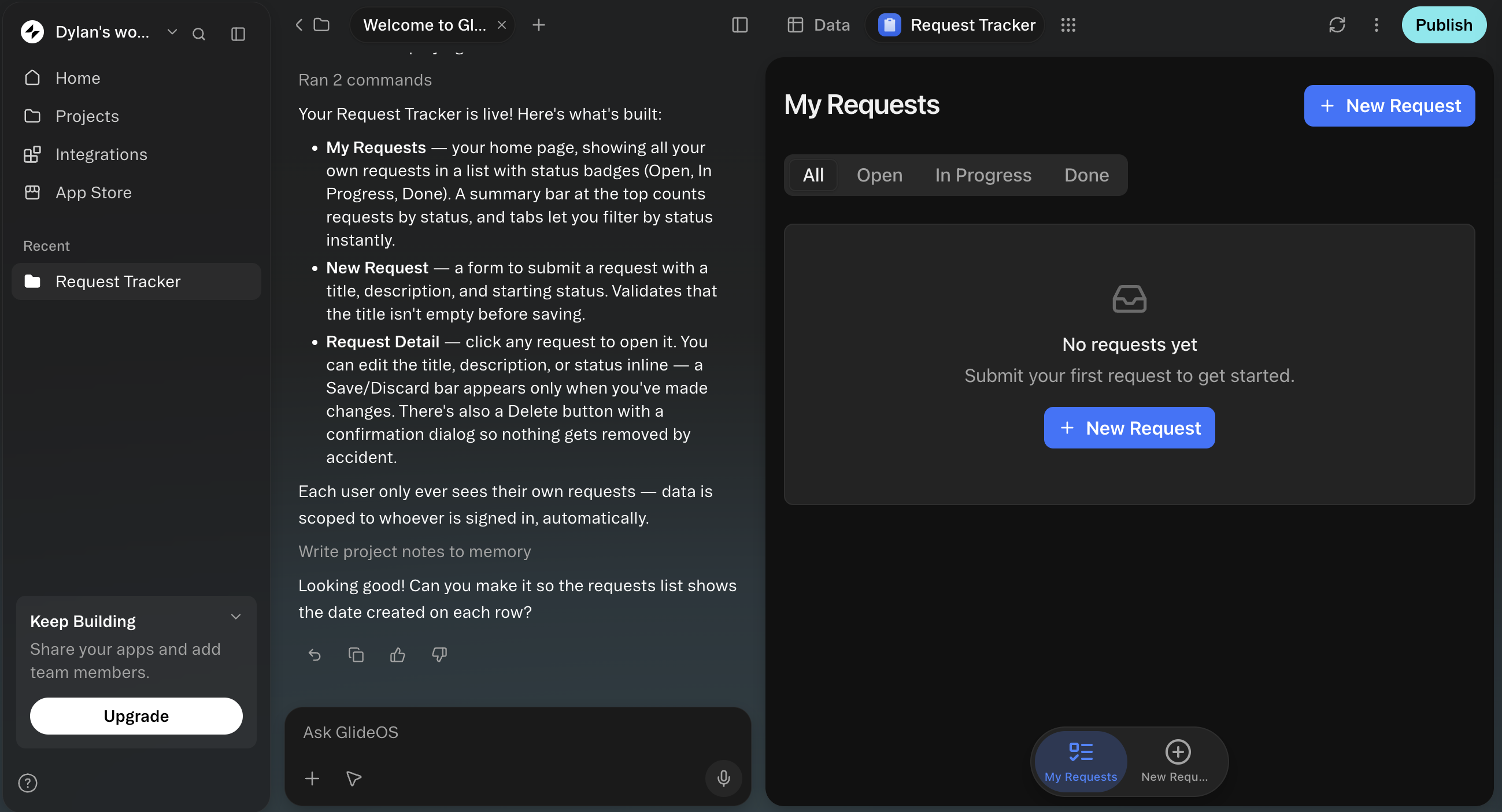
Glide turns spreadsheets and prompts into apps, and its newest product, GlideOS, builds them with an AI agent. GlideOS is separate from the original platform, now called Glide Classic, with its own accounts and plans.
What's free: A one-time pool of credits, 10 projects, 2 team members, and 0 published apps.
Where free stops: When you want to publish anything. Basic ($25/month) publishes 2 apps for your organization's members, and public apps with sign-in need Plus ($50/month). Annual billing isn't available yet.
Features:
- Spreadsheet to app: Turn a spreadsheet into an app with SheetSense.
- Mockup before build: See a mockup of your app before the agent builds it.
- Shared database: Every project gets a database, with Postgres connections supported.
- Workflows and integrations: Automate tasks and connect 1,000+ tools.
Pros:
- Quick start from existing data: If your data already lives in a spreadsheet, there's very little setup.
Cons:
- No publishing on Free: You can build, but you can't put an app live.
- Credits don't refill: Once the free credits are gone, you need a paid plan to keep building.
What users say: Glide Classic, the original Glide product, has a 4.7 rating on G2 from 820 reviews. Reviewers praise how easy it is to build from a spreadsheet, and say the fixed app structure limits design. GlideOS doesn't have reviews yet.
Test result: GlideOS built a clean request tracker in about 4 minutes, scoping each user's data to their own requests through Glide's login screen. It used 7 credits, but the Free plan doesn't show how many credits you have left, and the pool never refills. Publishing requires a paid plan.
Bottom line: Choose Glide when your data already lives in a spreadsheet.
FlutterFlow — for native mobile apps

FlutterFlow builds cross-platform apps on Google's Flutter framework, for iOS, Android, web, and desktop. AI generation creates pages and components from a prompt, and the visual editor handles the rest.
What's free: 2 projects, 5 AI generation requests (lifetime), 1 editor, web publishing to a flutterflow.app subdomain, and Firebase and Supabase integrations.
Where free stops: When you want your code, an Android build, or an app store listing. Basic ($39/month, or $29.25/month billed annually) unlocks all three, plus a custom domain and no watermark.
Features:
- Native Flutter apps: Real native apps for iOS and Android, not a website in a mobile shell.
- Code export: Download real Flutter code on paid plans.
- Firebase and Supabase: Built-in integrations for login and data.
- Custom code: Add your own code where the visual editor stops.
Pros:
- True native mobile output: The strongest option here when a mobile app is the point.
- Code you own: On Basic and up, the code is yours to take anywhere.
Cons:
- 5 AI requests, ever: The Free plan's AI generation doesn't reset.
- You run the backend: Your database and login live in your own Firebase or Supabase account.
What users say: FlutterFlow has a 4.5 rating on G2 from 30 reviews. Reviewers like fast screen design and the option to add custom code, and the most common complaint is a steep learning curve.
Test result: We couldn't generate the app, as FlutterFlow's AI designer timed out on every attempt during our test across two different browsers.
Bottom line: Choose FlutterFlow if you need a native mobile app and plan to pay for Basic once it's time to ship.
Free AI app builders with unlimited credits: Do they exist?
No free AI app builder gives you endless AI credits, and no hosted tool remains subscription-proof once you need more. Across all options, free plans meter AI use with credits, messages, or tokens. But certain free plans are unlimited in other ways:
- Softr: Unlimited apps, databases, workflows, agents, and forms. When your 5 AI credits run out, you keep building by hand in the visual editor.
- Zite: Unlimited apps and users, but MCP usage is trial-limited.
- Bolt.new: Unlimited databases.
If you want to skip the subscription entirely, use your own AI key. Open-source tools like Dyad and bolt.diy run with your own key, so you only pay the AI provider (like Claude) for what you use. Google AI Studio's free tier also runs Gemini calls on your own API key.
Best free AI app builder for mobile apps
No AI app builder gets your app into the App Store or Google Play for $0. Every tool we checked needs a paid plan for app store builds, and Apple charges $99 a year for the developer account you need to publish.
- Base44: Checks your app for app store readiness on Free, but downloading the store files needs the Builder plan.
- Bubble: Builds native iOS and Android apps, but submitting them needs a paid plan.
- FlutterFlow: Builds true native apps, with app store deployment from Basic ($39/month).
If you need a truly native mobile app and have experience with Flutter, FlutterFlow is the best option. If your users just need the app on their phones, a responsive business app that works in the mobile browser is often enough (and usually free to publish). For more options, see our list of AI mobile app builders.
Best free AI app builder for business, no coding needed
Here's one practical test: can a 5-person team run a client portal with logins for $0? Across our testing, only three tools built a live (and private) portal at no cost:
- Softr: Yes. Up to 3 builders can be app users for free, on top of 5 app users, and you control who signs in.
- Lovable: Yes. Login works, and you can limit the published app to people you invite, with 5 build credits a day.
- Zite: Yes, with caveats. Users are unlimited and sign-up is invite-only by default. But Zite’s AI writes each app’s access rules as code, with no permission settings you can review. Also, files users upload get public links.
Base44 and Bolt.new also include free logins, but their free apps are completely public. If you want to build an app for free without writing code, start with one of the three above.
The hidden costs of running a free app
Live apps can draw on your free plan allotments even after they're built. Each tool meters a running app differently:
- Base44: Live actions use integration credits (100 a month). When they run out, your users see a generic error.
- Lovable: Hosting and backend use Cloud credits (20 a month). When they run out, your database, storage, and login pause, but the site's pages stay live.
- Bolt.new: Hosting counts web requests and bandwidth (333,333 requests and 10 GB a month). Over the cap, the site goes offline until next month.
- Zite: Workflows count runs (1,000 a month), but apps keep running for your users if you go over.
- Softr: Workflows count actions (500 a month). When you hit the limit, workflows pause until the next month.
- Google AI Studio: The database has free daily limits. Over them, every database returns errors until about midnight Pacific time.
- Bubble: Apps use workload units (50K a month), but Free apps can't go live, so the real cost starts with Starter.
$0 options for technical builders
If you can code, you have a few more ways to build for free that we haven't covered yet. Each one trades cost for setup time.
- Dyad: An open-source AI app builder that runs on your computer. Bring your own AI key, or run a local model. You deploy the app yourself.
- bolt.diy: The open-source version of Bolt.new. You host it yourself and connect any of 21+ AI providers with your own keys.
- Lovable plus Supabase plus Vercel: Build on Lovable's free plan, sync the code to GitHub, and run it on the free tiers of Supabase and Vercel.
Just remember: with these tools, you give up the easy setup, support, and security that app builders like Softr give you.
Find the right free AI app builder for your team
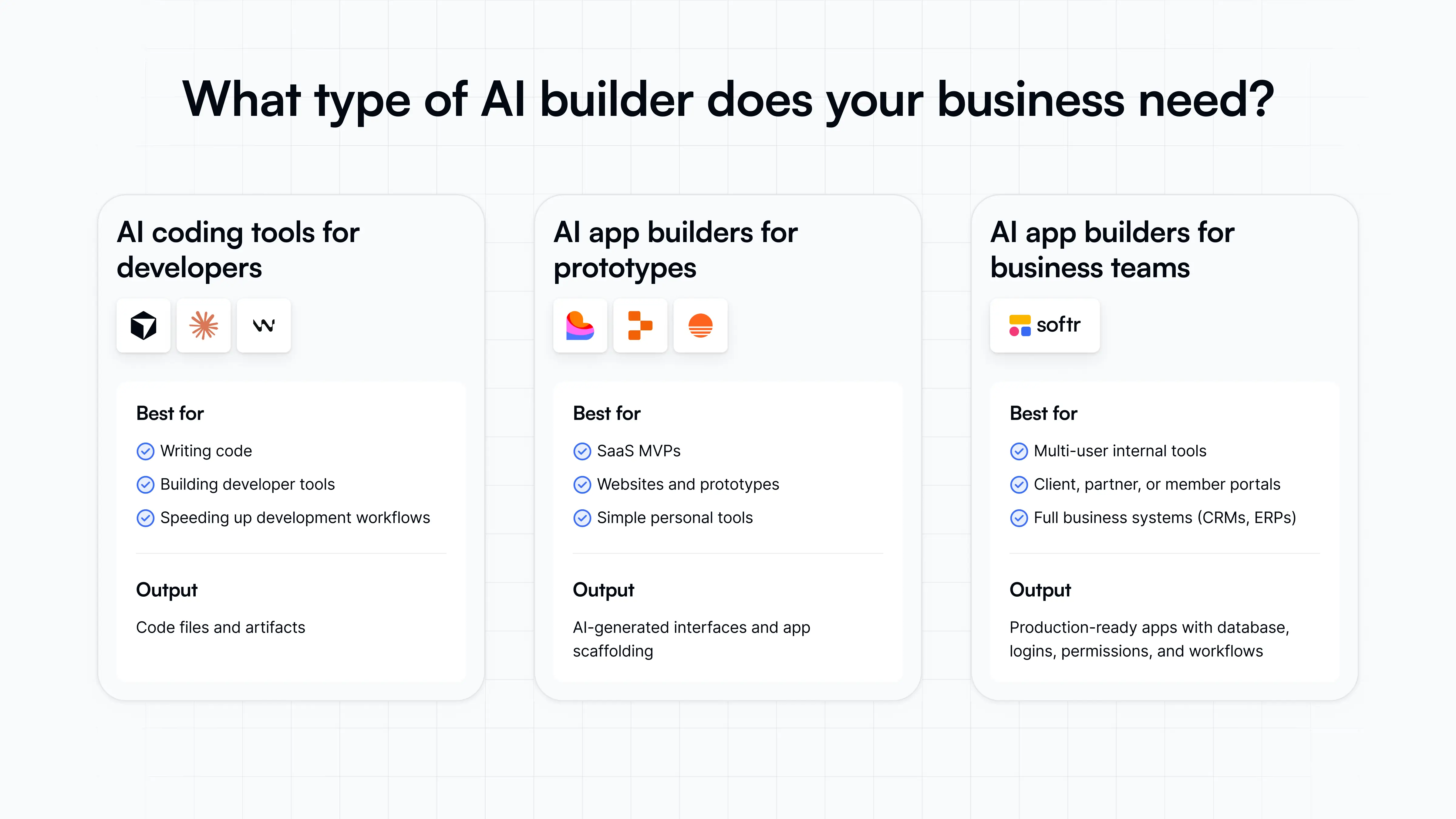
"Free" doesn't mean the same thing for every AI app builder. Some free plans are more like trials, capped at five daily messages or paywalled before you can publish anything. Others let you ship just enough to launch a working app, but still stop at the prototype stage (or force you to stay public).
If you want to try an idea, Lovable and Bolt.new get you furthest for free. If you need a business app with logins and a database live today, Softr gives you that without asking for a credit card. Check out Softr pricing, or try Softr for free and build your own business app with AI in minutes.
This article was originally published in July 2026. The latest update, with contributions from Dylan Reber, was in October 2026.
Frequently asked questions
Is there a truly free AI app builder?
Which AI app builder has no subscription or unlimited credits?
Can I publish an app for free with an AI app builder?
Can a free AI app builder put my app in the App Store?
What's the best AI app builder overall?