Bolt AI pricing: A complete guide to plans in 2026


I’ve been testing AI app builders for a little over two years now, and one recurring theme I’ve noticed is just how unpredictable and confusing pricing can be. Bolt is no exception, especially after the new usage-based token system entered the picture earlier this year.
I’ve put together a full (and accurate) breakdown of Bolt’s current pricing, token usage, limitations, and how the different subscriptions stack up against each other, based on hands-on testing and real user reviews.
Bolt pricing plans at a glance
| Plan | Price | Best for | Key features | Limitations |
|---|---|---|---|---|
| Free | $0 | Beginners experimenting with vibe coding, lightweight prototypes, and front-end landing pages | 1M monthly tokens, public & private projects, hosting, unlimited databases | 300K daily token cap, Standard agent only, Bolt branding, limited uploads and no collaboration features |
| Pro | $25/month billed monthly or $18/month billed yearly | Solo builders, freelancers, indie hackers, and startups building more seriously | 10M+ monthly tokens, no daily cap, token rollover, 100 MB file upload, custom domains, private sharing, no Bolt branding | Token usage can still scale quickly, storage and compute limits apply |
| Teams | $30/month and member billed monthly or $27/month and member billed yearly | Product, engineering, and collaborative startup teams | Everything in Pro+ team access controls, centralized billing, admin tools, private NPM registries, design system support | Tokens aren’t shared between teammates, limited chat, no shared project browser |
| Enterprise | Custom (quote-based) | Large organizations with governance, compliance, and security requirements | Everything in Pro + SSO, audit logs, compliance support, dedicated onboarding, custom workflows, priority support | No public pricing, requires sales onboarding and enterprise setup |
Bolt pricing: How tokens work
As you can probably tell, Bolt’s pricing model is heavily tied to token usage. The Free plan includes 1 million monthly tokens, while paid plans start at 10 million tokens per month and scale from there depending on your subscription tier.
[.blog-callout]
What are tokens?
“Okay”, you might think, “but what actually counts as a token?”
Put simply, AI tokens are the small chunks of text AI models break language into before they can process it. Words, punctuation, code, and even parts of words all get converted into tokens the AI can mathematically understand.
In AI app builders, tokens effectively become the “usage meter” behind pricing. The more prompts, files, code, and context the AI has to process, the more tokens get consumed.
[.blog-callout]
You're likely using Bolt to build applications, and token usage can vary wildly depending on what you’re building. A simple landing page is one thing, but full-stack apps are a completely different story. Once you start adding user permissions, authentication, data management, interface pages, debugging, and all the other infrastructure needed to make an app actually work, token usage can really start clocking in overtime.
Sure, your pricing plan determines how many tokens you can use each month before hitting your limit. But those limits aren’t especially helpful if your app still isn’t finished. As projects grow, token costs can start coming out of the woodwork pretty quickly—especially once you move beyond lightweight prototypes and into more complex builds.
That’s fine if you’re a developer and already have a sense of the workload involved, but for everyone else, Bolt’s pricing can feel a little harder to estimate upfront. Let’s break down the plans and see which option actually makes the most sense for different types of projects.
Bolt pricing: a full breakdown
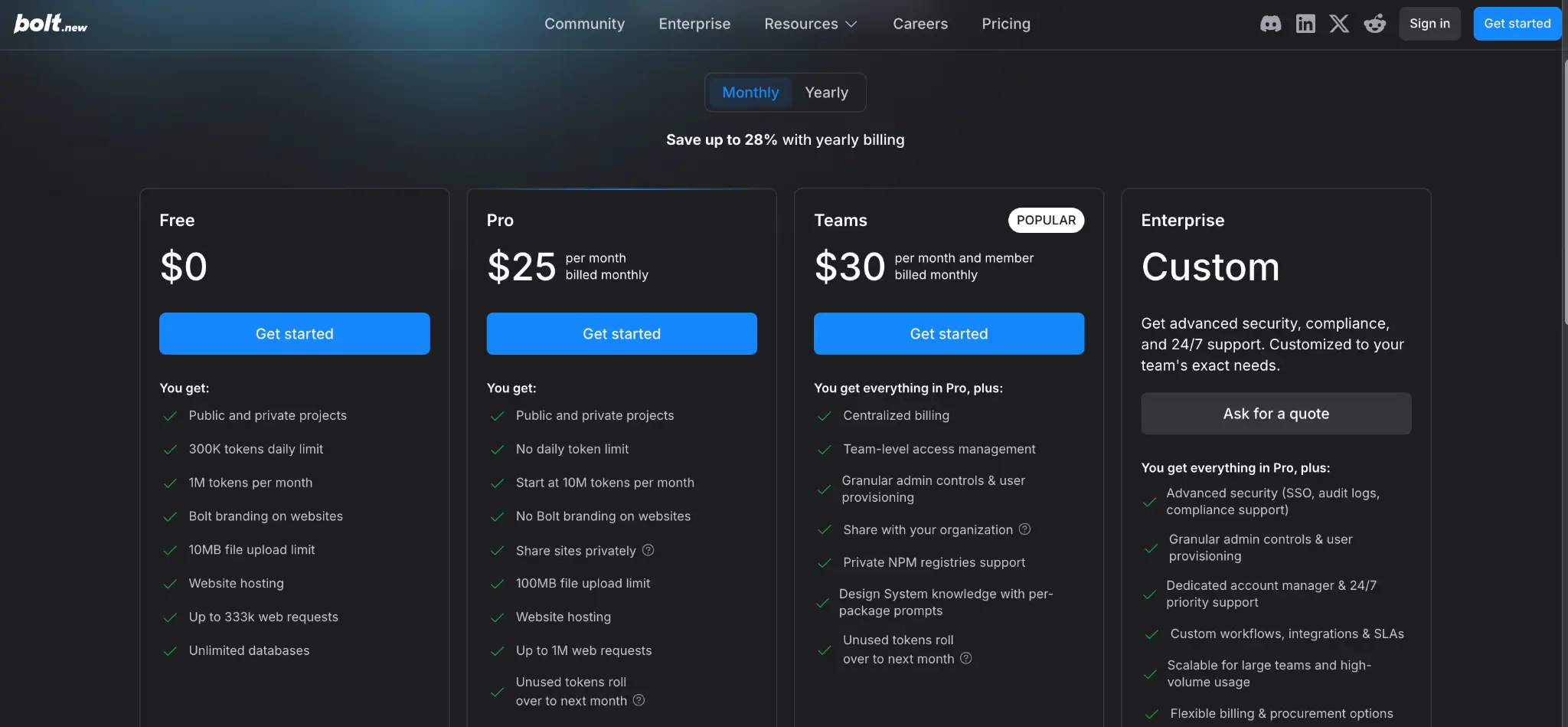
Free plan — best for experimentation and lightweight prototypes
Bolt's free plan gives you:
- 1M monthly tokens with a 300K daily usage limit
- Ability to create both public and private projects
- Built-in website hosting for publishing apps and landing pages
- Unlimited databases for storing app data and user information
- Up to 333K web requests
- Up to 10MB file uploads for assets, images, and project files
Pros
- Completely free to start with no credit card required
- Gives new users enough usage to test Bolt and learn the basics of vibe coding
- Includes hosting and databases, which makes it easy to prototype full applications quickly
- Private projects are included, unlike some competing free plans
Cons
- The daily token cap can interrupt longer sessions
- No access to premium features like priority support or collaboration tools
- The 10MB upload limit can feel restrictive for media-heavy or design-focused projects
- Bolt branding remains visible on published apps and websites
- Larger apps can consume the daily token allowance surprisingly quickly
- Unused tokens do not roll over into the next month; you’ll lose them
Best for
- Learning how Bolt works and experimenting with AI-assisted development
- Testing app ideas before committing to a paid plan
- Building small MVPs, landing pages, or proof-of-concept projects
- Beginners who want hands-on experience with vibe coding workflows before scaling up
Verdict: For beginners, the Free plan is relatively generous. But once projects become more complex, token usage can ramp up quickly—especially during debugging, larger prompts, or repeated editing sessions.
Pro plan — best for building prototypes without the daily token cap
💸 Pricing: Starts at $25/month, billed monthly
The Pro plan removes the daily token cap and significantly increases monthly token allowances, making it a much more practical option for users building apps consistently. This is the plan most serious Bolt users will probably end up using once they move beyond experimentation.
The Pro plan gives you:
- No daily token limit, allowing for longer uninterrupted build sessions
- Increased monthly token allowance starting at 10M tokens per month
- Up to 100MB file uploads for larger assets and project files
- Token rollover, so unused tokens carry into the next billing cycle
- Custom domain support for publishing professional client-facing apps
- SEO tools to help optimize websites and landing pages
- Image editing with AI
- Private sharing options for collaborators or clients
- Removal of Bolt branding from published projects
- Higher hosting and deployment limits compared to the Free plan
Pros
- Much better suited for ongoing app development and larger projects
- No daily cap means you’re less likely to get interrupted mid-build
- Token rollover helps reduce wasted usage during lighter months
- Custom domains and removed branding make projects feel more professional
Cons
- Token usage can still increase very quickly on larger or debugging-heavy projects
- While unused tokens roll over into the next month, this is for one month only and you’ll need an active paid subscription
- Storage and compute limits may eventually become restrictive for more advanced apps
- Costs become harder to predict as projects and codebases grow in complexity
- Larger projects can still burn through monthly token allowances surprisingly fast
Best for
- Freelancers building client-facing applications
- Indie hackers and solo founders working on SaaS products
- Startup teams building MVPs or internal tools
- Developers who want longer uninterrupted AI-assisted coding sessions
- Ongoing app development rather than one-off experiments
Verdict: The biggest advantage of Pro is removing the daily token limit. On the Free plan, it’s very easy to hit the cap halfway through a duty-heavy coding sessions.
Teams plan — best for product or developer teams who want to collaborate
💸 Pricing: Starts at $30/month per member, billed monthly
The Teams plan adds collaboration and organization-level management features on top of Bolt Pro. It’s designed for companies, agencies, and development teams that need shared workflows, centralized billing, and more control over access permissions.
The Teams plan gives you:
- Everything included in the Pro plan
- Centralized billing for managing team subscriptions in one place
- Team-level access management and permissions
- Granular admin controls and user provisioning
- Organizational sharing for internal collaboration
- Support for private NPM registries and internal company packages
- Design system support so Bolt can follow shared UI and component standards
- Token rollover into the following month on paid allocations
Pros
- Makes collaboration easier for agencies and product teams
- Centralized billing simplifies subscription management across multiple users
- Admin controls provide better oversight of projects and permissions
- Design system support helps teams maintain more consistent UI patterns
Cons
- Pricing scales quickly because billing is charged per member
- Tokens are allocated individually rather than shared across the team
- Heavy users can still run out of tokens even if teammates have unused balances
- Collaboration tooling still feels lighter than traditional engineering platforms in some workflows
Best for
- Product and engineering teams building collaboratively
- Startups that need shared development workflows
- Companies maintaining internal design systems or reusable components
- Teams that want centralized administration and billing controls
Verdict: One of the biggest limitations of the Teams plan is that token allowances aren’t pooled between users. That means one developer can run low on tokens while another still has a large unused balance remaining—and the per-member pricing can quickly get expensive for growing teams.
Enterprise plan — best for companies with stricter governance
💸 Pricing: Custom options with quotes dependent on project/scale
The Enterprise plan is designed for larger organizations that need advanced governance, compliance, security, and onboarding support. Unlike the self-serve Free, Pro, and Teams plans, Enterprise pricing is custom and handled directly through Bolt’s sales team.
The Enterprise plan gives you:
- Everything included in the Pro plan
- Advanced security features like SSO and audit logs
- Compliance support for organizations with governance requirements
- Granular admin controls and enterprise-level user provisioning
- Dedicated account management and onboarding support
- 24/7 priority support for faster troubleshooting and assistance
- Custom workflows and integrations tailored to organizational needs
- Flexible procurement, billing, and contract options
- Data governance and retention policies for larger teams and enterprises
Pros
- Stronger security and governance features for enterprise environments
- Dedicated onboarding and account management reduce setup friction
- Better suited for organizations with compliance or procurement requirements
Cons
- No public pricing, making costs harder to estimate upfront
- Requires direct sales conversations and onboarding processes
- Likely excessive for smaller teams, startups, or solo builders
Best for
- Large organizations rolling out Bolt across multiple teams
- Enterprises with compliance and security requirements
- Companies needing SSO, audit logs, and centralized governance
- Organizations requiring procurement support or custom agreements
- High-volume teams building larger internal or customer-facing applications
Verdict: For most smaller builders, the Enterprise plan will probably be overkill. It’s mainly aimed at organizations that need governance, security controls, procurement flexibility, and dedicated support at scale.
Bolt pricing: What users say are saying on Reddit
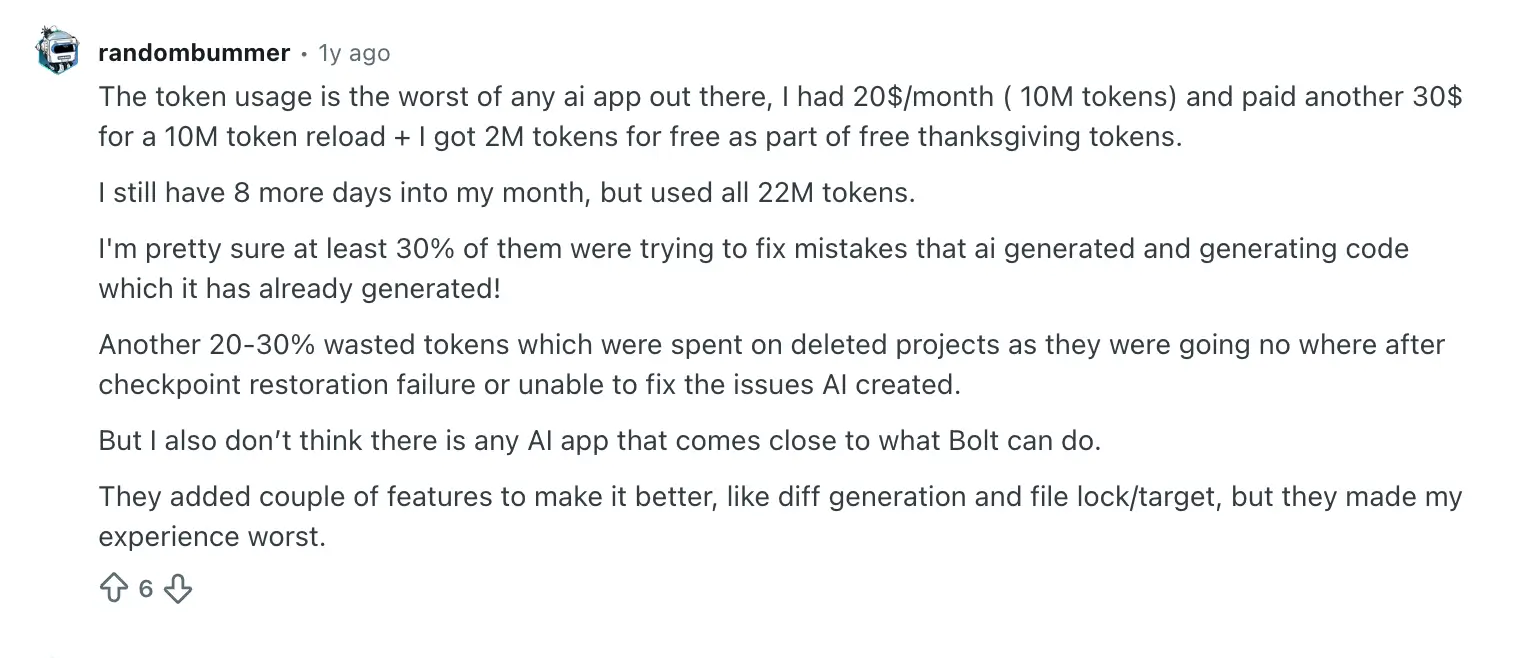
Even users considering Bolt’s Pro plan often struggle to estimate how far their token allowance will realistically go, with one user reporting going through 22 million tokens in under a month on fixing issues.

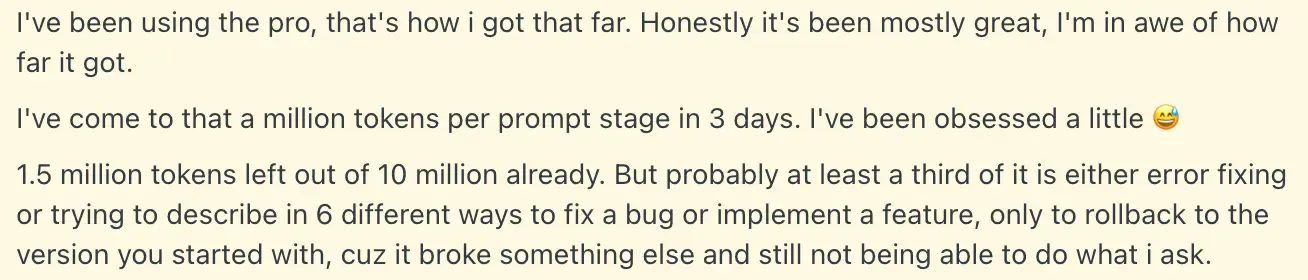
Another Pro user described token usage accelerating rapidly during sessions, despite still being impressed by how capable Bolt felt overall.
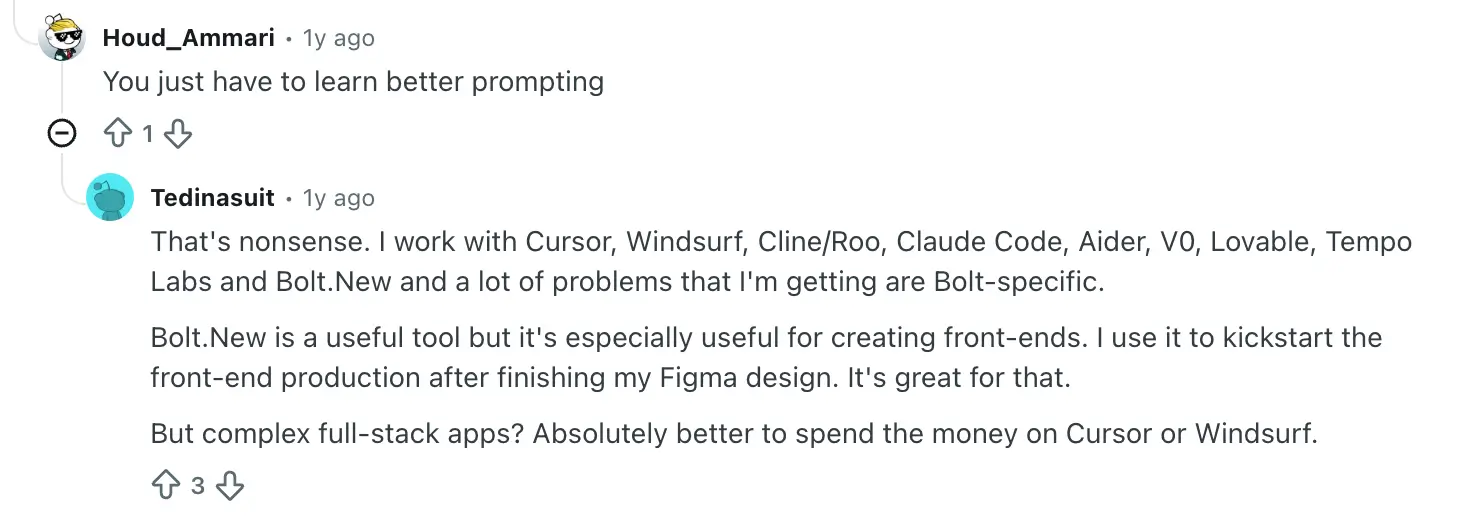
Some users say Bolt works best for rapid front-end generation and prototyping, while more complex full-stack applications may be more cost-effective in other AI coding IDEs.
A recurring complaint from Teams users is about token allocations, which can leave heavier users running out while teammates still have large unused balances.
.webp)

The lack of collaboration features is also a point of contention:

Understanding Bolt’s agents: Standard vs Max
A lot of those pricing frustrations ultimately tie back to how Bolt handles token usage behind the scenes—including the AI agent you choose. Bolt recently replaced its previous Claude model selection system with two simplified agents: Standard and Max.
The important thing from a pricing perspective is that the two agents consume tokens differently. Bolt itself notes that Standard is more token-efficient, while Max uses more tokens for deeper reasoning and more complex problem-solving.
| Agent | Speed | Reasoning depth | Best for | Token usage |
|---|---|---|---|---|
| Standard (available on all plans) | Faster | Balanced | Everyday development, UI updates, smaller apps, clear tasks | Lower |
| Max (requires a paid plan) | Slower | Deeper | Large apps, complex debugging, refactoring, advanced workflows | Higher |
Standard agent
The Standard agent is designed for everyday development and is the default option for most users. I found it works best for smaller app ideas, UI updates, front-end work, and other well-defined tasks. Because it’s faster and more token-efficient, Standard is usually the better choice if you’re trying to keep costs more predictable.
Max agent
The Max agent is built for more advanced reasoning and complex engineering tasks. I found it performs better on larger codebases, difficult debugging sessions, interconnected features, and more open-ended workflows. However, deeper reasoning also means higher token usage, so Max is generally better reserved for larger or more technically demanding projects.
Which agent should you use?
For most users, Standard will probably be enough for everyday development and simple coding tasks, while Max makes more sense for complex projects where deeper reasoning justifies the additional token usage. While Bolt’s simpler Standard vs Max setup makes the platform easier to understand, it also gives users less control over balancing reasoning depth against token costs. In practice, many builders will probably switch between the two depending on the task—using Standard for lighter edits and Max for larger builds where deeper reasoning becomes necessary.
What happens if you run out of tokens?
If you hit your token limit mid-project, Bolt gives you two main options: upgrade your plan or purchase additional token reloads.
- Upgrading to a higher plan increases your monthly token allowance immediately, which is usually the more cost-effective option if you’re consistently running into limits. Bolt’s paid plans scale from 10M monthly tokens upward depending on the tier you choose.
- For heavier users already on higher-tier plans, Bolt also allows token top-ups (called reloads). These give you additional tokens without changing your subscription plan entirely. According to Bolt, reload tokens don’t expire as long as your subscription (Pro or Teams) remains active.
That said, constantly topping up tokens can make pricing harder to predict over time—especially if your project is still evolving and requires frequent edits or feature changes.
Tips for lowering your token usage with Bolt
Because Bolt’s pricing is tied so closely to token consumption, reducing unnecessary usage can make a difference to overall costs. Here are a few ways users try to stretch their token allowance further:
- Write highly specific prompts as vague requests usually lead to more back-and-forth iterations, which burns additional tokens.
- Use buttons, built-in actions, and version history to do things like publishing your app or restoring projects without consuming tokens.
- Don’t jump straight into Build mode for everything. If you’re just brainstorming features, troubleshooting issues, or mapping out ideas, use Bolt's Plan or Discussion modes as they use fewer tokens.
- Use the Standard agent for lighter edits and UI work whenever possible, since it’s more token-efficient than Max.
- Avoid repeatedly re-prompting the AI to fix the same error. At a certain point, error loops can consume huge amounts of tokens very quickly.
- Break larger projects into smaller, focused tasks rather than asking Bolt to process massive amounts of context at once.
- Move mature projects into a traditional IDE once the initial scaffolding is complete. Many developers use Bolt for rapid prototyping, then continue development elsewhere to avoid ongoing token costs.
Is Bolt worth it?
If you’re a developer, technical founder, or someone comfortable working with AI-generated code, then yes—Bolt can absolutely be worth it. It’s one of the fastest ways to go from idea to working prototype, especially for front-end apps, landing pages, and MVPs.
Where things get more complicated is long-term development. As projects grow, token usage can become difficult to predict, especially once debugging, authentication, permissions, and larger codebases enter the picture. Many users love Bolt for rapid prototyping, but eventually move projects into traditional IDEs or more structured platforms once apps become more operational.
For non-technical teams, whether Bolt feels “worth it” often comes down to how much ongoing maintenance and troubleshooting they’re comfortable managing. If you mainly want speed and flexibility, Bolt can be powerful. But if you want to build custom, production-ready apps that users can use securely without the technical overhead, you might want to set your sights on something a little different.
Bolt vs Softr: which is best?
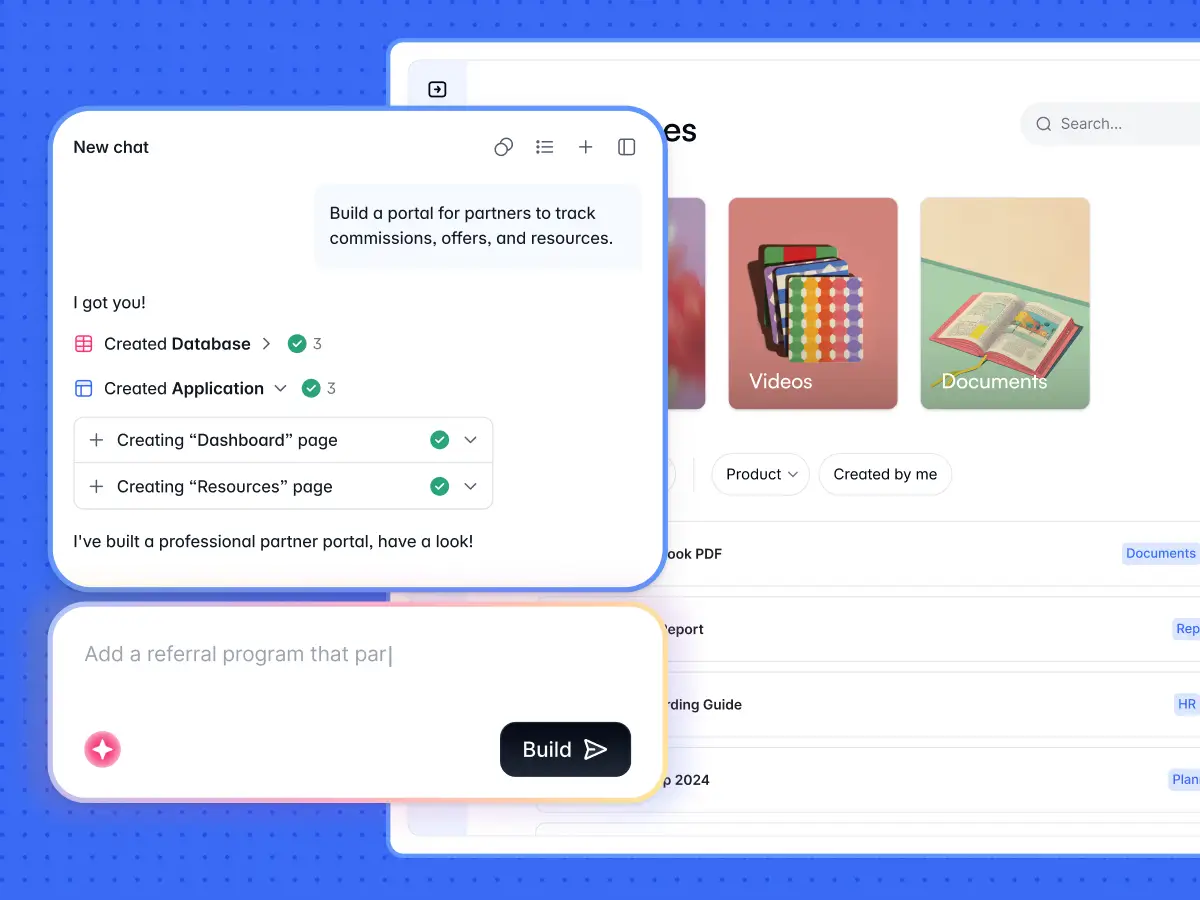
We've established that Bolt is great for developers who are comfortable working with code. Not so much where non-technical teams are involved.
That’s the gap Softr closes. It lets teams build business apps like client portals, CRMs, intranets, dashboards, and project trackers without worrying about the underlying code or infrastructure. Softr’s AI Co-Builder can generate the app, database, and business logic together, while the Vibe Coding block lets you create custom components that adopt your app’s theme, permissions, data connections, and security settings. You can also switch back to visual editing at any time, so you’re not stuck re-prompting the AI every time you want to update something.
Plus, Softr offers flat, predictable pricing plans.
Softr pricing: an overview
| Softr plan | Price | What you get |
|---|---|---|
| Free | $0 | 5 users total, unlimited apps, 5 AI credits, 5,000 database records, and 500 workflow actions |
| Basic | $19/month | Team: 5 + Client: 5 app users, 10 AI credits, 50K records, 2.5K workflow actions |
| Pro | $99/month | Team: 10 + Client: 50 app users, 50 AI credits, 500K records, and 10K workflow actions |
| Business | $329/month | Team: 30 + Client: 100 app users, 100 AI credits, 1M records, and 25K workflow actions |
| Enterprise | Custom | SSO, audit logs, SOC2 reporting, IP blocking, SLAs, dedicated success manager, priority support |
*Every plan includes a monthly AI credit allowance, so you can try the AI Co-builder and Vibe Coding block at no cost.
What you get with Softr
- A visual app builder, not AI code generation
Bolt uses AI to generate application code your team still has to configure, connect, and maintain. Softr pairs an AI Co-Builder with a visual editor where UI, logic, permissions, and workflows are managed without code—so your apps are easy to understand and update.
- Built for any team, not just engineers or developers
Bolt accelerates AI-assisted coding, especially for technical teams working with Supabase or custom backends. Softr is designed for operators to launch and run ready-to-use tools from day one—with database, auth, and hosting already handled.
- Predictable pricing, more control
Bolt’s pricing scales with AI credits and compute usage, which can fluctuate during development and iteration. With Softr, you can edit your apps and data visually and use credits only when you want AI to do the work, so costs stay more predictable as you scale.
Why teams choose Softr over Bolt
- Softr generates complete business apps with the database, interface, and business logic already connected, while Bolt primarily generates front-end code and still leaves much of the backend, authentication, and deployment setup to you.
- Softr includes built-in logins, SSO, user management, and server-side permissions from day one, whereas Bolt typically relies on external authentication services and manual configuration.
- Softr lets teams configure granular user groups and permissions visually, while Bolt manages permissions through generated code and database rules.
- Softr includes a visual workflow builder with conditional logic, UI triggers, branching, and run history built in, while Bolt handles automation through AI-generated code that teams may still need to maintain over time.
- Softr combines AI generation with visual editing, so teams can make changes without constantly re-prompting or touching code, whereas Bolt workflows often require reviewing and maintaining generated code manually.
- Softr’s Ask AI allows end users to query live app data in plain English while respecting permissions, while Bolt’s AI is focused more heavily on generating application code itself.
- Softr includes native relational databases plus integrations with Airtable, Google Sheets, Notion, HubSpot, SQL databases, Supabase, and more. Bolt is limited to Supabase and Bolt's own database structure.
- Softr’s pricing is generally flatter and easier to predict compared to heavily token-dependent AI coding workflows like Bolt.
Bolt vs Softr: Which should you choose?
Here's my final take.
Choose Softr if:
- You want to build secure business apps without managing code yourself
- You need ready-to-use portals, CRMs, dashboards, or internal tools
- Your team prefers visual editing or fast AI app generation over debugging AI-generated code
- You need built-in authentication, permissions, workflows, and databases from day one
- You want flatter, more predictable pricing that doesn’t heavily depend on token usage
Choose Bolt if:
- You want fast AI-assisted prototyping and code generation
- You’re comfortable reviewing, editing, or debugging code when needed
- You need flexibility for custom front-end development and experimentation
- You’re primarily building MVPs, prototypes, landing pages, or developer-led projects
Use both if:
You want Bolt for rapid prototyping and early-stage experimentation, but Softr for the production-ready version your team will actually manage long term. Many teams use AI coding tools to move quickly upfront, then transition into more structured platforms once permissions, workflows, data management, and maintainability become more important.
Ultimately, Softr combines fast AI app generation with the operational features most businesses eventually need—like authentication, permissions, workflows, and data security.
Try Softr for free and build your first production-ready business app with AI.
Frequently asked questions
How many tokens do you get with Bolt’s free plan?
What are tokens?
Does Bolt offer unlimited tokens?
Does Bolt offer annual pricing discounts?
What’s the best Bolt alternative for non-technical teams?