Base44 pricing: A complete guide to plans in 2026


Over the past few weeks, I’ve been testing different AI app builders to understand how their credits actually work and what you can build using the free plan.
Base44 was second on my list. I tested the free plan firsthand, then read through tons of user feedback online to understand what the paid plans look like in practice—since I didn't have the budget to upgrade. Lots of people had concerns and confusion about how Base44's credits work and how fast they get used up.
So I did some more digging and put together this guide to help you make sense of Base44's pricing. You'll learn how its dual-credit system works, where the limits kick in, what people are saying about it, and proven tips to manage your usage.
Base44 pricing plans at a glance
| Plan | Price | Best for | Key features | Limitations |
|---|---|---|---|---|
| Free | $0 | Trying Base44 and building a first app before paying | 25 message + 100 integration credits/mo; core features, database, authentication, analytics | 5-message daily cap; fixing AI mistakes costs credits; no code export |
| Starter | $20/mo ($16/mo annually) | Hobbyists and solo builders making personal tools or early MVPs | 100 message + 2,000 integration credits/mo; unlimited apps; in-app code edits | No custom domain; no code export; credits don't roll over |
| Builder | $50/mo ($40/mo annually) | Freelancers and founders launching client-facing MVPs | 250 message + 10,000 integration credits/mo; custom domain; backend functions; GitHub export (frontend only); AI model select | Login screens still Base44-branded; backend not exportable; steep jump from Starter |
| Pro | $100/mo ($80/mo annually) | Live apps whose user activity has outgrown Builder's credits | 500 message + 20,000 integration credits/mo; early access to beta features | Mostly a credit increase, not new features; same branding/export limits; no rollover |
| Elite | $200/mo ($160/mo annually) | High-volume, AI-heavy apps needing top credits and support | 1,200 message + 50,000 integration credits/mo; premium support | Still no branded login or full code export; credits don't roll over |
Base44 pricing: How its dual-credit model works
Base44 charges two types of credits: message credits which cover the building process and integration credits for your live app's operations. They’re tracked separately, so running out of one doesn’t always mean you’ve run out of the other.
On the Free plan, Base44 gives you up to 5 message credits per day—capped at 25 per month—plus 100 integration credits. Paid plans start at 100 message credits and 2,000 integration credits each month.
What are message credits? They’re what you spend when you use Base44’s AI builder to create or edit your app. That includes asking the AI to add a feature, fix a bug, rewrite some text, or apply changes from the chat.
But Base44 doesn't charge a flat rate per prompt. The cost scales with how much work the request takes. A simple text or visual tweak, for example, runs about 0.5 credits, while a big, app-wide change can cost 3–4.
What about integration credits? These are what you spend once your app goes live and starts using Base44’s built-in services. That includes actions like sending an email, generating an image, triggering an automation, or making an LLM call.
Some actions have simple costs, while others scale with the service or the request. A basic action like sending an email costs 1 credit, but LLM calls cost more—and heavier AI models cost more still. That's why an AI-heavy app—like a chatbot handling hundreds of user questions—can burn through integration credits quickly, since every question it answers is another LLM call.
Standard database reads and writes don’t use integration credits. Neither do external services you call through your own API keys or backend functions.
The thing with both credit types is that it’s hard to estimate usage just from the pricing page. Because Base44 calculates credits only after an action runs, you can’t preview exactly what something will cost before you trigger it. So the plan you choose depends on both how much you’ll build with message credits and how much your app will actually do with integration credits once people start using it.
Now, let’s go over each plan, what it includes, and where it makes the most sense.
Base44 AI pricing: Full breakdown
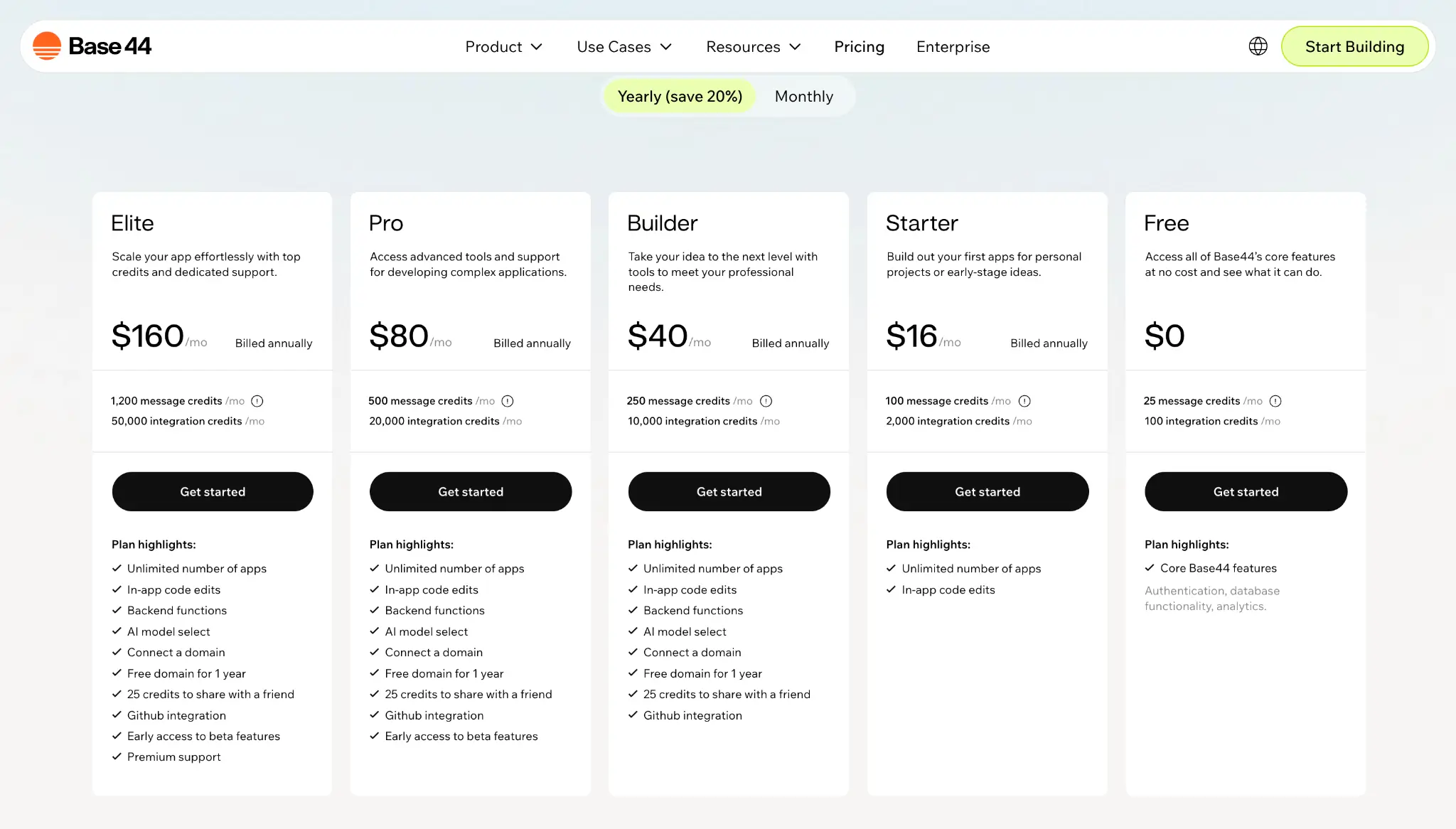
Free: $0/month
Base44's free plan gives you full access to its core features, so you can generate a functional app, explore the interface, and get a feel for how the platform works.
The Free plan gives you full access to Base44’s app builder, as well as:
- 25 message credits per month, with a 5-message daily cap
- 100 integration credits per month
- Authentication, database, and analytics built into your app
- Access to built-in integration types, so you can test actions like emails, AI calls, and other connected app workflows
Pros
- Lets you try Base44’s full builder for free without adding a credit card
- Provides an all-in-one setup—a built-in database and everything needed to run a working app
- Includes integration credits, so you can test live app actions like emails or AI calls and see what they cost
- Lets you explore cheaply in Discussion mode—each message costs about 0.3 credits, so you can plan your app without burning your available credits
Cons
- Caps you at 5 messages per day, so you can get stopped mid-build even if you still have monthly credits left
- Keeps Base44 branding in your app's URL unless you connect a custom domain on a paid plan
- Doesn't let you export your code, which makes moving your project elsewhere harder
Best for: Anyone who wants to try Base44's AI Builder before paying.
My verdict: You can build a real, working app on Base44’s free plan, explore the builder, and understand how the two credit types work. But with 25 total credits, you have very little room for trial and error—especially if you don’t have the budget to upgrade—since even fixing the AI's mistakes drains your credit allowance.
Starter: $20/month, or $16/month billed annually
Starter is Base44's entry-level paid plan and the first step up from the free tier. You get four times the message credits and twenty times the integration headroom to go beyond testing and ship Minimum Viable Products (MVPs) or internal tools.
This plan gives you everything included in the Free plan, plus:
- 100 message credits per month
- 2,000 integration credits per month
- Unlimited number of apps
- In-app code edits
Pros
- Lets you create unlimited apps, which is useful if you’re testing multiple ideas
- Four times the message credits of free, so you have real room to iterate on prompts and refine your UI
- In-app code edits let you fix small things directly in the code instead of spending message credits asking the AI
- Gives you 2,000 integration credits, so you can test more live app actions before worrying about runtime limits
Cons
- Still no code export
- No custom domain, so your app keeps its Base44-branded URL until you upgrade to a plan that includes one
- Both credit types can still drain fast—message credits during heavy building, integration credits if your app leans on AI calls or automations
- In-app code edits only help if you know some code, so non-technical builders won't get that credit-saving benefit
Best for: Hobbyists, solo builders, and early-stage founders building personal projects, internal tools, or MVPs they're not yet putting in front of customers.
My verdict: Starter is the plan for when you want room to turn your idea into an internal tool or MVP. The extra credits and unlimited apps make it feel much less cramped, and in-app code edits are a money-saver if you know a little code. It’s an ideal fit for personal projects and MVPs.
Builder: $50/month, or $40/month billed annually
Builder is where Base44 makes more sense for individuals looking to launch client-facing products or standalone software with real external users. This plan gives you everything included in the Starter plan, plus:
- 250 message credits per month
- 10,000 integration credits per month
- Backend functions for server-side logic
- 25 credits to share with a friend you refer
- GitHub integration and code export (frontend only)
- Custom domains, with a free domain for the first year
- AI model select, so you can choose which model handles a task
Pros
- A custom domain lets your app live at your own URL instead of a Base44 subdomain—the first tier that's presentable to real customers
- GitHub integration lets you export your frontend code and keep version control
- AI model select lets you match the model to the task—a faster one for simple changes, a stronger one for complex work
- 10,000 integration credits—5× Starter's—gives a live app real room for active users, file uploads, and AI calls before you hit runtime limits
Cons
- Can still deplete your message credits quickly if you’re building a complex app, debugging often, or asking for big UI rewrites
- Costs $50 month to month, which may feel steep if you’re only building occasionally or treating Base44 as a hobby tool
- Code export is frontend-only—your backend and database stay on Base44, so it's not a clean exit if you want to leave
Best for: Solopreneurs, freelancers building apps for clients, and startup founders ready to launch a public-facing MVP or commercial SaaS product.
My verdict: The Builder plan is the sweet spot for anybody serious about shipping a clean, customer-facing app, especially with the custom domain, backend functions, and GitHub integration. But it’s still usage-based, so heavy AI building or active app usage can push the credit limits faster than expected.
Pro: $100/month, or $80/month billed annually
Pro is one of Base44’s high-capacity tiers that doubles your development and runtime limits to give you more room to build, test, and support active users.
This plan gives you everything included in the Builder plan, plus:
- 500 message credits per month
- 20,000 integration credits per month
- Early access to beta features
Pros
- Gives you more room for revisions, debugging, and complex feature work
- Best for apps with active users, automations, emails, or frequent LLM calls
- Lets you try new Base44 capabilities before they roll out more widely
- Keeps the professional features from Builder, including custom domains, backend functions, AI model selection, and GitHub integration
Cons
- Costs much more than Builder without adding many major new features beyond more credits and beta access
- Can still get expensive if your app relies heavily on LLM calls, automations, or other frequent user-triggered actions
Best for: Startups, agencies, and builders with a live app whose user activity—AI features, uploads, automations—has outgrown Builder's integration credits.
My verdict: Pro is more like a capacity upgrade. It’s a good move when your app has real users and their activity is burning through Builder's credit pool faster than it resets. But if you're still mostly building rather than supporting live usage, the doubled price is hard to justify, and Builder is the smarter place to stay.
Elite: $200/month, or $160/month billed annually
Elite is the top of Base44's self-serve ladder, with the most credits and the only tier with dedicated support. You get enough room for high-volume apps that rely on Base44’s built-in services and faster help when something goes wrong.
This plan adds:
- 1,200 message credits per month
- 50,000 integration credits per month
- Premium support
Pros
- Offers a massive development budget
- Gives you priority access to Base44's technical team when troubleshooting platform bugs or workflow errors
- Works well for AI-heavy apps—like content generators, support bots, or internal tools with lots of automated workflows—with lots of users
Cons
- Costs $200 month to month, so it’s hard to justify unless your app is already seeing meaningful usage
- Doesn’t remove the need to monitor usage if your app depends heavily on LLM calls or frequent automations
- May be overkill for solo builders, early MVPs, or apps without active users yet
Best for: Growing startups, established agencies, and teams running high-traffic apps or AI-heavy tools with real usage.
My verdict: Elite makes sense in two situations: your app's usage genuinely needs the largest credit pool Base44 offers, or you need dedicated support because real users depend on your app and slow tickets aren't acceptable. Outside those, the jump from Pro is hard to justify—it's the same platform with a bigger meter.
What happens if you run out of credits?
Unlike Replit or Bolt, Base44 doesn’t let you buy extra credits or keep going on pay-as-you-go. Once your credits are gone, you either wait for them to reset or move to a higher plan. Unused credits also don’t roll over.
What happens next depends on the type of credit that’s gone.
Hitting your message credit limits means you can’t keep building with AI. On the Free plan, that means waiting until the next day for your daily credits to reset. On a paid plan—or once you hit the Free plan’s monthly limit—you’ll need to wait until your next billing cycle or upgrade your plan.
Integration credits are different because they affect the app after it’s live. When those credits are gone, actions like sending emails, generating images, running LLM calls, or triggering automations may fail for users. To keep those actions working, you’ll need to wait for the monthly reset or upgrade your plan.
Hidden costs to watch out for with Base44
Base44 doesn’t have surprise overage charges because it stops you when you hit your limit. But there are still a few costs and limits that aren’t obvious at first.
You spend credits fixing AI mistakes. If the AI breaks your layout, introduces a bug, or makes a change you don’t want, asking it to fix the issue uses message credits. On lower plans, that can eat into the same small pool you’re using to build.
Code export doesn't mean full portability. Even though the Builder plan lets you export your code through GitHub, the export only includes the frontend. Your database, login system, and backend logic stay on Base44. So if your app grows and you decide to move it elsewhere, you’ll still need to rebuild the backend.
A successful app can use up integration credits quickly, especially if your live app uses Base44’s built-in services, like emails, image generation, automations, or in-app agents. So usage can climb even when you’re not actively building.
External services can move the cost elsewhere. Calling external services through your own API keys or backend functions may avoid Base44 integration credits, but you’ll still pay those providers directly.
Base44 pricing: What users are saying on Reddit
The most common frustration Redditors have with Base44's pricing is how fast credits disappear. This user ran out on the free plan, upgraded to Starter and then Builder within a few hours to keep going, and still only got a few more hours each time—with no way to just buy more credits instead of waiting a whole month.

Users are also frustrated when credits go toward fixing the AI's own mistakes. One Redditor burned 17.5 credits in about ten minutes on what should have been a single 2.5-credit task—the AI kept getting it wrong, and every retry to fix the last mistake cost another 2.5 credits.

Even the bigger plans don't always feel like enough for some users. One Pro user said they burned through 500 credits in three days—and to keep building, their only option was to upgrade to the Elite plan, since Base44 doesn't sell smaller top-ups.

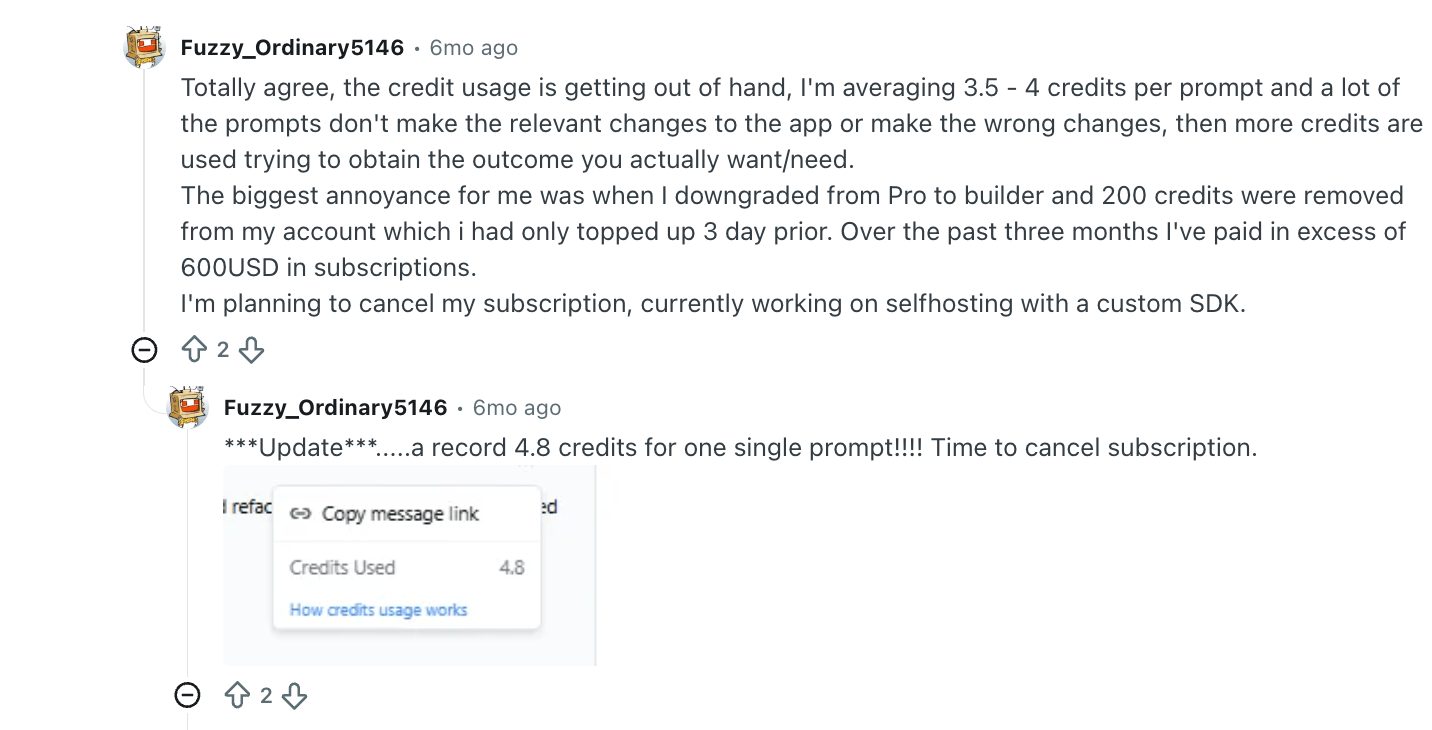
For some, the per-prompt cost alone adds up fast. One Redditor said they were averaging 3.5 to 4 credits on every prompt and had spent over $600 in three months—enough that they considered self-hosting instead.
But the feedback isn't all negative. Several users say they rarely hit their limits and find Base44 good value. One user said they’d built multiple internal apps and a full app with paying subscribers, and they rarely ran out of credits.

Another Redditor used Base44 heavily with Cloudflare and backend integrations and still hasn’t exhausted their monthly allowance.

Tips for lowering credit usage with Base44
Base44 charges based on how much work the AI does, so how you prompt and manage each session makes a real difference. A few habits, drawn from Base44's own docs and tips from experienced users, can help your credits go further:
- Plan in Discuss mode before you build. Base44’s docs say each message costs 0.3 credits, so it’s much cheaper than using the regular builder chat.
- Make simple edits by hand. Manual edits don’t use credits, so use it to make simple changes to text, colors, spacing, or layout.
- Keep each prompt focused. Big, do-everything requests are harder for the AI to get right—and costlier to fix when they miss. Ask for one specific change at a time so the AI knows exactly what you want.
- Draft your prompts in another AI tool first. Ask it to write a clear, detailed Base44 prompt, then paste that into Base44. Several Redditors said this cut down on the wasted credits that come from vague prompts the AI misreads.
- Use free automatic fixes on paid plans. When Base44 detects a code error in your preview, click "Resolve with AI" in the Issues Found notification—it won't cost message credits, unlike asking the AI to fix it in a normal prompt.
- Stick with Automatic model selection. It picks the right model for each task and is usually the most credit-efficient choice—manual selection can cost more, so only switch when you have a reason to.
- Roll back instead of re-prompting. If a change goes wrong, Version History undoes it for free—cheaper than spending credits to fix it. Use Discuss mode if you need to work out what went wrong first.
None of these tips stretch your credits forever, but they help you avoid burning them on vague prompts, repeated fixes, and changes you could make yourself.
Which Base44 plan should you choose?
Choose Free if you want to test Base44 and build a first app before paying. It's enough to build something real and learn how the two credit types work, as long as you prompt carefully and don't expect much room for trial and error.
Choose Starter if you've tested the idea and want room to build it out. It's best for personal tools, internal apps, and MVPs you're not yet putting in front of customers.
Choose Builder if you want to ship more polished apps. It's the first tier with custom domains, backend functions, and code export, which makes it the practical choice for client projects and customer-facing MVPs.
Choose Pro when your live app's usage has outgrown Builder's credits. You get more credits and early access to beta features. It’s best for agencies, startups, and builders managing more complex apps or apps with growing usage.
Choose Elite if you need the largest credit pool Base44 offers plus dedicated support, typically for high-volume, AI-heavy apps with active users.
Is Base44 worth it?
Base44 can be worth it if you want to build a working app quickly and you’re comfortable managing credits as you build and launch.
Consider Base44 if you:
- Want to build prototypes, MVPs, internal tools, or simple SaaS apps quickly
- Prefer an all-in-one app builder with AI, database, hosting, auth, and integrations included
- Want to generate a working app without starting from a blank codebase
- Are comfortable planning prompts carefully to avoid wasting message credits
- Want built-in services like emails, AI calls, automations, and file uploads
- Are okay upgrading as your building or your app's usage grows
Pass on Base44 if you:
- Want predictable pricing that doesn’t depend on credits
- Don’t want to monitor message credits and integration credits separately
- Need full backend portability or want to own every part of your app outside Base44
- Rely heavily on AI debugging and don’t want to pay for repeated issues or AI mistakes
- Plan to run an AI-heavy app where integration credits could climb faster than you’d like
Base44 vs Softr: Which is better?
Base44 is built for generating apps fast from a prompt, with a managed backend created for you behind the scenes. But its credit model can make costs hard to predict. Plus, fixing the AI's mistakes eats into the same budget you build with.
If you’re looking for a Base44 alternative that lets you build and ship secure, ready-to-use business apps fast without worrying about credit burn, consider Softr.
The AI-native platform lets anyone create portals, CRMs, dashboards, and internal tools on top of your structured data, and automate the workflows behind them.
Simply describe the app you want to create, and Softr’s AI Co-Builder generates the app structure, database, pages, workflows, user permissions, and business logic. Softr also includes the technical parts of your app—like authentication, user roles, permissions, data security, and hosting—from the start. So, you don’t have to set them up separately before sharing your app with employees, clients, or partners.
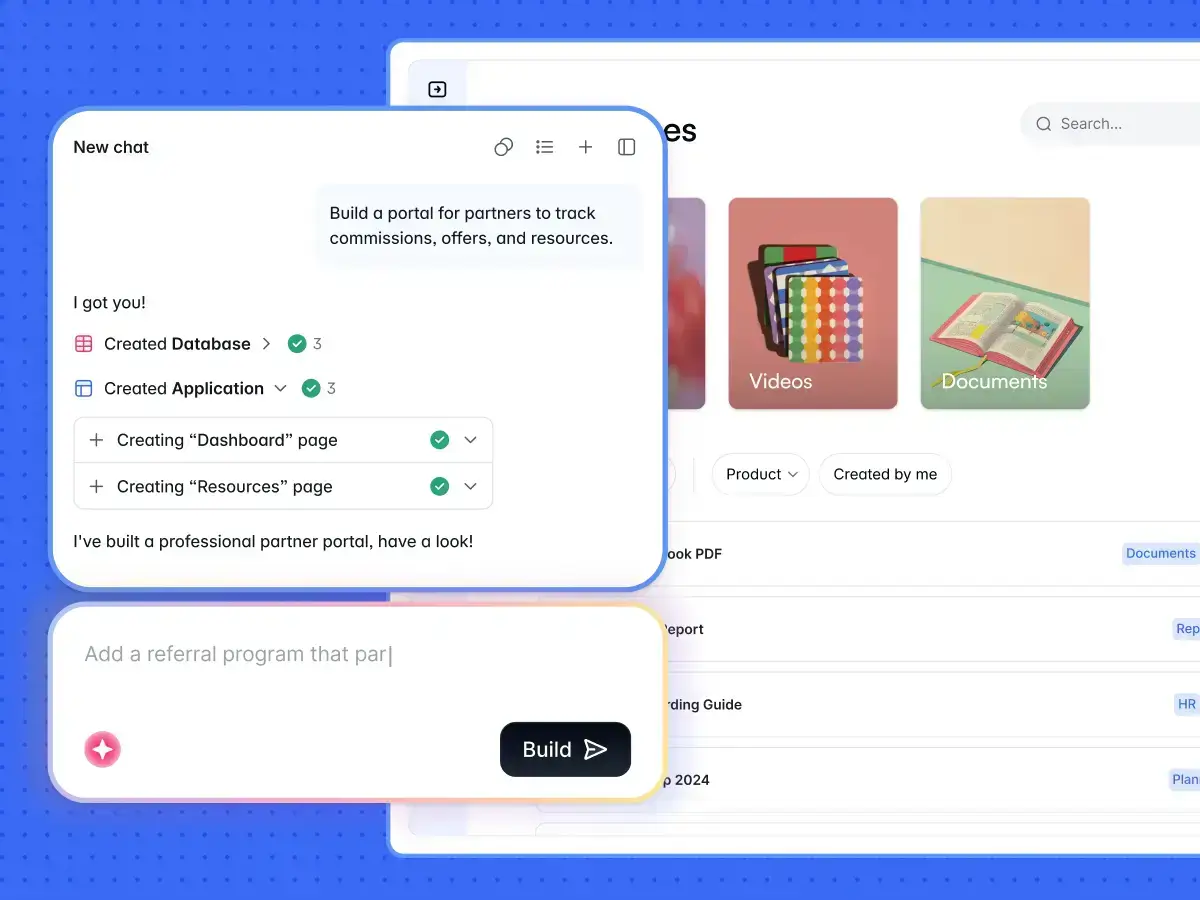
Once your app is built, you can make quick changes in Softr’s visual editor without spending AI credits. Update pages, tweak layouts, manage user permissions, or adjust workflows directly. You can also make changes from your own AI assistant through the Softr MCP, which doesn’t use Softr AI credits either. If you have a developer on your team, they can customize your app with HTML, CSS, or JavaScript through Softr’s Custom Code block.
Or use the Vibe Coding block to generate custom components, like dashboards, pricing calculators, or chatbot-style widgets, from plain-language prompts.
✨See vibe coding examples built in Softr.
With Softr, you get:
- Predictable, flat pricing. Softr's pricing is based on plan limits like users, records, workflows, and AI credits, so you know what you'll pay before you start. And if you hit a limit, you can buy an add-on pack—for example, 100 extra AI credits for $10 on the Basic plan.
- Built-in logins and granular permissions. Softr comes with authentication, custom user groups, and granular permissions out of the box. You can control what people see and do at the page, block, record, or field level.
- A native database plus external data sources. Base44 gives you an AI-generated managed database, but Softr lets you create a native relational database you can structure directly, or bring in your own data from Airtable, Google Sheets, or any of its 20+ external data sources.
- Visual workflows you can inspect and update. Softr gives you a workflow builder with clear triggers, actions, and run history. That makes it easier to understand what runs, when it runs, and why.
- A complete AI-native platform for building business apps. Softr combines AI app building, databases, workflows, permissions, integrations, hosting, and user management in one platform, so teams can build apps that are easier to maintain as the business grows.
Softr pricing: an overview
| Softr plan | Price | What you get |
|---|---|---|
| Free | $0 | 5 total users, unlimited apps, 5 AI credits, 5,000 database records, 500 workflow actions |
| Basic | $19/month | Team: 5 + Client: 5 app users, 10 AI credits, 50K records, 2.5K workflow actions |
| Pro | $99/month | Team: 10 + Client: 50 app users, 50 AI credits, 500K records, 10K workflow actions |
| Business | $329/month | Team: 30 + Client: 100 app users, 100 AI credits, 1M records, 25K workflow actions |
| Enterprise | Enterprise (custom pricing, contact sales) | SSO, audit logs, SOC2 reporting, IP blocking, SLAs, dedicated success manager, priority support |
Every Softr plan includes a monthly AI credit allowance, so you can try the AI Co-Builder and Vibe Coding block without needing a separate AI budget. Plus, you can buy add-on packs if you need more—hitting a limit doesn't force you up to the next tier the way it does on Base44.
Base44 vs Softr: Which should you choose?
Choose Base44 if you:
- Want to generate an app quickly from prompts
- Are building an early MVP, prototype, or experimental app
- Are happy letting AI generate and manage the app structure for you
- Are comfortable monitoring message credits and integration credits
- Have enough technical confidence to inspect, fix, or rebuild parts of the app when needed
Choose Softr if you:
- Want secure, production-ready business apps—portals, CRMs, dashboards, internal tools—that real users rely on from day one
- Prefer flat, predictable pricing over costs that move with every AI action
- Want the option to top up with an add-on pack instead of upgrading a whole tier when you hit a limit
- Want built-in logins, granular permissions, workflows, and a relational database
- Need to connect your app to existing tools and data sources
- Want to keep editing your app visually without spending AI credits on every change
- Have technical and non-technical people who need to build, update, and maintain apps together
For quick prototypes, Base44 may be enough. But for secure business apps with real users, permissions, and workflows, Softr is usually the stronger fit—and the difference compounds after launch.
On Base44, every change runs back through the AI and costs credits; in Softr, your team edits pages, workflows, and permissions visually for free, so you spend AI credits only when you actually want AI to do the work.
Try Softr for free and build your first ready-to-use business app with AI.
Frequently asked questions
How much does Base44 cost?
Is Base44 completely free?
How much does it cost to publish an app with Base44?
What are the disadvantages of Base44?
What's the difference between Base44 and Softr?