


Zite pricing: A complete guide to plans in 2026


If you’ve ever considered using Zite and skimmed their pricing plans only to walk away confused, you wouldn’t be the first. AI credits, workflow runs, and database record caps all vary by plan (and real-life usage)—while advanced features are often limited to much higher tiers.
To help you figure out how far your credits will actually go, I’ve put together a full breakdown of Zite’s pricing, where restrictions kick in, and how each subscription measures up (based on hands-on testing and user reviews).
To find out if you’re getting the best bang for your buck compared to other AI app builders, keep reading.
Zite pricing plans at a glance
| Plan | Price | Best for | Key features | Limitations |
|---|---|---|---|---|
| Free | $0 | Beginners experimenting with prototypes and lightweight internal tools | 50 credits/month; 5,000 database records; 1,000 workflow runs/month; unlimited users and apps; 1 brand kit | Only 10 messages/day; Zite branding; no custom domain; no advanced AI models; no white-label emails; no AI training opt-out; free-tier support |
| Pro | $19/month billed monthly or $15/month billed annually | Building prototypes without the daily messaging cap | Everything in Free, plus 100 credits/month; 100,000 database records 5,000 workflow runs/month; 1 custom domain, ability to remove Zite branding | Only 1 custom domain; no advanced AI models; no white-label emails; no AI training opt-out by default; lower usage limits than Business |
| Business | $69/month billed monthly or $55/month billed annually | Non-technical teams who want to test rapidly deploying internal tools | Everything in Pro, plus 200 credits/month; 250,000 database records; 50,000 workflow runs/month; domains; AI training opt-out by default; Advanced AI models | Usage caps still apply; higher usage requires a custom plan (if applicable) |
| Team bundle | $300/month billed monthly or $250/month annually | For growing teams who need higher usage limits, bundled access, and priority support | 800 credits per/month; 1,000,000 database records; 250,000 workflow runs/month; granular permissions; unlimited brand kits; two-factor auth; region for end-user data | Expensive starting price; only 800 AI credits/month; workflow runs capped at 250,000/month; database records capped at 1,000,000; enterprise security features require a custom plan |
| Custom | No public pricing, requires sales onboarding and enterprise setup | For enterprise companies who need higher usage limits, bundled access, priority support, and advanced security features | Everything in Team bundle; Single Sign On (SSO); 1,000,000+ database records; unlimited workflow runs; audit logs; dedicated support; unlimited revision history; custom agreements & SLAs | Custom pricing only; requires contacting sales; pricing not publicly available; feature access depends on contract and plan terms |
Zite pricing: How credits and workflow runs work
Zite's pricing is tied to two separate usage limits: AI credits and workflow runs. The free plan includes 50 credits and 1,000 workflow runs per month, while paid plans increase those allowances depending on your subscription tier. If you need more credits, you'll need to move to a higher-priced plan with a larger monthly allocation.
What are credits, you ask? Credits are usage units that measure how much AI functionality you consume within your plan. Each and every AI-powered action consumes credits from your subscription’s monthly allowance. Once you run out, you can’t use AI until your credits reset or you upgrade to a higher plan.
What about workflow runs? Workflow runs are tracked separately from credits. Every time a workflow successfully executes from a published app, it counts as one workflow run. A workflow can consume a run without using any credits, or it can consume both if it happens to rely on any AI features. One very important thing to keep in mind: workflow runs are tracked separately from AI credits. Any time a user action triggers a workflow—such as updating a database record, submitting a form, calling an API, sending a notification, or running an automation—it counts as a workflow run. Those hidden costs will grab you as app usage grows, because those runs inevitably add up quickly.
The challenge is that neither metric is especially easy to estimate upfront. The more you rely on AI to generate features and even make changes, the faster you'll consume credits. It’s as simple as that.
At the same time, growing apps with more users and automations will naturally burn through workflow runs as activity increases.
But here’s the real sticking point: Because credits and workflow runs are tracked separately, you're effectively managing two different usage limits at once. As a result, predicting those costs on paper without actually trying the platform first is anyone’s guess. (Something your finance team probably doesn't want to hear.)
Let's break down each plan and see which option actually offers the best value.
Zite pricing: A full breakdown
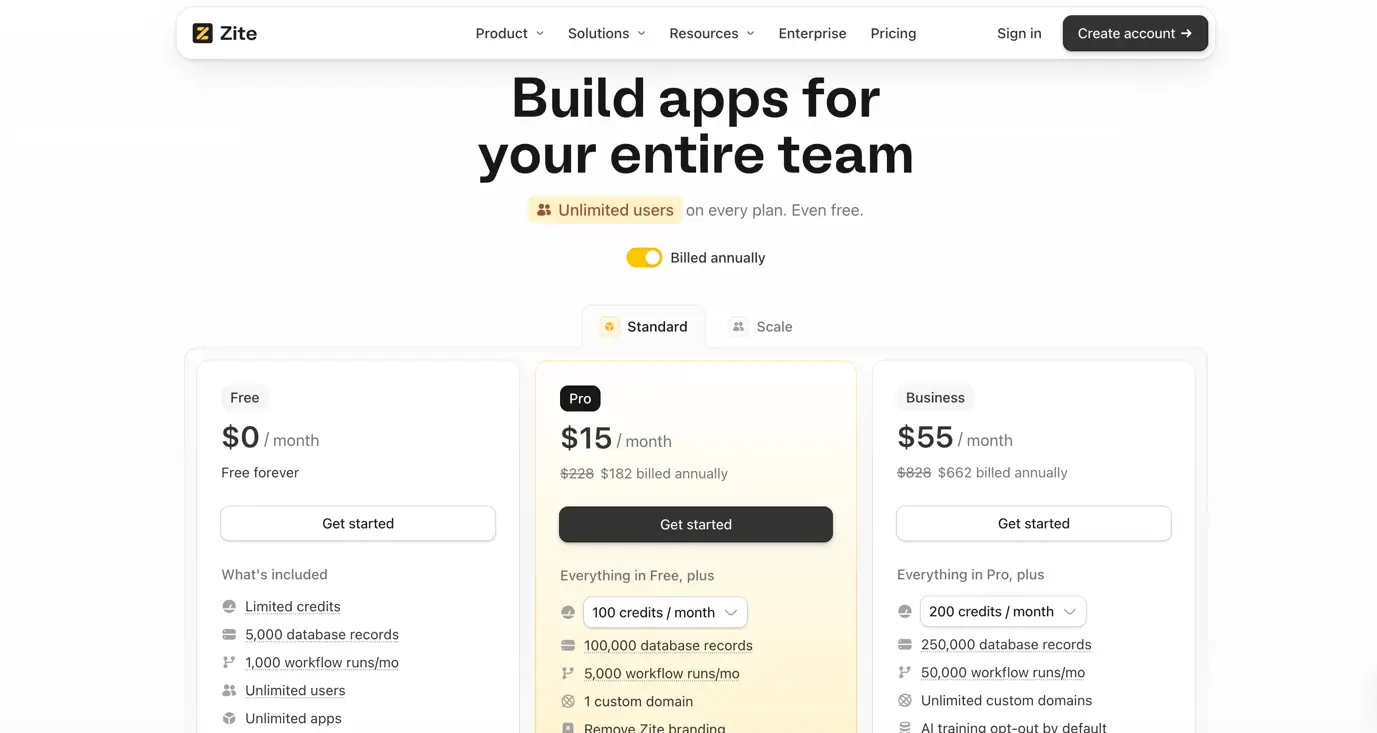
Zite’s Free plan: $0/month
Zite’s free plan gives you:
- 50 AI credits per month with a maximum of 10 messages per day
- Up to 5,000 database records you can store across your Zite workspace
- 1,000 workflow runs per month, and each workflow execution counts as one run
- Unlimited users
- 1 brand kit to add logos, colors, fonts, and style guidelines
- Access to Zite's AI app builder
Note: While Zite says you get unlimited apps on any plan, building and modifying those apps still consumes credits. In practice, the number of apps you can realistically create each month is limited by your credit allowance, not an explicit cap.
Pros
- Free to start with no credit card required
- Unlimited users and apps (though credits run out fast)
- Includes access to the AI app builder
- Can test out the platform before committing financially
Cons
- The 10-message daily limit will interrupt longer building and testing sessions almost immediately
- 50 monthly AI credits will disappear quickly on larger apps with multiple screens, databases, and workflows
- The 5,000-record database limit can become restrictive fast as apps accumulate more users and data
- The 1,000 workflow run allowance may not be enough for apps with active automations
- No custom domain support, making it difficult to launch a fully branded application
- Zite branding remains visible unless you upgrade to a paid plan
- No access to advanced AI models available on higher tiers
- No white-label emails for customer-facing applications
- No AI training opt-out, which is only available on Business plans and above
- Credits and workflow runs are tracked separately, requiring users to monitor multiple usage limits
Best for: Exploring Zite's app builder, testing quick MVPs and internal tool ideas, and helping individuals or small teams evaluate AI-powered app generation before committing to a paid plan.
My verdict: The Free plan is a solid way to get familiar with Zite and validate early-stage ideas. But the 50-credit allowance, 5,000-record database limit, and 1,000 monthly workflow runs can become restrictive as soon as you want to get a serious app off the ground.
Zite’s Pro plan: $19/month billed monthly or $15/month billed annually
The Pro plan feels less like a feature upgrade and more like the minimum plan most users will eventually need. While it removes branding and adds a custom domain, the included AI credits and workflow limits are still conservative, meaning active projects will outgrow the plan fairly quickly.
The Pro plan gives you everything included in the free plan, plus:
- 100 AI credits per month, double the allowance included in the Free plan
- Up to 100,000 database records for storing user, application, and business data
- 5,000 workflow runs per month, allowing for more automations and background processes
- 1 custom domain for publishing apps under your own brand
- Ability to remove Zite branding from published applications
- 1 brand kit for managing logos, colors, fonts, and visual identity
- Access to Zite's AI app builder
Pros
- Removes Zite branding from published applications
- Supports a custom domain for launching apps under your own brand
- Doubles the monthly AI credit allowance compared to the Free plan
- Increases database capacity from 5,000 to 100,000 records
- Increases workflow limits from 1,000 to 5,000 runs per month
- Removes the 10-message daily limit found on the Free plan
Cons
- Credit usage can become difficult to predict as apps grow in complexity
- 100 monthly AI credits may still feel restrictive for AI-assisted development
- Workflow runs and credits are tracked separately, creating multiple usage limits to monitor
- Unused credits do not roll over between billing cycles
- Limited to a single custom domain
- No access to advanced AI models available on Business plans and above
- No white-label emails for customer-facing applications
- No AI training opt-out by default
- Growing teams may still outgrow the workflow and database limits relatively quickly
Best for: Solo builders launching prototypes or startups validating products with early internal users.
My verdict: The Pro plan removes some of the Free plan's limitations, particularly Zite branding and custom domain restrictions. However, the jump from 50 to 100 monthly credits isn't huge, and the workflow limits are still restrictive for apps with active users. For most solo builders, this is likely the best value plan, but growing businesses may find themselves needing Business sooner than expected.
Zite Business: $69/month billed monthly or $55/month billed annually
You'd expect any business plan to remove most of the usage concerns found on lower tiers. Instead, credits, workflow runs, and database records are all still capped, meaning growing applications can eventually run into the same scaling questions (just later).
The Business plan gives you everything in the pro plan, plus:
- 200 AI credits per month
- Up to 250,000 database records for storing larger customer and application datasets
- 50,000 workflow runs per month, a 10x increase over the Pro plan
- Unlimited custom domains for publishing multiple branded applications
- Access to advanced AI models unavailable on lower tiers
- White-label emails for customer-facing communications
- AI training opt-out enabled by default
Pros
- Unlocks advanced AI models unavailable on lower tiers
- Includes white-label emails for customer-facing applications
- Workflow limits increase from 5,000 to 50,000 runs per month
- Supports unlimited custom domains
- Removes the single-domain restriction found on Pro
- Better suited for larger applications with heavier automation requirements
Cons
- 200 monthly AI credits may still feel restrictive for teams relying heavily on AI-assisted development
- Credits, workflow runs, and database records are all tracked separately, creating multiple usage limits to monitor
- More advanced AI models can consume credits faster than simpler requests
- Workflow runs remain capped at 50,000 per month despite the higher-priced plan
- Database records are still limited to 250,000, with larger databases requiring Team Bundle or Enterprise
- Granular permissions are locked behind Team Bundle
- Two-factor authentication enforcement requires Team Bundle
- Data residency controls (choosing where end-user data is stored) require Team Bundle
- SSO, audit logs, dedicated support, and SLAs are reserved for Enterprise
Best for: Deploying internal tools to users for testing purposes.
My verdict: The Business plan is positioned for growing teams, but many of the controls larger organizations typically expect are still reserved for Team Bundle and Enterprise. While the higher limits help, you're ultimately buying yourself more time and capacity rather than escaping the usage-based pricing model. As apps grow, the same questions around credits, workflows, and database limits don't disappear; they just get delayed.
Zite Team Bundle: $300/month billed monthly or $250/month annually
The Team Bundle increases Zite's usage limits while adding several administrative and security features that aren't available on lower tiers. It's aimed at organizations managing multiple applications, larger datasets, and more users across teams.
The catch is that Team Bundle feels more like a stepping stone to Enterprise than a final destination. Organizations that need SSO, audit logging, dedicated support, or contractual SLAs will still need to contact sales and move up another tier. For a plan that costs $250/month, it's surprising how many governance and security features are still unavailable.
The Team Bundle plan gives you everything in the Business plan, plus:
- 800 AI credits per month, a 4x increase over the Business plan
- Up to 1,000,000 database records across your workspace
- 250,000 workflow runs per month
- Granular permissions for managing user access and roles
- Unlimited brand kits
- Enforced two-factor authentication
- Ability to choose where end-user data is stored
Pros
- 4x more AI credits than the Business plan
- Database capacity increases from 250,000 to 1,000,000 records
- Workflow limits increase from 50,000 to 250,000 runs per month
- Unlocks granular permissions unavailable on lower tiers
- Includes additional security controls such as enforced two-factor authentication
- Supports multiple brands with unlimited brand kits
Cons
- Limited to 800 AI credits per month, which may still feel restrictive for organizations managing multiple apps and frequent AI-assisted changes.
- Larger teams may still outgrow the included usage limits
- Priority support is unavailable despite the higher price point
- SSO, audit logs, dedicated support, and SLAs remain locked behind Enterprise
- Pricing increases significantly compared to the Business plan
- More advanced AI usage can consume credits faster than expected
Best for: Teams that want granular permissions and stricter security and compliance requirements.
My verdict: The Team Bundle finally introduces several administrative and security controls missing from lower tiers, but it comes at a steep price increase. Many enterprise-focused features (including SSO, audit logs, dedicated support, and SLAs) still require yet another upgrade.
Zite Enterprise: Custom pricing
The Enterprise plan is Zite's custom offering for organizations that need additional security, compliance, governance, and support. Unlike every other plan, pricing isn't publicly available and requires speaking with sales.
The Enterprise plan gives you everything included in Team Bundle, plus:
- Single Sign-On (SSO)
- 1,000,000+ database records
- Unlimited workflow runs
- Audit logs
- Dedicated support
- Unlimited revision history
- Custom agreements and SLAs
- Custom pricing and deployment options
Pros
- Removes workflow run limits entirely
- Includes SSO for enterprise identity management (the only plan to do so)
- Includes audit logs for compliance and governance
- Dedicated support is included
- Unlimited revision history so you can keep previous versions
- Includes custom agreements and SLAs
- Most comprehensive security and compliance offering
Cons
- No public pricing
- Requires speaking with sales
- Final costs depend on custom negotiations
- Credit allowances are not clearly disclosed on the pricing page
- Feature availability may vary depending on contract terms
- Organizations may need to evaluate the platform through a sales process rather than self-service
Best for: Large organizations with strict security, compliance, and governance requirements that need SSO, audit logs, dedicated support, contractual SLAs, and have outgrown the limits of the Team Bundle plan.
My verdict: Enterprise removes several of the limitations found on lower tiers, particularly around governance, support, and workflow capacity. However, like many enterprise SaaS offerings, pricing becomes opaque at this level. Organizations must contact sales to understand costs, making it difficult to compare the true price of Enterprise against competing platforms upfront.
Zite pricing: What users are saying on Reddit
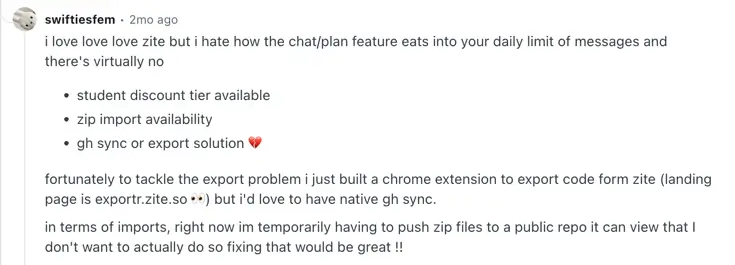
Because Zite is still a relatively new platform, there isn't nearly as much pricing discussion on Reddit as you'll find for more established app builders. However, the conversations that do exist tend to focus on one recurring theme: AI credits are difficult to estimate and may disappear faster than expected.
One Pro subscriber reported burning through their entire monthly credit allocation in a single day, arguing that both Chat mode and Plan mode contributed to credit consumption more aggressively than anticipated.

Several users also questioned whether conversational interactions should count toward usage at all. In one thread, users specifically criticized Chat mode and Plan mode consuming credits, arguing that brainstorming and planning activities eat into the same allowance used for actual app generation.
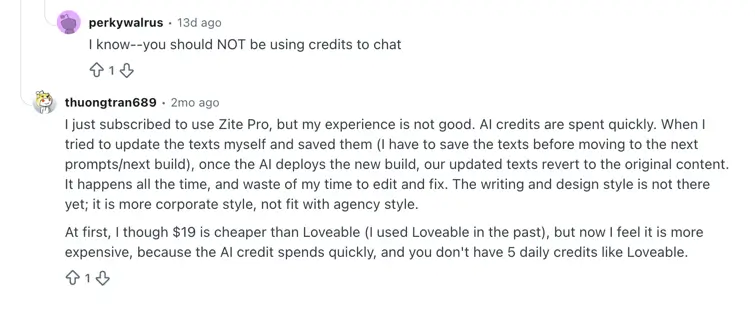
One user argued that while Zite may be cheaper than traditional development, the long-term trade-offs (read: that thing most AI app builders tend to ignore, ahem, security) resemble those of hiring a less experienced developer.
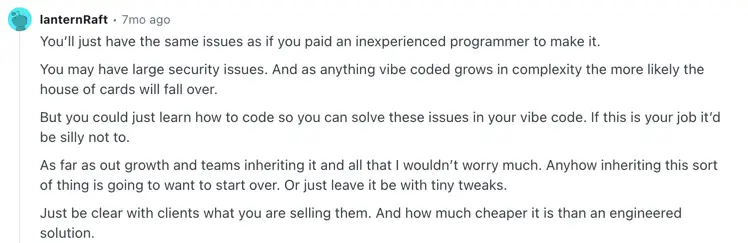
That said, not all feedback is negative. One user criticizing the pricing model made it clear they still enjoyed using the platform overall:
What happens if you run out of credits?
If you hit your monthly credit limit in Zite, your apps don't suddenly stop working. Published apps remain live, users can continue accessing them, and standard database operations continue functioning as normal.
However, the main limitation is that many of Zite's AI-powered features rely on credits, including:
- Building and modifying apps with AI
- Using the Database Agent
- AI fields in databases
- Apps using Zite's AI API key
- Document generation
Although some actions don't consume credits at all, including:
- Manual edits to text, layouts, spacing, and styling
- Applying themes
- Standard database storage and operations
- Users visiting published apps
- Workflow runs from the editor
- Using "Fix it for me" to resolve app errors
The tricky part is that credit consumption isn't fixed. Usage depends on factors such as:
- The complexity of your prompt
- The AI model being used
- The size of your application
- How many screens, files, or database tables need to be analyzed
- How many changes the AI needs to make
To give you an idea, simple styling updates may consume less than a single credit, while creating databases, adding authentication, generating new pages, or building more advanced functionality can consume several credits per request.
If you run out, you'll need to wait for your credits to reset, add more to your plan, or move to a plan with a higher credit allowance. Just beware: unused credits don't roll over between billing cycles, so any remaining balance disappears when your subscription renews.
Tips for lowering credit usage with Zite
Because Zite's pricing is tied directly to credit consumption, using credits efficiently can help stretch your monthly allowance further. Here are a few ways to reduce unnecessary credit usage:
- Be as specific as possible when prompting the AI. Vague requests often lead to follow-up prompts, revisions, and rework—all of which consume additional credits.
- Upload screenshots, mockups, or reference images when possible. Giving the AI clearer context can reduce the number of iterations needed to achieve the desired result.
- Use Chat mode for brainstorming, troubleshooting, reviewing changes, and asking questions. Although chat mode still uses up credits, it’s fewer than directly building with AI.
- Use Plan mode before tackling larger requests. Planning out requirements first can help avoid wasted credits caused by rebuilding or revising features later.
- Make small edits manually whenever possible. Changes to text, colors, spacing, layouts, buttons, and other design elements can often be made directly without consuming any credits.
- Use Design mode for visual updates such as changing themes, fonts, and colors instead of relying on AI-generated edits.
- Monitor your usage regularly. Zite allows you to view how many credits each request consumes, so you can identify which types of prompts are using the most credits.
- Break larger projects into smaller, focused requests. Asking the AI to make targeted changes is often more efficient than submitting broad prompts that require it to analyze large portions of your app.
- Avoid repeatedly re-prompting the AI to solve the same issue. Multiple rounds of trial-and-error can consume credits surprisingly quickly, especially on larger applications.
Ultimately, the biggest factor affecting credit consumption is complexity. Creating databases, authentication systems, new pages, and other features will naturally consume more credits than simple styling or content updates. The more precise your requests are, the further your monthly credit allowance is likely to go.
What happens if you run out of workflow usage?
Workflow runs are tracked separately from credits, which means it's entirely possible to run out of workflow runs while still having credits remaining—or vice versa.
A workflow run is counted every time a workflow successfully executes from a published app. Interestingly, the number of actions inside the workflow doesn't matter. Whether your workflow contains a single step or dozens of integrations, loops, emails, database updates, and API calls, a successful execution still counts as just one workflow run.
Here's what counts toward your workflow allowance:
- Successful workflow executions from published apps
- Workflows that send emails
- Workflows that update databases
- Workflows that connect to third-party integrations
- Workflows that call APIs
Here's what doesn't count:
- Workflow runs from the editor
- Failed workflow executions
- Timeouts and unsuccessful runs
One important distinction is that workflow runs and credits are not the same thing. For example:
- A workflow that sends emails uses 1 workflow run
- A workflow that updates data uses 1 workflow run
- A workflow that uses Zite AI consumes 1 workflow run plus credits
- A workflow that uses your own OpenAI API key consumes 1 workflow run but no Zite credits
When you do hit your limit, your published apps continue working, workflows continue executing, and AI-powered workflows continue running even after you've exhausted your workflow allowance. Users won't suddenly lose access to your applications and existing automations won't stop functioning.
The restriction is that you won't be able to publish new edits until your usage resets or you move to a plan with a higher workflow allowance.
Further, workflow runs are tracked across your entire organization rather than per app. As you launch more applications, add more users, and build more automations, all successful workflow executions contribute toward the same monthly limit.
Hidden costs to watch out for with Zite
At first glance, Zite's pricing looks fairly generous. Every plan includes unlimited users and unlimited apps, which can make it appear significantly cheaper than alternatives that charge based on seats or app limits.
The reality is a bit more nuanced.
The first hidden cost is credit consumption. Building with AI, modifying apps, generating databases, using AI fields, running the Database Agent, and generating documents all consume credits. The amount used depends on factors such as the complexity of your prompt, the size of your application, the AI model being used, and how many screens, files, or database tables Zite needs to inspect.
The second hidden cost is workflow usage.
One detail that's easy to miss is that workflow executions aren't only consumed when users submit forms, send emails, trigger automations, or perform other obvious actions. Based on our testing, data reads can also count toward workflow usage. In practice, this means that simply loading a page, viewing records, refreshing data, or interacting with information inside an app can contribute to your workflow consumption.
This creates an important distinction. While users themselves are unlimited, the activity those users generate is not. As more employees, customers, or clients actively use an application, workflow usage can increase alongside adoption. For teams comparing Zite against platforms that charge based on users, this is an important detail because the true scaling factor may be app activity rather than seat count.
Another challenge is workflow management itself. Because so much app behavior is represented through workflows, larger applications can quickly accumulate dozens—or even hundreds—of workflows. During testing, a simple CRM generated more than 30 workflows after only a few prompts. As applications become more sophisticated, navigating, debugging, and maintaining those workflows can become increasingly difficult.
The bigger issue is predictability. Before you've launched an application, it's often difficult to estimate how many credits you'll consume while building or how much workflow activity real-world usage will generate. As a result, costs can become harder to forecast as applications grow in complexity and adoption increases.
Which Zite plan should you choose?
Choose the Free plan if you:
- Want to test Zite before committing to a paid plan
- Are learning how AI-powered app builders work
- Need to validate an idea or build a simple MVP
- Don't mind the 10-message-per-day limit
Choose Pro ($15/month billed annually) if you:
- Have outgrown the Free plan's credit and workflow limits
- Need a custom domain for an application
- Want to remove Zite branding
- Are building prototypes regularly but don't need advanced AI models
Choose Business ($55/month billed annually) if you:
- Need advanced AI models
- Want white-label emails for customer-facing tools
- Require AI training opt-out by default
- Expect to run significantly more workflows and store larger amounts of data
Choose Team Bundle ($250/month billed annually) if you:
- Need granular permissions and stronger team management controls
- Manage multiple apps, brands, or business units
- Require enforced two-factor authentication
- Need substantially higher credit, workflow, and database limits
Choose Enterprise if you:
- Require SSO for security and compliance
- Need audit logs and dedicated support
- Require custom agreements or SLAs
- Need unlimited workflow runs and enterprise governance features
Is Zite worth it?
Zite is worth the cost if you want AI to generate a large portion of your application and value speed over having complete control of the development process.
Check these parameters first:
Zite is worth it if you:
- Want to build internal tools, MVPs, and prototypes quickly
- Prefer AI-assisted app development over building from scratch
- Want non-technical team members to contribute to app creation
- Are comfortable working within a credit and workflow-based pricing model
Pass on Zite if you:
- Want highly predictable pricing that doesn't depend on usage
- Don't want to manage credits and workflow runs separately
- Expect unlimited app building (with advanced AI features) after paying for a subscription
- Need enterprise security features without moving to higher-tier plans
- Plan on heavily iterating with AI and are concerned about burning through credits quickly
- Prefer paying for platform access rather than increasing usage allowances as you grow
Softr vs Zite: Which is better?
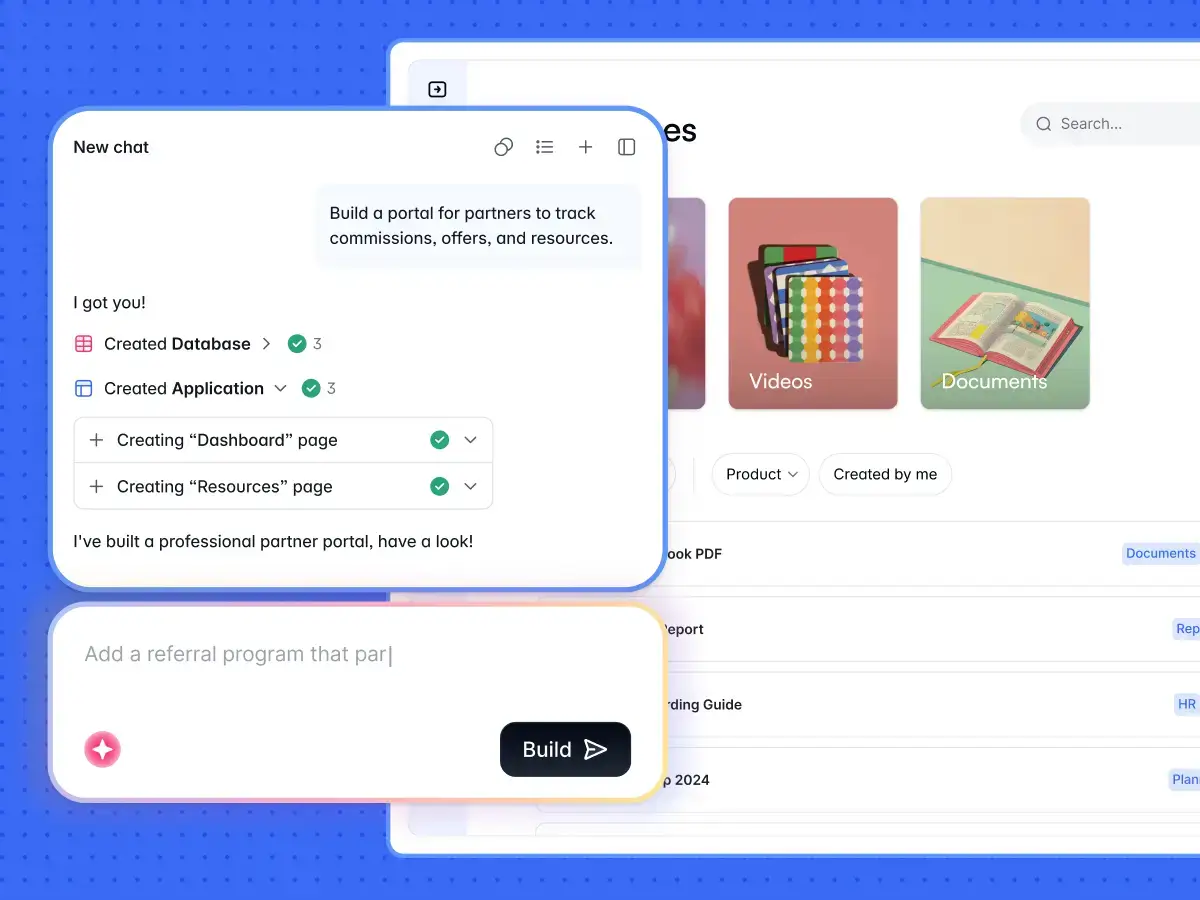
Zite builds prototypes and interfaces with AI that you have to prompt and re-prompt over and over to get results, using up credits fast in the process. Softr, on the other hand, builds fully functional (and secure) business apps from the get-go, complete with native databases, workflow automation, and business logic already set up for you.
That includes everything that Zite skips, including authentication out of the box, roles and permissions you can visually configure, a visual, scalable database you control and edit, and enterprise-grade security you can trust. In fact, you can build and launch apps to both internal and external users the same day, no dev needed.
Using the AI Co-Builder, build any kind of business app under the sun—client portals, CRMs, intranets, dashboards—while still retaining full control through Softr's visual editor. That way, you’re not stuck prompting AI in endless debugging loops and credit waste; you can switch back and forth whenever you like. And when you do need more, you can use the Vibe Coding block to create custom components with your app’s theme, permissions, and data connections all intact.
With Softr, you get:
- A complete application platform, not just AI app generation: Zite focuses heavily on AI-generated app building, with usage tied to credits and workflow runs. Softr combines AI-assisted creation with a mature visual platform that includes authentication, permissions, databases, workflows, integrations, and hosting out of the box—making it easier to move from idea to production without assembling the foundations yourself.
- Built for real business applications: While Zite is optimized around generating apps with AI, Softr is designed to help teams launch client portals, CRMs, internal tools, dashboards, intranets, and other operational software that employees and customers use every day. Features like user management, role-based permissions, security controls, and data management are already built into the platform rather than added later.
- Predictable pricing and fewer usage limits: One of the biggest differences is pricing. Zite's plans revolve around credits, workflow runs, and database allowances, which can make costs difficult to estimate as apps grow. Softr's pricing is easier to understand upfront, allowing teams to focus on building and scaling applications rather than constantly monitoring AI consumption and multiple usage meters.
Plus, Softr offers flat, predictable pricing plans.
Softr pricing: an overview
| Softr plan | Price | What you get |
|---|---|---|
| Free | $0 | 5 users, unlimited apps, 5 AI credits, 5,000 database records, and 500 workflow actions |
| Basic | $19/month | Team: 5 + Client: 5 app users, 10 AI credits, 50K records, 2.5K workflow actions |
| Pro | $99/month | Team: 10 + Client: 50 app users, 50 AI credits, 500K records, and 10K workflow actions |
| Business | $329/month | Team: 30 + Client: 100 app users, 100 AI credits, 1M records, and 25K workflow actions |
| Enterprise | Custom | SSO, audit logs, SOC2 reporting, IP blocking, SLAs, dedicated success manager, priority support |
*Every plan includes a monthly AI credit allowance, so you can try the AI Co-builder and Vibe Coding block at no cost.
Softr vs Zite: Which should you choose?
Here’s my final take on where Softr beats Zite:
- Plan-based pricing keeps costs predictable as your apps scale: Zite’s app-building approach can lead to repeated prompting and hard-to-predict credit usage. With Softr, AI generates, then you can edit visually, so you only spend on AI when you want to.
- No workflow-run charges for user activity: With Softr, users can submit forms, update records, and interact with apps without consuming separate workflow-run quotas. In Zite, actions that update data, trigger automations, call APIs, or perform other workflow actions count toward workflow run limits, which can increase costs as app usage grows.
- Granular permissions and user groups: Zite is limited in terms of access control and only includes basic authetication. Softr makes it easy to set up custom user groups with granular permissions and conditional filters, giving teams precise control over what each user sees and does, tied directly to relational data.
- Built for real business software: Zite works well for building prototypes and lightweight internal tools. Softr handles complex business apps like secure portals, CRMs, dashboards, and operational systems your teams and customers can use from day one.
- More UI and AI control: Zite uses AI for full app generation, with changes made through prompting or looking at code. Softr's AI Co-Builder generates apps you can edit visually—no prompting loops, no code to debug.
- More data sources: Zite only supports its own native database, Google Sheets, and Airtable. Softr combines its own relational database along with 21+ native integrations, including Airtable, HubSpot, Notion, Google Sheets, and SQL sources, so you can build on top of existing systems and connect multiple sources in one app.
- Evolves at the same time as your business: Softr includes a visual workflow builder with triggers, actions, conditional logic, UI-triggered actions, and run history—so teams can automate business logic and change it as processes scale.
- AI that’s actually useful to the end user: Softr includes a native AI chatbot for end users (Ask AI) that queries live app data while respecting permissions, plus AI Agents that enrich records in your database. It’s built for real operational use, not just app generation.
- Built for both technical and non-technical teams: Zite’s AI-first approach requires constant re-prompting to fix layout, data, or logic, which eats into credits and requires technical expertise. Softr provides a stable visual builder where AI-generated components live alongside pages, data, and workflows you can edit directly, making it easier for non-technical teams to refine apps quickly without developers.
Softr vs Zite: My final verdict
If your goal is to build business applications that real teams and customers will use every day, I'd lean toward Softr. Both platforms use AI to help generate apps, but Softr combines AI-assisted creation with visual editing, built-in authentication, permissions, workflows, and a production-ready database layer, making it easier to move from idea to launch without constantly monitoring usage limits.
Zite is an interesting option if you want to build lightweight prototypes and demos for internal use, but its pricing model revolves around credits, workflow runs, and database allowances that can be difficult to estimate upfront.
Ultimately, Softr is the clear winner for technical and non-technical teams that want to build real business apps with predictable pricing and a complete application platform.
Try Softr for free and build your first production-ready business app with AI.
Frequently asked questions
How do Zite credits work?
What happens if I run out of credits or workflow runs on Zite?
Is Zite's unlimited apps claim really unlimited?
What's the difference between Softr and Zite?
Is Softr easier to use than Zite?


