


[.blog-callout]
✨ TL;DR:
- Vibe coding helps you move fast: describe what you need in plain language and generate a working first version of your tool without heavy dev time.
- Start with structure, not prompts: clear workflows, data rules, and permissions prevent messy builds and fragile logic later.
- Build in small, testable steps: generate the data model, interface, and automations separately so issues are easier to catch.
- Use real scenarios to validate: run an actual case through the tool to check accuracy, gaps, and user experience before rolling it out.
- Document as you go: keep a simple log of prompts, decisions, and changes so updates are easy for you or anyone else later.
- Know when to upgrade tools: early AI builders are great for fast drafts, but production-ready business apps need structure, permissions, and stable workflows...
- Softr is the next step once vibe coding hits its limits: with databases, permissions, and real workflows, you can shift from quick AI sketches to stable, operational business apps without starting over (no code required).
[.blog-callout]
Most small and mid-sized teams have a long list of tools they wish existed: a cleaner way to track jobs, a simple portal for clients, a dashboard that actually reflects today’s numbers. But with limited dev support, those ideas usually stay on the backlog.
Learning how to vibe code can help with that. Instead of coding the app from scratch, you describe what you need in plain language and let AI generate the first version. For lean teams, it’s a practical way to turn an idea into a working internal tool without waiting weeks or hiring extra help. But most vibe-coded tools are best for first drafts and not the systems you use to manage clients, jobs, or internal handoffs every day.
In this guide, you’ll learn what vibe coding really looks like for non-technical teams, the common mistakes to avoid, and a step-by-step approach you can use to build your first workflow or app with confidence.
What vibe coding really means
In practical terms, vibe coding is the act of describing what you need in plain language to a vibe-coding platform or an AI model so it generates structure, interface, and logic for the app/tool you have in mind.
What matters most for you here is:
- Speed: You can go from idea to working prototype in days, not months.
- Simplicity: You don’t need deep coding expertise to give it a try. You need a clear goal and the right tool stack.
- Flexibility: Since you build it yourself (or with your team), you can iterate quickly as your process evolves.
6 practical steps to vibe-code your first tool
Vibe coding works best when you treat it like a lightweight build process, and not a magic prompt.
{{cta-1}}
The following steps give you enough structure to move fast without creating something that will break once your team starts relying on it.
1. Start with the problem and sketch the user flow
Write down the exact workflow you want to fix or replace. Keep it simple: “We need a way to assign jobs to technicians faster,” or “We need one place for clients to upload files.”
You can also do a simple wireframe of the logic and the flow that your app would take, for example:
“Tenant submits job →
Manager reviews job →
Manager assigns technician →
Technician updates status →
Client gets notified.”
A clear problem statement gives the AI something real to work with and helps you avoid scope creep later.
Example prompt to start with
“Create a simple job assignment tool (technical jobs) where managers can log new jobs, assign technicians, track status, and notify clients automatically when jobs are completed. Include fields for job type, priority, photos, deadlines, and internal notes.”
2. Map the data and set up rules
What data needs to exist? Who should see or edit it?
AI-generated tools created with platforms like Lovable or Replit fall apart when the structure isn’t clear. Before you involve AI, outline the core tables, key fields, and who gets access to what.
Even a simple list keeps you from running into mismatched permissions or missing relationships later. For example:
- Fields: Task name, description, owner, due date, priority, status (To do / In progress / Done)
- Roles:
- Anyone on the team can create a task
- Each user can update tasks assigned to them
- Team leads can edit any task
If you’ve used tools like custom GPTs or Chatbot builders before, you’ve seen a version of this: they rely on “global rules” to stay consistent. App-building works the same way. Creating a lightweight set of rules for your project (how names should be formatted, how records move through stages, or what counts as a valid input) helps the AI understand the boundaries.
3. Prompt in small, testable chunks
Instead of one huge prompt, break it down:
- First, generate the data model
- Then the interface
- Then the workflow logic
This keeps the AI focused and reduces messy outputs you’ll have to redo later.
[.blog-callout]
⚠️ Be careful when you start adding advanced features later. AI tools don’t automatically rebuild the foundation: they stack new logic on top of what’s already there. That can lead to hidden issues if your app’s structure needs to evolve.
Say, you first build a basic job tracker with one table for jobs and one for clients. Later, you add approvals, technician notes, and customer portals. If the data model isn’t updated first, the AI will stack these new features on the old structure, leading to messy fields, wrong permissions, or workflows that don’t trigger correctly.
[.blog-callout]
Then, to refine, instead of rewriting everything, adjust one part at a time:
- Ask the AI to add a “My tasks” view that only shows tasks where
owner = current user. - Add an automation: when a task is marked ‘Done’, notify the task creator.
- Tweak the priority options (for example: Low, Medium, High) if the default ones don’t match how your team talks.
4. Test before you ship (with a real scenario, not just “it works”)
Even the best AI will sometimes give you steps that look right but don’t quite match how your process works. Before you lock anything in, skim through the changes and make sure the logic, fields, and actions actually line up with the flow you designed.
Small tweaks can have a ripple effect. Adding one new action might break an earlier assumption, or a missing condition might send data the wrong way.
Pick one real case from your team and walk it through the flow. If something feels unclear or clunky, adjust before adding more features.
Example:
If you’re a property management team, run last month’s “overdue rent” cases through your new workflow. Does the agent pick the right tenants, send the right email version, and log the follow-up in the right place? If not, fix those gaps before you roll it out to everyone.
5. Document prompts and decisions as you go
Just a simple notes file:
- What the tool does
- Your main prompts
- Changes you made
This ensures you or someone else on your team can update it without starting from scratch in the future.
6. Decide whether to keep iterating or upgrade the tool
If this simple tracker holds up in daily use, you can layer on more: recurring tasks, tags by client, or weekly summary reports.
At this point, you start running into gaps, like needing stronger permissions, cross-team automation, or a more structured database that other tools can connect to.
Common pitfalls and how teams avoid them
Here are the main ones you’ll face, and how to keep them from derailing your efforts.
| Issue | What it means | How to avoid |
|---|---|---|
| 1. Scope creep: building too much too soon | Trying to cram in every feature right away leads to a half-finished tool nobody uses (or a broken one). | Start with one core workflow, ship it, and add more only after the first version works in the real world. |
| 2. Data chaos: unstructured backend causes trouble | A tool may look polished, but without clear roles, permissions, and data structure, it collapses under real use. | Define user roles, permissions, data flows, and sources before building so the foundation is stable. |
| 3. Security and governance gaps | Moving fast often means skipping essentials like access control, audit logging, and user role restrictions. | Build with permissions, backups, and ownership in place from day one—especially when handling client or vendor data. |
| 4. Prototype becomes production without review | A quick test version ends up powering real operations without being hardened or owned. This is one of the biggest challenges with vibe-coded builds: the tool looks ready, but the underlying structure isn’t built for scale, permissions, or client-facing use. | Decide who maintains it, when it should scale, and when to move to a more stable platform before relying on it. |
Vibe coding is perfect when you’re experimenting. But the moment you need multi-step approvals, structured data, client visibility, or predictable workflows, you’ll need something built for operations, not just rapid generation.
That’s where Softr comes in.
Go beyond vibe coding: build secure, full-stack business apps in Softr
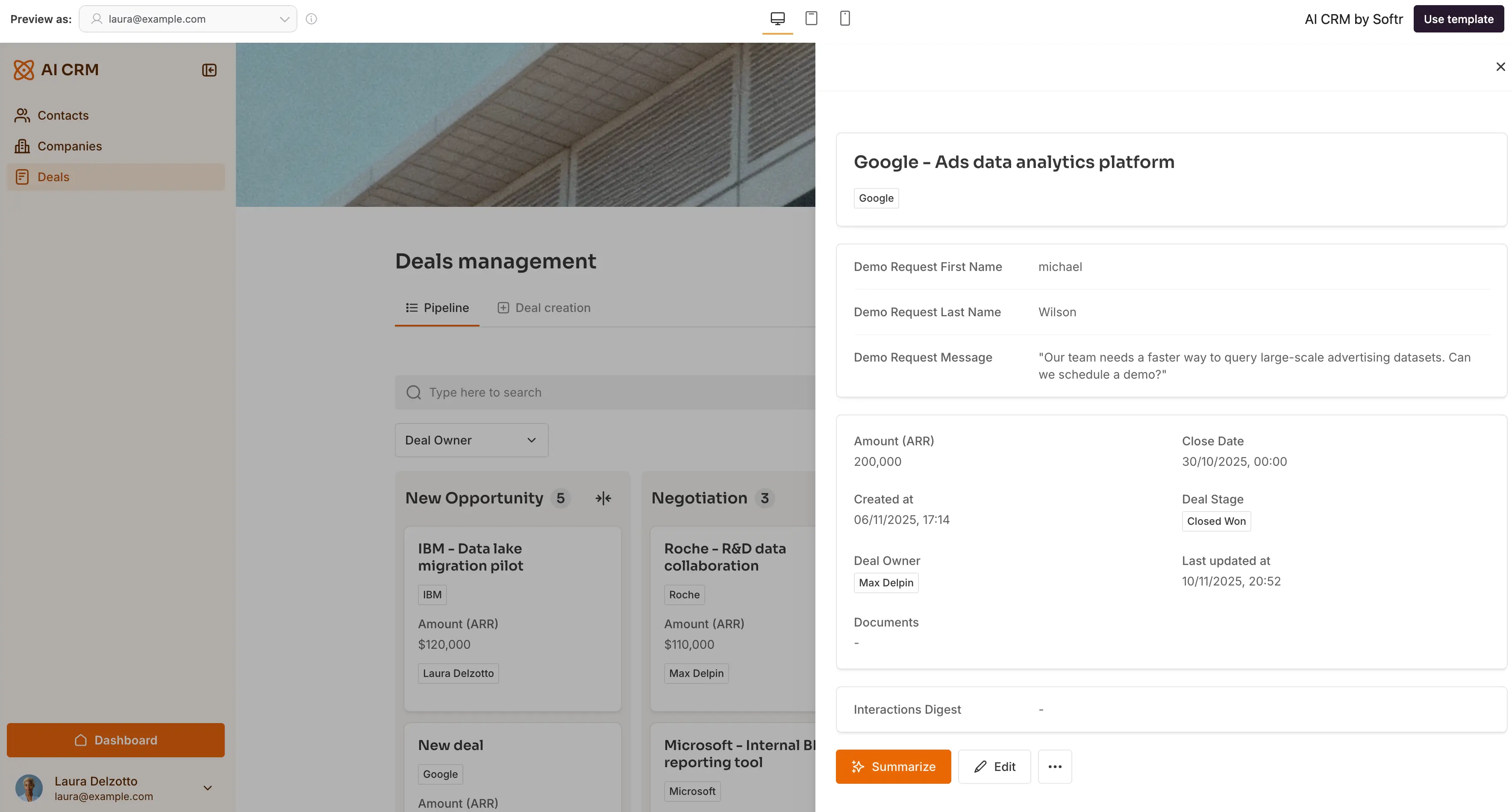
Softr gives you the reliability most vibe-coding tools skip: a secure place to manage data, clear roles and permissions, native workflows, and an interface your team and clients can actually use. With that, it combines the reliability of no-code with the speed and flexibility of vibe coding, so you can build fast without sacrificing structure or control.
Here’s what you get with Softr:
- All-in-one, production-ready app building: With secure authentication, granular, server-side permissions, and native databases, every Softr app is deployable and ready for daily business use. You can safely move from prototype to production without rewriting or migrating anything.
- Native data flexibility: Use built-in Softr Databases or connect to your data from 21+ data sources like Airtable, Google Sheets, Notion, or SQL databases for clean, dependable structure. Softr Databases give you relational data control with formulas, filters, and linked records, so your data remains structured as it grows.
- Clear roles and permissions: Control who can view or update records so clients, partners, and internal teams only see what they should.
- Highly customizable interface: With Softr, you can pick from 90 + customizable free templates for portals, CRMs, intranets, project trackers, and more. Softr's templates come pre-built with database structure and sample data, helping you launch faster and stay on brand. And when you need something beyond the standard blocks, the Vibe Coding block lets you generate fully custom UI components from plain-language prompts—giving you limitless design flexibility without sacrificing the stability of your app's underlying structure.
- AI Workflows you can trust: With AI-powered steps inside your Softr workflows, you can generate summaries, write updates, or send reports with the same global data restrictions and role-based permissions you already use for your app.
- AI App Co-builder: With this co-builder sitting inside your Softr platform, you can ask the AI to help you while you're building: create a page, add a form, tweak a layout, or update an existing flow. You can already ask it to generate a workflow that you can customize. This gives you the vibe coding experience without leaving the platform.
- Build with your own assistant: Connect Claude, ChatGPT, or Cursor to the Softr MCP to create databases, write Vibe Coding blocks, and manage apps directly from your favorite chat interface.
- AI built into your operations: Use Database AI Agents to enrich data, clean records, summarize information, and Ask AI to surface insights right inside your app, respecting your visibility and permissions rules.
[.blog-callout]
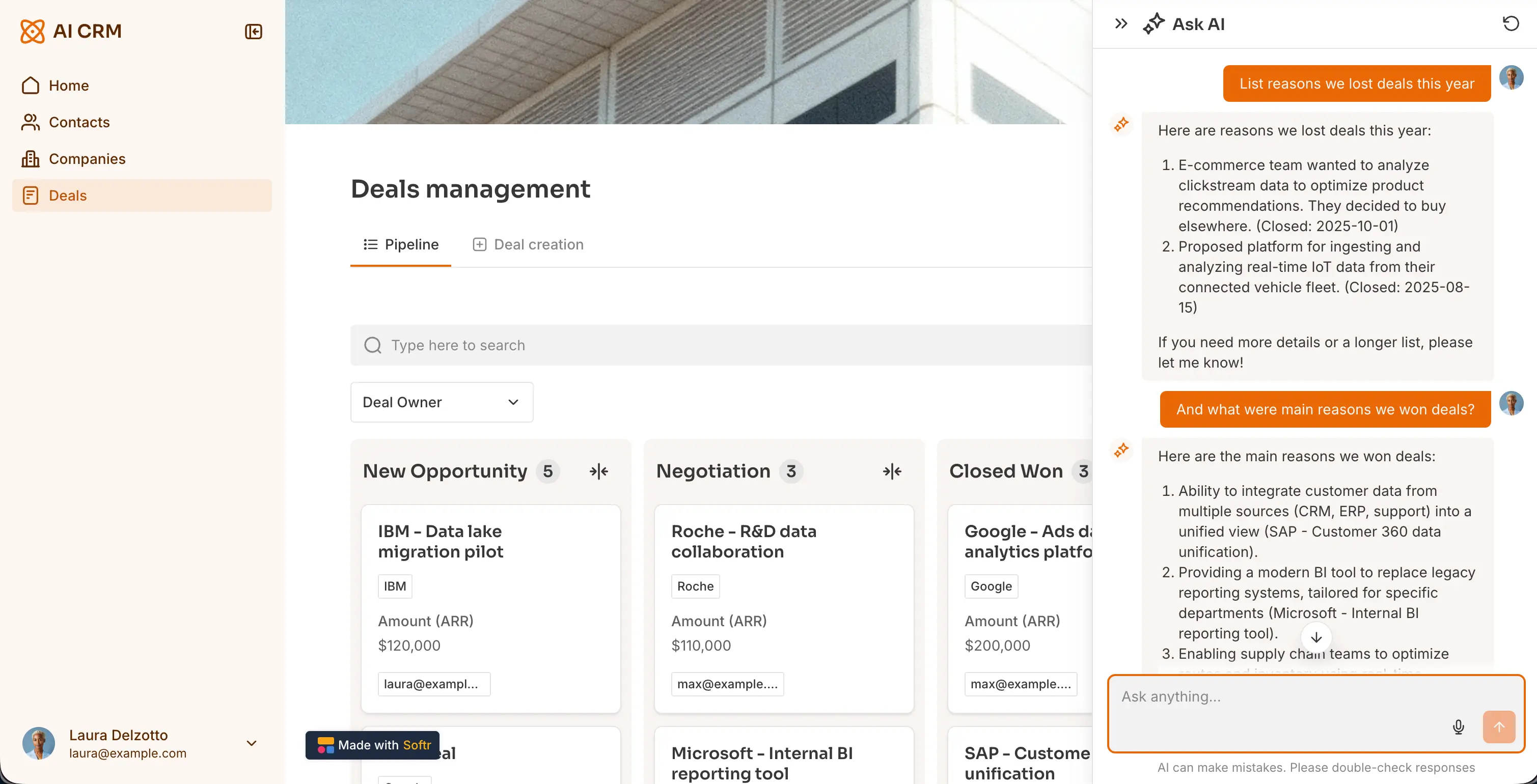
A quick example:Teams use Ask AI inside a CRM app to skip manual filtering and get instant, conversational insights from their pipeline.
Instead of digging through records, they can ask questions like “Which deals are most likely to close next quarter?” or “Why did we lose deals this year?” and get clear, actionable answers on the spot.
It’s a simple way to turn your existing data into guidance your team can use every day.
[.blog-callout]
Softr pricing
Softr offers flexible pricing plans, so you can build apps at any tier:
- Free: Unlimited apps, with access to Softr Workflows and Softr Databases, 5 app users total (includes 5,000 Softr Database records, 500 workflow actions and 5 AI credits)
- Basic plan at $19/month: Unlimited apps with 42+ integrations, Team: 5 + Client: 5 app users (when billed annually, includes 50,000 database records, 2,500 workflow actions and 10 AI credits)
- Pro: Starts at $99/month: Unlimited apps with 45+ integrations and custom code, Team: 10 + Client: 50 app users (when billed annually, includes 500,000 Softr Database records, 10,000 workflow actions and 50 AI credits)
- Business: Starting at $329/month: Unlimited apps with 52+ integrations, Team: 30 + Client: 100 app users (when billed annually, includes 1M Softr Database records, 25,000 workflow actions and 100 AI credits)
- Enterprise plans for enterprise customers.
Knowing how to vibe code fast is a fast way to bring ideas to life, but the real value shows up when those ideas become tools your team can rely on every day.
If you’ve hit the limits of your vibe-coded prototype, Softr gives you everything you need to turn it into a real business app without starting over.
Frequently asked questions
How do I start with vibe coding?
Can you vibe code for free?
What is vibe coding?
How to vibe code safely?


