
AI mobile app builders are good at getting you to a first version fast. The catch comes after that: performance, debugging, custom logic, and scaling are still real work. This matters if you’re building an app business users will rely on, not just testing an idea.
Below, we’ll look at seven AI mobile app builders through that lens: what you can ship with each one, where users tend to hit limits, and which use cases you can actually tackle.
Best AI mobile app builders at a glance
| Tool | Best for | Standout features | Pricing |
|---|---|---|---|
| Softr | Real business apps users can access on mobile | • AI Co-Builder • Installable PWA • Role-based permissions for clients, vendors, partners, and teams • Native workflows • SOC 2, GDPR, authentication, and server-side permissions | Free forever plan Basic: $19/month |
| Replit | AI-assisted full-stack prototypes with mobile app potential | • AI Agent for generating and editing code • Built-in database for full-stack apps • Browser-based workspace | Starter: Free Replit Core: $18/month |
| Bubble | Web-first apps that need complex logic and a mobile version | • Visual workflow builder • Native mobile editor • API connector for external tools and data | Free plan available Starter: $59/month |
| Glide | Spreadsheet-based field and operations apps | • Apps built from spreadsheets and business data • Forms and record updates for mobile users • Workflows for approvals and notifications | Free plan available Business: $199/month |
| Adalo | Simple native mobile apps built by non-technical teams | • Ada AI Assistant for app generation • Drag-and-drop mobile screen builder • App Store and Google Play publishing | Free plan available Starter: $36/month |
| Zoho Creator | AI-assisted field operations apps | • Form-based app building • Workflow automation for approvals and updates • Mobile access for field teams | Free 15-day trial Standard: $8/user/month |
| FlutterFlow | Mobile apps that need custom UI, backend logic, and app-store deployment | • Visual Flutter app builder • Custom code and widgets • Firebase, Supabase, and API integrations | Free for up to 2 projects Basic: $31.20/month |
What is an AI mobile app builder?
An AI mobile app builder is a platform that helps you create mobile apps using AI prompts, visual editing, and prebuilt components instead of coding everything from scratch. Some tools focus on native iOS and Android apps, while others are better for mobile-friendly web apps, internal tools, or PWAs.
The main value is speed, as AI can help you generate the first version of an app rapidly. But the quality of the builder depends on what happens after that: how well it handles multiple user groups, app logic, data, permissions, publishing, and long-term maintenance.
What to look for in AI mobile app builders
Here are the criteria I considered while testing the mobile app builders on this list:
- Mobile publishing options: Check whether the tool supports native iOS and Android publishing, PWAs, or both.
- Control after the AI-generated first draft: AI can speed up the initial build, but you still need to edit screens, user flows, data, logic, and permissions. A good builder should let you refine the app without forcing you to rebuild manually (or re-prompt endlessly).
- Data and backend flexibility: Look at how the tool handles databases, APIs, user accounts, file storage, and external data sources. For most use cases, the backend matters just as much as the interface.
- Performance with larger apps: Many builders work well for prototypes but slow down with more records, users, pages, or complex logic. Check user reviews for complaints about loading times and app stability before committing.
- Customization depth: Drag-and-drop tools are useful until your app needs a custom layout, or behavior. For these kinds of edge cases, you’ll want a tool that includes native vibe coding.
- Scalability and pricing: Don’t only compare starting prices. Check what happens as you add users, records, workflows, app publishing, storage, or advanced features. AI tokens can also rack up costs.
- Support and community: When a live app breaks or gets rejected by an app store, support quality matters. Look for active communities, clear documentation, responsive support, and enough public troubleshooting content to avoid getting stuck.
1. Softr — best AI app builder for real business apps users can access on mobile

Softr is an AI business app builder for teams that need custom mobile apps they can launch, manage, and scale over time without writing code. You can build SOC 2 and GDPR-compliant client portals, vendor portals, internal tools, CRMs, project trackers, and other systems without hiring a developer.
Softr lets you build a web-based, fully functional business app and turn it into a Progressive Web App (PWA) that users can install on iOS and Android devices. Anything you build for the web works seamlessly on mobile.
Just describe the software you need to the AI Co-Builder in plain language, and it’ll create a working app with a native database, interface, utility pages (e.g., login, account settings, password reset), and user groups already in place. You can also create your business app directly from your favorite AI assistant using the Softr MCP.
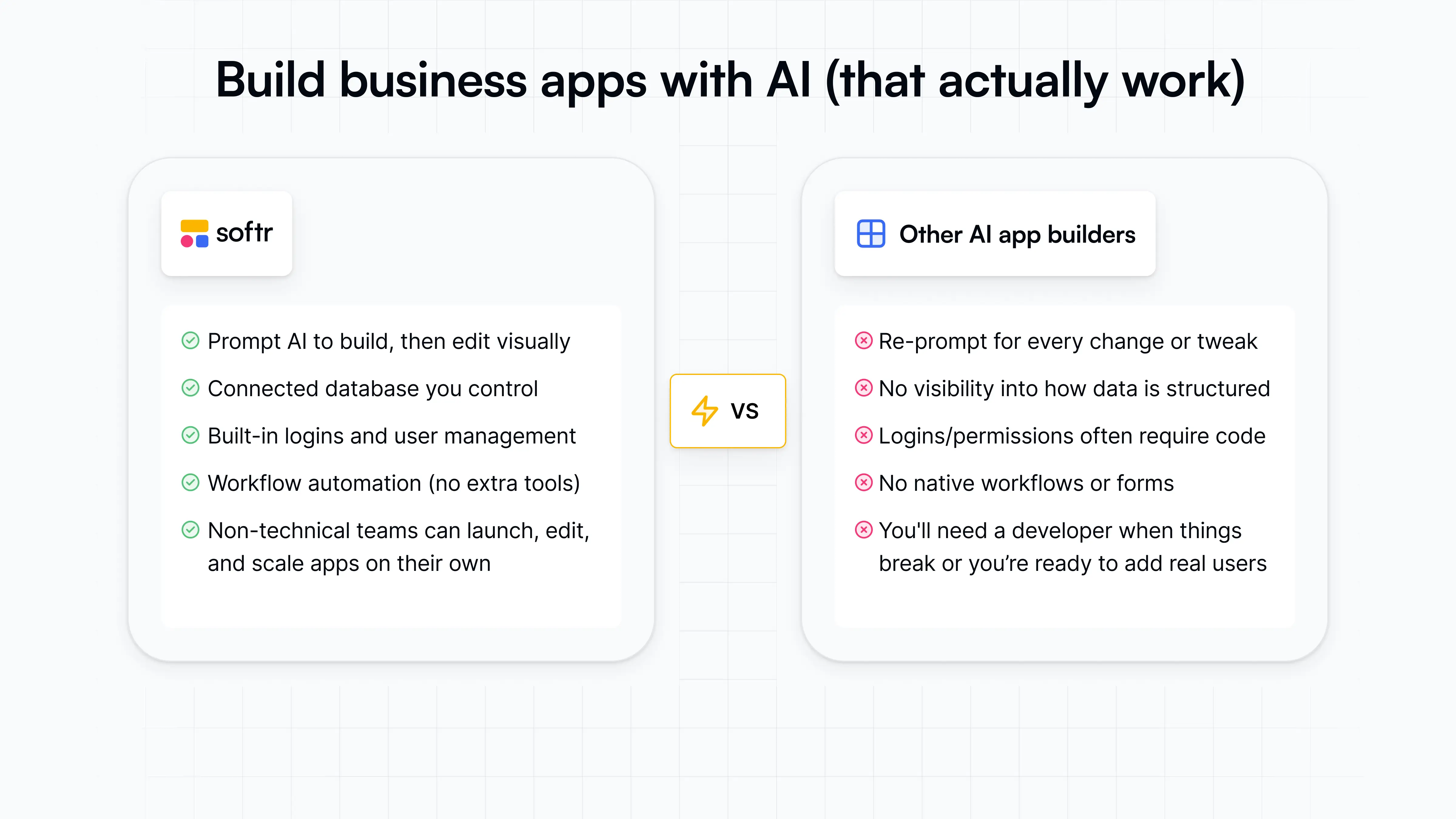
Unlike AI mobile app builders that start and end with UI, Softr provides an operational foundation behind the mobile experience. You can structure the data, manage who can log in, set up user groups and permissions, and control what different users can see or do.
When you turn a Softr app into a PWA for mobile devices, you configure the app name, icon, and install prompt, so users can open it from their device’s home screen instead of using their web browser.
Softr pros and cons
Pros:
- Strong backend control: Softr is useful for apps that need custom workflows, user roles and granular permissions, database relationships, and multi-step logic.
- Security and access control: Softr is enterprise-ready with built-in GDPR and SOC-2 compliance to protect customer data and keep you audit-ready.
- Business-ready and full-stack from the start: Softr AI generates apps with the relational database, user logic, and core page structure connected by default.
- Built for non-technical teams: Operators can describe what they need, then edit layouts, data, permissions, and workflows visually without wasting AI credits or waiting on developers.
- Flexible data setup: Teams can use Softr Databases as the backend for their business data or connect to existing tools like Airtable, Google Sheets, Notion, HubSpot, ClickUp, monday.com, SQL databases, and more.
- Predictable pricing model: Softr’s plans include user, database, workflow, and AI allowances, making it easier to predict costs than tools that rely on open-ended usage or token-based pricing.
- Good balance of AI and visual control: You can use AI to generate or adjust parts of the app, then make precise changes in the visual editor without re-prompting for minor tweaks.
Cons:
- It’s not suited for consumer mobile apps that need offline-first access or native device features since mobile publishing is not supported. Softr builds are PWAs (progressive web apps) and cannot be published to the iOS App Store or Google Play.
Softr best features
- AI Co-Builder: Softr’s AI Co-Builder turns a plain-language prompt into a working business app with the app structure, database, and logic connected, secure, and ready for users.
- Installable PWA experience: Softr apps can be turned into Progressive Web Apps, so users can add them to their device home screen and open them like an app. You can customize the app name, icon, splash-screen background, and install prompt.
- Role-based permissions: Custom user groups and granular access controls help teams share apps with clients, vendors, partners, or employees while keeping sensitive data protected.
- Native workflow automation: Softr Workflows lets teams automate tasks like approvals, notifications, assignments, updates, and follow-ups directly inside the platform.
- API & Webhook connectors: Connect your apps to any external data source or financial, marketing, or sales tool via REST API, and use Webhooks to trigger additional actions or receive events in real time.
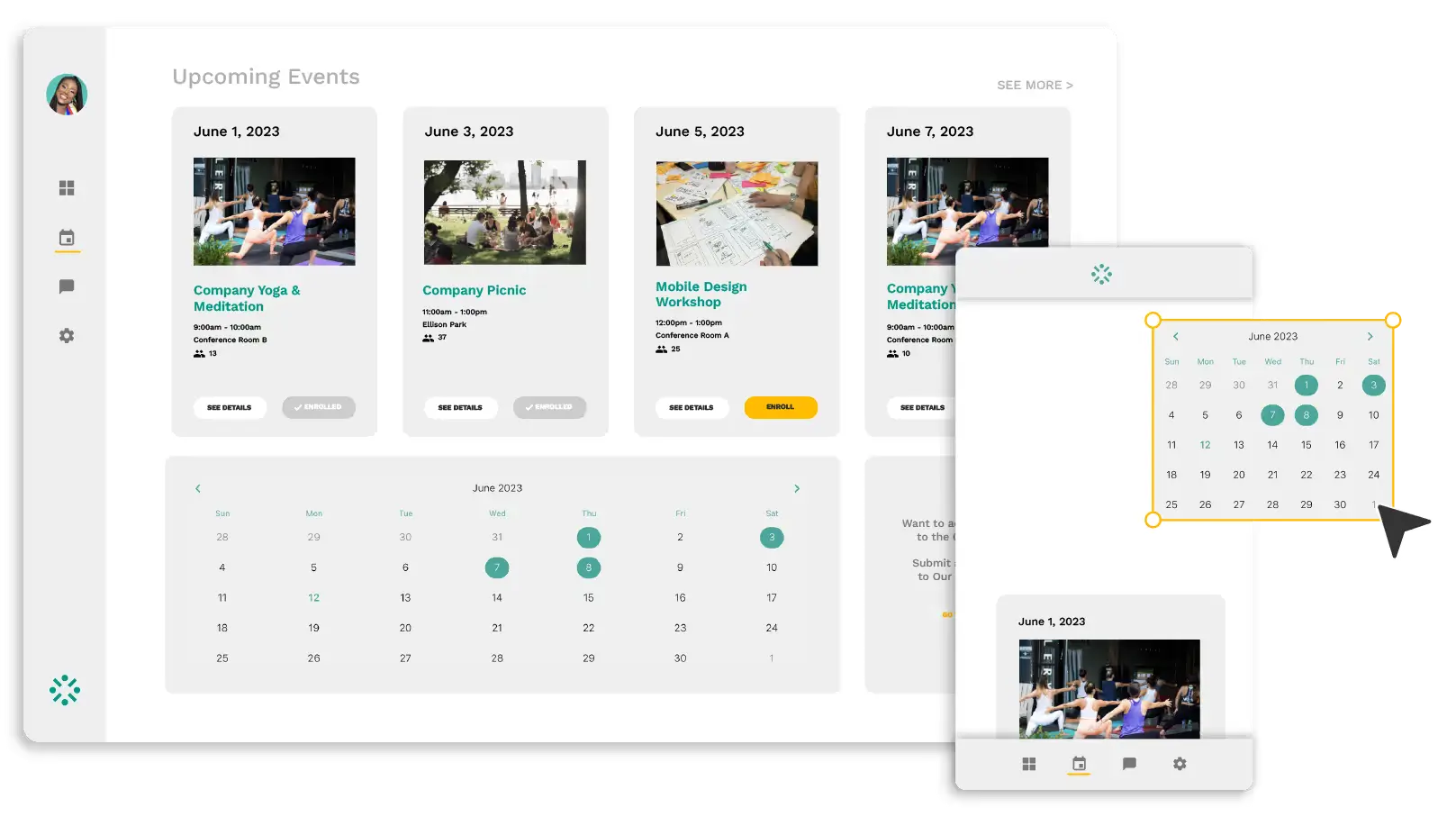
- Vibe Coding Block: Generate custom UI elements and tools for your app by prompting AI, like this drag-and-drop calendar.
.webp)
Softr pricing
Softr offers flat, predictable pricing plans.
- Free: Unlimited apps, with access to Softr Workflows and Softr Databases, 5 app users, 5 AI credits, 5,000 database records, and 500 workflow actions
- Basic: $19/month for unlimited apps with 42+ integrations, Team: 5 + Client: 5 app users, 10 AI credits, 50K records, 2.5K workflow actions
- Pro: $99/month for unlimited apps with 45+ integrations and custom code, Team: 10 + Client: 50 app users, 50 AI credits, 500K records, and 10K workflow actions
- Business: $329/month for unlimited apps with 52+ integrations, Team: 30 + Client: 100 app users, 100 AI credits, 1M records, and 25K workflow actions
- Enterprise: custom pricing, contact sales
Every plan includes a monthly AI credit allowance, so you can try the AI Co-Builder and Vibe Coding block at no cost.
2. Replit — best for AI-assisted full-stack prototypes with mobile app potential

Replit is best for builders who want to design mobile screens and turn prompts into working software. It’s closer to an AI coding workspace than a visual mobile app builder: you can generate the app, edit the code, connect a database, test, deploy, and keep iterating in one browser-based environment. That makes it useful for full-stack prototypes, AI tools, dashboards, and mobile-adjacent products that need backend logic.
But for polished native mobile apps with strict app store workflows and visual UI control, tools like Softr, Adalo, or Bubble Mobile offer more purpose-built solutions.
Replit pros and cons
Pros:
- Full-stack app creation: Replit can help generate the frontend, backend, database setup, and deployment flow from the same workspace.
- Real code access: Users can inspect and edit the generated code instead of being locked into a purely visual builder.
- Useful for custom logic: It fits apps that need APIs, AI features, authentication, or backend workflows beyond simple screen-to-database flows.
- Fast setup for prototypes: The browser-based IDE removes much of the local setup work, so users can start building and testing quickly.
- Submit apps to the app store: Replit walks users through the app store submission process (though acceptance can’t be guaranteed).
Cons:
- Credit usage can become unpredictable, especially when the Agent needs several rounds to debug, revise, or fix its own output.
- The AI Agent still needs close supervision because follow-up edits can introduce bugs, misunderstand context, or make risky changes.
- It’s not the strongest fit for polished native mobile apps, since its workflow is less visual and mobile-specific than dedicated mobile app builders.
Replit best features
- Replit Agent: The Agent can generate, modify, debug, and explain app code based on prompts, making it useful for moving from idea to working prototype.
- Built-in database: Replit includes database support for full-stack apps, so users can create projects that store and manage real data.
- Parallel agents: Paid plans let users run multiple agents at once, which helps when testing or developing different parts of a project.
- Database rollbacks: Replit Pro includes database rollbacks for up to 28 days, which gives teams more recovery room when manipulating data.
Replit pricing
Listed prices are billed annually.
- Starter: Free
- Replit Core: $18/month
- Replit Pro: $90/month
- Enterprise: Custom pricing
3. Bubble — best for web-first apps that need complex logic and a mobile version

Bubble is best suited for teams building web-first products where the backend logic matters more than native mobile polish. It works well for SaaS-style apps, marketplaces, booking tools, and community platforms that need user accounts, database relationships, workflows, payments, dashboards, and admin views. Compared to mobile-first builders like FlutterFlow or Adalo, Bubble gives you more room to shape how the app works behind the scenes.
The downside here is that it takes longer to learn. Workload-based pricing can also be tough to predict, and its native mobile builder is still relatively new, with users reporting rough edges around media uploads, deep linking, and app stability.
Bubble pros and cons
Pros:
- Strong backend control: Bubble is useful for apps that need custom workflows, user roles, database relationships, and multi-step logic.
- Good fit for web-first products: Teams can build a full web app first, then create a mobile version without moving to a separate platform.
- Works for marketplace and SaaS logic: Bubble can handle profiles, listings, bookings, payments, dashboards, and admin workflows in one app.
- Editable after AI generation: Bubble’s AI can create a starting structure, but builders can still adjust the database, workflows, and interface manually.
Cons:
- Bubble has a real learning curve once an app moves beyond a simple prototype, especially around workflows, privacy rules, data structure, and performance optimization.
- Workload-based pricing can be hard to predict because costs depend on how the app is built and how much logic, searching, and backend processing it uses.
- Native mobile is still less mature than mobile-first builders, with users reporting issues around media uploads, deep linking, file uploads, and general stability.
Bubble best features
- Visual workflow builder: Teams can define user actions, backend processes, approvals, notifications, and conditional logic without writing code.
- Native mobile editor: Bubble includes tools for building mobile apps, testing on-device, debugging mobile flows, managing app versions, and submitting builds.
- API connector: Builders can connect Bubble apps to external tools, services, and data sources when the app needs to work beyond Bubble’s database.
- Version control and collaboration: Higher plans include version control, app editors, custom branches, and server logs for teams working on more complex apps.
Bubble pricing
Listed prices are for Web & Mobile plans, billed annually.
- Free plan available
- Starter: $59/month
- Growth: $209/month
- Team: $549/month
- Enterprise: Custom pricing
4. Glide — best for spreadsheet-based field and operations apps

Glide is a good fit for teams that already run parts of their business in spreadsheets (or structured data tools) and need a more efficient way for people to access that data from a phone or browser. It’s most practical for building field service apps, inventory trackers, work order systems, lightweight CRMs, vendor directories, internal dashboards, and team portals.
Glide works well when your desired app is mostly about viewing, updating, and routing records. It’s less suited for teams building a native mobile product, customer-facing apps, or software they’ll eventually want to own as code.
Glide pros and cons
Pros:
- Fast setup from existing data: Glide works well when teams need to turn spreadsheets or operational databases into usable apps without rebuilding their processes from scratch.
- Useful for mobile fieldwork: Teams can give technicians, sales reps, warehouse staff, or on-site employees a simple way to check records, submit updates, and complete forms from their phones.
- Low technical barrier: Operations teams can build and maintain apps without relying on developers for every layout, form, or workflow change.
- Strong for record-based workflows: Glide is a practical choice for apps built around jobs, assets, customers, vendors, inventory items, requests, or tasks.
Cons:
- Glide apps are PWAs, so they’re not a direct fit for teams that need native App Store or Google Play publishing.
- Customization can feel limited when the app needs a specific interface, branded customer experience, or advanced product-style behavior.
- Pricing can become harder to manage as teams add more users, updates, workflows, and integrations.
Glide best features
- Connected data sources: Glide lets teams build apps on top of existing business data from tools like spreadsheets, Airtable, Excel, SQL sources, or Glide’s own data layer.
- Forms and record updates: Users can submit requests, update job details, change statuses, add notes, and keep operational records current from one interface.
- Workflows: Teams can automate steps like approvals, notifications, record changes, and follow-ups without manually moving data between tools.
- AI actions: Glide can help extract, summarize, classify, or convert information from text, documents, images, and app data.
Glide pricing
Listed prices are for Glide Classic, billed annually. GlideOS, Glide’s newer AI platform, is a separate subscription from $25/month.
- Free plan available
- Business: Starts at $199/month
- Enterprise: Custom pricing
5. Adalo — best for simple native mobile apps built by non-technical teams
Adalo is a no-code builder for creating native iOS, Android, and web apps from a drag-and-drop canvas. Users can design screens, set up app data, add user flows, preview the app on mobile, and publish it to app stores without writing code. Its AI assistant helps generate a first version from a prompt, but the platform is still mainly built around visual editing.
Adalo can be a solid builder for creating simple booking apps, directories, lightweight marketplaces, service apps, and MVPs where speed, mobile publishing, and hands-on design control matter most.
Adalo pros and cons
Pros:
- Low learning curve: Adalo is approachable for users who want to build and edit mobile apps visually instead of working with code.
- Native mobile app focus: It’s built for teams that need iOS and Android apps, not just web apps wrapped in a mobile-friendly interface.
- Predictable pricing model: Paid plans include unlimited app actions and no usage- or token-based charges, which makes costs easier to understand early on.
- Good fit for MVPs and simple launches: Adalo works well when the goal is to validate a mobile app idea, launch a small business app, or build a functional v1 without hiring developers.
Cons:
- Performance can slow down as apps grow, especially with large lists, image-heavy screens, frequent searches, or higher user activity.
- Native app performance can be inconsistent, with Android performance coming up as a recurring user concern.
- Adalo can feel limiting for sophisticated apps that need advanced backend logic, complex permissions, custom architecture, or long-term scaling.
Adalo best features
- Ada AI Assistant: Adalo’s AI assistant helps generate app screens, database structure, navigation, and prompt-based edits from a natural-language starting point.
- Multi-screen drag-and-drop canvas: Users can build and connect multiple mobile app screens visually, which makes it easier to map out simple user flows.
- Built-in hosted Postgres database: Adalo includes a hosted database, so early-stage builders don’t need to connect a separate backend just to store app data.
- Automated app store publishing: Paid users can publish native apps to the Apple App Store and Google Play without managing the full mobile deployment process manually.
- Custom actions and integrations: Higher-tier plans support custom integrations, API access, Xano integration, and custom app actions for teams that need more than basic app logic.
Adalo pricing
Listed prices are billed annually.
- Free plan available
- Starter: $36/month
- Professional: $52/month
- Team: $160/month
6. Zoho Creator — best for AI-assisted field operations apps
.webp)
Zoho Creator is a practical fit for teams building mobile apps around fieldwork, approvals, inspections, inventory checks, and service requests. It’s not the best choice for polished consumer apps or highly custom mobile interfaces, but it works well when your main goals are collecting data, routing tasks, updating records, and keeping mobile teams connected to back-office systems.
Its biggest advantage (and disadvantage) is how deeply it connects with the Zoho ecosystem. If you’re not planning to use it with other Zoho apps, you won’t get as much out of it.
Zoho Creator pros and cons
Pros:
- Strong fit for process-heavy operations: Zoho Creator works well for teams replacing spreadsheets, manual approvals, and disconnected forms with structured internal apps.
- Useful for mobile field teams: Mobile apps built with Zoho Creator can support practical use cases like inspections, maintenance updates, delivery logs, and on-site data collection.
- Deep Zoho ecosystem connection: Teams using Zoho CRM, Books, Inventory, or Desk can build custom workflows around the tools they already rely on.
- Flexible business logic: Deluge scripting gives teams more control over approvals, calculations, record updates, and workflow behavior.
Cons:
- Limited frontend customization can make apps feel less modern or polished than tools built for client-facing portals or branded interfaces.
- Advanced workflows often require Deluge, which adds a learning curve and can make teams dependent on Zoho-specific expertise.
- Performance, debugging, and maintenance can become harder with larger datasets, complex workflows, or heavily customized apps.
Zoho Creator best features
- Form-based app building: Teams can create structured forms for requests, inspections, registrations, approvals, and operational data capture.
- Workflow automation: Zoho Creator can trigger approvals, alerts, status changes, assignments, and record updates based on business rules.
- Custom reports and dashboards: Users can turn app data into operational views for tracking inventory, requests, field activity, orders, or team performance.
- Role-based access controls: Teams can control who sees, edits, approves, or manages specific records and app sections.
- Mobile app access: Zoho Creator apps can be used on mobile devices, which makes it useful for field teams and on-site operations.
Zoho Creator pricing
Listed prices reflect annual billing.
- Free trial for 15 days
- Standard: $8/user/month
- Professional: $20/user/month
- Enterprise: $25/user/month
- Flex: Custom pricing
7. FlutterFlow — best for mobile apps that need custom UI, backend logic, and app-store deployment

FlutterFlow is great for building mobile-first apps where the screen design, user flow, and native app experience matter. Its AI tools can generate UI components from prompts or images, create full pages from prompts, import components from Figma, and help teams add AI agents or connect to AI models through APIs.
The tradeoff is that FlutterFlow works best when someone on the team understands app structure, data logic, and debugging. It’s not the smoothest choice for quick internal tools, simple spreadsheet-based apps, or fully non-technical teams that expect AI to handle the whole build.
FlutterFlow pros and cons
Pros:
- Strong native mobile app control: FlutterFlow gives teams more control over screens, widgets, layouts, and mobile app behavior than simpler no-code builders.
- Good fit for backend-connected apps: It supports Firebase, Supabase, APIs, authentication, payments, and other integrations needed for real product logic.
- Useful code export path: Teams can export Flutter code when they need developer handoff, custom development, or more long-term ownership.
- AI features support real app-building workflows: FlutterFlow’s AI tools can help generate UI, components, pages, and in-app AI experiences without fully replacing the builder workflow.
Cons:
- Performance can slow down in larger projects with many screens, actions, components, or API calls.
- FlutterFlow has a steeper learning curve than many no-code buyers expect, especially around backend logic, APIs, and custom code.
- Support and debugging can feel inconsistent when issues involve generated code, deployment, or platform-specific behavior.
FlutterFlow best features
- Visual Flutter app builder: Teams can design mobile, web, and desktop apps visually using Flutter-based components instead of starting from code.
- Custom code and widgets: Developers can extend apps with custom actions, widgets, and Dart code when the visual builder is not enough.
- Firebase, Supabase, and API integrations: FlutterFlow can connect apps to common backend systems for user accounts, data storage, authentication, and dynamic app behavior.
- App-store deployment support: Builders can prepare and publish apps for iOS and Android without managing the full native development workflow manually.
- Branching and collaboration tools: Higher-tier plans support GitHub integration, real-time collaboration, branches, localization, and automated testing for more structured app development.
FlutterFlow pricing
Prices shown reflect annual billing.
- Free plan available for up to 2 projects
- Basic: $31.20/month
- Growth: First seat $64/month, second seat $44/month
- Business: First seat $120/month, seats 2–5 $68 each/month
Find an AI mobile app builder that fits your needs
AI mobile app builders are useful when they help you move faster without hiding the parts that make an app work in real life: data, logic, permissions, performance, publishing, and maintenance.
The right choice depends on what you’re building. FlutterFlow and Adalo are worth considering when native iOS and Android publishing is a priority. Replit is better for AI-assisted coding and full-stack prototypes. Bubble can generate web-first apps with some degree of logic. Glide and Zoho Creator work well for field operations and record-based workflows.
Softr stands out when the goal isn’t a consumer app-store product but a business app people can actually use from their phones: a client portal, vendor portal, field service app, CRM, dashboard, or internal tool. You get both an AI-generated interface and the operational infrastructure behind it: a built-in database, user groups, permissions, workflows, authentication, and the option to turn the app into an installable PWA as the cherry on top.
If you need a secure, mobile-friendly business app your team can build, manage, and improve without developers, Softr is the best overall pick. You can try Softr’s AI Co-Builder or browse 100+ templates for portals, CRMs, project trackers, and field operations apps with built-in data structure and layouts to see what fits your use case.
Frequently asked questions
Is there an AI that can build mobile apps?
Do AI app builders actually work?