


.svg)










Hours of manual work.
Done in seconds with AI.
Auto-fill and update fields in real time.
Set up AI agents to generate and update automatically. Just select a field, write a prompt, and the agent updates records in real time or on your schedule.
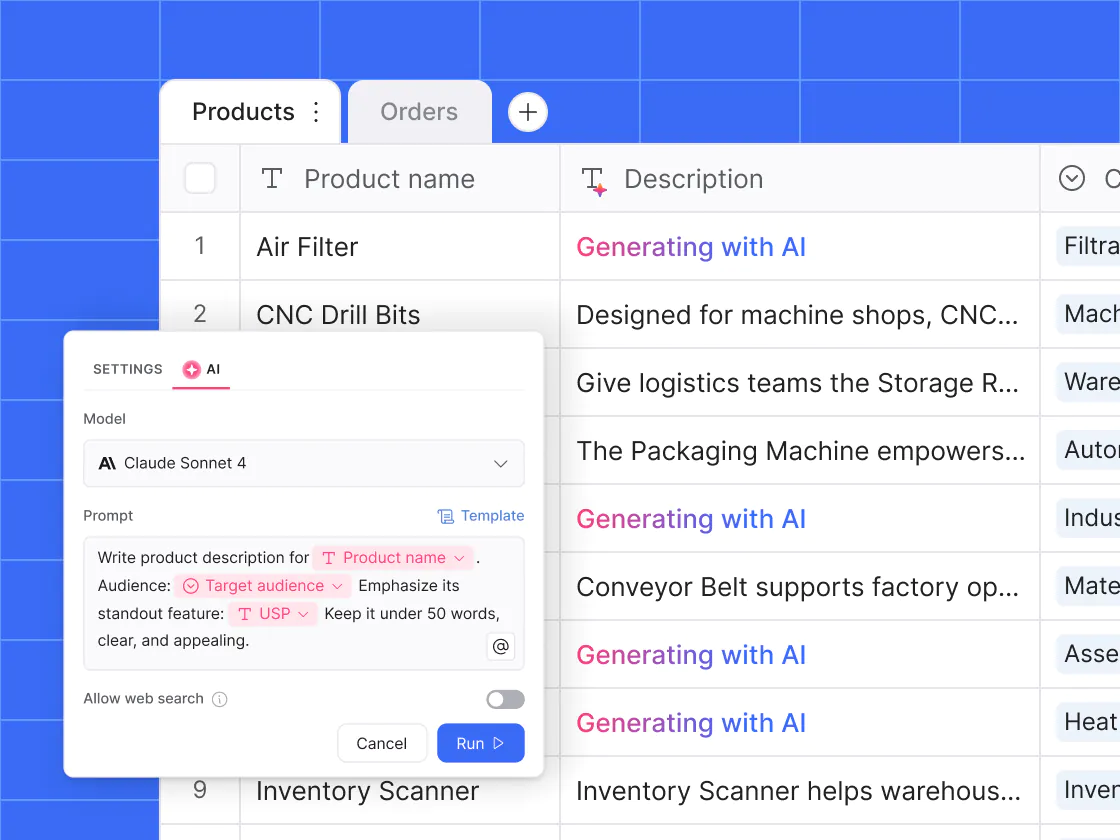
Create and classify
Replace hours of manual writing and organizing. Let an agent auto-generate content like summaries or product copy, and tag by topic, priority, and more.
Extract and enrich
Pull details like dates or contact info from contracts, invoices, and other files, and auto-fill missing fields. No more copy-pasting orscrolling through PDFs.
Format and clean
Clean and standardize messy data, like customer names or shipping addresses. Keep records consistent without writing complex formulas for every edge case.
Fine-tune exactly when and how your agents work.
Add an AI agent to nearly any table field, and customize when and how it runs to save money on AI credits and avoid unnecessary updates.

Pick the best model for the job
Choose the model (GPT 5.2, Gemini 3, Claude Sonnet, and more) that best fits the task. Get the right mix of speed and cost with clear visibility into cost per run.
Give instructions in plain English
Give agents access to linked tables and related fields so they can pull the right context and produce more accurate outputs without duplicating data.
Control exactly when agents run
Trigger agents when a record is created or when certain fields are updated. Set conditions like status changes or required field values to control when agents run.
Let an agent do the research and fact-checking for you.
Stop wasting time on manual research or Google searches. Let an AI agent search the public web in real time for the latest stats, numbers, and research.
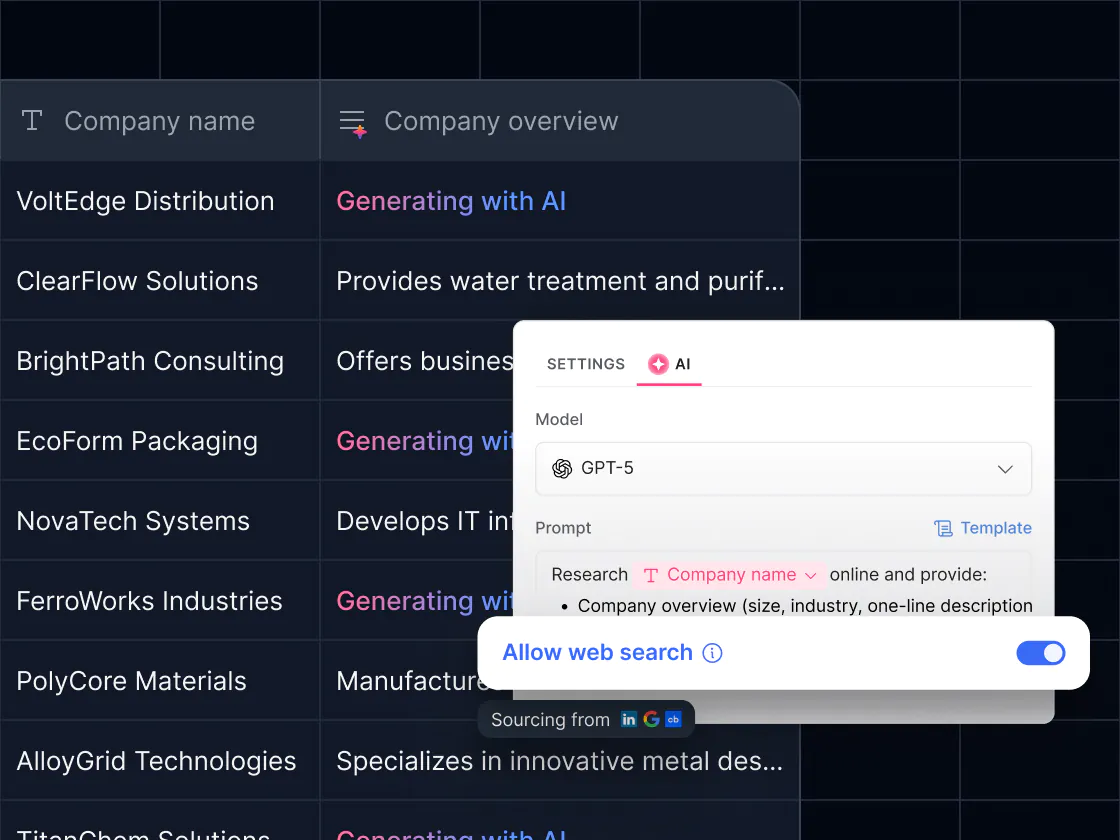
Research what you need in seconds
Skip the tab-hopping and copy-pasting and let an agent instantly pull the latest stats, competitor info, or market research straight into your database fields.
Enrich client and vendor records
Go beyond what’s in your CRM. Agents can fetch the latest company details (like size, industry, or recent news) from the websites you specify.
Fact-check at scale
From verifying numbers or confirming client details, agents ensure your data stays accurate—without hours of manual research.

Start with a ready made agent for any task
Need ideas on all the ways you can automate yourself out of your database and focus on more critical tasks? Explore a library of ready-made agents.

Product Description Agent
Auto-generates product descriptions for your catalog, while keeping messaging on brand.
.svg)
Meeting Summary Agent
Condenses long meeting notes or transcripts into actionable summaries that are easy to share and reference.

Enrichment Agent
Scans invoices to verify totals, dates, and line items, and flags possible billing errors or inconsistencies.

Email Follow-Up Agent
Drafts quick email follow-ups or creates task lists from notes and conversations.

Invoice Verification Agent
Scans invoices to confirm totals, dates, and line items, while flagging possible billing errors.

Customer Feedback Agent
Sorts feedback into categories, spots sentiment trends, and suggests product improvements.
Contract Review Agent
Pulls out key details like dates and clauses, making contracts faster to review.

Translation Agent
Translates content into your target language, tailored to the level of detail you need.

No setup.
Just turn it on.
Just ask questions in plain language and get real-time insights from your live data. No need to set up additional views and dashboards.
Enable AI in any field, choose a model, and define the task (or use a template).
Define when the agent runs and filter for the right records.
Save your setup and let AI populate the database records.







Frequently asked questions
What are Softr Database AI Agents?
What Softr plans include AI agents?
What happens if I run out of AI credits?
Do I need to write my own prompts?
Can I control when and how an agent runs?
Can I choose which AI model powers my agent?
Can I test an agent before turning it on?
What fields can I use AI agents in?
How do I get AI to extract information from files or PDFs?
How do I run web search?
Build your first AI agent in minutes
Just toggle it on in a database field, customize, and run.