AI app builder pricing compared: What you'll actually pay as your app grows


Let's say you build a client portal on an AI app builder over a weekend. It costs less to launch than your team’s monthly coffee budget, and it actually works. A few months later, your user count triples. Great problem to have, right? Then your next invoice shows up, and it’s not even close to the number you signed up for.
That's the thing about app builder pricing: the number on the pricing page is what you pay today. What you pay six months from now depends on how each platform decides to charge as you grow—usually by user, by usage, by app, or some combination of all three.
Here, I'll explain what makes app pricing predictable, break down how five popular AI app builders charge as your app grows, and then walk through three realistic scenarios so you can see roughly what you'd pay at each stage.
What is pricing predictability?
Pricing predictability is how accurately you can forecast what an app will cost, both up front and over time. If an app’s pricing is predictable, you can map your growth plans to its pricing page and land close to your actual bill. If it’s unpredictable, you don’t find out what you owe until the invoice shows up.
One thing predictable pricing isn't: the same as cheap. A per-seat plan can be completely predictable and still expensive at scale, while a usage-based plan can be cheap for months and then surprise you.
To see how that plays out in practice, I priced out five AI app builders as an app grows from 100 to 10,000 users. But first, I had to narrow down the field.
How I compared AI app builder pricing
The term “AI app builder" covers a lot of ground. Some tools generate code you host yourself, while others are built for developers who'd rather not write boilerplate. Comparing all of them on price is a bit like comparing a bike to a car lease—technically both get you to work, but the math isn't the same. So I focused on platforms that have three things in common:
- Same buyer. They're built for people who don't write code, like ops managers, founders, and agency owners.
- Same delivery. The platform hosts your app, so the plan price is (most of) the whole bill.
- Same job. They're all used to build business apps, like internal tools, client portals, and member apps.
That gave me five apps: Softr, Glide Classic, Microsoft Power Apps, Bubble, and Adalo.
Then I priced out three scenarios at 100, 1,000, and 10,000 users, each based on a type of app people actually build.
Note: All prices are in USD, billed annually. I left out taxes and payment processing fees.
AI app builder pricing at a glance
Softr pricing explained
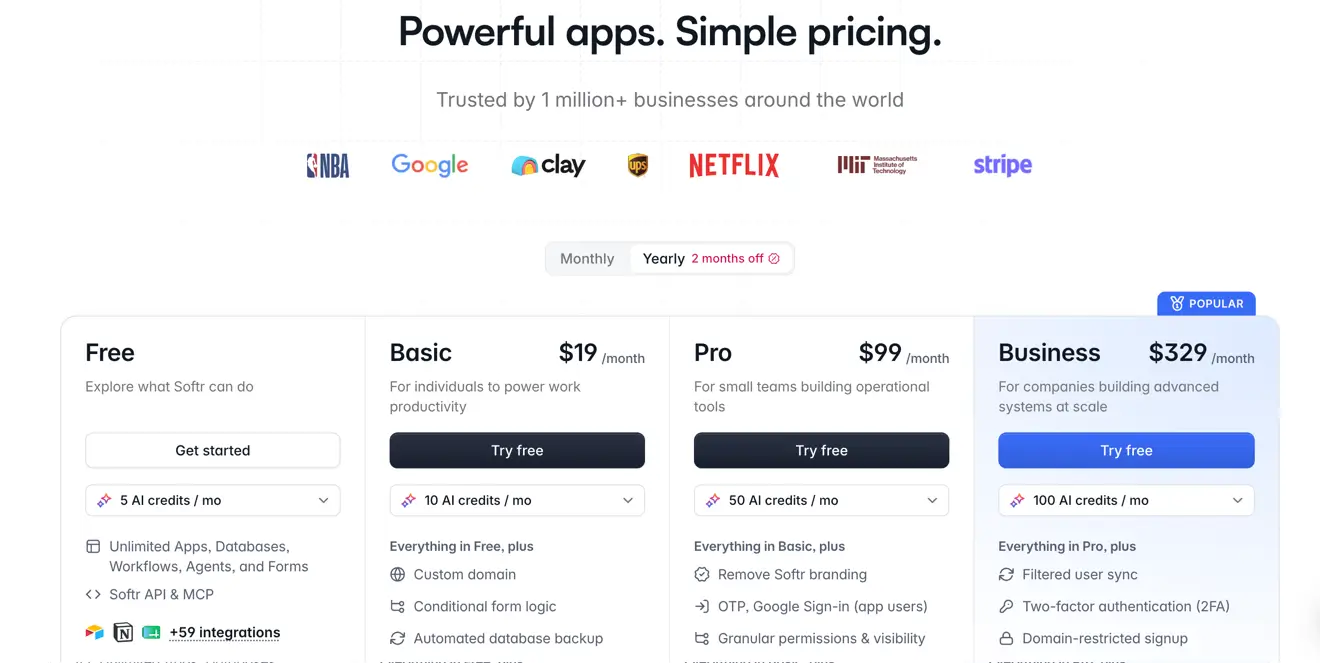
TL;DR: Softr’s pricing is highly predictable because every cost is tied to users, builders, and AI credits. Extra users are billed at a fixed rate, and AI features pause instead of charging overages when you run out of credits.
Softr is built for business apps that sit on top of your data: client portals, internal tools, CRMs, and intranets. Every plan, including free, comes with unlimited apps, so you're never paying per app. Instead, your bill depends on the number of builders (people who create and edit apps) and users (internal and external app users).
Here’s a closer look at how those pricing variables work:
- App users. Each plan includes a set number of users. If you’re on a Pro or Business plan, you can add additional users for $1-2/user without changing tiers. But if you’re on the free or Basic plan, you’ll need to upgrade to the next paid tier for more users.
- Builders. Free and paid tiers include a set number of builders, but you can add more builders only on the paid tiers ($5-20/builder, depending on your plan).
- AI credits. Every plan includes a monthly allowance of AI credits for features like Ask AI and database AI agents. If you run out, AI features pause until your credits reset or you buy more (this means no surprise overage charges).
Softr pricing: Free plan for up to 5 app users; paid plans from $19/month for the Basic plan, which includes 1 builder, 10 users, and 10 monthly AI credits.
Glide Classic pricing explained
TL;DR: Glide’s user pricing is easy to forecast, but its metered updates aren’t. If your app syncs with an external spreadsheet or uses Glide AI, busy months can cost more ($0.02/update over your allowance).
Glide offers two separate products, each with its own pricing plans and usage charges: Glide Classic (the original table-based builder) and GlideOS (new AI builder). This comparison covers Glide Classic. Two key factors shape what you’ll pay: who signs in to your app and how many updates it uses each month.
Here’s how each one affects your bill:
- Who signs in. If you’re on an individual paid plan, only users with personal or education email addresses can access your app. The lowest paid tier (from $19/month) gives you up to 100 users, but you can bump that up to unlimited with the next tier up (from $49/month). Once users with professional emails access your app, you’ll need to switch to a Business plan (from $199/month), which comes with 30 users. Each user after that adds $5/user/month.
- Updates. Glide counts an update each time your app syncs a change with an external app. Paid individual plans come with 250-500 monthly updates; the Business plan includes 5,000. Past that, every update (on any paid plan) costs $0.02. If your app runs on a spreadsheet that changes often, this is the hardest cost to estimate. Note: Changes to data stored in Glide’s own tables are free.
- AI features. Glide AI draws from the same update allowance, so running AI on a large or busy table can use it up sooner than you’d expect.
Glide pricing: Free plan for building and testing (no publishing); individual paid plans from $19/month for the Explorer plan, which includes 1 published app, 100 personal users, and 250 monthly updates. Business plan from $199/month for unlimited apps, 30 users (with the option to add more), and 5,000 monthly updates.
Microsoft Power Apps pricing explained
TL;DR: Power Apps charges per user, so your bill grows with your team (e.g., double the team, double the bill), making its pricing easy to forecast. The exception is AI, which is billed by usage. Automations that run outside your apps may need separate Power Automate licenses (from $15/user/month).
If your company already runs on Microsoft 365, Power Apps is likely on your shortlist. It's deeply connected to SharePoint, Teams, Excel, and Dataverse (Microsoft's business database), and, like most enterprise software, it’s priced per person.
What you’ll pay comes down to who’s using your app:
- Internal users are priced per seat. Power Apps Premium costs $20/user/month and covers as many apps as each person needs. At 2,000+ seats, the price drops to $12/user. (Microsoft also offers a pay-as-you-go option billed by usage, but most teams start with Premium.)
- External users require Power Pages. For an app that clients, partners, or the public will use, you’ll build it as a Power Pages site and buy user capacity in packs. Logged-in users cost $200/month for every 100 users, per site, with lower rates at higher volumes.
- AI is billed separately. AI features draw from Copilot Credits (purchased separately). If you choose pay-as-you-go coverage, usage beyond your prepaid credits is billed automatically, which makes this the hardest cost to predict.
Power Apps pricing: Free Developer plan for building and testing; paid plans from $20/user/month for Power Apps Premium, which includes unlimited apps per user. External users are priced separately through Power Pages, from $200/month per 100 users per site.
Bubble pricing explained
TL;DR: Bubble bills by how much work your app does on its servers. Overage charges kick in automatically once you pass your plan’s allowance, unless you turn them off or prepay for extra capacity.
Bubble is a full-stack builder for custom web and mobile apps, and it’s often used for customer-facing products and marketplaces. Your bill is based on two kinds of usage: workload units (WUs) and AI credits. WUs measure the server work behind running your app, like loading pages, running workflows, and calling outside APIs. AI credits cover building with Bubble’s AI tools, like the Bubble AI Agent.
Here’s a closer look at those factors:
- AI features. Each plan includes a monthly allowance of AI credits, and you can buy more on any paid plan. If you run out, you’ll build manually in the visual editor until your credits refresh (but your live app won’t be affected).
- Workload overages. If your app goes past its monthly workload allowance, Bubble automatically charges $0.30 per 1,000 extra WUs. You can lower that rate by prepaying for more capacity. Or, turn off overages so you never pay more than your plan.
- Editors and add-ons. The number of people who can build in your app is set by plan—for example, 1 on the lowest paid tier and 5 on the highest (Enterprise is customizable). The only way to add editors is to upgrade. Extra file storage and paid plugins are billed separately.
Bubble pricing: Free plan for building and testing (no live app); paid plans from $32/month (billed annually) for the web-only Starter plan, which includes 175,000 monthly workload units and a live website. Mobile and combined web and mobile plans cost more.
Adalo pricing explained
TL;DR: Adalo charges a flat monthly fee with no usage-based charges, AI fees, or per-user costs, so your bill changes only when you upgrade. The main things that push you up a tier are publishing more apps and adding more editors.
Adalo builds native mobile apps for the Apple App Store and Google Play, plus web apps, all from one project. Your bill doesn’t depend on how much traffic your apps get. Instead, it depends on a few plan limits:
- Published apps. Every paid plan lets you publish a set number of apps. If you want to launch more apps beyond your limit, you’ll need to upgrade—even if your first app barely gets any traffic.
- Editors. Only one person can build on the Free and Starter plans. If you want to bring in a designer or collaborator, you’ll need to upgrade to at least the Professional plan (from $52/month, billed annually).
- Storage limits. If you’re building a simple app, the 5GB of storage that comes with the Starter plan is probably plenty. But storage is shared across all your team’s apps, so if your app holds lots of files or records, you may have to upgrade.
Adalo pricing: Free plan for building and testing (no publishing); paid plans from $36/month (billed annually) for the Starter plan, which includes 1 published app, 1 editor, and 5 GB of storage. Publishing to the app stores also requires an Apple Developer account ($99/year) and a Google Play account ($25 one-time).
What you'd pay in three real-world scenarios
Knowing what drives each AI app builder’s bill is a good start, but it still leaves you with a lot of “it depends.” To get from hypotheticals to real numbers, here’s what each app would cost for three common types of apps.
Scenario 1: A client portal for 100 clients
Say you run a small agency or consulting firm. Two people on your team build and maintain a portal where roughly 100 clients log in each week to check project status, approve deliverables, and download files. Most clients sign in with their work email, and the portal uses a little AI to do things like summarize project updates.
Key takeaways:
- Who your clients are can matter as much as how many. Some platforms put you on a pricier plan once clients sign in with work emails, and others bill external users separately from your team.
- Built-in AI credits keep the full cost in one place. If your portal uses AI, look for a plan that includes AI credits, so you aren’t paying an outside AI provider on top of your subscription.
Scenario 2: An internal tool for 1,000 employees
This one’s an operations hub: a single app where employees submit requests, managers approve them, and the ops team tracks inventory. It’s built and maintained by two people, and all 1,000 employees use it daily with their company email addresses. AI is part of the daily routine, too: employees use it to draft requests and pull answers from the data.
*Softr moves teams of this size to its Enterprise plan, which bundles security features like SSO and advanced admin controls with your user count. Pricing is quoted based on your number of users and builders, so you’ll know your full monthly cost before you commit.
Key takeaways:
- Per-seat pricing gets steep at this size. Paying full price for every employee can push the bill into the tens of thousands each month, while plans that don’t charge per user can stay in the hundreds.
- At 1,000 employees, plan for security as well as seats. Companies this size often need enterprise-level security—like single sign-on (SSO) and admin controls. On many platforms, those come as paid add-ons on top of a usage or per-seat bill. Others, like Softr, bundle them into an enterprise plan, so security and seats are priced together in a single quote.
Scenario 3: A member app with 10,000 users
The last app is a member hub for a university alumni association. Its 10,000 members use it to search the alumni directory, register for events, and browse a library of career resources. Most sign up with personal email addresses and stop by a couple of times a month, often asking AI to find the right contact or resource. Behind the scenes, two staff members build and run the app.
**Softr’s Enterprise plan covers large external audiences like member communities. Pricing is quoted up front based on your user count, and member activity doesn’t change the bill.
Key takeaways:
- Large, casual audiences favor plans that don’t charge per user (but check the fine print). The cheapest options at this size often come with conditions, like rules about which email addresses members can sign in with, or limits on rows and storage that a growing member base could outgrow.
- Engagement can swing a usage-based bill. When members only visit occasionally, a busy month can push usage well past your allowance. If your budget needs to stay fixed, look for a plan where activity doesn’t change the price.
How to keep your AI app builder spend predictable
Every platform in this guide can fit your budget, but some take more planning than others. These six steps will help you estimate your real bill before you commit, and keep it steady once your app is live.
1. Find the billing unit
Start by working out what the platform actually charges for. If the unit is something you can count, like users or published apps, that makes your bill easier to forecast. If it’s activity-based, your bill will rise and fall with how much your app gets used.
2. Count your users by type
Platforms often charge different rates for employees, clients, and members, so a single headcount can make two plans look closer in price than they are. Before you compare, split your users into groups: who works at your company, who’s outside it, and how often each group will actually log in. Then price each group separately on every plan you’re considering.
3. Map your next threshold
Every plan has limits—like a cap on users or monthly usage. Once you reach one, you’ll usually need to upgrade or buy add-ons to keep growing. Find the limit you’re most likely to hit first and estimate when you’ll reach it. If it’s within the next year, price out the next tier now, so you’re making the decision on your own schedule rather than when the limit forces it.
4. Stress-test your AI usage
Ask what happens if your team uses AI twice as much as planned. On some platforms, extra usage bills automatically, while others pause until your credits reset or you buy more. If you can’t afford surprise charges, look for a platform where you choose when to spend more.
5. Add the costs outside the platform
The plan price is rarely the whole bill. Depending on the platform, you may also pay for an outsider AI provider, app store fees, extra storage, or something else. Add these up so you’re comparing the full cost—not just the subscription price.
6. Add a buffer and turn on alerts
Even with careful math, usage can surprise you, so build some room into your budget. Then turn on whatever usage alerts your platform offers, so you hear about a spike before it shows up on your invoice.
Which app builder fits your use case?
The right platform depends on what you’re building and how much budget variability you can live with. But if your head’s still spinning with numbers (we’ve covered a lot of ground, after all), here’s a quick way to narrow down your options:
If you’re building client portals, internal tools, or other business apps on your existing data, try Softr or Glide. Both are built for no-code business apps, but they handle growth differently. Softr ties your bill to users, builders, and AI credits (AI pauses instead of charging overages); Glide’s per-user pricing is easy to forecast, but syncing external spreadsheets uses metered updates.
If your company already runs on Microsoft 365, try Microsoft Power Apps. It plugs straight into the Microsoft ecosystem, and per-seat pricing makes the bill simple to calculate. Just expect that bill to grow with every person you add, and plan separately for external users and AI.
If you’re building a custom customer-facing product or marketplace, try Bubble. It offers a lot of flexibility, but it bills for the server work your app does. That makes costs harder to predict, so set a workload tier or turn off overages if you need a firm budget.
If you need a native mobile app in the App Store and Google Play, try Adalo. Its flat pricing doesn’t change with traffic, so your plan price stays put. Just budget for app store fees and any outside services that your app relies on (like an AI provider).
Build business apps with predictable pricing on Softr
Pricing pages make every platform look manageable at first. The harder part is knowing what you’ll pay a year from now, once app usage begins to scale. By then, a busy month or a wave of new users can turn a tidy monthly estimate into a moving target.
Softr makes it easy to plan your costs around things you can count instead of guessing at usage, so your budget holds up as your app grows. Whether you’re launching a client portal or rolling out an internal tool to your team, you’ll know what each new user or builder adds to your bill before you add them.
Frequently asked questions
Which AI app builder has the most predictable pricing?
How much does an AI app builder cost for 1,000 users?
What hidden costs should I look for when choosing an AI app builder?