The 8 best AI marketing tools in 2026: Ranked and tested


We’ve all fallen for a slick AI demo, only to realize the actual tool comes with a steep learning curve and requires endless tweaking. Instead of adding to your choice paralysis with a bloated 30-tool listicle, we cut straight to the point. Here are eight AI marketing tools—one per use case—reviewed for what they actually deliver and what their main friction points are.
The best AI marketing tools at a glance
| Tool | Best for | Key features | Pricing |
|---|---|---|---|
| Softr | Marketing teams that need custom AI apps without a developer | AI Co-Builder, native database, no-code workflow automation, built-in LLM actions, role-based access control, white-label branding, PWA publishing | Free; from $19/mo (Basic) |
| Jasper | Content teams that need to enforce brand voice consistently across writers and channels | Brand Voice enforcement, Knowledge Base, Jasper Canvas, 100+ AI agents, Audiences, 30+ languages | From $59/mo (Pro); Business: custom |
| VEED | Video creators who need to produce polished content fast without a production crew | Magic Cut (filler removal), Clean Audio, text-to-video, Brand Kit, screen recorder, stock media library | Free; from $12/mo (Creator) |
| Canva | Non-designers who need to produce branded marketing assets at volume | Magic Studio AI suite, Brand Kit, locked templates, Magic Resize, approval workflows, Content Scheduler | Free; from $12/mo (Pro) |
| Semrush | SEO and content teams that need an all-in-one keyword, audit, and AI visibility platform | Keyword Magic Tool (27B+ keywords), competitive intelligence, site audit, ContentShake AI, AI Visibility Toolkit, Semrush Copilot | 7-day trial; from $117.33/mo (Pro) |
| Publer | Social media managers who need reliable multi-network scheduling at a fair price | 12+ platform scheduling, AI caption writing, analytics chat, bulk CSV scheduling, approval workflows, Canva integration | Free; from $9.60/mo (Professional) |
| ActiveCampaign | Email marketers who need deep automation and segmentation beyond basic newsletter tools | Visual automation builder (900+ recipes), site & event tracking, predictive sending, conditional content, built-in CRM, Active Intelligence AI | 14-day trial; from $15/mo (Starter) |
| Creatify | Performance marketers who need to generate and A/B test video ads at scale without a production team | URL-to-video generation, 1,500+ AI avatars, AI script writer, batch mode (12 variations), multi-format export, ad launcher | Free (10 credits/mo); from $33/mo (Starter) |
What are AI marketing tools?
AI marketing tools are any type of software used in marketing that runs on or integrates with AI models. This can span categories such as content writing, ad creation, SEO/AEO, email marketing, social media management, and automation. The unifying factor is that all of them rely on AI to deliver work faster and more efficiently.
What I look for in AI marketing tools
When I test any AI marketing tool (including the ones on this list), these are the criteria I consider.
- Useful AI, not AI washing: Most marketing platforms now claim to be AI-powered. But do those features actually save time or improve quality, or is it just a chatbot bolted to a template?
- High output quality, not generic responses: AI tool outputs reflect their training data, which can make them sound like everything else on the internet. Look for tools that run on the top AI models on the market, have a good range of configuration settings, and ways to add your own data to ground the output.
- Brand voice controls: When producing content at scale or collaborating with others, brand voice controls ensure that everyone stays on-brand consistently, project after project.
- Multimodal content generation: Marketing relies on more than just copy. If a tool only generates text, you're still stitching together a separate video editor, image generator, and audio tool, with the handoffs between them eating the time you're trying to save.
- Workflow integration: Tools that have a wide range of connections to other platforms, such as your CMS or social scheduler, can save you a lot of time in copy/pasting (and any mistakes that can happen during that manual process).
- Personalization at scale: As you gather data about your audience, you can improve performance by personalizing each message based on the recipient. Look for tools that adapt content to different segments without a separate production run for each one.
- Performance analytics: You can't improve what you can't measure. The best AI tools close the loop: you can see output performance, understand the meaning behind it, and feed that back into the next campaign.
- Value for money: AI tool pricing can look reasonable until you're running the platform at volume. Pricing structures built around contacts, credits, or AI usage caps tend to sneak up fast; check what your monthly cost looks like at the scale you'll actually need.
1. Softr — best all-around platform for building AI marketing apps
.webp)
Most AI marketing tools are all about generating content faster and getting it in front of your audience. Softr is about infrastructure: a no-code AI platform for building the business software that runs your workflows securely and reliably.
Enter a prompt into the AI Co-Builder, and you can easily create custom campaign trackers, content calendars, creative request forms with conditional logic, or freelancer management portals. Store your data in Softr’s native database, or connect to external sources to see real-time updates from platforms like Airtable, Google Sheets, or Notion. All changes sync immediately, making collaboration and reporting easy.
After you build your marketing software stack, you can invite external collaborators, shaping permissions to make sure they can only access what they need. You can also connect campaign data and invite your clients to report on progress. Security, user authentication, and access control are robust (and included by default), so you can combine agility with safety.
Softr pros and cons
Softr pros
- Easy to learn: Non-technical marketers can go from zero to a collection of working apps in hours, all without involving developers in the process.
- High quality support: G2 gives Softr a 9.6/10 quality of support score, unusually high for a product at this price point. Multiple reviewers looking for help got answers in minutes. Softr founders are usually seen engaging with the community personally.
- Role-based access that handles real-world complexity: You can share one app with multiple different audiences, such as internal staff, clients, and admins. Set page-level, block-level, and action-level permissions to share only what each needs to see.
- Polished results, even without design experience: The default design output looks sleek even when generating an app with AI. The results are clean, intuitive, and you can also add custom branding.
Softr cons
- No app store publishing: Softr apps can be published as PWAs (installable on iOS and Android home screens), but there is no path to distributing through the Apple App Store or Google Play.
Softr key features
- AI Co-Builder: Go from a simple text prompt to a complete working app in minutes, with interface, database, user roles, permissions, navigation, and automations. Keep editing with prompts or with the visual editor.
- 17+ native data source integrations: Connect directly to Airtable, Notion, HubSpot, Google Sheets, Supabase, BigQuery, and other popular tools with real-time bi-directional sync. Changes in the source appear instantly in the app without a manual refresh or import.
- 100+ pre-built blocks and templates: Drag-and-drop building blocks cover list, table, kanban, calendar, chart, and form views, so you can assemble fully interactive dashboards without touching code.
- Workflow automation builder: Softr’s native no-code workflow engine supports triggers, conditional branches, loops, wait steps, and bulk actions.
- Built-in LLM and AI workflow actions: Workflows can call OpenAI, Anthropic, or a custom LLM API as a step, so you can generate content, enrich data, or classify data without copying and pasting from a chatbot app.
- White-label branding and custom domains: Custom domain mapping, branded login screens, favicon, accent colors, and full removal of Softr branding are available on paid plans, letting agencies and marketing teams deliver client-facing portals with their own branding.
- One-click PWA publishing: Any Softr app can be published as a Progressive Web App installable on iOS and Android home screens with a single toggle.
Softr pricing
Softr’s pricing is flat and predictable. Every plan (Free included) comes with AI credits, so you can try out the Co-Builder and Vibe Coding block at no charge.
- Free: Unlimited apps for up to 3 builders, with access to Softr Workflows and Softr Databases, 5 app users, 5,000 database records, 5 AI credits/month
- Basic: $19/month (billed annually) for unlimited apps with 42+ integrations, Team: 5 + Client: 5 app users, 50,000 database records, 10 AI credits/month
- Pro: $99/month (billed annually) for unlimited apps with 45+ integrations and custom code, Team: 10 + Client: 50 app users, 500,000 database records, 3 custom user groups, 50 AI credits/month
- Business: $329/month (billed annually) for unlimited apps with 52+ integrations, Team: 30 + Client: 100 app users, 1M database records, custom user groups (up to 10), 100 AI credits/month
- Enterprise: Custom pricing for SSO (SAML/OpenID), SOC2 reporting, audit logging, dedicated success manager, and priority support
2. Jasper — best for marketing content generation
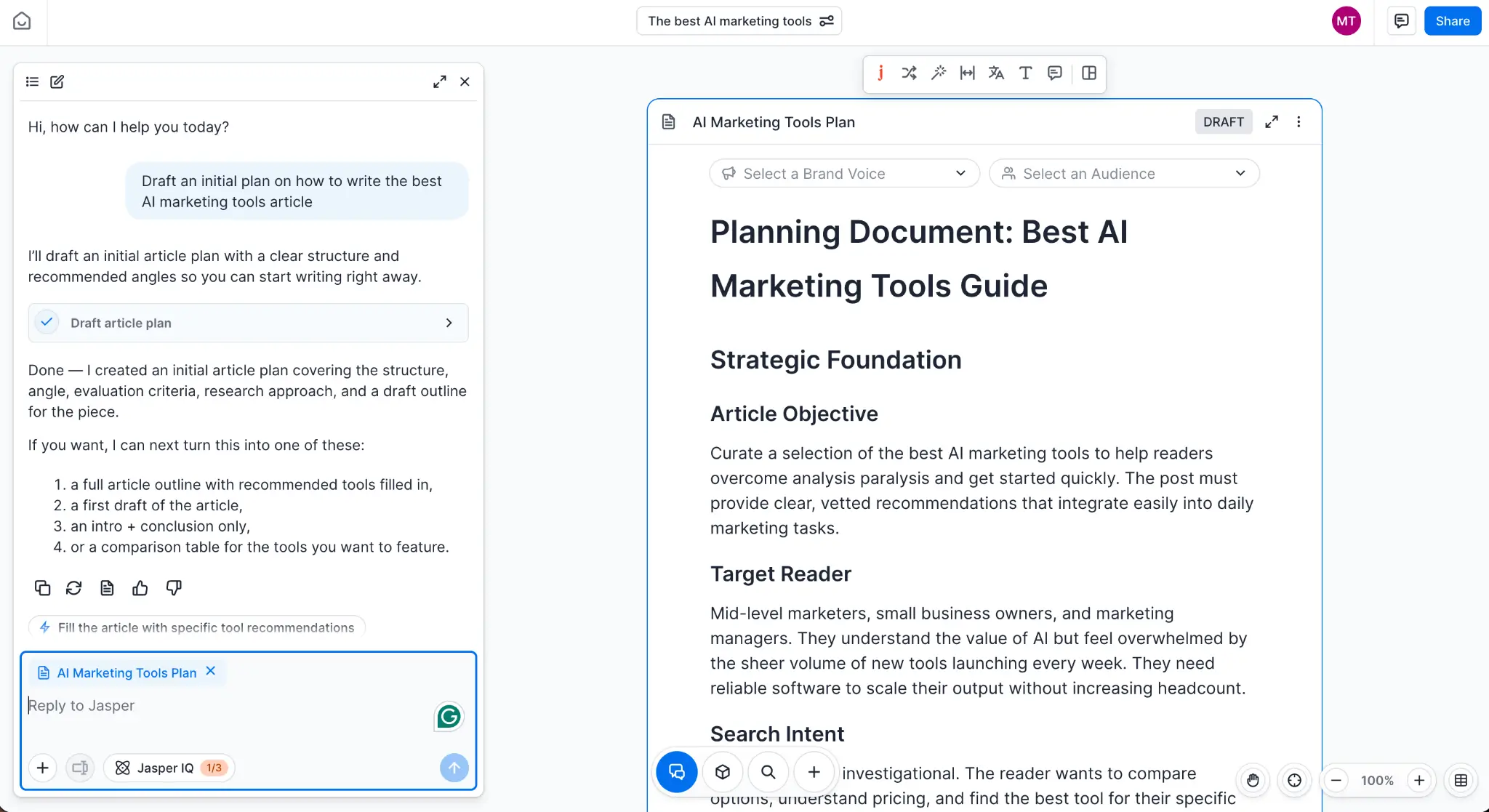
Jasper started as an AI content platform for marketing teams, but it's now evolving into an agentic platform to automate your workflows from end-to-end. The features that make it the best for content writing are still there, acting as the content infrastructure layer to produce on-brand pieces consistently.
The brand voice controls offer an unusual amount of depth. You can set the overall style of your brand and then adapt the tone on a platform-by-platform basis, so your LinkedIn posts and Instagram captions still sound like you while adapting to the channel's requirements. When you connect your knowledge to Jasper, you can import files to ground the responses of the writing agent, which is useful for making sure important facts are mentioned the right way.
Jasper is becoming a deep platform with lots of controls, exposing more and more AI capabilities to its users. The drawback is that you'll have to beat a learning curve that assumes deep knowledge of context management, humanizing AI drafts, and overall AI automation best practices. The time-to-value might be long depending on your team's current skillset.
Jasper pros and cons
Jasper pros
- Brand Voice actually enforces consistency across the whole team: Keep all writers on-brand, no matter which channel they're writing for. Useful for teams with multiple collaborators, reducing editing time.
- Marketing templates produce usable output fast: Jasper has specific agents for marketing use cases, covering multiple content formats such as AIDA ad copy, blog outlines, product descriptions, or email subject lines.
- Works like a content governance layer, not just a writing tool: Role-based permissions, shared Brand Voices, shared Knowledge assets, shared Audience profiles. Multiple people can collaborate on campaigns while always sharing prompts and resources.
- 30+ language support that scales global content without additional tools: Translate and generate content in multiple target languages while preserving brand voice, useful for teams that work across different regions.
Jasper cons
- Long-form content loops back on itself and needs heavy editing: Jasper can repeat ideas, patterns, and sentences cyclically, sometimes producing circular logic that forces a structural rewrite in pieces around 2,000 words and above. This doesn't show up for short form content.
- It hallucinates on anything niche or technical: Even with the Knowledge Base loaded, Jasper can generate facts that sound correct but aren't. Keep enforcing a tight fact-checking pass.
- The UI is overwhelming for new users: There are too many instructions to follow, AI agents to set up, and workspace settings to adjust before you can become productive. This initial learning curve adds friction but disappears after months of consistent use.
Jasper key features
- Brand voice: The platform stores your brand's tone, style, and vocabulary, enforcing it across every output. Useful for teams with multiple writers, it flags off-brand passages and suggests corrections, acting like an interactive style guide that actually runs.
- Knowledge base: Store text, images, audio, and video to use as context to create content. Select which resources to attach to a new content piece, and the AI engine draws upon that data to make claims and state facts.
- Jasper Canvas: An infinite visual workspace for building entire campaigns, where you can plan, draft, and iterate in one shared space.
- AI agents (100+): Agents handle specific content tasks end to end, from SEO optimization to generating social captions. These aren't generic chatbots; you can create an agent for each marketing task or use case, and then chain them in pipelines to automate sections of your content workflow.
- Audiences: Store defined audience segments in a central place, covering demographics to pain points, so your content can target the right persona without constantly adding these details manually in each prompt.
Jasper pricing
- No free tier; 7-day free trial available for Pro
- Pro: $59/month (billed annually) for 1 seat, Canvas platform, essential marketing agents, 2 Brand Voices, 5 Knowledge assets, 3 Audiences, 100+ marketing apps, image generation, browser extension, plagiarism checker, SOC2 compliance
- Business: Custom pricing for everything in Pro plus advanced campaign agents, no-code AI App Builder, Jasper Grid for scaled content, and unlimited Brand Voices/Knowledge/Audiences
3. VEED — best for AI video generation
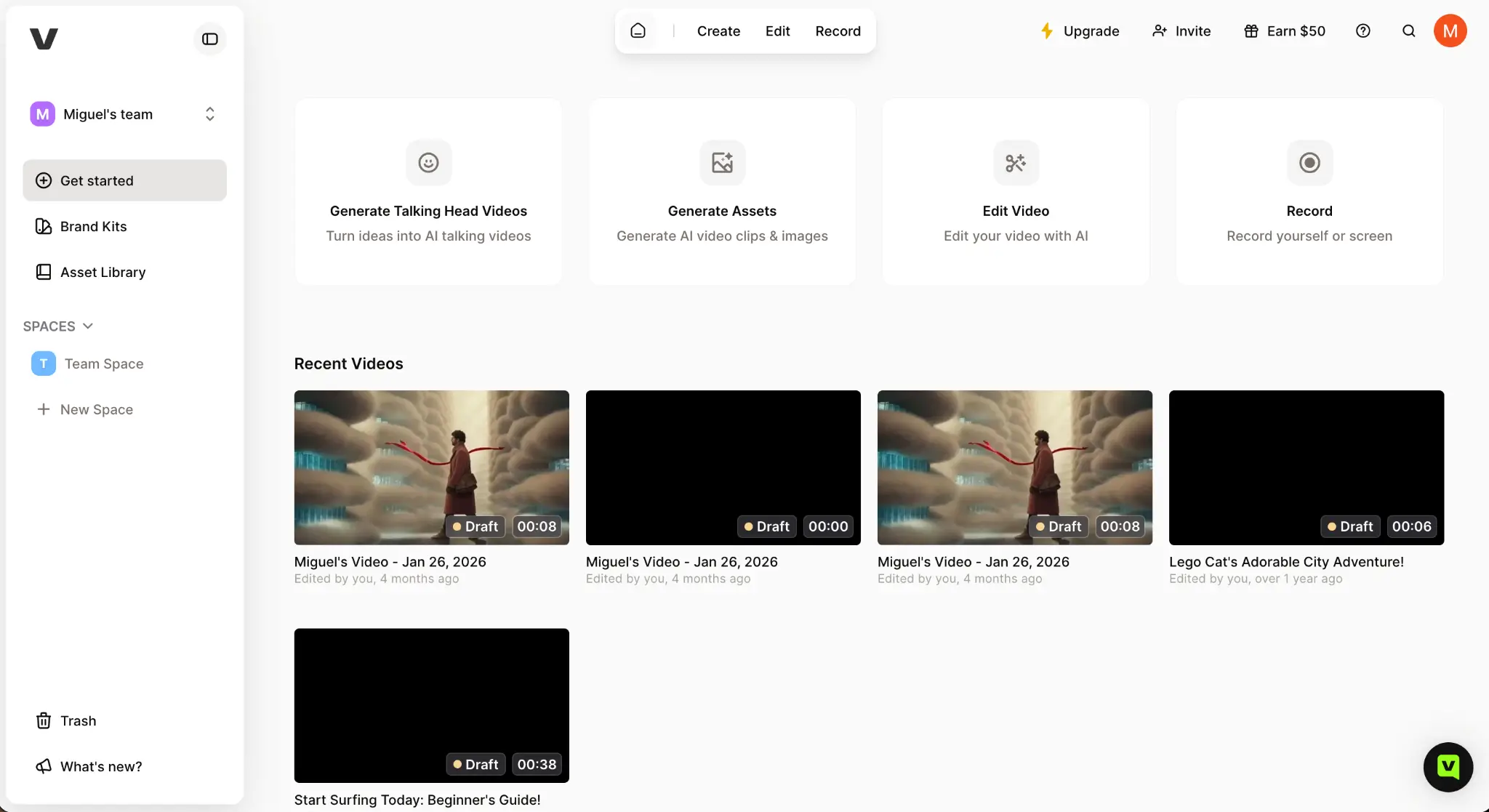
Video is one of the most time-consuming content types to produce, especially with how much polish you need to apply to stand out. VEED's ease of use and wide AI feature set make it one of the most useful toolkits in the market, cutting down your post-production time, so you can increase volume without sacrificing quality.
AI features apply enhancements with just a couple of clicks: add subtitles in multiple languages, use Magic Cut to strip filler words and dead silence, or clean audio to bump up the quality without extra tweaks. And if you need B-roll, you can either browse the integrated stock library or generate it with the AI text-to-video tool.
The fact that it runs in the browser is a double-edged knife: it makes it easier to use and collaborate with others on multiple devices; at the same time, it can slow down and freeze when editing 4k clips or very long videos. Always be mindful of length as you edit, and consider using the app on your most powerful devices to help VEED's servers keep up.
VEED pros and cons
VEED pros
- No learning curve for non-editors: VEED runs in the browser without installing anything on your device, and its user interface is intuitive even if you've never edited video before.
- Easily add auto-subtitles: Add captions to video with one click, with multiple languages and visual customization available.
- Background noise removal compensates for low-quality microphones: VEED's Clean Audio feature reduces the impact of noisy environments and poor hardware, making sound better without you having to invest in new gear.
- Replaces multiple tools in one subscription: You get a video editor, generator, stock library, subtitles, AI optimization tools, and more in one platform.
VEED cons
- Performance degrades on longer and high-resolution videos: The platform starts lagging and occasionally freezing up when editing long videos or content at 4k resolution. The browser-based app is great for collaboration and working across multiple devices, but becomes a liability in terms of performance for more ambitious projects.
- Auto-subtitle accuracy drops with accents, overlapping dialogue, and long content: VEED's subtitle tool works well on clean recordings in standard English, but accuracy drops in noisier environments and regional accents, fast speakers, or multiple people speaking on top of one another. Manual fixes are possible; remember to budget for that time when fixing noisy, chaotic clips.
VEED key features
- Magic Cut (filler word & silence removal): Automatically scans your recording and removes filler words like "um" and "uh," awkward pauses, and interruptions like a phone ringing or dog barking.
- Clean audio: Remove background hiss, fans, traffic, and ambient noise while reconstructing the speaker's voice.
- Text-to-video: Paste a script or describe a concept and VEED assembles a complete video, with footage, narration, and auto-subtitles included.
- Brand kit: Store logos, fonts, colors, and video templates in a centralized Brand Kit accessible to all editors. Share custom intro/outro templates across projects so every video ships on-brand without starting from scratch each time.
- Built-in screen and webcam recorder: Capture your screen, webcam, or both simultaneously from inside the browser, no separate recording software required. The footage feeds directly into the editor.
- Stock media library available: Access two million+ royalty-free audio tracks and video clips directly inside the editor without having to purchase a separate subscription.
VEED pricing
- Free: Core editing tools, 2GB storage, 720p export, 10-min video limit, VEED watermark on all exports, 2 min/month auto-subtitles
- Creator: $12/month (billed annually) for watermark-free 1080p exports, unlimited video length, unlimited auto-subtitles, voice clone, 5GB storage, 6,000 AI credits/year, up to 3 editors
- Pro: $21/month per user (billed annually) for 4K export, 50GB storage, 30,000 AI credits/year, dubbing & translation (6 hrs/year each), multiple brand kits, custom templates, up to 3 editors
- Studio: $39/month per user (billed annually) for everything in Pro plus unlimited storage, 180,000 AI credits/year, 12 hrs/year avatars/dubbing/translation, up to 5 editors
- Enterprise: Custom pricing for 5+ editor seats, unlimited reviewers, SSO, custom integrations, dedicated support
4. Canva — best for generating visual assets and design elements
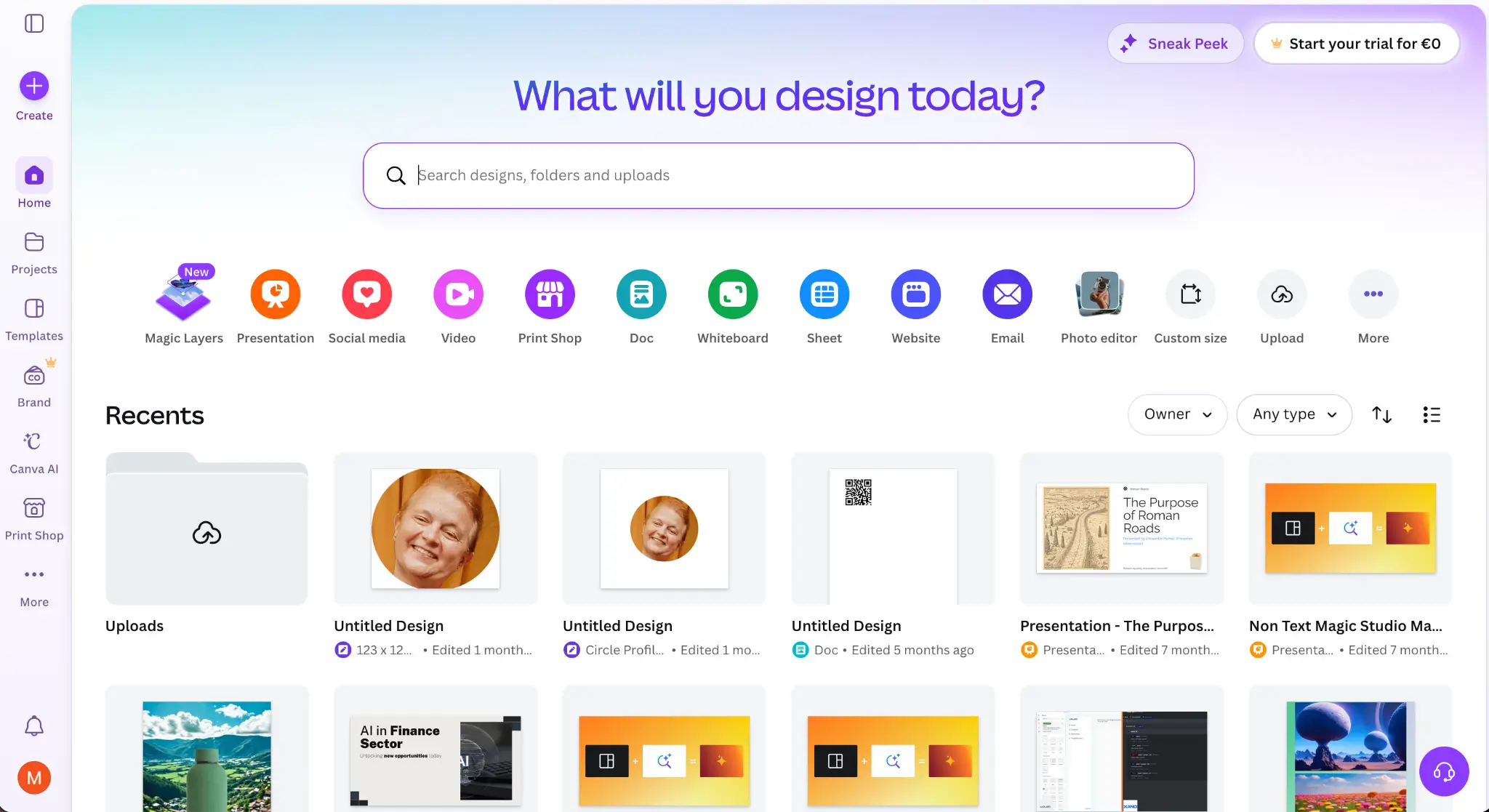
Before Canva, producing lots of appealing visual assets usually involved having a designer on call or building the skills yourself over a long stretch of time. Now, you can still hand off the more ambitious work to a designer, but produce iterative assets quickly.
Start by setting up your brand kit on the platform, so Canva has your logo, fonts, and color palettes at hand. With that out of the way, any AI-generated output reflects your branding automatically. Magic Resize converts assets into multiple platform formats in one click, and Bulk Create can take a spreadsheet and produce hundreds of personalized variations.
These speed boosts are great to extend your content calendar. Canva focuses on volume, not on design depth, so the limitations start to show there: there's no pixel-level control, and the range of export formats only cover more common formats (which also prevents transferring projects from Canva to professional design suites like Adobe’s).
Canva pros and cons
Canva pros
- Non-designers can produce professional-looking results: The drag-and-drop interface is so intuitive that anyone with zero design background can publish polished marketing assets right away.
- Template library eliminates the blank-canvas problem: 4M+ searchable templates cover social posts, email headers, presentations, ad creatives, and print, so you can move forward to final adjustments and exporting.
- Magic Resize turns one design into every format in seconds: Convert a finished asset into Instagram square, LinkedIn banner, Facebook ad, YouTube thumbnail, and more with a single click. No more fiddling with resizing images all the time.
- Real-time collaboration removes the file-version chaos: Multiple contributors can edit the same design at the same time, leave comments, and see updates live, saving you from "final_v3_REAL.pptx" email threads. All files are stored in the cloud, always available across devices.
Canva cons
- Your designs may look like everyone else's: Canva's template library cuts both ways, with the same visual assets available to everyone. Even after swapping colors and copy, finished designs can have a distinct Canva-made look to anyone who uses the platform regularly.
- Not a real print tool: Canva is built for screens, not physical assets. There's no CMYK colour mode, no professional print calibration, and colour output can run several shades darker in print than it appears on screen.
- Layer and asset management breaks down on complex projects: For simple one-off assets, the interface is frictionless. For campaigns with dozens of assets, nested elements, or multi-team editing, it gets messy fast. Version history is shallow, folder navigation is confusing, and layer control is limited compared to what designers need for non-trivial work. Users who graduate from simple social posts to production-scale campaigns consistently hit these walls.
Canva key features
- Magic Studio (AI suite): Canva's AI hub combines text generation (Magic Write), image editing (Magic Edit, Magic Eraser), generative image creation (Dream Lab), and auto-generated design layouts (Magic Design), all inside the editor, with no copy-pasting to external tools.
- Brand kit & locked templates: Store logos, fonts, color palettes, and approved templates in a centralized Brand Kit. Elements can be locked so contributors can customize copy or images without breaking the layout or drifting off-brand.
- Design approval workflows: Admins can set up a review and sign-off process before publishing or downloading assets; group reviewers mean only one approver needs to act for the queue to move.
- Content scheduler: Pro subscribers can connect up to eight social accounts and schedule posts directly from the design interface without exporting and re-uploading. Please note: you can only schedule designs made within Canva, and there's a 25-post scheduling cap at any one time.
- Integrations & connectors (AI 2.0): Canva AI can now pull context from Slack, Gmail, Google Drive, Google Calendar, Notion, HubSpot, Zoom, Microsoft, and Atlassian to inform design creation.
Canva pricing
- Free: Access to 1.6M templates, 4.7M+ free photos and graphics, 5 GB storage, 1 brand kit, basic AI features with usage limits
- Pro: $12/month (or $144/year) for 1 TB storage, 100M+ premium assets, 5 brand kits, background remover, full Magic Studio AI suite (Magic Write, Magic Edit, Magic Design), content scheduler, design resizing
- Business: $20.83/user/month billed annually (or $250/user/year) for everything in Pro plus real-time collaboration, 100 brand kits, approval workflows, admin controls, activity logs, priority support
- Enterprise: Custom pricing for everything in Teams plus SSO, advanced security, custom roles and permissions, brand governance, dedicated account manager, API access, and SOC 2 / ISO compliance
5. Semrush — best for AI-powered SEO and keyword research
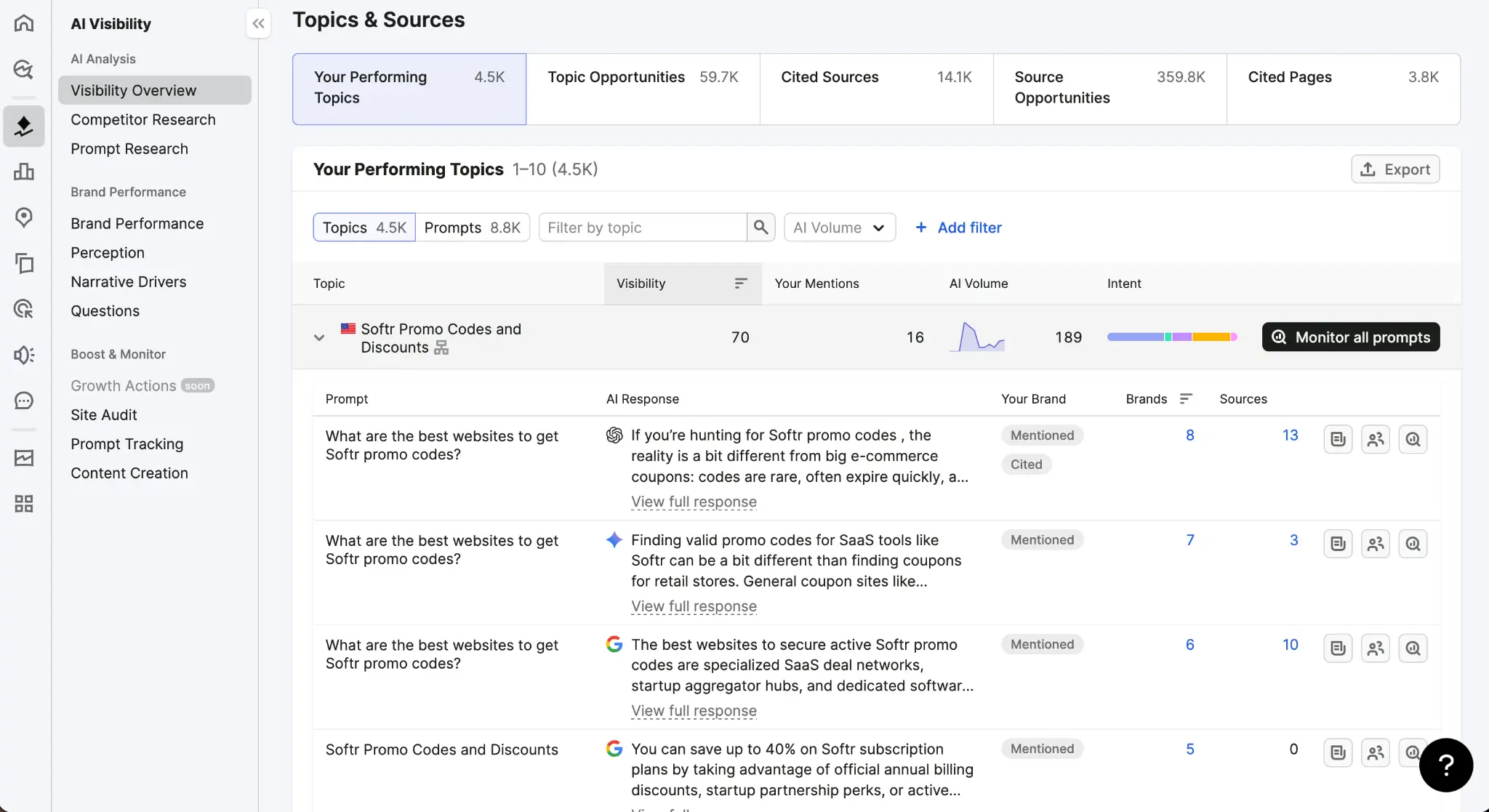
Where other SEO platforms on the market go deep on specific areas of the discipline, such as backlinks or traffic stats, Semrush earns the spot on this list for its breadth. It covers keyword research, technical audits, competitive intelligence, content creation, and AI visibility tracking.
Drawing upon the SEO data on the platform, the ContentShake AI tool can generate a full article with title, subheadings, and body for your target keywords, and then push it directly to WordPress. The Semrush One AI Visibility Toolkit tracks your brand presence in chatbot-powered searches across ChatGPT and Google's AI Overviews, so you can see how many times your brand is mentioned and adjust your strategy.
The breadth comes with a high price point, even for entry-level plans, which might make small businesses and solo operators think twice. There's also a learning curve to get up to speed with how all the features work; the way screens are filled up with so much data can be intimidating at first.
Semrush pros and cons
Semrush pros
- Competitor intelligence goes deeper than keyword overlap: Semrush surfaces not just which keywords competitors rank for, but which ones they're actively bidding on in paid search (with historical ad copy going back to 2012). This helps identify gaps and reverse-engineer competitor strategies that are working.
- Keyword data comes with volume and search intent: Every keyword in the Keyword Magic Tool is tagged informational, navigational, commercial, or transactional. This is key for knowing what type of resource you should create based on what people search for.
- Agencies love the white-label reporting: Get customizable PDF reports and a branded dashboard, saving hours per week for agencies reporting results to their clients.
Semrush cons
- The pricing punishes small teams hard: The entry plan starts at $117.33/month with 5 projects, 500 tracked keywords, and one user seat, with steep cost scaling for higher tiers. Plus, the AI visibility toolkit is a paid add-on.
- The AI Visibility Toolkit has blind spots: Semrush tracks brand visibility inside ChatGPT, Google AI Overviews, Google AI Mode, and Gemini. Claude and Meta AI aren't covered.
Semrush key features
- Keyword Magic tool: The largest keyword research database on the market with 27 billion+ keywords, filterable by match type, search intent, question format, and topic cluster.
- Competitive intelligence & traffic analytics: See exactly where a competitor's traffic comes from and an estimate of their total monthly visitors. The Market Overview dashboard surfaces market share for up to 5 competitors at the same time, so you can benchmark your campaign's positioning before launching.
- Site audit: Crawls up to 1 million pages (Business plan) for 140+ technical SEO issues—think keyword cannibalization or broken redirect—ranked by impact severity.
- ContentShake AI: Semrush’s AI article generator produces content from live competitor insights. It pulls from what's ranking, suggests trending angles, and produces the full draft.
- AI visibility toolkit (Semrush One): Track your brand's presence across AI-powered search environments. See which prompts highlight your brand, how AI models perceive it, and the competitor share of AI-generated answers.
- Semrush Copilot: This free AI assistant surfaces personalized SEO recommendations based on your connected projects, flagging ranking drops, audit issues, and backlink changes.
Semrush pricing
- 7-day free trial on Pro or Guru. No permanent free tier.
- Pro: $117.33/month (billed annually) for 5 projects, 500 keywords tracked, 10,000 results per report, 100,000 pages audited/month
- Guru: $208.33/month (billed annually) for 15 projects, 1,500 keywords tracked, 30,000 results per report, 300,000 pages audited/month, historical data, content marketing tools, multi-location tracking
- Business: $416.66/month (billed annually) for 40 projects, 5,000 keywords tracked, 50,000 results per report, 1M pages audited/month, API access, Share of Voice metrics
6. Publer — best for AI-assisted social media management
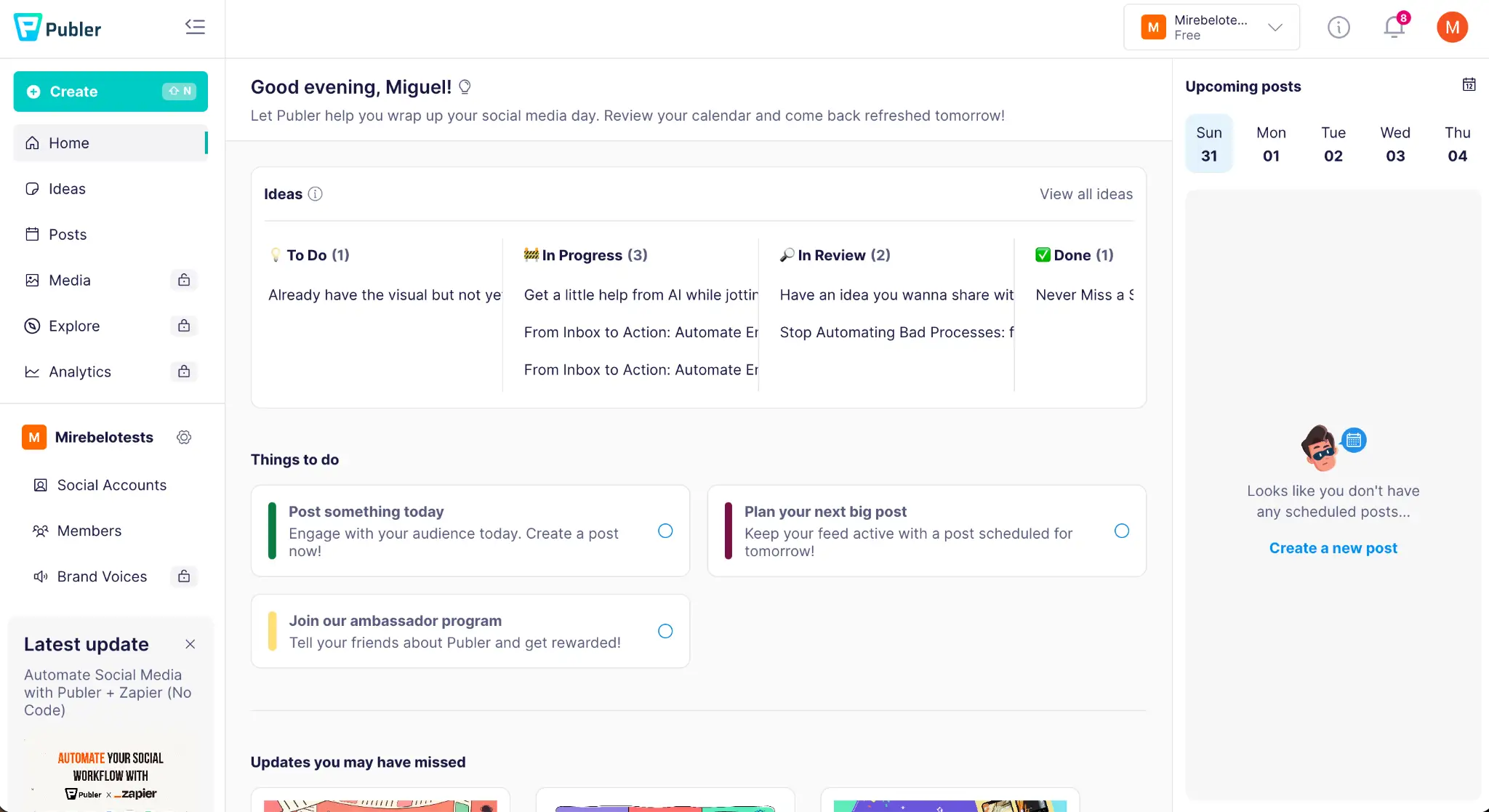
There are a lot of options for teams of all sizes when picking a social media management platform. Publer wins because it hits the sweet spot: it offers a robust feature set, including a range of AI boosts and time-saving features, for a reasonable price.
When scheduling your posts, you have four modes to choose from. You can start with the classic "pick a date," but also set up an automatic post queue, recycle previous content, or set up recurring posts. To keep this engine running, the AI Assist helps generate captions from scratch, and you can review results by chatting with your analytics in the AI Chat feature.
Publer is great to step up production and find momentum, but you'll hit walls the moment you want to move into building a serious strategy. The analytics are basic when compared with other platforms, even after you graduate to the highest paid plan. This limitation can prevent you from pivoting quickly when audience engagement changes.
Publer pros and cons
Publer pros
- Easy to use from day one: The interface, scheduling workflow, and available tools are all intuitive and easy to use.
- Great feature set at a good price: Publer's free plan allows 3 social accounts with 10 scheduled posts each, and up to 25 drafts. The paid plans are modular, so you only pay for the number of accounts and seats you actually need, not a fixed bundle with headroom you'll never use.
- Customize each post per platform without starting over: Write your post once, then edit the version for each channel separately, so you can adapt posts from LinkedIn to Instagram or any other platform combo.
Publer cons
- Analytics are locked behind the most expensive plan, and still basic when you get there: The analytics suite is a Business-tier feature, so you need to pay at least $21/month before you can see engagement rates, follower growth, or post performance. When you hop on that plan, you won't have access to deeper insights such as cross-channel reporting or deep attribution.
- Bulk video uploads are unreliable: Users report the bulk uploader becomes unstable with large video files, crashing during upload or returning vague error messages with no clear path to fix.
Publer key features
- Multi-platform scheduling (12+ networks): Publer supports Facebook, Instagram, Threads, TikTok, X/Twitter, LinkedIn, Pinterest, YouTube, Google Business, Mastodon, Bluesky, and Telegram from a single dashboard.
- AI Assist (caption writing + hashtag suggestions): Built-in AI writes captions from scratch or completes what you've started, and you can train it on brand guidelines to match a specific voice.
- Chat about live performance data: The AI chat assistant pulls your account performance, so you can ask it whether a campaign is working and get answers grounded in your actual data.
- Bulk scheduling via CSV: Upload a CSV file to queue hundreds of posts in one action, with a drag-and-drop calendar view for reorganizing after it's on the platform.
- Approval workflows and role-based access: A two-tier approval system lets editors draft posts while managers or clients hold final publish authority; three roles (Admin, Editor, Client) control account-level permissions across workspaces.
- Link in Bio for Instagram: Built-in Link in Bio page tied to your Instagram account, with the unbranded version unlocked on the Professional plan, so you can skip Linktree and manage everything in one platform instead.
Publer pricing
- Free: Up to 3 social accounts (Twitter/X excluded), max 10 scheduled posts per account, post history deleted after 24 hours
- Professional: From $9.60/month (billed annually, 3 accounts) for all social networks including Twitter/X, unlimited scheduling, permanent post history, unlimited workspaces
- Business: From $21/month (billed annually, 3 accounts) for everything in Professional plus analytics & insights, unlimited AI credits, advanced content features
- Enterprise: Custom quote for everything in Business plus volume discounts, dedicated 1:1 onboarding, prioritized support, unlimited daily posting, and early feature access
7. ActiveCampaign — best for AI email marketing automation
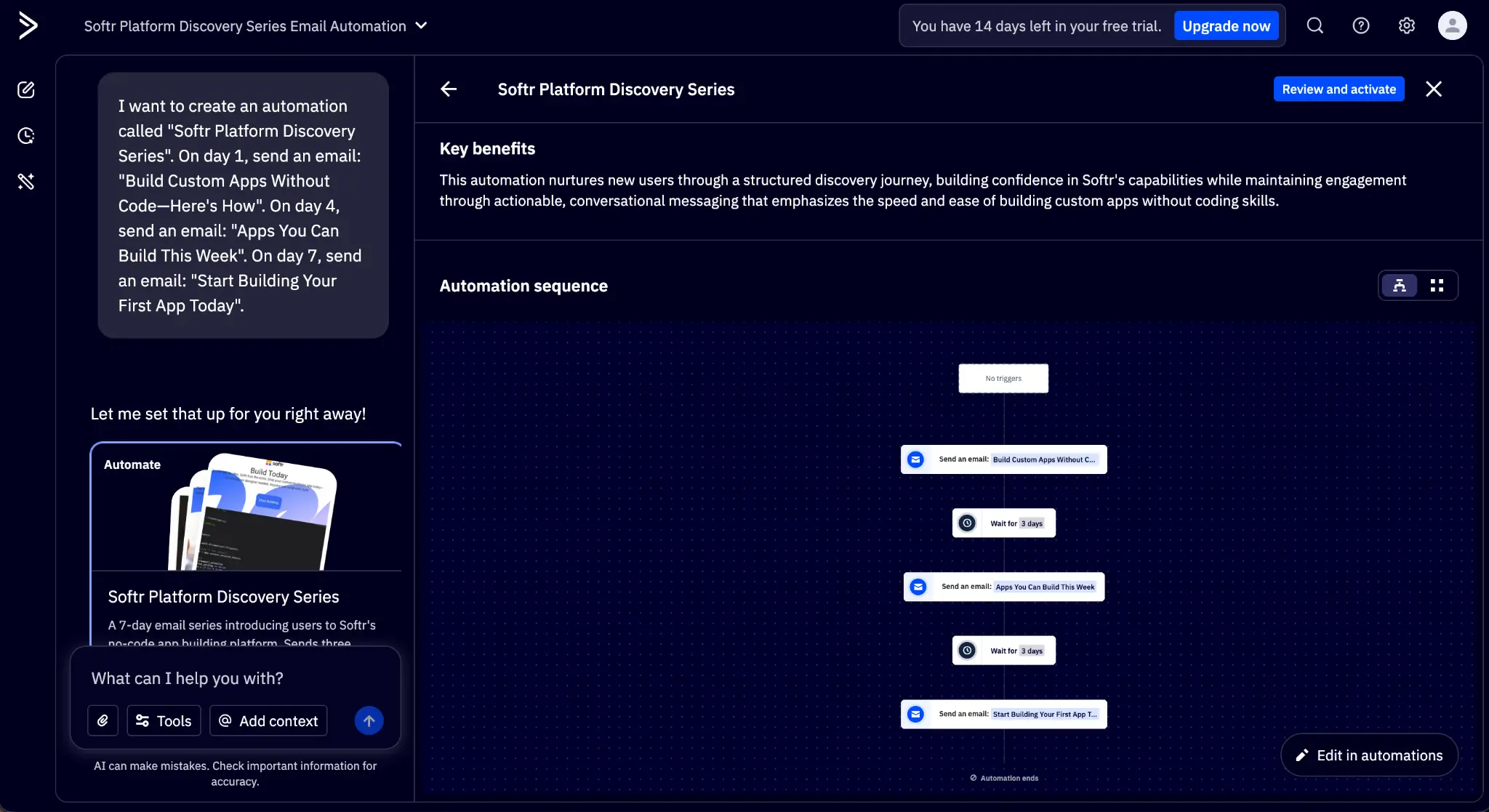
Evolving from its origins as an email marketing platform, ActiveCampaign boasts deep automation capabilities, with AI for content creation and campaign management. It's a step above entry-level tools, but a step below enterprise-grade platforms, so you'll get more power for the price point.
The AI Campaign Builder acts as an interface to the ActiveCampaign platform: once you send a prompt with your campaign's details, the AI engine creates all assets and configures settings to make sure it's ready for your approval step. You can generate content for your emails with AI, personalize each message based on a contact's data, and use AI-powered predictive analytics to get an idea of what future performance might look like.
This only touches the surface of everything ActiveCampaign can do, and that's partly a problem, too. New users find the amount of settings and controls overwhelming, reporting a steep learning curve until they're completely comfortable. ROI over time can also shrink due to the contact-based pricing scaling, so make sure to prune your list as you go.
ActiveCampaign pros and cons
ActiveCampaign pros
- The built-in CRM is a pleasant surprise: You'll come for email marketing automation and find a decent CRM with deal pipelines, contact scoring, sales tasks, and win probability tracking. Useful if you're not ready to shop for a dedicated CRM yet.
- Segmentation is the most flexible in its class: Slice contacts by any combination of email behavior, website visits, purchase history, custom fields, and AI-predicted attributes.
- Active Intelligence cuts campaign setup time significantly: The AI campaign builder can save a lot of time in initial campaign setup, automating the first steps successfully.
ActiveCampaign cons
- Steep learning curve that punishes non-technical users: The automation builder, segmentation logic, and CRM each require time to master, and the interface layers them without much hand-holding.
- Pricing escalates fast as your list grows: ActiveCampaign charges for every contact, including unsubscribed and bounced addresses.
- The email editor is functional but glitchy: Font shifts, color inconsistencies, and spacing problems appear regularly on sent emails, especially when you're editing across devices or switching between drag-and-drop and HTML modes.
ActiveCampaign key features
- Visual automation builder: A drag-and-drop canvas for mapping multi-step customer journeys using 135+ triggers, actions, and conditional logic. Start from one of the 900+ prebuilt automation recipes.
- Site & event tracking: Add a tracking script to your website and ActiveCampaign records which pages each contact visits and trigger automations in response. Event tracking extends this to any in-app action (video views, button clicks, logins), so you can track behavioral signals and use them for targeting.
- Predictive sending (AI): Predictive sending analyzes each contact's historical open patterns and delivers the email at the individual moment they are most likely to engage, increasing open rates.
- Conditional content: A single email campaign can show different content blocks to different contacts based on segmentation rules. You don't need to build multiple versions of the same send.
- Active Intelligence AI (Campaign Builder): Describe a marketing goal in plain language and Active Intelligence generates a full campaign, including automations, emails, and audience segments. It draws on anonymized data from ActiveCampaign's broader customer base, which theoretically improves its recommendations over generic AI tools trained only on public content.
ActiveCampaign pricing
Prices shown are billed annually for 1,000 contacts.
- No free plan; 14-day free trial available.
- Starter: $15/month for mail marketing, marketing automation (5 actions per workflow), limited segmentation, basic CRM integrations, Active Intelligence AI (limited), 1 user
- Plus: $49/month for everything in Starter, plus unlimited automation actions, landing pages, SMS, site messages, customer journey tracking, advanced forms, 1 user
- Pro: $79/month for everything in Plus, plus predictive sending, predictive and conditional content, attribution tracking, premium ecommerce integrations, 3 users
- Enterprise: $145/month for everything in Pro, plus custom objects, Single Sign-On (SSO), dedicated account team, premium segmentation, 5 users (custom quote above base tiers)
8. Creatify — best for AI ad generation
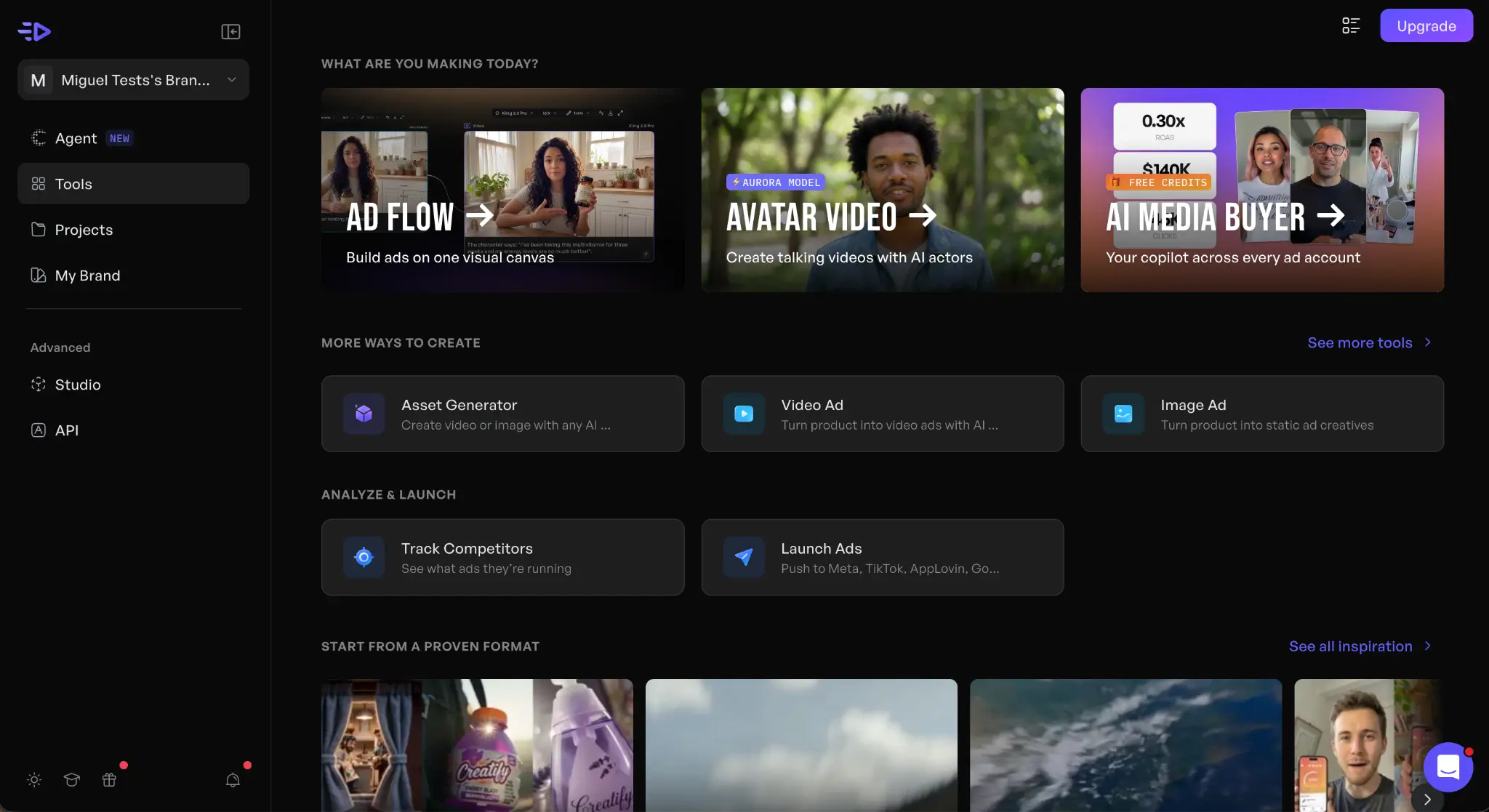
Creatify lets you create (no pun intended) ads without a brief writer, scriptwriter, production crew, or an editor. It’s an AI ad generation platform that specializes in generating complete advertisements quickly, so you can experiment and optimize conversion over time.
Paste a product URL from your website, and Creatify gathers the copy, images, and core selling points. After that, it writes an ad script, assigns an AI avatar presenter, adds captions, and renders a video of up to 60 seconds long. The platform is tuned for volume, and here the batch mode shines: it can generate 12 variations in a single session, so you can A/B test them and see which drives the most engagement. You can export it to popular formats that cover TikTok, YouTube, and Meta platforms. This way, you don't have to run it through another video editor if you're happy with the results.
AI video has evolved a lot in the past two years, becoming more realistic and believable (especially in social media feeds where attention is already fragmented). Still, generated video can sometimes hit the uncanny valley with artificial movement or lip-syncing problems. This does apply to Creatify, so you'll need to think about how your audience might react.
Creatify pros and cons
Creatify pros
- URL-to-video cuts briefing and production time to minutes: Paste a product page and Creatify scrapes and generates a finished ad in under 10 minutes.
- Batch mode scales creative testing: Spin up multiple ad variations in a single session, swapping hooks or CTAs without any additional briefing or manual coordination. Use the best candidates to run A/B tests.
- Multilingual output with no extra production cost: Creatify supports 29 languages with avatar lip-sync, so a single creative run produces localized versions for multiple markets.
Creatify cons
- The credit system punishes experimentation: Credits expire after 2 months and are consumed even by failed renders or minor edits. Testing multiple hooks and avatars without finding a winner early can burn through the quota quickly.
- You need another app for making deep edits to the video: If you need anything beyond the template-driven output, you need to export it and finish elsewhere (like VEED, listed above).
Creatify key features
- 1,500+ AI avatars with 24fps lip sync: Choose from over 1,500 AI presenters with full-body motion, expressions, and lip-sync across multiple languages.
- Custom avatar: Upload video footage of a real person and Creatify builds a digital twin that lip-syncs new scripts in multiple languages.
- AI script writer: Generate persuasive ad scripts highlighting your product's benefits, audience, and offer. Each URL scan produces multiple angle variations so teams can quickly test messaging without involving a copywriter.
- Multi-format auto-export: Render the same ad in 9:16 (TikTok/Reels), 16:9 (YouTube), and 1:1 (Facebook/Instagram).
- Competitor ad tracker: Monitor any competitor's live ad creative across platforms, with filtering and AI-generated breakdowns available to explore performance, hooks, headlines, selling points, and landing pages.
- Ad launcher (Meta, TikTok, AppLovin): Push finished ads directly to ad platforms without downloading and re-uploading through each platform's native interface.
Creatify pricing
- Free: 10 credits/month, up to 2 video ads or 20 image ads, 300 AI actors, watermarked exports
- Starter: $33/month for 100 credits/month, all creation tools, 300 AI actors, 200+ ad templates, no watermark
- Pro: $49/month for 300 credits/month, 1,500 AI actors + 3 custom avatars, 500+ ad templates, competitor ad tracker, ad launcher (Meta/TikTok/AppLovin)
- Enterprise: Custom pricing for everything in Pro plus studio services, white-label, API access, 6+ seats, and a dedicated account manager
Find the best AI marketing tool for your business
Instead of choosing an app from this list right off the bat, start by identifying your biggest bottleneck. Pick the one app that seems likely to solve it and start a free trial or sign up for a free plan.
If the app passes your test, sign up for a paid plan, configure the workspace, learn the core features, and adapt your workflows to integrate it into your daily operations. It's better to focus your attention on one app rather than spread your attention thin by learning two or three at the same time.
After you've locked in your content and distribution toolkit, you'll notice the gap they all leave: the operations layer. You'll likely need to stitch together different platforms to get access to automation, databases, a CRM, client portals, and the other features that make your marketing workflows tick.
Instead of adding yet another point solution to your stack, Softr lets you build the AI tools your team needs without writing any code. Describe the tool you want, and watch the Co-Builder generate a working app with the database, logic, and permissions already in place. Try Softr free and start building an AI marketing system today.
Frequently asked questions
Are AI marketing tools worth the subscription cost?
Will AI replace marketing teams?
Do I need to disclose when my marketing content is AI-generated?