AI generated apps: 10 examples built with Softr


I'm only 29, but the landscape has changed so much since I started tech writing that I can actually say "back in my day" and have it mean something. Back in my day, for example, an app was something you either paid for a license to or had a team of developers create with code. And while this was true even as recently as 2020, it just isn't true anymore.
But saying and showing are two different things, so if you're still suspicious that AI-generated apps are smoke and mirrors rather than legit business tools, I used Softr to build and test 10 AI-generated apps for 10 different (and very legit) use cases.
In this blog, I'll show you what they look like and how they work, plus share prompts you can try yourself.
10 AI generated apps at a glance
Note: The AI Co-Builder generates a working version of each app in minutes. The estimated times above include configuring permissions, branding, and real data to make it publishable.
What is an AI generated app?
An AI generated app is software you create by describing it with prompts instead of building it with code. You might write something like "generate a portal for partners to track commissions," and an AI app builder turns that request into a functional interface with multiple pages and a backend (depending on how capable the platform you're using is).
There are really two kinds of AI platforms that can generate software:
- Pure vibe coding tools that generate raw code you own, maintain, and extend yourself
- AI app builders that assemble software with pre-built components on top of managed infrastructure
Tools in the first category—think Claude Code and Cursor—aren't really designed for non-technical users. Softr, which sits in the second category, handles an app's database, logins, security, and permissions for you, which makes it the right choice if you don't want to manage code.
1. Sales CRM with a deal pipeline
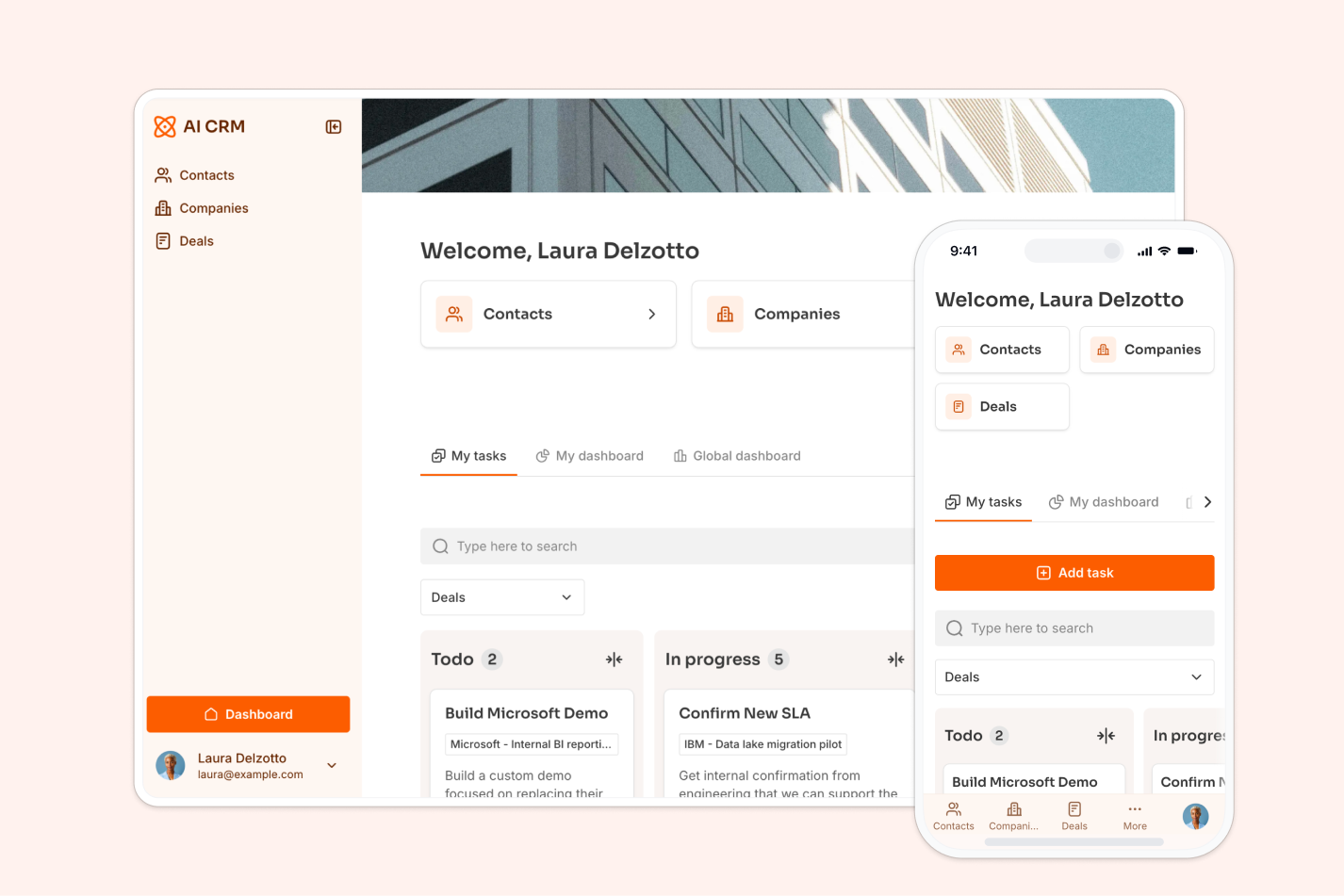
Prompt to try: "Generate a CRM to track leads, deals, and interactions, with a kanban deal pipeline and a dashboard showing revenue by month."
A CRM can be a really solid first build, since its structure tends to follow a basic pattern. You'll pretty much always need three things: contacts (customers and/or leads), the companies or organizations they're associated with, and deals.
Because Softr isn't just a frontend, ask the Co-Builder for a CRM and it'll generate a relational database with linked Contacts, Companies, and Deals tables. Your interface lives on top of this database and reflects it in real-time.
For this build, I also requested a kanban-style pipeline you can drag deals across, and a dashboard with live revenue charts. Permissions come pre-configured, so you can let each sales rep see only their own assigned contacts and deals.
Then there's the automation layer. Softr's Workflow AI can build a lead-nurturing flow from a prompt, too: when a new lead comes in, an AI step scores it, qualified leads receive an outreach email automatically, and the rest are marked for later.
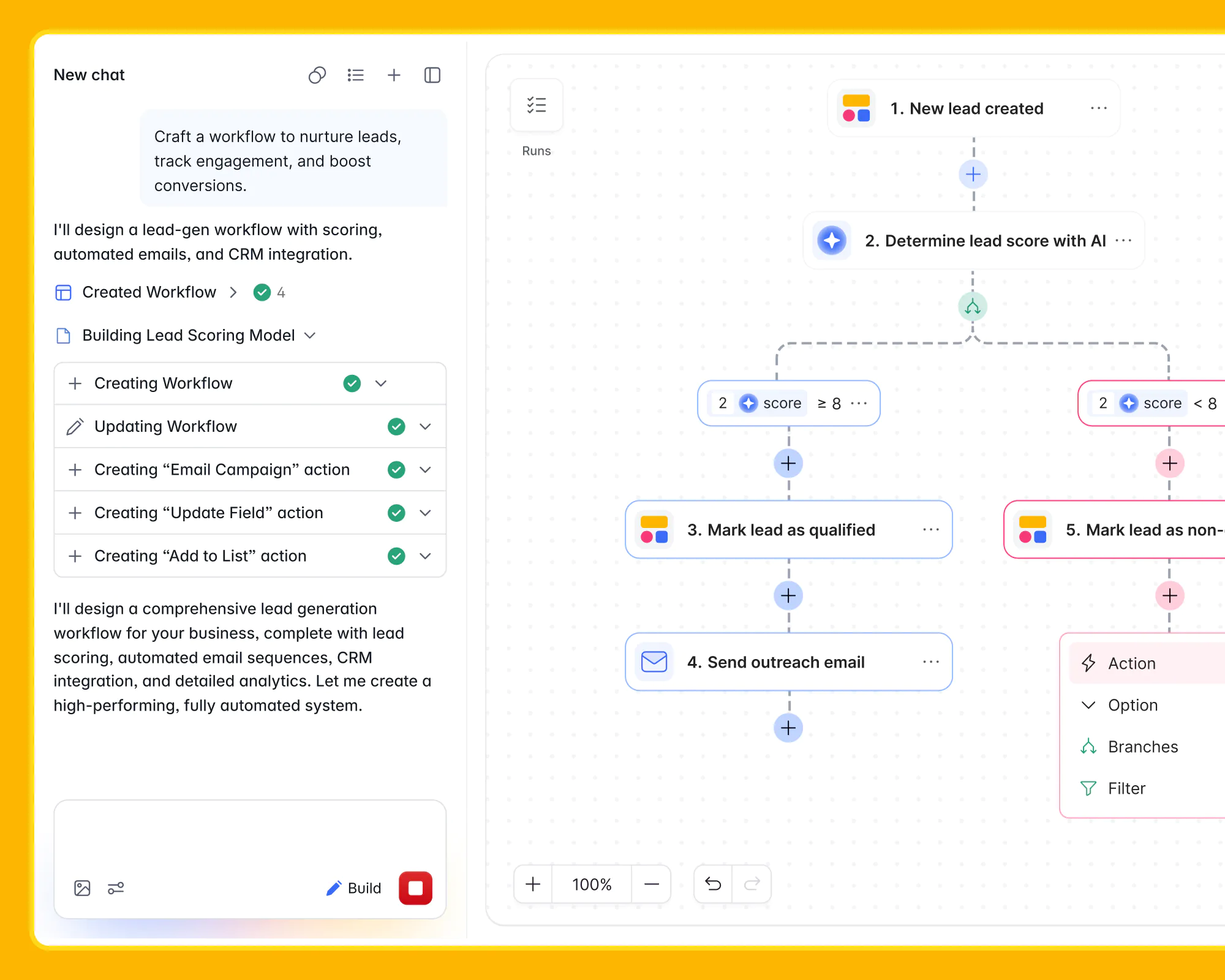
If you'd rather start from something pre-made and customize with AI from there, this CRM template covers the same ground, and this step-by-step CRM guide walks through the full build process.
2. Client onboarding portal
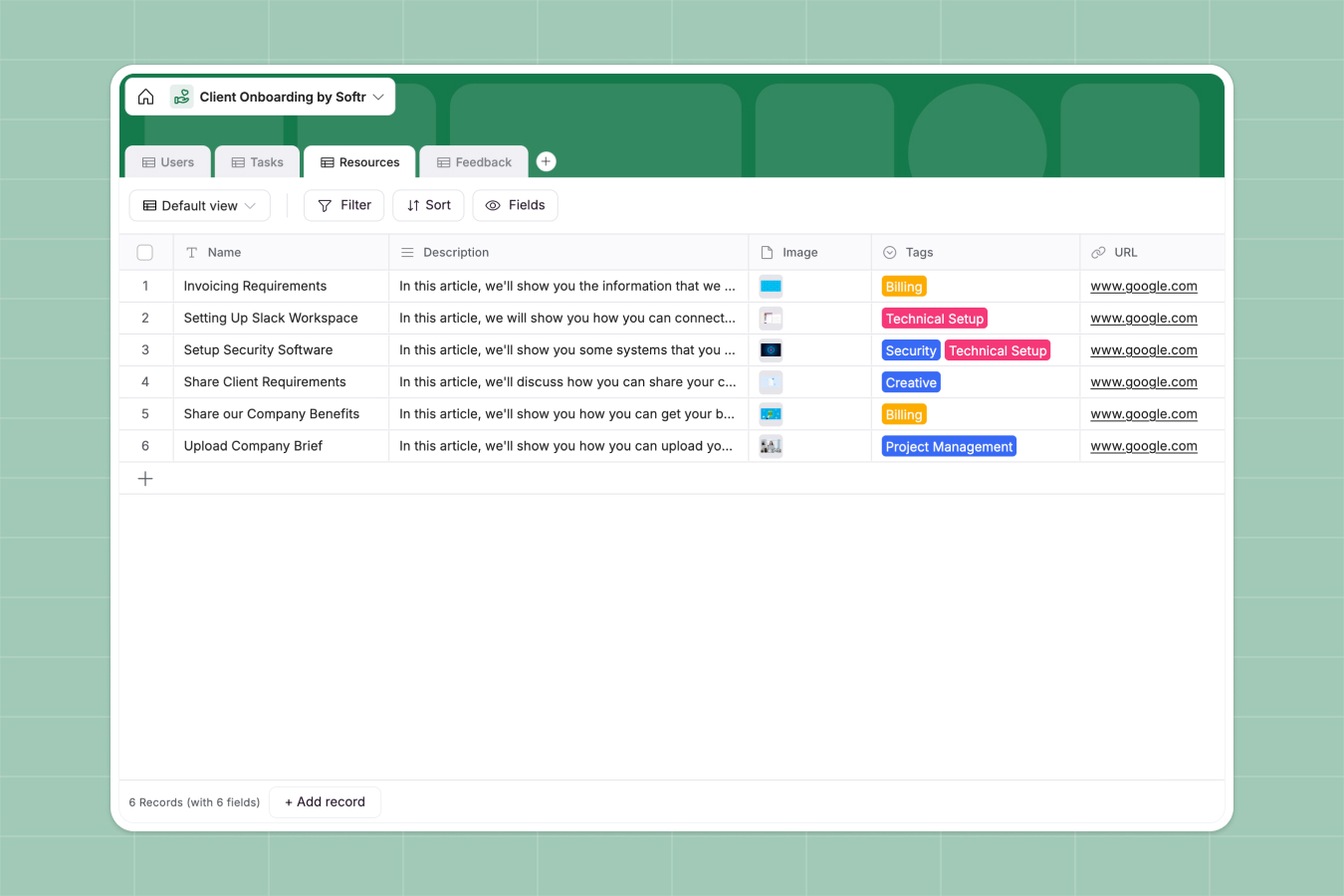
Prompt to try: "Build a client onboarding portal where each client logs in to see their onboarding checklist, upload documents, and track progress."
Agencies and consultancies can burn a ridiculous amount of time onboarding new clients, especially if they're doing it over email. An onboarding portal solves this problem by giving every client a login and a personalized checklist.
For this build, I asked the AI Co-Builder to generate tables for clients, onboarding tasks, and shared resources (like documents), plus a client-facing interface where each customer sees only their own steps, files, and status. Record-level permissions are the make-or-break feature here, and they can be configured as part of the build rather than bolted on later.
You can also start from the client portal template or browse Softr's portal use cases for additional variations.
3. Partner portal for commissions and resources
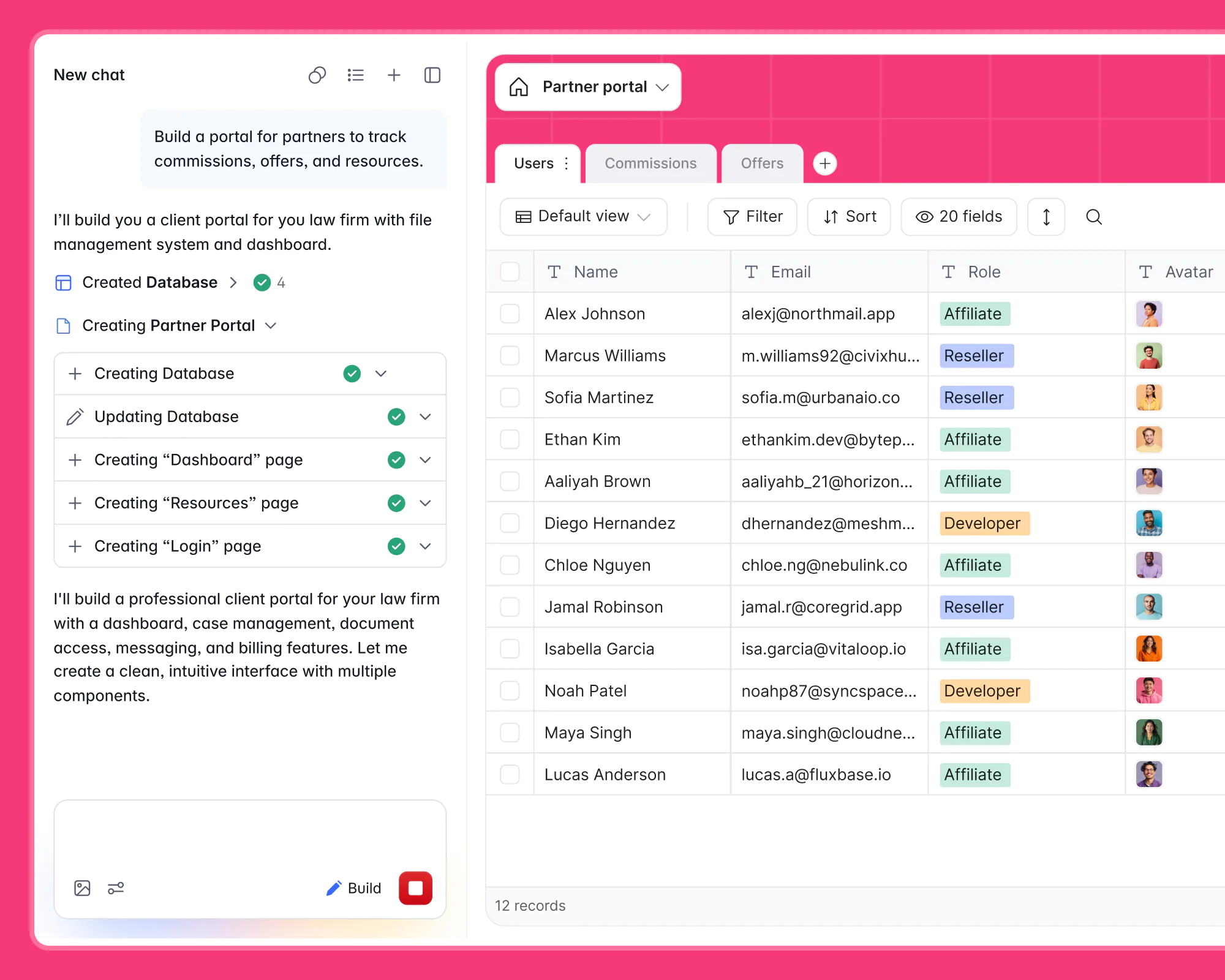
Prompt to try: "Build a portal for partners to track commissions, offers, and resources, with separate roles for affiliates and resellers."
Partner programs run on visibility. Affiliates and resellers want to know what they've earned, what offers are live, and where the latest marketing assets are. And in the best case scenario, they won't have to reach out to you to access any of this info.
This example comes straight from a real AI app build for a legal use case. The prompt produced a fully-functional partner portal, complete with a Users table with partner roles (Affiliate, Reseller, and Developer) and realistic sample data to develop against.
I'm emphasizing the database here because it's really the determining factor in whether this app (or any app) works. Because the Co-Builder configures the relational data structure automatically, you don't have to worry about getting it wrong (or learning SQL just to manage your records).
"If you use the AI Co-Builder to generate the database, you can trust that you are in the top 10% of database design already." — Mariam Hakobyan, CEO & Co-founder of Softr
4. Vendor portal with a built-in AI assistant
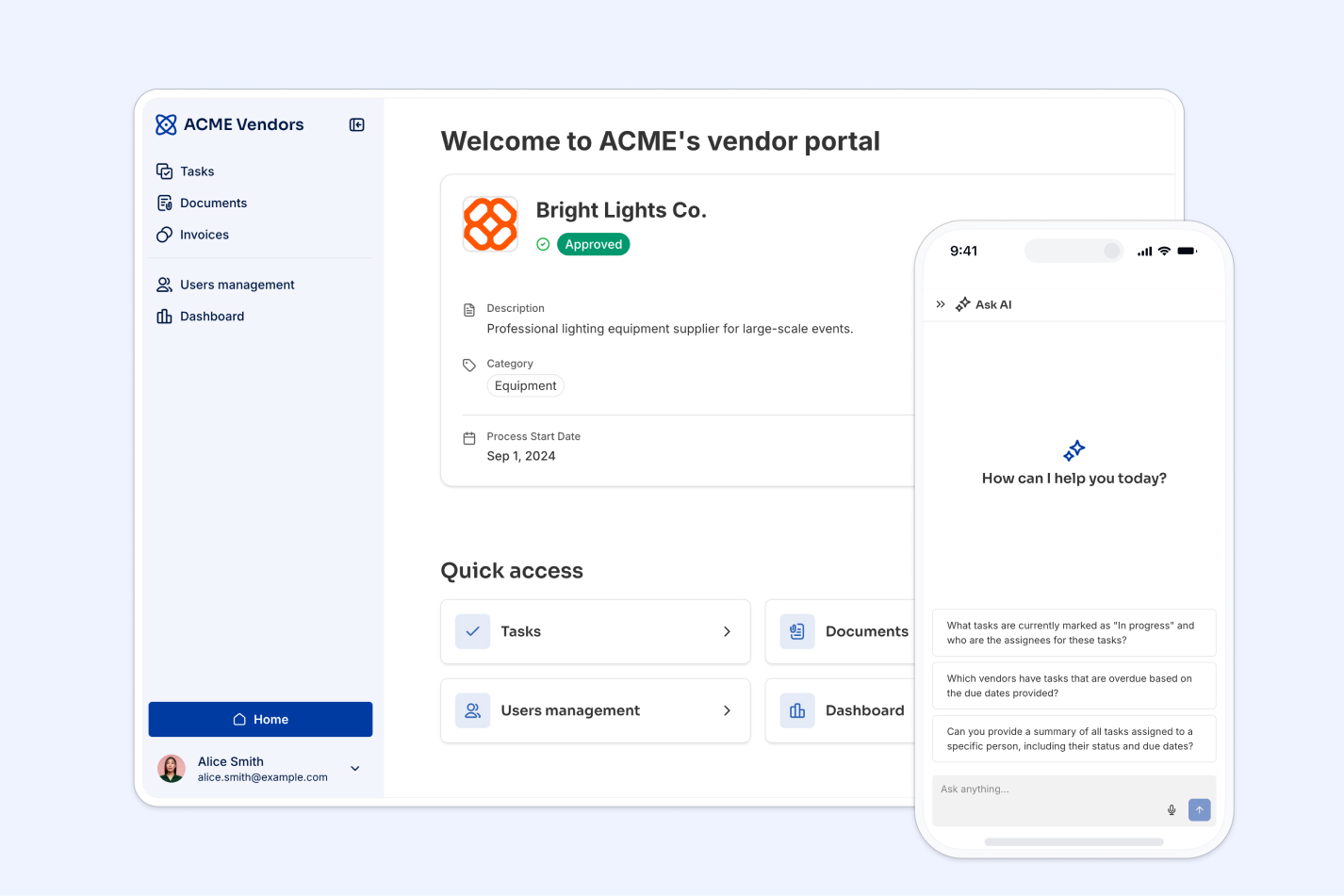
Prompt to try: "Build a vendor portal where each supplier can view their tasks, upload documents, and track invoice status, with an AI assistant for questions."
A vendor portal flips the client portal model outward to your suppliers: each vendor logs in to see their assigned tasks, submit documents, check invoice status, and more. The AI Co-Builder generates the vendor-facing home page, app navigation, and the underlying tables in one pass.
For this example, I also requested an Ask AI assistant so users can ask questions about their records, like "which of my invoices are still unpaid?" In Softr, any block connected to data can get a conversational AI layer with a single toggle, with answers restricted to the information they're allowed to see.
Softr excels at multi-tenant setups like this, where multiple external orgs share one app but never access each other's data.
5. Issue tracker for internal teams
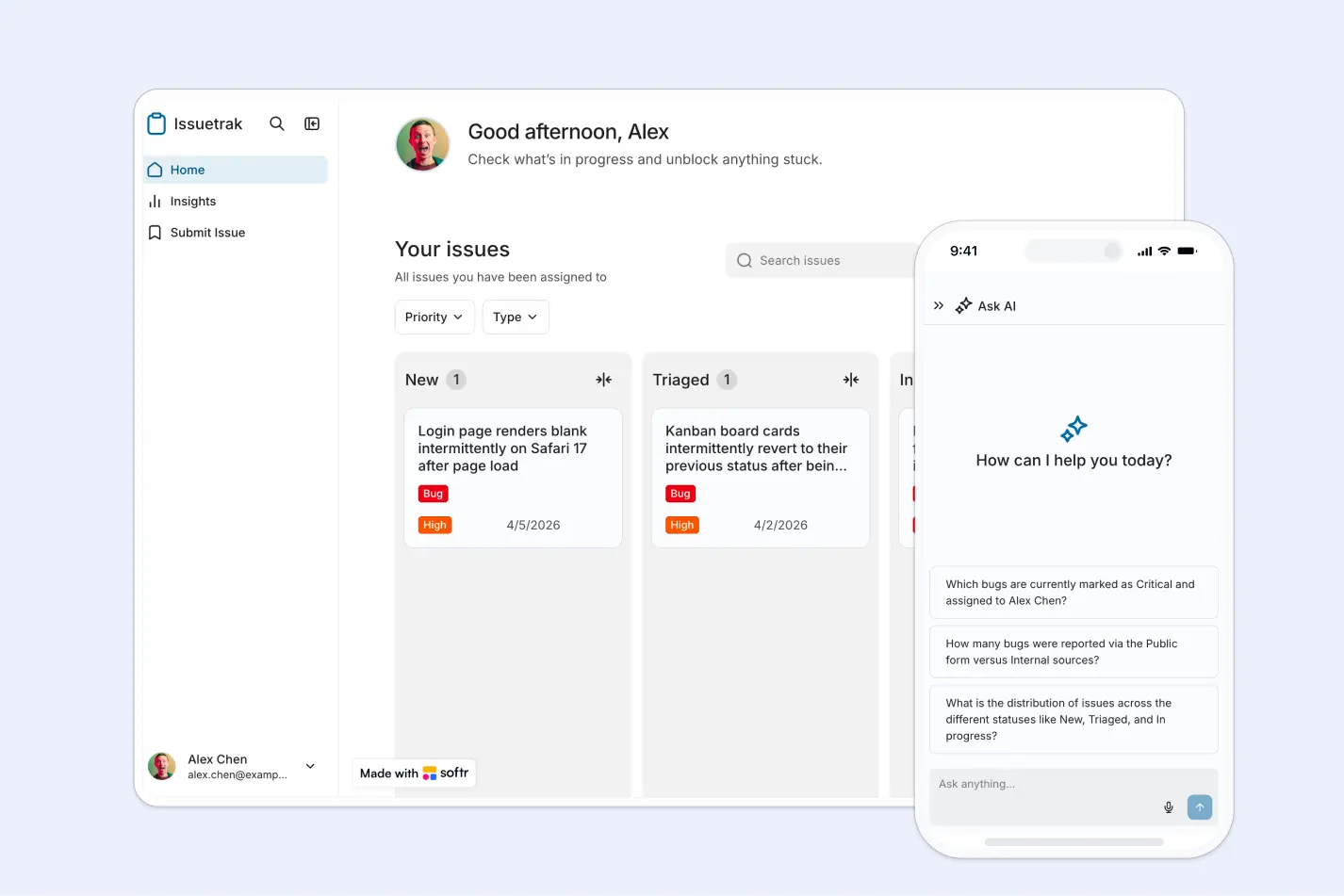
Prompt to try: "Build an internal issue tracker with a kanban board by status, a submission form for employees, and a dashboard showing open issues by team."
Not every team should learn Jira. Plenty of ops, facilities, and support teams just need a shared board for tickets, broken down by status: reported, assigned, in progress, done. Prompted for an issue tracker, the AI Co-Builder generates an Issues table with statuses and assignees, a kanban board grouped by stage, and a form for submitting new issues.
Because the tracker runs on an actual database with permissions, you can open parts of it up safely. Let the whole company submit issues through a form while only the ops team sees the full board, or give managers a dashboard page with resolution-time charts. If you're weighing this kind of build against other software, our comparison of internal tool builders is a good place to start.
6. Inventory management app
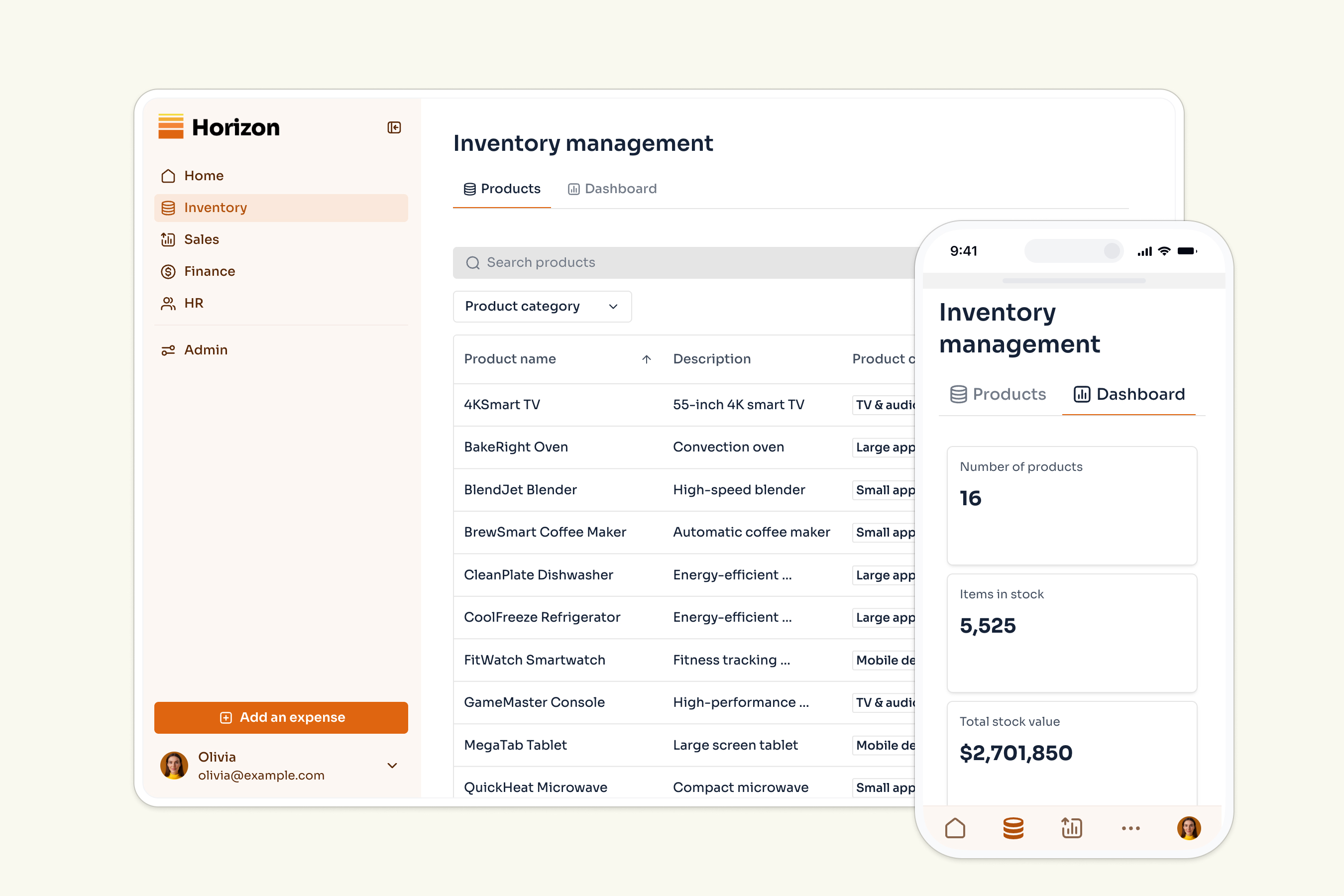
Prompt to try: "Build an inventory management app with products, suppliers, and stock levels, plus an alert workflow when stock falls below a reorder point."
Inventory management can be a real spreadsheet-killer, since it's an absolute must to have live, auto-syncing stock updates as opposed to static data. An inventory app generated with Softr replaces that with a product list, stock-level KPIs, and update flows your warehouse or field team can use on mobile devices.
Within the database, products link relationally to suppliers and orders, while rollup fields keep totals accurate automatically. This structure can power useful automations, like a workflow that emails the purchasing manager whenever stock dips below a reorder threshold. You could also expand the app into a broader ERP, adding purchasing, vendors, and reporting on a page-by-page basis. It all depends on what you need.
7. Product KPI dashboard
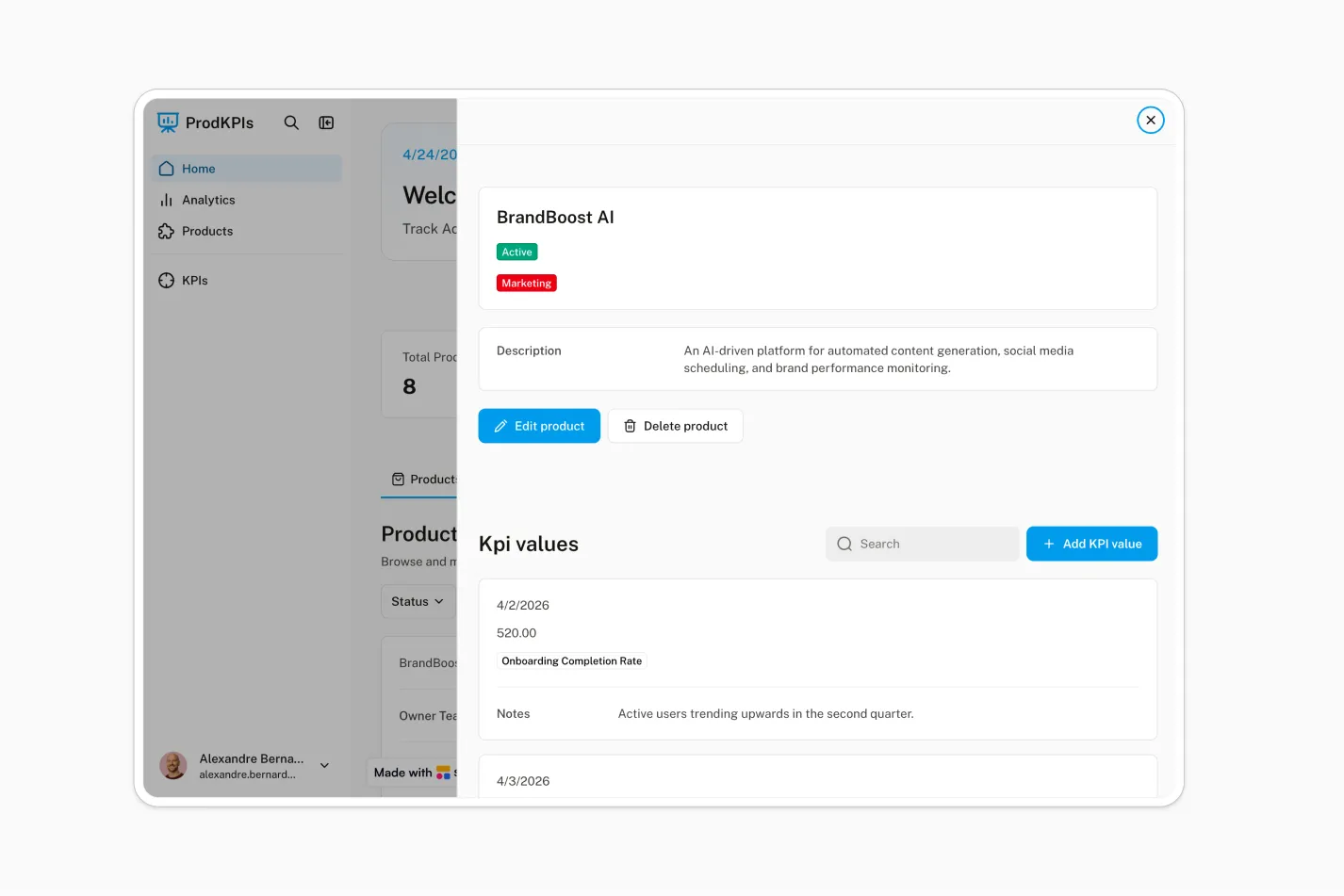
Prompt to try: "Build an internal dashboard where product owners submit KPIs each month and leadership sees charts of trends by product."
This example solves the problem of business metrics being scattered across slide decks and spreadsheets rather than living in a single source of truth. A KPI dashboard app gives every team or team member a page where owners can submit their numbers and keep tabs on performance using live charts — and that's what Softr AI built here.
The Co-Builder generates the submission forms, the KPI tables, and the chart blocks. For added functionality, I configured Softr's Database AI agents to enrich what people enter—tagging metrics and categorizing entries automatically—so the dashboard remains organized without constant manual clean-up.
8. Company intranet
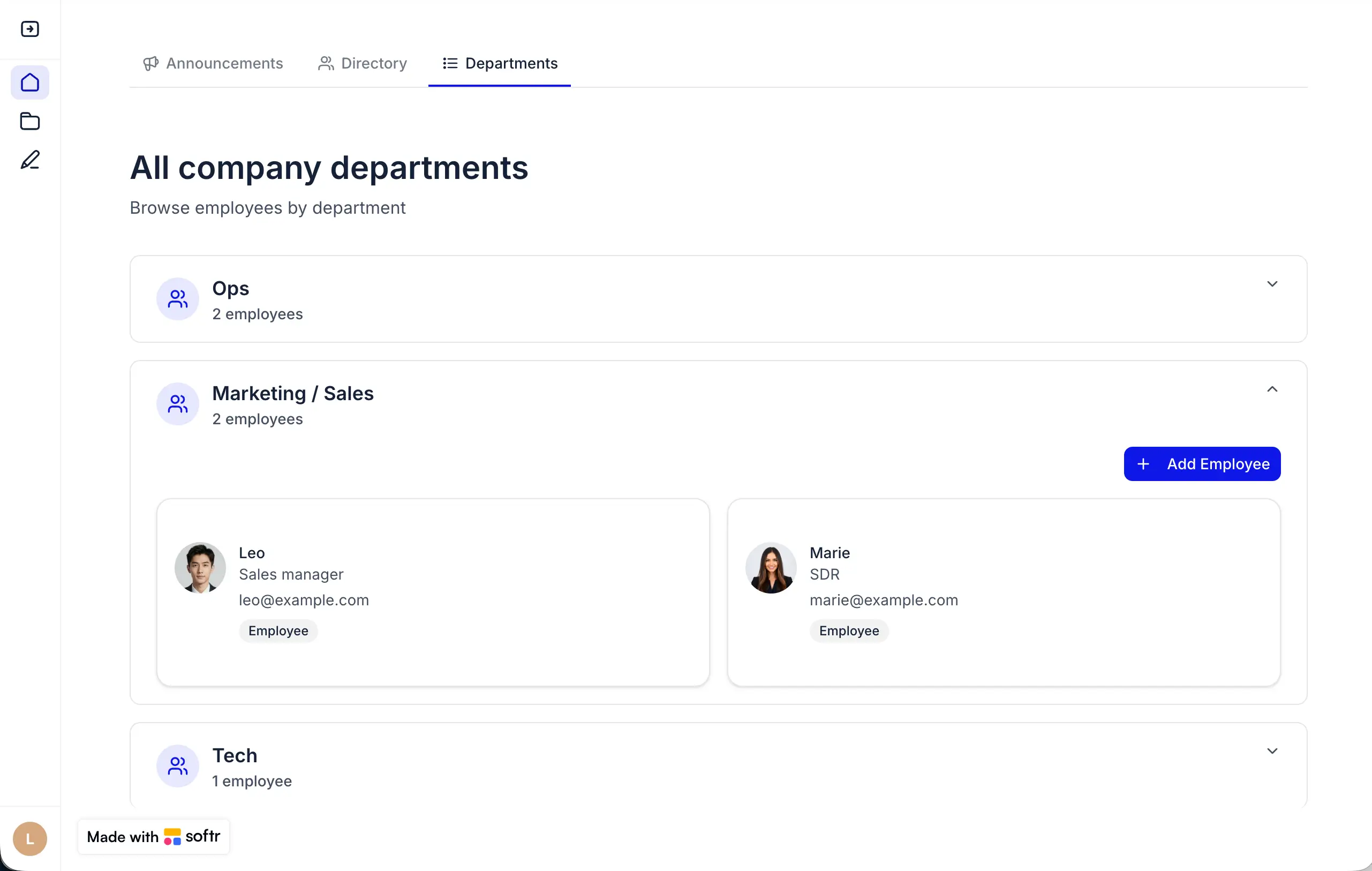
Prompt to try: "Build a company intranet with an announcements feed, department pages, an events calendar, and employee logins restricted to our domain."
An intranet streamlines communication and cuts down on cross-departmental bottlenecks. In this build, you get one login-protected home for company news, department pages, and an events calendar. From the prompt, the AI Co-Builder generates those pages along with employee authentication logic (and you can also restrict sign-ups to your company domain with a toggle).
The screenshot above shows a custom, vibe-coded department directory component. It inherits the broader app's theme, data, and permissions, so it's wired up, functional, and secure in the same way the rest of the intranet is.
9. Knowledge base
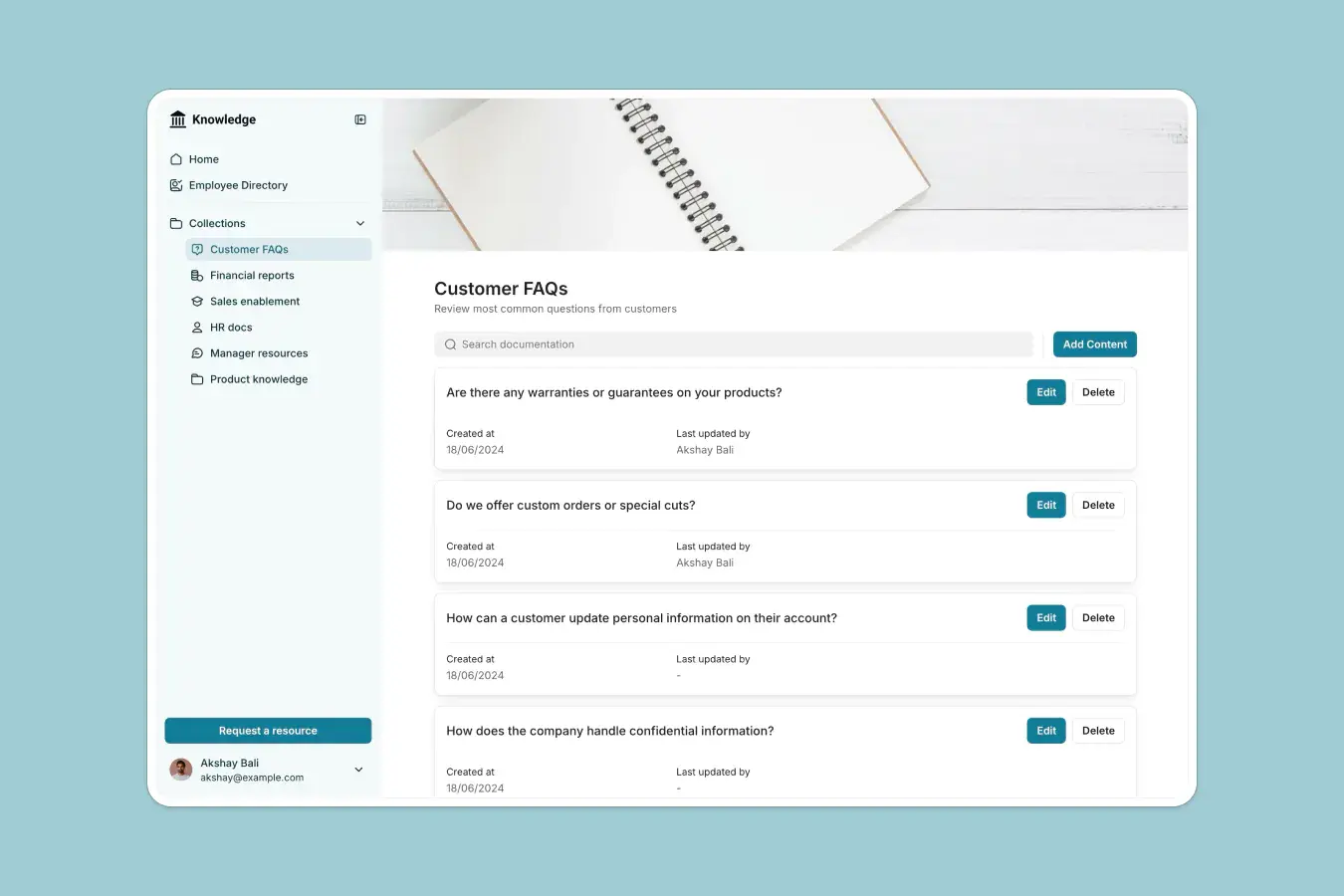
Prompt to try: "Build a knowledge base with searchable articles organized in collections, a form for requesting new resources, and an AI assistant that answers questions from the articles."
Answering the same five questions on repeat is a Sisyphean task no human being should have to perform. Thankfully, a knowledge base app turns those answers into easily searchable documents. In this Softr-built app, help docs are organized in collections, with a form for requesting resources that don't exist yet, and an Ask AI layer so people can query the whole library conversationally instead of browsing.
This is a business pattern that Softr solves at scale. Celonis, for example, replaced a hard-to-maintain Google Slides setup with a Softr-built GTM knowledge base serving more than 1,500 team members.
"Building the knowledge base was almost as easy as putting together a slide deck, but the result is way more maintainable and long-lasting." — Bao Huy Lam, Director of Demo Engineering & Competitive Engagement at Celonis
10. Applicant tracking system

Prompt to try: "Build an applicant tracking system with a public application form, a kanban board of candidates by hiring stage, and access restricted to the hiring team."
Hiring through an inbox and a spreadsheet isn't an ideal solution (there's a patten here), even if you're only dealing with a small pool of candidates. An applicant tracking system generated with Softr gives you a public application form that feeds straight into a database, plus a kanban board of candidates grouped by hiring stage (with totals per column) and pages for open positions.
Permissions matter more here than in most internal tools, since applicant data is highly sensitive. Because access rules are part of the generated app by default, you can scope the board to the hiring team and give interviewers a narrower view with only their assigned candidates visible.
How to generate your own app with the AI Co-Builder
Building each of the 10 apps above started with a conversation. You describe your app, the AI Co-Builder asks a handful of clarifying questions, and then it builds the whole thing right in front of you: database tables with relationships and sample data, pages with navigation pre-configured, blocks matched to each use case (tables, kanbans, forms, charts), and user groups with defined permissions.
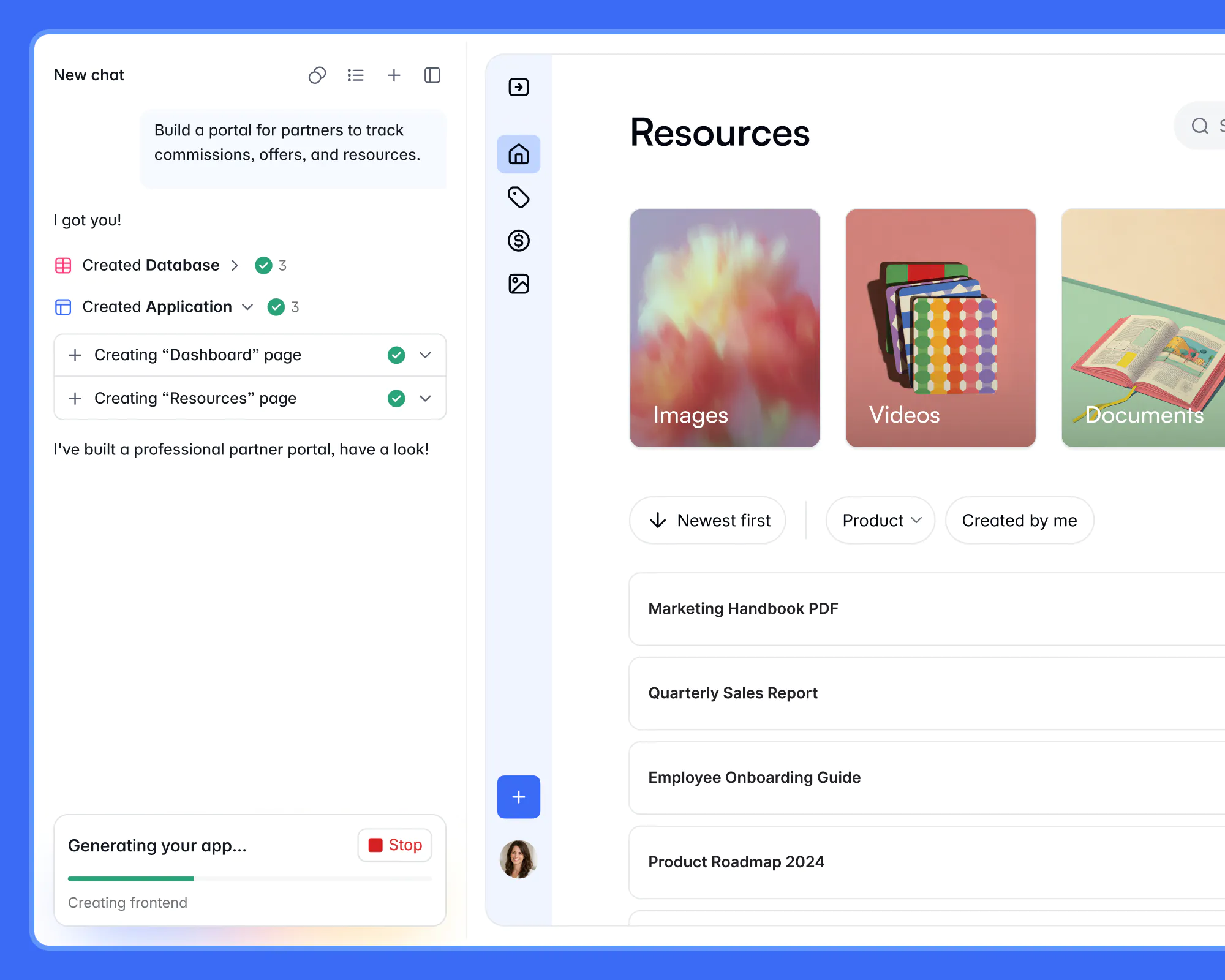
The key distinction between Softr's approach and most vibe coding tools is what the AI builds with. Instead of writing thousands of lines of fresh code, the Co-Builder composes your app from pre-made, battle-tested blocks, the same ones over a million users already run their businesses on. (And for any custom components you need, the Vibe Coding block has you covered.)
Additionally, everything the AI creates is fully editable in the visual editor, so you can tweak a permission or add a field directly instead of burning credits on another prompt.
To build your own app like the examples above, follow these five steps:
- Sign up for Softr (the free plan includes AI credits to generate your first app) and choose Generate with AI.
- Describe your app in plain language. Mention who will use it and what they should be able to do. The prompts above are solid starting points, but you can add more detail as needed.
- Answer the clarifying questions. The Co-Builder asks two or three questions before it builds, which is how it gets the data model and authentication right.
- Preview and refine. Impersonate different user groups with the built-in preview mode, then adjust anything in the visual editor or ask the AI for changes.
- Publish and invite users. Logins, permissions, and hosting are already in place, so your app can go live for real users the same day you build it.
💡 For a more detailed walkthrough of the process, see our guide on how to build a business app with AI in under 10 minutes.
When you're ready to get started, pick the example that looks most like your problem, copy the prompt, and generate your first app today. Or, get started with a custom prompt for whatever use case you have in mind.
Frequently asked questions
What is an AI generated app?
Are AI generated apps ready for real users, or just prototypes?
How much does it cost to build an AI generated app with Softr?
What data sources can an AI generated app connect to?