When company information lives across email threads, shared drives, and outdated folders, teams waste hours searching for what they need.
An intranet fixes that, bringing together secure access to resources, company updates, and AI-powered search that surfaces the right information instantly.
The best intranets also integrate with the tools you already use, helping teams work more efficiently while improving visibility, alignment, and trust across the company.
In this guide, we’ll cover what an intranet is, the different use cases it serves, common frustrations teams face, and how to build one that people actually want to use (no dev resources required).
What is an intranet?

A team intranet is your company’s main hub for information. Instead of looking through Slack threads, Google Drive folders, and emails, an intranet gives everyone a single place to find what they need: HR forms and policies, product catalogs, company news, project resources, and a team directory can securely live in one place.
But today’s intranets aren’t static. What used to be a place for uploading documents has become a connected workspace, with AI working behind the scenes to surface what matters most.
Here’s what you can use an intranet for:
- HR & operations: Centralize policies, forms, and approvals so people can self-serve instead of pinging HR every time they need something.
- Knowledge sharing: Keep your SOPs, internal docs, sales sheets, and internal knowledge base organized, searchable, and up to date.
- Company communication: Announce team updates and events, share wins, and align teams in one central space.
- Team directories: Quickly find the right person, their role, and what they work on without asking around.
- Project spaces: Store plans, assets, and tasks, so everyone knows what’s happening and when.
Types of intranets and when to use them
There are five common types of intranets we can name these days:
| Type | What it does | Best for |
|---|---|---|
| Traditional intranet | A structured, IT-managed site for hosting company policies, HR docs, and announcements. Reliable but static, with limited interactivity. | Large organizations with top-down communication and compliance needs. |
| Social intranet | Adds posts, comments, and activity feeds to make communication more engaging and personal. Can feel busy without structure. | Distributed or hybrid teams focused on connection and engagement. |
| Collaborative intranet | Enables teamwork through shared files, task tracking, and real-time project updates. Often integrates with productivity tools. | Project-based teams that need shared visibility and coordination. |
| Cloud-based intranet | Hosted online and accessible from anywhere. Easy to maintain and integrate with other tools. | Remote or hybrid teams that need flexible, cross-location access. |
| Custom or modular intranet | Lets teams design their own hub with connected data, custom layouts, and permissions (no developers needed). | Growing teams that want control, scalability, and fast setup without IT. |
Key benefits of an intranet
A good intranet quietly fixes many of the small daily frictions that slow teams down. Here’s what it brings to the table:
1. Easier access to information
Everything from policies to quarterly goals live in one searchable hub. No more digging through email chains or Slack threads to find the latest version of a document.
2. Better alignment and communication
When announcements, docs, and team info are visible to everyone, teams stay in sync. People know where to look, what's new, and who's responsible, without the noise of scattered channels.
3. Faster onboarding and smoother HR workflows
New hires can find forms, benefits, and company guides in one place, while HR teams automate routine requests instead of fielding endless questions.
4. Higher productivity
Employees can spend nearly 30% of their week searching for information, according to Forrester. A well-structured intranet cuts that time dramatically, helping teams move faster and make better decisions.
5. Stronger security and control
Role-based permissions and secure logins ensure that sensitive data stays private. Each team member sees only what’s relevant to their role.
6. A better employee experience
A good intranet reduces confusion, builds trust, and helps teams feel connected, even across locations.
[.blog-callout]
💡Arizona State University built a fully functional team intranet with Softr, connecting 1,200+ users and ensuring faculty could update their course data in one place.
[.blog-callout]
What makes a good intranet
The best intranets are easy to use, secure by design, and flexible enough to grow with your team.
Here’s what every modern intranet should include:
| Feature | Why it matters |
|---|---|
| Role-based access and permissions | Keeps sensitive data protected while letting the right people collaborate freely. |
| Document and knowledge management | Stores company policies, SOPs, and resources in one organized, searchable space. |
| News and announcements | Shares updates and posts with the right teams at the right time to keep everyone aligned. |
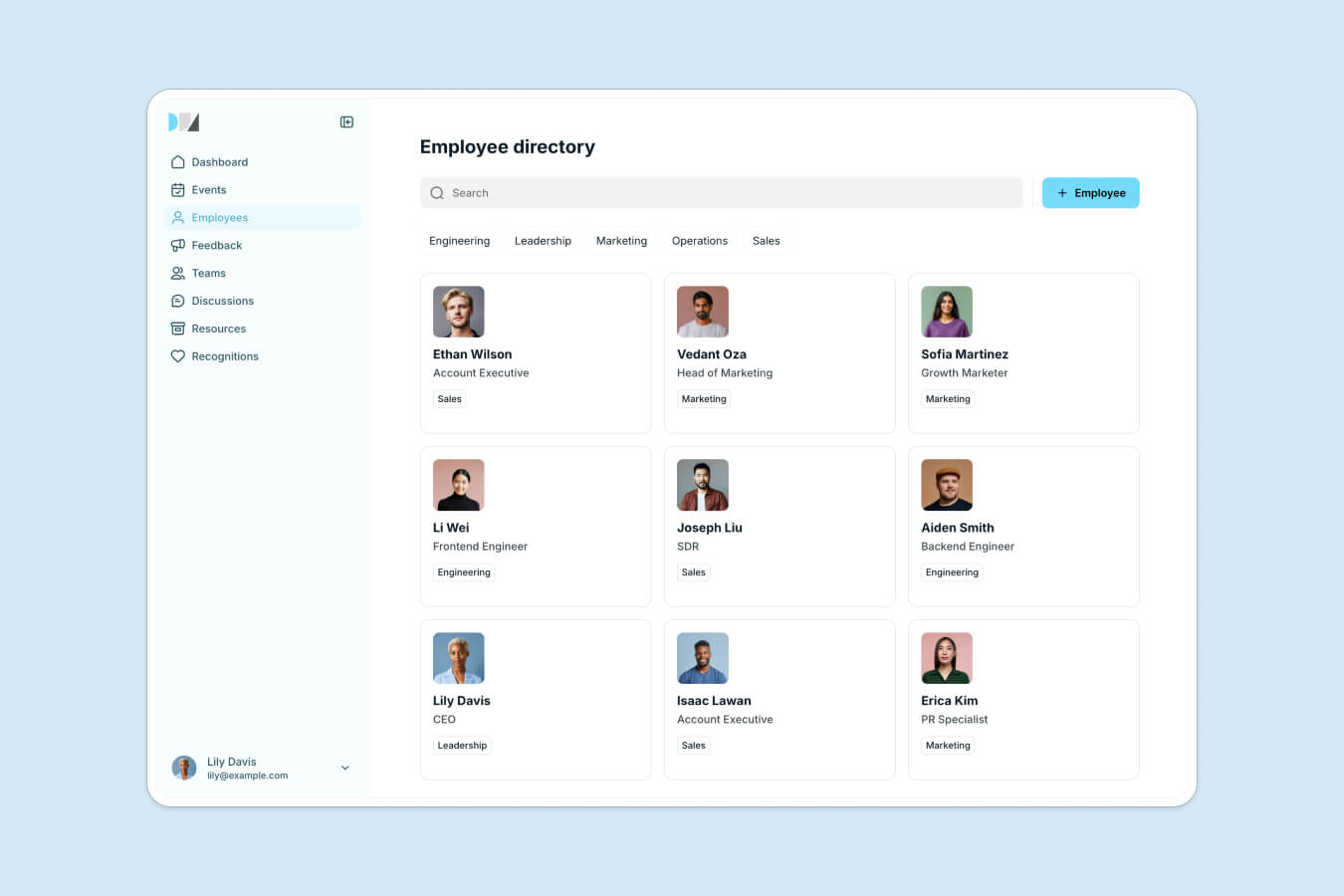
| Employee directory | Makes it easy to find teammates, departments, and roles, reducing friction across teams. |
| Task and request tracking | Simplifies workflows like IT tickets, HR forms, and other workflow approvals without switching tools. |
| Search and AI assistance | Helps employees find answers instantly and reduces time spent searching for information. |
| Mobile and responsive access | Keeps everyone connected and productive from any device, wherever they work. |
| Integrations with everyday tools | Syncs data from platforms like Airtable, Google Sheets, SQL databases, and monday.com for smoother workflows. |
The result? An intranet that feels less like another platform to manage, and more like one of your key tools for internal communication.
Check out this video for more details on how to build a centralized knowledge hub for your team.
Advantages and disadvantages of intranets
Like any tool, intranets come with trade-offs. When designed well, they improve how teams share and find information. When not, they risk becoming another forgotten link where content doesn’t get updated.
Advantages of intranets
- Better access to information: Employees know exactly where to find documents, updates, and policies, reducing time spent searching or asking around.
- Improved communication and alignment: News, announcements, and resources reach everyone in one place, keeping teams synced and informed.
- Stronger data security: Role-based access and user permissions keep sensitive information safe and limit unnecessary visibility.
- Faster onboarding and higher productivity: New hires can access forms, guides, and training materials without manual follow-ups, freeing HR and ops teams for higher-value work.
- Scalability and flexibility: Modern no-code intranets grow with your company: easy to update, restructure, and expand without heavy IT support.
Disadvantages of intranets
- Low adoption if poorly designed: If it's slow, complicated, or hard to navigate, employees will avoid using it, no matter how many features it has.
- Ongoing maintenance: Without clear ownership, content becomes outdated quickly. Every page needs a review process and a responsible owner.
- Initial setup complexity: Traditional intranets or enterprise platforms can take months to configure and roll out, making it easy to lose momentum and keep dated systems.
- Risk of content overload: Without a structure or content governance, intranets can turn into storage dumps of information instead of well-organized knowledge hubs.
- Requires continuous engagement: The value of an intranet comes from regular use and adoption. Teams need to see it as part of their daily workflow, not a side tool.
Bottom line: A great intranet has to be secure, well structured, and actually easy to use.
How to build your own intranet
There are three main ways to build an intranet: hiring developers, using dedicated intranet software, or creating your own without code.
1. Building a custom intranet from scratch
Some large enterprise companies still build their intranets in-house for full control over design, infrastructure, and data. It gives flexibility but demands dev resources for maintenance.
Custom builds only make sense when compliance, integrations, or scale are highly specific. For most teams, it’s an expensive route to recreate what modern, secure platforms can already do faster and cheaper.
2. Buying a dedicated intranet solution
Packaged intranet software (like SharePoint or Simpplr) comes with ready-made modules for communication, documents, and workflows. It's reliable and supported, but can feel inflexible, especially as your needs change.
These solutions are best for mid-to-large organizations that want a structured rollout, enterprise-grade compliance, and IT-managed access. For leaner teams, the setup, customization, and cost can outweigh the benefit, especially now that flexible no-code intranet options exist.
3. Building a no-code intranet
For most modern teams, this is the sweet spot. No-code platforms like Softr let you build a custom, AI-powered intranet in days, without needing developers.
Describe the intranet you need to Softr's AI Co-Builder and it generates a working app (database, pages, and permissions) in minutes, or start from a pre-built intranet template, or build from scratch for full manual control. Connect your data, using Softr Databases as the native foundation or linking to Airtable, Google Sheets, ClickUp, and more, then publish internal pages for news, requests, and resources. Everything from user management to permissions is easy to set up, and employees get a user-friendly front-end.
This approach fits small and mid-sized businesses that want full control over how their intranet looks and works, without the technical overhead or price tag of enterprise tools. It’s fast to launch, simple to maintain, and flexible enough to evolve with your processes.
Why Softr is the best way to build a no-code intranet
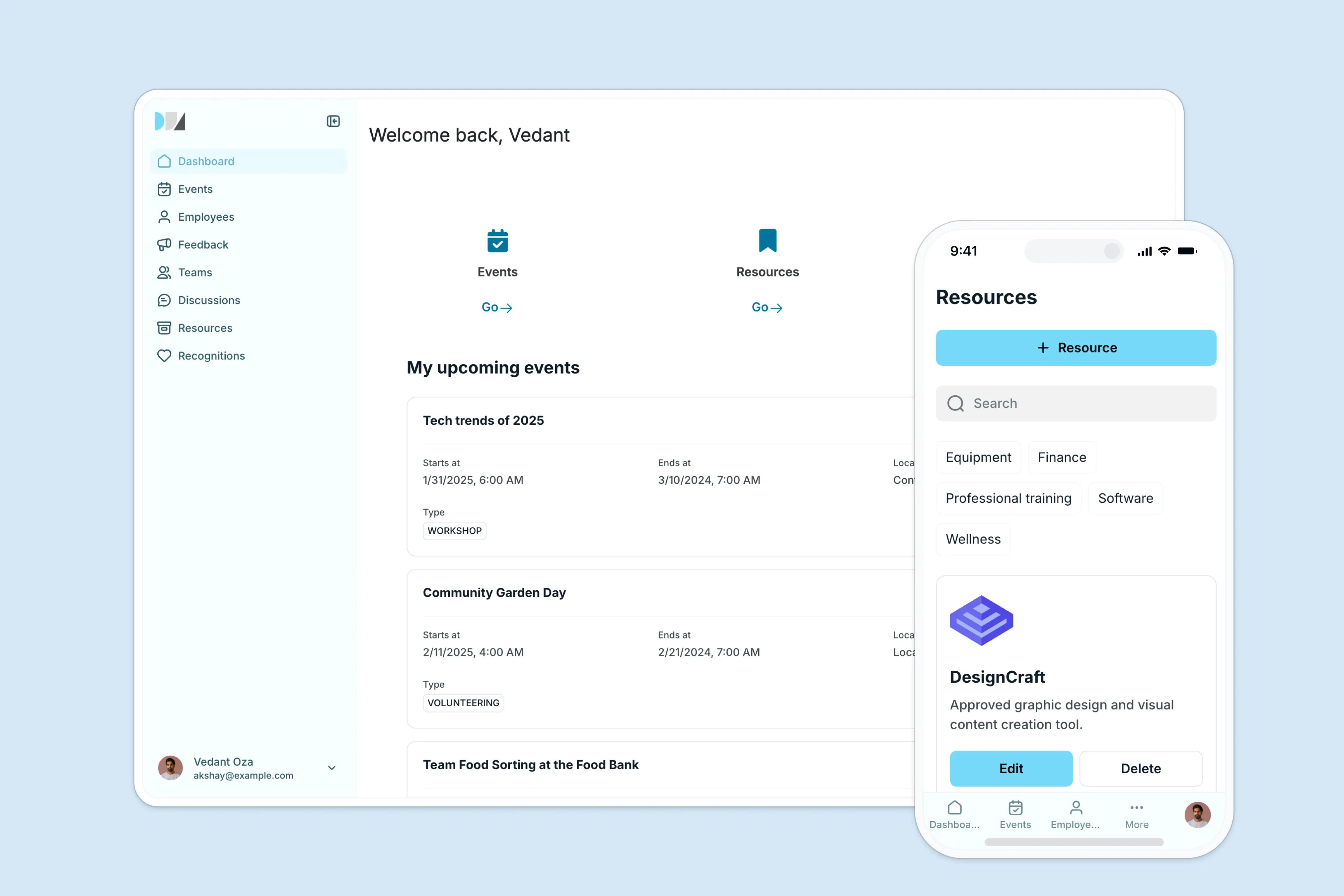
Softr is a full-stack platform that lets you build powerful intranets, no coding or design skills needed. It combines databases, apps, and workflows in one place, so you can manage your data, create secure interfaces, and automate processes across your team.
With Softr, you can:
- Use Softr Databases as your native, relational data layer (or sync existing data from Airtable, Google Sheets, and other sources with real-time, 2-way sync).
- Use conditional visibility to show or hide content by role or team.
- Add conditional forms for HR requests, feedback, or onboarding checklists.
- Automate tasks with Softr Workflows to post policy updates in Slack, send weekly digests, or auto-tag new uploads to keep content organized. Describe the automation you need to the Workflow AI Co-Builder and it builds the logic for you.
- Toggle on Ask AI to give employees a built-in, permission-aware chat assistant that searches only the data they have access to.
- Use the Vibe Coding block to design fully custom pages, like an interactive org chart or a custom dashboard, whenever a pre-built block isn't enough.
- Make it mobile-ready using PWA support, so on-site or hybrid teams stay connected anywhere.
The result is an intranet that scales with your company, without you having to rely on developers, plug-ins, or extra systems.
"Our users love it. They think it's the perfect way to connect knowledge we are building up across our customer interactions, structure it, and make it easily accessible." - Celonis, via Softr customer story
Benefits of building an intranet with Softr
Many teams find real value in building intranets with Softr. Here are some of the key benefits:
- Built for operators, not developers: Anyone can build or update an internal hub, no coding or IT backlog required.
- Works with your existing data and tools: Use Softr Databases as your native, relational database with linked records, formulas, rollups, and file attachments, or connect Airtable, Google Sheets, Notion, HubSpot, and 21+ other native data sources in seconds.
- Comments: Build your intranet with a commenting system that allows employees to ask questions or flag documents that are out of date.
- Scale securely: Granular permissions and role-based access keep sensitive content private and public info visible to all logged-in users.
- Designed for real workflows: You can create a simple intranet, then extend it into a project tracker, inventory management system, or other internal tool without adding more software subscriptions.
Key Softr features
- Pre-built templates: Start fast with an app template for a team intranet, knowledge base, employee directory, and more, or describe your intranet to the AI Co-Builder and let it assemble the app for you.
- Data flexibility: Use Softr's native databases with linked records, formulas, rollups, and file attachments, or connect your app to Airtable, Google Sheets, HubSpot, Notion, monday.com, BigQuery, SQL databases, and more with real-time, two-way sync. Describe your data structure to the Database AI Co-Builder and it generates the tables and fields for you.
- AI-powered apps and databases: With features like Ask AI (a built-in chat assistant for app users) and Database AI Agents (which automatically enrich records, update data, or pull live insights from the web), it's easy to integrate useful AI into your intranet without complex setup.
- The Vibe Coding block: For custom UI that goes beyond pre-built blocks (like a drag-and-drop org chart or a booking calendar), the Vibe Coding block generates a component from a plain-language prompt, and it connects securely to your data with built-in permissions.
- Granular permissions: Control access at the page, block, or record level to protect sensitive data, and use conditional visibility to show or hide content by role, department, or user.
- Advanced conditional forms: Create forms for time-off requests, onboarding, IT tickets, or employee feedback that adapt based on what users select.
- Dynamic filtering & search: Let employees quickly find resources, policies, or team contacts using structured filters and search.
- Custom branding: Match your company's look by adding your own logo, colors, and layouts.
- Enterprise-grade security: SOC 2 Type II compliant, with all data hosted in Europe (Germany) and optional SSO on Custom plans.
- PWA-ready: Teams can access the intranet from any device (desktop, tablet, or mobile) like a native app.
- Live chat support & active community: Get live chat support and join a community of thousands of Softr builders.
{{cta-1}}
How to increase employee adoption of an intranet
Even the most feature-rich intranet can fail if teams don’t actually use it. Adoption comes down to trust, clarity, and ease of use. People need to know where to find things, who owns them, and how often they’re updated.
Below are five practical ways to make your intranet a tool employees rely on daily.
1. Structure your information in a shared database
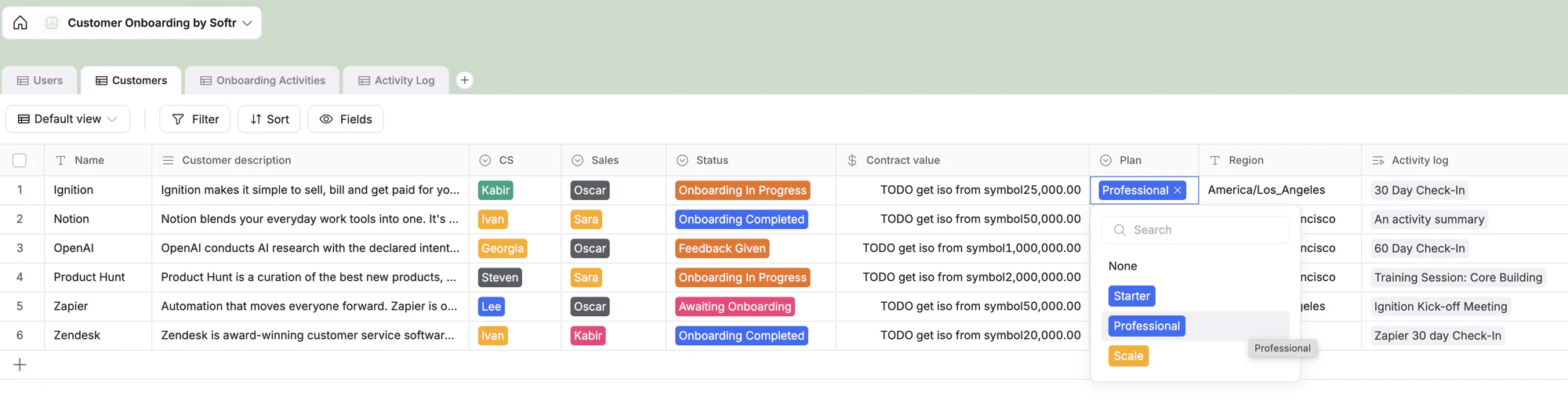
Centralize resources, policies, and requests in a connected database. With Softr Databases, you can link records (e.g., users ↔ customers ↔ onboarding activities) so everything stays organized and up to date.
2. Assign clear admins and team owners
Give each team ownership of their space: HR for onboarding, IT for support, Operations for policies. Softr’s granular permissions make it easy to control who can view, edit, or publish content at the page, block, or record level.
3. Track updates & content relevance
An intranet only works if people trust the information. Keep a “last updated” or a similar field in your database, and use Workflows to send reminders when a document hasn’t been reviewed after a set time.
4. Automate recurring tasks and communication
Reduce manual admin by setting up Workflows that post announcements to Slack, send weekly summaries, or tag new uploads automatically. Automation keeps the intranet relevant without someone going in and constantly maintaining it.
5. Make access and search effortless
If it’s hard to log in or find information in the intranet, people won’t use it. Softr supports SSO (in the Custom plan) and passwordless login codes for secure access, and features like Ask AI let employees find answers instantly by searching only the data they’re allowed to see.
When your intranet is organized, automated, and easy to use, adoption follows naturally, and Softr helps you get there without writing a single line of code.
{{cta-2}}
Build a custom intranet that makes teamwork easier
Building an intranet isn’t about adding another tool your team has to use. It’s about removing friction and making information easy to find.
When employees can access the right resources without wondering if they’re outdated or misplaced, the impact shows up everywhere: fewer questions, faster decisions, and more focused work.
And now, building a custom intranet doesn’t require months of dev work. With Softr, you can launch a secure, branded internal hub that connects your data, automates routine workflows, and is easy to adapt and maintain as your company grows.
Start with Softr’s free intranet template to build a no-code intranet your team will want to use.
Frequently asked questions
What is intranet vs. internet?
What is the difference between intranet and extranet?
Is an intranet safe?
Who can use an intranet?
Which intranet features are available with Softr?