Internal tools: Types, benefits, and how to build them with AI
.png)

Internal tools are apps a company builds for its own staff, not for its customers. Admin panels, dashboards, request trackers, and approval apps are all internal tools. Unlike off-the-shelf software, these are frequently purpose-built around a team’s workflows and data.
In this guide, we’ll break down the types of internal tools, how they compare with operational software and ERP, and when to build, buy, or use a platform. We’ll also share a governance checklist for IT and show how Softr’s AI Co-Builder can generate a complete internal tool from a single prompt.
What are internal tools used for?
You can build internal tools for various use cases, primarily when external tools don’t fit your exact requirements, and create blockers for the team.
For example, you can build a vendor management tool tailored to your needs. This internal-facing software can automate processes like vendor onboarding, registration, and relationship management.

Internal tools for engineering teams
For software engineers, “internal tooling” usually means something narrower: the in-house software developers use to build and run the product. Examples include build and deploy pipelines, code search, feature flag dashboards, and internal question-and-answer sites. In that sense, internal tools development is the work of a platform or developer experience team.
This guide covers the wider meaning: the apps that operations, sales, support, and IT teams use to run the business.
6 types of internal tools by team
Internal tools come in many shapes and sizes. Let’s break down six types of tools you can create for your internal workflows, grouped by the team that uses them.
Marketing
Marketing teams usually work with tons of data. While several marketing analytics tools already exist, teams can often struggle to get granular and specific data. Internal tools allow you to skip past these limitations and track, organize, and share data from a single platform.
Marketing teams can use internal apps like:
- Metrics dashboard
- Campaign calendar
- Content repurposing
- Contractor management
Operations
The operations team would likely benefit the most from internal tools. You can build a custom app to accommodate all critical workflows and use cases to improve efficiency. Unlike off-the-shelf project management tools, internal tools can offer a holistic view of your company’s operations.
Operations teams can use internal apps like:
- Team intranet
- Internal help desk
- Vendor management
- Inventory management
IT
IT teams handle requests from every other department, so their internal tools focus on intake, tracking, and access. A shared request tracker replaces the IT inbox, and an asset register shows who has which laptop or software license.
IT teams can use internal apps like:
- IT ticketing
- Asset and license tracking
- Access request approvals
- Software request intake
Sales
A typical sales team has to generate leads, build a lead database, manage leads in the pipeline, and close deals. With the right tools, your sales staff can work more efficiently and win deals faster.
Sales teams can use internal apps like:
- CRM
- Lead capturing
- Customer onboarding
- Sales pipeline tracking
Product
Internal tools enable product teams to conduct continuous product discovery and streamline user research. You can conveniently collect user feedback to make data-driven decisions about the product lifecycle.
Product teams can use internal apps like:
- Product roadmaps
- Product KPI tracker
- Bug tracking board
- Feature tracking board
Customer support
Your customer support setup can fall apart without airtight systems to manage a large volume of support requests. This is where internal tools build alignment between different support team members and enhance your customer education efforts.
Customer support teams can use internal apps like:
- NPS tracker
- Community forum
- Customer feedback
- Support ticketing tool
Internal tools vs operational software vs ERP
Vendors use these three terms loosely, meaning there's some overlap. Operational software is the part of your internal tools that runs day-to-day processes. An ERP (enterprise resource planning system, such as SAP) is one large packaged system that manages company-wide resources like finance and inventory.
| Internal tools | Operational software | ERP | |
|---|---|---|---|
| What it is | Any app a company builds or configures for its own staff | Internal tools that run daily processes and move work between systems | A packaged suite that manages company-wide resources |
| Scope | One team or one workflow, up to company-wide | One process, often across several systems | The whole company, on standard processes |
| Examples | Admin panels, dashboards, intranets, request trackers | Vendor onboarding, order routing, status dashboards, alerts | SAP, Oracle NetSuite, Microsoft Dynamics 365 |
| Who builds and changes it | Developers, IT, or business teams on a platform | Developers, IT, or business teams on a platform | The vendor, configured by IT or consultants |
In practice, many companies run all three at once. The ERP holds the system of record, while internal tools and operational software cover the team-specific processes that the ERP doesn’t fit.
Types of operational software
- Monitoring apps: Alert a team when something it tracks changes, such as a failed payment or a stalled order.
- Status dashboards: Show live metrics or progress for one process, such as open IT requests by priority.
- CRUD tools: Let staff create, read, update, and delete records without direct database access. A CRUD application builder gives you these screens without code.
- Process apps: Guide people through a multi-step workflow, such as vendor onboarding, with data entry, status tracking, and automation in one place.
- Admin panels: Combine the other four to manage users, trigger workflows, and correct records, usually behind stricter permissions.
5 reasons why businesses need internal tools
To build or to buy: that is the question for many teams struggling to improve efficiency without draining resources. Let’s face it, building a tool from scratch can seem like a lot of effort and resources without any direct ROI from clients. Here’s why many teams build them anyway.
1. Streamline workflows and improve productivity
Building internal-facing apps allows you to tailor each tool exactly to your workflows. You’re not stuck with a one-size-fits-all platform that requires lots of configuration, a lengthy learning curve, and endless blockers.
These tools can also deliver strong ROI by increasing team productivity. When employees face fewer blockers in their work, they’ll be less frustrated and perform better.
2. Gain more control and flexibility to customize
Buying an external tool means you can only do so much to configure it for your needs. It’s difficult to customize most software to fit your requirements. Plus, you might even have to spend more to access better customization options.
Instead, building custom tools allows you to design capabilities based on your use cases. And you can iterate these features to adapt to your team’s evolving needs.
Essentially, you create a solution around your pain points instead of doing the opposite.
3. Maintain greater data security and compliance
Security is a key priority when buying software, especially for enterprise teams. In fact, security (48%) is the second-most decisive factor for software buyers after price (49%).
With internal tools, you can protect confidential data more effectively. It’s a lot easier to implement security measures and maximize compliance since you have complete ownership of these tools. This is one reason teams favor production-ready platforms over fragile, vibe-coded apps that look fine in a demo but leak data once real users log in.
4. Break down internal silos and build team alignment
You can build custom apps to automate processes and standardize workflows at an org-wide level. As a result, different teams will have greater visibility into different projects and be on the same page.
Put simply, internal tools can create more transparency in the way your company functions. This would bring different departments together and improve collaboration.
5. Save costs and increase ROI
For many teams, the choice between building or buying a tool would ultimately boil down to cost.
Building internal tools can prove cost-effective for larger organizations, especially when you need specific features that third-party solutions don’t offer. For smaller teams, creating internal tools can replace expensive out-of-the-box solutions.
The numbers back this up. The legal tech company EvenUp built an internal performance tracker with Softr in 24 hours, replacing pricey per-seat tooling and saving over $6,000 a month while serving 340+ employees and contractors. MIT’s Project Manus replaced a custom Ruby on Rails portal that had cost $100K+ to build and maintain, with a single person rebuilding it in Softr for 2,800+ users.
Build vs buy vs platform
Once a team knows it needs a tool, there are three ways to get one: build it with code, buy an off-the-shelf product, or build it on a platform. More teams now pick building. In Retool’s 2026 survey of 817 customers and builders, 35% had already replaced at least one SaaS tool with a custom build.
| Build with code | Buy off-the-shelf | Build on a platform | |
|---|---|---|---|
| Upfront cost | Developer time | License fee | Platform subscription and builder time |
| Time to ship | Weeks to months | Days, after procurement and setup | Hours to days |
| Fit to your workflow | Exact | You adapt to the product | Close, with custom code where the platform allows it |
| Ongoing maintenance | Your team owns hosting, security patches, and updates | The vendor, plus your admin for configuration | The platform owns infrastructure and security, your team owns the app’s logic, with IT oversight |
| Per-user pricing | None, but hosting costs grow with usage | Usually per seat | Varies: per builder, per end user, or both |
| Best for | Core product capabilities and unusual scale | Standard processes, such as payroll or accounting | Team-specific workflows that change often |
On top of the above, you'll also want to consider these:
- Maintenance: A coded tool keeps costing money after launch, for fixes, security patches, and dependency updates. Budget for it every year, not only for the build.
- Per-user pricing: A tool priced per end user gets more expensive with every colleague you add, so a company-wide rollout can cost more than the build. Check whether a platform charges per builder, per end user, or both, and what an extra user costs. Softr includes a set number of team and client users on each plan and bills extra users monthly.
For a longer look at the trade-offs, see our comparison of internal tools vs SaaS.
How to build internal tools
Building internal tools is almost similar to building a consumer-facing solution. The main difference is: you have first-hand access to the end-users. You don’t have to engage in guesswork or conduct lengthy research studies to learn what your users want.
With this big difference in mind, let’s look at your options for building internal tools, then break down the steps to create one.
Identify pain points and use cases
Internal tools are designed for your own colleagues. That means your end-users are just a Slack message away, so you can ask them what they need instead of guessing.
Start by identifying the pain points you want to solve with this tool. A needs assessment gives you an objective idea of the tool’s purpose: what the team does today, where the work slows down, and which data it relies on. Our guide on what to plan before building an internal tool lists the questions to ask.
Collaborate with end-users to define goals
Sit down with the people who will use the tool and agree on what it must do: the workflow it covers, the data it needs, and who can see what. Collaborating with your colleagues ensures you’re building for real-world workflows instead of something they don’t need.
Besides defining goals, you also want buy-in from the leadership team and from IT. Leadership sets the priority, and IT confirms that the tool meets the rules in the governance checklist below. Agreeing at this stage prevents delays later in the build.
Build and optimize tools for efficiency
Not every team can put their developers on an internal tool project. In fact, they're one of the most obvious things to vibe code. Every business has that one spreadsheet that's holding things together. With the power of AI coding tools, why not turn it into an app rather than a very obvious risk factor? And with the right vibe coding platform, this is possible even for non-technical teams.
There are a few different ways to use AI to build internal tools, depending on how technical your team is and how much control you want over the underlying code:
- AI coding assistants like Cursor, Claude Code, and Codex generate code, but you’re still responsible for the infrastructure, deployment, and other technical decisions. They’re generally better suited to teams with development experience.
- AI app generators like Lovable and Bolt let you describe an app in a prompt, then generate and host a working prototype for you.
- AI-native app platforms like Softr use AI to build on top of an existing app platform, where things like databases, authentication, permissions, and hosting are already part of the system.
For a side-by-side look at the platforms in each group, see our roundup of no-code internal tools.
Governance and security checklist for IT
Business teams can now build internal tools without waiting for developers. In the same Retool survey, 60% of builders said they had shipped software outside IT oversight. So the job for IT shifts from building every tool to setting the rules every tool must follow.
Check these 8 controls before you approve any tool or platform:
- Single sign-on (SSO): Staff sign in with your identity provider, such as Okta or Microsoft Entra ID. One login covers all work apps, and access ends in one place when someone leaves.
- SCIM provisioning: Accounts are created and removed automatically from your company directory. Without it, a departing employee keeps access until someone removes it by hand.
- SOC 2 Type II report: Ask the vendor for the report itself. A Type II report shows that an auditor tested the vendor’s controls over a period of months, not on a single date.
- User groups: Each role sees only the pages, blocks, and actions it needs.
- Record-level restrictions: Each person sees only the rows of data they should, such as their own requests or their region’s accounts.
- Audit logs: The platform records who changed what and when, in the apps and in the database.
- Data residency: You know which country stores the data, and it matches your legal requirements, such as GDPR.
- A named owner: Each tool has a business owner and an IT contact, so it keeps working when the person who built it leaves.
On Softr, SSO, SCIM, and audit logs are on the Enterprise plan. Global data restrictions start on Business, and user groups with granular permissions start on Pro. Softr is SOC 2 Type II compliant, with the report available on request. Data is hosted in Germany by default, and US hosting is available on request.
Vibe-coded apps vs governed platforms
A vibe-coded app is a new codebase that an AI tool generated from a prompt. Its login, permissions, and data access are whatever the AI wrote, and someone has to review, host, and patch that code. A governed platform provides those layers once, already tested, for every app built on it. A vibe-coded app can do anything code can do, while a platform app stays inside rules that IT has already approved.
IT ownership vs business ownership
The model that works for a small IT team is shared ownership. Business teams build and change their own tools, because they know the workflow best. IT owns the platform: who can build, who can publish, which data sources connect, and which sign-in methods are allowed. With one or two developers, IT then reviews tools instead of writing each one.
What to look for in a vibe coding platform for internal tools
Here are some of the important things to focus on:
- Security, security, security: There have been lots of security concerns and data leaks from vibe coded apps. A lot of these issues are configuration problems, but if a platform doesn't put security first, you shouldn't connect your business data to it.
- Control and customization: Vibe coding is great for building a rough prototype, but setting up user authentication, permissions, a database, and even some aspects of the UI is much safer and easier with dedicated tools.
- Connect to your existing data: You're probably building internal tools to replace a hacked together combination of spreadsheets, files, and folders. Whatever existing data you have, you need to be able to connect it into your new tools.
- Support multiple users: Teams across your whole organization will need to access any internal tools you build, so you need to be able to scale up the number of users easily.
- Affordable pricing: Most companies can't afford to spend hundreds of dollars per seat for custom internal tools. Pricing needs to support both affordable building and using of any tools.
With an AI-native no-code platform like Softr, you can build custom apps in minutes, without developer support. Softr is an AI-native no-code platform: its AI Co-Builder takes a plain-language prompt and generates a complete internal tool, including the database, the pages, and the user permissions, all in one pass. Zapier’s roundup of internal tool builders names Softr the best internal app builder for creating with AI.
Crucially, Softr is AI-first, not AI-only. You can generate an app with AI, start from a template, or build from scratch, and you keep full visual control of everything the AI produces. The result is production-ready and secure from day one, which is exactly what an internal tool that your colleagues rely on every day needs to be. That sets it apart from fragile vibe-coded apps that break the moment real data and real users hit them.
Softr is a full-stack platform: the interface, the native Softr Databases, and native Softr Workflows for automation. You can store your data directly in Softr Databases, or connect to 21+ external sources like Airtable, Google Sheets, and HubSpot if your data already lives elsewhere.
Build an internal tool with Softr AI
Here’s a concise playbook to build a full-fledged internal tool using Softr:
- Structure your data. Map your tool to relational tables (for example Users, Tasks, Vendors). Use Softr Databases as your native source of truth, or connect an existing Airtable, Google Sheets, or HubSpot base.
- Generate with the AI Co-Builder (or a template). Describe what you need in plain language and the AI Co-Builder scaffolds the database, pages, and user groups for you. Prefer a head start? Pick from a wide range of templates, or build from scratch.
- Set up user groups and data restrictions. Define dynamic user groups (such as Admins and Employees) and enforce row-level data restrictions so each person only sees the records they should.
- Build your pages. Assemble dashboards, list and table views, and record detail pages with native blocks, or ask the AI Co-Builder to add and configure blocks for you.
- Automate with Softr Workflows. Trigger native workflows directly from UI actions (like an action button or form submission) to send notifications, update records, or run AI steps, or connect to Zapier, Make, and n8n via native integrations.
- Publish and invite your team. Preview with user impersonation to verify permissions, then publish in one click and invite colleagues by email.
As you build, you can customize everything: add dynamic blocks, create user groups, make new pages, specify access permissions, and restyle the design to match your brand. Action buttons let users update records directly from the interface without writing code.
To keep your tool secure, set page-level visibility and user groups so each role only sees what it should.
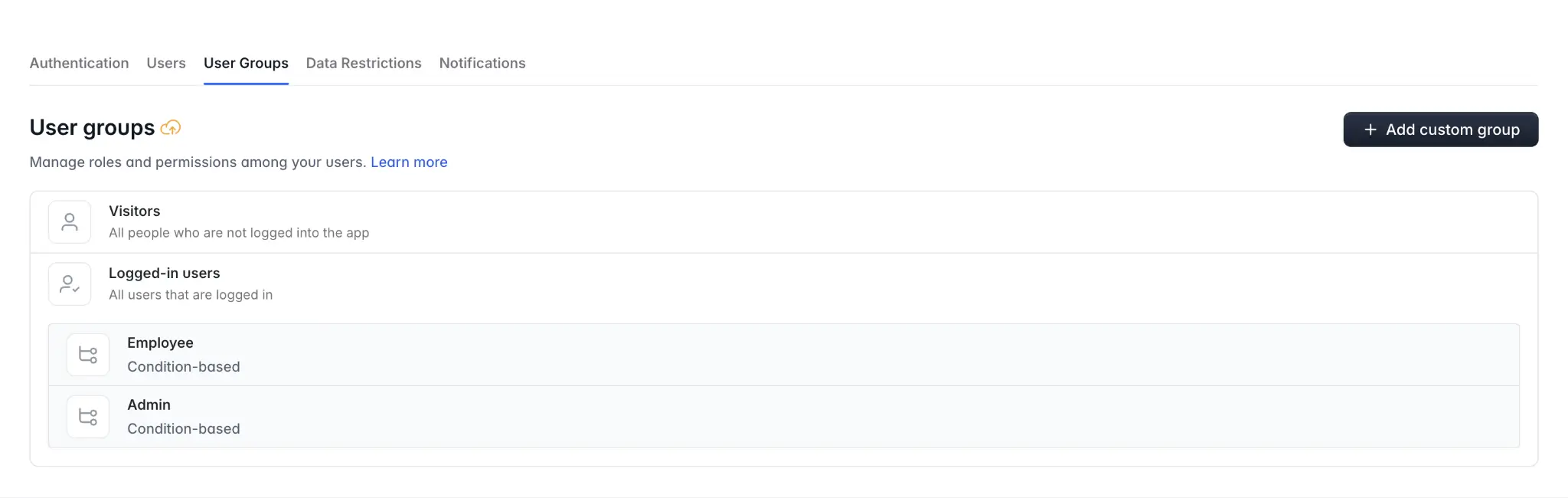
Want to make this process more collaborative? Add your colleagues to your Softr workspace and create new elements together. When you’re ready, preview your app across screen sizes, then connect a custom domain (if required) and publish. Once published, your tool can be shared with a simple URL.
Roll out new tools with documentation and training
You’ve built a brand new tool for your team. What next?
Before rolling it out to the entire organization, it’s important to conduct pilot testing with a smaller group of users. Consider it a beta test before the full-scale launch, where you get contextual feedback from real users.
When the product is ready to be shipped, roll it out in phases with adequate documentation and hands-on training.
Host training sessions with different sets of users to explain different capabilities. Answer their questions and create comprehensive documentation to drive product adoption quickly.
Build internal tools to empower your team
Internal tools might not have a direct impact on your bottom line. But they can significantly enhance employee productivity, efficiency, and performance.
Most teams don’t build internal apps because they believe it’s a resource-heavy process. However, with an AI app builder like Softr, the development process for internal tools becomes a breeze. Describe what you need to the AI Co-Builder, or get started with any of Softr’s templates, to see how quickly you can develop a production-ready custom app.
Frequently asked questions
What is an internal tool?
What is internal tools development?
What is operational software?
Are no-code internal tools secure?
How can a small IT team deliver internal tools faster?