Retool pricing: A complete guide to plans in 2026


As someone who can’t code, I never thought I’d be able to build my own tools. AI app builders changed all that. For the first time, I can create what I’ve always wanted without spending time and money on a developer. And because I’m doing a lot of experimenting, one of the first things I check with any tool is pricing.
Retool was one of the tools I tested. I started with the free plan, then a free trial of its highest-paid tier, to understand how its pricing and features actually work. Retool looks simple at first—you pay per user—but the real cost is harder to predict once you factor in usage and the features locked behind higher plans.
So here’s a detailed breakdown of Retool’s pricing: what each plan includes, how the costs climb, its limitations, and how it compares to an alternative like Softr.
Retool pricing at a glance
| Plan | Price | Best for | What to know |
|---|---|---|---|
| Free | $0 | Solo builders or small teams testing Retool | Build as many apps as you want with up to five users, free. But there are no external users, and you can’t buy more of anything. |
| Team | $10 per builder, $5 per internal user (monthly) | Growing teams who need more users and usage limits | Add more than five users, higher usage limits, and a staging environment. Still no external users. |
| Business | $50 per builder, $15 per internal user (monthly) | Teams that need external users and access controls | Add external users (first 50 free), permissions, audit logs, and custom branding. But the price is a steep jump from Team. |
| Enterprise | Custom | Large organizations who need advanced features or want to self-host | Get SSO, source control, self-hosting, and dedicated support. No public price. |
How Retool’s pricing works
First, Retool charges per user, not per app. You can build unlimited apps on every plan. What you pay for is people, and Retool splits those people into three types, each priced differently: builder, internal user, and external user.
A builder is someone who built or edited an app or workflow during the billing cycle. An internal user is one who didn’t build or edit anything that cycle, which is why they’re billed lower than builders. While an external user is someone outside your organization, like a client or vendor, and they’re only available on the Business and Enterprise plans.
Then there are AI credits. There’s no limit on how many apps you can build, but the AI credits you use to build them can run out. Every plan comes with a monthly pool, and every app you generate or edit with AI reduces it. Retool estimates a typical app at 3 to 6 prompts and about 12 credits per prompt, but that assumes you know exactly what you’re building.
When I tried building an app myself, my first prompt cost 11 credits and the second cost 18. That’s almost 30 credits on one unfinished app, and it’s easy to see how a few sessions of experimenting would eat through a monthly pool. Complex prompts cost more, too. And once you’re out of credits, you can’t use the AI features until the next month, unless you buy more.
Workflow runs and agent hours follow the same pattern, with monthly allowances and extra charges once you exceed them. So on top of paying per seat for every person, you also pay based on how much you build and run.
Retool pricing breakdown
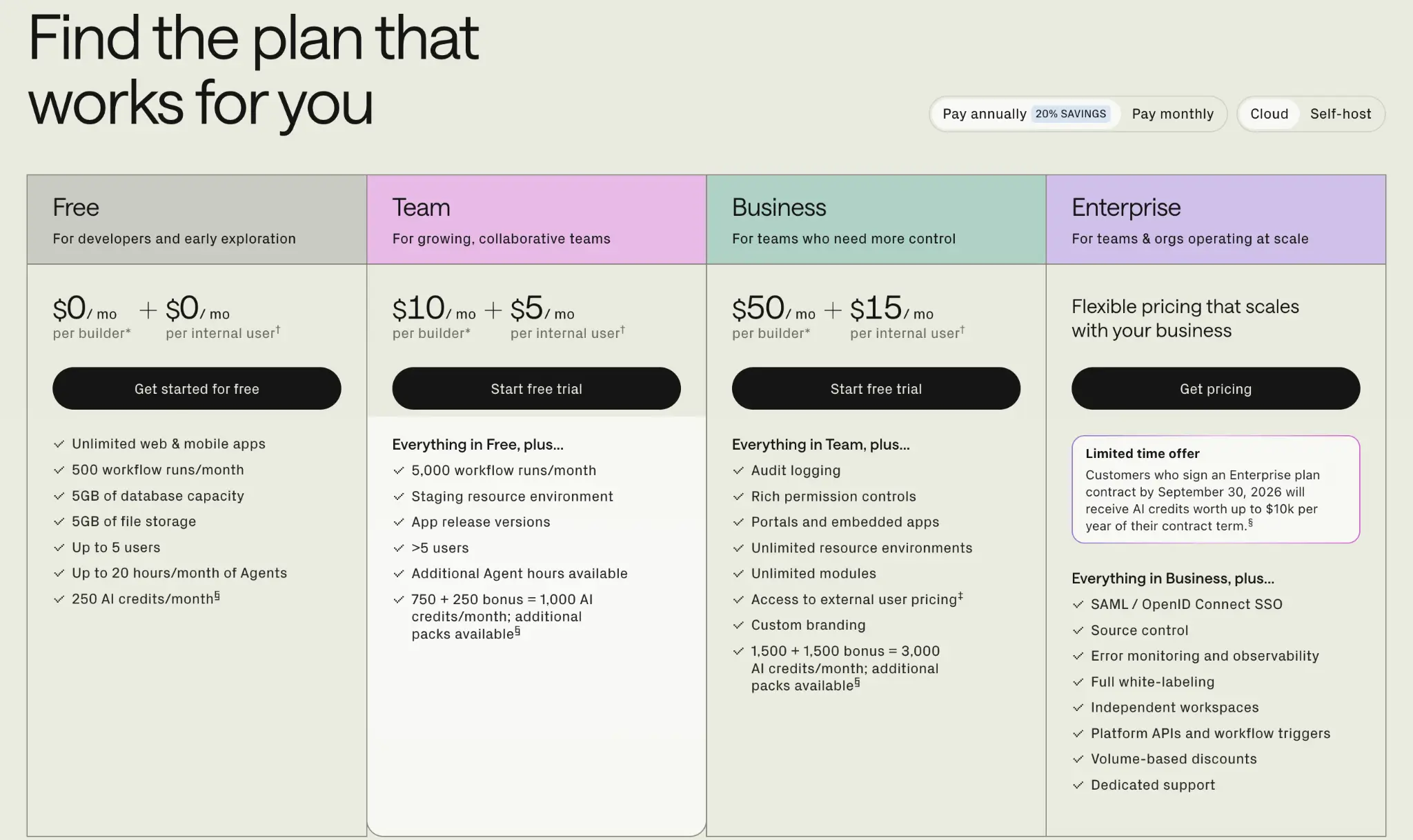
The prices below are for annual billing on Retool Cloud. Monthly billing costs 20% more, and the self-host option is only available for the Enterprise plan.
Free: $0/month
The Free plan is Retool’s entry point. It’s the only plan that doesn’t charge extra for additional users (though there’s a limit on how many you get), and it offers a decent set of features to test the tool and decide if it’s for you. The catch is that you can’t buy extra AI credits, users, or agent hours on this plan.
Best for: Solo builders or developers who want to explore the tool before buying.
Key features
- Unlimited web and mobile apps
- 250 AI credits a month with no option to buy extra
- Up to 5 users total, with no option to add more
- 500 workflow runs a month
- 20 agent hours a month
- 5GB database capacity and 5GB file storage
Pros
- It’s free with no time limit, so you can test Retool at your own pace
- You can build as many apps as you want and see what the tool actually does
- You get enough credits and features to build something real, not just click around a demo
Limitations
- 250 AI credits can finish quite fast, especially if you’re building complex apps
- If you have a team, the 5-user limit might not be enough
- No external users, so you can’t create customer-facing apps, only internal apps
- You can’t buy more AI credits, users, or agent hours
- No staging environment, so there’s no separate space to test changes before they go live
My verdict: It’s a good starting point to see whether Retool fits your needs. But between the 5-user limit and 250 credits, you’ll run out faster than you’d expect, especially if you’re experimenting. For ongoing work with a full team and external users, you might need to upgrade.
Team: $10 per builder, $5 per internal user per month
The Team plan is Retool’s first paid tier, and it’s where you can start adding more than 5 users and buy extra credits and agent hours when you run out. You pay per user, split between builders and internal users, so your total Retool cost depends on how you structure your team.
Best for: Growing teams that have outgrown Free and need more users, higher limits, and a staging environment.
Key features
- More than 5 users
- 1,000 AI credits (750 + 250 bonus) a month, with the option to buy more
- 5,000 workflow runs a month
- Extra agent hours billed hourly
- A staging resource environment
- Environmental configuration variables
Pros
- Since users cost less than builders, you can keep your bill down by giving build access only to the people who need it
- There’s no user cap, so you can bring on more team members without having to upgrade
- You can top up AI credits, users, and agent hours when you hit a limit, so work doesn’t stall
- The staging environment lets you test changes safely before they reach real users
- You can choose which model to use for agents, and switch between models through the month
Limitations
- Still no external users, so you can’t build customer-facing apps
- Costs can add up as you add builders and internal users until it becomes too expensive
- No access control or audit logs
- Extra agent costs vary by model, and some models are more expensive than others, driving the cost up
My verdict: Team works well for a group who need more users and limits. You get more AI credits than Free, and you can decide who builds and who only uses the apps. But if you’re building just a few apps or have fewer than five teammates, the jump from Free may not be worth it yet.
Business: $50 per builder, $15 per internal user per month
If you’ve been looking for the Retool pricing plan that lets you bring on external users, this is it. You get 50 free external users per month, and pay for the rest. You also get more control with access permissions, audit logs, and custom branding. All of it comes at a cost, though, since the per-builder and per-user price jumps sharply from Team.
Best for: Larger teams that want more control and need to invite external users
Key features
- External users, with the first 50 free, then billed by volume
- 3,000 AI credits (1,500 + 1,500 bonus) a month, with the option to buy more
- Portals and embedded apps
- Granular permission controls and audit logs
- Custom branding
- Unlimited resource environments and modules
- Limited access to platform APIs
- Offline mode and push notifications for mobile apps
Pros
- You can reach people outside your company, so client portals and customer dashboards become possible
- You decide exactly who can see, edit, and manage each app, which protects sensitive data as more people get access
- You can see who did what and when, so mistakes are easier to trace
- The bigger credit pool means you can build more without worrying about using too much credit or topping up
Limitations
- The per-builder and internal-user price increase from Team to Business is significant
- External users cost extra once you pass the first 50, and that adds up fast with a large user base
- Still no SSO or source control, both are locked to Enterprise
- No dedicated support, you’re still on community and standard help
My verdict: Business has almost every you’d want for building apps. But it’s a big step up in price, especially per builder and internal user. So unless you’re bulding for customers or need proper access controls, it might not be worth it. If you just want to build internal tools for a small team, Team does the job for far less.
Enterprise: Custom pricing
Enterprise is Retool’s plan for large organizations, and it’s the only tier with self-hosting and other advanced features. Pricing isn’t public, you have to talk to their sales team for a quote, though many users say it runs into five figures a year plus other costs. But they do have bulk discounts available.
Best for: Large organizations that need advanced security and dedicated support or self-hosting
Key features
- Everything in Business, plus SSO through SAML and OpenID SSO provider
- Self-hosting, so you can run Retool on your own infrastructure
- Source control, so you can manage app changes through Git
- 10,000 AI credits a month, plus the option to use your own model API key
- Full white-labeling and independent workspaces
- Biometric authentication so you can protect access to apps
- Usage analytics across all apps and users and connect to analytics vendors like Segment and Google Analytics
- Full access to all Platform API scopes, for managing Retool programmatically
Pros
- You get bulk discounts and per-use-case pricing
- Your team can sign in with your existing company login, so access is easier to manage as headcount grows
- You can self-host, which keeps sensitive data in your control
- You get a dedicated support relationship, so problems get handled faster
Limitations
- Retool Enterprise pricing isn’t public, so you can’t budget or compare without going through sales
- Features many teams consider basic, like SSO, are locked behind this top tier
- You’ll likely need technical help to integrate systems and set it up properly
My verdict: Enterprise is worth it if you’re a large organization with heavy usage and strict security needs, you want to self-host, and price isn’t your main concern. You get premium support and plenty of room to customize. For everyone else, it’s too expensive to justify.
Retool pricing: What users are saying on Reddit
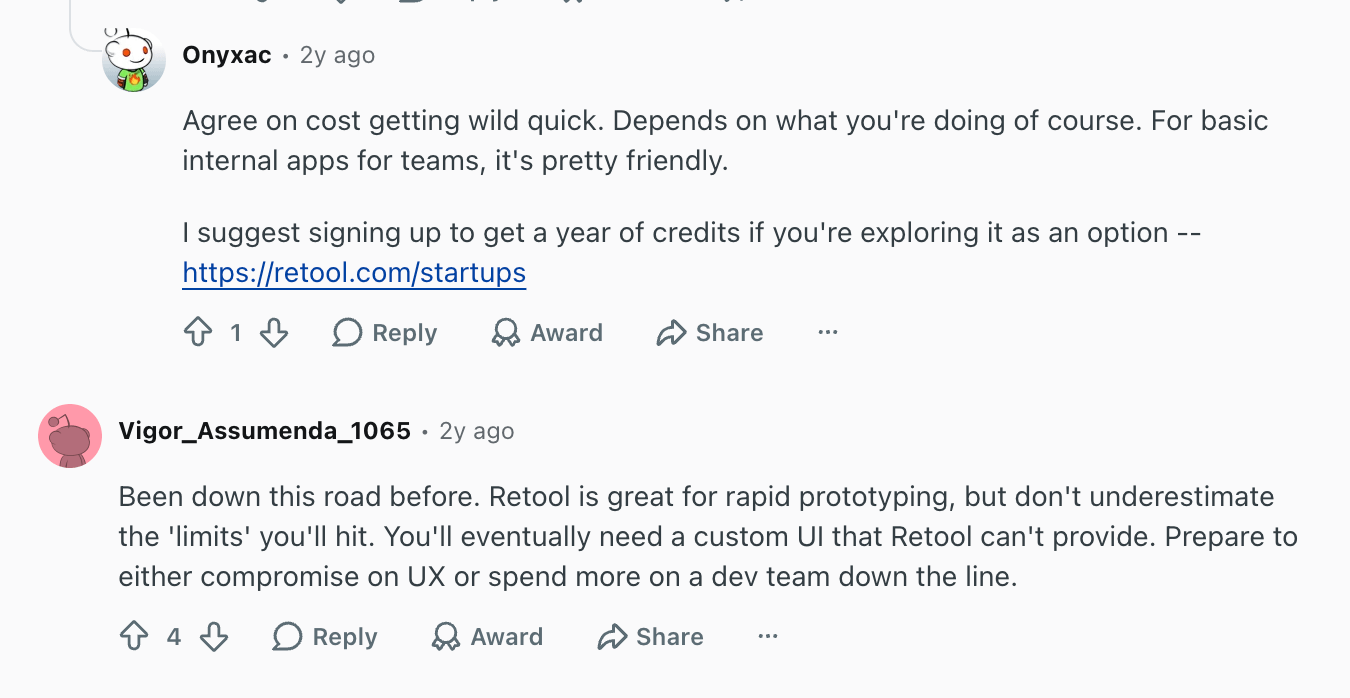
Users often talk about how Retool starts off being affordable, then gets expensive fast. It’s far easier than you think to work through all your credits. One Reddit user in particular shared that their bill went up 20x, their leadership had to pull the plug. And another said the cost was so high it became cheaper to pay full-time staff to build the UIs themselves.
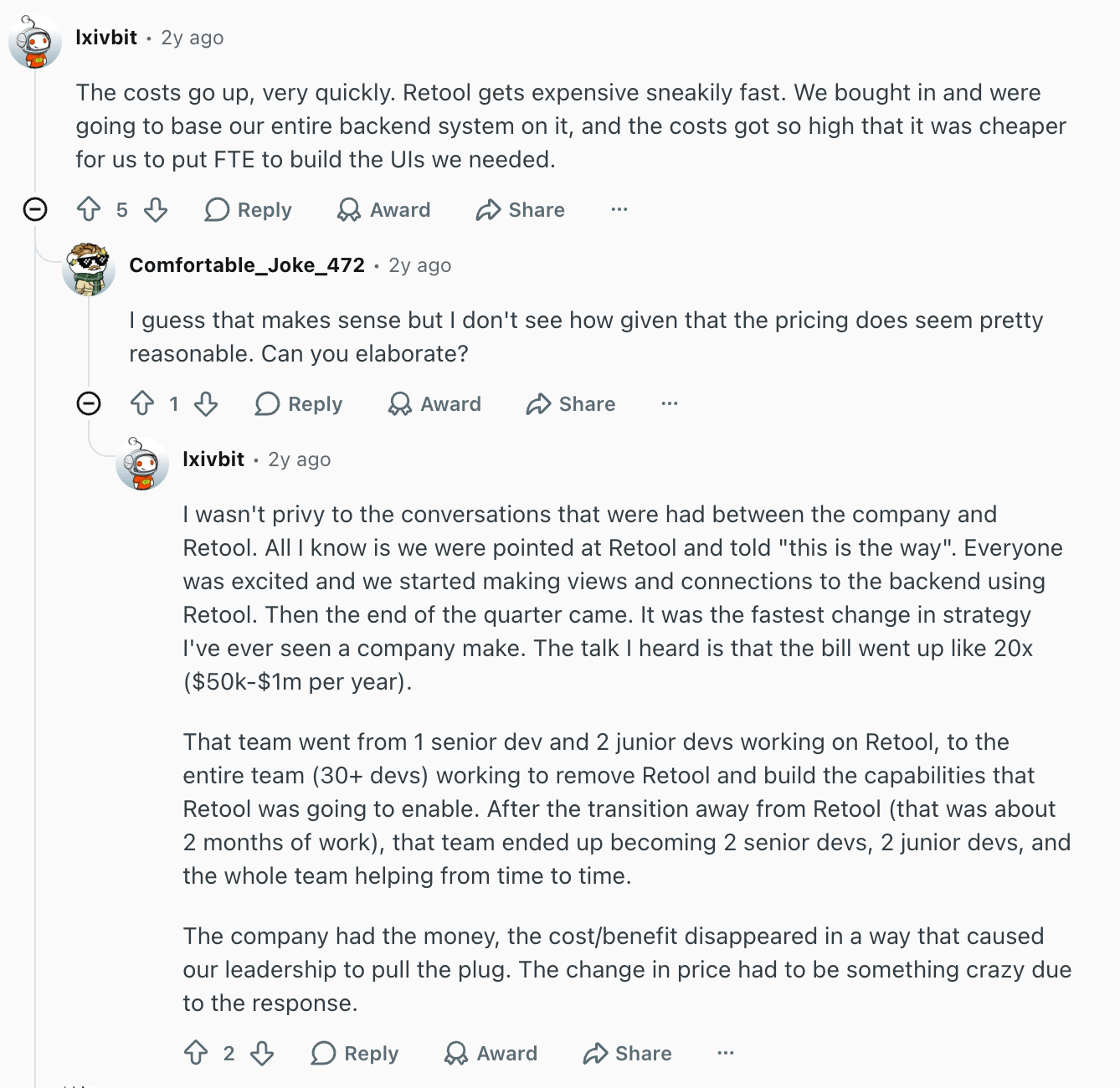
The feedback isn’t all negative, though. Several others point out that for basic internal apps or rapid prototyping, Retool is reasonably priced and does the job well. The issue only comes when you start building more complex apps and bringing on tons of internal and external users.
Which Retool pricing plan should you choose?
Choose Free if you’re a solo builder or a small team of up to five, and you mostly want to test Retool and build a few internal tools. It costs nothing, so it’s the natural place to start before you pay for anything.
Choose Team if you’ve outgrown the five-user limit, need more AI credits, or you need a staging environment. It’s a reasonable step up, and if most of your people only use the apps rather than build them, you can keep costs even lower.
Choose Business if you need to build apps for clients or customers, or you need permission controls and audit logs. It’s a big jump in price, so I’d recommend choosing it only if you need those features.
Choose Enterprise if you’re a large organization that needs dedicated support, SSO, self-hosting, or source control, and don’t mind forking 5 figures for the tool.
Is Retool worth it?
Retool is worth it if you’re a small team building simple internal apps. But once you start scaling, building apps with portals and external users, or needing features like permission controls, audit logs, white-labeling, source control, and self-hosting, the costs rise fast, and it might no longer be worth it.
Consider Retool if you:
- Have a small team building straightforward internal tools, not customer-facing apps
- Are comfortable with JavaScript and SQL for the more advanced parts
- Want unlimited apps and don’t mind usage-based pricing for AI, agents, and workflows as you scale
- Have a stable team so the per-user cost stays predictable
- Need enterprise controls like SSO, source control, or self-hosting and have the budget for it
Pass on Retool if you:
- Are non-technical and want to build and maintain apps without code
- Are watching your budget, since per-user seats, AI credits, and usage charges add up fast as you grow
- Need customer-facing apps, which require the Business plan plus external user fees on top
- Want to self-host without paying five figures for it
Retool vs Softr pricing: Which is better?
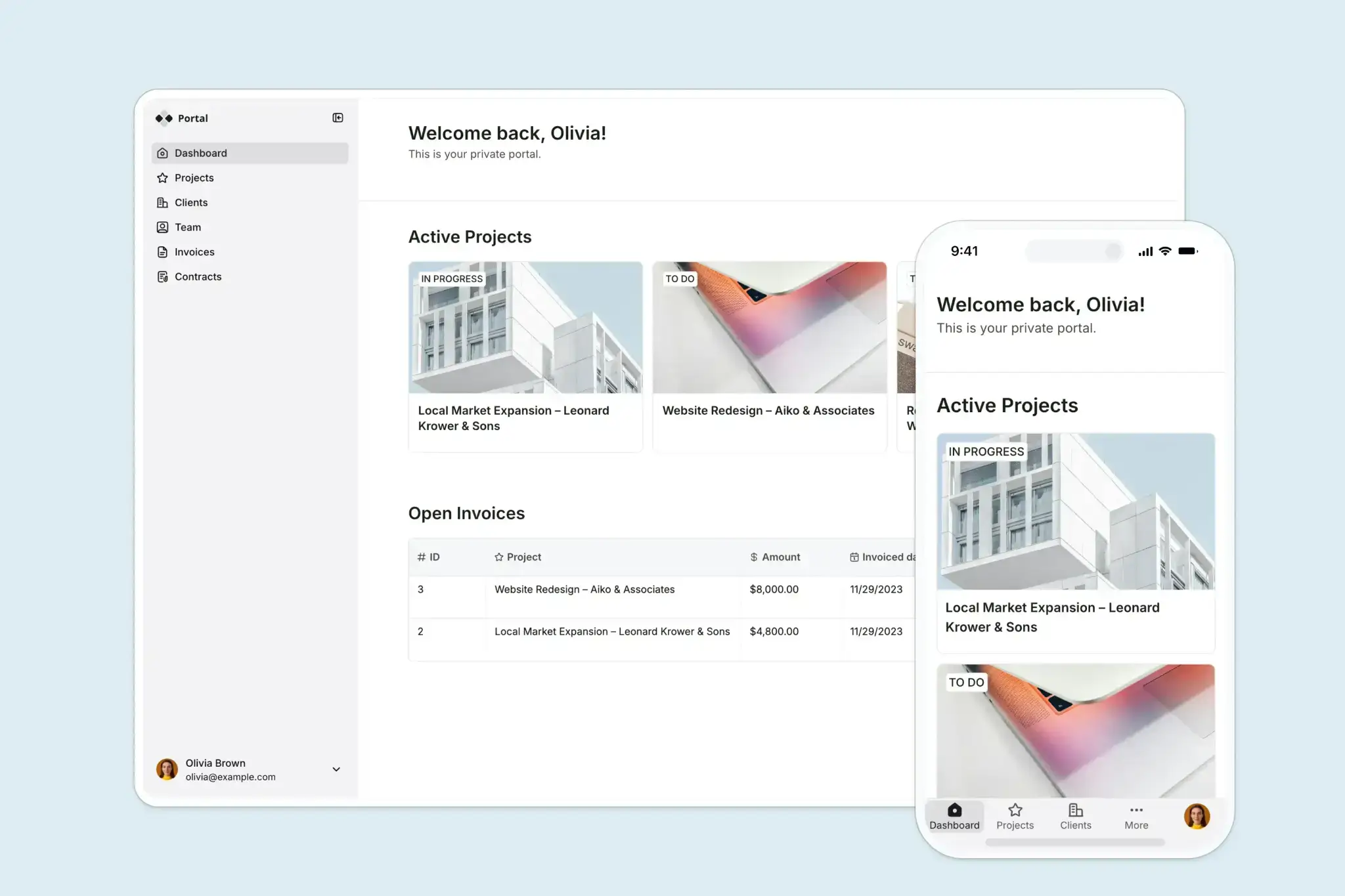
Both tools charge for builders and app users, but Softr costs far less per seat. Extra builders are $5 to $20 a month on Softr, against $10 to $50 on Retool. That’s roughly half the price. And each extra app user is $1 to $5 on Softr, against $5 to $15 for internal users and $4 to $8 for external users on Retool. Softr also lets your workspace members use the app for free. They don’t count toward your app-user limit, but on Retool every user does. This can save you costs even further.
AI credits are another cost. You get a set amount on both tools, but when they run out on Retool, you either buy more or continue building with SQL and JavaScript. Softr, on the other hand, is no-code, so even with no credits left, you can keep building visually. That means no developer to build or maintain your apps, which you would need on Retool as the work gets more advanced.
Softr pricing overview
| Softr plan | Price | What you get |
|---|---|---|
| Free | $0 | Up to 3 builders, 5 app users, 5 AI credits, 5k database records, 500 workflow actions |
| Basic | $19/month | 1 builder, 5 team + 5 client users, 10 AI credits, 50K records, 2.5K workflow actions |
| Pro | $99/month | 2 builders, 10 team + 50 client users, 50 AI credits, 500K records, 10K workflow actions |
| Business | $329/month | 3 builders, 30 team + 100 client users, 100 AI credits, 1M records, 25K workflow actions |
| Enterprise | Custom | SSO, audit logs, SOC2 reporting, IP blocking, SLAs, dedicated success manager, priority support |
What you get with Softr
- Cheaper seats than Retool: Softr’s per-builder and per-app user seats are lower than those of Retool. This means you spend less overall for the same number of people. On top of that, your workspace members use the app for free, and the same person is counted once across all your apps.
- No code required: You’ll get the best out of Retool if you know JavaScript and SQL for deeper customization. But Softr is built for non-technical users. You describe what you want, Softr builds the app, database, and logic together, and you can keep editing visually or with AI. No need to hand off to a developer at any point.
- A full app stack in one place: Softr combines an AI-powered app builder, a native relational database, and workflow automation. Each works on its own, and all three are built to work together from day one, so no need to pay for separate software for each part of your business.
- Integration with your existing data: Softr connects to 20+ data sources, including Airtable, Google Sheets, HubSpot, Notion, SQL databases, and Supabase. With the Softr MCP, you can also build and manage your apps, databases, and workflows directly from AI assistants like Claude, ChatGPT, or Cursor.
Why teams choose Softr over Retool
- Softr’s builder and user seats cost a fraction of Retool’s, and the gap widens as you add more people. This can become too expensive for a small or growing team.
- Softr lets you build customer-facing apps from the free plan, while Retool keeps external users off the Free and Team plans entirely. You only get them from Business plan.
- Softr is genuinely no-code. A non-coder can build and maintain a whole app with the drag-and-drop builder and AI Co-Builder, while Retool is more developer-friendly.
Retool vs Softr: Which should you choose?
After spending some time on each platform, here’s what I would advise.
Choose Retool if you have developers on the team and you’re building internal tools that need deep, code-level control. It also fits if you don’t expect to add many collaborators, have the budget to pay per seat for them, or if you want to self-host.
Choose Softr if you’re a lean or non-technical team that wants to build apps like client portals, internal tools, CRMs, or dashboards, and you want to ship without writing code. It’s the better fit when you’d rather not hire or wait on a developer, need customer-facing apps from the start, or want lower per-seat costs as your team and user base grow.
Ready to get started? Try Softr for free and build your first business app with AI.
Frequently asked questions
How much does Retool cost?
Why is Retool so expensive?
What does Retool charge for enterprise?
Does Retool offer self-hosting?
Is Softr cheaper than Retool?