


How to create a wiki from your monday.com docs using Softr

[.blog-callout]
TL;DR
- A company wiki centralizes your monday.com docs and boards into one searchable, easy-to-navigate hub for your team.
- Softr connects to monday.com as a data source (or lets you centralize everything in Softr Databases) and turns your docs into a fully customizable interface, no code required.
- Prepare your docs first: define your audience, take inventory of what you're moving over, and map out a clear information hierarchy before you build.
- You'll need a monday.com account with Admin access and a Softr Pro plan or higher to connect the two.
- Use Softr's users and permissions to control who sees what, and its AI Co-Builder to speed up building and maintaining your wiki. [.blog-callout]
Have you ever found yourself wasting time looking for a document in all the wrong places?
Well, you’re not alone. Employees spend at least two hours a day on average looking for documents. That’s a whopping 25% of your entire work week.
An easy-to-use and accessible document management system is the ideal solution to this problem. When teams have better access to company and departmental documentation, they make better decisions, become more engaged, and align better with company values.
But perfecting knowledge management isn’t easy. Keeping track of your documentation can be manual and time-consuming, especially if you use multiple tools to store and disseminate information. The good news? That’s the problem this guide aims to solve.
We’ll walk you through how to centralize your docs and data from monday.com into a user-friendly company wiki built with Softr!
What is a monday.com wiki?
A company wiki is a digital workspace for employees to share, create, and update all kinds of work documentation, from employee handbooks to departmental standard operating procedures (SOPs), frequently asked questions, and more.
Unlike knowledge bases, a company wiki isn’t a curated or structured collection of content that serves one specific need. It’s more unstructured and collaborative so employees can view and share relevant knowledge across various organizational topics.
Companies use monday.com to manage projects and create documents across all departments. Streamlining these docs from the platform into a user-friendly wiki is a great way to make this information accessible in a single location that you can quickly point team members toward.
Although you can’t currently build a company wiki directly in monday.com, you can use Softr to pull your docs into a fully customizable wiki interface for your organization!
Benefits of a wiki for your team
Before we start explaining how to integrate your monday.com docs with Softr, let’s dive into why it’s worth your time to pull your docs together to build a wiki:
- Centralized, easy-to-find information: Keep your company information organized and searchable. Your company wiki is a repository of knowledge covering a wide range of organizational topics. It gives your team a go-to starting point for general information without having to dig through old communication threads, links, and documents.
- Faster knowledge sharing and education: Organizing your information in one place helps accelerate employee onboarding, learning, and overall information retention. The collaborative nature of a company wiki also empowers employees to learn from and alongside each other.
- Convenient document updates: If you know where your company documents are, you’ll know where to go when information needs to be updated. Wikis make it easier for you to ensure that teams have access to the latest and most relevant information. The visibility of resources in your company wiki also helps everyone collectively identify outdated information and work together to make necessary updates.
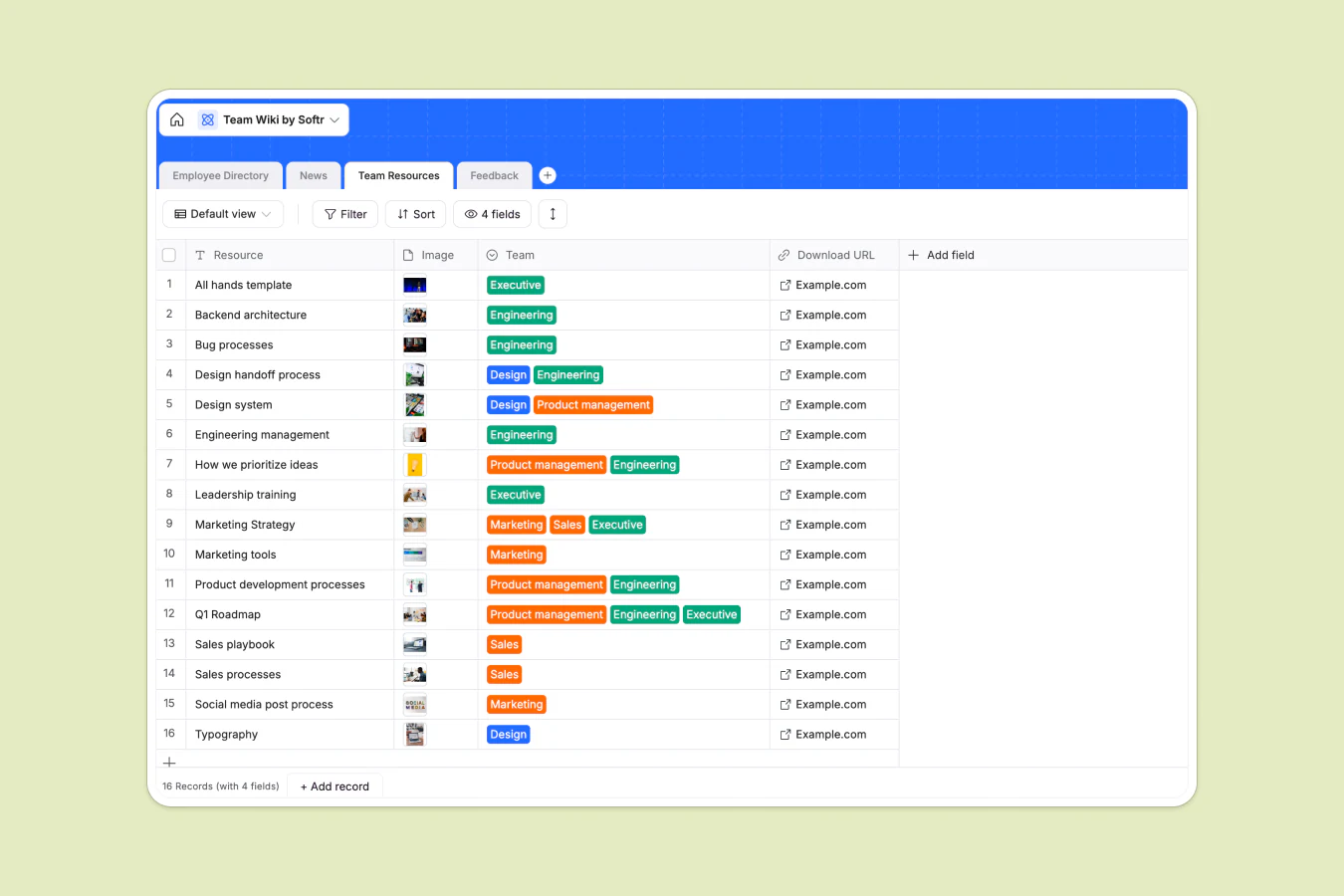
- More company-wide contribution and collaboration: The heart of a robust company wiki is its collaborative qualities. You want to give your team more opportunities to actively share knowledge with their colleagues, engage in company-wide initiatives, and contribute to shared visions and goals. For example, the company wiki app below highlights team resources within the wiki that employees can add to at their own time.
Celonis moved its go-to-market knowledge, previously buried in a Google Slides deck, into a Softr-built knowledge base connected to Airtable. Within two to three months, it became one of the top three tools used by their 1,500+ go-to-market team members.
"Our users love it. They think it's the perfect way to connect knowledge we are building up across our customer interactions, structure it, and make it easily accessible." - Celonis team, Softr customer story

Preparing your monday.com docs for your wiki
Before you build your company wiki, you need to begin by assessing your existing document library and identifying the ones you want to share with your team. You can approach this process by focusing on three key factors:
Knowing your audience
Understanding your audience helps you define the purpose of your company wiki.
Who will be reading the resources you add in there?
What would add the most value to these readers?
What outcome or difference do you want to achieve by making your docs easier to find?
Answering these questions helps you build a strategic vision of the information you want in your wiki, from the topics and categories you want to cover to how you want to present all these resources.
Taking inventory
The next step is to take inventory of all the monday.com docs that fall within the scope of your defined purpose. For example, you can create a comprehensive list of all docs from a few priority project boards, quarterly dashboards, and departments.
Add all your selected docs into a centralized monday.com board. This will make it easier to map the right columns to a Softr block when you build the app later.
Now, you can categorize your documents into topic streams. You can group your documents based on the following categories.
- Purpose or function: E.g. company benefits, branding guidelines, employee handbook, employee directory, product documentation
- Department: E.g., Engineering, Human Resources, Marketing, Sales
- Content type: E.g.. SOPs, FAQs, checklists, meeting minutes
- Audience: E.g. new hires, managers, go-to-market teams, engineering
These categories will help you define subtopics under each umbrella term and improve your wiki’s layout and navigation. It also speeds up the process of understanding and reviewing each document, naming them, and assessing information to add, remove, and update.
Defining your information hierarchy
Your hierarchy of information ultimately dictates how you’ll lay out all resources within your wiki interface. Your inventory of monday.com docs will help you identify the top-level categories you want to make more prominent in your wiki. These topics should be clear enough for employees to correlate to a document they hope to find.
For example, these are the top categories in Softr’s wiki template 👇

Within each category, you’ll then want to map out any subcategories that would simplify the search for your audience. Make sure these subcategories have a logical flow and maintain consistency and clarity when naming your categories, subcategories, and documents.
Introduction to Softr
Now, let's talk about how you're going to turn your organized collection of docs into a clean and easy-to-use wiki interface.
Softr is an AI app builder for creating real business software without code. Describe the wiki you want and Softr's AI Co-Builder can generate the database, pages, and permissions for you, or you can build it manually with the visual editor, whichever fits how you like to work. For a monday.com wiki specifically, you can pull your boards straight into Softr as a connected data source, or centralize everything in Softr Databases alongside monday.com and 21+ other data sources, including Airtable, Google Sheets, and a REST API connector.
Once your data is connected, Softr's pre-built blocks (Lists, Tables, Kanbans) handle the display without any code. For anything more custom, the Vibe Coding block lets you generate bespoke UI components from a plain-language prompt, and it automatically inherits your app's design and connects securely to your data.
Softr's monday.com integration allows teams to share their docs within a custom interface, without writing any code. You can also enhance your monday.com wiki with these Softr capabilities:
- Real-time data synchronization: Save time updating resources. All content updates you make in your Softr app will be reflected on monday.com and vice versa.
- Create custom user groups and permissions: Layer granular users and permissions controls on top of your monday.com data to decide what different types of users can access within your wiki app and which actions they can take.
- Connect monday.com with other data sources: Create wikis that centralize docs from monday.com with other relevant resources across your technology stack. Just connect more tools as a data source to Softr.
- Create interactive features on top of your data: Collect, organize, and visualize docs with pre-built blocks for lists, forms, and tables, or add Ask AI so your team can search and query your wiki's content in plain English instead of scrolling through pages manually.
A step-by-step guide to creating a wiki from monday.com docs with Softr
Let’s get this integration up and running! Before we get started, you’ll need two things to complete this guide successfully:
- A monday.com account with Admin-level access
- A Softr account on a Pro, Business, or Custom plan
Step 1: Setting up your Softr account
Head on over to the Softr website to create your account. It's a simple process requiring only your name, email address, and password. You can also create an account via Google to streamline your login credentials with your Google workspace.
Once you're in, you can describe your wiki to the AI Co-Builder and get a working starting point in minutes, start from the Team Wiki template, or build from a blank canvas. If you're interested in trying Softr out for yourself and getting buy-in from your team before committing to a paid plan, you can publish your first app on Softr's free plan.
But to connect your account to a monday.com data source, you'll need one of the following plans:
- Pro ($99/month): Softr's most popular plan, with Team: 10 + Client: 50 app users, 500,000 database records, and 10,000 workflow actions. Includes the monday.com integration, plus forms, comments, and 50 AI credits per month.
- Business ($329/month): Built for scale, with Team: 30 + Client: 100 app users, 1 million database records, and 25,000 workflow actions. Adds custom user groups (up to 10) and advanced integrations like HubSpot and SQL databases.
- Enterprise (custom pricing, contact sales): Everything in Business, plus custom limits, SSO, advanced security, and dedicated support for larger organizations.
Step 2: Connecting Softr to your monday.com account
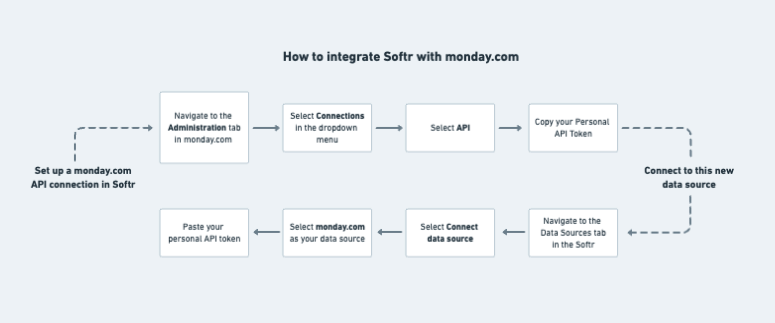
To connect your monday.com data to Softr, you’ll need Admin access to your monday.com workspace. Your monday.com data will be retrieved and synchronized via Softr’s Call API. You’ll find the API token you need in the Administration tab of your Monday account. Here are all the steps to getting your data source set up in Softr 👇
Step 3: Designing Your wiki layout
Softr has a wiki template that serves as a great starting point to visualize how yours might look. Although this template doesn't support monday.com as a data source, you can copy content from your docs into a free Softr Database (or Airtable or Google Sheets, if you prefer) to start, then remap each block to monday.com later.
But of course, you can create your layout from scratch so it best meets the needs of your team. Here are a few general tips for designing an intuitive wiki:
- Follow your company branding guidelines: Branding consistency gives your wiki a professional and polished look. Softr's global theme system lets you set colors, fonts, and your logo once and apply them across every page.
- Use a modular design: Lay out each section of content and resources into digestible modules or blocks so your audience can quickly skim through your wiki to find what they need.
- Clearly label headings, calls to action, and descriptions: Use concise copy in readable fonts to help readers quickly identify what they're looking for and skim through text to assess their available resources.
- Create responsive interface designs: Softr's pre-built blocks are responsive by default, so your wiki looks balanced on any screen size without extra work. If you need a layout the pre-built blocks don't cover, describe it to the AI Co-Builder or generate a custom Vibe Coding block instead.
Step 4: Adding and organizing content
Once connected to monday.com, you'll import the docs you need via a Softr block, like a Text or List block. You can add and configure these manually, or describe what you want to the AI Co-Builder (for example, "add a list block showing all documents from the HR board, grouped by category") and let it set up the block and field mapping for you.
Select the board containing all the docs you want to add to your company wiki. Next, you'll map each block field to the corresponding monday.com field. From there, you can configure how to display your content visually in the wiki.
The most important thing to be mindful of when adding more docs to your wiki is readability and searchability. This is where the content hierarchy you’ve prepared will come in handy.
- Structure your topics logically: Arrange your content into bigger topic buckets that break out into smaller subtopics, and so on. You can group your blocks into pages that link to each other to create a logical flow of information that’s easy to navigate.
- Create a filtering system for your content: Instead of having readers sort through documents one at a time, enhance your wiki with a category menu and tagging system so users can find and explore resources that fit a specific department, function, content type, and more.
- Optimize your interface for search: A custom search bar is another feature to consider adding to your wiki. If you have a robust wiki that’s too time-consuming to scroll manually, then a search bar will help you improve your wiki’s usability.
Step 5: Customizing user access and permissions
Your company wiki will contain important information that you probably don’t want going beyond your employees. At Softr, we know that internal applications and strong user permissions go hand in hand. You can enhance your board permissions on monday.com by:
- Allowing designated app logins for each user via password, magic links, one-time codes, or single sign-on.
- Creating specific user groups with defined permission levels.
- Managing how much access each user or user group has when interacting with pages, blocks, and actions in your wiki.
Step 6: Publishing and maintaining your wiki
Once you’re done designing your wiki and finalizing your user permissions, you’re ready for your company wiki to go live!
But remember that publishing your wiki isn’t where it ends 👀
Your company wiki is a resource that's constantly changing, and that means it's going to need some regular spring cleaning.
Softr’s integration with monday.com allows you to create a dynamic wiki without manually controlling data quality across two platforms. All updates in your wiki will be reflected in your monday.com docs and vice versa.
All you need to do now is create a culture of consistent document management by assigning a point of accountability for wiki maintenance, scheduling regular content reviews, and empowering all team members to update their documents and contribute changes where needed.
How to optimize your monday.com wiki for improved usability
If you want people to actually use your wiki, then your best friend is your user experience. Here are a few final things to consider as you launch your company wiki and scale it to more team members:
- Enhance readability: When arranging your content, think about how to make it easier for readers to find the important points they need while on the go. Beyond clear headings and subheadings, you can also optimize font sizes and introduce white space between paragraphs of text for easy reading.
- Break up text with visuals: Be mindful that reading long walls of text isn’t the best learning method for everybody. Incorporating videos, interactive content, and visuals like images and charts can help boost reader engagement and information retention.
- Prioritize the navigation experience: Design your wiki around your audience behavior and preferences. What categories and keywords would they search for? What supporting links and resources would help them better understand a particular topic? Build a strong interlinking strategy between the pages in your wiki and other external resources you might have best to represent your team’s learning and working style.
- Create a feedback loop directly within your wiki: Encourage team members to contribute to the wiki and share their suggestions for improving the user experience. You can use Softr to incorporate forms into the wiki as one example of collecting direct user feedback without managing another external tool.
- Measure and analyze usage: Track metrics such as page views for specific resources, content engagement, and app login frequency to understand how frequently team members use your wiki. This will help you identify low usage, collect targeted feedback from your team, and implement changes that better integrate your wiki into existing workflows.
Build a user-friendly wiki with monday.com and Softr
If you’re considering building a company wiki with your monday.com documentation, you have to prioritize a user-friendly interface, digestible content design, seamless data hygiene processes, and robust user permissions.
Softr helps you centralize knowledge and increase how much your team actually uses your company wiki. Connect your monday.com boards, layer on the right permissions, and let the AI Co-Builder handle the repetitive configuration so you can focus on the content itself. Try Softr out for yourself by building a wiki for free.
Frequently asked questions
Can I build a company wiki from monday.com without writing any code?
What's the difference between a wiki and a knowledge base?
Which Softr plan do I need to connect monday.com to my wiki?
Can I combine monday.com data with other tools in the same wiki?
How do I keep sensitive company documents secure in my wiki?


