
Google Forms is free, fast, and fine for a survey. But it's not ideal for collecting business-critical data that has to be secure, routed to the right person, and fed into the systems your team works from. These five Google Forms alternatives excel at handling what happens after someone hits submit.
Best Google Forms alternatives at a glance
What to look for in a Google Forms alternative
Not every form builder is trying to solve the same problem. Some focus on design, others on automation, and a few go way beyond forms entirely.
But whatever their niche, they need to actually fit how your business operates. Here are a few key features to prioritize in your search:
- Advanced logic and dynamic fields: Google Forms users gripe about its clunky section-based branching, especially once forms get more complex. There’s no true show/hide logic, no multi-condition rules, and no easy way to build dynamic experiences. Look for tools with proper conditional logic, hidden fields, and multi-step flows.
- Workflow automation: Collecting data is one thing. Doing something with it is another. The best alternatives can automatically trigger follow-ups, notifications, approvals, task assignments, and other workflows the moment someone submits.
- Built-in data management: While Google Forms can automatically add submissions to Google Sheets, spreadsheet-based response handling can become limiting for business-critical workflows. Built-in databases or stronger data management tools often scale better.
- Security and access controls: If you’re collecting anything sensitive, basic sharing settings won’t cut it. Look for features like domain restrictions, email verification, role-based permissions, encryption, and compliance support.
- AI that’s actually useful: Plenty of form builders now tout AI features, but many feel tacked on. Look for tools where AI genuinely improves the workflow — whether that’s generating forms from prompts, helping analyze submissions, enriching data, or automating repetitive admin work.
- Customization and branding: Google Forms isn’t exactly known for its design flexibility. If brand presentation matters, prioritize tools with proper styling controls, custom domains, and embeddable forms that don’t scream “default template.”
- Pricing that scales sanely: Plenty of form builders lure you in with cheap entry plans, then hit you with limits on submissions, logic, integrations, or branding. Make sure the pricing still makes sense once you’re actually using the product.
- Built-in extras: Need payments, eSignatures, advanced analytics, or richer post-submission experiences? Some tools bundle these in — saving you from bolting on even more software later.
1. Softr — best for forms that power business operations with built-in database and automation

There's a reason some form builders get a bad rap: People tend to view them as mere data collection tools, and not the starting point that sets an entire workflow in motion. I'll be the first to admit I've left submissions sitting untouched for weeks because the tools I used offered little beyond basic integrations and an inbox for responses to pile up.
Softr strips away those bad habits. First up, every submission is saved automatically to its built-in relational database, with configurable permissions, so you and your team can act on live data, edit records, filter responses, and update submissions the moment they land.
💡 Make your team’s day: Skip the worst part of handling form submissions by adding database agents to scan incoming data, answer questions, categorize responses, and fill in missing details automatically.
From there, you can trigger workflows whenever new submissions come in or records change. For example, you might automate actions across the apps you build in Softr and the rest of your tech stack — from surfacing booking requests in scheduling dashboards and client submissions in portals, to assigning tasks, sending notifications, and updating external tools like HubSpot, Notion, or Google Sheets.
Building the form itself is just as straightforward. Describe what you want with Softr’s AI Co-Builder or build and refine visually using the drag-and-drop editor. (Or you can start with a template and make it your own.)
Softr supports multi-step functionality, conditional logic, hidden fields, validation rules, and custom styling to fit your brand.
.webp)
And unlike many form builders that gate serious usage behind paywalls, Softr’s free plan includes unlimited forms and submissions, so you won’t hit any monthly caps as you scale.
Softr pros and cons
Pros
- Unlimited forms: Skip the paywalls; build and publish unlimited forms for free, with unlimited responses and no cap on questions per form.
- Built-in database: Every submission is stored in Softr’s relational database for immediate action; add AI agents to tag, extract, and clean up data.
- Go live anywhere: Publish your form as a standalone page with a free custom domain, embed it on websites, landing pages, or include it directly into the business apps you build with Softr.
- Granular access control: Set domain restrictions, email verification rules, and role-based validation to ensure forms are secure (they’re SOC2 and GDPR compliant) and data comes from the right sources.
- Advanced customization: Add multi-step layouts, conditional logic, dynamic field types (file upload, signatures, addresses), validation, custom styling, company branding, and personalized messages.
Cons
- Fewer native integrations than some form builders competing in the same space, though much of that can be addressed via third-party integration tools like Zapier, Make, or n8n.
Softr key features:
- AI Co-Builder: Describe the type of form (and use case) you want in plain English and let AI build the full form for you, complete with a relational database to store your data.
- Full design control: Use Softr’s visual drag-and-drop builder to customize fields, rearrange sections, and adjust styling — without the complexity other form builders make hard to maintain.
- Multi-step forms with conditional logic: Add conditional logic that dynamically shows or hides steps based on user input, creating a more intuitive experience.
- Unified platform for full business apps: Softr works as a standalone form builder, but you can also add forms to the Softr apps, databases, and workflows you build — so submissions feed directly into your broader business systems.
- Multiple storage options: Store and manage responses (including file uploads) securely in Softr’s native, relational database or sync them with external sources (Airtable, Google Sheets, HubSpot, or other 3rd party tools in your stack.)
- Database AI agents: Configure AI agents within Softr’s native database to help answer questions about your form responses, enrich incomplete submissions with web research, or categorize them for better organization.
- Built-in workflow automation: Route responses, update data, or send notifications automatically to other apps in your stack whenever forms are submitted or specific conditions are met.
Softr pricing
Softr offers unlimited forms, unlimited submissions, and premium features (like advanced logic and custom branding) on the free plan. But if you want to jump to a paid tier to get more users, AI credits, and workflow actions, pricing is flat and predictable.
- Free: Unlimited apps, with access to Softr Workflows and Softr Databases, No submission or form limits, 5 app users, 5 AI credits
- Basic: $19/month for unlimited apps with 42+ integrations, Team: 5 + Client: 5 app users, 10 AI credits, 50K records, 2.5K workflow actions
- Pro: $99/month for unlimited apps with 45+ integrations and custom code, Team: 10 + Client: 50 app users, 50 AI credits, 500K records, and 10K workflow actions
- Business: $329/month for unlimited apps with 52+ integrations, Team: 30 + Client: 100 app users, 100 AI credits, 1M records, and 25K workflow actions
- Enterprise (custom pricing, contact sales): Custom pricing
2. Formstack — best for security-compliant forms, documents, and e-signatures

While security should be top of mind for any form builder, Formstack is especially suited to industries like healthcare and education that handle sensitive data and strict HIPAA, GDPR, and PCI compliance requirements.
If a big part of your job involves handling digital paperwork, you’ll benefit from integrating your forms with Formstack Documents, as you can turn submissions into documents. So say you’re collecting client onboarding information: you can use those submission details to populate a contract template automatically, then send it off for approval or eSignature.
A word of warning, though: most of these features are only accessible on higher tier plans, which might be a deal breaker if you aren't ready to jump to enterprise-level pricing.
Formstack pros and cons
Pros
- Designed for regulated organizations: It comes with compliance support for frameworks like GDPR and HIPAA.
- Create, send, and sign documents: Generate documents (like invoices or contracts) automatically based on form submissions.
- Automate workflows: Trigger actions like group approvals and data routing with 300+ integrations with CRMs, payment processors, and other tools.
Cons
- AI form builder is limited if the first output misses the mark, since there’s no re-prompt/refinement flow.
- Pricing ramps up quickly, starting at $83/month for just 1 user, 25 forms, and 1,000 submissions.
- Many of the most valuable features (approval workflows, pre-fill, document generation, eSignatures, and compliance tooling) require higher-tier plans starting at $250/month before moving into custom pricing.
Formstack key features
- Dynamic form logic: Build forms with multi-step layouts, conditional logic, approval routing, and pre-filled fields to support more complex submission processes.
- Document and signature automation: Turn form submissions into contracts, invoices, PDFs, or agreements automatically, then route them for eSignature without leaving the platform.
- Built-in analytics: Track form views, submission rates, and conversion performance to identify drop-off points and optimize completion rates.
Formstack pricing
Note: The following pricing reflects annual billing.
- Forms: $83/month for 1 builder user, 25 forms, 1,000 submissions per form, and 2GB storage
- Suite: $250/month for 3 builder users, 100 forms, 5,000 submissions per form, 10GB storage, unlimited document senders, and unlimited eSignatures
- Salesforce Solutions: Custom pricing for Salesforce-native forms, document generation, eSignatures, and advanced compliance features
- Enterprise: Custom pricing for unlimited users/submissions, SSO, API access, custom integrations, and enterprise security controls
3. Jotform — best for extensive templates and features
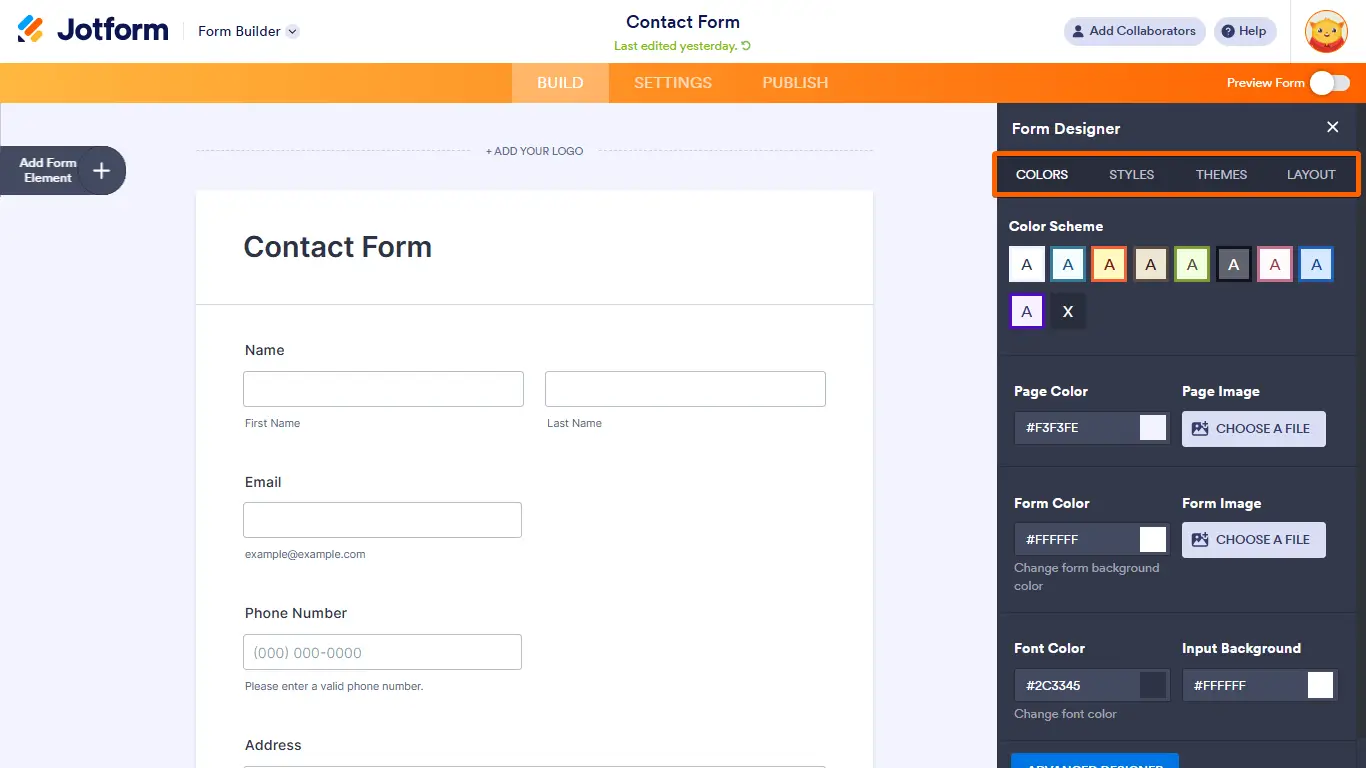
Jotform was one of the first no-code form builders on the market, so it has plenty of experience under its belt — with a broad feature set to show for it. That includes advanced logic, payment collection, approval flows, and 20,000+ templates, making it a strong contender if you want flexibility without stepping into enterprise-level complexity.
One major hang-up for heavy form users is that you’ll be limited to 100 submissions per month, so you’ll need to pay higher tiers to reap the rewards.
Jotform pros and cons
Pros
- Extensive widget library: Jotform has pre-built, embeddable elements for signatures, file uploads, calculations, and more.
- Huge template library: The platform offers 20,000+ prebuilt templates for nearly every form use case.
- Strong integration ecosystem: Supports 150+ native integrations with CRMs, project management tools, payment processors, and more.
Cons
- Jotform’s design feels a little dated, especially compared to newer form builders with more modern, polished interfaces.
- Submission and usage limits increase quickly unless you upgrade to higher-tier plans.
- UI is somewhat outdated and interface can become cluttered when building more complex forms or workflows.
Jotform key features
- Flexible visual builder: Build forms using Jotform’s drag-and-drop editor, with support for advanced field types, embedded media, widgets, and custom layouts.
- Broad payment support: Accept payments directly through your forms via major processors like PayPal, Stripe, Square, and dozens of other gateways.
- AI-assisted form creation: Generate forms from text prompts using Jotform AI, then use the AI Copilot to help refine logic, styling, and other form settings.
- Data management: Review and organize form responses in Jotform Tables, where you can filter data, collaborate with teammates, and manage submissions in a grid view.
Jotform pricing
Note: All prices shown are billed annually.
- Free: 100 submissions/month, 5 forms
- Bronze ($34/month): 1,000 submissions/month
- Silver ($39/month): 2,500 submissions/month
- Gold ($99/month): 10,000 submissions/month
- Enterprise: Custom pricing with unlimited seats and dedicated support
4. HubSpot Forms — best for forms tied to your sales and marketing funnel
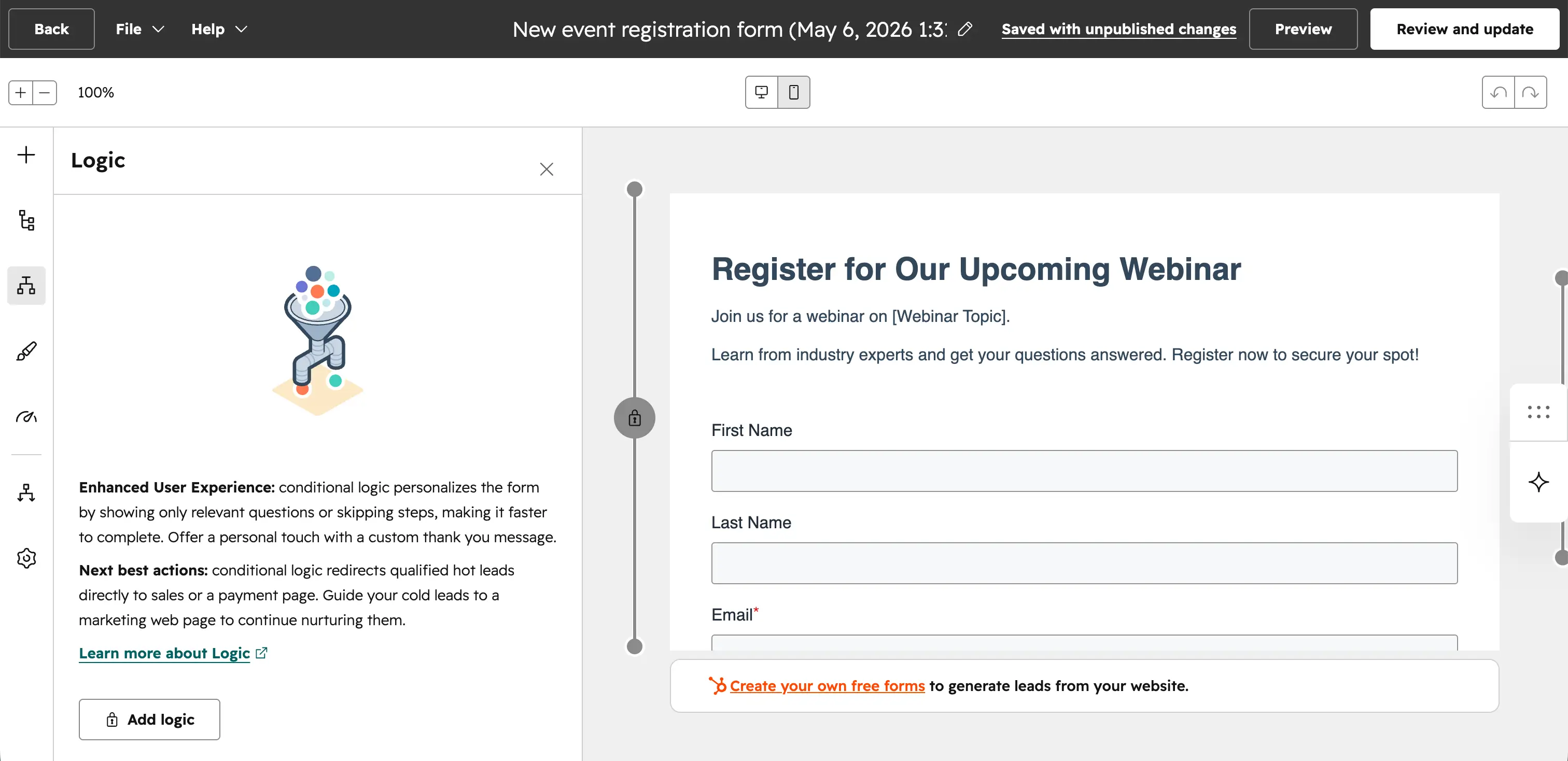
If your main goal is generating and qualifying leads, HubSpot Forms makes the most sense, especially when you're already using the broader HubSpot ecosystem.
Every submission syncs directly into your HubSpot CRM, so form fills can immediately trigger contact creation, segmentation, email nurtures, sales notifications, and downstream marketing automations.
You can use progressive profiling to show different fields to returning visitors, personalize forms based on lifecycle stage, and build lead capture workflows that tie directly into your sales and marketing funnel. There is a tradeoff, though, as HubSpot Forms is far more useful inside the HubSpot ecosystem than as a standalone form builder.
HubSpot Forms pros and cons
Pros
- CRM integration: Every submission syncs directly into HubSpot CRM with no third-party integration required.
- Marketing automation support: Great for lead generation, segmentation, and marketing automation workflows.
- Lead capture: Supports progressive profiling and smart fields for personalized lead capture.
- Free plans available: Free plan available for basic form and CRM usage.
Cons
- Best suited for teams already using HubSpot’s broader platform.
- Design customization is limited compared to dedicated form builders.
- Advanced automation and smart form features require expensive higher-tier HubSpot plans.
HubSpot Forms key features
- CRM-native lead capture: Automatically create or update contact records in HubSpot whenever someone submits a form.
- Progressive profiling: Show returning visitors different fields over time so you can gradually enrich contact data without repeatedly asking the same questions.
- Embedded and pop-up forms: Publish forms inline, as pop-ups, dropdown banners, or slide-ins across your site.
- Marketing automation triggers: Connect form submissions directly to email workflows, lead routing, lifecycle stage updates, and other automations.
HubSpot Forms pricing
Note: Pricing below reflects HubSpot’s broader platform tiers, as forms are included within HubSpot products.
- Free: Basic forms, CRM, and lead capture tools with HubSpot branding
- Starter: ~$20/month for branded removal and entry-level CRM/marketing tools
- Professional: Starts around $890/month for advanced automation, progressive profiling, and marketing workflows
- Enterprise: Custom pricing for enterprise reporting, governance, and advanced controls
5. Paperform — best for design-forward forms and polished UI
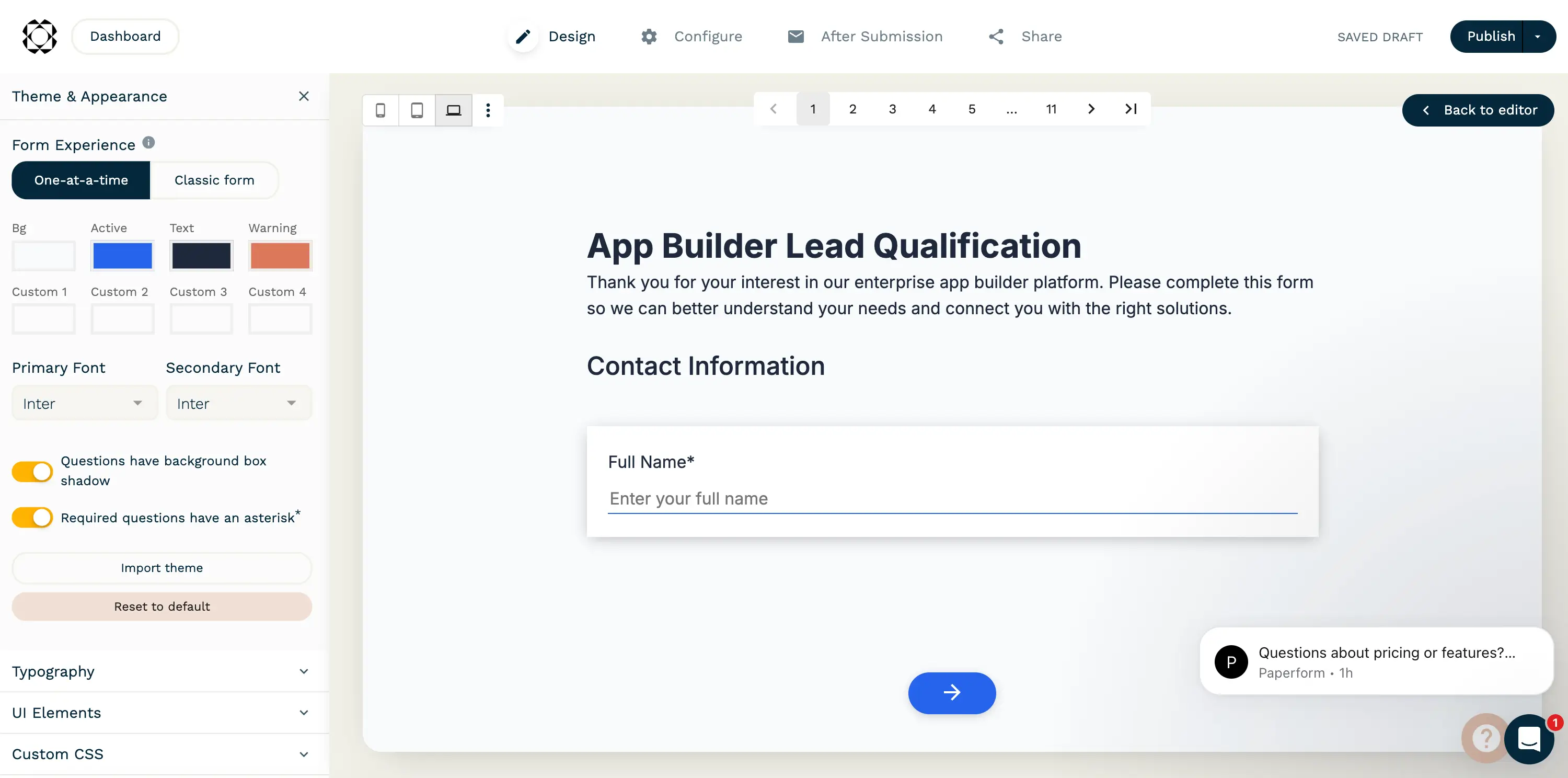
If aesthetics matter just as much as functionality, Paperform is one of the best-looking form builders around. Instead of forcing you into rigid, traditional layouts, it lets you create forms that feel more like polished landing pages — ideal for brands that care about design, conversion, and keeping every touchpoint on-brand.
Its editor is especially flexible, blending document-style editing with advanced customization so you can add rich media, structure layouts more freely, and create more engaging form experiences than most standard builders allow. Just keep in mind that pricing climbs fairly quickly if you need higher submission limits or advanced features.
Paperform pros and cons
Pros
- Design flexibility: Customize layouts, branding, typography, media, spacing, and interactive elements to reflect your brand.
- Landing page experience: Forms can double as branded landing pages or microsites.
- Payment processing: Strong support for payments, calculations, scheduling, and conditional logic.
- Intuitive editor: Paperform feels more like editing a document than configuring blocks.
Cons
- Pricing increases quickly as submission limits grow.
- Less suited for database-driven or operational workflows than tools like Softr.
- Advanced customization can take more setup than simpler plug-and-play builders.
Paperform key features
- Document-style editor: Build forms in a writing-style editor rather than a rigid drag-and-drop interface, making layout customization more flexible.
- Advanced design controls: Add rich media, custom branding, flexible formatting, and landing-page-style layouts to create more polished form experiences.
- Built-in payments and calculations: Accept payments, calculate totals dynamically, and build quote/order forms with pricing logic.
- Conditional logic and automations: Personalize form paths and trigger follow-up actions based on user responses.
Paperform pricing
Note: The following pricing reflects annual billing.
- Free: Unlimited forms, 30 submissions/month, and 1 user
- Essentials: $24/month for 1 user and 1,200 submissions/year
- Pro: $49/month for 3 users, 12,000 submissions/year, branding removal, and advanced customization
- Business: $99/month for 5 users, 120,000 submissions/year, SSO, API access, and advanced business features
- Enterprise: Custom pricing for bespoke enterprise/security needs
Choose the right Google Forms alternative for your team
Google Forms still makes plenty of sense for basic surveys, event RSVPs, and lightweight internal forms (especially if you’re already working inside the Google ecosystem). But once you need more advanced workflows, branded experiences, stronger data management, or forms that actually power business processes, it starts to show its limits.
That’s where Softr starts to make sense. Its AI-powered platform helps you build forms, internal tools, portals, and business apps, complete with built-in databases, workflow automation, and granular permissions.
Try Softr for free to build forms that do more than collect responses. They power your workflows, feed your business systems, and help your team act on data faster.
Frequently asked questions
What is the best alternative to Google Forms?
Why do people switch from Google Forms?
Can I build workflows from form submissions without third-party automation tools?