7 best project management software with client portals [2026]


Of course, you know that clear communication, both internally and with clients, is crucial. But have you seen the numbers? Currently, 55% of people still rely on email for client communication, and only 19% primarily use a project management tool for this purpose.
And while 64% of people feel they have a good grasp of their project's status, this number jumps to 83% when they use a project management tool to communicate with both team members and clients.
The problem is, finding software that effectively combines internal project tracking with secure client communication and reporting is a real challenge. It's usually one or the other.
What is project management software with a client portal?
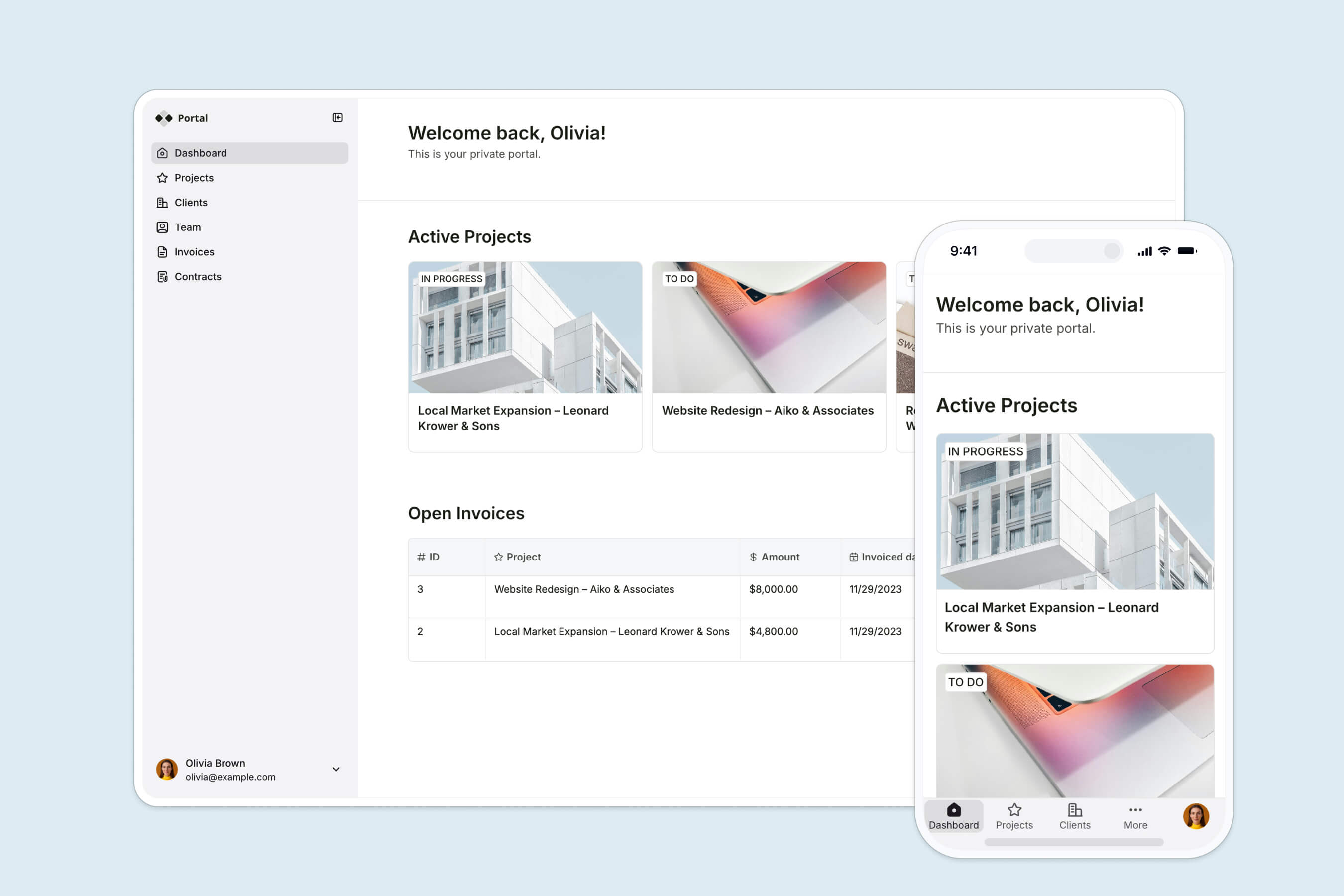
Project management software with a client portal is a platform that streamlines project planning, execution, and monitoring by integrating both internal team collaboration and external client communication.
This type of software enables teams to manage tasks, deadlines, and resources while providing clients with real-time updates, reports, and direct communication channels.
How we evaluate project management software with client portal
Look for software that fits these criteria:
- Ease of use: Clients are often the least tech-savvy users, so prioritize a simple interface. Survey clients to see which platforms they already know.
- Key project management features: Beyond task management and time tracking, check for specialized needs like version control, dependencies, and resource allocation.
- Client portal functionalities: External users should log in easily and see only what you share, while internal users see full project details.
- Integration capabilities: Native integrations with your existing tools let you sync data automatically instead of entering it manually.
- Security features: Granular permissions, encryption, and advanced authentication like 2FA or domain-restricted sign-ins.
- Customization and scalability: Flexible features like custom reporting and approval paths, plus pricing that stays reasonable as you add users.
- Support and community: Responsive support and an active community help you get past the learning curve faster.
7 best project management software with client portals in 2026
1. Softr
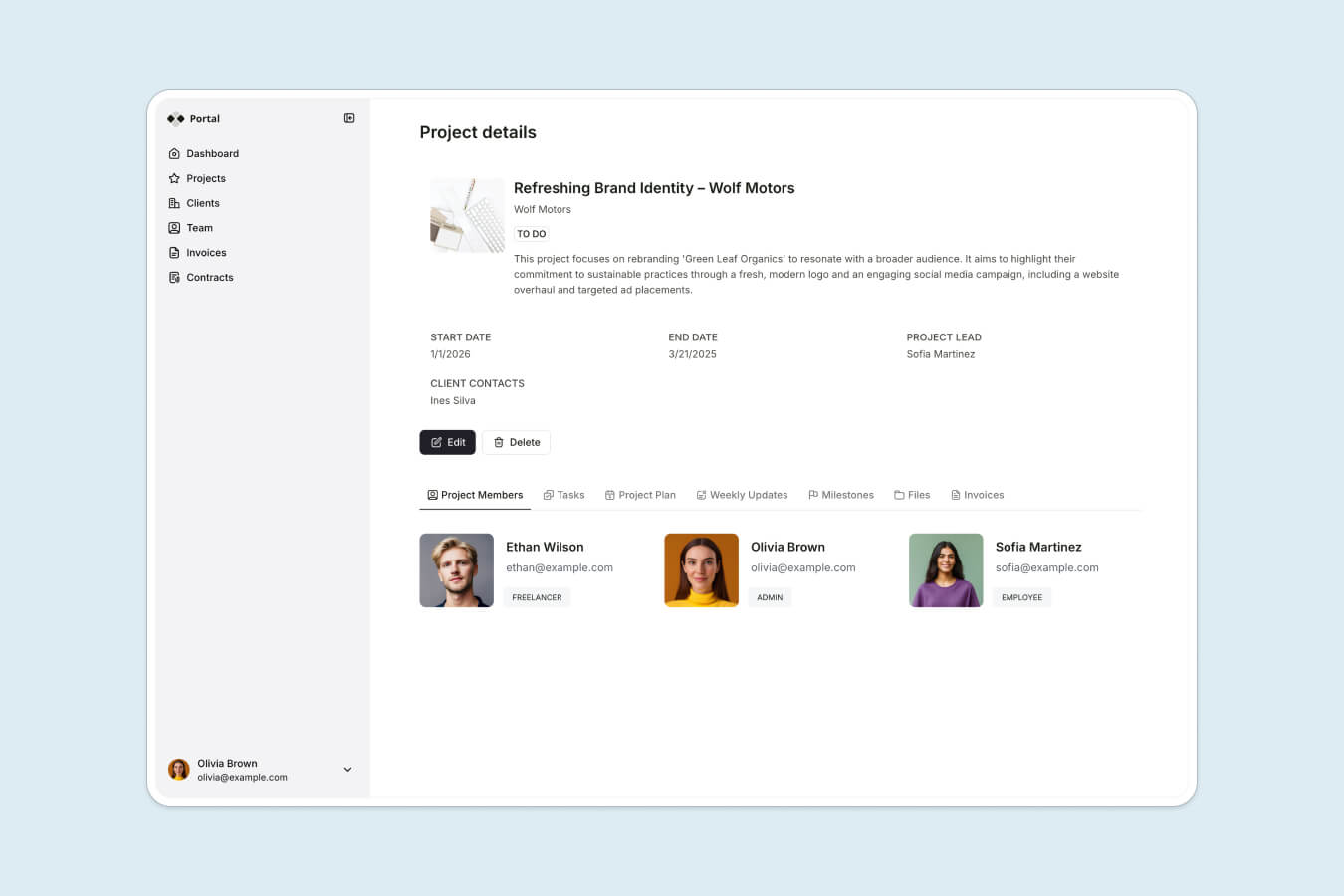
Want a project management tool that checks all the boxes and beyond? Softr lets you use AI to generate exactly the tracker and portal you need, no matter your tech skills.
There are three ways to build it. Describe what you want and the AI Co-Builder generates the database, the pages, and the permissions for you. Start from a pre-built template. Or build from scratch on a blank canvas. Softr is AI-first, not AI-only, so you can move fluidly between asking the AI Co-Builder to do the heavy lifting and configuring things by hand. Unlike fragile, vibe-coded apps that turn prompts into code you then have to maintain, what Softr generates is production-ready and secure from day one.
The result is a single platform: an internal project tracker for your team and a client-facing portal that only surfaces what each client should see. You can use our project tracker and client portal templates as a starting point.
Creative platform Designity built three interconnected portals on Softr, one each for clients, creative directors, and team members, that now serve 500+ users with 108K records synced, all without in-house developers. Accounting firm Officeheads built the first version of its client portal in less than two days, replacing a developer project and a failed SharePoint attempt, and now serves 50+ SMB clients with eight self-serve workflows.
Key features
- AI Co-Builder that generates a working app, including the database, pages, and business logic, from a single prompt, then helps you edit it in plain language.
- A drag-and-drop builder with a variety of building blocks such as dashboards, forms, timelines, Kanban boards, and AI chatbots to build apps of any complexity.
- Pre-built app templates to quickly set up internal and external portals.
- Granular permissions to control who sees what with detailed access management, ensuring sensitive data stays secure.
- Built-in data and integrations powered by Softr Databases, with the option to connect 17+ external sources like Airtable, HubSpot, Google Sheets, and SQL databases.
- Softr Workflows to automate approvals, follow-ups, and notifications, triggered directly from buttons inside your app.
- Robust security features including encryption, user permissions, and advanced authentication methods to protect client data.
Softr pros and cons
✅ Highly customizable with a wide range of building blocks and templates.
✅ Integrates seamlessly with numerous tools and databases.
✅ Suitable for developing a complete ecosystem of interconnected business apps.
✅ Centralizes customer data, enhancing project management efficiency.
✅ Strong support with an active community and comprehensive resources.
❌ It's not an out-of-the-box solution. Even if you start with a template or an AI-generated app, you still need to spend some time tailoring your custom project management system.
❌ Advanced customizations may require a deeper understanding of the platform and more time to master.
Best for
Softr is a great fit for businesses of any size. It works well for small teams that don’t need all the features of a ready-made solution, as well as for large enterprises that require more customization and scalability than standard tools can provide.
Softr pricing
The free plan supports unlimited apps and collaborators, up to 5 app users, and includes building blocks and AI credits for portals and other tools. Paid plans start at $19/month, which covers Team: 5 + Client: 5 app users, a custom domain, and form-logic branches.
For a comprehensive project management platform with a client portal, the $99/month Pro plan is ideal. It includes Team: 10 + Client: 50 app users, advanced visibility settings, and enhanced security features.
2. FuseBase

FuseBase is a collaboration platform with out-of-the-box project management and client portal functionality. It allows teams to track project progress, manage tasks, and communicate with clients all within the same platform, making it easier to keep everyone on the same page.
Besides standard features, FuseBase offers helpful productivity tools like AI-powered suggestions, transcription services, and automated workflows.
Key features
- Project management
- Client portals
- Document management
- Templates
- AI assistance
- Built-in CRM
- White-labeling
FuseBase pros and cons
✅ Easy-to-navigate interface makes it accessible for all users, including those who aren’t tech-savvy.
✅ Integrated client portals allow businesses to seamlessly manage client interactions and provide them with real-time updates and reports.
✅ Users can access a variety of time-saving add-ons like transcribing and AI-powered capture.
❌ The platform focuses on the needs of small companies and may be too simplistic for large organizations.
❌ All plans include a maximum of 3 team members, requiring you to get extra credits to add more internal users.
Best for
FuseBase is well-suited for those who need a straightforward, easy-to-use project management tool with a focus on documentation and knowledge management.
FuseBase pricing
FuseBase offers a free plan that includes 1 client portal and 1 workspace. Paid plans start at $28/month, which covers up to 3 team members, 2 client accounts, and 2 client portals. For $73/month, you can access 5 client portals and 15 client accounts.
White-labeling and advanced customization options are available only with the $148/month plan. Note that additional credits are required to add more than 3 team members on any plan.
3. Moxo

Moxo is a service orchestration platform with a focus on B2B relationships. It’s designed to smooth out the entire client journey, from the initial sale and onboarding to ongoing project management.
Key features
- Client onboarding
- Automated workflows
- Document management
- Project management
- Complete collaboration suite
- Client reporting
- Vendor management
- Document collection
- Mobile apps
Moxo pros and cons
✅ Combines onboarding, project management, and document collection into one streamlined platform.
✅ Responsive and helpful support team.
✅ Prioritizes reducing client dropoffs and shortening process lengths.
❌ Limited flexibility for custom workflows common for an out-of-the-box solution.
❌ Missing advanced features like conditional logic forms and custom automations.
❌ Project management tools are less developed compared to the platform's strong communication features.
Best for
Moxo is a great choice for service-based businesses needing a robust external project management platform, especially in legal, financial, and consulting industries.
Moxo pricing
Pricing information is available upon request.
4. Bonsai

Bonsai is comprehensive business management software for solopreneurs and small companies. It offers tools to manage projects, clients, and finances in one place.
The platform's biggest strength is its simplicity. It strives to simplify the dreaded administrative tasks so you can focus more on your work.
Key features
- Basic project management
- Client portals
- Contract and proposal templates
- Time tracking and invoicing
- Expense tracking
- Task automation
- Built-in CRM
- Tax assistance
Bonsai pros and cons
✅ Comprehensive suite of tools for freelancers and small businesses, reducing the need for multiple apps to manage client operations.
✅ User-friendly interface with a minimal learning curve.
✅ Strong financial management features, including invoicing, expense tracking, and tax assistance.
❌ Limited customization options for client portals and workflows.
❌ Missing direct sync with critical business software.
❌ Not ideal for large teams or complex project management needs.
Best for
Bonsai is best suited for freelancers, solopreneurs, and small business owners who need a simple, all-in-one client management solution with a focus on financial management.
Bonsai pricing
Bonsai pricing starts at $21/month, with an additional $10/month per extra user across all plans. Branded client portals and essential integrations like QuickBooks, Zapier, and Calendly are available starting at $32/month.
5. OneDesk

As the name suggests, OneDesk is a platform that combines help desk and project management features into a single solution.
Its ability to manage client communications, track client issues, and monitor project progress in the same place is especially valuable for aligning service desk and development teams.
Key features
- Project management
- Workflow automation
- Professional service automation (PSA)
- Help desk
- AI assistance (add-on)
- Mobile apps
OneDesk pros and cons
✅ Combines project management and help desk functionalities.
✅ OneDesk is more affordable than other similar products.
✅ Responsive customer support team.
❌ Can be overkill for small teams or businesses that don’t need an integrated help desk.
❌ User interface may not feel as sleek or modern as other solutions on the list.
Best for
It’s ideal for mid-sized organizations that need to handle customer support and project workflows together, such as IT support teams, managed service providers (MSPs), and software development companies.
OneDesk pricing
OneDesk pricing starts at $11.99/user/month. Clients using customer-facing apps (such as the portal, chat, help center, and web forms) aren’t counted as paid users.
6. SuiteDash

SuiteDash is a comprehensive all-in-one platform that brings together literally an entire suite of business tools in one place.
In addition to the project management and client portal features, SuiteDash also includes marketing and sales tools, help desk functionality, learning management features, and more, all at a very competitive price.
Key features
- Project management
- Client portals
- Workflow automation
- Document management
- Help desk
- Learning management
- Community management
- Built-in CRM
- White-labeling
- Mobile apps
- Marketing tools
SuiteDash pros and cons
✅ Unlimited users and portals in all plans make it the most cost-effective choice on the list.
✅ Extensive support libraries and learning resources are available.
✅ Strong white-labeling options, great for small teams.
❌ The learning curve is quite steep for new users.
❌ A wide range of features can be overwhelming.
Best for
SuiteDash is very popular among small businesses looking to consolidate all business operations under one roof.
SuiteDash pricing
SuiteDash pricing starts at $19/month, which includes access to project management and client portal features. The next tiers are priced at $49/month and $99/month and include additional growth and automation tools.
7. Smartsheet

Smartsheet is a powerhouse in project management and collaboration. While it mainly focuses on internal work management, it also offers client-facing features like approval workflows, guest access, and granular access controls.
What truly sets Smartsheet apart is its customizability. With its built-in app builder, you can easily extend your project management platform by creating tailored business apps to suit your specific needs.
Key features
- Project management
- Task tracking
- Collaboration tools
- Automated workflows
- Approval workflows
- Reporting and analytics
- Enterprise-grade security
- Granular access control
- Integration with key business apps
- Mobile apps
- AI tools
- No-code app builder
Smartsheet pros and cons
✅ Top-tier security features.
✅ No-code app builder allows for creating custom workflows and apps.
✅ Much of the core functionality replicates the most common spreadsheets, making the transition really smooth.
✅ Robust project management capabilities tailored to enterprise needs.
❌ Lacks a ready-made client portal; you’ll need to build one yourself.
❌ The platform’s flexibility and range of features create a steep learning curve for new users, with limited resources available to help users get up to speed.
Best for
Smartsheet is built for enterprises in the first place. It’s ideal for mid-market companies and large organizations that need to manage complex projects with a strong emphasis on security.
Smartsheet pricing
Smartsheet plans start at $9/member/month. The app builder, along with advanced security and access control features, is available exclusively in the Enterprise plan, which is priced on a custom basis.
Benefits of using project management software with client portal
So why exactly is a project management tool more effective than email (or another tool) for communication? Here are some reasons:
- By automating tasks like approval requests and follow-ups, the software speeds up processes and helps projects move forward more quickly.
- A single platform for all communication reduces the need for back-and-forth emails, making it easier to keep everyone (management, the project team, and the client) on the same page and accountable.
- Clients can access real-time updates on project progress, which builds trust and reduces their anxiety by keeping them informed every step of the way.
- Automated client reporting and visibility into project development mean the team spends less time on compiling reports and more time on actual work.
- Having all project-related information in one place simplifies data management and retrieval, making it easier to find the information you need when you need it.
- Advanced security features protect sensitive client information from unauthorized access throughout the project.
Choose the right project management tool with client poratl for your team
The right tool depends on your priorities. If you want an out-of-the-box solution for a small team, FuseBase or Bonsai will get you running fast. If you need help desk and project management together, look at OneDesk or Moxo. For consolidating an entire business under one roof, SuiteDash is hard to beat on price. And for enterprise-grade work management, Smartsheet brings the security and scale.
But if you want a platform that adapts to your exact workflows instead of forcing you into someone else's template, Softr stands apart. You describe the tracker and portal you need, and the AI Co-Builder generates the database, pages, and permissions. From there you refine in plain language or configure by hand. The result is one platform: an internal tracker for your team and a client portal that surfaces only what each client should see, production-ready and secure from day one.
Frequently asked questions
Are there any limitations to using project management software with client portals for large organizations?
Can project management software with client portals integrate with other business tools and systems?
Can project management software with client portals handle multiple projects and clients simultaneously?