Which internal tools can your sales team use to start building with no-code

[.blog-callout]
TL;DR
- No-code lets sales teams build the internal tools they actually need (CRMs, deal trackers, commission dashboards, lead forms) without waiting on engineering.
- Softr is the full-stack path: it gives you the interface builder, Softr Databases, and Softr Workflows in one place, so you are not just wrapping a spreadsheet.
- The AI Co-Builder turns a plain-language prompt into a working app, then you refine blocks, pages, and automations right in the editor.
- Integrate database AI agents and Softr Workflows to automate lead enrichment, match demo requests, and support human-in-the-loop personalized email outreach.
- Users and permissions control which rep sees which deals, so sensitive pipeline data stays restricted by role.
- Skip the build entirely and start from the free Sales CRM template. [.blog-callout]
Sales teams almost always need software that bends to their process, not the other way around. Off-the-shelf CRMs cover the basics, but the moment you want a custom deal stage, a commission dashboard, or a portal that shows each rep only their accounts, you hit a wall and end up filing a ticket with IT.
No-code closes that gap. It lets you build internal tools by assembling ready-made pieces, so the people who run the sales process can shape the tools themselves. In this guide, we will walk through the internal tools your sales team can build with no-code, and show how Softr handles the full stack (interface, database, and automations) so your tools are production-ready, not throwaway prototypes.
In a hurry? Grab the free Sales CRM template and customize it instead of building from scratch.
What is Softr, and why use it for sales tools?
Most no-code builders only give you the front end and expect you to bolt on a database and automation tools separately. Softr is a full-stack platform: you get the interface builder, Softr Databases as your native backend (or a connection to Airtable, Google Sheets, HubSpot, and 17+ other data sources), and Softr Workflows for automation, all in one tool.
That matters for sales because pipeline data is sensitive and your tools need to stay reliable as the team grows. Instead of describing your app to an AI and hoping it wired the access rules correctly, you build on a platform with users and permissions as a first-class feature.
"Where we really see Softr is at that intersection between no-code and AI, taking the speed and freedom that comes with vibe coding and combining it with the security, reliability, and infrastructure of no-code." - Shiran Brodie, Head of Marketing at Softr
You also do not have to start from a blank canvas. Describe what you need and the AI Co-Builder generates a complete app (database, pages, and permissions included), or start from a template or build manually if you prefer.
The no-code sales toolkit: what your team can build
Here is a look at the internal tools your sales team can build with no-code. The list is broad, but the real advantage is that you can tailor each tool to how your team actually sells.
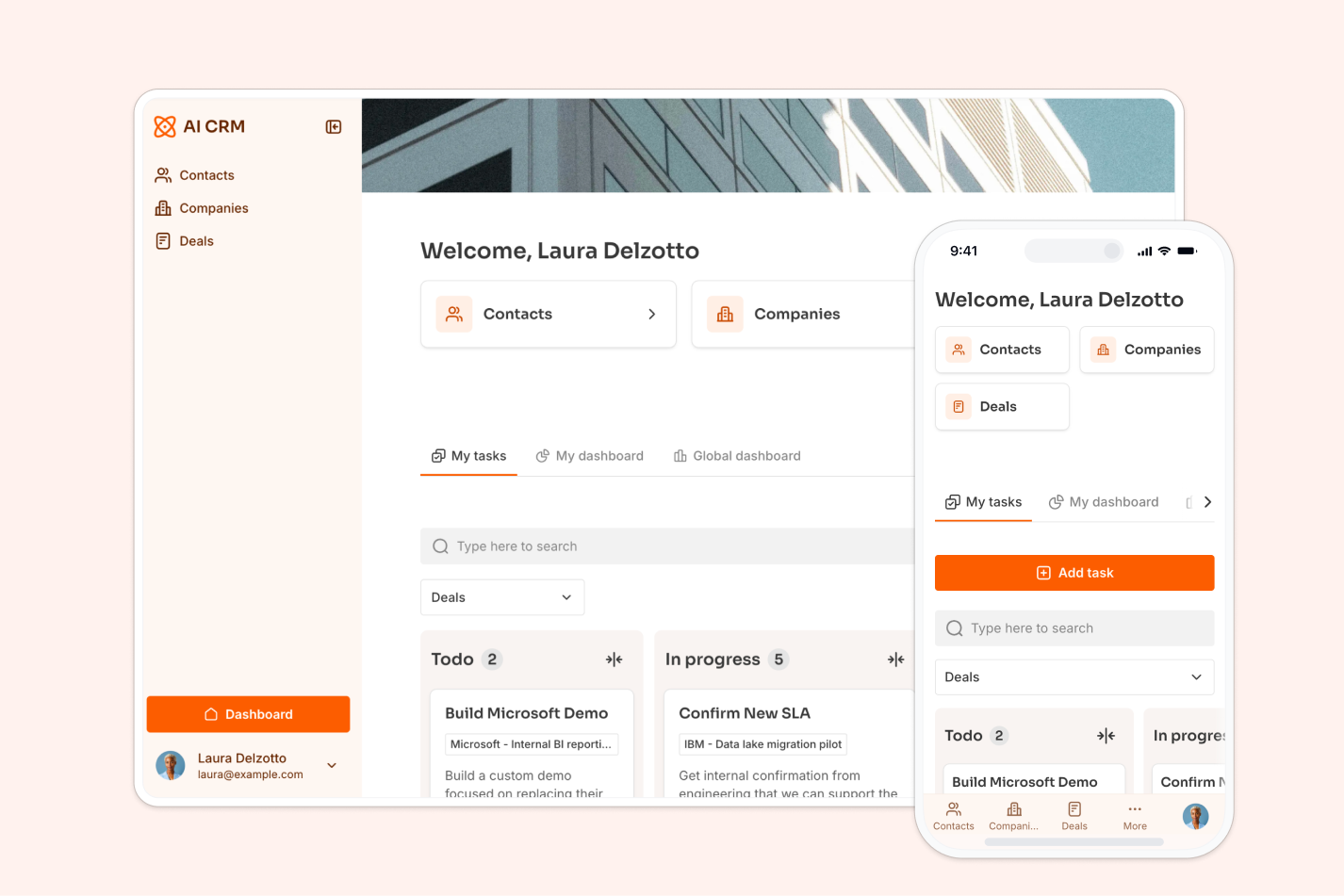
Sales CRM
The Sales CRM is the cornerstone of any sales operation. Off-the-shelf systems are capable, but they often carry features you will never use while missing the ones specific to your process, and they rarely match how your team works.
Building your own changes that. You decide exactly what to track, from custom deal stages to a follow-up calendar to an alert that fires when a lead goes cold, and you can refine it as your process evolves. Because you define the schema, the data you capture is specific to your business, which means the reports and insights you pull out are far more relevant.
A real example shows how far this goes:
"In roofing, there were not many good CRM options, except for one that cost thousands of dollars a month. Instead, I used Softr to build our own CRM that rivals the expensive ones. I do not pay for features I will not use, and simply build the ones I want, exactly how I want them." - Verified User, Construction (Small-Business), G2 review
In Softr, start by structuring your data in Softr Databases. You can add tables and fields manually, or describe your data structure to the Database AI Co-Builder and it will generate the tables, fields, and relationships for you. Then surface that data with Table, List, and Kanban blocks for your pipeline. For a deeper walkthrough, see our guide on building a CRM database.

Lead capture with forms
Every sales process begins with capturing leads, and the quality of information you gather at this stage shapes the entire journey. Most teams rely on generic forms that miss key details, so the rep spends time chasing follow-up questions later.
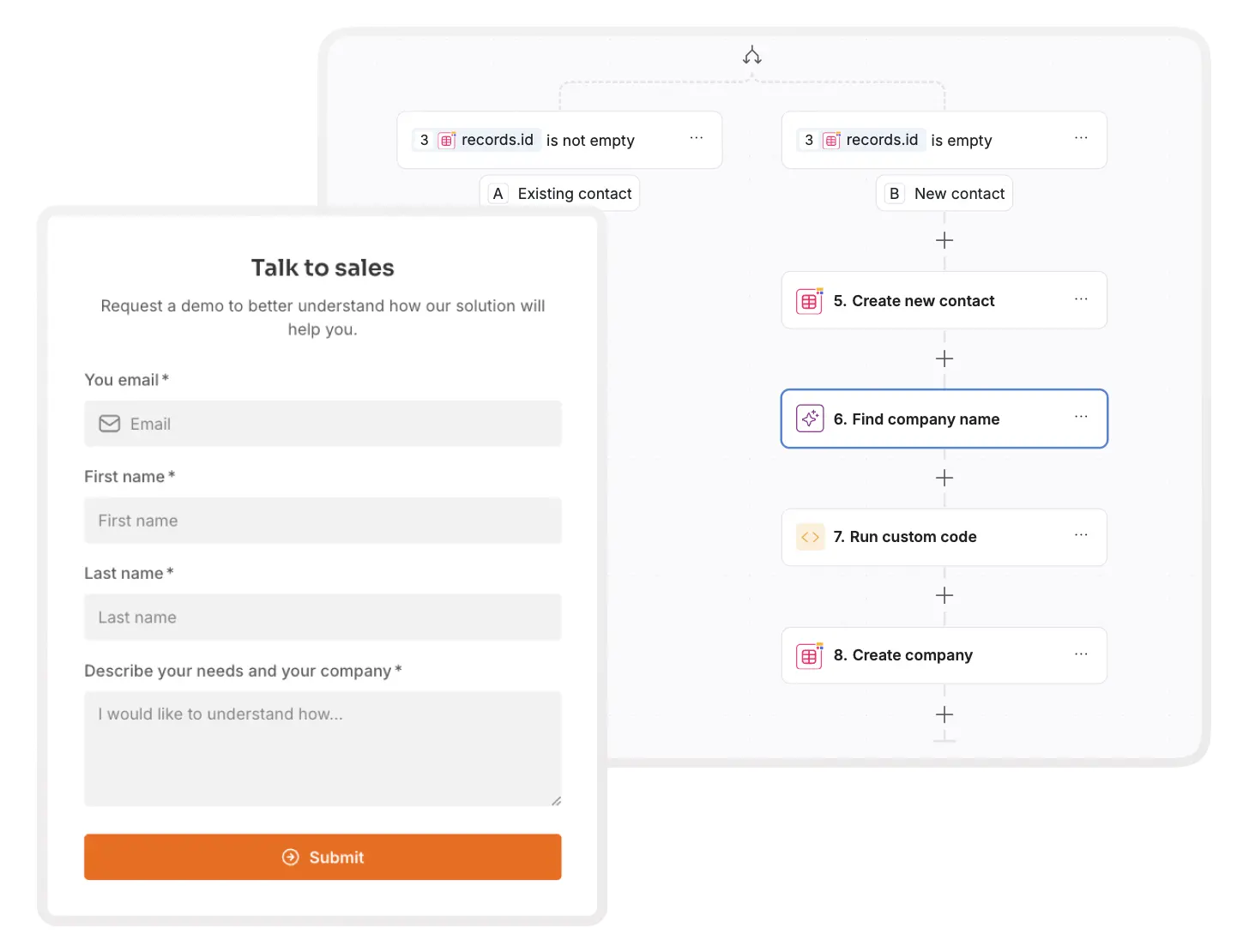
With a custom form, you capture exactly the information you need from each lead. You can build different forms for different campaigns or segments, add conditional fields that change based on responses, or include a scoring system to qualify leads on the spot. Grab the lead capture form template to get a head start.
The bigger win is automation. When a lead submits a form, the record can flow straight into your CRM, with no manual data entry and no transcription errors. You can take it further with a database AI agent that automatically enriches each new record, pulling in firmographic details like industry, company size, or a description from the web the moment the lead lands.
Account management portals
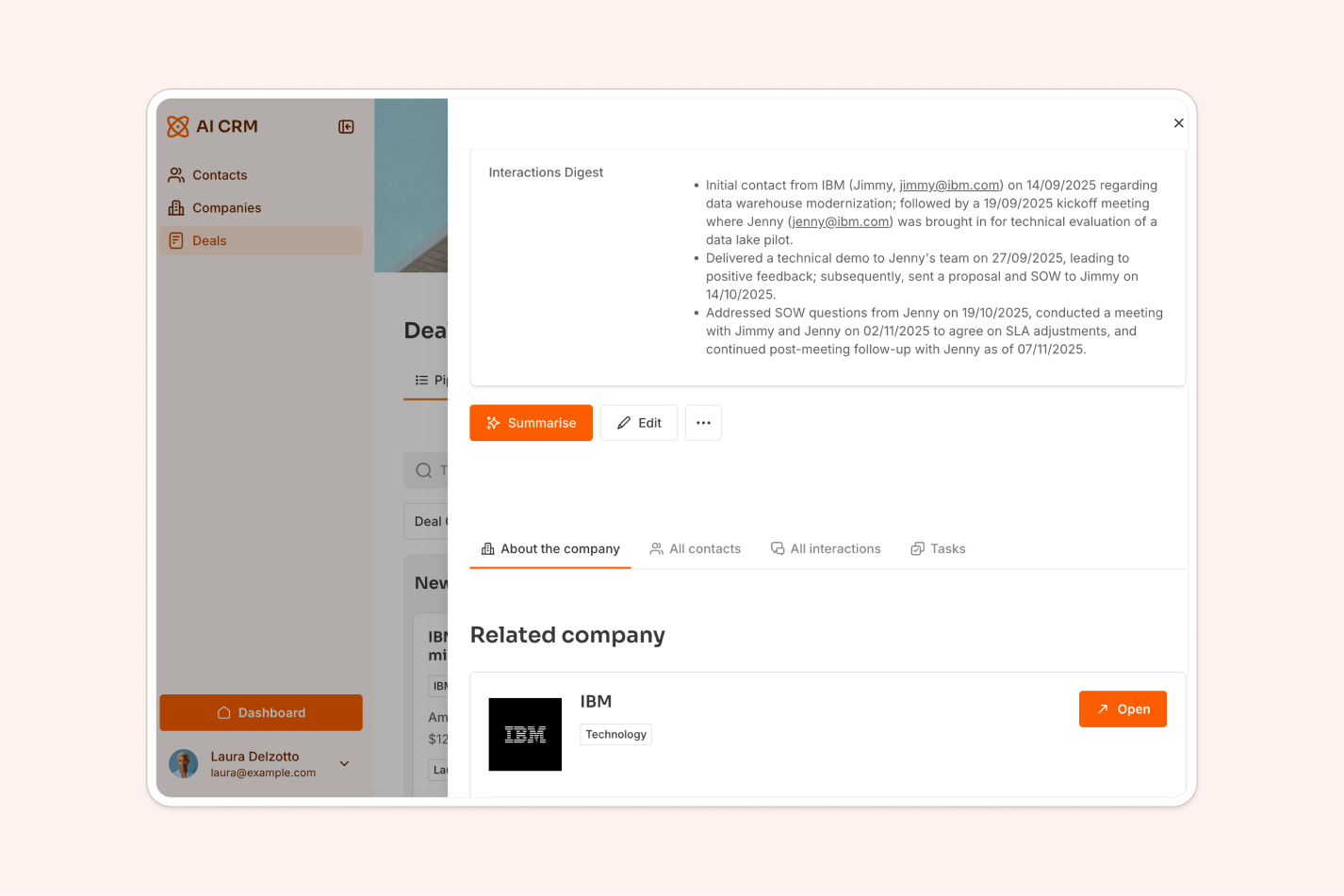
An account management portal is the one-stop shop for everything tied to a customer account. Having a centralized, accessible system for the important details about each customer keeps reps from digging through email threads and scattered spreadsheets.
When you build it yourself, you choose what information to display, how to display it, and who has access to it. You can pull in real-time data from your CRM or customer service platform, surfacing contact details, product usage stats, communication history, and more. With users and permissions, you also decide which reps can see which accounts, so the portal respects your data boundaries.
Done well, an account portal arms your reps with everything they need at their fingertips, which streamlines account management and strengthens customer relationships. Altitude Marketing built exactly this kind of tool on Softr: a personalized sales enablement portal that has served 295+ prospects and saves their team one to two hours per prospect on content delivery, while feeding engagement signals back to HubSpot.
Customer onboarding directories and progress trackers
Onboarding new customers is a critical part of the sales process, and a smooth handoff sets up a successful relationship. The trouble is that managing the many steps involved can get overwhelming fast.
An onboarding directory and progress tracker solves this. Picture a tool that outlines each step, assigns responsibilities, tracks progress, and notifies the right person when tasks are done or deadlines approach. Tailored to your process, it can cover everything from initial account setup and product training to follow-ups and feedback collection. Because it all lives in one place, you always have a clear view of where each customer is in their journey.

Project trackers
For complex deals with multiple stakeholders and stages, project tracking is essential. A good tracker can be the difference between a deal that moves smoothly and one that gets lost in the shuffle, but only if it aligns with your process well enough that your team actually uses it.
Build your own and you get exactly that fit: customized stages, task assignment, deadlines, and reminders. With real-time updates and collaborative features, everyone stays in the loop. When you add blocks like a List or Kanban view inside the Softr editor, you can place them yourself or ask the AI Co-Builder to add and configure them by describing what you need.
KPI dashboards
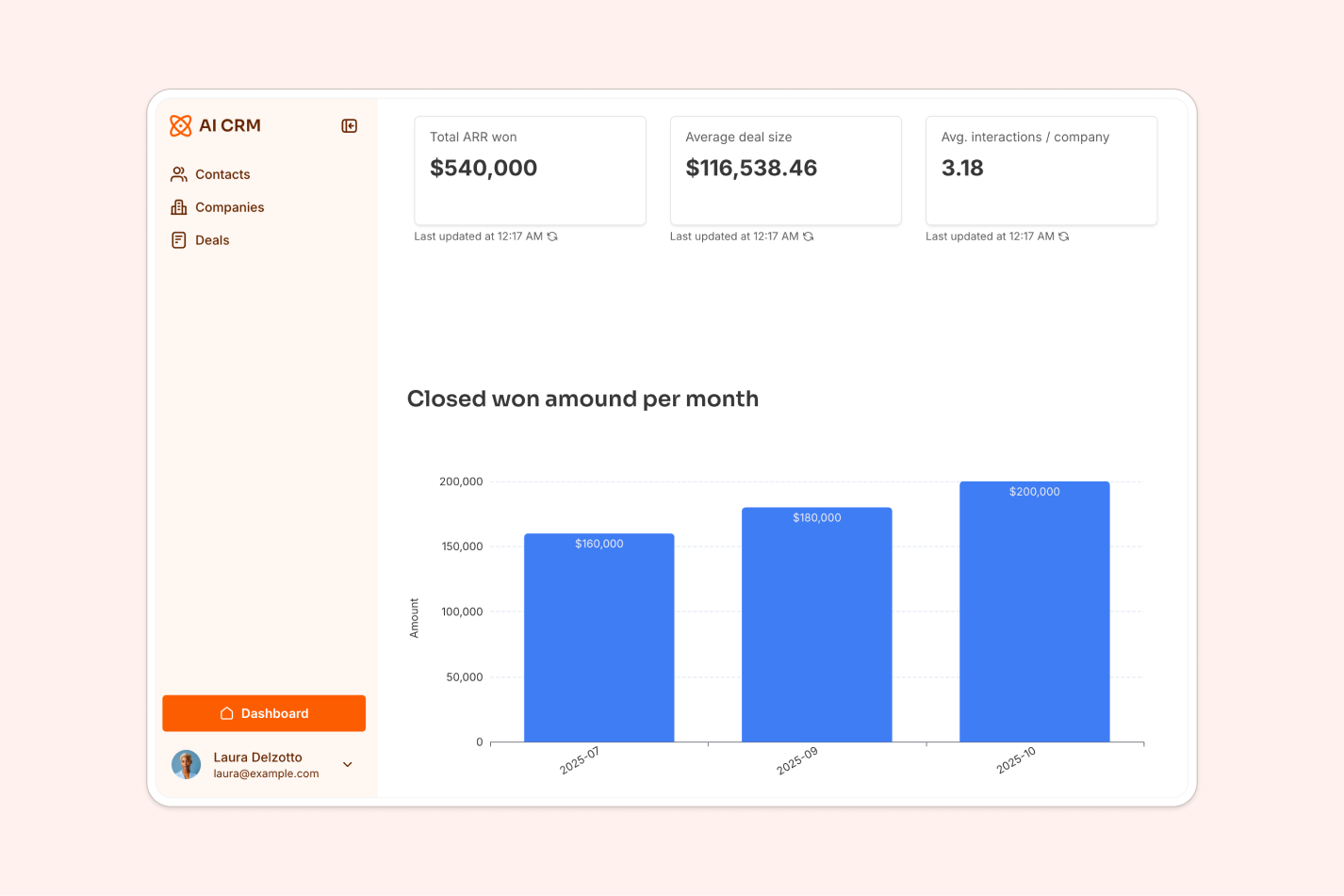
If you cannot measure it, you cannot improve it. A KPI dashboard lets you measure what matters, and you can decide which indicators to track, how to visualize them, and who gets to see what. From conversion rates to average deal sizes, lead response time, and churn, you keep an eye on everything that affects sales performance. The free sales KPIs dashboard template is a good starting point.
The advantage of building your own dashboard is the live data behind it. Feed it from your CRM or your client-facing portal so customers can see their own usage, and create reporting sections on demand. With data flowing in from your other tools in real time, you can spot trends and act on them quickly instead of waiting for an end-of-month report. For a wider view of your options, see our roundup of the best dashboard builders.
Competitor analysis tools
Staying one step ahead of your competition matters, and a competitor analysis tool helps you keep tabs on their moves: product offerings, pricing strategies, marketing tactics, and more. You can build one that tracks competitors' social media activity, analyzes their customer reviews, and compares their product features against yours.
Beyond understanding the competition, this kind of tool surfaces insights that shape your own strategy. You can spot gaps in your offerings, find inspiration for new features, and catch market trends before they go mainstream.
Quotation generators
Generating quotes by hand is slow and error-prone, since it demands accuracy, consistency, and speed all at once. A quotation generator automates the process: it pulls in product and pricing information, applies discounts based on predefined rules, calculates taxes, and produces a clean, professional quote in seconds. Connect it to your CRM and it can include client-specific details automatically, which speeds things up while keeping every quote consistent.
Contract management tools
Contracts involve many steps that demand accuracy: drafting new agreements, tracking renewals, and managing amendments. A custom contract management tool streamlines all of it. Storing contracts in one place is part of the value, but the bigger win is a system that keeps the whole lifecycle organized.
Picture a tool that tracks where each contract sits in its lifecycle, sends reminders for key dates like renewal or termination, and gives quick access to any contract's full history. You can manage amendments, add notes, and upload related documents, all in the same place.
This is where Softr Workflows connect the dots. Because workflows are triggered directly by interactions in your app, a deal moving to the contract stage in your pipeline can auto-create a draft, and a signed contract can kick off onboarding in your customer management tool. If you would rather not build the logic by hand, describe the automation to the Workflow AI Co-Builder and it will assemble it for you. The result is less admin work for your reps and more time spent selling.

Elevating sales tools with AI agents and automation
Traditional CRMs are often static data repositories, requiring sales teams to spend hours manually entering records, looking up company details, and switching tabs. Modern sales teams can use AI automation to turn their sales tools from passive databases into active productivity engines.
See it in action: this walkthrough shows an AI-powered CRM built in Softr, combining native features like Ask AI (a chatbot that works directly on top of your displayed data) with Softr Workflows connected straight to the interface. A rep clicks a button, sees a loading screen while the AI workflow runs, and the data blocks reload automatically with the updated results.
By combining your database, interface, and workflows inside a single builder, you can deploy intelligent automation to handle the administrative busy work. Here are four ways to build AI agents and automation directly into your custom sales tools:
Lead enrichment and database autopilot
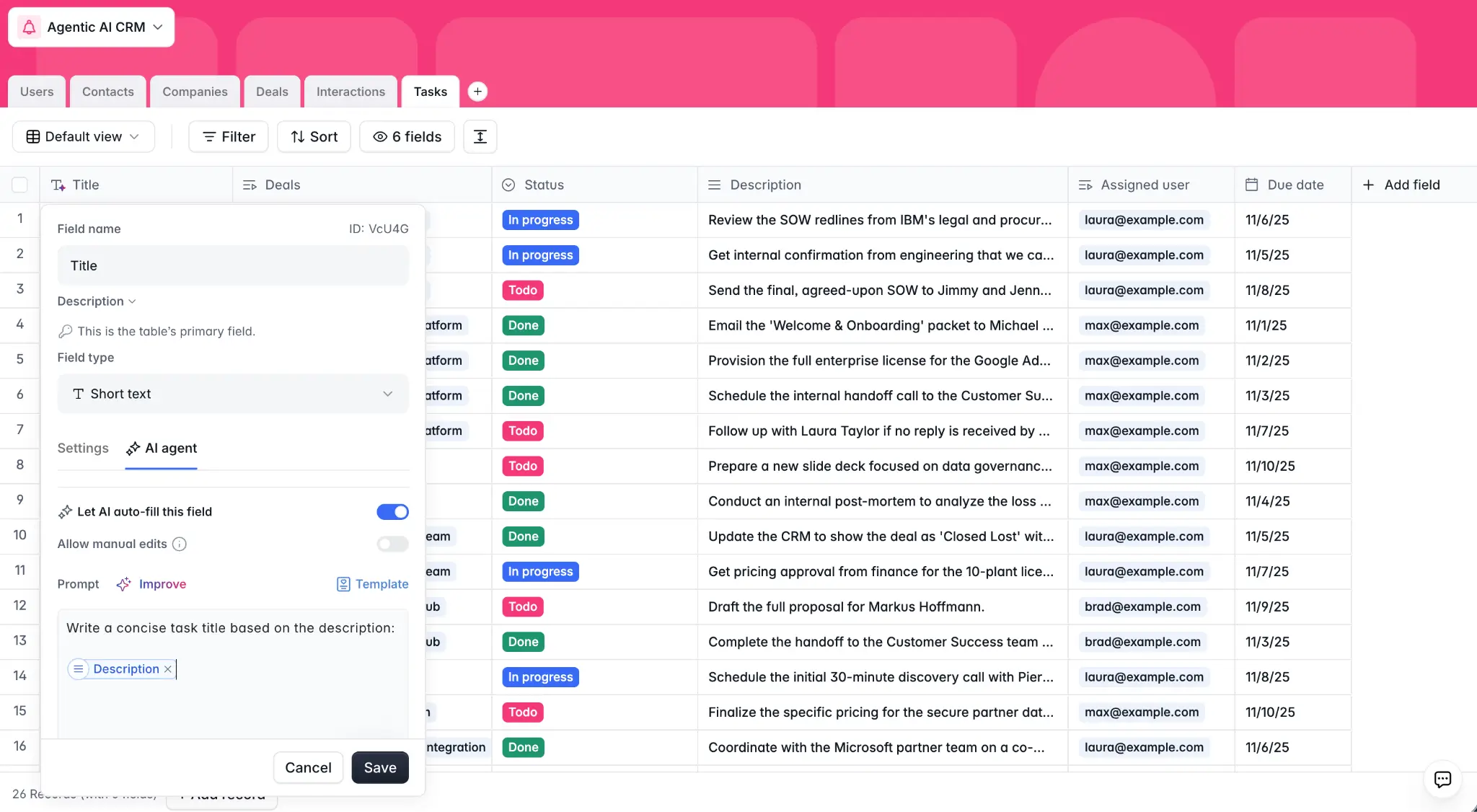
Instead of requiring sales reps to search the web for firmographic data, you can automate company and prospect enrichment. Using database AI agents on your contacts or companies tables, you can configure fields that automatically update.
For example, when a sales rep adds a new website URL to a company record, a background AI agent can browse the web and generate a concise summary of the company's size, industry, and description. This ensures your sales team has instant context before their first outreach.
Demo request matching and deduplication
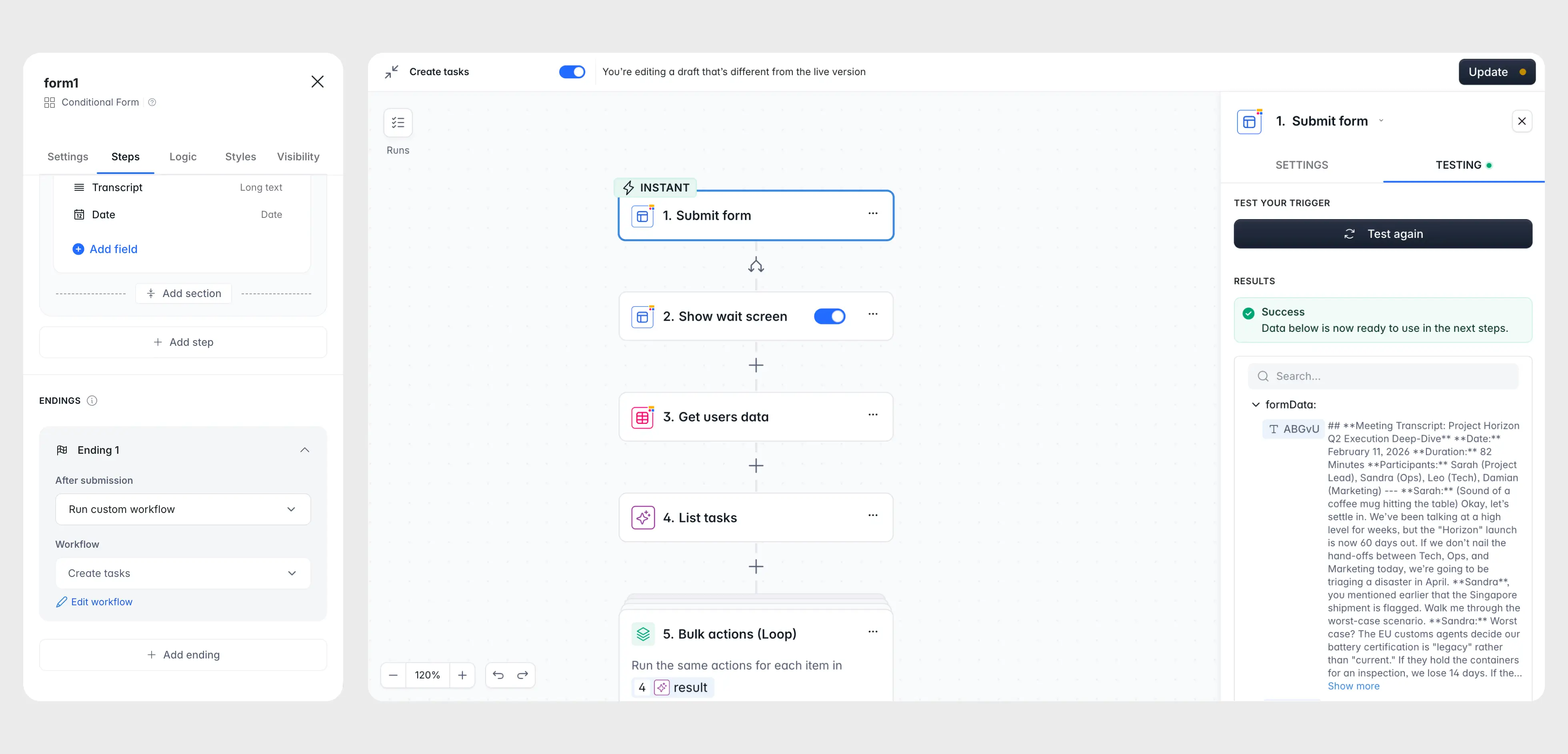
When a prospect submits a lead capture form, manual data cleanup can slow down response times. You can build a Softr Workflows automation that handles demo requests intelligently.
When a form is submitted, the workflow first checks your database to see if the contact email already exists. If it does, the workflow links the new request to the existing contact profile. If the contact is new, the system can extract the domain from the email, identify the company name, and create a company record automatically. This workflow reduces friction for the user by letting you ask for less information on public forms.
Conversational intelligence with Ask AI
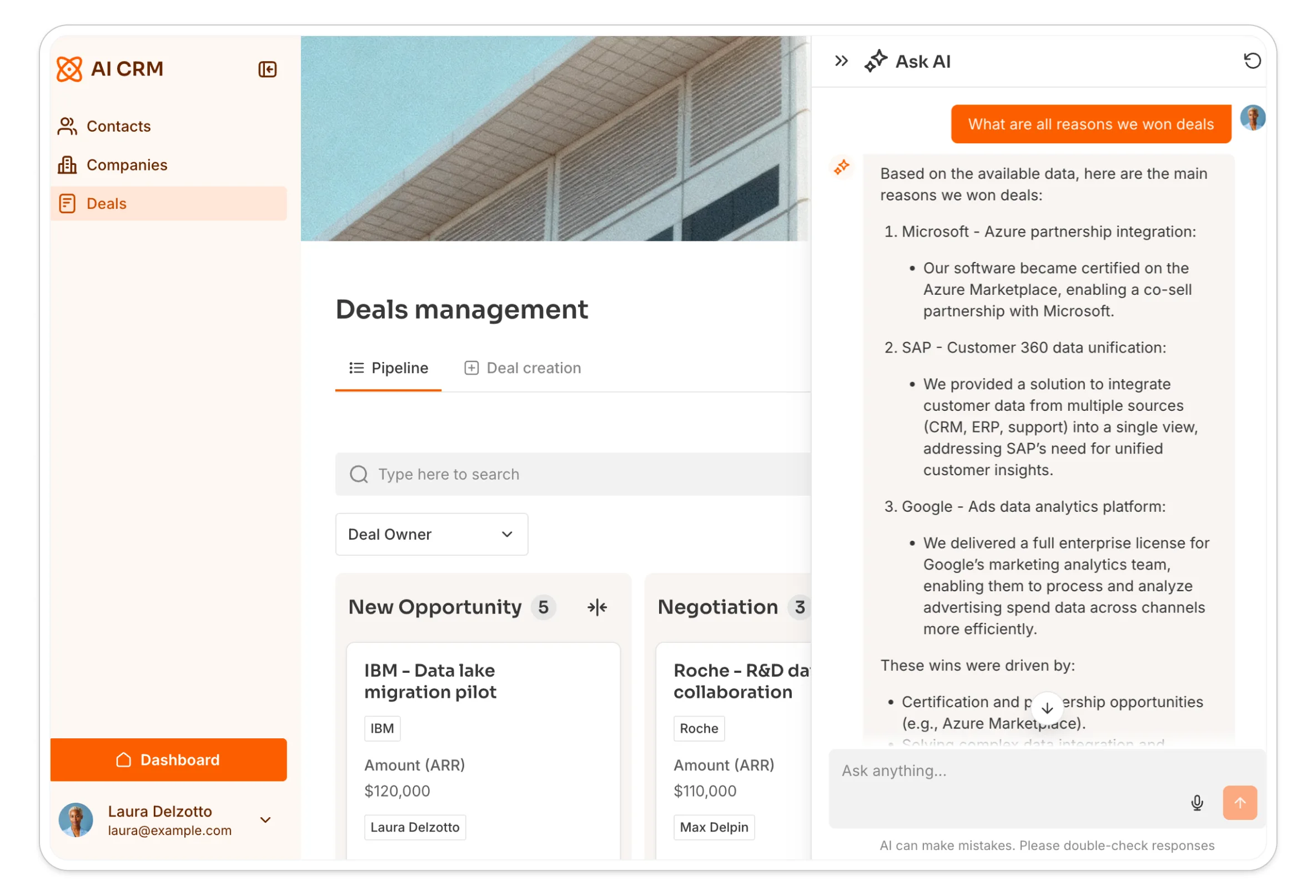
Sometimes sales reps do not have time to read through dozens of meeting notes and email logs to find a specific detail. By enabling the Ask AI feature on your lead or interaction lists, you can add a chatbot interface to your sales portal.
Your sales team can ask questions in plain language, such as asking what objection a customer raised in a previous call or who the primary decision maker is on a specific account. The chatbot answers instantly based on the actual records stored in your database.
Human-in-the-loop personalized outreach
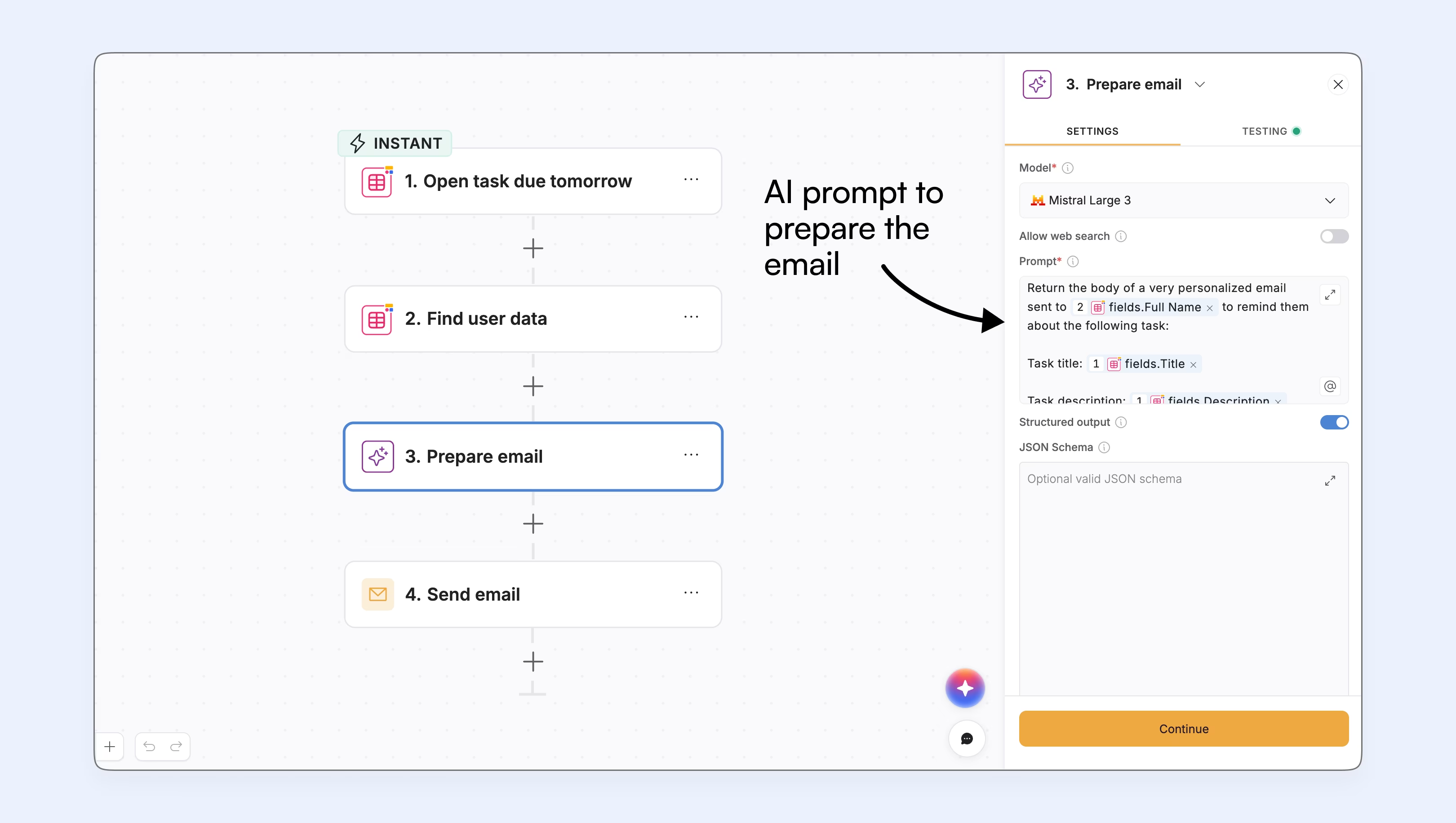
While pure AI automation can sometimes feel generic or error-prone, a human-in-the-loop approach combines AI speed with human quality control. You can connect a frontend app built on Softr to backend workflows powered by tools like Clay or n8n to build a personalized outreach engine.
The backend automatically ingests, scores, and prioritizes incoming leads. Inside your Softr sales tool, reps see a prioritized list of high-value prospects. On a prospect's detail page, the rep can add a custom instruction (such as mentioning a shared connection or location) and click a button to generate a draft. The AI model drafts the personalized email, but the message is not sent automatically. Instead, the rep reviews the draft directly in the Softr interface, edits the final details, and sends it when ready. This workflow automates eighty percent of the preparation while leaving the critical final adjustments to the salesperson.
How to start building your sales tools
You have seen the range of tools your team can build. Here is how to get from idea to a working app without stalling.
First, get your team and manager on board. Walk through the improvements above and share success stories from teams that already build their own tools. As Softr CTO Artur Mkrtchyan points out, ownership and clarity matter, especially around access:
"I had a friend who is actually an engineer and they built a custom admin panel in Lovable. One day I asked, 'How do you know who has access to what?' He was silent for a few minutes and said, 'Let me check the code.' After five minutes of checking, he was still not sure who has access to what." - Artur Mkrtchyan, CTO and Co-founder of Softr
That clarity is exactly why building on a platform with native users and permissions beats wiring access rules into raw code.
Next, look at your sales operations and pick the process that would benefit most from automation, whether that is a slow report or a messy contract workflow. Start where the impact is most visible.
Then pick your platform. With Softr, the fastest path is the AI Co-Builder: describe the tool you need and it generates a working app with a database, pages, and permissions in minutes. From there, refine blocks and pages right in the editor, or start from a template if one already fits. For the full walkthrough, see how to build a business app with AI.
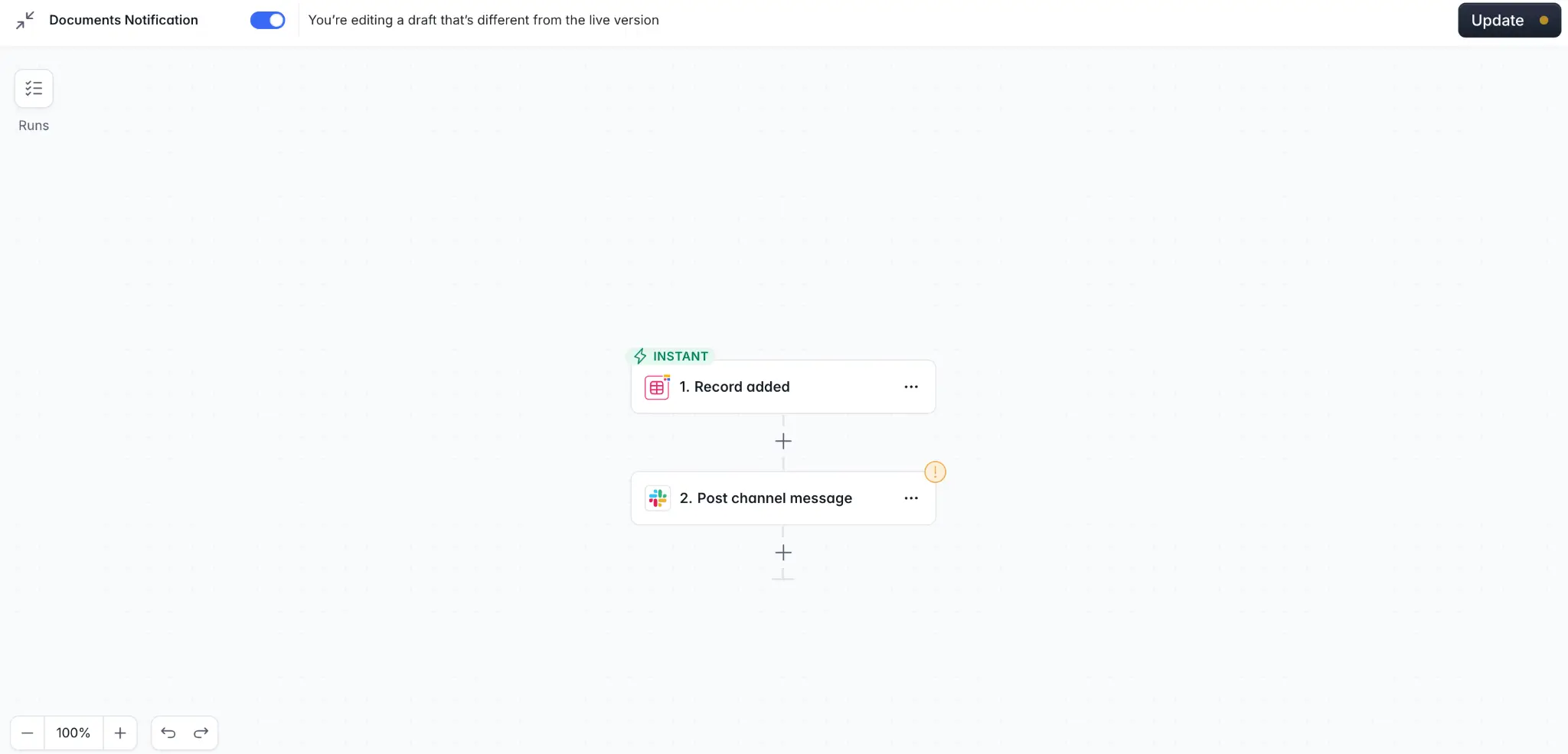
Finally, build the data layer first. Success in Softr is mostly about getting the database right, so define your tables and relationships before you design a single page. Then add automations like a new-lead Slack alert: a Softr Workflow can fire the moment a record is created, so the right rep gets pinged instantly. Ship a focused first version, gather feedback, and expand from there.
Start building your sales toolkit today
The tools your sales team needs rarely come off the shelf, and with Softr you do not have to settle or wait on engineering to get them. You get the interface, the database, the workflows, and role-based permissions in one place, with an AI Co-Builder to do the heavy lifting.
The fastest way to start is from a working example. Grab the free Sales CRM template, make it your own, and add the tools around it as your process grows.
Frequently asked questions
- Can a sales team build internal tools without any coding?
- Do I need a separate database to build a sales CRM with no-code?
- How do I control which sales reps can see which deals?
- Can no-code sales tools automate tasks like lead alerts?
- Is no-code reliable enough for production sales operations?