Best practices for designing an HR portal your employees will use

[.blog-callout]
TL;DR
- An HR portal centralizes leave management, benefits, payroll, performance reviews, and onboarding in one self-service place, so employees stop pinging HR for basic answers.
- Start by auditing your current HR setup and defining a roadmap, then build the portal, pilot it with a small group, and roll it out with proper training.
- No-code platforms like Softr let you build the interface, connect or create the underlying database, and automate the workflows behind it, without hiring developers. [.blog-callout]
In an ideal world, your employees would have no complaints and perform exceptionally to consistently drive business growth.
In reality, poor communication, knowledge gaps, and inefficient processes often drain a company's resources and directly hit the revenue pipeline.
What's the ideal way to bridge this gap between the real and ideal scenarios?
Building an HR portal is an impactful solution. An HR portal brings your team together and streamlines HR operations to eliminate these negative factors. Let's learn why you should invest in an HR portal and how to build one.
What is an HR portal?
An HR portal, or an employee portal, is a one-stop platform for your HR team to manage different workflows, like recruitment, onboarding, leave management, payroll, and more. It also enables employees to access crucial information or connect with the HR team.
Typically, an HR portal serves two broad use cases:
- Internal: This is for employees to access company information, like policies, employee handbooks, benefits, and other important documents. HR teams use an employee portal to conduct surveys, document performance reviews, and launch learning and development (L&D) initiatives.
- External: This is for the HR team to execute the recruitment process. They can consolidate documents like job posts, candidate databases, checklists, offer letters, and more.
Let's break down what information to include if you want to create an employee portal.
What to include in an HR portal
Here are some elements to cover in your employee portal:
- Leave management: Let employees manage their leaves and track the status of leave requests. Managers will get visibility into their team's availability, and the HR team can track absenteeism.
- Benefits administration: Build a self-service setup to share information about employee benefits, such as insurance, parental leave, 401(k) plans, wellness programs, and other perks.
- Payroll and compensation: HR teams can use this portal to create and manage the monthly or annual compensation database. Employees can also access their payslips, tax forms, and other documents.
- Learning and development: An HR portal can give employees access to online training resources. You can also add registration forms for workshops and learning-related events.
- Performance management: Add tools to help employees and managers set quarterly goals. This section can also record performance reviews and feedback reports.
- Recruitment and onboarding: HR teams can use this portal to consolidate hiring efforts. This can include tools to manage job posts, track applicants, and execute the employee onboarding flow.
- Employee engagement: An HR portal can also include polls or surveys to collect employee feedback. Features like reward points and recognition badges are great for boosting engagement.

Put simply, an HR portal centralizes company information and acts as a single source of truth for your entire organization. The result is a better employee experience.
Do you really need an HR portal?
The short answer: yes.
The long answer: let's break down five key benefits you can achieve with a comprehensive employee portal.
Build a single source of truth
Too many tools for each HR function can confuse employees and frustrate your HR team. Choosing the right technology is the top priority for 40% of HR teams, and 51% of teams find it difficult to integrate new tools into their existing HR setup.

An HR portal acts as a repository of employee and company data. It includes everything, from an employee directory and organizational documents to payroll and performance management.
This unified system can minimize discrepancies and build better alignment between different teams.
Improve team collaboration
An employee portal enables your team to communicate seamlessly, access information on demand, and collaborate on different tasks.
For example, you can check out shared calendars in your HR platform to help employees coordinate more effectively. Engagement features, like rewards and recognitions, can also create a sense of community.
Enhance employee autonomy
Autonomy is a decisive factor in employees' success.
Research suggests that employees feel more motivated to produce results when they have more autonomy to perform their tasks. It positively impacts their performance and creates a higher sense of job satisfaction.
An HR portal can empower employees to work more autonomously since they can quickly access important information. With an employee portal, you remove friction points and set employees up for success with more control over their work.
Plan and manage HR initiatives
A typical HR setup involves many moving parts. Handling many processes and resources can be daunting, especially when you don't have a strong technological system.
This is where an HR portal can truly pay dividends.
An employee portal can streamline repeat workflows to eliminate confusion and minimize errors. It can also facilitate strategic planning based on people analytics, so you're not relying on guesswork to plan new initiatives and make informed decisions. Understanding the difference between a metric vs KPI helps HR teams focus on the most meaningful measurements, ensuring that analytics translate into actionable insights rather than just data points.
Such a portal supports the growing need to reduce complexity in HR processes and make services easily accessible.

Maximize efficiency with automation
Finding ways to improve efficiency is a top priority for 68% of HR executives.
Why? Because nearly three-quarters of these teams use spreadsheets and email to manage HR processes. This shows a serious lack of automation to improve HR efficiency.

With an HR portal, you can automate tasks like leave management, payroll, benefits administration, and more. Automated workflows also free up your HR team's time to focus on more strategic tasks, and they lead to lower error rates.
Building an HR portal? Here's how to do it right
Now that we've made the case for why you need an HR portal, let's walk you through the five best practices for building one.
Audit your existing HR management setup
Start by understanding what's missing in your current HR setup.
Is it too many tools causing confusion and chaos? Or is it the lack of automation creating loose ends in your HR processes?
Think along these lines to list the main roadblocks that adversely impact your team's performance. This will prepare the groundwork for your employee portal by clarifying the problem statements and what to build first.
You can also conduct employee feedback about HR processes using:
- Surveys
- 1:1 interviews
- Questionnaires
- Team discussions
- Real-time observations
For example, Alex Gilev, a product designer, explains how he spent two weeks interviewing 20+ employees at a company to understand their needs and expectations from a back-end employee portal.
He leveraged this data to find strategic opportunities for building this portal.

Remember: the first step is simply to analyze the status quo and document all this data. You can also extract meaningful insights to discuss the big picture of your HR portal with key stakeholders.
Identify strategic goals and create a roadmap
When you know exactly what problems to solve, you can set goals for your employee portal and build an implementation roadmap.
Involve multiple stakeholders in the process of defining the goals for this portal. Here are a few objectives to set for your HR platform:
- Reduce the time spent on administrative HR tasks by 30% within the first year.
- Improve employee satisfaction with HR services by 20%, as measured by annual surveys.
- Ensure 100% compliance with employment laws through automated tracking and reporting.
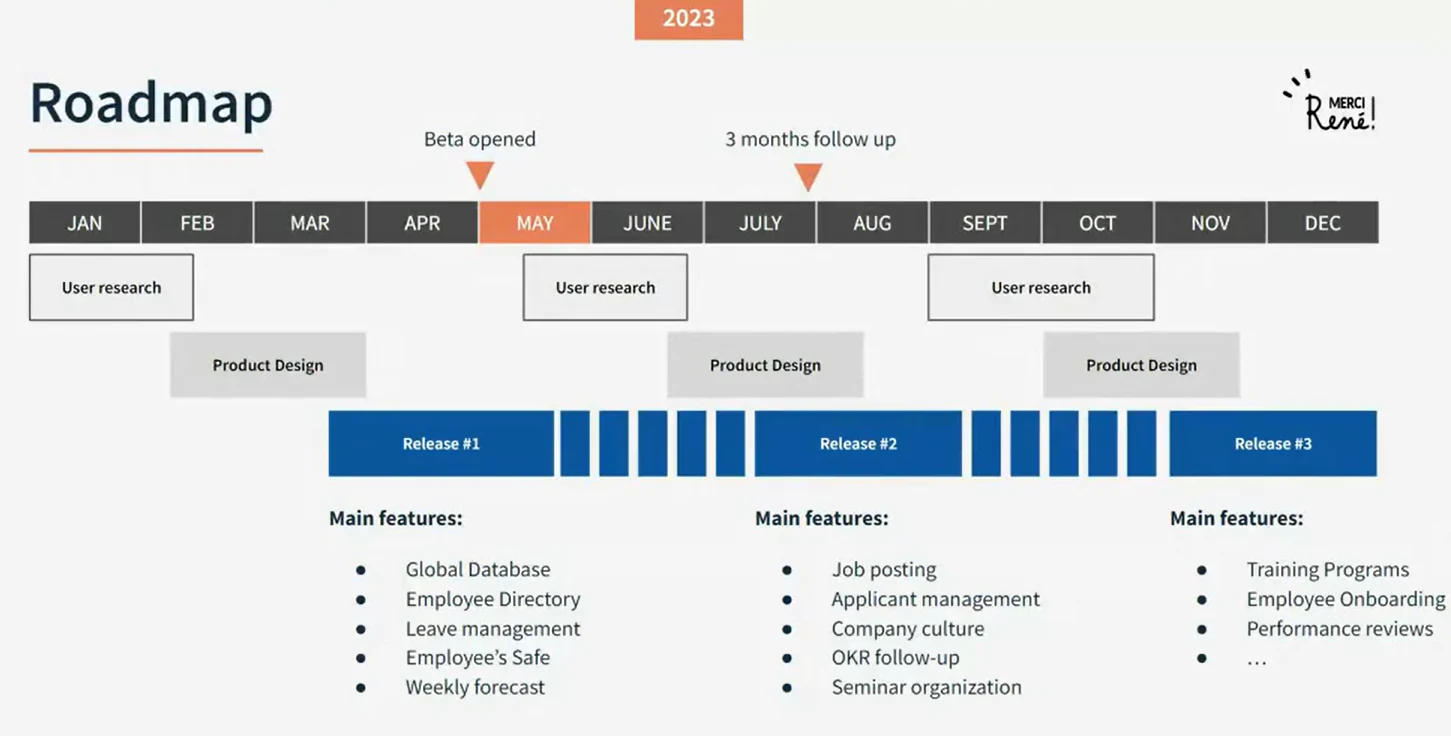
With these goals in place, it's time to outline a roadmap for developing the portal. This roadmap should explain the phases in which you'll build functionalities, starting with the most high-value tasks that fix critical issues.
Here's an example of an implementation roadmap divided into three release phases with time allocated for user research:
Use a no-code solution to build the portal
So, you've identified key objectives and created a roadmap to build an employee portal. What next?
You have two options:
- Hire a team of developers to build this portal at a steep cost.
- Use a no-code platform like Softr to build it yourself, with your team's help.
With Softr, describe the portal you need to the AI Co-Builder and it generates a working first version: the employee database, pages, and user groups for HR admins, managers, and employees. From there, you can keep prompting the AI for changes or switch to manual editing whenever you want precise control, since every element the AI creates is fully editable through Softr's visual editor.
The foundation of a good HR portal is its data. We recommend building your employee records in Softr Databases, Softr's native database, since it's purpose-built for business data and won't hit the rate limits you'd run into with an external spreadsheet tool. If your HR data already lives elsewhere, Softr also connects to 21+ external data sources, including Airtable, Google Sheets, HubSpot, and SQL databases.

Once the data is in place, users and permissions come next. Set up user groups for employees, managers, and HR admins so each sees only the pages and records relevant to them, whether that's a manager approving their team's leave requests or an employee viewing their own payslips. Keep everyone in a single Users table with a role field rather than splitting them into separate tables. As Guillaume Duvernay, a Softr builder who's created 50+ business apps, puts it: "You definitely want to keep all your users in the same table, using a role field to define access, rather than creating separate tables for admins and vendors."
You can start from one of Softr's pre-built templates, like the employee directory or employee onboarding templates, or start from scratch and design the platform entirely on your own. For anything a standard block can't handle, like a custom benefits calculator or a specific approval flow, the Vibe Coding block lets you generate a bespoke UI component from a plain-language prompt, and it automatically inherits your app's theme and connects securely to your data.
DS Automotive, an independent Jaguar Land Rover specialist, is an excellent case study of building an internal employee portal using Softr. The company's director, Dan Smith, tried multiple platforms to create such a portal but ran into restrictions on customizing features. With Softr, he built a user-friendly front end for his Airtable data so his team could access vehicle data, job cards, and history from any device.
"The ability to pull data from different Airtable bases into different blocks and display them on one page was one of the main reasons I chose Softr. It's also more user-friendly than other no-code tools." - Dan Smith, Director, DS Automotive

Once the interface and permissions are in place, connect Softr Workflows to the logic that should happen behind the scenes, like notifying a manager when a leave request comes in or updating a record when an employee completes onboarding. Because Softr Workflows are triggered directly by actions inside your app, they run instantly rather than waiting on a polling schedule. And if you'd rather describe the automation instead of building it step by step, the Workflow AI Co-Builder can generate the logic from a plain-language description.
Need more inspiration to start designing your HR portal? Check out this workshop, which will help you plan, design, and iterate an employee portal using Softr.
Conduct pilot testing and make iterations
Before a full-scale launch, conduct a round of pilot testing with a small group of users to ensure your portal has no glitches or errors.
You can run a test launch with the HR staff and a few employees from each department. Record their feedback and spend time making necessary improvements to the platform. This might require design changes, feature additions, and bug fixes.
Launch the portal with multiple rounds of training
One of the HR portal's best practices is to launch the platform with in-depth employee training.
Make it easy for users to adapt to this new portal and use it actively. You can do this with a quick help center, training videos, and product walkthroughs.
Additionally, create a support chat to answer people's queries in real time and ensure a seamless, disruption-free transition phase.
Enhance your employee experience with HR portals
An HR portal is your gateway to greater productivity and stronger business performance. It can promote better communication and operational alignment to get rid of leaks in your revenue pipeline.
To start building an HR portal, consult your team to define goals and prioritize features. Then, use a platform like Softr to design your database, interface, and automations in one place, and iterate as your team grows. Try the employee directory template for free.
Frequently asked questions
What is an HR portal, and how is it different from an HRIS?
What features should every employee portal include?
How long does it take to build an HR portal with a no-code platform?
Does an HR portal need its own database, or can it run on Airtable or Google Sheets?
How do I keep sensitive employee data secure in a self-service HR portal?