Managing a few vendors manually is usually doable. You can use email, spreadsheets, and a shared folder to collect and store key information. It takes effort, but you can probably stay organized.
But 56% of companies work with more than 100 vendors, and the average company manages 286. At that scale, tracking contracts, tax forms, compliance documents, and payment status through spreadsheets and email becomes harder and unreliable.
That’s where vendor management systems come in. They centralize supplier information, standardize onboarding and approvals, and make it easier to manage vendor relationships as you grow.
In this guide, we compare the best vendor management portals in 2026 and help you choose the right one for your business.
Best vendor management portals at a glance
| Tool | Category | Best for | Key features | Pricing |
|---|---|---|---|---|
| Softr | Flexible/custom portal builder with AI and no code | Building custom, AI-powered vendor management portals without coding | AI App Generator, drag-and-drop builder, Ask AI, workflows and automation, role-based control, predictable pricing | Free plan available with unlimited apps; paid plans start at $19/month |
| Zoho Creator | Flexible/custom portal builder | Building custom apps and connecting with other Zoho apps | Drag and drop interface, custom branding, mobile apps, AI tools, reporting dashboards | From $8/user/month (billed annually) |
| Tipalti | Plug-and-play vendor management system | Automating accounts payable and global vendor payments | Self-service supplier portal, invoice automation, compliance automation, global mass payments | AP plans start from €99/month. Custom pricing for mass payments plans |
| Transformify (TFY) | Plug-and-play vendor management system | Finding talents, managing vendors, and processing global payments in one system | Compliance automation, multi-currency and crypto payouts, contract generation, integrations and API access | £5 per active contractor + 1.5% platform fee |
| SAP Ariba | Enterprise procurement suite | Automating and managing complex procurement for large enterprises | Supplier lifecycle management, automation, promote subscription, advanced analytics | Custom pricing |
| Oracle Procurement Cloud | Enterprise procurement suite | Managing enterprise procurement and spend | AI Assist, purchasing landing page, supplier portal, environmental data, analytics | Custom pricing |
What are vendor management portals?
Vendor management portals are online platforms that businesses use to manage relationships with their vendors and suppliers. Their main advantage is that they replace scattered communication, spreadsheets, and shared folders with one centralized system that both your team and your vendors can access.
Vendors can log in to submit company details, upload required documents, update contact or payment information, track their approval status, and communicate with your business. At the same time, you can review submissions, approve vendors, store contracts, monitor document expirations, coordinate payments, and maintain a complete record of vendor activity.
What to look out for in vendor management portals
Before choosing a platform, make sure it fits your team’s workflows and solves your specific needs. Here are the key features to evaluate:
- Document management and tracking: Your portal should give you one place to store and organize vendor documents. It should also send reminders when important documents are about to expire.
- Integrations: Vendor management software should connect with the tools your business already uses so you don’t have to duplicate work or export data manually.
- Security: Since you’re handling sensitive vendor and business information, look for strong security features such as encryption, multi-factor authentication, and compliance with data protection standards.
- Scalability and transparent pricing: The platform should support growth as you add more vendors, users, and documents without performance issues or unexpected pricing surges.
- Ease of use: Internal teams and vendors shouldn’t struggle to use the system. Choose portal software with intuitive interfaces and minimal training requirements so they can easily get started.
- Onboarding flows: The best vendor management portals make onboarding simple for both your team and vendors. That means collecting the right information upfront, guiding vendors through required fields and document uploads, and routing approvals to the correct stakeholders automatically.
- Role-based access: The system should allow you to control who can view, edit, or approve information. Different users need different levels of access and visibility.
- Instant notifications and status updates: Look for a tool that sends real-time alerts when vendors submit documents, approvals are needed, or something is overdue.
- Data analytics and reporting: Beyond storing information, the platform should provide visibility into your vendor network. You should be able to see which vendors are active, pending approval, or missing documents. Some platforms also offer spend reporting to help you understand vendor costs and make informed decisions.
Categories of vendor management portals
Vendor portals fall into three broad categories based on how they work and the problems they solve:
- Flexible/custom portal builders: These platforms let you build vendor portals specific to your processes and needs. This category is ideal if your workflows are unique, you need to meet industry-specific requirements, you require features most off-the-shelf tools don’t offer, or you want a system that can adapt as your operations evolve.
- Plug-and-play vendor management systems: These are pre-built, ready-to-deploy tools with vendor onboarding, document tracking, approval workflows, and reporting already configured. You’re not building the system yourself; you’re only implementing it. This category is a good fit if you want to get started quickly. However, they offer fewer flexibility and customization options.
- Enterprise procurement suites: These are platforms designed for large organizations with complex procurement needs. Vendor management is only one part of a broader source-to-pay system that often includes sourcing, contract management, purchasing, invoicing, and integration with ERP and finance systems. These suites offer extensive features and capabilities, but often require longer implementation cycles and higher costs.
Softr — best for building custom, AI-powered vendor management portals without coding
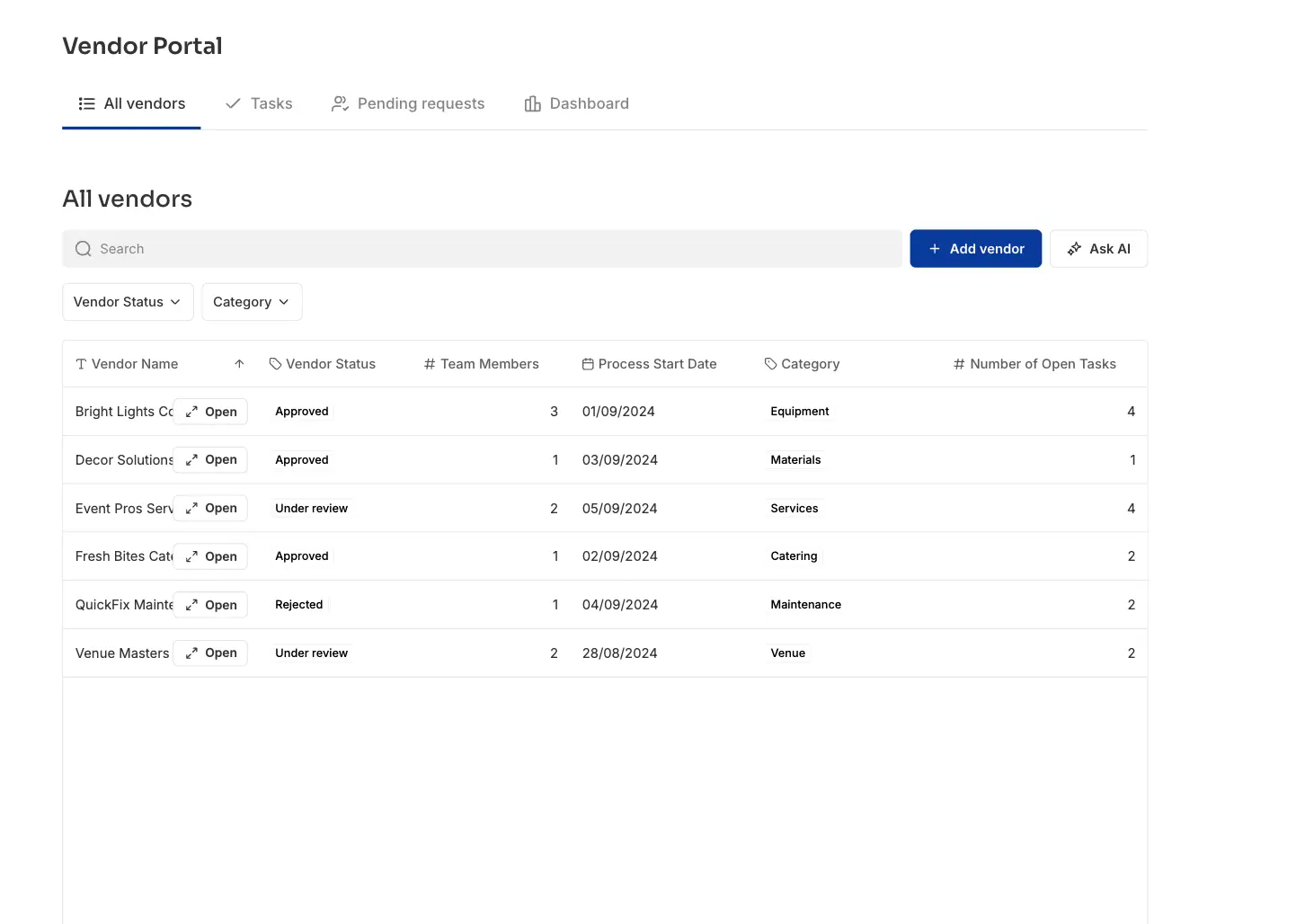
Softr is an AI-powered app builder that lets you build working vendor management portals and procurement systems on top of your existing business data, without writing code.
Instead of forcing your workflows into a rigid vendor management software, you can build a portal that matches how your process actually works. That includes supplier onboarding, document collection, compliance tracking, vendor directories, and performance dashboards.
You just describe what you need in plain language, and the AI App Co-Builder can build your vendor portal app and turn your existing data into a secure, working database your team (and suppliers) can start using the same day. Then refine (if you need to) elements using the drag-and-drop visual builder or the Vibe Coding Block.
To set it up, create a vendor database in Softr Databases, then once your data is structured, build the portal interface on top of it. You can create separate experiences for internal teams and vendors. Admins can oversee approvals, documents, and workflows through a control center, while vendors log in to submit information, upload documents, and track status updates.
With Softr Workflows, you can automate manual follow-ups, such as sending automatic emails to vendors when status changes or sending task reminders. You can also include an AI assistant, Ask AI, that lets teams ask about vendor status, documents, or payments and receive answers based on live data inside the portal.
Here’s a step-by-step tutorial on how to build a vendor portal in Softr.
Softr gives you full control over layout, branding, navigation, and user permissions so you can customize however you want. You can define user roles such as vendor, admin, or procurement manager and control what each role can view or edit. This makes it easier to manage multiple vendors or supplier teams within one system.
Pros
- Custom builder: Build your vendor portal around how your procurement process actually works instead of adapting to predefined systems.
- Full-stack client portals: Store data in Softr Databases or sync live data from your entire tech stack, then layer portals and workflows on top.
- Affordable and predictable pricing: Store data, build portals, and automate workflows with transparent subscription pricing instead of enterprise-level fees.
- Fast to launch: Go live in hours or days with pre-built templates and drag-and-drop building blocks.
- Accessible non-technical teams: No coding or engineering support required to build and manage the portal.
- Branded, professional portals: Go beyond basic form/table views with custom layouts, blocks, and full design control. Build experiences that look and feel like your brand.
- Scales with your needs: Softr scales with you as you grow without performance issues. You can start with simple onboarding or document tracking and expand into multi-step approvals, reporting, or additional user roles without rebuilding from scratch.
- Built-in workflows and automation: Automate onboarding, request intake, approvals, notifications, and updates directly inside the portal, without relying on external automation tools.
Cons
- Not designed for teams that require full backend code control.
Key features
- Flexible data setup: Use Softr’s relational database to build the data foundation to power your portal. Or connect existing data from tools like Google Sheets, Airtable, HubSpot, and other supported sources.
- AI App Generator: Generate a working vendor portal by describing your requirements in plain language.
- Drag-and-drop building blocks: Combine pre-built blocks to create portals in minutes, without coding.
- Ask AI: Let clients and teams ask questions directly inside the portal and get instant answers from live data.
- Workflows and automation: Automate approvals, reminders, document requests, and multi-step processes directly inside Softr without relying on third-party automation tools.
- Accessible across devices: The portal works on desktop and mobile, allowing vendors to upload documents or check updates from any device.
- Role-based controls: Assign user roles and define permissions so vendors, internal teams, and admins have appropriate access.
- Enterprise-grade security: Keep client data protected with secure authentication, server-side permissions, and full SOC 2 and GDPR compliance.
- Predictable pricing: Flat-rate subscription tiers offer cost certainty and avoid the surprise charges that come with infrastructure overages and API calls.
Pricing
Softr offers flexible pricing plans designed to scale your client portal as your user base grows:
- Free: Unlimited apps, with access to Softr Workflows and Softr Databases, 5 AI credits, up to 5 app users, 5,000 database records, and up to 3 builders.
- Basic ($19/month): Unlimited apps with 42+ integrations, 10 AI credits, Team: 5 + Client: 5 app users, 50,000 database records, and a custom domain.
- Pro ($99/month): Unlimited apps with 45+ integrations and custom code, 50 AI credits, Team: 10 + Client: 50 app users, custom user groups (up to 3), 500,000 database records.
- Business ($329/month): Unlimited apps with 52+ integrations, 100 AI credits, Team: 30 + Client: 100 app users, custom user groups (up to 10), 1M database records
- Enterprise: Custom pricing, custom usage limits, SSO, advanced app security (IP Blocking), dedicated success manager, and priority support.
Zoho Creator — best for building custom apps and connecting with other Zoho apps
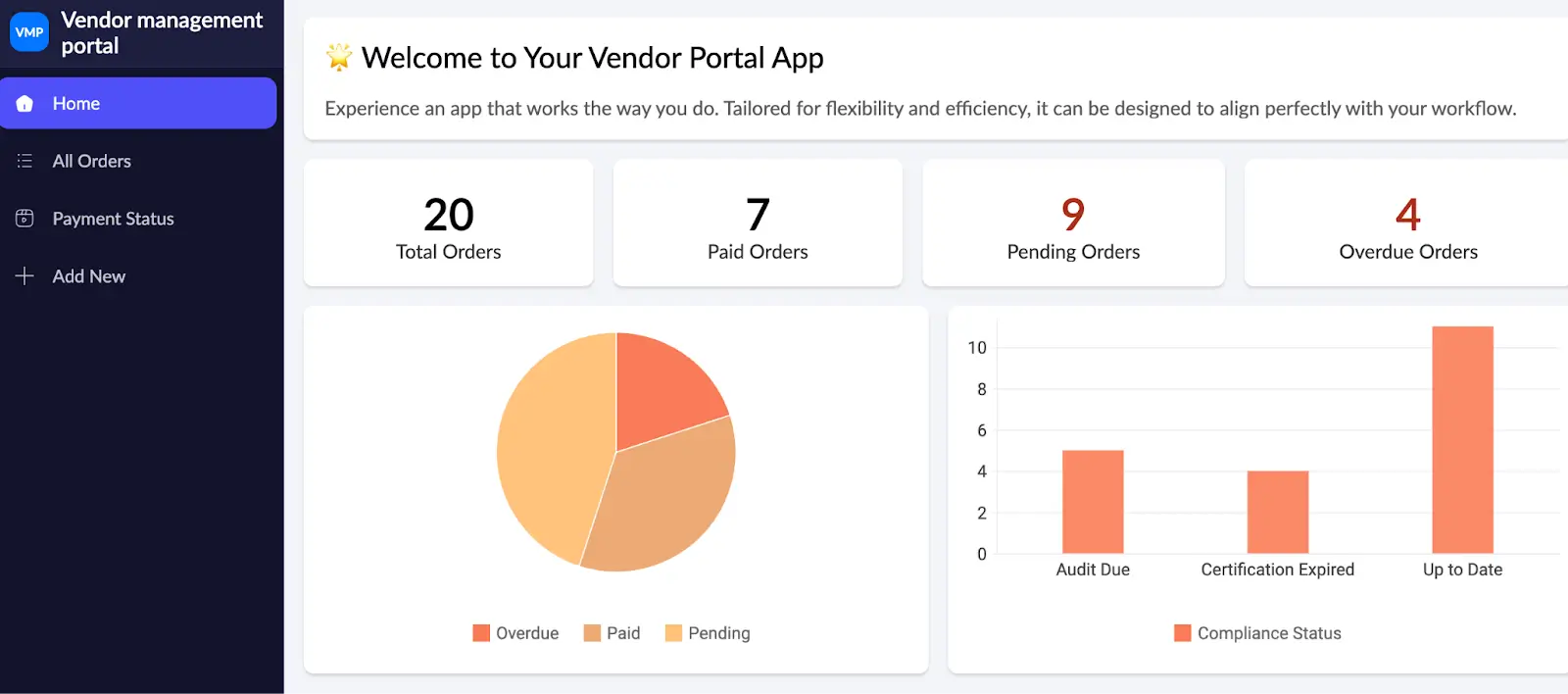
Zoho Creator is another no-code tool that allows businesses to build custom internal tools and portals, including vendor management systems. With over 7 million apps built, it provides an intuitive drag-and-drop interface to build forms, dashboards, workflows, and reports tailored to your organization’s processes. Zoho also offers app templates so you don’t have to build apps from scratch.
Pros
- Highly customizable: Build vendor workflows or portals based on your specific requirements.
- Ready-to-use templates: Includes vendor management and other business app templates you can adapt for use.
- Zoho integrations: Zoho Creator connects with Zoho CRM, Zoho Books, Zoho Analytics, and more, making it a hub for your business operations.
- AI functionality: Includes AI tools to help generate apps and surface insights for smarter decisions.
- Active user community: Connect with other Zoho Creator users to exchange ideas, ask questions, and learn practical implementation tips from peers and product experts.
Cons
- Learning curve for advanced customization: More complex workflows may require time to configure, and some familiarity with Zoho’s scripting language (Deluge) can be helpful.
- UI flexibility can be limited: Achieving highly customized or pixel-perfect interface designs may require workarounds.
- Per-user pricing: Costs increase as you add more users.
Key features
- Drag-and-drop interface: Build dashboards and apps with no coding experience required.
- Reporting and analytics: Generate reports and dashboards from application data. Integration with Zoho Analytics enables more advanced reporting.
- Mobile apps ready: Automatically generate mobile-ready versions of your applications.
- Security & compliance: Granular permissions, encrypted data, and audit logs ensure your applications are both secure and compliant with industry standards.
- Custom branding: Apply branding elements to create white-labeled applications.
Pricing
All pricing is billed annually.
- Standard ($8/user/month): 1 app, building blocks, multi-experience deployment, mobile app customization, app templates, app import and export.
- Professional ($20/user/month): Unlimited apps, 100 custom AI models, 250 ready-to-use AI models, and 50/app portal permission sets.
- Enterprise ($25/user/month): Unlimited apps, 600 /user/month custom schedules, 250/app portal permission sets, 30 data sources, and 20 custom connectors.
- Flex: Custom requirements and pricing.
Tipalti — best for automating accounts payable and global vendor payments
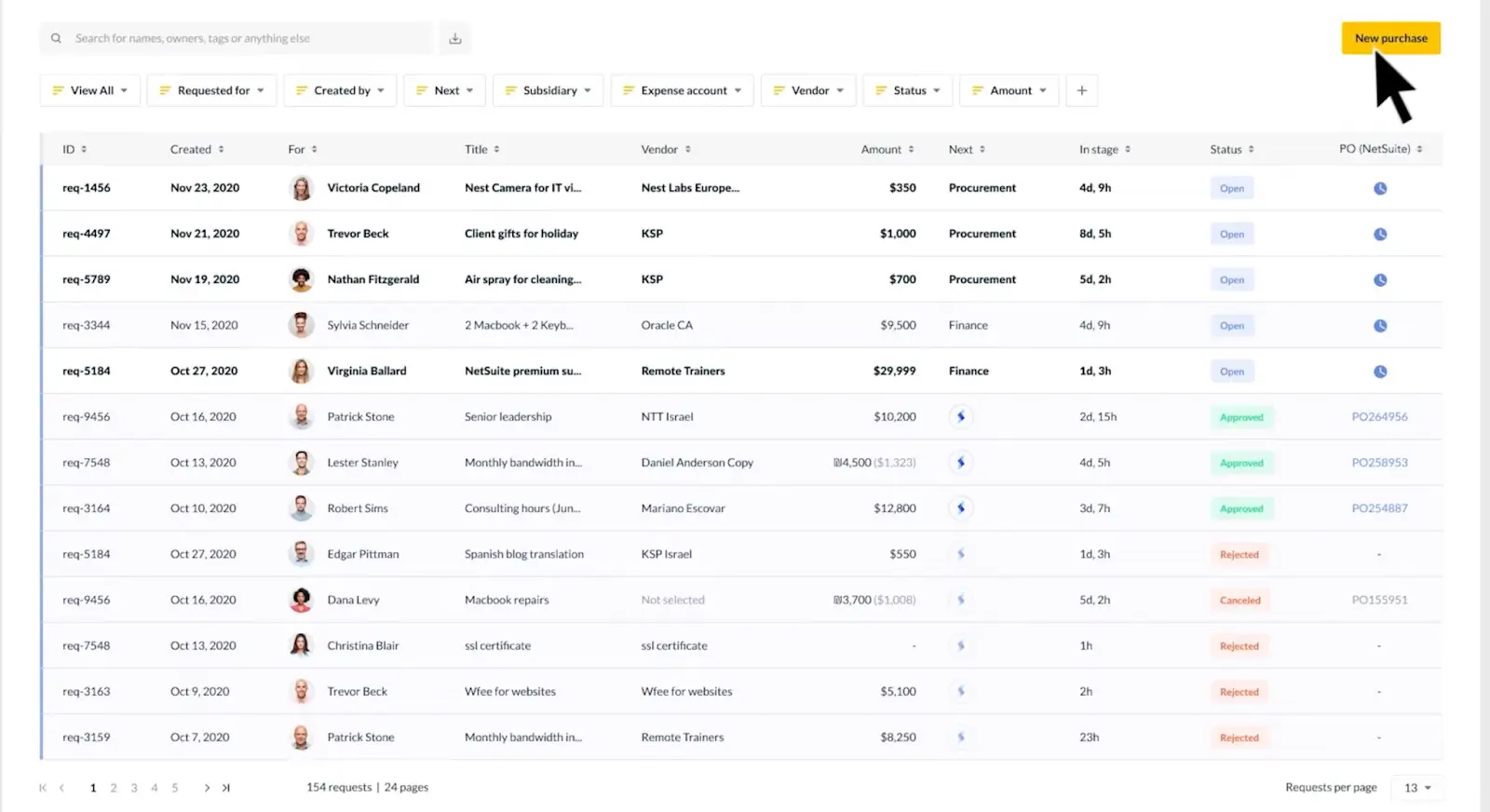
Tipalti is an AI-powered accounts payable (AP) automation and mass payment platform that helps businesses manage the vendor lifecycle from onboarding through global payments and reporting. It’s a plug-and-play tool, meaning it comes with pre-built integrations and APIs for major ERPs, accounting systems, performance marketing platforms, HR systems, SSO providers, and collaboration tools.
Pros
- Global payment support: Supports large-scale vendor payments in over 120 currencies across 200+ countries with 50+ payment methods.
- Invoice and PO automation: Two- and three-way purchase order matching and AI Smart Scan invoice processing to reduce manual processing.
- ERP and accounting integrations: Syncs supplier, invoice, and payment data with systems like NetSuite, QuickBooks, Microsoft Dynamics, Xero, and others.
- Unlimited user access: Tipalti’s pricing includes unlimited users so teams can collaborate without per-seat fees.
- Self-service supplier portal where vendors can register, enter contact and banking details, upload tax forms, and select payment preferences.
Cons
- Separate pricing structures: Accounts payable and mass payments functions are priced separately.
- Custom pricing for advanced features: Multi-entity, global, and advanced capabilities are typically custom-quoted and may increase total cost.
- No free trial: This means you can’t evaluate the tool on your own before purchasing.
Key features
- Self-service supplier onboarding: Step-by-step vendor registration, document upload, and payment preference selection via a secure portal, which reduces manual work and improves data accuracy.
- Supplier management hub: Centralized repository for accessing and tracking supplier records and global payments.
- Compliance automation: Automated tax form collection, validation, and regulatory screening.
- Invoice automation: AI-assisted invoice capture, purchase order matching, and reconciliation.
- Mass payouts: Send payments to multiple vendors in a single batch, across different countries, currencies, and payment methods.
Pricing
Tipalti offers separate pricing for AP and Mass Payments.
AP plans:
- Select (€99/month): Unlimited user access, supplier portal for self onboarding, automated VAT ID collection and validation, AI Smart Scan invoice processing and auto-coding, AI Smart Report builder, and seamless integrations with leading ERPs.
- Advanced (€219/month): All Select features, plus 2/3 way PO Matching, domestic multi-entity infrastructure, global Tax ID collection and validation, 50+ payment methods to 200+ countries in +120 currencies.
- Elevate (custom pricing): All Advanced features, plus global multi-entity infrastructure, global multi-currency fund management, FX Hedging, professional services for custom ERP integrations, and priority customer support.
Mass payment plans:
- Accelerate: Custom pricing
- Plus: Custom pricing
Transformify — best for finding talents, managing vendors, and processing global payments in one system
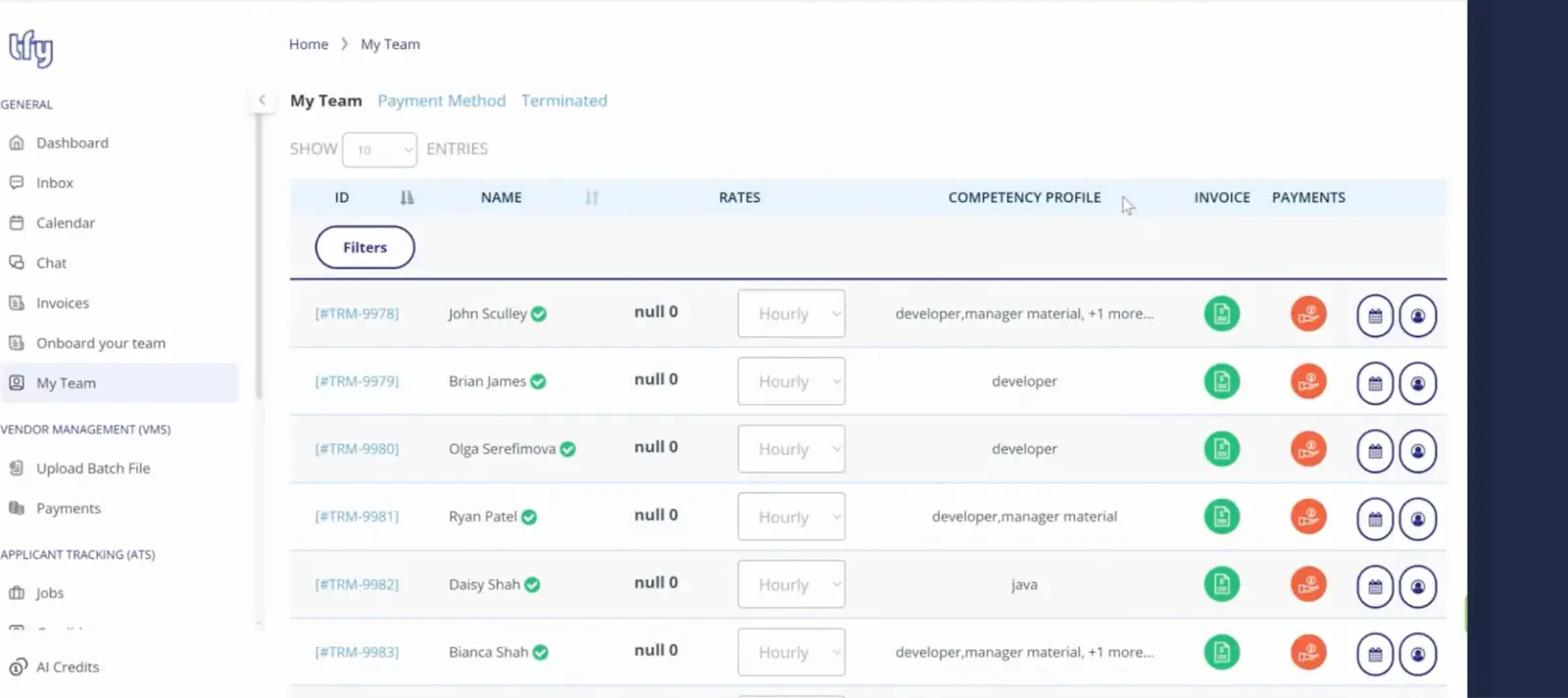
Another plug-and-play tool, Transformify (TFY), combines an AI-powered applicant tracking system, vendor management, and global contractor payments into a single smart platform.
Its vendor management system allows you to manage independent contractors and vendors in 184 countries, pay them in 70+ currencies, including crypto, and stay compliant while at it.
Pros
- Global payments: Supports multi-currency payouts and 20+ crypto payments across many continents. Bulk payment functionality is also available.
- Bulk onboarding: Upload contractor or vendor data, send invitations, and sign contracts.
- Role-based access: Fine-grained permissions for HR, finance, and management teams.
- Billing & invoicing automation: Automates invoice processing and contractor billing.
- All-in-one system: It helps businesses find top talent faster, onboard them seamlessly, manage, and pay vendors through a single system.
Cons
- May be more than small teams need: Organizations with a small number of vendors may not require the full feature set.
- Per-active-contractor pricing: Charges per active contractor, which can increase costs as your network grows.
- Platform fee on payments: A percentage fee is applied to outgoing payments, which can add up at high volumes.
Key features
- Compliance automation: Built-in checks for tax, labor, and regulatory requirements across jurisdictions.
- Multi-currency payments: Supports payouts in 70+ fiat currencies and multiple crypto payout options.
- Contract generation and e-signatures: Create and manage vendor agreements with version tracking and integrated e-signature capabilities.
- Reporting and reconciliation: Real-time tracking of onboarding status, invoices, payments, and compliance records.
- Integrations and API access: Connect with payroll, HR, and finance systems to synchronize vendor and payment data.
Pricing
TFY offers modular pricing based on capabilities.
For Vendor Management:
- £5 per active contractor
- 1.5% platform fee on sent payments
SAP Ariba — best for automating and managing complex procurement for large enterprises
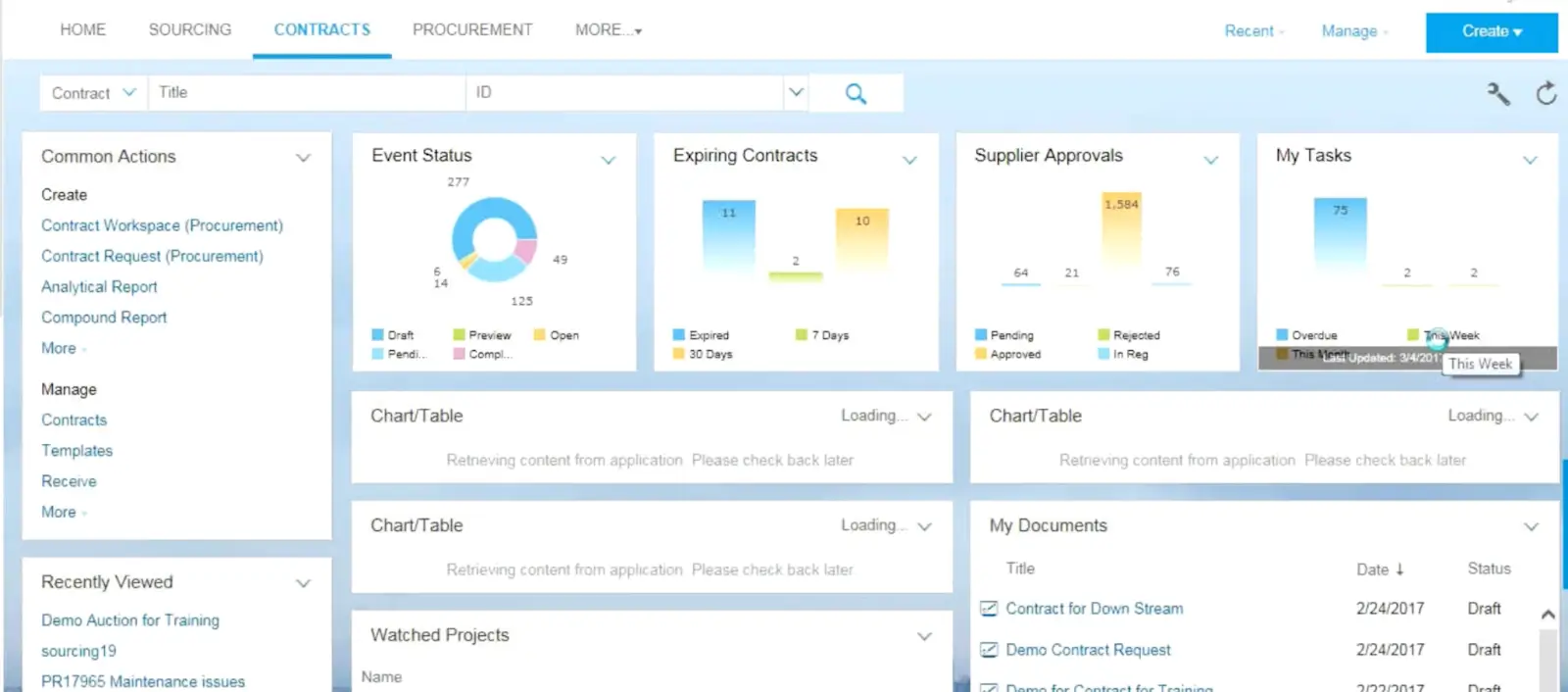
Originally founded as Ariba and then acquired by SAP in 2012, SAP Ariba is a cloud-based procurement and supplier management platform designed for large organizations. It supports end-to-end source-to-pay processes, including sourcing, contracting, purchasing, invoicing, supplier lifecycle management, and spend analysis.
SAP Ariba can operate as a standalone platform or integrate deeply with SAP S/4HANA and other SAP enterprise systems such as SAP Fieldglass (services procurement) and SAP Concur (travel and expense management).
Pros
- Comprehensive source-to-pay coverage: Supports sourcing, contracts, purchasing, invoicing, and supplier collaboration in one system.
- Large supplier network: Access to the SAP Business Network which connects millions of buyers and vendors.
- ESG and compliance controls: Supports supplier screening and sustainability criteria to ensure suppliers are aligned with sustainability commitments.
- Enterprise tool: Designed for global enterprises with deep integration into ERPs and supply chain systems.
- Guided buying controls: Helps organizations enforce preferred supplier policies and procurement criteria.
Cons
- Complex implementation: Configuration and customization can require significant time, planning, and IT involvement.
- Overbuilt for smaller teams: Organizations with simple vendor tracking needs may not require full source-to-pay functionality.
- Integration effort outside SAP ecosystem: Businesses using non-SAP ERP systems may require additional integration planning.
Key features
- Supplier lifecycle management: Structured onboarding, qualification, segmentation, and performance tracking.
- Automation: SAP Ariba reduces the manual effort required to manage supply chains and initiate procurement processes.
- Advanced analytics: Powered by SAP’s HANA database, providing spend patterns and supplier performance.
- Promote subscription: AI tools and capabilities to boost discoverability on SAP Business Network.
Pricing
Not publicly available, contact sales for more information
Oracle Procurement Cloud — best for managing enterprise procurement and spend
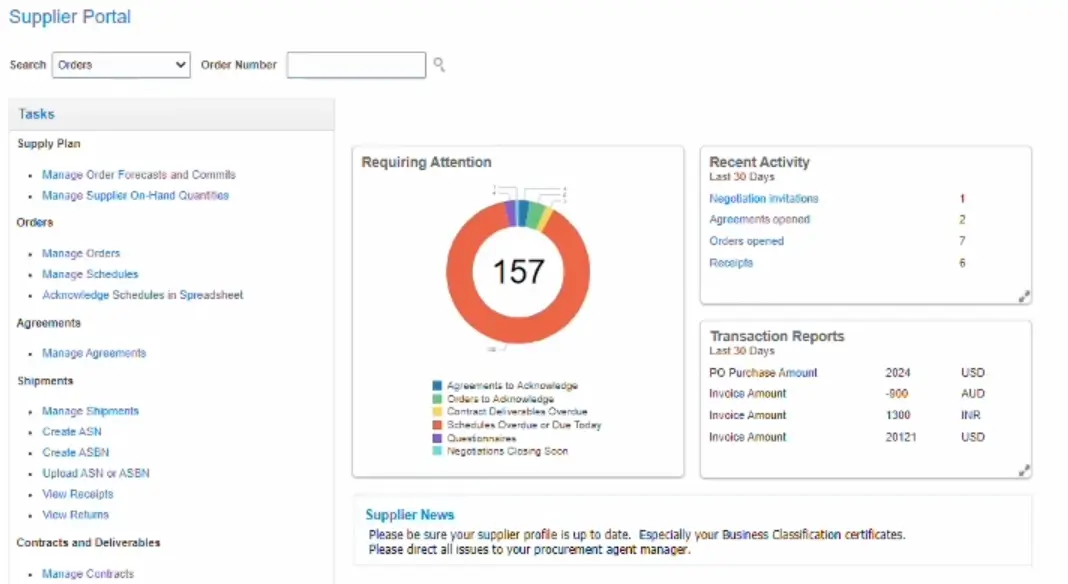
Oracle Procurement Cloud (part of Oracle Fusion Cloud Procurement) is a source-to-settle suite that helps enterprise companies automate and manage complex procurement and supplier management processes.
Unlike standalone vendor portals, Oracle Procurement Cloud is designed for full enterprise procurement and spend management, giving large teams control over supplier relationships as part of a wider source-to-pay cycle
Pros
- Comprehensive source-to-pay coverage: Supports supplier onboarding, qualification, purchasing, approvals, invoicing, and spend analysis in a single suite.
- Built for global enterprises: Suitable for complex operations with strict compliance, audit, and reporting requirements.
- Deep Oracle integration: Native connection to Oracle Fusion Cloud ERP and related applications.
- Embedded analytics: Built-in dashboards provide visibility into spend, supplier performance, and procurement activity.
Cons
- Complex implementation: Requires IT and procurement expertise for configuration and integration.
- Enterprise-level pricing: Costs typically reflect large-scale deployments which can be expensive for smaller organizations.
- User interface complexity: Some users report that the interface can feel dated or less intuitive compared to newer platforms.
Key features
- Purchasing landing page: Consolidated view of purchase orders, supplier information, and order status to help buyers manage activity efficiently.
- Supplier portal: Self-service interface for suppliers to manage tasks and notifications.
- AI assist: Tools to help generate negotiation messages and communication for buyers and suppliers.
- Track environmental data: Manage supplier sustainability data to meet regulatory and stakeholder requirements.
- Analytics: Real-time dashboards and reporting for spend classification, supplier performance, and value opportunities.
Pricing
Oracle does not publish their pricing publicly, but according to G2, it starts at $650/user/month for sourcing (sourcing, supplier management, transactional business intelligence for procurement) and $405/user/month for procurement (procurement contracts, supplier management, transactional business intelligence for procurement).
Choose the tool that fits your processes
The best vendor management portal for your business depends on how complex your operations are and what you need. Choose the system that fits how your team works today, and can scale with you tomorrow.
If you want a ready-made system, plug-and-play platforms like Tipalti, or TFY may be a good fit. If you’re a large enterprise managing global sourcing, compliance, and ERP integrations, enterprise procurement platforms like SAP Ariba or Oracle Procurement Cloud offer extensive source-to-pay functionality.
But if your priority is building a vendor management portal that matches your actual workflows without hiring a developer or spending weeks to build and implement it, a flexible platform like Softr gives you more control. You can start with a simple portal and add more features as your needs evolve.
Frequently asked questions
What is the difference between a vendor management portal and vendor management software?
Can you build a vendor management portal without coding?
How do companies manage vendor onboarding and documents efficiently?