Managing a network of vendors, suppliers, or freelancers gets messy fast. In this guide, we'll build the fix: a vendor portal on Softr, with a relational database, two separate interfaces (one for your internal admin team, one for external vendors), and an automated backend that handles approvals and reminders.
By the end, you'll have a secure environment where vendors self-onboard, manage their tasks, and submit invoices, while your team keeps full oversight from a central dashboard.
If you'd rather skip the build, grab the vendor portal template here.
What is Softr, and why use it for a vendor portal?
Softr is an AI app builder for creating real business software without code, used by more than 1 million builders. It gives operators (ops managers, procurement teams, and department heads) everything one portal needs: a visual interface builder, Softr Databases, and automated workflows.

The reason Softr fits vendor portals specifically is the external user problem. Most internal tool builders charge per seat, so inviting 500 suppliers costs more than the software you're replacing. Softr handles external users differently:
- Permissions are granular. Data restrictions make sure that Vendor A never sees Vendor B's records, while your internal admins keep full visibility.
- The data does work for you. Database AI Agents classify uploaded documents, onboarding flows enforce profile completeness, and workflows send the chase emails.
- Roles get different interfaces. One application serves an analytics dashboard to an admin and a focused task workspace to a vendor.
What features should a vendor portal include?
Before you build anything, it helps to know what a working vendor portal actually has to do. Every portal we see teams build covers the same seven jobs:
- Vendor self-onboarding: A guided flow that collects company details, contacts, and required fields before a supplier can start working.
- Document exchange and compliance: A place for vendors to upload contracts, W9s, insurance certificates, and NDAs, with visible expiry and status.
- Task assignment and tracking: A shared view of what each vendor owes you and when it's due, so nobody chases updates over email.
- Invoice submission and payment status: A form for vendors to submit invoices, plus a running list showing what's paid and what's pending.
- Role-based access: Separate admin and vendor experiences, with strict record-level isolation between vendor companies.
- An approval gate: A review step so an admin approves each new vendor user before that person can sign in.
- Automated notifications: Approval emails, deadline reminders, and status changes that fire without anyone drafting them.
We'll build all seven in this tutorial. If you'd like to watch the full live-build session for this portal, check it out here:
Who is this vendor portal for?
This portal is built for operations managers, procurement teams, and any business that works with external agencies, suppliers, or contractors. It's most useful for teams that need to enforce compliance (collecting insurance documents, for example) or handle a high volume of invoices and tasks across many partners.
Vendor portal user roles
The portal serves two distinct groups.
1. Vendors (the external users)
These are your external partners. Their job is to stay compliant and get paid. They need a simple way to:
- Complete onboarding and submit required documentation.
- Track assigned tasks and their due dates.
- Submit invoices and check payment status.
- Invite their own team members, such as legal or finance, into the portal.
2. Admins (the internal team)
These are your operations or finance managers. Their job is oversight. They need to:
- See a global dashboard of every vendor, active and pending.
- Assign tasks to specific vendor companies.
- Review and approve pending vendor team members.
- Query document data with AI instead of opening files one by one.
Here's the plan we'll build:

How to structure a vendor portal: Pages and database
Plan before you build. Success in Softr is 80% data structure, so instead of one giant spreadsheet, map the data into distinct objects first.
Pages to build
Page rules split the portal into two paths.
- Admin experience: A homepage with tabbed dashboards for "All Vendors," "All Tasks," and "Analytics," plus detail pages for drilling into one company.
- Vendor experience: An onboarding flow that captures profile data, then a "Vendor Home" with a personal status card, a task Kanban board, and an invoice submission form.
Database structure
You'll use Softr Databases to create five connected tables:
- Users: One table for all people, admins and vendors alike, separated by a Role field.
- Vendors: The company entities.
- Tasks: Action items linked to a specific vendor.
- Documents: General files such as contracts and certifications.
- Invoices: Financial documents.

Pro tip: Keep invoices separate from documents. Invoices need fields like Amount and Payment Status for calculations that a generic document never uses.
Part 1: How to build the vendor database
Start with the data foundation. A clean relational structure is what makes the portal scale and what makes the AI features useful later.
1.1. Configure the Users table as your source of truth
Start with the most important table. A common mistake is creating separate tables for admins and vendors. Keep all portal users in a single table. That centralizes authentication and makes permissions far easier to manage.

- Open your Softr Database and find the default
Userstable. - Make sure that
Emailis the primary field. Always use email as the unique identifier, because names are not unique. - Add a Single Select field named
Role, with the options Admin and Vendor. This drives your permission logic later. - Add a Single Select field named
Status, with the options Active and Pending. This becomes your approval gate, so vendors can't sign in until an admin reviews them. - Create a Linked Record field named
Related Vendor, connected to theVendorstable. This links a person to the company they represent.
1.2. Configure the Vendors table with Database AI Agents
Next, build the table for the companies. Here you'll use Database AI Agents to cut manual data entry.
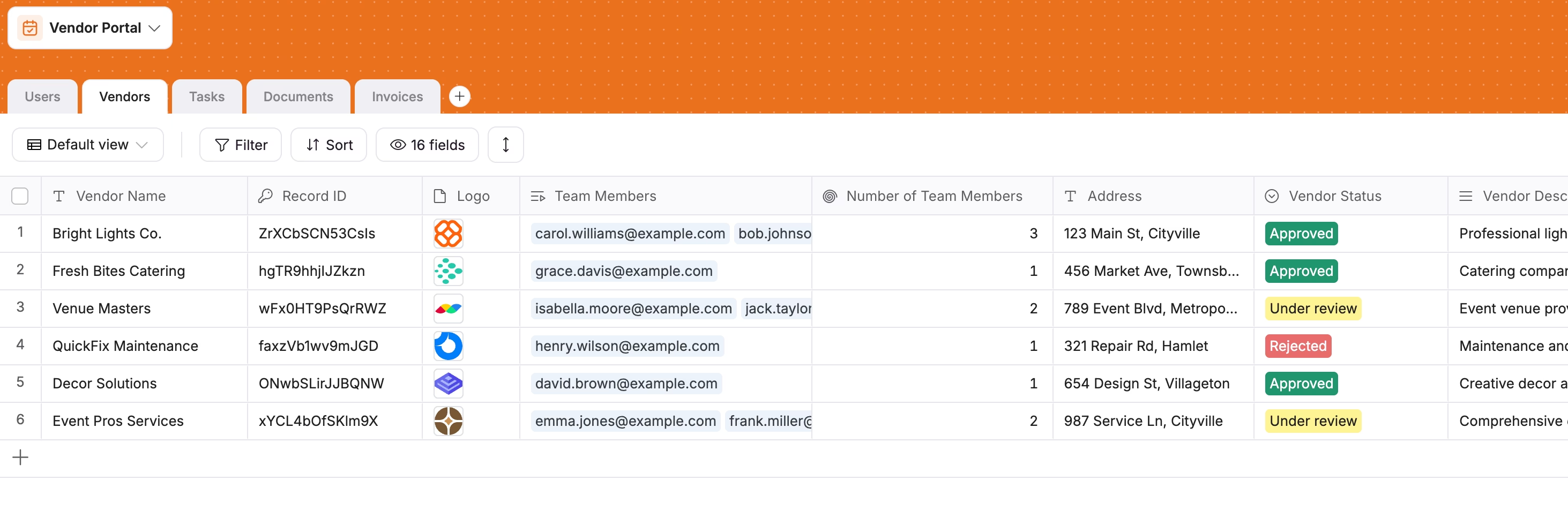
Create a Vendors table with fields for Company Name, Address, Process Start Date, and Approval Date. Then make it smart:
- AI categorization: Add a Select field named
Categoryand turn on the Database AI Agent setting for it. In the prompt, tell the agent to "Classify the vendor category based on @Description." Now every new description tags the vendor automatically, as "Logistics" or "Software," with no manual step.

- Rollups for quick stats: To see a vendor's open workload on their profile, create a Rollup field named
Open Tasks. Point it at theTaskstable and set it to Count records where the status is not "Done."
1.3. Separate tables for tasks, documents, and invoices
Following the same principle of one table per object, create specific tables for the rest of the data.
Taskstable: Add fields for Title, Description, Status (To Do, In Progress, Done), and Due Date. Link every task to aVendorand to anAssigneefrom the Users table.Documentstable: This holds general files. Add a File field. Pro Tip: Turn on a Database AI Agent on a text field here to "Classify this document based on the filename." It tags uploads as "NDA," "W9," or "Insurance" so your compliance files stay organized without anyone sorting them.Invoicestable: AddAmountas a Currency field andStatusas a Select field (Paid, Pending). Keeping invoices in their own table is what lets you chart "Total Outstanding Spend" later, which you can't do if invoices sit inside a generic documents table.
Part 2: How to build the admin side of the vendor portal
With the data structured, build the interface where admins oversee everything.
2.1. Sync users and define vendor roles
Permissions start with the user sync. Go to the Users section in the Softr Studio. Instead of inviting people by hand, choose Sync with Data Source and connect it to your Users table.

Now the important step. Set a sync condition to import only users whose Status is Active. That creates a waiting room: a vendor can be invited, which writes a "Pending" record, but they cannot sign in until an admin flips them to "Active."
Next, define your user groups dynamically. Create an Admin group with the condition Role is Admin, and a Vendor group with Role is Vendor. Promote someone in the database and their access updates in the portal straight away.

2.2. Build the admin dashboard
Admins need a high-level view without clicking through a dozen pages. Build one Admin Home page and use a Tabbed Container to organize it.

- Vendors tab: Add a Table block listing every vendor. Include a filter bar for Status and Category so admins can pull up "Pending" vendors in one click.
- Tasks tab: Add a Kanban block to see work in progress. Turn on drag and drop so admins can move a task from "To Do" to "Done" without leaving the dashboard.
- Dashboard tab: Use Chart blocks for your KPIs. A bar chart of "Invoices by Status" and a summary card for "Total Active Vendors" tell an admin the state of the portal at a glance.

2.3. Build the vendor details page
When an admin clicks a vendor, they need everything tied to that company in one view. Create a Vendor Details page and open it as a Sliding Modal, so the admin can check details and slide it away without losing their place in the list.
On this page, use Conditional Filters to pull in related data. Add a Table block for Documents and set the filter to show documents where the Related Vendor matches the current record's Company Name. Repeat that for Tasks, Invoices, and Team Members. The result is a drill-down view where every child record sits on the parent.

Pro tip: Turn on Ask AI for these lists. An admin can type "Does this vendor have a valid insurance certificate?" into the chat bar and get an answer read from the documents list, instead of opening every PDF.

Part 3: How to set up vendor onboarding, document exchange, and approvals
The vendor experience has to be different from the admin view: focused, personal, and hard to get wrong. This part covers onboarding and document exchange. The approval gate you configured in step 2.1 gets automated in Part 4.
3.1. Build the vendor onboarding flow
You need vendors to supply their details, such as job title and phone number, before they start working. Use a User Onboarding Flow for this.
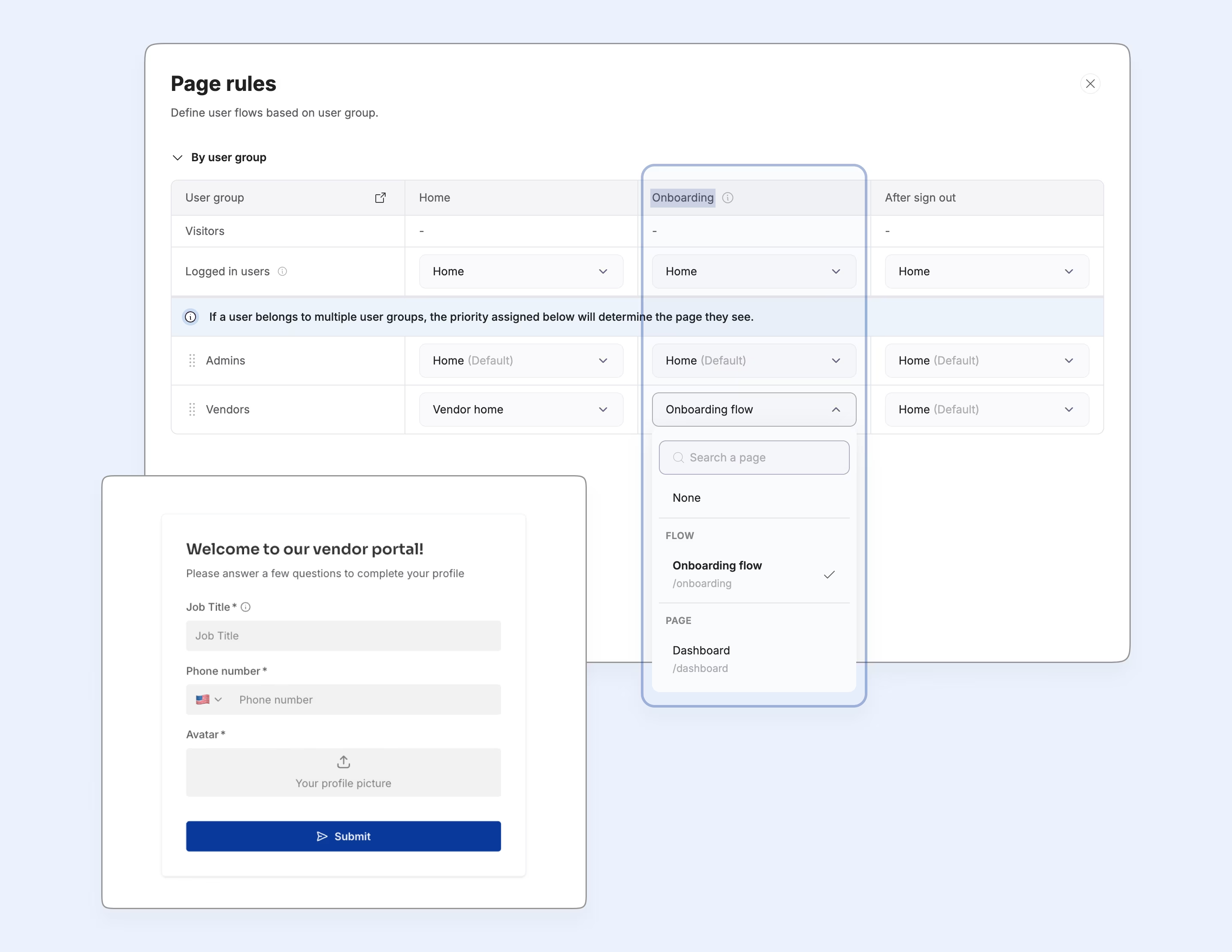
Create an Onboarding page and assign it to the Vendor user group in the page visibility settings. New vendors then have to complete the form on their first sign-in. You'll never chase a supplier for their phone number again, because the portal won't let them past the form without it.
3.2. Design the vendor home page with the Vibe Coding block
Once onboarded, vendors land on Vendor Home. This page should feel personal rather than like another list view.
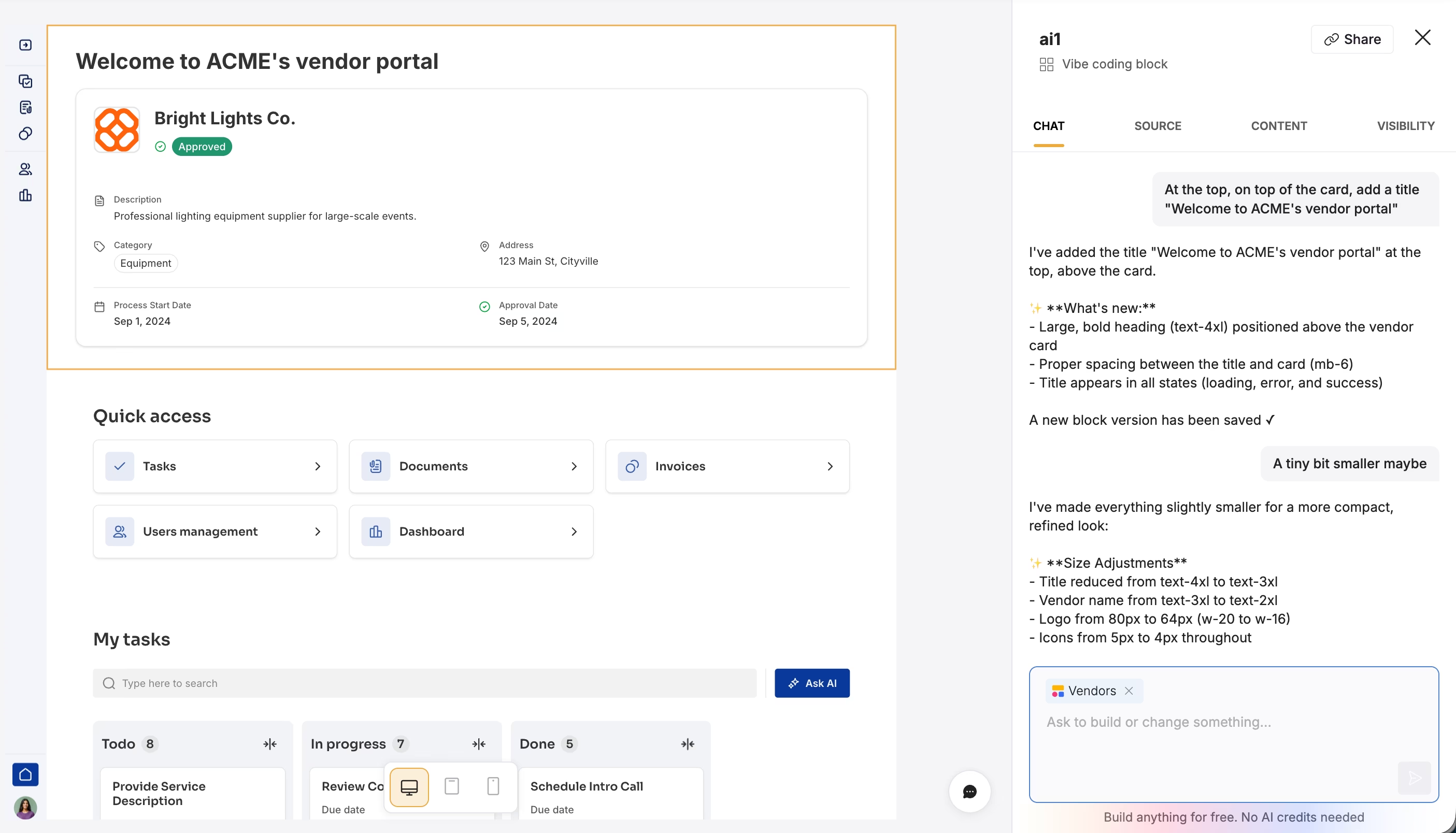
Add a Vibe Coding block and prompt it: "Create a minimalist status card displaying the Vendor Name, Process Start Date, and Status with color-coded badges."
Softr generates the component and wires it to your database. The block inherits your app theme, respects your visibility rules, and stays visually editable afterwards, so you're not locked into whatever the AI produced first.
3.3. Set up task tracking and invoice submission
The portal earns its keep here, where the actual work gets done.
- Tasks: Add a Kanban board linked to the Tasks table. Step 3.4 restricts it so each vendor sees only their own tasks.

- Invoices: Add a List block for past invoices and a Form block for new submissions. Use Hidden Fields in the form. Hide the
Related Vendorfield and auto-populate it with the logged-in user's vendor. The supplier never picks their own company from a dropdown, so they can't tag an invoice to the wrong one.
3.4. How should vendor roles and data permissions be configured?
Configure vendor permissions in two layers. The first is the user groups from step 2.1, which decide who sees which pages: admins get the dashboard and detail pages, vendors get onboarding, Vendor Home, tasks, and invoices.
The second layer is global data restrictions, and it's the one that actually keeps vendors apart. Page filters alone are not enough, because one forgotten filter exposes another company's records.
Go to Settings > Data Restrictions. For the Vendor user group, apply this rule to the Tasks, Documents, and Invoices tables: "Can view records where Related Vendor is Logged-in User's Related Vendor."

This rule sits below every page in the portal. Forget a filter on one block and the system still refuses to serve records belonging to another company, so a vendor cannot reach data that isn't theirs.
Part 4: How to automate vendor approvals and reminders
Finally, hand the manual chasing over to Softr Workflows.
4.1. Automate the vendor approval process
When a vendor invites a colleague, that person shows up as "Pending" in your dashboard. Once an admin reviews them and switches their status to "Active," the portal should take it from there.

Create a workflow triggered when User Status changes to Active. Add a Send Email action, map the user's email, and include a magic link to the login page. Nobody drafts a welcome email again, and vendors get access the moment they're approved.
4.2. Send AI-written task reminders
Generic automated emails get ignored. Use an AI step to make the reminder specific to the task.
Create a workflow triggered when a task's Due Date is tomorrow.
- Find record: Use this step to find the assignee's user record, so you have their name.
- AI custom prompt: Add an AI / LLM step. Prompt it: "Read the Task Title and Description and write a polite, personalized reminder email to @User Name."
- Send email: Map the AI output to the email body.
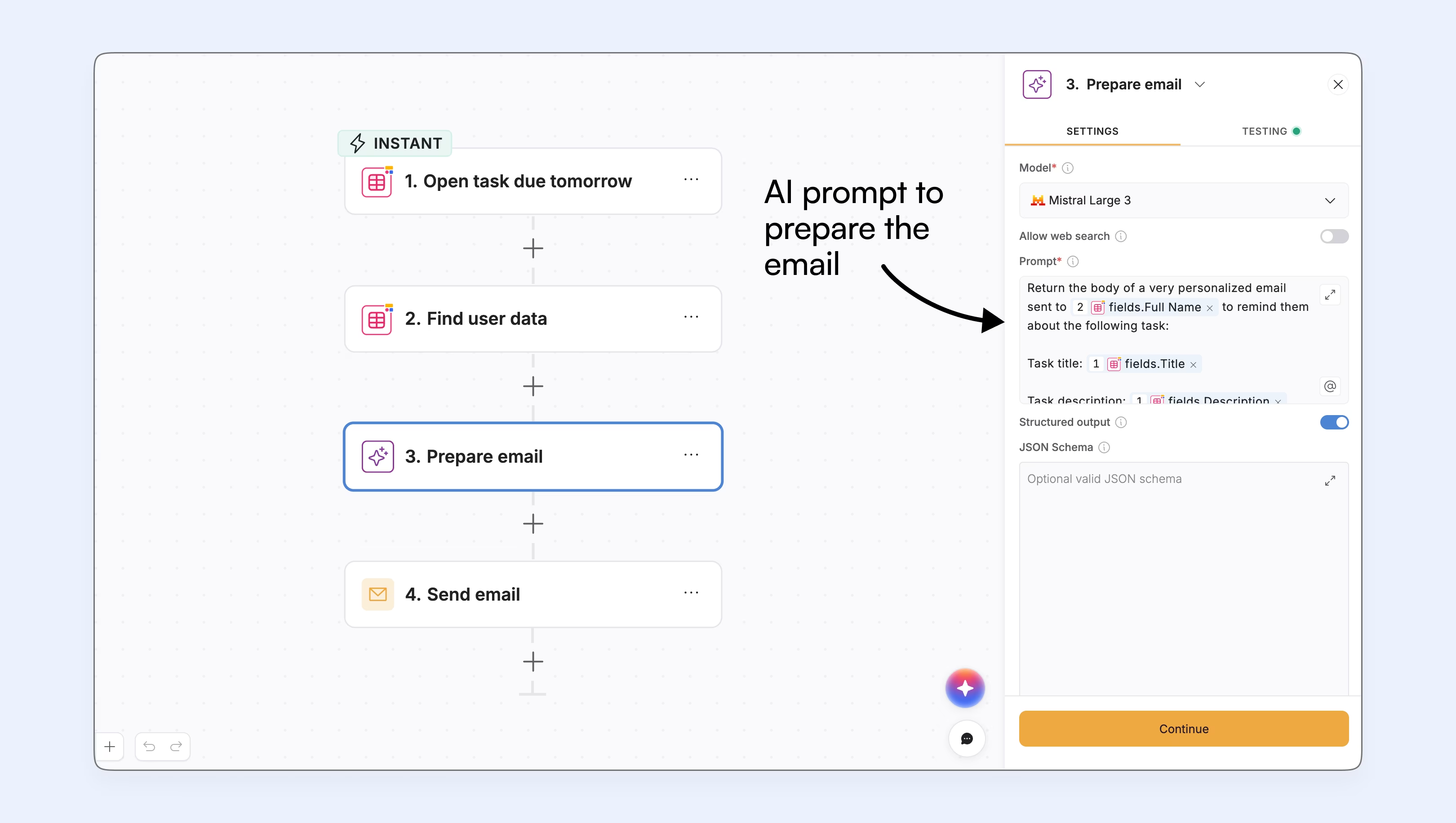
A reminder that names the actual deliverable and its deadline gets acted on. A reminder that says "you have a task" does not.
Which procurement, ERP, and database integrations does a vendor portal need?
A vendor portal rarely lives on its own island. Invoices usually have to reach finance, approved suppliers have to exist in your ERP, and procurement data often already sits in another app. There are three connections worth ensuring you can make up front:
1. Your data layer: Softr Databases is the native option and the one we'd recommend for a new portal, because triggers fire instantly and the interface doesn't wait on a third-party API. If your vendor list already lives elsewhere, Softr connects to 21+ external data sources. Airtable, Notion, Google Sheets, SmartSuite, Coda, Xano, Zoho CRM, and the REST API connector are available on every plan, including Free. The Business plan adds HubSpot, BigQuery, Microsoft Excel, MySQL, PostgreSQL, SQL Server, and MariaDB, and Enterprise adds Salesforce and Snowflake.
2. Your ERP or procurement system: Most ERPs (NetSuite, SAP, Odoo) expose a REST API rather than a native connector. Handle these inside Softr Workflows with an HTTP request step: when an admin approves an invoice in the portal, post it to your ERP endpoint and write the returned reference back to the Invoices table. The same pattern works in reverse, pulling approved purchase orders in on a schedule.
3. Everything else: Softr Workflows ship with built-in connections to Gmail, Calendly, DocsAutomator for PDF generation, and the major LLM providers. If your team already runs Make, Zapier, or n8n, you can trigger those from a workflow instead of writing the API call yourself.
I recommend keeping the portal's own records in Softr Databases and treat the ERP as a system you sync with rather than your live data source. Vendors get a fast portal, and finance still gets the records where they expect them.
Start building your vendor portal
The part that matters most is the one you do first. Get the database right, keep every user in one table, and set the data restrictions before you invite a single supplier. Everything else—the dashboards, AI steps, and automated emails—is much easier to change later.
Copy the vendor portal template to start from a working build, or open a blank Softr project and follow Part 1. It's free to get started.
Frequently asked questions
What is a vendor portal?
How do you build a vendor portal from scratch?
How can AI improve my vendor management workflows?
Why is Softr a good platform for building a vendor portal?
What are the benefits of building a custom portal over buying software?