The best AI app builders for work: Tested in 2026


[.blog-callout]
✨TL;DR:
- An AI app builder turns a plain-English description into a working app, with the database, interface, and logic included, instead of just a flimsy prototype.
- The best ones for daily team use go past generating something that looks like it works. They support real users, real data, permissions, and the ability to make edits to an app without starting from scratch.
- Softr is my top pick for building production-ready business apps, especially if you need a portal or manage operations.
[.blog-callout]
I follow a lot of curly hair influencers in an attempt to pick up advice for getting my own mane under control. There's all kinds of impassioned (and largely unrealistic) advice out there, each routine guaranteed to make me look like Keri Russell circa 1997.
Another side of the internet has been reminding me of this madness lately: ads and videos for AI app builders. Right now, there's no shortage of people swearing that their app builder of choice will make you a billionaire in 72 hours.
While a billion dollars would be nice, if you’re reading this, you’re probably just looking for an AI app builder that makes good on the promises that matter, like generating functional software your team can depend on. I've worked with enough of these tools to recognize what’s hype and what’s not, so I put together my recommendations for AI app builders for work that your team can use reliably, day in and day out.
Best AI app builders for work at a glance
| Tool | Best for | Top features | Price |
|---|---|---|---|
| Softr | Production-ready portals and operations management | AI App Builder, native databases, granular permissions, workflow automation, security from day one | Free plan available. Paid plans start at $19/month. |
| Retool | Internal admin tools | AI agent builds, huge component library, connects to any database or API, source control, granular RBAC | Free plan available. Paid plans start at $10/month per builder plus $5/month per internal user. |
| Knack | HIPAA-ready CRMs and record-driven systems | Relational database, connected tables, Knack Health HIPAA plans with a BAA, flat pricing with unlimited app users | No free plan, but there’s a 14-day trial. Plans start at $49/month. Knack Health plans run at different price points. |
| Omni (Airtable) | A flexible database with dashboards on top | Conversational building, relational database, dashboards and reporting, fully editable in Airtable | Airtable’s free plan comes with Omni. Paid plans start at $20/month per seat. |
| monday vibe (monday.com) | Project tracking and team collaboration apps inside monday.com | Prompt-to-app inside monday.com, builds on your boards, runs on monday's infrastructure | Requires a paid monday.com plan. Plans start at $9/month per seat. |
| Microsoft Power Apps | Workflow apps for teams in the Microsoft ecosystem | Copilot app generation, Microsoft Dataverse, Power Automate workflows, deep Microsoft 365 integration | Free plan available for testing only. Paid plans start at $20/month per user. |
Note: The prices throughout this post reflect annual billing.
What is an AI app builder?
An AI app builder lets you create an app without coding, and without visually assembling every piece of an app by clicking and dragging. Step one usually looks like describing what app you want in plain English and letting AI generate the database, the interface, and the logic that connects them. Once you spin that up, some app builders let you keep editing visually, some let you add custom code, and others let you do both.
The apps you build might live inside your company, like CRMs, dashboards, approval systems, and employee directories. Or they might serve users outside of it, like client portals, booking tools, and self-service knowledge bases.
What makes an AI app builder for work effective?
Plenty of tools can generate something that looks like an app. Far fewer can generate one your team can run reliably. That's one of the main differences between a builder that spits out prototypes and a work tool.
When you're picking an AI app builder for software that needs to hold up to daily use, keep an eye out for the features below. (Every tool on this list checks all or most of these boxes, by the way.)
- Real user support. Authentication, user roles, and permissions need to work out of the box.
- A real database. If your team isn't technical, your app should sit on structured, connected data that everyone can see and edit without code.
- Workflow automation. Approvals, notifications, and multi-step actions should run reliably, every time.
- Edits without re-prompting. When you need to change a field or a permission in your app, you should be able to do that directly instead of prompting AI in a way that rebuilds everything.
- Security and governance. To protect your data, you want permissions, compliance, and access controls that hold up.
- Pricing that fits your team. Some tools charge per end user, which gets expensive fast when a lot of people need access.
1. Softr — best for production-ready portals and operations management

I always go back and forth on whether I should learn how to code. I take classes here and there, but if I'm building an app that needs to work fast, I'd rather use an AI builder that gets me from an abstract idea to a working product in the simplest manner possible.
That’s what Softr’s AI App Builder excels at. It turns a prompt into an app with a database, permissions, hosting, and logic already wired in, without code. And you're never boxed into prompting. You can drop into visual edits anytime you want to change a field, permission, or workflow directly.
Softr is the strongest pick on this list for portals. Access control makes or breaks a portal, so it needs solid authentication and permissions that show each person their data and no one else’s. You don't have to code that in with Softr. The custom user groups deliver it down to the individual record.
It's just as strong for building apps that run everyday operations, too, like requests, approvals, inventory, and reporting. Those have to stay connected and reliable. With Softr’s built-in workflows and native databases, an operations app can route requests and fire approvals on its own without any duct-taped integrations.
Softr pros and cons
Pros:
- Your app works the moment you publish it (and keeps working). Softr handles the invisible infrastructure your app runs on. There's nothing to stand up before launch and nothing to maintain after, so the tools your team logs into every day won’t randomly break.
- You're never locked into prompting. Submitting a whole new prompt could mess with working parts of your app. In Softr, you can change a specific field, permission, or workflow directly.
- Business apps are a core use case, not an afterthought. The Softr team built the platform to work with internal tools, CRMs, dashboards, and operational systems specifically. So the features those apps depend on are baked in.
- You're not maintaining a patchwork of tools. A Softr app doesn't need a separate stack bolted on behind it because the database, authentication, hosting, and automations are all part of the platform. There’s less to integrate, less to pay for, and less that can fail as your operations expand.
- It's trusted at scale. More than a million people build on Softr, including teams at Netflix, Google, Stripe, UPS, and Clay.
Cons:
- Some AI app builders hand you a codebase you can host anywhere. Softr, however, keeps everything on its own fully hosted platform. That's part of why apps work the moment you publish them. But it also means it can be tricky to move an app off Softr.
- Softr is made for the business apps and internal tools that teams run day to day, not algorithm-heavy products like simulation engines or data-processing pipelines. For those, an AI tool that generates raw code (or custom code) is a better fit.
Softr best features
- Connect your data in real time. Build on Softr's native databases, or sync live with tools you already use, like Airtable, Google Sheets, HubSpot, and Notion. With a REST API connector, you can plug into virtually any other data source.
- Build automations inside your app. Trigger emails, Slack alerts, approvals, and data updates using built-in workflows without a third-party connector.
- Control access with custom user groups. Set role-based permissions for your users at the app, page, block, and record level.
- Extend anything with the Vibe Coding block. Add a custom component through a prompt, and it inherits your app's data, theme, and permissions. A single block can even pull from multiple data sources at once, each with its own filter and sort.
- Open your app's data to AI assistants. Turn any Softr app into an MCP server, so tools like Claude and ChatGPT can securely connect over OAuth and work with its data.
- Turn any app into a mobile app. With one click, you can produce a progressive web app (PWA) anyone can install on Apple and Android devices.
- Trust the security layer. Softr is SOC 2 and GDPR compliant, with single sign-on (SSO) available on Enterprise plans.
Softr pricing
- Free: Unlimited apps, with access to Softr Workflows and Softr Databases, 5 app users, 5,000 Softr Database records, 5 AI credits
- Basic: $19/month. Unlimited apps with 42+ integrations, Team: 5 + Client: 5 app users, 50,000 records, 10 AI credits
- Pro: $99/month. Unlimited apps with 45+ integrations and custom code, Team: 10 + Client: 50 app users, 500,000 records, 50 AI credits
- Business: $329/month. Unlimited apps with 52+ integrations, Team: 30 + Client: 100 app users, 1M records, 100 AI credits
- Enterprise: Custom pricing. Includes SSO, SOC 2 reporting, advanced security, and dedicated support
2. Retool — best for internal admin tools
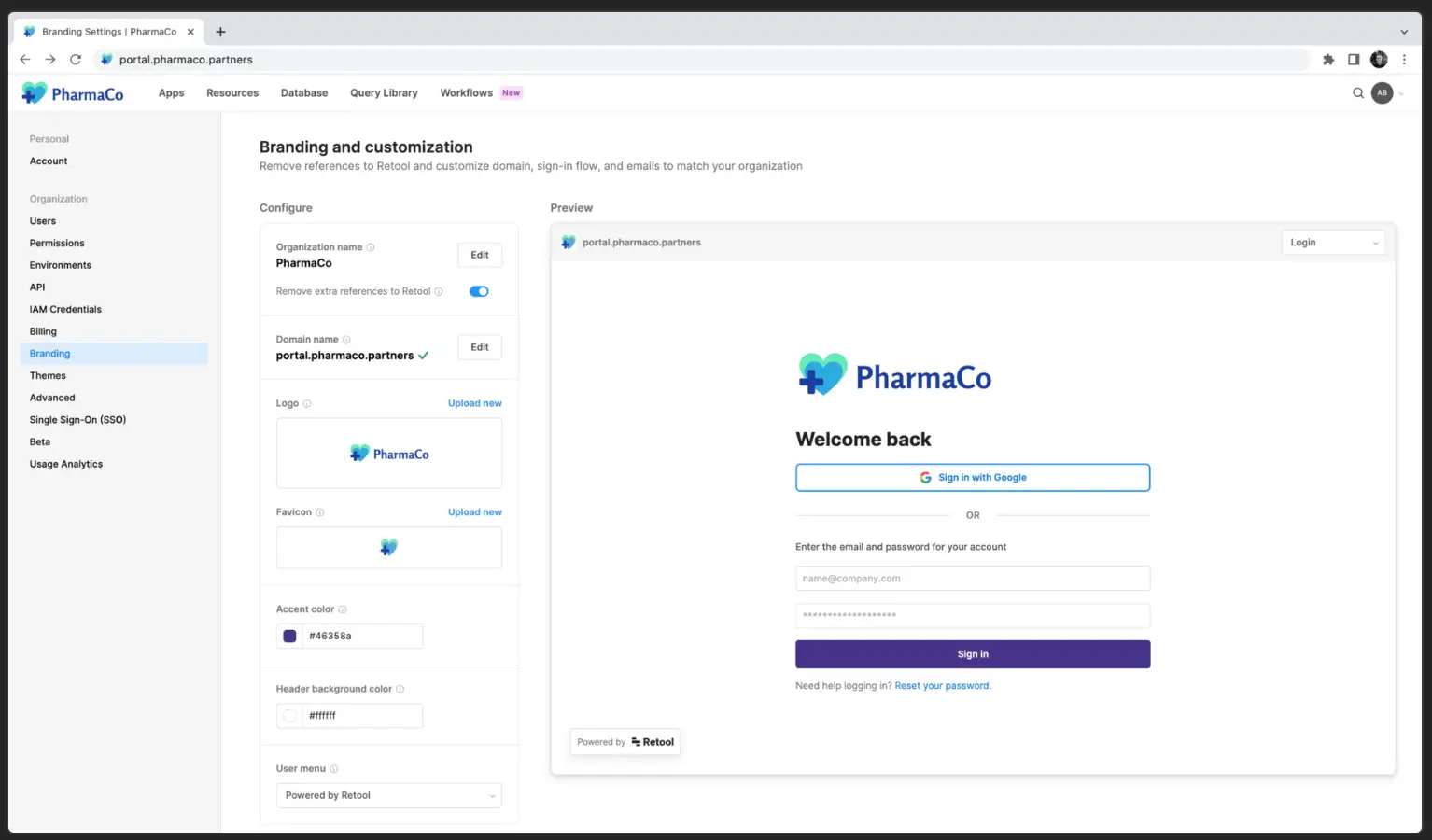
An internal tool needs to be able to wire into your existing databases, APIs, and backend services, because it has to read and write to the systems you already run. And it needs tight access controls. Retool provides all of that. Its AI agent builds against your live connections using one of the biggest component libraries around, with role-based permissions so each person only touches what they should.
It also connects to GitHub, which keeps a history of every change to your apps. Engineers can review each other's edits before they go live and restore a previous version if something breaks. That safety net matters more for internal tools. Because if a key app goes down in the middle of the workday, your team’s productivity is sure to tank.
Retool pros and cons
Pros:
- Retool is purpose-built for admin tools, dashboards, and operational apps.
- It slots into databases and services your team already runs on, rather than forcing a new stack around them.
- Large engineering orgs run production tools on Retool, so it's proven at scale and with complex business logic.
- Its governance is thorough enough that most security teams will sign off on it without a fuss.
Cons:
- Even with the AI agent, you'll want developers on your build team or folks who are comfortable with JavaScript.
- You pay for everyone who uses an app, not just the people building them, so costs climb as more of your team logs in.
- It's a limited fit for client portals or anything you'd share through a public URL.
Retool best features
- Connect to any database or API: Wire apps into your existing data sources and services, backed by one of the largest component libraries around.
- Build with an AI agent: Describe what you need and let an agent plan and generate the app inside Retool's environment.
- Manage releases with source control: Connect to GitHub for branch-based development, code review, and rollback.
- Control access with granular RBAC: Set custom roles, audit logging, SSO, and SCIM provisioning (which automatically creates and removes accounts as people join or leave your company).
Retool pricing
- Free: Unlimited apps, 500 workflow runs/month, 5GB data storage
- Team: $10/month per builder plus $5/month per internal user. Adds 5,000 workflow runs/month, staging, and app release versions
- Business: $50/month per builder plus $15/month per internal user. Adds audit logging, permissions, portals, and unlimited modules and environments
- Enterprise: Custom pricing. Adds SSO, source control, workspaces, platform APIs, and dedicated support
3. Knack — best for HIPAA-ready CRMs and record-driven systems

For teams building apps around sensitive, structured data, there's Knack. It's built on a relational database that scales up to 2.5 million records on the Corporate plan (and more on Enterprise), so the CRMs, inventories, and patient portals you build on it can hold serious volume without falling over.
Its real edge is Knack Health, a dedicated product for teams handling regulated data. It signs a business associate agreement (BAA), ships with healthcare templates, and makes HIPAA-readiness accessible to smaller teams instead of locking it behind the highest enterprise tier, like many builders on this list do. And because Knack prices by records and apps instead of per user, a CRM or portal with thousands of logins won't drive up your bill.
Knack pros and cons
Pros:
- Knack Health is a purpose-built HIPAA-ready product that signs a BAA, and it doesn't reserve that for a top enterprise tier the way the other tools do.
- It's built data-first, a natural fit for record-heavy systems like patient portals, case management, CRMs, and directories.
- Pricing is by records and apps, not per user, so a patient portal or CRM with thousands of logins won't inflate your bill.
Cons:
- You can scaffold an app quickly with AI, but customizing the design and interface can be difficult without custom code.
- Record and storage caps can push you into pricier tiers as your data grows.
- Some users have reported occasional latency and interface glitches.
Knack best features
- Model data with connected tables: Build a relational database with more than 20 field types and one-to-many or many-to-many connections.
- Build pages with rich views: Add grids, forms, calendars, maps, reports, and even eCommerce and payment views on top of your data.
- Generate a starting app with AI or a template: Describe what you need, or start from a prebuilt template, including Knack Health's patient portal and intake templates.
- Automate work with Knack Flows: Trigger notifications, approvals, scheduled tasks, and integrations across more than 450 connected apps.
- Handle regulated data with Knack Health: Get encryption in transit and at rest, record change logs, role-based access, and 2FA on HIPAA-ready plans.
Knack pricing
- Starter: $59/month. 20,000 records, 3 apps, unlimited app users, 25 AI credits, basic SSO
- Pro: $130/month. 50,000 records, unlimited apps, custom branding and domains, scheduled tasks, 50 AI credits
- Corporate: $300/month. 125,000 records, IP blocking, 100 AI credits
- Enterprise: Custom pricing
Knack Health runs on its own plans, which you can learn about on the Knack Health pricing page.
4. Omni — best for a flexible database with dashboards on top

I've got Airtable connected to Claude, so I can take action inside the app right from my AI chat window. But from time to time, I still pop into Airtable for a direct visual of my content publishing pipeline. There's a rich history of everything my team has published in there, so if I wanted to build, say, a dashboard tracking how my blog posts were performing, Omni could help me turn that data into something usable.
If you're already using Airtable, building a dashboard on top of your data is about as easy as it gets. A good dashboard needs live, well-structured data and flexible ways to slice it. That's what Omni gives you, layering reporting and interface views on the relational base that made Airtable famous. And for security-minded teams, Omni can run its AI through Amazon Bedrock, meaning your data gets processed inside Amazon's secure cloud rather than shipped off to a third-party AI company.
Omni pros and cons
Pros:
- If your team's data already lives in Airtable, Omni can turn that into an app without moving anything.
- Building and iterating with Omni costs nothing extra. Only data-analysis questions consume credits.
- It's backed by Airtable's maturity and scale, with 500,000+ organizations already on the platform.
- Non-technical teammates can build and adjust apps in the same Airtable tools they’re already comfortable with.
Cons:
- Per-editor pricing adds up, and record caps force upgrades as your data grows.
- Client-facing portals require a separate add-on or a frontend tool.
- Data analysis questions consume AI credits that can run out mid-month.
- The value is strongest only if your data already lives in Airtable.
Omni best features
- Build by describing what you need: Prompt Omni and watch it generate tables, interfaces, and automations in real time.
- Structure data in a flexible database: Work in a relational database with dozens of field types and linked records.
- Layer dashboards and reporting on top: Turn your records into views, reports, and dashboards.
- Edit everything visually in Airtable: Tweak tables, interfaces, and logic with drag-and-drop tools without code.
- Choose your AI model: On enterprise plans, admins pick which models (from OpenAI, Anthropic, and others) are enabled.
Omni pricing
Omni runs on Airtable's standard plans. And it comes with every plan, including the free one.
- Free: Up to 5 editors, 1,000 records per base, 100 automation runs/month
- Team: $20/seat/month. 50,000 records per base, 25,000 automation runs/month
- Business: $45/seat/month. 125,000 records per base, plus advanced admin and security
- Enterprise Scale: Custom pricing
Pro tip: You can also build a branded, secure portal on top of your Airtable data with Softr, without paying per seat for every viewer, or import your base into Softr Databases in a few clicks.
5. monday vibe — best for project tracking and team collaboration apps inside monday.com

monday.com started as a work management tool, but it's since expanded with a bunch of AI products — among them, monday vibe. Where monday.com helps you get more done by consolidating your boards, workflows, automations, and integrations in one platform, monday vibe builds apps that plug into all of that. Like with Omni and Airtable, if you already run projects with your team on monday, this makes for a strong choice.
monday vibe pros and cons
Pros:
- If your team already runs on monday.com, monday vibe apps live right alongside your boards instead of in a separate tool.
- Apps inherit monday.com's enterprise security and governance with no extra setup, since they run on its infrastructure.
- Building happens in the workspace your team already opens every day, so there's little to adopt or train on.
- Apps work on mobile out of the box, which helps deskless and field teams.
Cons:
- You need a paid monday.com plan, plus AI credits, to build and publish apps.
- Under the new credit-based pricing, every build prompt consumes credits.
- Each plan caps how many apps you can publish, and adding more costs around $100/month for a pack of 10.
monday vibe best features
- Build apps from a prompt inside monday.com: Describe what you need and get a working app in your workspace without code.
- Pull data from your boards: Connect up to five monday boards to a single app.
- Pick your AI model per build: Choose between models (or let Auto-Select decide) depending on how complex the build is.
- Control publishing with admin permissions: Decide which roles can create and publish apps.
monday vibe pricing
monday vibe requires a paid monday.com plan.
- Basic: $9/seat/month. 1,000 AI credits/month, limited access to AI agents, unlimited free viewers (read-only access)
- Standard: $12/seat/month. 2,000 AI credits/month, plus automations and integrations (250 actions each) and timeline, Gantt, and calendar views
- Pro: $19/seat/month. 3,000 AI credits/month, plus the AI workflow builder, private boards, time tracking, and bigger automation limits (25,000 actions)
- Enterprise: Custom pricing
6. Microsoft Power Apps — best for workflow apps for teams in the Microsoft ecosystem
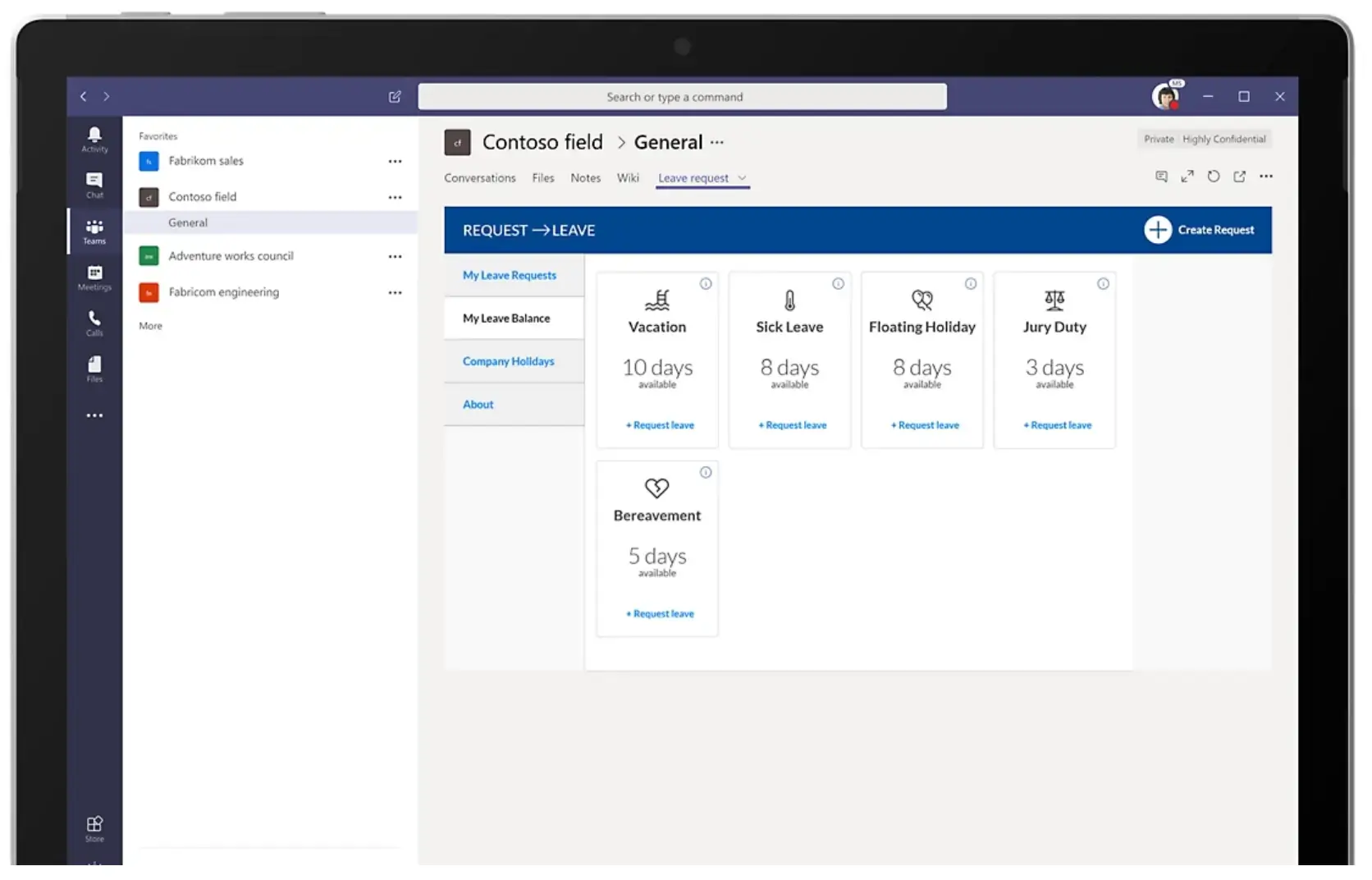
There's a theme forming here: if you already live in an ecosystem, building with that platform's vibe coding app is a strong pick. So if your company leans on Microsoft 365, consider Power Apps. It generates apps on top of Microsoft Dataverse (its built-in database), and Copilot can scaffold one from a plain-English prompt. Where it really earns its keep is workflow and approval apps, the kind that pull data from SharePoint or Excel, route an approval through Teams, and fire off an email in Outlook, all inside the tools your team already opens daily. If that's your stack, Power Apps will likely fit nicely with your flow.
Microsoft Power Apps pros and cons
Pros:
- If your organization already lives in Microsoft 365, Power Apps fits into tools your team uses daily without adding a new vendor.
- It's a strong fit for workflow and approval apps that need to tie Microsoft tools together.
- Because it's backed by Microsoft, most IT and security teams have likely already vetted it.
- It scales to thousands of makers and apps, so it holds up for organization-wide rollouts.
Cons:
- Even with Copilot generating the first draft, it's low-code, not no-code, so you'll want some technical skill (knowing SQL helps).
- Premium connectors (for things like SQL Server or Salesforce) and per-user licensing add costs that aren't obvious upfront.
- Hosting is cloud-only, which rules out air-gapped setups — in other words, systems kept isolated from outside networks for security.
Microsoft Power Apps best features
- Generate apps with Copilot: Describe an app in plain language and let Copilot build the screens and logic.
- Store data in Microsoft Dataverse: Keep app data in Microsoft's secure, governed database with role-based access built in.
- Automate approvals with Power Automate: Wire multi-step workflows and approvals into your apps.
- Connect across the Microsoft ecosystem: Tap SharePoint, Teams, Excel, and hundreds of connectors.
Microsoft Power Apps pricing
- Developer plan: Free. For building and testing in non-production environments only.
- Power Apps Premium: $20/user/month (or $12/user/month at 2,000+ seats). Unlimited apps, premium connectors, and Dataverse for each licensed user.
- Pay-as-you-go: $10 per active user, per app, per month, billed through Azure.
Final verdict
The flashy AI app builders promise everything. But the apps they build fall apart the first week you rely on them. A login breaks, a workflow doesn't fire, and suddenly you're the one doing app maintenance instead of your actual job. So don't pick the AI app builder that creates a shiny demo. Go for the one that builds fully functional software tailored to your use case.
After working with these tools, the one I keep returning to is Softr. Try it free today to see just how easy it is to create a custom app for your team.
📖 Related reading
Frequently asked questions
What's the difference between an AI app builder and a vibe coding tool?
What should you look for in an AI app builder for work?
Are AI-generated apps secure and maintainable enough for daily use?