


[.blog-callout]
TL;DR
- Airtable extensions add features inside your base, from custom charts and document layouts to email sending, financial syncing, and AI image tagging.
- Most first-party extensions (Page Designer, Vega-Lite, Time Tracker) are free with a paid Airtable plan, while third-party tools like Whalesync, Fintable, and Softr have their own pricing.
- Use the at-a-glance table below to match each tool to your workflow, whether that's visualization, automation, syncing, or feedback collection.
- Extensions stretch what you can do inside Airtable, but they can't give your team or clients a real app. When you need a front-end, Softr turns your Airtable data into a secure portal or internal tool, and its AI Co-Builder can assemble the whole thing from a prompt. [.blog-callout]
If you're using Airtable to streamline your projects, you already know how flexible it is. What's easy to miss is how much further Airtable extensions can take that workflow. With the right add-ons, you can automate tasks, visualize your work, and connect Airtable to your favorite tools, all without writing a single line of code.
In this guide, I'll walk you through the 13 best Airtable extensions to increase productivity and build a better Airtable experience. Whether you want to improve project management, data visualization, or automation, these extensions can help you save time and get more done. If you'd rather skip ahead, the comparison table below shows what each tool is best for at a glance.
What are Airtable extensions?
Airtable extensions extend the functionality of your Airtable base by adding extra features or integrating with external apps. These add-ons let you do more within a base, making it possible to:
- Generate dynamic summaries,
- Import information from other sources,
- Engage with external services, or
- Create custom, real-time interactive features directly within your base.
Unlike Airtable integrations, which primarily focus on syncing data between Airtable and third-party applications, Airtable extensions do much more. They give you new ways to interact with your data, whether it's through advanced visualizations, language translations, or real-time messaging.
{{cta-1}}
Airtable extensions at a glance
Here's a quick summary of all 13 tools, so you can find the right fit before diving into the details below.
| Tool | Best for | Standout features | Pricing |
|---|---|---|---|
| Softr | Building real apps and client portals on Airtable data | AI Co-Builder, users and permissions, 21+ data sources, native databases and workflows | Free plan; paid from $19/month |
| Page Designer | Custom printable documents and reports | Drag-and-drop layouts, dynamic fields, reusable templates | Free with a paid Airtable plan |
| Supersparks | Advanced automations and app integrations | Multi-step forms, custom formulas, CRUD operations | Free plan; paid from $10/month |
| Vega-Lite | Custom data visualizations and charts | Layered charts, faceting, interactive graphics | Included with a paid Airtable plan |
| SendGrid | Automating email campaigns from Airtable | Personalized emails, view-based sending, dynamic fields | Free plan; paid from $19.95/month |
| Vision | Image classification, OCR, and logo detection | Bulk image tagging, text extraction, Google Cloud Vision | Free with Airtable; Vision API billed separately |
| Whalesync | Two-way syncing with Notion, Webflow, and more | Bi-directional sync, field mapping, HTML sync | Paid from $99/month |
| Time Tracker | Tracking time spent on tasks | Start/stop timers, collaborator logging, duration fields | Included with a paid Airtable plan |
| Fintable | Managing live financial data | Bank syncing via Plaid, 15,000+ banks, secure pipeline | Paid from $7/month |
| Formito | Conversational forms and chatbots | No-code chatbots, payments, in-Airtable editing | Free plan; paid from $17/month |
| CMS Bridge | Syncing Airtable data with Webflow's CMS | Two-way sync, bulk publishing, scheduled updates | Free plan; paid from $10/month |
| Zonka Feedback | Collecting and managing customer feedback | Survey sync, flexible field mapping, conditional logic | Free plan; paid from $49/month |
| TaskRobin | Saving emails and attachments into Airtable | Email forwarding, metadata mapping, auto-population rules | Paid from $2.49/month |
13 Airtable extensions you should try
Now that we've covered what Airtable extensions can do, let's examine the top 13 options to help you automate your workflow and improve your Airtable experience.
From automation to real-time collaboration, these tools are designed to help you get more done in less time.
1. Softr
Best for: Building real web apps and client portals on top of Airtable data.
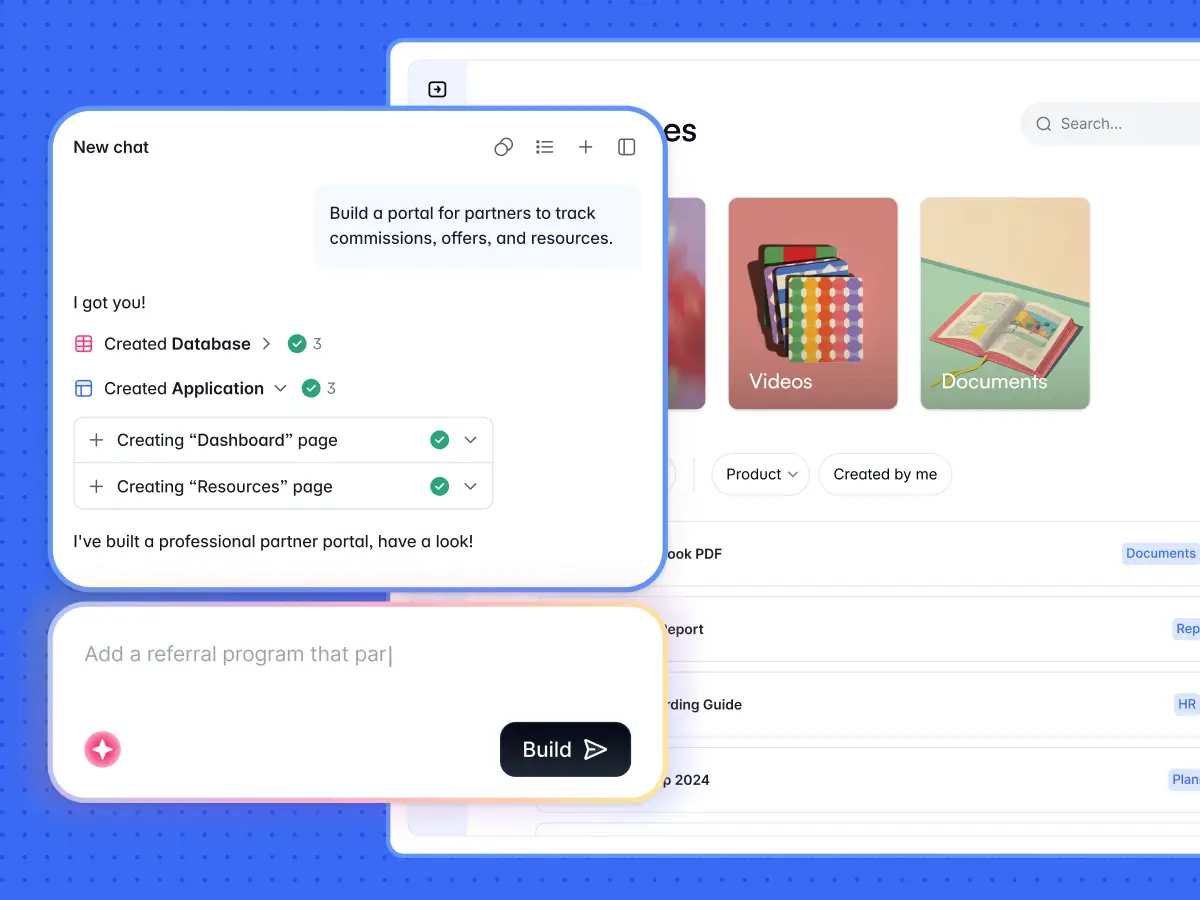
Most tools on this list add a feature inside Airtable. Softr does something different: it gives your Airtable data a real front-end. If you've ever wanted to turn your base into a fully functioning portal, internal tool, or CRM without writing code, this is where you start. Softr connects to your Airtable bases and lets you build the interface your team or clients actually use, with the data you're already managing.
What makes the current version stand out is the AI Co-Builder. You describe what you need in plain language, and it assembles a complete app for you, picking layouts, wiring up your data, and setting up access. Softr's AI doesn't generate your app from scratch, line by line. It composes it from blocks that already work (authentication, the database connection, tables, forms, kanban), so you skip the broken layouts and reprompting that plague pure AI builders.
"I find Softr very intuitive and easy to navigate, which is great for someone who is not a programmer by nature. It integrates very nicely with Airtable and other databases we are already using, making it nice that it just sits on top of the systems we have." - Natalie S., Director of Operations, G2 review
Here's a quick video featuring no-code expert Dan Leeman on how to use your Airtable database to build client portals, websites, and more:
Beyond the interface, Softr is a full-stack platform. You get an interface builder, native Softr Databases, and Softr Workflows for automations, all in one place. So you can stay on Airtable as your backend, or move data into Softr's own database, whichever fits your setup.
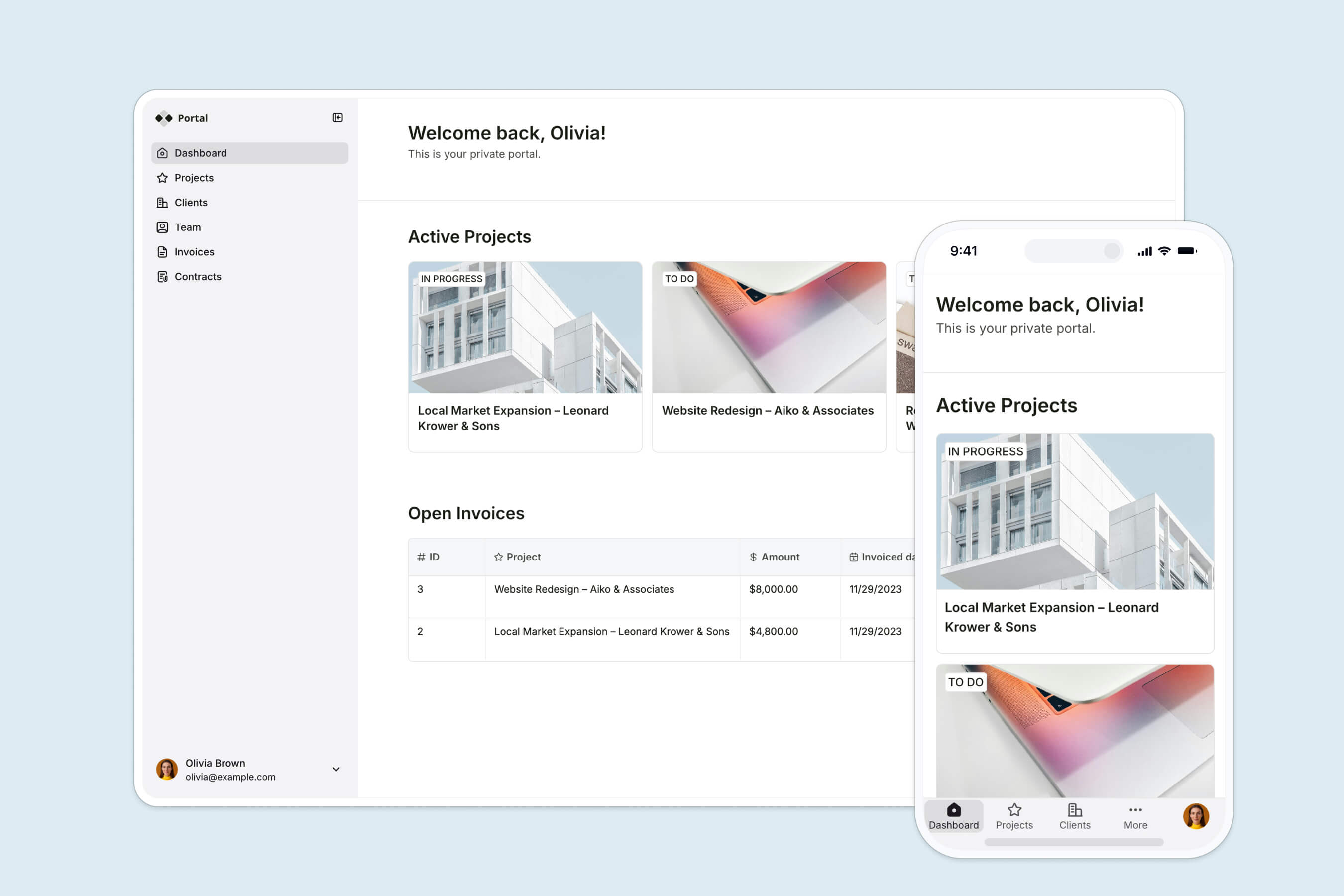
I've used Softr to create a client dashboard, and it saved me a ton of time compared to manually coding a solution. The whole process was painless, and I had everything up and running within a day.
Features
- AI Co-Builder: Describe your app in plain language and it builds the pages, connects your data, and sets up access. You can also start from a template or a blank canvas.
- Drag-and-drop interface builder with responsive customizable templates to kickstart the build.
- Granular users and permissions: create member-only areas with login, magic links, and per-group data restrictions for secure client and team access.
- Connect to 21+ data sources, including Airtable, Google Sheets, HubSpot, a REST API connector, and Softr's own native database.
- Native workflows triggered by in-app actions, like sending a notification when a record changes or a button is clicked.
- Mobile-ready apps you can install as a PWA (Progressive Web App) in a few minutes.
Pros and cons
Pros:
- Goes beyond an extension by giving your Airtable data a full, branded front-end your clients and team can log into.
- The AI Co-Builder removes most of the manual setup, so non-technical operators can ship a working app fast.
- Strong security model with user groups and data restrictions, which extensions inside Airtable can't provide.
- Works as a full stack (interface, databases, and workflows), so you're not stitching together separate tools.
Cons:
- It's not the right fit if you're building a public SaaS product, a marketplace, or an MVP aimed at investors. Softr is built for internal tools, portals, and client-facing apps.
- For the rare design that pre-built blocks don't cover, you'll lean on the Vibe Coding block rather than fully open-ended code.
Pricing
- Free plan.
- Basic: $59/month.
- Professional: $167/month.
- Business: $323/month.
- Enterprise: Custom quote.
2. Page Designer
Best for: Creating custom documents or printable reports from Airtable.
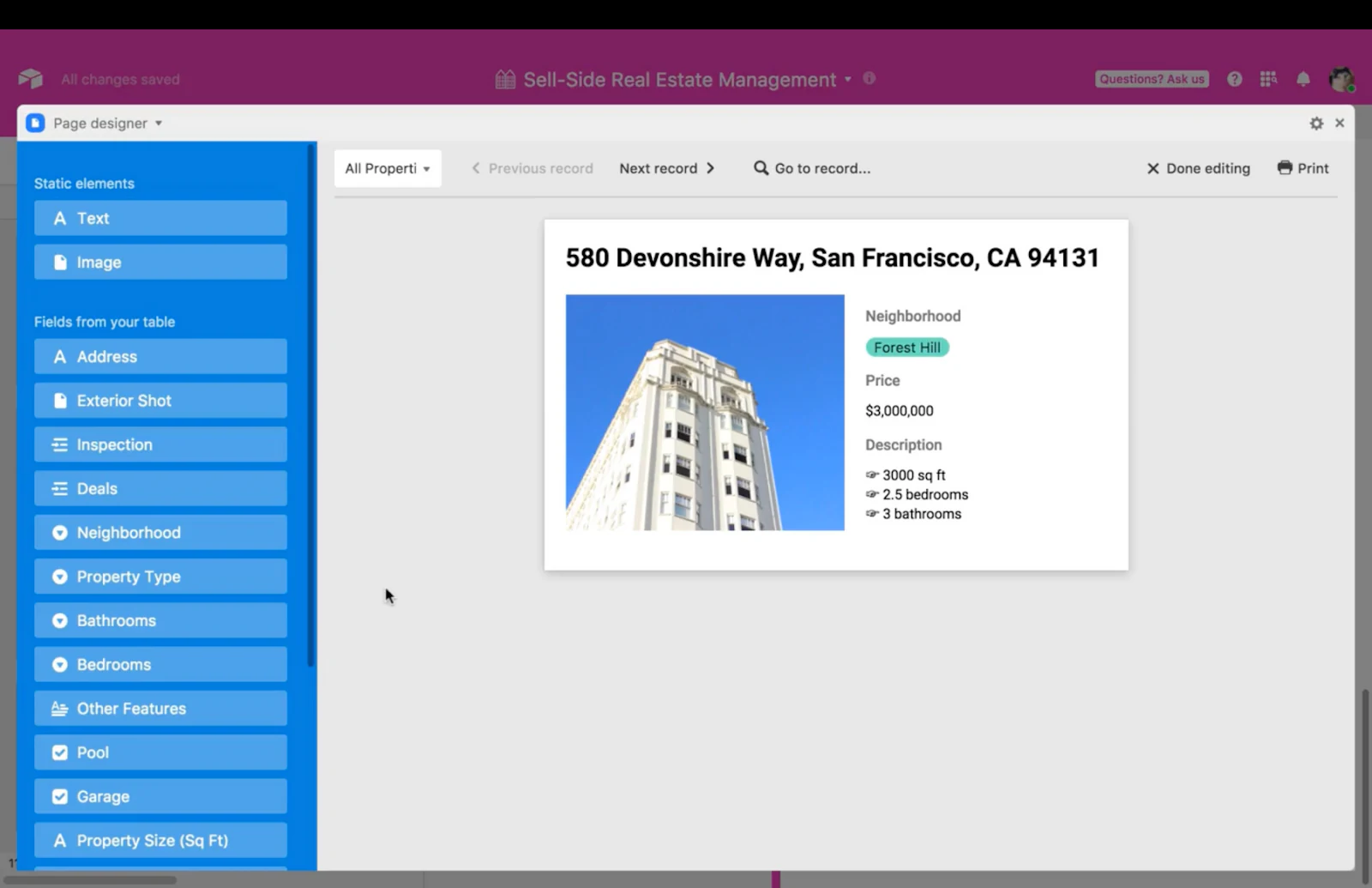
If you're looking for a way to create custom reports or layouts using your Airtable data, Page Designer is a good choice. It lets you design printable pages that pull directly from your base, whether you need invoices, catalogs, or personalized documents.
I've found Page Designer useful for generating custom invoices from my project management bases. I can select various fields from my Airtable database to include in custom layouts, such as text, images, and barcodes, arrange these elements on the page, and use the real-time preview to see the final output.
Features
- Dynamic data integration: Insert data fields directly into the layout, automatically populating with information from your Airtable base.
- Customizable elements can be resized, rotated, and repositioned.
- A range of styling options for text elements, including font choice, size, color, and alignment.
- Customize and save templates to speed up the design process.
Pricing
Free with a paid Airtable account.
3. Supersparks

Best for: Advanced workflow automations and app integrations.
Following its success as a Webflow extension, Supersparks is an excellent choice for those who want to automate workflows and trigger actions across multiple apps. It offers a comprehensive library of apps and extensions, called "sparks," that extend Airtable's native automations, letting you set up more complex sequences that save time and reduce manual work.
I love their advanced form spark, which improves user engagement and data collection through a multi-step form design, a format known to increase completion rates for longer forms.
Features
- Break the data collection process into manageable sections to create multi-step forms, which helps prevent form abandonment.
- Offers custom formulas that aren't natively available, like CountIF and VLOOKUP spreadsheet functions.
- Create, Read, Update, and Delete operations within Airtable, which are essential for managing databases.
Pricing
- Free plan.
- Basic: $10/month.
- Pro: $20/month.
- Premium: $40/month.
4. Vega-Lite

Best for: Creating custom data visualizations and charts.
If you need more advanced data visualization options, Vega-Lite is a chart extension that lets you create detailed, interactive charts that go beyond Airtable's standard chart blocks. Whether you want custom bar charts, scatter plots, or heat maps, Vega-Lite gives you full control over how you display your Airtable data.
The extension is configured using JSON, which might seem daunting at first, but it allows for precision and customization. You can create layered and multi-view visualizations, apply conditional formatting, and even build interactive graphics that respond to user inputs.
Features
- Layering: Overlay different types of visualizations to create rich, informative graphics.
- Faceting: Build multiple charts from subsets of data for comparative analysis across different segments.
- Responsive design: Set the chart dimensions to "container" for responsive charts.
- Create interactive charts that respond to user actions like hovering, clicking, or selecting.
- If you're unfamiliar with JSON or Vega-Lite syntax, the learning curve can be steep, though support articles and examples help you get started.
Pricing
Included in your paid Airtable account.
5. SendGrid

Best for: Automating email campaigns directly from Airtable.
When it comes to sending emails directly from your Airtable database, SendGrid is a popular tool. This extension makes it easy to automate email campaigns, whether you're sending newsletters, event invites, or personalized updates. The best part is that you can pull data from Airtable and use it to personalize emails on the fly.
I've used the SendGrid API to send emails to contacts within a specific view of a table, which lets me create targeted campaigns. I can include dynamic content pulled from Airtable fields, which is useful for personalization at scale.
Features
- Send customized emails to contacts in your Airtable records.
- The SendGrid API lets users send emails directly from Airtable.
- Emails can be sent to contacts within a specific view of a table for targeted campaigns.
- Insert dynamic content from Airtable fields into emails using curly brackets, e.g., {Name}.
Pricing
The cost of using SendGrid's services is separate from your Airtable subscription.
- Free plan.
- Essentials: Starts at $19.95/month.
- Pro: Starts at $89.95/month.
6. Vision

Best for: Image classification, text extraction, and logo identification.
With the Vision extension, you can quickly classify and tag images in your Airtable base using the Google Cloud Vision API. Whether it's identifying objects, extracting text with OCR, or detecting logos, you can categorize hundreds of images in just a few clicks. Simply upload your images to an attachment field, and Vision will do the rest, which is great for organizing large image libraries or gathering insights from visual data. (Note: this requires a Google Cloud Vision API key.)
I found the extension straightforward to install and set up inside Airtable using my Google Cloud API key. Once the key is entered, you can configure it to analyze images from specific tables and views.
Features
- Image classification: Automatically categorizes images into predefined categories such as "animal," "monument," or "product," saved as tags in your base.
- Identify and extract logos within images, which is particularly useful for brand recognition tasks.
- OCR capabilities: Extract text from images, digitizing printed or handwritten information without manual data entry.
- Bulk processing: Process and tag hundreds of images with just a few clicks.
- Integrates with the Google Cloud Vision API to provide accurate, detailed insights.
Pricing
Available on all paid Airtable plans. The Google Cloud Vision API has its own pricing structure. To use it, you must set up billing on your Google Cloud account, and costs are based on the number of images analyzed.
7. Whalesync

Best for: Syncing data between Airtable and other apps like Notion and Webflow.
If you manage data across multiple apps and need everything to stay in sync, Whalesync is designed to bridge the gap. This extension automatically syncs data between Airtable and other platforms like Notion, Webflow, and Bubble without any code.
It's particularly useful for users like me, who rely on Airtable as a flexible backend database and need to sync that data with a frontend interface like Webflow for client-facing functionality. I appreciate Whalesync's design freedom, which lets you tailor the synchronization to fit specific needs.
Features
- Two-way sync: Real-time, bi-directional synchronization between Airtable and other apps.
- Ease of setup: Map fields in your Airtable database to fields in another app.
- HTML field sync: Supports syncing HTML content from Airtable into rich text fields in other applications.
- Multiple app integrations: Connect Airtable with a variety of other tools, expanding the potential use cases for your data.
Pricing
- Starter: $99/month.
- Operator: $249/month.
- Professional: Custom pricing.
8. Time Tracker
Best for: Tracking time spent on tasks within Airtable.
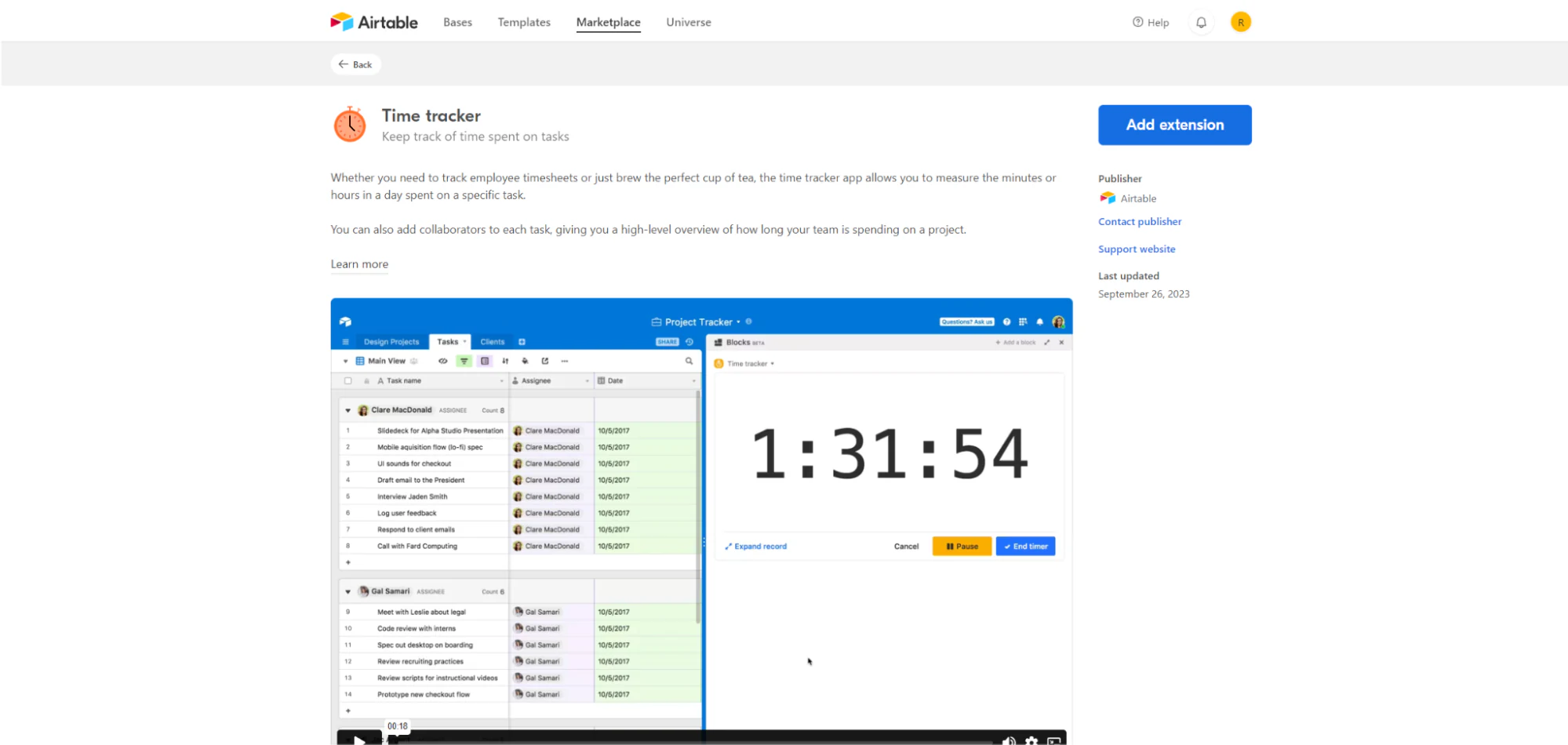
Need to track how much time you spend on tasks in Airtable? Time Tracker is a simple yet effective extension for logging time spent on different projects or tasks. Whether you're tracking billable hours or monitoring team productivity, Time Tracker fits neatly into your existing Airtable workflow.
I found it easy to set up and use. You select the appropriate table, view, and fields for time tracking, then track time across different records and sessions, pause and resume timers as needed, and let it run in the background even if you navigate away from Airtable.
Features
- Start/stop timer for individual records, allowing for precise time tracking.
- Time is automatically logged into a designated field within the Airtable database.
- Collaborator identification: Record which collaborator started the timer, providing clarity on who worked on what task.
- Pause/resume functionality.
- Duration field and unit selection: Choose the field where the duration is logged and whether the time is recorded in minutes or hours.
Pricing
Included with a paid Airtable account.
9. Fintable
Best for: Managing and tracking financial data in Airtable.
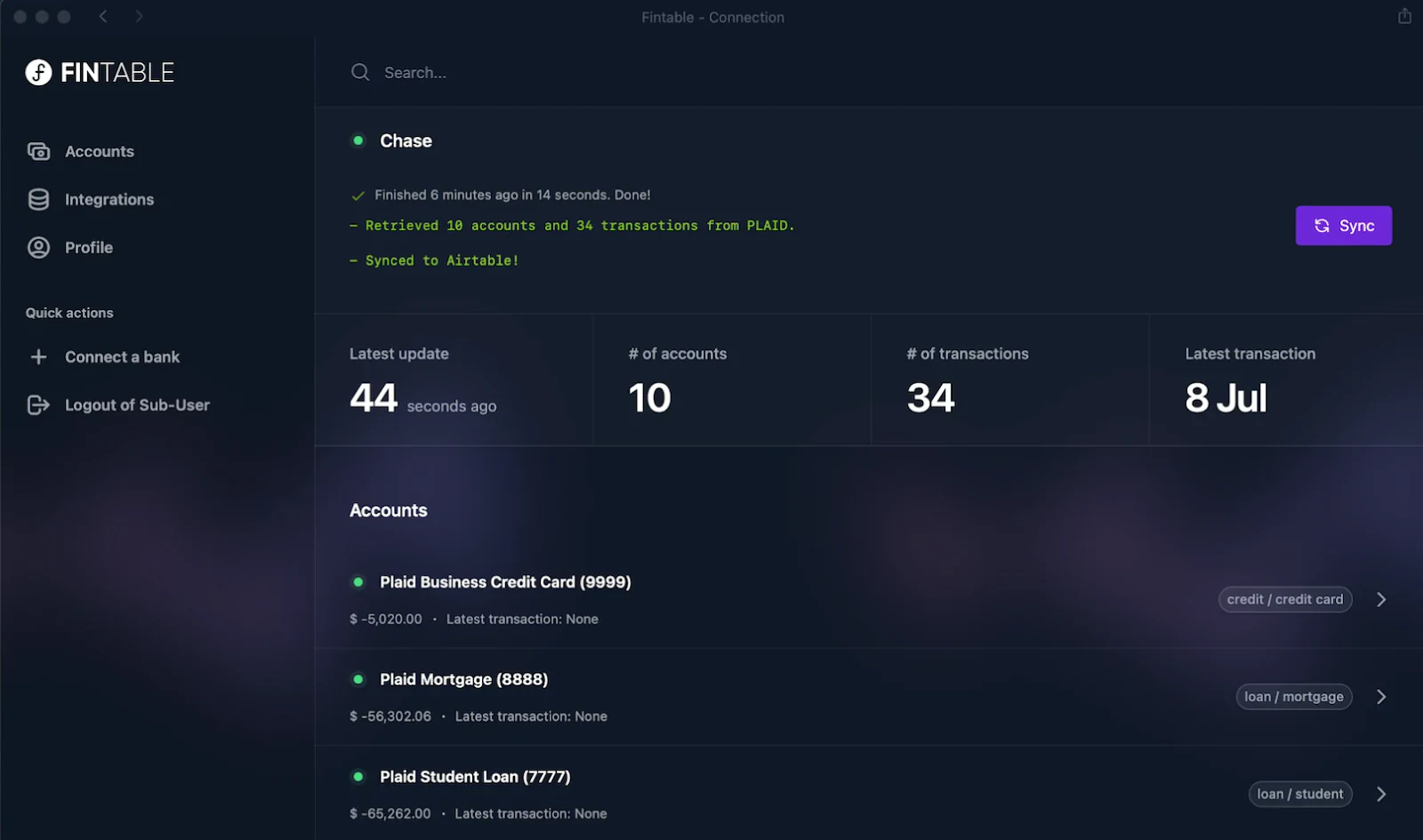
If you manage financial data inside Airtable, Fintable makes it easy to pull in live financial data from your bank accounts or payment platforms. It's great for tracking transactions, expenses, and income directly within your Airtable database, keeping everything centralized for easier budgeting and reporting.
When I set up Fintable, I linked my bank accounts to my Airtable bases using secure financial data aggregators like Plaid. This connection let Fintable pull in transaction data, including the date and amount of each transaction along with the merchant name and category.
Features
- Real-time bank data updates keep your Airtable records current with the latest transactions and balances.
- Connections to over 15,000 banks in 39 countries.
- Secure data pipeline with encryption to protect the transmission of financial data.
- Third-party integration with no-code tools like Zapier.
- Classify, archive, search, notify, and approve transactions within Airtable.
Pricing
- Personal: $7/month.
- Office: $365/year.
- Enterprise: Starting at $500/month.
10. Formito

Best for: Creating conversational forms and chatbots integrated with Airtable.
Formito offers a unique approach to data collection and customer interaction. This extension lets you create conversational forms and chatbots that integrate with Airtable, making it easy to gather data and engage with users in real time.
Creating my chatbot was a no-code process. My database records and fields turned into chatbot questions, making it possible to collect data, feedback, and even payments. Chatbots can be embedded into websites or shared via links, and all responses are tracked and managed within the Airtable database.
Features
- Create new chatbots from your Airtable bases, streamlining data collection and interaction.
- Quick edits within Airtable make it easy to manage chatbot flows.
- Preview the chatbot before deployment to ensure everything functions as intended.
Pricing
- Free plan.
- Personal plan: $17/month.
- Startup: $50/month.
- Business: $100/month.
11. CMS Bridge

Best for: Syncing Airtable data with Webflow's CMS.
If you're looking to seamlessly sync your Airtable data with Webflow, CMS Bridge by Finsweet automatically updates Webflow's CMS from Airtable. Say you're running an e-commerce site on Webflow: CMS Bridge helps you sync your product data from Airtable to Webflow's CMS. It's a great option for stores that frequently update product information, inventory, or content.
Features
- Real-time, two-way syncing: Updates in Airtable automatically appear in Webflow, and you can also pull data from Webflow back into Airtable.
- Bulk publishing: Save time by publishing multiple items to Webflow's CMS at once.
- Scheduled updates: Schedule when your data should sync so your content stays fresh.
Pricing
- Free plan.
- Small: $10/month.
- Medium: $20/month.
- Large: $30/month.
- Unlimited: $50/month.
12. Zonka Feedback

Best for: Collecting and managing customer feedback in Airtable.
When it comes to gathering customer feedback directly in Airtable, Zonka Feedback makes it easy. With this extension, you can create surveys and forms that send responses straight into your Airtable database, giving you a simple way to track customer satisfaction, conduct NPS surveys, or gather feedback after events.
Setting it up involves connecting your Zonka Feedback account to Airtable using your Airtable API key. Once connected, you can map survey questions to specific fields in your Airtable tables. You can also send responses to multiple bases and tables for a flexible setup tailored to different workflows or projects.
Features
- Automatic response sync: New survey responses are automatically sent to the designated Airtable base and table.
- Flexible mapping: Map survey questions to specific fields in Airtable tables.
- Conditional logic: Set conditions for when survey responses should be mapped to Airtable, for control over what data is synced.
Pricing
You need a Zonka Feedback account to use this Airtable extension.
- Free plan.
- Starter: $49/month.
- Growth: $99/month.
- Enterprise: Custom pricing.
13. TaskRobin
Best for: Saving emails and attachments into Airtable.
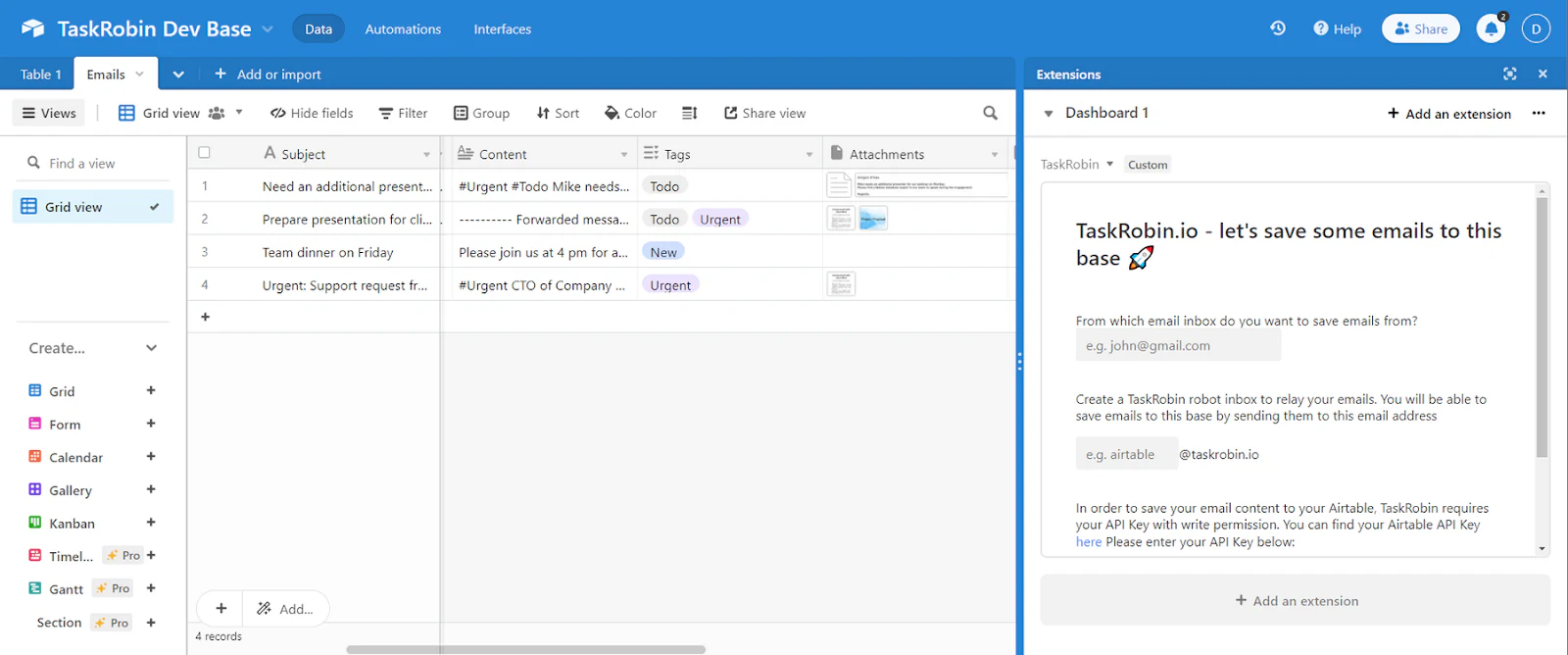
TaskRobin is a handy extension for getting email content into Airtable automatically. It lets you forward emails from any email service, such as Gmail or Outlook, to a unique TaskRobin inbox.
The way it works is straightforward: after setting up the service, you forward emails to a designated TaskRobin address. The system processes these emails and populates the relevant fields in your Airtable base with the content, including the text and any attachments, which are stored and linked within the base.
Features
- Saves emails and attachments into Airtable by forwarding them to a TaskRobin inbox.
- Customize which email metadata is saved and how it maps to Airtable fields.
- Automated rules to auto-populate Airtable fields based on specific email content.
- Securely save email attachments into Airtable, with encryption.
- Create multiple TaskRobin inboxes to manage various workflows, each linking to the same or different Airtable tables.
Pricing
- Lite: $2.49/month.
- Pro: $4.99/month.
- Pro Plus: $15.99/month.
- Team: $47.99/month.
Turning Airtable into an app your team will actually use
The right Airtable extensions can stretch what you do inside a base, from custom charts and printable invoices to automated emails and live financial syncing. Airtable's own extension marketplace is a good place to keep exploring, and every tool above is worth a look depending on your workflow.
The moment your data needs to leave the base, though, an extension hits its ceiling. When you need a real interface for your team or clients, Softr turns your Airtable data into a secure Airtable front-end, with permissions, automations, and a mobile-ready experience. Describe what you want to the AI Co-Builder and start building your custom app in minutes.
Frequently asked questions
What is the difference between an Airtable extension and an Airtable integration?
Can I build a real app or client portal on top of my Airtable data?
Are Airtable extensions free?
Do Airtable extensions work on mobile?
How many extensions can I add to one Airtable base?


