8 best admin panel builders to try in 2026

An admin panel builder connects databases like MySQL, SQL Server, and MariaDB, then lets you build dashboards and business logic on top of them without hiring specialized developers. The hard part is picking one that adapts to your workflow instead of forcing you to reshape it. Here are 8 builders compared.
At a glance: 8 admin panel builders compared
| Tool | Best for | Standout feature | Starting price |
|---|---|---|---|
| Softr | Business teams that want a full app, not just a panel | AI Co-Builder + native database + workflows in one platform | Free, paid plans from $19/month |
| Retool | Engineering teams building internal tools fast | 100+ UI components and custom React support | Free plan, paid from ~$10/user/month |
| DronaHQ | Enterprises needing self-hosted deployment | Cloud and self-hosted options with a connector hub | From $12/month/user |
| AppSmith | Developers who want an open-source option | Full source-code access and Git-based version control | From $40/month (usage-based) |
| JetAdmin | Quick, no-code operational dashboards | Import designs directly from Figma | From $49/month |
| Budibase | Self-hosted, open-source internal tools | 40+ pre-built components and unlimited users | From $60/month per app creator |
| Superblocks | Product teams shipping many internal apps | Multi-cloud deployment and AI-assisted development | From $70/month per creator |
| Plasmic | Design-first teams collaborating with developers | Visual design system with code export | From $49/month |
What is an admin panel builder?
An admin panel builder is a software tool that allows organizations to create customized administrative interfaces without extensive coding knowledge. These platforms provide visual development environments where users can design, build, and deploy web-based control panels for managing business operations, data, and internal processes.
So, the core purpose of admin panel builders is to simplify complex administrative interface creation, reduce traditional software development time, enable non-technical staff to build operational tools, and standardize internal software management.
Primary use cases include internal business process management, customer data administration, document management systems, analytics and reporting, user management systems, etc. Each of these areas represents a critical operational need that admin panel builders can address.
What should you look for in an admin panel builder?
When evaluating an admin panel builder, consider these critical criteria:
- Integration capabilities: A platform that supports a native database as well as multiple external data sources can dramatically reduce development time. Look for a built-in database option like Softr Databases for speed, plus native connectors to popular databases and data warehouses like MySQL, BigQuery, and MariaDB. Robust integration ensures your admin panel can pull, push, and synchronize data efficiently without requiring complex custom coding.
- Customization options: Beyond basic template-based interfaces, seek platforms allowing deep customization. The ideal admin panel builder should support pre-built blocks for the bulk of your interface, plus a way to generate custom components with AI (such as a Vibe Coding block) for the edge cases pre-built blocks don't cover, and enable complex workflow automations without forcing you to hire a developer.
- Scalability and performance: Assess the platform's infrastructure, considering aspects like concurrent user support, data processing speed, and ability to handle increasing computational loads. Look for cloud-native solutions offering automatic scaling, load balancing, and performance optimization tools. A scalable admin panel ensures your application can grow without requiring complete architectural redesigns.
- Pricing: Analyze pricing tiers to examine the feature spectrum across free, basic, and enterprise plans. Platforms vary in their approach: some offer robust free tiers with core functionalities, while others require immediate paid subscriptions. Pricing models also differ widely since some charge per user, others by usage volume, and some employ hybrid approaches.
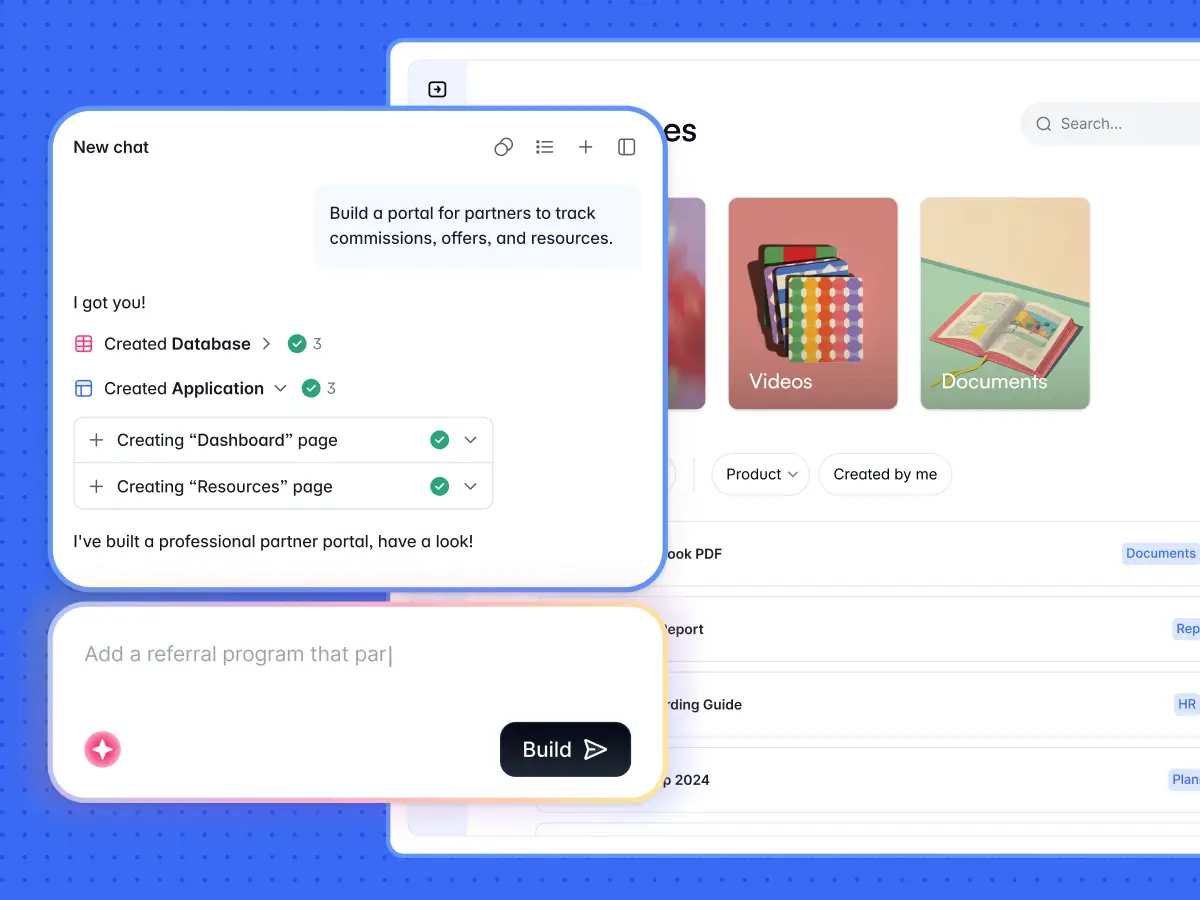
- AI assistance for building and maintaining the panel: Look for a platform where an AI Co-Builder can generate tables, pages, and permissions from a plain-language description, and keep helping as your needs evolve, rather than a one-time AI generator you outgrow after the first version.
- Community and support ecosystem: We also recommend that you evaluate the platform's documentation, community support, and available resources. A strong community means faster problem resolution, regular updates, and a wealth of third-party resources. Check for documentation, active developer forums, certification programs (Softr has one), and tutorial libraries. Platforms with robust support ecosystems make implementation and ongoing maintenance significantly smoother.
These custom admin panel builders stand out as the best in the market.
1. Softr
Softr is an AI app builder that lets businesses of all sizes create admin panels, internal tools, and client-facing portals without writing code. Describe what you need, and the AI Co-Builder generates the database, pages, and permissions already connected and ready for real users. You can also start from a template or build manually, so you're never locked into a single way of working.
Small businesses often choose Softr for its cost-effective, rapid development. Teams can go from a blank workspace to a working admin panel in a day, without hiring a developer or waiting on IT.
Large enterprises select Softr for its enterprise-grade security, granular permissions, and room to grow. The platform offers dedicated success managers, additional builder seats, and robust integration capabilities that meet complex organizational requirements.
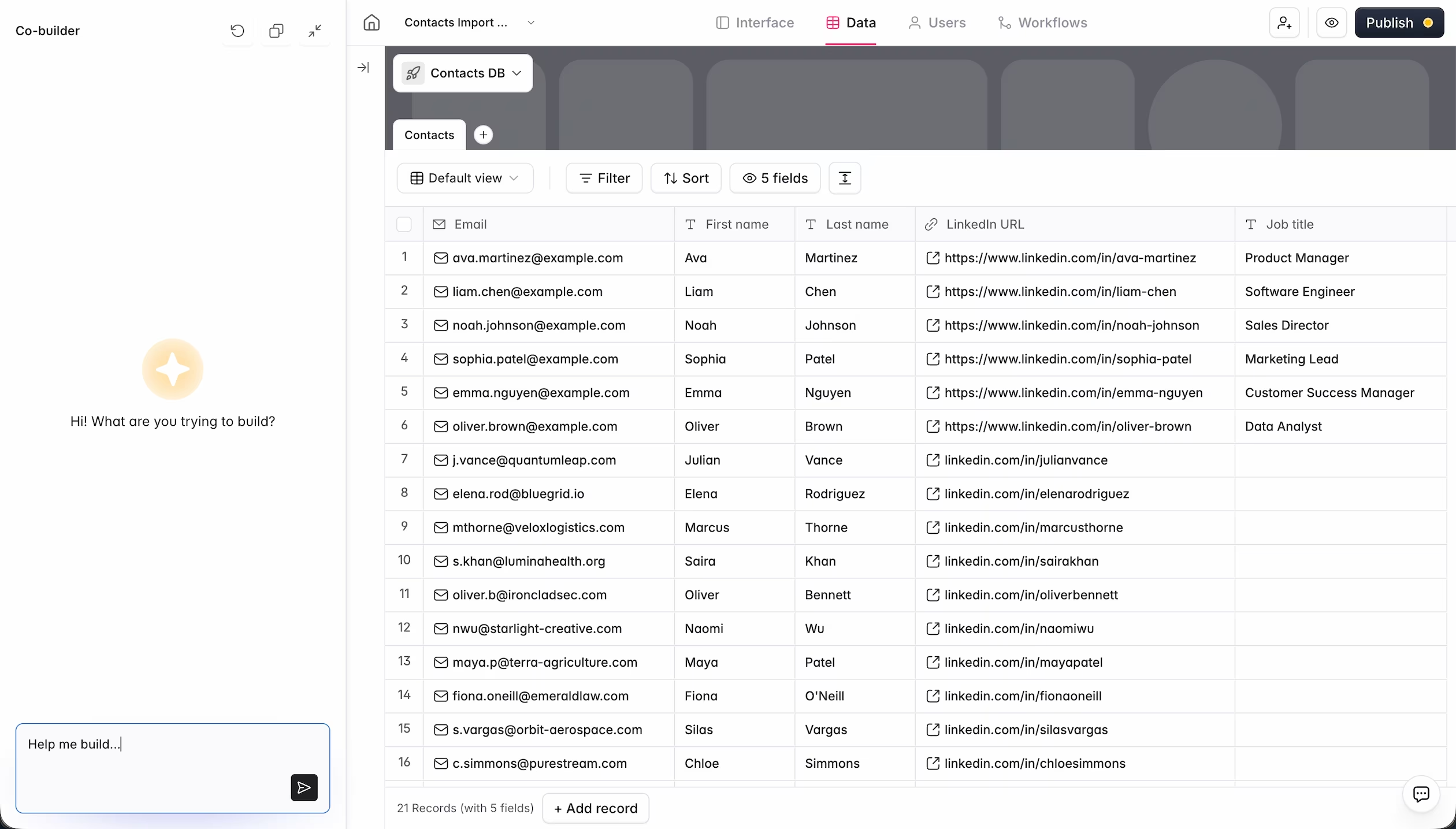
Key features
- Softr Databases, a native relational database, plus 21+ external data sources including Airtable, Google Sheets, MySQL, and a REST API connector
- AI Co-Builder for generating full apps, database schemas, and workflows from plain language
- Pre-built building blocks (tables, kanbans, calendars, charts, forms) covering most panel needs out of the box
- Vibe Coding block for AI-generated custom UI when a pre-built block isn't enough
- Softr Workflows, a native automation engine triggered by UI actions or data changes
- Role-based users and permissions with row-level data restrictions
- Ask AI chat interface for querying data in plain language
- Mobile-responsive design and search functionality across every block
- Conditional logic for forms
- Custom domains and white-labeling
- Data export options (CSV, PDF, XLSX)
- File upload capability in forms
Pros
- Extremely user-friendly interface, so non-technical teams can build without training
- Fastest path from idea to working panel thanks to the AI Co-Builder, with full manual control still available
- Native database and workflows mean you don't have to stitch together separate tools for data and automation
- Scales from a free internal tool to an enterprise-grade, multi-role portal on the same platform
- Active user community and certification program
- Strong data privacy: SOC 2 Type II compliant, with data hosted in Europe
Cons
- Pre-built blocks cover most needs, but truly bespoke UI still requires prompting the Vibe Coding block or writing some custom code
- Not built for public marketing sites or SEO-heavy content; it's optimized for internal tools and portals, not general-purpose websites
Customer reviews
- G2: 4.8 out of 5 (426 reviews)
- Capterra: 4.6 out of 5 (60 reviews)
- Product Hunt: 4.8 out of 5 (368 reviews)
"In roofing, there were not many good CRM options, except for one that cost thousands of dollars a month. Instead, I used Softr to build our own CRM that rivals the expensive ones. I do not pay for features I will not use, and simply build the ones I want, exactly how I want them." - Verified User, Construction (Small-Business), G2 review
Pricing
Softr's free plan supports 5 app users, 5,000 database records, and 500 workflow actions, enough for testing a small internal tool. Paid plans start at $19/month with the Basic plan, supporting Team: 5 + Client: 5 app users, 50,000 database records, and 2,500 workflow actions. The Pro plan ($99/month) adds Team: 10 + Client: 50 app users, 500,000 database records, and integrations like monday.com and Supabase, while the Business plan ($329/month) supports Team: 30 + Client: 100 app users and adds SQL databases and HubSpot. Enterprise (custom pricing, contact sales) plans are available for enterprise needs like SSO and dedicated SLAs.
2. Retool
Retool is a low-code platform for building internal tools and dynamic admin panels. It connects to any database or API and allows developers to create custom interfaces using drag-and-drop components and JavaScript. The platform specializes in business applications like dashboards, CRUD apps, and workflow automation tools, making it popular among startups and enterprises.
Key features
- 100+ UI components
- Custom JavaScript modules
- Google Sheets front end
- Query builder and editor
- Event-driven scripts
- Database integrations
- Notifications and alerting
- ETL and data processing
- Generative AI blocks
- Advanced permissions
- Custom error handling
- Self-documenting
- Offline mode
- Webhook triggers
- Custom React components
- Environments and schema migrations
- Version release and history
- Usage analytics
Pros
- Free plan available
- Multi-environment support
Cons
- Steep learning curve for non-technical users
Customer reviews
- G2: 4.6 out of 5 (304 reviews)
- Gartner: 4.5 out of 5 (133 reviews)
- Capterra: 4.5 out of 5 (24 reviews)
Pricing
Retool pricing distinguishes two user types: standard users, who are developers creating and editing apps, are priced at €11/month, while end users, who only view and interact with apps, cost €6/month. The basic plan covers up to 5 users and allows 5000 monthly workflows. So, the pricing is calculated based on users' active roles in the platform during each billing cycle.
3. DronaHQ
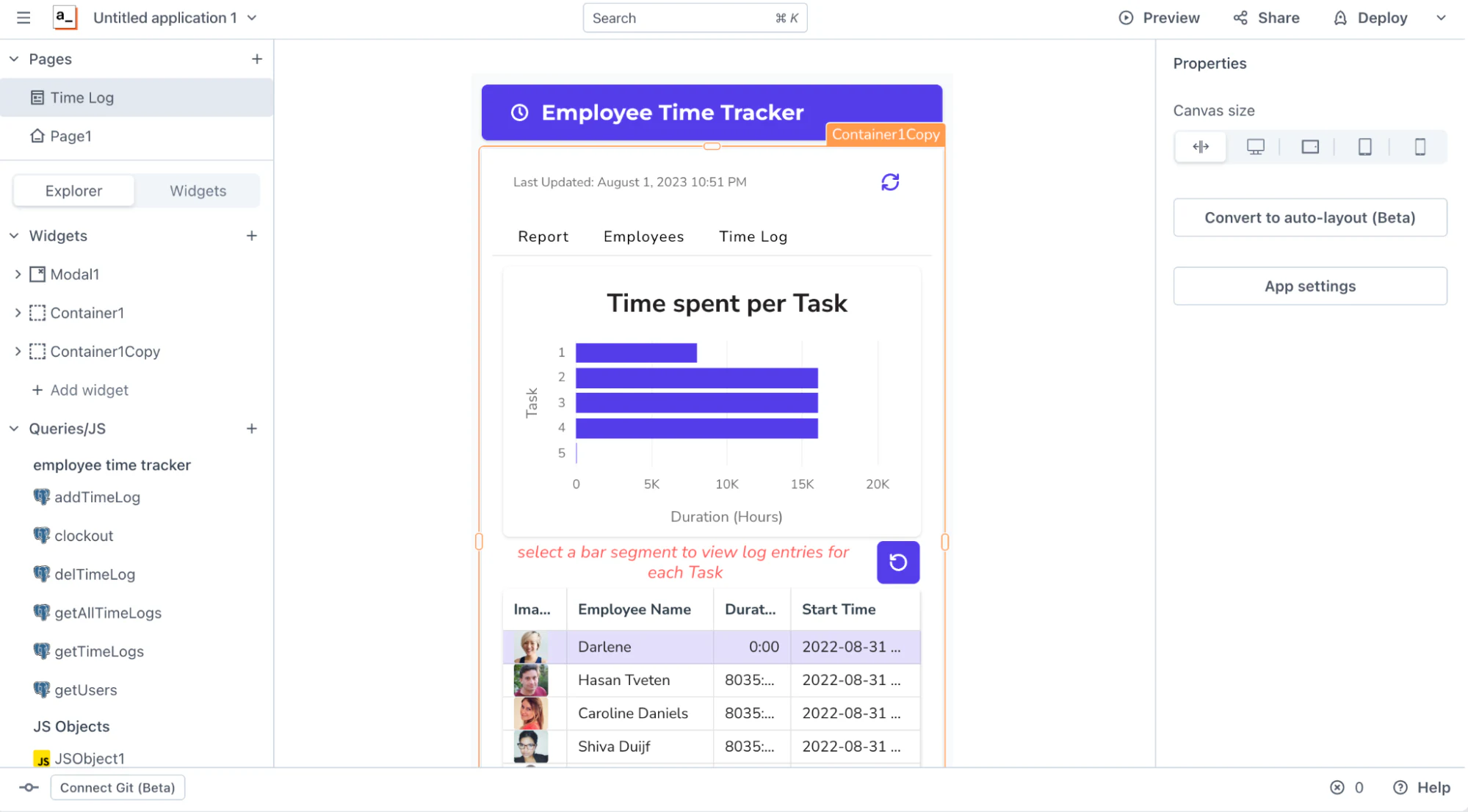
DronaHQ is a low-code admin panel design tool focused on creating operational apps and admin panels. It provides ready-to-use UI components and integrates with multiple data sources to build workflows, forms, and dashboards. The platform emphasizes rapid development and deployment of business applications, offering both cloud and self-hosted options for enterprises.
Key features
- Visual app builder
- App catalogs and themes
- Database connector hub
- Custom JavaScript and transformations
- Excel functions
- Dynamic control library
- Git-based source control
- Form builder system
- Reusable action blocks
- iframe embeds
- Restricted public URLs
- Workflow automations
- Multi-tenant architecture
- Query optimization tool
- White-label options
- Granular permissions
Pros
- Mobile app access
- 24/7 technical support
- Extensive third-party integrations
Cons
- Complex setup for advanced features
- Less intuitive UI compared to competitors
Customer reviews
- G2: 4.4 out of 5 (39 reviews)
- Capterra: 4.6 out of 5 (10 reviews)
Pricing
DronaHQ provides three pricing tiers: user-based, usage-based, and developer-only models. For example, the cloud-hosted user-based plan costs $12/month/user, offering features including unlimited web and mobile app creation, version control, and extensive database and API connectivity. For more detailed info, you may want to refer to DronaHQ’s pricing page.
4. AppSmith

AppSmith is an open-source low-code platform for building internal tools and admin dashboards. Developers can create custom applications by connecting to databases, APIs, and integrating various data sources through a visual interface. The platform supports rapid development of complex business applications with extensive customization options.
Key features
- Reusable packages
- JavaScript code editor
- Drag-and-drop interface
- API connection toolkit
- Custom widget library
- Multi-environment support
- Versioning with Git
- Git branch protection
- Workflow automation
- Audit logs
- Custom branding
Pros
- Free plan available
- Extensive customization capabilities
- Enterprise-grade security
Cons
- Limited pre-built templates
- Steeper learning curve
Customer reviews
- G2: 4.7 out of 5 (59 reviews)
- Product Hunt: 4.9 out of 5 (50 reviews)
Pricing
Appsmith takes a usage-based approach to pricing, with entry-level plans starting at $40 monthly. This plan provides 100 hours of usage, with additional hours available at $0.40 per hour.
5. JetAdmin

Jet Admin is another no-code admin panel builder. It enables users to create data-driven interfaces quickly by connecting multiple data sources and APIs without requiring extensive coding knowledge. The platform focuses on providing an intuitive interface for building operational tools and dashboards with minimal technical complexity.
Key features
- 30+ building blocks
- Query builder
- Computed columns
- Custom components (HTML/CSS/JavaScript)
- Custom dashboard builder
- Import design from Figma
- Mobile responsive design
- Automated workflows
- API integration hub
- Tasks and comments
- Template collections
- Version control
- Built-in permission management
Pros
- 14-day free trial
- User-friendly interface
- Fast application development
Cons
- Limited advanced customization
Customer reviews
- G2: 4.2 out of 5 (6 reviews)
- Product Hunt: 4.2 out of 5 (26 reviews)
Pricing
Jet Admin offers different pricing models for internal tools and customer portals. For internal tools, companies are charged per employee user, allowing flexible scaling of workplace applications. Customer portals are priced by user groups, with plans starting at $49 monthly. This entry-level package provides database integrations and unlimited monthly workflow runs.
6. Budibase

Budibase is an open-source low-code admin panel solution that helps developers and non-technical users create custom internal tools, web applications, and admin panels. It offers a visual interface for building full-stack applications with minimal coding required. The platform supports multiple data sources and provides a flexible approach to application development across various industries and use cases.
Key features
- Responsive design builder
- 40+ pre-built components
- Custom queries
- If/then logic
- Custom JavaScript actions
- Database management
- Single-page application architecture
- Extensible plugin system
- Self-hosting capabilities
- Live evaluation
- 20+ triggers and actions
- Automation logs
- Upload CSVs
- Reusable snippets
- REST API connector
- Role-based access control
Pros
- Free plan available
- 14-day free trial
- Drag-and-drop interface
Cons
- Steeper learning curve for advanced customizations
Customer reviews
- G2: 4.5 out of 5 (68 reviews)
- Capterra: 4.7 out of 5 (25 reviews)
- Product Hunt: 4.9 out of 5 (28 reviews)
Pricing
Budibase offers paid plans starting at $60/month per app creator, with an additional $6 per app user monthly. The plan is unlimited in users and includes features like custom branding, reusable code snippets, synchronous automations, and other advanced development tools.
7. Superblocks

Superblocks is a low-code platform designed for building internal tools, dynamic admin panels, and custom workflows with rapid development capabilities. It focuses on enabling engineers and product teams to create powerful business applications quickly by connecting multiple data sources and providing a flexible development environment.
Key features
- Visual workflow builder
- Reusable modules
- AI-powered development assistance
- Multi-cloud deployment
- Interactive dashboard creation
- Custom JavaScript transformations
- Automated event triggers
- Version control
- Live queries with timers
- Granular role-based permissions
- Git-based source control
- Embedded apps
- Custom branding
Pros
- Free plan available
- Comprehensive integration ecosystem
Cons
- Steeper learning curve
- Pricing can be expensive for smaller teams
Customer reviews
- G2: 4.7 out of 5 (168 reviews)
Pricing
Superblocks offers paid plans priced at $70 monthly per creator and $21 monthly per end-user. This pricing model is suitable for startups with fewer than 100 employees looking to develop internal tools that can be used across different teams.
8. Plasmic

Plasmic is a visual development platform that enables designers and developers to create web applications, design systems, and administrative interfaces without deep coding expertise. It’s famous for its design-first approach that enables smooth collaboration between design and development teams while providing powerful visual editing capabilities. The platform integrates directly with different codebases and supports multiple front-end frameworks.
Key features
- Visual design system builder
- Code-based component generation
- Responsive design tools
- Design token management
- Dynamic content rendering
- Component library creation
- Code export capabilities
- Variant and state management
- Design-to-code automation
- Access control systems
- Custom interaction design
- Custom targeting & segmentation
- Localization
- Code generation
- A/B testing
- Import with Figma
Pros
- Free plan available
- High visual design flexibility
Cons
- Requires technical understanding
- Learning curve for non-technical users
Customer reviews
- G2: 4.6 out of 5 (12 reviews)
- Product Hunt: 4.5 out of 5 (37 reviews)
Pricing
Plasmic offers pricing starting at $49/month, which includes 3 collaborators and 100,000 monthly page views. Their SMB-focused plan is priced at $129/month, accommodating 4-10 collaborators for professional application development.
Softr can help you build interactive and custom admin panels
The admin panel builder market offers plenty of low-code options, but Softr delivers unique value by combining three things most competitors keep separate: an AI Co-Builder that generates your panel from a description, a native database built for speed and permissions, and a workflow engine to automate what happens next. Teams without coding skills can create powerful internal tools through its intuitive interface, describe changes in plain language to the AI Co-Builder, or fine-tune everything manually. The platform also offers integrations with popular data sources, especially SQL databases like PostgreSQL, MySQL, SQL Server, and MariaDB. Plus, its free plan lets teams test capabilities before any financial commitment.
Start your free trial with Softr and see how smooth admin panel development can be.
Frequently asked questions
What's the difference between an admin panel builder and a full app builder?
Can I build an admin panel without any coding experience?
Which admin panel builder connects best to SQL databases like MySQL or PostgreSQL?
How much does an admin panel builder typically cost?
Can AI build an admin panel for me automatically?