


Airtable vs Google Sheets: Everything you need to know
[.blog-callout]
TL;DR
- Compare Airtable (a relational database hybrid) and Google Sheets (a traditional spreadsheet) for different workflows.
- Evaluate pros and cons including pricing, field types, collaboration, offline access, and database structures.
- Learn how to convert your raw sheets or bases into secure business portals and web apps using Softr.
[.blog-callout]
Airtable and Google Sheets both operate with spreadsheet-like interfaces, so they might seem like similar tools at first glance. In practice, they have different capabilities and lend themselves to very different use cases.
Airtable is a database solution that lets you dynamically view, link, and manage your data. Google Sheets is a more static, traditional spreadsheet that gives you a familiar way to store and organize information.
This article has everything you need to know about Airtable vs Google Sheets in 2026, including the advantages and disadvantages of databases versus spreadsheets, and how to turn either one into a real business app when a grid of cells isn't enough.
Here's a quick side-by-side before we dig into the details.
| Criteria | Airtable | Google Sheets |
|---|---|---|
| Type | Spreadsheet-database hybrid | Traditional spreadsheet |
| Best for | Structured, relational, growing data | Quick calculations and number crunching |
| Relational links | Yes, native linked records | No, only formula-based lookups (VLOOKUP) |
| Views | Grid, Kanban, calendar, gallery, Gantt, form | Grid only |
| Field types | Rich (attachments, selects, formulas, buttons) | Basic (text, numbers, formulas) |
| Collaboration | Comments, mentions, personal views, audit trails | Real-time editing, offline access |
| Pricing | Free tier, then per-seat paid plans | Effectively free for most use |
| Build an app on top | Yes, with Softr | Yes, with Softr |
For a more detailed overview, check out our tutorial:
{{cta-1}}
Airtable vs Google Sheets: What’s the difference?
While there’s some overlap between Airtable and Google Sheets, they’re two very distinct tools.
Airtable is a spreadsheet-database hybrid. It brings the best of both worlds together as it has all the features that spreadsheet users and database users love.
Airtable goes a step further than traditional databases with innovative features like a variety of different field types, a large library of ready-to-use templates, and a huge ecosystem of related integrations and no-code platforms like Softr.
It’s important to note that Airtable can also act as a relational database. That means it can use linked records to bond different tables together.
Google Sheets is a much more traditional spreadsheet. It doesn’t look like anything fancy, but it gets the job done. The platform is reminiscent of Excel, but it has a few more modern features. For instance, it works pretty well for multiple users and collaborative teams as it updates in real-time.
Databases vs spreadsheets: Which is better?
To help you choose the right tool for your needs, let’s jump into some definitions.

A spreadsheet is a two-dimensional electronic document designed to store, organize, and analyze data. They’ve been around almost as long as the internet has and are popular for practical uses, like sorting data and producing graphs, as well as technical uses, like crunching numbers and keeping track of budgets. Think of them as an electronic version of the paper.

A database also stores, organizes, and analyzes information, but is typically more scalable and reliable than a spreadsheet. It also has more functionalities, is compatible with a wider range of data types, and makes it easier to programmatically manage data.
Spreadsheets and databases both have a time and a place, so let’s talk about their strengths and weaknesses to figure out which one is best for you.
Databases: What are the pros and cons?
Pros
- Easier to work with large amounts of data
- Ideal for fast-growing businesses that need to scale
- Can manage data programmatically
- Handy for many different use cases like project management, customer relationship management (CRM), and eCommerce
- Possible to use within applications
- Typically more secure than spreadsheets
- Modern databases have advanced fields so users can store many different information types
- Some have powerful relational database capabilities
Cons
- Often require some training, so there can be a learning curve at first
- Platforms often require payment
- It’s time-consuming to set up a database system when you’re starting from scratch
- Can be more rigid that spreadsheets because they expect values to match the existing structure
Use cases
One of the biggest advantages to databases is the nearly limitless use cases they come with. Once you’ve familiarized yourself with your database tool and are feeling confident navigating it, you can turn it into just about anything you can imagine.
Here are just some of the ways you can use databases:
- Project management
- CRM
- Ecommerce
- Inventory management
- Human resources
Airtable is one of the most popular database tools out there. The platform empowers users to store and organize data any way they want, allowing them to work more efficiently, streamline their processes, and create custom solutions for their needs.
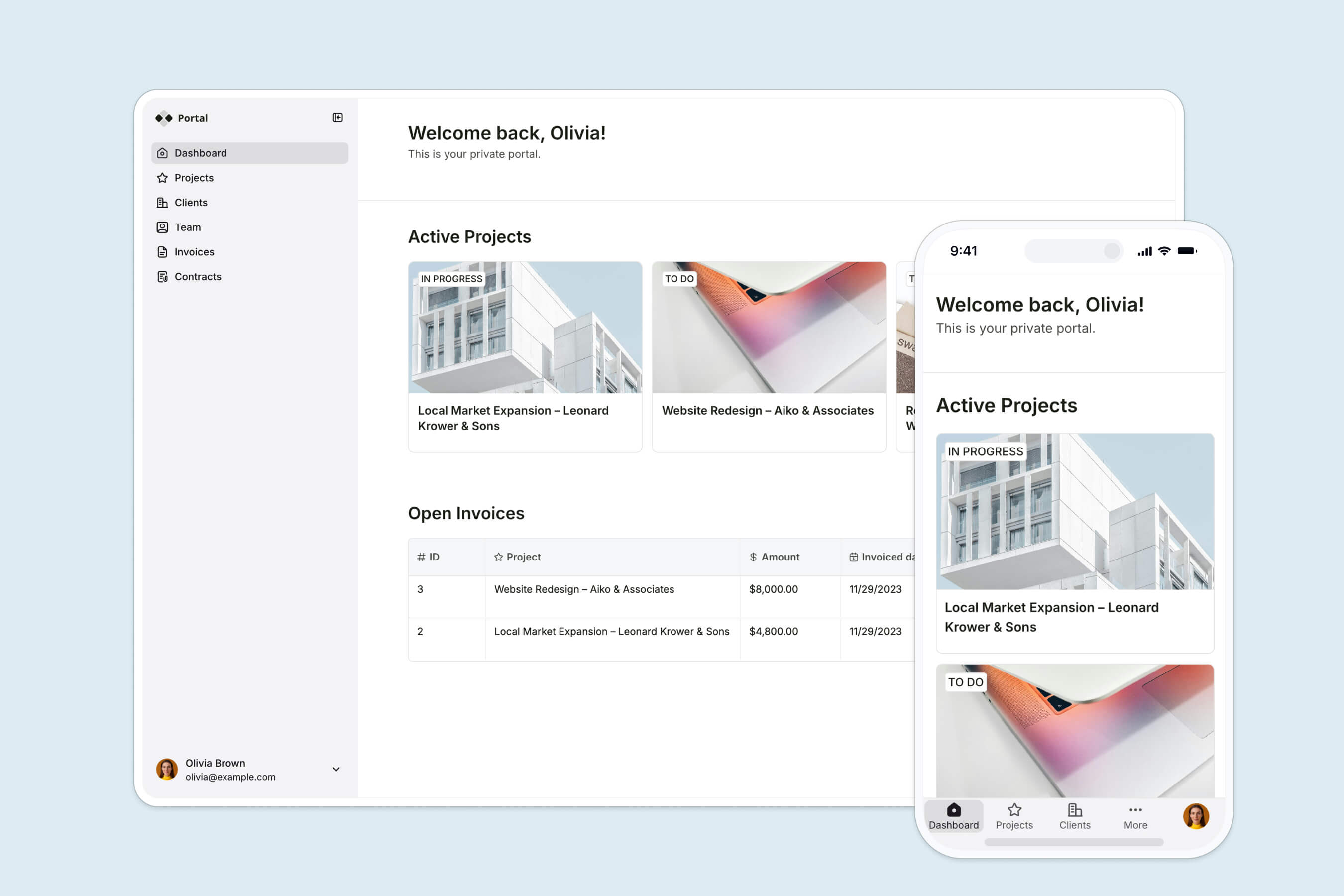
It's worth mentioning that databases like Airtable become even more useful when you put a real interface on top of them. With Softr, you can build a business app, client portal, or internal tool on top of your Airtable data without writing code, complete with secure logins and per-user views. The same works on top of Softr Databases (our native option), Google Sheets, and 20+ other data sources. For instance:
- DS Automotive is a Jaguar Land Rover specialist in the United Kingdom. They started using Airtable to manage their internal data, then added Softr to create their employee portal.
- SkillIt helps businesses work more efficiently through automations, tooling, and better internal processes. Airtable has long been part of their stack, and they added Softr to build their client portal.
"I use Softr to build a customer portal, and it helps us streamline both customer-facing and internal record-keeping. The interface looks great, and the integration with Airtable makes it easier." - Ruby H., G2 customer review
Spreadsheets: What are the pros and cons?
Pros
- Familiar to most people and easy to set up
- Ideal if you want a simple way to store and organize information
- Handy for crunching numbers and automatic calculations
- Great for creating tables, charts, and graphs out of your data
- Easy to sort and filter data
- Usually free or inexpensive to use
Cons
- The type of information you store is limited to numbers, letters, and keyboard characters
- The amount of text you can add into cells is usually limited
- If you’re storing a lot of data, it can get overwhelming fast in a traditional spreadsheet
- Usually less secure than databases
- Not ideal for long-term storage
- Spreadsheets aren't that engaging to look at, though building an interface on top of them with Softr changes that
- All-or-nothing sharing: a spreadsheet is shared at the file level, so you can't easily give one person edit access to only their own rows
Use cases
Spreadsheets were initially created as a way to crunch numbers, but they’ve come a long way since then. Even though they’ve remained most popular for technical use cases, they’re also more flexible than they seem. Some key spreadsheet use cases include:
- Business & accounting: Businesses of all shapes and sizes use spreadsheets to organize and analyze all their numerical data, particularly finance teams. For instance, for monitoring administrative work, creating budgets, and carrying out monthly accounting tasks and payroll.
- General data storage: This use case is very basic, but it’s truly one of the most popular ways to use spreadsheets. When people have any kind of information they want to store and organize for future reference, they put it in a spreadsheet.
- Education: Surprisingly, higher and continuing education institutions are some of the organizations that use spreadsheets the most. They come in handy for everything from keeping records on students to taking attendance to storing test results and calculating grades.
Let’s compare Airtable vs Google Sheets

If you’re looking for a spreadsheet/database tool like Airtable or Google Sheets, there are lots of different criteria you should consider when comparing the two. Here are some of the most important.
Design and visuals
Overall, Airtable’s interface is much more interesting to look at when compared with Google Sheets. Its design is dynamic, intuitive, and fun to navigate. Different elements can also be customized and color-coded according to your preferences.
We also love that Airtable provides users with several different ways to view their dashboards. You can choose between timeline, form, grid, calendar, gallery, Gantt, and Kanban.
Google Sheets’ interface is simple, straightforward, and instantly recognizable as a Google product. It’s not going to win any design awards and isn’t particularly captivating, but it has a clean design and gets the job done.
Usefulness
A tool’s usefulness is subjective, so both Airtable and Google Sheets are useful depending on what you want them to do for you.
If you:
- Work with large amounts of data
- Want a relational database tool
- Need a predefined set of field types
- Want to manipulate and view data in a variety of different ways
- Have a dynamic use case like project management or CRM
- Are collaborating with multiple team members
Then, Airtable is a more useful platform. The possibilities it offers its users are simply wider when compared with Google Sheets.
However, if you’re looking for a quick and effective tool to store and organize your data, Google Sheets could be a very useful platform for you.
Collaboration
Both Airtable and Google Sheets have great collaboration features. They’re both cloud-based tools and update more or less in real-time, so they work great for asynchronous and remote teams.
Airtable has a larger range of collaboration-specific features like comments, mentions, advanced data fields, personal views, and the ability to access audit trails to see all the changes made to different documents.
Google Sheets has a slight advantage over Airtable because you can work offline. With Airtable, you can only work when you’re connected to the internet.
No-code apps on top of your data
Whichever tool you pick, the data is only half the story. Neither Airtable nor Google Sheets is a true interface for end users: there's no secure login flow, no way to give each person their own filtered view, and no polished UI to hand to a client or a teammate.
This is where a no-code builder comes in. With Softr, you can build a business app, client portal, or internal tool on top of your data. You connect to Softr Databases (the native option), Airtable, Google Sheets, or 20+ other data sources including a REST API connector, then add secure users and permissions, a clean interface builder, and native workflows to automate the busywork.
You don't have to build it block by block either. Describe what you need to the AI Co-Builder and it generates the database, pages, and logic for you, then you fine-tune anything visually.
"I find Softr to be the easiest system to connect a database to. As someone less technical, I find it helpful that working with a database in Softr is similar to an Excel spreadsheet. The initial setup was very easy for me since I used the AI assistant, which I thought was very in tune with what I was looking for." - Joe L., Sales and Strategic Partnerships, G2 customer review
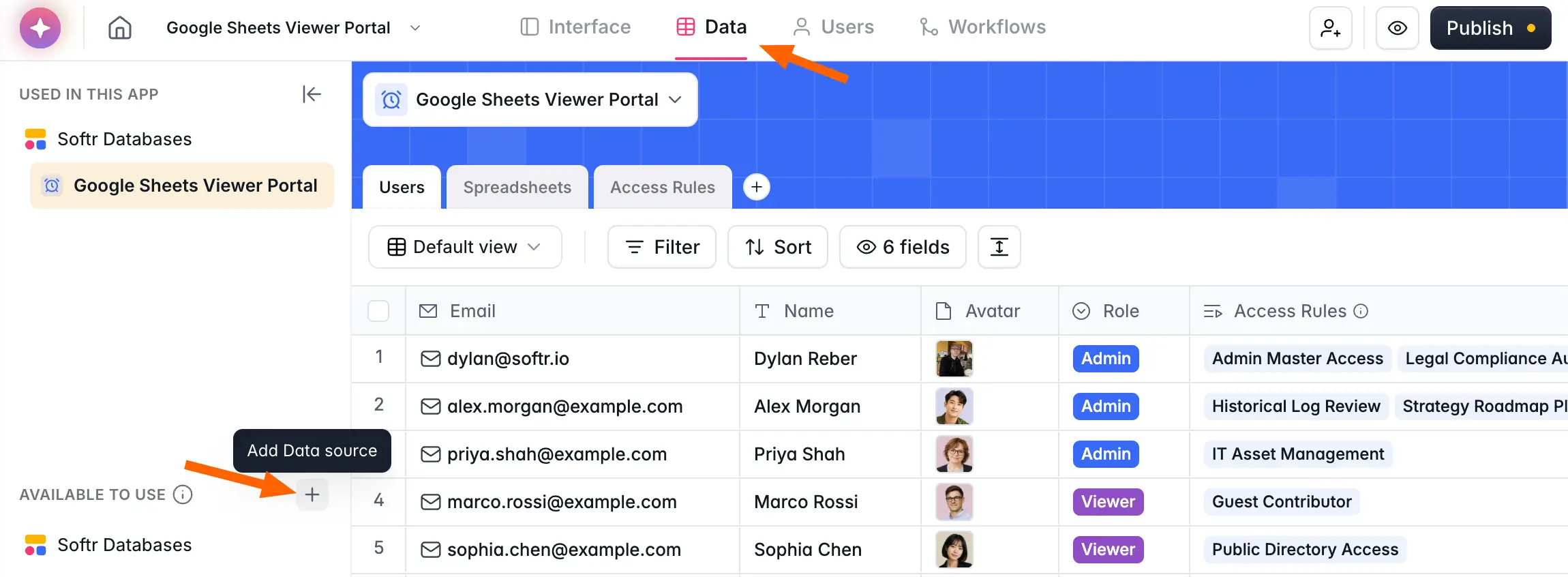
Try Softr today and turn your spreadsheet or database into a real app.
Integrations
When it comes to integrations, Airtable definitely wins. It has tons of built-in integrations like Typeform, Slack, Mailchimp, Asana, and Trello. You can also connect Airtable with over 1000 more integrations by using Zapier.
Beyond its native Airtable integrations, Airtable's robust API has spurred a network of third-party no-code tools like Softr, Make, and MiniExtensions that extend what it can do. Softr, for instance, lets Airtable users turn their databases into business apps and client portals.
Google Sheets has fewer integrations than Airtable. However, since the platform has been around for a long time, you can integrate it within many of your favorite web apps like Slack and Typeform.
Complexity
Airtable is a more complex tool than Google Sheets. In fact, many people struggle to understand what Airtable actually does before they try it out for themselves. It has so many different features and ways to organize data that it can be overwhelming at first.
For that reason, it’s a good idea to try out Airtable’s free plan to get oriented with their software before making your final decision.
There are lots of complex ways to use Google Sheets as well, but it’s easier for people to get the hang of. Its interface feels familiar and many people have experience working with Google apps, so Google Sheets’ learning curve is less steep than Airtable’s.
Price
When it comes to pricing, Google Sheets has a clear advantage.
Google Sheets is pretty much free, with very few limitations.
Airtable has a free plan with a capped number of records per base and up to five users. Once you're ready for more advanced features, paid plans are priced per user per month, so the cost can scale quickly for big teams.
Airtable's paid plans offer more than Google Sheets' free tier, but per-seat pricing adds up fast as your team grows. This is one reason teams that need to share data with many users often build an app on Softr Databases instead, where pricing scales by app users rather than per editor.
We also wrote a complete guide to Airtable pricing if you're interested.
Finding the best database tool for your needs
Both Airtable and Google Sheets are effective tools, and the right pick depends on your data and your team. If you need to make a quick call, Airtable is the stronger all-around choice for complex, relational use cases, while Google Sheets is free and intuitive for straightforward storage and calculations.
Either way, the moment you need real users logging in, secure per-user views, and a polished interface, the spreadsheet alone won't cut it. That's when you build an app on top of it with Softr, starting from Softr Databases, Airtable, Google Sheets, or any of our 20+ data sources, and let the AI Co-Builder do the heavy lifting.
Frequently asked questions
Is Airtable better than Google Sheets?
Can you use Google Sheets like Airtable?
What's the difference between a spreadsheet and a database?
Can I build an app on top of Airtable or Google Sheets?
Is Airtable free?


