The 5 best Lindy alternatives: Reviewed and tested in 2026


Lindy started as a no-code AI agent builder, but recently pivoted to a much narrower scope: AI executive assistants. It can help you manage your workday and tackle admin tasks, but it doesn’t attempt to solve broader team-wide productivity or operational challenges. I tested five of the best Lindy alternatives, and what each one is best at.
Best alternatives to Lindy at a glance
| Tool | Best for | Key features | Pricing |
|---|---|---|---|
| Softr | Building AI-powered business apps and client-facing portals | Native database, AI-generated apps, Database AI Agents, granular permissions | Free plan available. Paid plans from $19/month. |
| Gumloop | Granular control over AI agents | Visual node canvas, self-improving Skills, Gumstack observability | Free plan available. Paid plans from ~$30/month. |
| Relevance AI | Enterprise teams building a coordinated AI workforce | Multi-agent "AI Workforce," 250+ agent templates and 35+ Workforce templates, agent evaluations | Free plan available. Paid plans from $19/month. Enterprise plans have custom, sales-led pricing. |
| Zapier | Connecting workflows and agents to thousands of apps | 9,000+ integrations, Agents, Tables, Forms, Canvas, Copilot | Free plan available. Paid plans from $19.99/month. |
| n8n | Self-hosted control over your own agents and workflow infrastructure | Free self-hosted platform, execution-based pricing, custom code nodes, AI Agent nodes | Community edition is free to self-host; Business edition starts at ~$800/month; Cloud plans from ~$20/month |
What to look for in a Lindy alternative
Lindy is an AI executive assistant you text over iMessage or SMS, built around one person’s inbox, calendar, and meetings. While it’s a convenient way for one person to manage their admin work, there’s a lot it can’t do. Here’s what to look for when considering an alternative.
- Org-wide collaboration: Every Lindy plan below Enterprise is single-user, with no self-serve way to add a teammate. And although Lindy’s Enterprise plans support multiple users and shared credit pools, the goal is to provide AI executive assistants for your team—not to coordinate workflows across your organization.
- Built-in databases: Lindy works across the tools you already use. It doesn’t serve as a place for you to structure your own records, which limits your ability to store data and use it to power your business apps.
- User permissions: Once you build an org-wide business app with access to lots of data, you need to control who sees what. Look for a platform that lets you restrict data access according to the privileges of each user role. You should also be able to create entirely different interfaces for each user type, since end users don’t need the same options as admins.
- Business apps for teammates and clients: As a personal assistant, Lindy’s impact is limited to one person—you. Look for a platform that lets you create custom AI-powered apps, like project trackers, vendor management tools, and customer portals, that other people can use on their own.
1. Softr — best for building AI-powered internal apps and client-facing portals
While Lindy works well within its narrow scope as an AI executive assistant, there’s a lot it can’t do. It’s built for individual use, not team productivity, which means any gains you get from managing your inbox or tasks with Lindy are limited to one person. Softr is different: it’s designed for systems, workflows, and apps that impact the productivity of your entire organization.
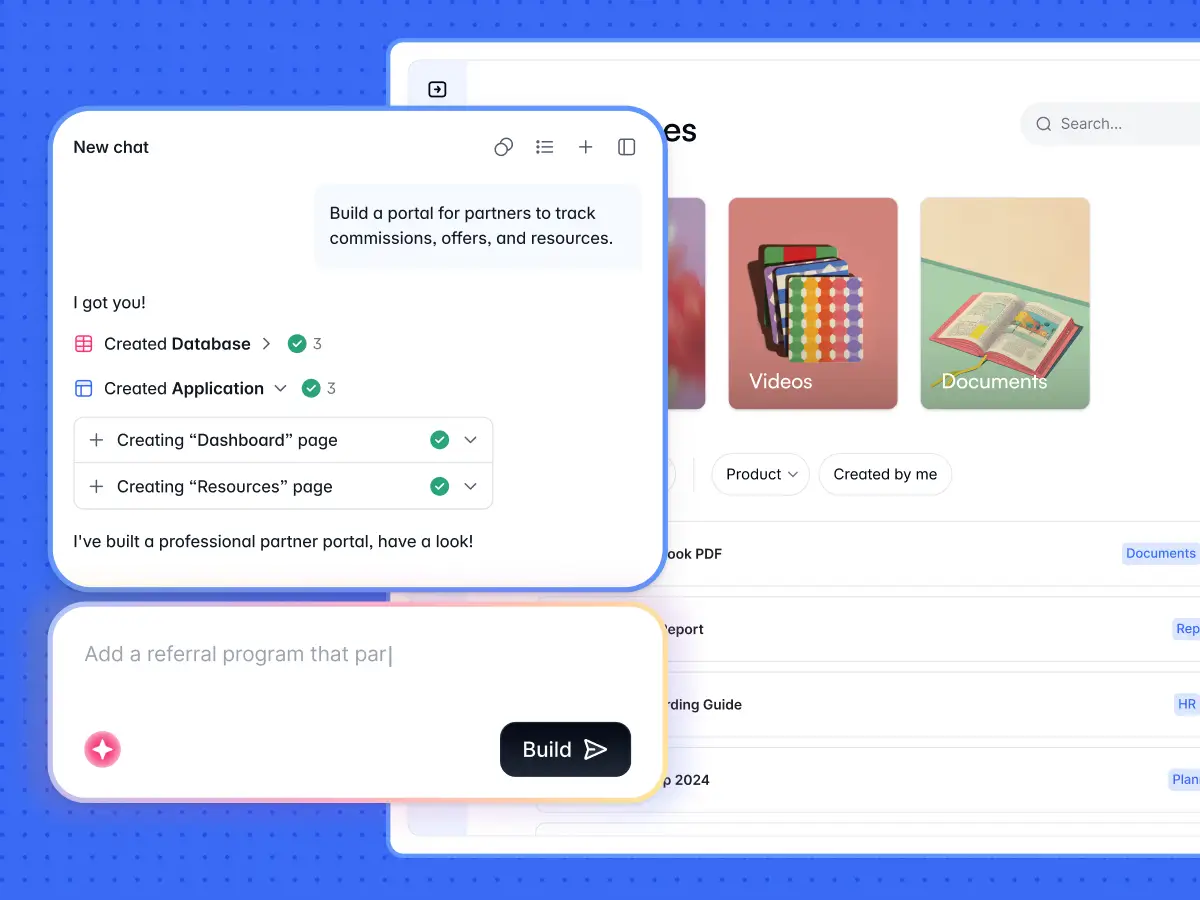
Softr is an AI-powered, no-code platform for building business apps, like client portals, CRMs, and internal tools. Its AI Co-Builder creates databases, apps, and workflow logic based on your prompts, with everything connected and ready for your team to use immediately. Unlike pure vibe coding tools, Softr includes built-in permissions and user management, so it’s ready out of the box for secure deployment. And with the Softr MCP, you can build and manage apps directly from assistants like Claude or ChatGPT, or turn any published app into its own MCP server for end users.
.webp)
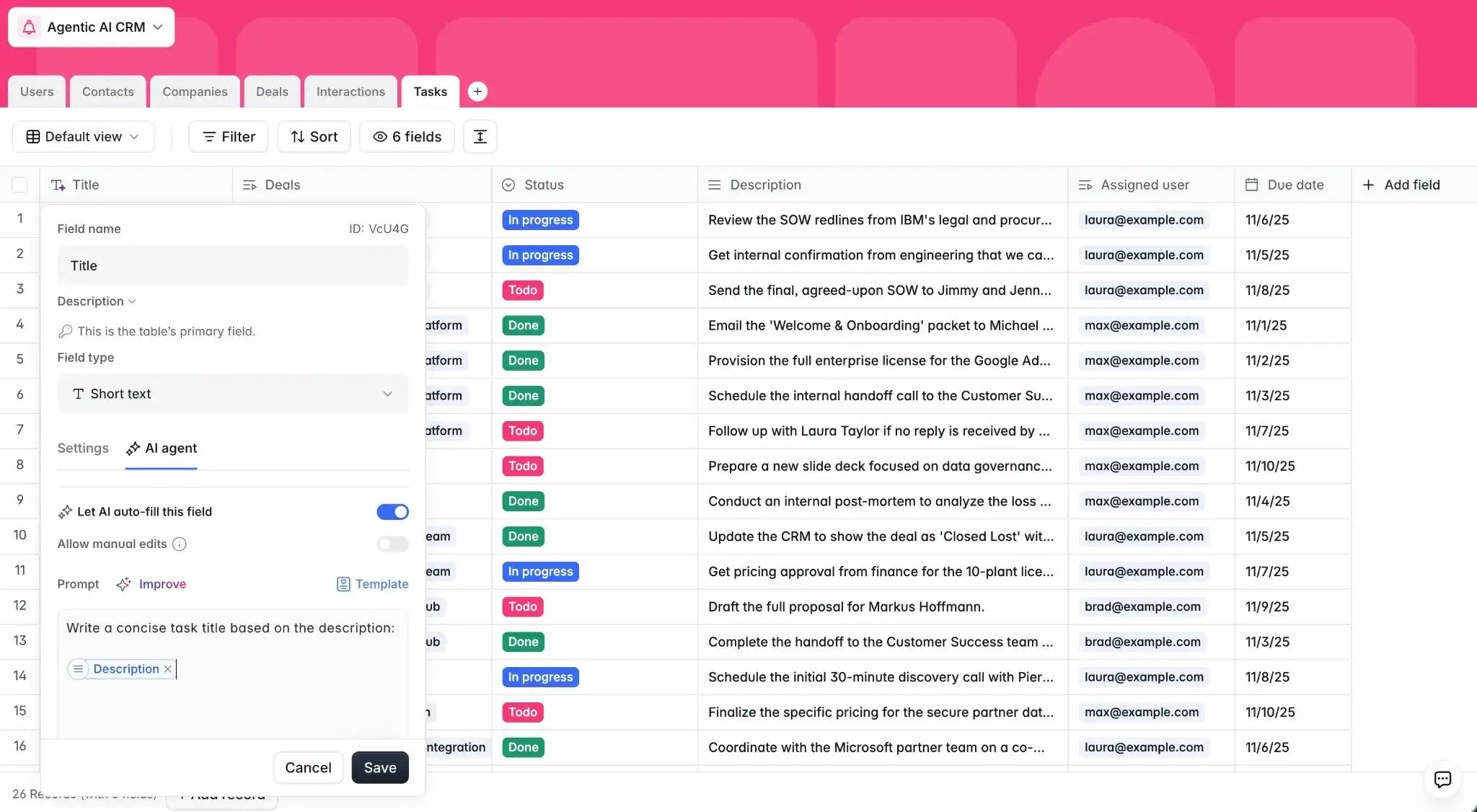
If you’re managing lots of data, Softr gets even more useful. Database AI Agents can auto-fill, summarize, and enrich your records, with guardrails that decide exactly when they're allowed to run. For popular Softr use cases like CRMs, inventory management, project management, and dashboards, that means many of the most tedious aspects of your app can be automated with embedded agents.
Pros
- Up to 3 builders on the free plan, so a small team can build apps together.
- You can build with AI (using prompts and vibe coding blocks), design with the drag-and-drop visual editor, or jump back and forth as needed.
- All Softr apps, whether internal or client-facing, come with permissions and user authentication built in.
- Create entirely different app views for different user roles, so each person can view and edit the data they need without getting distracted by irrelevant information.
- Database AI Agents are highly customizable and specialized for each task. You choose the model, the prompt, and the conditions under which an agent fires.
- Works with 21+ data sources including Airtable, Google Sheets, and a REST API connector, and you can interact with your Softr apps from any AI tool.
Cons
- Softr is a hosted platform, so it doesn't generate exportable code and you can’t host apps on your own infrastructure.
Best features
- AI Co-Builder: Describe the app you need and Softr builds the database, interface, and logic together; you can refine your app using conversational AI or the visual editor.
- Softr Databases: Structure data with relational tables, linked records, and rollups; Softr Databases syncs with your app natively, so updates happen in real time.
- Database AI Agents: Populate your database with agents that fill empty fields automatically by writing descriptions, enriching contact details, formatting data, and extracting information from files.
- Granular permissions: Define access at the page, block, and record level, so admins, employees, and clients can share one app with different views.
- Workflows: Trigger workflows when changes happen in your app or database, with conditions and filters to run automations only under specific conditions.
- Ask AI: An AI assistant is built directly into your app, so teammates or clients can ask questions about your data and get the answers they need (and those answers respect the user permissions you’ve set).
- Softr MCP: Build apps, databases, and workflows from your own AI assistant, or let app users interact with your data through the App MCP Server.
Pricing
Softr’s free plan includes up to 3 builders, and paid plans include 1 to 3 builders, with extra builder seats from $5/month. Higher-tier Softr plans offer more app users. All pricing shown is billed annually.
- Free: Unlimited apps, with access to Softr Workflows and Softr Databases, 5 app users, 5,000 records, 5 AI credits
- Basic ($19/month): Unlimited apps with 42+ integrations, Team: 5 + Client: 5 app users, 50,000 records, 10 AI credits
- Pro ($99/month): Unlimited apps with 45+ integrations and custom code, Team: 10 + Client: 50 app users, 500,000 records, 50 AI credits, 3 custom user groups
- Business ($329/month): Unlimited apps with 52+ integrations, Team: 30 + Client: 100 app users, 1M records, 100 AI credits, custom user groups (up to 10)
- Enterprise: Custom pricing, SSO, audit logging
The bottom line: What Softr has on Lindy
While Lindy is fundamentally a single-person platform, Softr is built for collaboration and multi-user access. Rather than boosting productivity for just one person, Softr can create a team-wide productivity impact through business apps that handle CRM systems, client portals, inventory management, and more. Softr also has a notable price advantage: Lindy tops out at $199.99/month per person and gates any multi-user setup behind a sales call. Softr’s free plan supports up to 3 builders and 5 app users, and $19/month covers Team: 5 + Client: 5 app users.
Start with a free plan to build your first business app, or browse Softr’s templates to launch in minutes.
2. Gumloop — best for granular control over AI agents
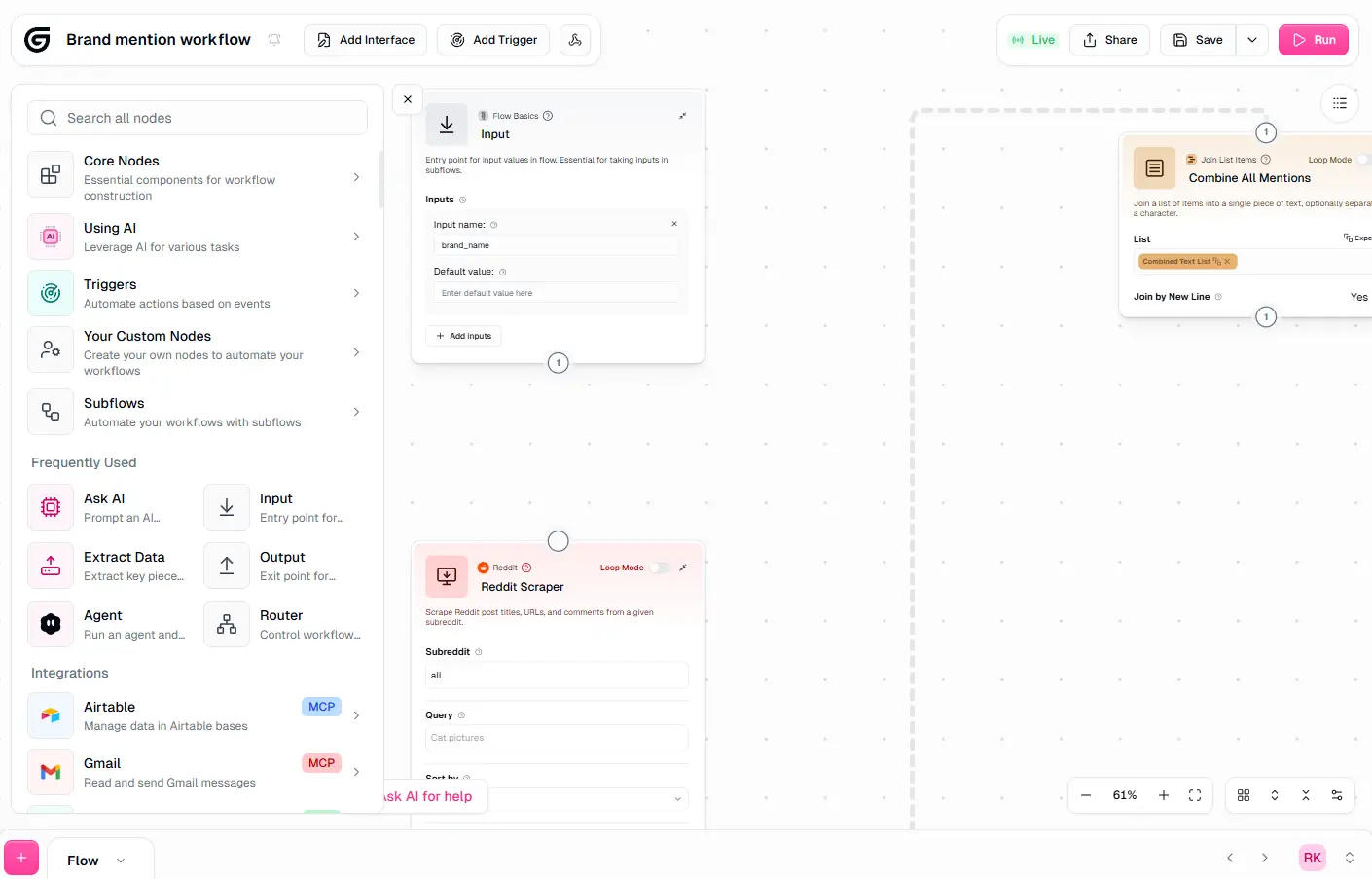
Gumloop is an AI agent builder designed for automating work within organizations. It also includes a node-based automation tool, which gives you visual control over what happens at each step of your AI workflows. If you want to call a specific model, scrape a page, or enrich a contact, it’s easy to specify that within your process. Gumloop Agents can operate on a schedule, trigger based on things that happen in other apps, or run self-improving skills for tasks you do often. You can also message Gumloop Agents directly in Slack, Microsoft Teams, Gmail, or WhatsApp, so you can collaborate without ever opening Gumloop itself.
Pros
- Visual canvas offers granular control and shows exactly how each agent reasons through a task.
- Skills let agents improve automatically from your corrections over time.
- Gumstack monitors agentic activity across your organization.
- The Pro plan has no per-seat limit.
Cons
- Costs vary widely based on the type of action you’re requesting; you can burn through lots of credits just testing your agent.
- Gumloop’s node-based interface has a learning curve, so customizing workflows can take time.
- There's no native database, so you’ll need to store your data elsewhere.
Best features
- Visual node canvas: Connect nodes for AI calls, scraping, data transforms, and app actions to see exactly what an agent will do.
- Skills: Save a process once and let your agent reuse it; your agent improves based on your corrections over time.
- Gumstack: Monitor how agents access data and call tools across your organization.
- MCP server hosting: Make your Gumloop flows available to call across your AI tools.
- Spend caps and approval gates: Set budgets per agent, team, or org-wide, and require human sign-off before an agent takes an expensive action.
Pricing
Gumloop uses a credit-based system that prices each workflow differently depending on the resources it consumes. Simple actions, like moving data between apps, are cheaper than high-intensity actions like contact enrichment or AI actions. All pricing shown is billed annually.
- Free: 5,000 credits/month, 1 seat, 2 concurrent runs
- Pro (~$30/month): 20,000+ credits/month, unlimited seats, MCP server hosting
- Enterprise: Custom pricing, SCIM/SAML, role based access control, audit logs
3. Relevance AI — best for teams building an AI workforce
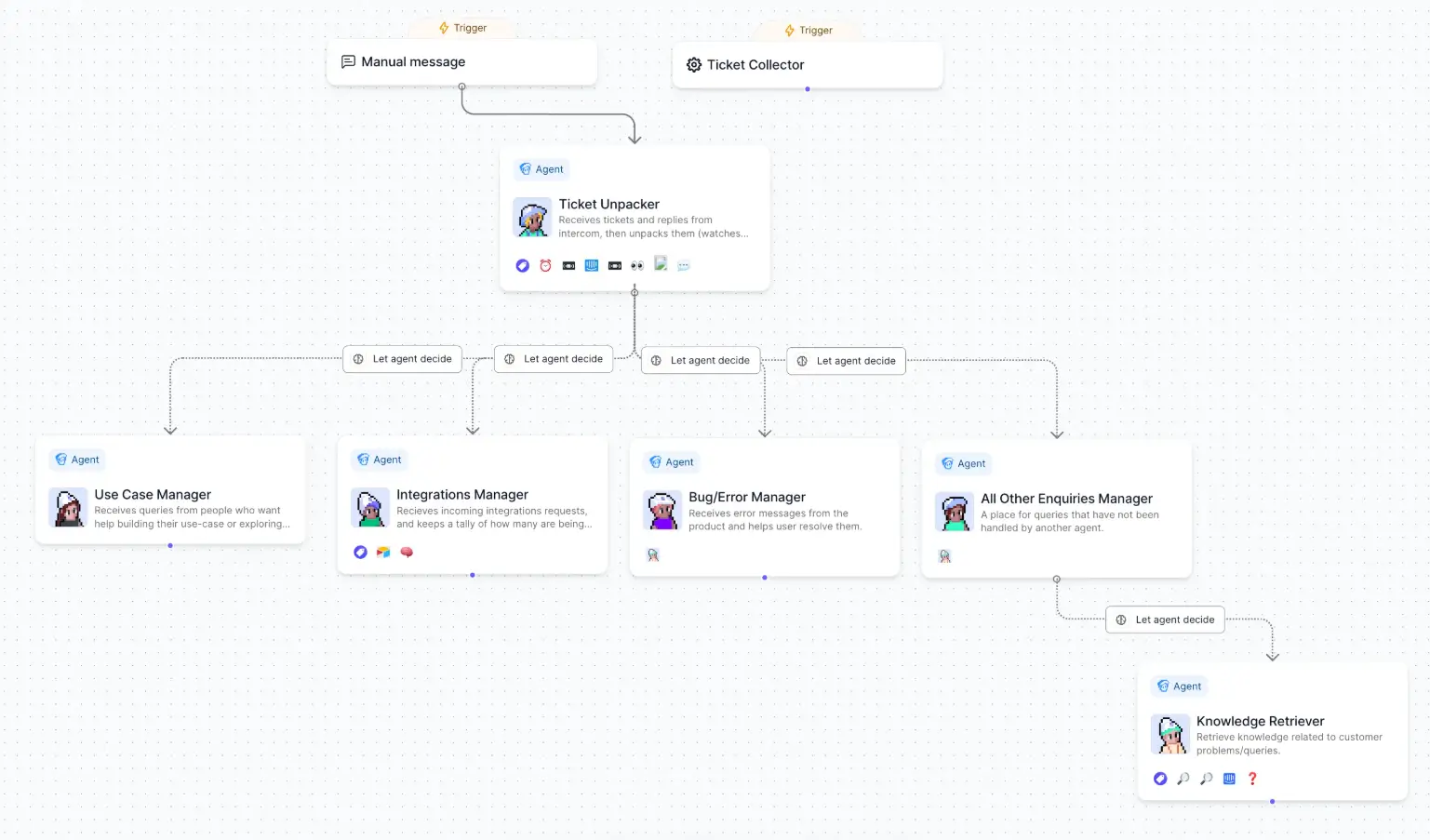
Relevance AI is a no-code platform for building AI agents, designed around what it calls an “AI Workforce” of role-based agents working together. For example, lead generation might involve a research agent, a business development agent, and a lead qualification agent, each specializing in certain tasks and passing data between one another. Relevance AI works with any major AI model, and you can get started quickly with a marketplace of pre-built agent templates.
Pros
- Agent workforce architecture lets you assign each part of a process to a specialized agent with custom instructions and context, instead of one generalist handling everything.
- Built-in infrastructure for automatic retries, checkpointing, and queues for failed runs.
- A built-in knowledge pipeline lets agents pull from your latest documents and data so agent context stays current.
- Free plan allows you to test the platform before committing.
Cons
- Pricing runs on two separate meters, actions and credits, which makes total cost harder to predict.
- If you exceed 2 users, you need to upgrade to the Team plan, which is over 10x more expensive.
- Agent templates can be underwhelming; many are niche, like the “Pixel Art Agent.”
Best features
- AI Workforce: Deploy multiple specialized agents that hand off work to each other instead of relying on one generalist.
- Agent marketplace: Start from 250+ agent templates or 35+ full AI Workforce templates for common sales and ops workflows.
- Bring your own API key: Connect your own model account to control costs directly.
- Agent evaluations: Score every agent run against defined criteria, with pre-publish checks and production sampling. Available on the Enterprise plan.
- Approval gates and autonomy limits: Require human sign-off on high-stakes actions and limit how far an agent can go without oversight.
Pricing
Relevance AI’s homepage is focused on enterprises and directs users to contact the sales team for pricing. But other sections of the site still list prices openly, offer self-serve signup, and provide access to a free plan.
- Free: 200 actions/month, 1,000 credits/month, unlimited agents & tools, multi-agent workforce, chat mode, marketplace agents
- Pro ($19/month): 2,500 actions/month, 10,000 credits/month, 2 users, unlimited multi-agent workforces, scheduled tasks, smart escalations, bring your own LLM
- Team ($234/month): 7,000 actions/month, 35,000 credits/month, 50 users, 5 shared projects, calling & meeting agents, A/B testing, priority support
- Enterprise: Custom pricing, unlimited users & projects, agent evaluations, multi-org management, dedicated account manager
All pricing shown is billed annually.
4. Zapier — best for connecting workflows and agents to thousands of apps
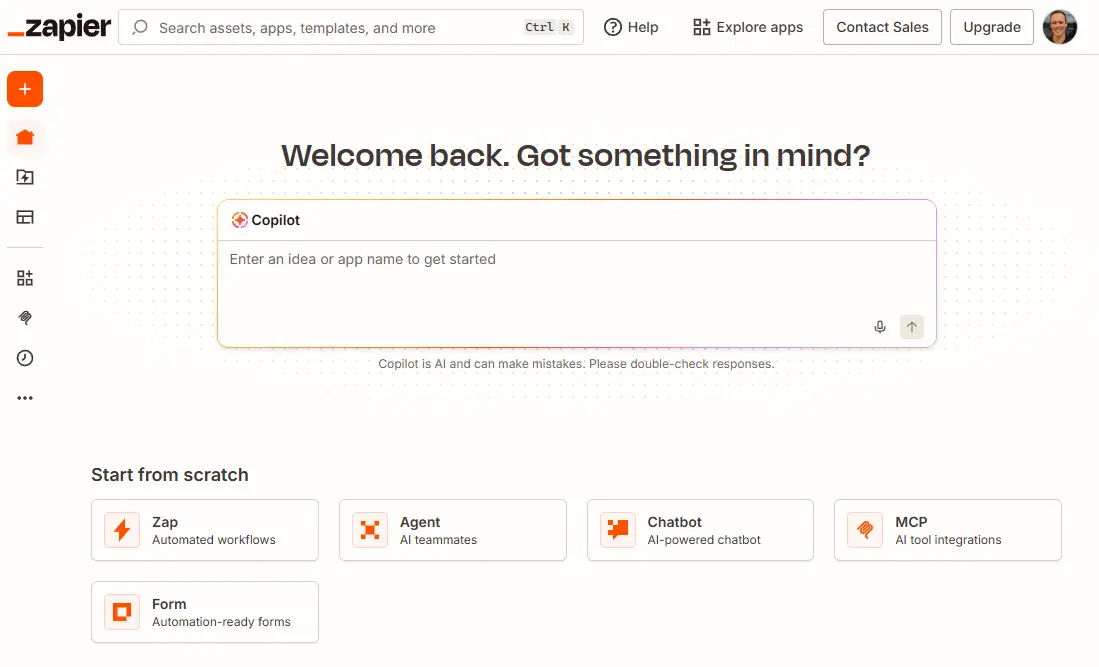
Zapier is an automation and AI orchestration platform connecting more than 9,000 apps, all centrally maintained. Beyond app-to-app automation, it includes Zapier Agents for AI teammates, Tables for structured data, Forms for input and portals, Canvas for mapping processes, and Copilot, an assistant that can build business systems across all of those from one prompt. Zapier’s workflow builder supports complex branching, built-in retries, and error handling. And with Zapier MCP, you can initiate Zapier workflows from the AI tools you use every day (like ChatGPT).
Pro tip: Both Zapier and Softr include a built-in database. Here’s how Softr Databases compares to Zapier Tables.
Pros
- 9,000+ maintained integrations mean you can connect most any app you can think of.
- Branching logic, fallback paths, and sub-Zaps give you more control than most automation tools.
- Built-in retries and error handling are included on every plan.
- Copilot helps you connect workflows, tables, forms, and agents into a single business system.
Cons
- Task-based pricing means complex multi-step workflows can use up your budget quickly.
- Zapier Forms can build simple portals, but they aren’t built to handle the permissions or scale of a real internal tool or client-facing portal.
- With thousands of integrations and multiple products, Zapier can be overkill if you’re just trying to build a few agents to automate tasks.
Best features
- 9,000+ integrations: Connect nearly any app in your stack with a pre-built, centrally maintained connector.
- Agents: Build AI teammates for a defined role, like lead routing or support triage.
- Tables and Forms: Store structured data and collect input directly inside Zapier.
- Canvas: Map a business process visually and tie it to the workflows and agents that run it.
- Copilot: Describe what you need and have it build the Zap, agent, or multi-product system for you.
- Paths and Sub-Zaps: Build workflows with up to 10 branching paths and reuse common steps across automations.
Pricing
Zapier uses a task-based pricing model that scales according to how many tasks you complete. A limited number of Agent activities are also included for free. All pricing shown is billed annually.
- Free: 100 tasks/month, access to Zaps, Tables, Forms, and Copilot
- Professional ($19.99/month): 750 tasks/month, multi-step Zaps, webhooks
- Team ($69/month): 2,000 tasks/month, up to 25 users
- Agents: Free tier includes 400 activities/month; Agents Pro plan offers 1,500 activities for $33.33/month
- Enterprise: Custom pricing, SSO/SCIM, unified admin center
5. n8n — best for self-hosted control over your own agents and workflow infrastructure
.webp)
n8n is a workflow automation platform built for self-hosting: you run it entirely on your own infrastructure, for free, and pay only for the server and your own time for setup and maintenance. For teams that don't want to manage infrastructure, a fully managed n8n Cloud option also exists, along with a self-hosted Business plan for larger teams that still want to self-host but need SSO and version control. Assuming you already have an IT team managing your infrastructure, self-hosting n8n can be an economical way to run workflows and agents.
Pros
- n8n’s Community Edition is entirely free and a solid option for anyone willing to self-host.
- On paid tiers, execution-based pricing means complex workflows don’t cost more than simple ones.
- Full code-node support means technical teams can go more in-depth.
- Self-hosting offers complete control over your server location and data security, which is useful for compliance requirements.
Cons
- Self-hosting puts setup, security, and troubleshooting entirely on you, with no support if something breaks.
- Many common actions require JavaScript or Python rather than a point-and-click option, so most real-world workflows end up needing at least one code node.
- The free Community Edition has no built-in collaboration or role-based access; that requires a paid plan.
Best features
- Custom code nodes: Drop inline JavaScript or Python into any step. For technical users, this offers more granular control over logic.
- AI Agent nodes: Build agents with memory and tool-calling built in, connected to OpenAI, Anthropic, Gemini, or other model providers of your choice.
- Native data tables: Store and manage structured data directly inside n8n without needing to connect an external database.
- Community template library: Start from thousands of shared, pre-built workflow templates instead of building every automation from a blank canvas.
Pricing
n8n is nearly free if you self-host with the Community Edition (you just need to pay for hosting). But most organizations need to upgrade to the self-hosted Business plan, which requires a paid license. If you use n8n’s cloud-hosted version, it handles all the infrastructure for you.
- Community Edition (self-hosted): Free, plus hosting (roughly $6-20/month for a basic VPS) and your own setup time
- Business (self-hosted): ~$800/month for 40,000 executions, adds Git version control, SSO, shared projects, and multiple environments
- n8n Cloud Starter: From ~$20/month for 2,500 executions
- Enterprise: Custom, scales with execution volume
All pricing shown is billed annually.
Choose the right Lindy alternative for your team
If you’ve outgrown Lindy, you probably need something that works for your entire team rather than a single-user AI assistant. Here’s how to think about your options.
- Need to coordinate multiple AI agents? Relevance AI orchestrates specialized agents that each handle one part of a process, instead of a generalist agent doing everything. Gumloop is another strong option: its visual canvas lets you view and edit the exact logic your agents are using. And Softr offers database agents that make it much easier to manage data at scale.
- Need to connect with lots of apps across your existing software stack? Zapier connects to 9,000+ apps, so it’s a good bet if you need your agents to act across a wide range of tools.
- Need full infrastructure control? n8n’s self-hosted version is a good option if you’re dealing with compliance or data residency requirements.
- Need an AI-powered business system? Softr lets you build internal apps and client-facing portals that anyone on your team can log into. And since your database, permissions, and user authentication are all handled natively, your team can start using your apps quickly and securely.
Ready to build business apps your whole team can use? Get started for free with Softr, or browse templates to see what's possible.
Frequently asked questions
What happened to Lindy? Is it still an AI agent builder?
Is Softr a good alternative to Lindy?
What's the best free alternative to Lindy?