


The 7 best Airtable Forms alternatives in 2026

Airtable Forms is a popular pick because it slots neatly into an existing Airtable base, but it isn't always the right fit. As soon as you need richer logic, tighter permissions, or forms that feed a real business app rather than just a spreadsheet, it's worth looking around. We've reviewed the seven best alternatives on features, pricing, security, customization, integrations, and support.
Airtable Forms alternatives at a glance
Before we dive into each tool, here's a quick side-by-side view to help you narrow things down based on what you're building.
| Tool | Best for | Free plan | Paid plans start at |
|---|---|---|---|
| Softr | Forms that feed a full app, portal, or internal tool | Yes, unlimited forms and submissions | $19/month (Basic) |
| SuiteDash | All-in-one client portal with deep white-labeling | No, 14-day trial | $19/month (flat rate) |
| Zuko | Lead-gen forms optimized for completion rates | Yes, under 100 submissions/month | Around $28/month (submission-based) |
| Formstack | Advanced standalone forms and customization | No, free trial | $83/month billed annually ($99 monthly) |
| monday.com | Forms tied to project and task management | Yes, limited | $12/seat/month (Standard, billed annually) |
| Typeform | Conversational, on-brand forms | Yes, 10 responses/month | $25/month billed annually ($29 monthly) |
| FastField | Mobile and offline field data collection | No, 14-day trial | Around $25/user/month |
What is Airtable Forms?
First, let's understand the function that Airtable Forms plays in Airtable's larger context.
The spreadsheet software lets users build forms to source information for data analysis. The forms view makes data easy to collect, share, and filter.
You can build forms in Airtable through a number of features, but Airtable recommends using the "Form Builder" as it has the most advanced functionality. If you want a deeper walkthrough, our guide on Airtable forms covers setup, customization, and sharing.

Airtable Form Builder features
While the Form Builder is available to free users, you might want to use a play plan depending on how you want to share and visualize data.
Free Airtable Form Builder
If you're on a free forever plan, you can still build and share forms in Airtable. This includes:
- Syncing forms with your Airtable base;
- Customizing the form's title and description;
- Adding or removing fields;
- Adjusting conditional field and row settings;
- Publishing your form software live.
This is an absolutely useful solution for teams looking for a cheap, easy-to-use form that doesn't need advanced security or customization options.
Pay plan Airtable Form Builder
Airtable Team and Enterprise Scale users can take advantage of advanced features, such as:
- Building a custom brand form with logos, cover images, and button colors;
- Allowing respondents to access a copy of their submission;
- A URL redirect after someone submits to the form;
- Restricting access by password or email domain.
If you're not a Teams or Enterprise user, the free plan limitations might make it worth an upgrade. But even with these additional functions, you might still need more for your custom application.
Now, let's take a look at the Airtable Forms alternatives to see how they compare.
1. Softr
Softr is the first AI-native platform for building business software without code. It pairs a full-stack toolkit (native databases, an interface builder, and workflows) with form-building features, so the data you collect doesn't just sit in a table. It powers a real app.
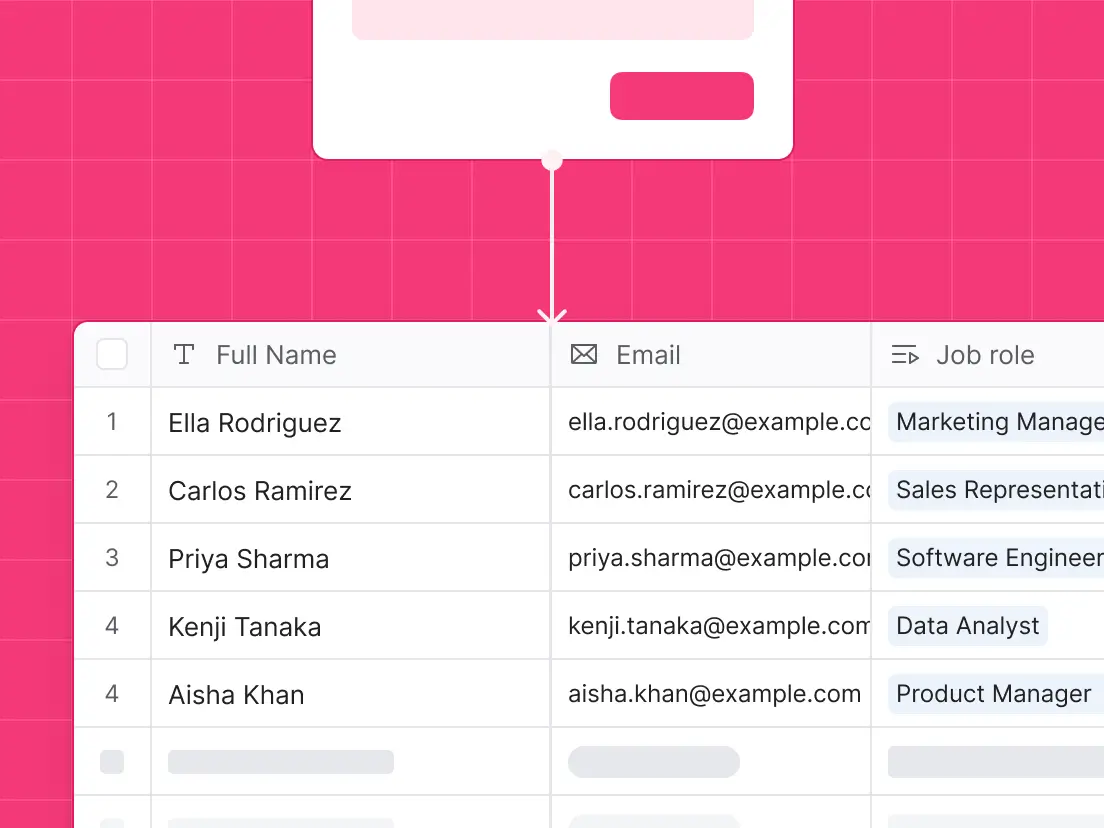
This makes Softr a versatile alternative to Airtable Forms: you can connect forms to Softr Databases or 20+ external sources, then surface that data for different stakeholders inside portals, internal tools, and dashboards.

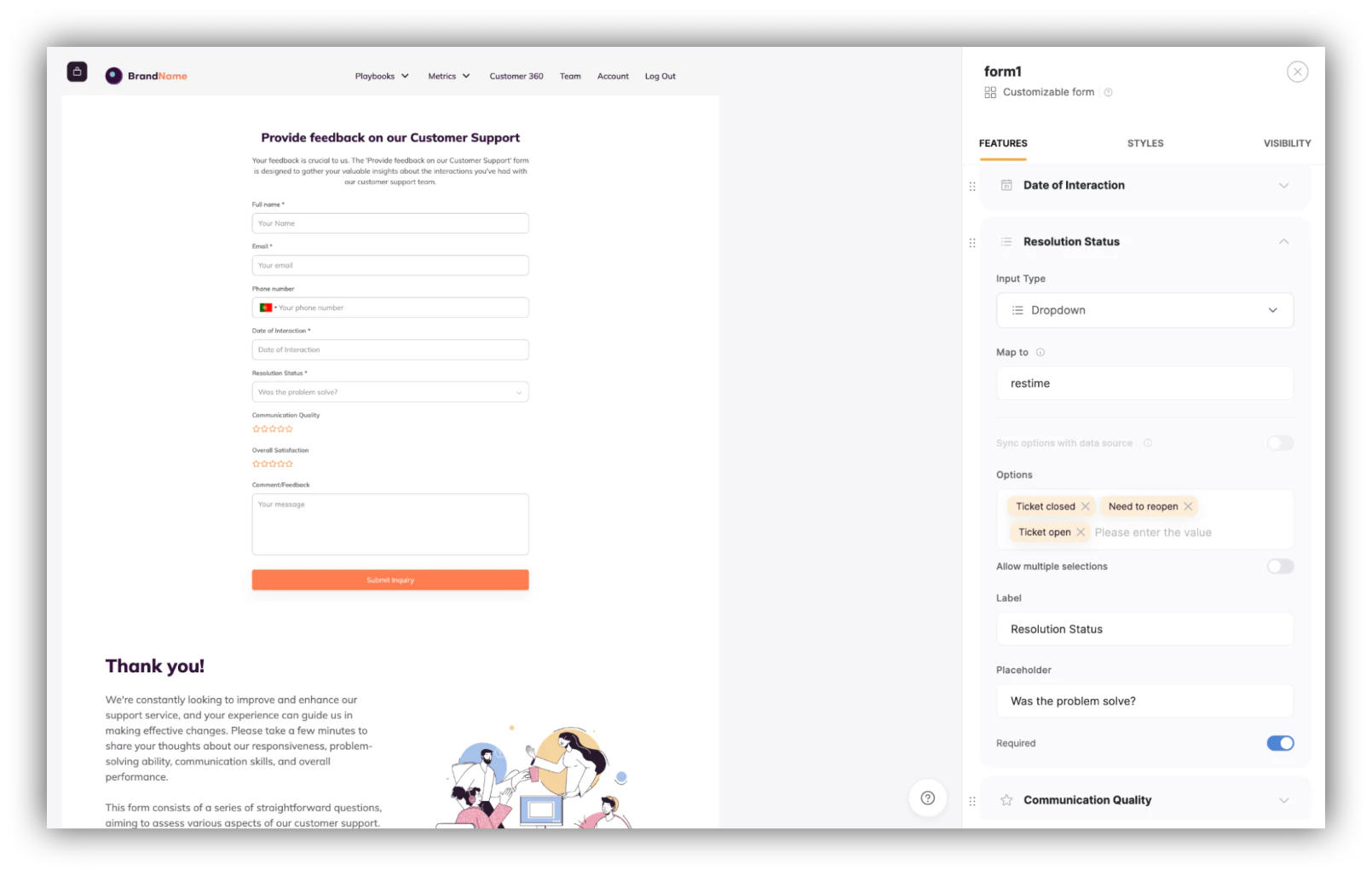
Softr offers the same core form-building tools as Airtable, plus the ability to build the entire application around the form. The form block lets you craft custom forms to collect diverse data, with advanced permissions and sharing built in.
You can pick from a range of form layouts, including "Customizable Form" and "Customizable Form with Labels," each allowing personalized titles, subtitles, and background images. You can also incorporate "hidden fields" into conditional forms, which is especially useful for job applications or support tickets, where each submission needs to be tied to a specific record, the logged-in user, or an ID.
Crucially, a Softr form isn't just a place to drop data. As Softr PM Romain Minaud puts it:
"Instead of just storing the data, a form trigger launches a workflow to run downstream business logic immediately on submission." — Romain Minaud, Product Manager at Softr
That means a support form can categorize a ticket with AI and route it to the right team the moment it's submitted, all through native Softr Workflows. And if you don't want to build manually, you can describe what you need to the AI Co-Builder and it assembles the database, the form-based pages, and the app around them. For any custom form UI that pre-built blocks don't cover, the Vibe Coding block generates a custom component from a plain-language prompt.
You can also create dynamic, multi-step conditional forms that adapt to each user as they go, showing or hiding fields based on previous answers.
Softr pricing
Softr has five plans, including a free tier that supports unlimited forms with unlimited submissions:
- Free ($0/month): Unlimited apps and forms for up to 3 builders, with access to Softr Workflows and Softr Databases, 5 app users, and 5,000 database records.
- Basic ($19/month): Unlimited apps with 42+ integrations, Team: 5 + Client: 5 app users, 50,000 records, and 2,500 workflow actions. Best for makers building simple apps.
- Pro ($99/month): Unlimited apps with 45+ integrations and custom code, Team: 10 + Client: 50 app users, 500,000 records, and custom user groups. Ideal for internal tools and client portals.
- Business ($329/month): Unlimited apps with 52+ integrations, Team: 30 + Client: 100 app users, 1 million records, and advanced integrations including HubSpot, SQL databases, and REST APIs.
- Enterprise (custom pricing, contact sales): Everything in Business, plus SSO, advanced security, and SLAs for enterprise needs.
Because Softr replaces several tools at once (form builder, app builder, database, and dashboard), it often costs less than stitching together separate subscriptions. The Animalz content agency, for example, built a freelancer management portal on top of Airtable and saved $700+ per month on Airtable seats while cutting hours of manual admin each week.
Softr vs. Airtable Forms
Softr backs its product with comprehensive documentation, step-by-step tutorials, and live chat support (averaging a two-minute response time) even for free users. Airtable offers learning resources and a chatbot, but reserves priority support for Pro and Enterprise subscribers, and it has no live chat. For users who want fast help while building, Softr is the more accessible option.
The verdict
Softr stands out as a full-stack alternative to Airtable Forms. It retains everything you'd expect from a capable form builder while letting you drop those forms straight into client portals, internal tools, and CRMs, all on one platform. If you only ever need a single standalone form, a dedicated tool may be simpler. But if your forms are the front door to a real application, Softr is the most complete choice on this list.
{{cta-1}}
2. SuiteDash
SuiteDash is a fully integrated client portal software that offers a comprehensive array of functionality, making it more than just a form builder.

SuiteDash’s form builder is designed to streamline the process of data collection, simplify client interactions, and automate workflows, hence fostering efficiency and productivity.
Its expansive toolkit includes a(n):
- Customer relationship management (CRM);
- Project management app;
- File sharing;
- Email marketing;
...and of course, form creation.
By providing these tools all in one platform, SuiteDash allows for a seamless experience and significantly reduces the need for multiple disjointed applications
SuiteDash pricing
When it comes to pricing, SuiteDash provides options tailored to different needs and budgets, offering a fixed-price model, regardless of the number of users:
- Start: $19 per month, which includes unlimited CRM contacts and team members, and is limited to 100GB file storage;
- Thrive: $49 per month, adding advanced custom menus and other features and upgrading the file storage to 500GB;
- Pinnacle: $99 per month, with 2TB of file storage and trigger automations, task dependency logic, and more.
They also offer the option to pay annually with savings on each plan, and uniquely, SuiteDash offers lifetime plans with a single payment. This flexibility makes SuiteDash an accessible choice for businesses of varying sizes and budget constraints. On the other hand, Airtable employs a per-seat monthly pricing structure starting at $12 per seat.
SuiteDash vs. Airtable Forms
In contrast to Airtable Forms, which is primarily a database tool with form creation abilities, SuiteDash allows businesses to consolidate their workflows and client interactions through the creation of custom forms.
A distinctive feature of SuiteDash is its extreme white-labeling capability, which extends to a custom-branded mobile app. This level of customization goes beyond the aesthetic, allowing businesses to provide a more personalized experience to their clients, which is a feature Airtable Forms does not currently provide.
The verdict
The comparison between SuiteDash and Airtable Forms is, however, not a strict one-to-one. While Airtable Forms is a robust no-code form builder that integrates well with a powerful database tool, SuiteDash presents a comprehensive, all-encompassing platform.
This all-in-one functionality, combined with its client portal focus and its workflow automations, makes SuiteDash a compelling alternative to Airtable Forms for businesses seeking to consolidate their digital tools and provide a centralized client interaction experience.
3. Zuko Form Builder
Zuko Form Builder is one of the newer products in the form-building market. It was created by Zuko Analytics, which has spent over a decade on form behavior tracking software.
Based on those years of form optimization experience, the no-code platform has designed form UX patterns that deliver a smooth user experience and minimize the chance of people dropping off unnecessarily.

Zuko’s no-code system allows you to use the intuitive interface to create, edit, and publish a multi-step form within minutes.
The main features of Zuko include:
- Easily embeddable - Publish forms on any website page
- CRM integrations - Push your form responses into pretty much any CRM systems
- Multi-step forms - Create forms with multiple stages to make it easier for users to complete
- Great user experience - Zuko’s form optimization expertise means that the forms they have created impose minimal friction on the user.
- Inline error validation - Research shows that inline live validation reduces submission errors and makes people less likely to drop off. Zuko's forms include this as standard.
- Analytics - Zuko specialise in analytics and they’ve included their award winning tracking with their form builder as standard. This means that you can quickly identify and fix issues that are causing people to abandon your forms.
Zuko pricing
The pricing for the tool is pretty reasonable. It starts with a free tier where you can get most of the product features without paying anything (although your forms will include the Zuko logo).
The paid packages range from $28 - $150 per month depending on how many form submissions you want to track (up to 25,000 monthly submissions). Enterprise deals are available for higher volumes.
Zuko vs. Airtable Forms
Zuko Form Builder can be used for most purposes but the focus on delivering good user experience and maximizing completion rates means that it has a natural home within organizations looking to use forms to capture leads.
The verdict
In summary, Zuko Form Builder is a great tool for creating and publishing simple forms that deliver a smooth user experience.
Its pricing is competitive and the software is especially good for lead generation funnels.
4. Formstack
Formstack is a specialized tool with a keen focus on form creation, providing a powerful platform to design and manage forms without needing to write a single line of code.
One of the standout features of Formstack is its easy-to-use, drag-and-drop form builder. Its interface enables users to create custom forms by simply moving and arranging elements on the page, without any need for technical expertise. This convenience echoes that of Airtable Forms, which also offers a drag-and-drop interface for form creation, highlighting the user-friendly nature of these no-code tools.

Formstack offers considerable customization options in the design of forms, with options to adjust themes to align with a company's branding or specific aesthetic preferences.
This adds a degree of flexibility that can be beneficial for businesses looking to maintain brand consistency across their various customer touchpoints.
In contrast, while Airtable does allow for some customization, it does not offer the same breadth of options that Formstack provides.
When it comes to integrating forms with other platforms, Formstack shines with its ability to connect forms to a range of external systems and services.
Whether for managing email subscriptions, linking to CRM systems, or integrating with payment platforms, Formstack offers a seamless way to enhance the functionality of its forms. This can be a significant advantage over Airtable Forms, which may not provide the same level of form-specific connectivity.
Formstack pricing
Formstack has specific pricing for Forms: $83 per month billed annually, or $99 billed monthly, for its Forms plan. The plan includes one user account, the ability to create up to 20 digital forms, and a cap of 1,000 submissions per form.
Formstack vs. Airtable Forms
Formstack is a direct alternative to Airtable Forms, but with a narrower focus that can appeal to users specifically seeking a no-code tool for form creation and data management.
In terms of customer support, Formstack provides a wide range of resources to assist users, including:
- Comprehensive documentation;
- Educational webinars;
- A dedicated support center.
Airtable also offers extensive support services, but it's worth noting that there are limitations to specific support options depending on the user's chosen plan.
As for pricing, while Airtable Forms does offer free access to basic form creation, it doesn't provide the same depth of form-specific features that Formstack does. Therefore, while Formstack does require a higher initial investment, it could offer more value for those specifically looking for an advanced form creation tool.
The Verdict
In summary, Formstack presents itself as a robust, form-focused alternative to Airtable Forms, with a particular emphasis on customization, integration, and user-friendly design.
As always, users should consider their specific needs and budget before making a choice.
5. monday.com
monday.com is a versatile work operating system, capable of managing tasks, projects, and team collaboration in a unified platform.

While monday.com isn't a standalone form builder like Airtable Forms, it has integrated form capabilities through WorkForms that you can use to collect and manage data via a user-friendly, board-based interface.
These customizable forms cater to various business needs, like:
- Registration;
- Orders;
- Contracts;
- Project management through project requests;
... and more.
monday.com pricing
WorkForms is included with monday.com's Work Management plans rather than sold as a standalone product, so pricing follows monday's per-seat model:
- Free plan: includes WorkForms for up to 2 seats, suited to individuals collecting a small volume of responses
- Standard: $12 per seat per month (billed annually), adding conditional logic plus sharing and embedding for websites and social media
- Pro: $19 per seat per month (billed annually), adding advanced form features and higher automation limits.
All paid plans require a minimum of 3 seats.
monday.com vs. Airtable Forms
Compared to Airtable's free-level form-building features, monday.com's WorkForms presents an appealing, scalable alternative for teams needing advanced form-handling capabilities.
WorkForms pairs form creation with project management and workflow automation, making it a strong fit for teams that need advanced workflow management alongside form handling.
On support, monday.com prioritizes customer assistance from its Basic plan onward, an advantage over Airtable, which only offers priority support at its higher tiers.
The verdict
monday.com's form capabilities extend beyond simple data collection, supporting team-specific customization, workflow automation, and data-driven dashboards.
That makes monday.com and its WorkForms a versatile choice for teams that need form handling alongside comprehensive project and task management.
Overall, WorkForms offers an alternative to Airtable Forms by providing versatile, customizable form capabilities within a powerful project management framework.
Its strengths lie in workflow automation and form integration, making it an excellent choice for teams seeking more than just straightforward form building.
6. Typeform
Typeform is a specialized form creation tool that prioritizes user interaction and aesthetics. Known for its appealing, conversational approach to form design, Typeform is an alternative to Airtable Forms for users seeking more customization and a unique user experience in their forms.
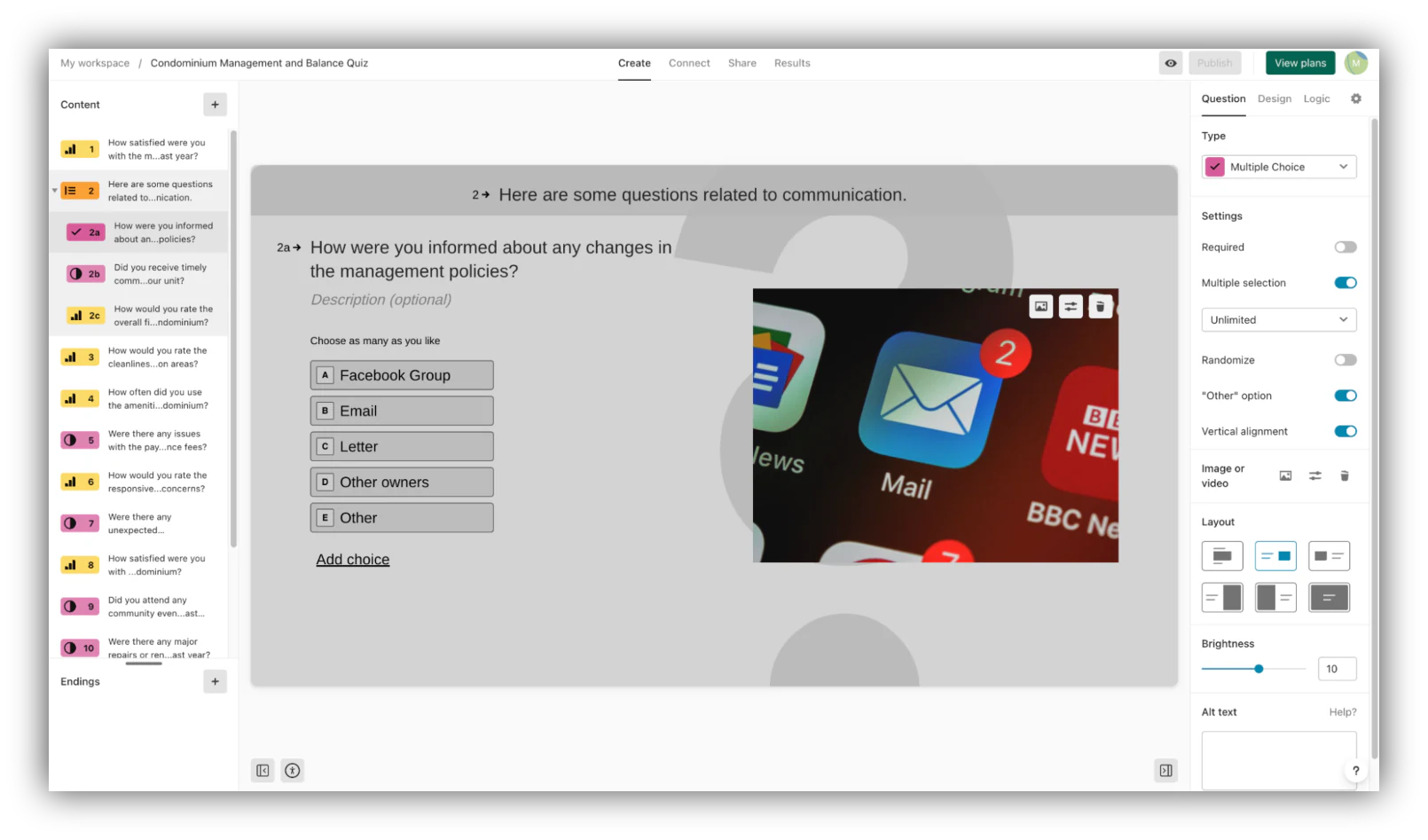
At the core of Typeform's offering is the ability to create interactive forms that offer a conversational, more engaging approach to data collection.
This distinctiveness is a significant differentiator compared to Airtable Forms' more traditional, linear design, and can help businesses improve response rates and data quality by offering a more engaging user experience.
Typeform pricing
In terms of pricing, Typeform offers three plans:
- Basic: priced at $29 per month, which allows a single user to create unlimited typeforms and questions with a limit of 100 responses per month;
- Plus: for $59 per month, it allows the removal of Typeform branding, allowing custom subdomains, and increasing the response limit to 1,000 per month for up to 3 users;
- Business: costs $99 per month, adds features like drop-off rate tracking, conversion tracking, and priority support for up to 5 users.
Typeform vs. Airtable Forms
One of Typeform's key strengths is its focus on aesthetics and customization. Users can create visually appealing forms that align with their brand's look and feel.
This level of customization is greater than what's available in Airtable Forms, offering users more control over their forms' appearance.
Typeform steps up its form creation process with its unique AI-powered feature: users can simply articulate their needs, and the system intelligently constructs the form.
This inventive approach revolutionizes form-building, delivering a level of ease not found in Airtable Forms. However, it's important to note that mastering Typeform's AI and advanced customizability might present a steeper learning curve compared to other platforms
Typeform also offers an array of integrations to connect forms with other platforms and tools. These integrations allow users to automate workflows and enhance the utility of their forms, much like Airtable Forms' integration capabilities.
However, specific integrations may differ between the two platforms, so users should ensure their required tools are supported.
The verdict
When it comes to customer support, Typeform offers priority support and live chat at the Business plan level.
In contrast, Airtable offers different levels of support depending on the plan, with priority support available at higher-tier plans.
In conclusion, Typeform stands out as an alternative to Airtable Forms with its unique interactive form design methodology, high degree of aesthetic adaptability, and extensive integration capabilities.
While its pricing starts at a higher point than Airtable's, Typeform’s focus on engagement and brand consistency might justify the investment for users requiring these specific features. Ultimately, the appropriate selection will be determined by the user’s requirements and budget.
7. FastField
FastField is a cloud-based, no-code form creation tool designed to facilitate data collection and form generation on tablets and smartphones.
Built specifically for form creation, it's a viable alternative to Airtable Forms, especially for businesses that need more mobile-oriented capabilities.

FastField's core offering includes a world-class form builder that allows for the creation of unlimited forms and accepts unlimited submissions.
This feature set parallels Airtable Forms in its ability to handle an unrestricted number of forms and responses, depending on the plan level. However, FastField emphasizes mobile use, with offline data collection capabilities for phones and tablets.
Other features include anonymous forms that allow third-party form submissions without an authenticated user account and white-label branding that lets users add their logo and custom color scheme to the FastField application.
These features come with additional charges and provide extra customization and flexibility.
FastField pricing
Priced at $35 per user per month, with a discount for annual billing, FastField also offers unique features such as dispatch and simplified form distribution, and an integrated business intelligence dashboard.
FastField vs. Airtable Forms
While FastField provides diverse support channels, Airtable, being a larger platform, possibly has a more extensive support team able to offer quicker responses.
In addition, Airtable benefits from a substantial base of user-generated content, including guides and forums, which can provide valuable aid and problem-solving insights. This implies that users may find more immediate solutions with Airtable's community support, supplemented by its formal support structure.
The verdict
Overall, FastField is a comprehensive form creation tool that focuses on mobile data collection. Its pricing is similar to other competitors in the market and offers a range of features that can cater to a variety of needs, making it a strong contender as an alternative to Airtable Forms. However, users should consider their specific requirements and budget when making a decision.
Choosing an Airtable Forms alternative
Airtable Forms is a solid choice when you just need quick data capture inside an existing base, and its higher tiers add useful branding and access controls. The right alternative comes down to your goal: a dedicated tool like Typeform or Zuko if you only need a standalone form, or a full-stack platform if those submissions should feed a real business app.
That's where Softr fits. Your forms flow straight into Softr Databases or 20+ connected sources, trigger workflows on submission, and live inside the portal, CRM, or internal tool you actually want to run.
Get the best of both worlds and sign up for Softr for free.
Frequently asked questions
What is the best Airtable Forms alternative?
Are Airtable Forms free?
Can I build forms with conditional logic without Airtable?
How do form submissions connect to my database?
Do I need to know how to code to build a form-based app?


