Employee onboarding helps businesses align their goals with performance expectations from hired employees by helping them:
- Understand the business and what their products or services achieve for their customers.
- Clarify their role in product/service delivery and how to achieve performance outcomes.
- Get started with their work, access resources, or seek support.
The above tasks usually require extensive documentation. For small companies lacking resources, this may seem like extra work.
However, effective employee onboarding increases employee retention by 82%, which further translates to saving hiring costs and increases ROI on hired employees.
For startups and small businesses, such savings are key to scale growth.
Digital onboarding platforms help small businesses use automation to minimize the efforts and costs associated with delivering consistent employee onboarding experiences.
To help you take the first step in improving employee retention, we have curated a list of top onboarding software for small businesses. The list is created considering small business needs and highlights features, pros, cons, feedback, integrations, and pricing.
Why is employee onboarding software pivotal for small businesses?
Here’s what the hiring time range looks like across industries: it takes at least 10 days for a restaurant and 32 days for aerospace and defense companies to hire a new employee.
That’s a lot of time if you’re a startup or small business hungry to scale.
Now, this is what happens if your business uses manual processes to onboard and engage employees:
- More time is spent on paperwork to onboard an employee.
- Data entry errors or miscommunication lead to incorrect payroll information or missing training materials.
- Looking at the chaos while onboarding, the new employee may feel frustrated by the lack of support and clarity during their initial days.
So even if you manage to successfully hire, and if they do not retain, your company has to start this process all over again. This becomes a clear distraction from daily operations and a hindrance to improving business performance.
Using employee onboarding software, you automate such manual and repetitive tasks to ensure the hired employee aligns with the company’s expectations, can perform, and feels engaged. This helps improve employee retention to avoid spending resources and time on frequent hiring.
6 best onboarding software for small businesses in 2024
1. Softr: Best no-code app builder to create custom employee onboarding software
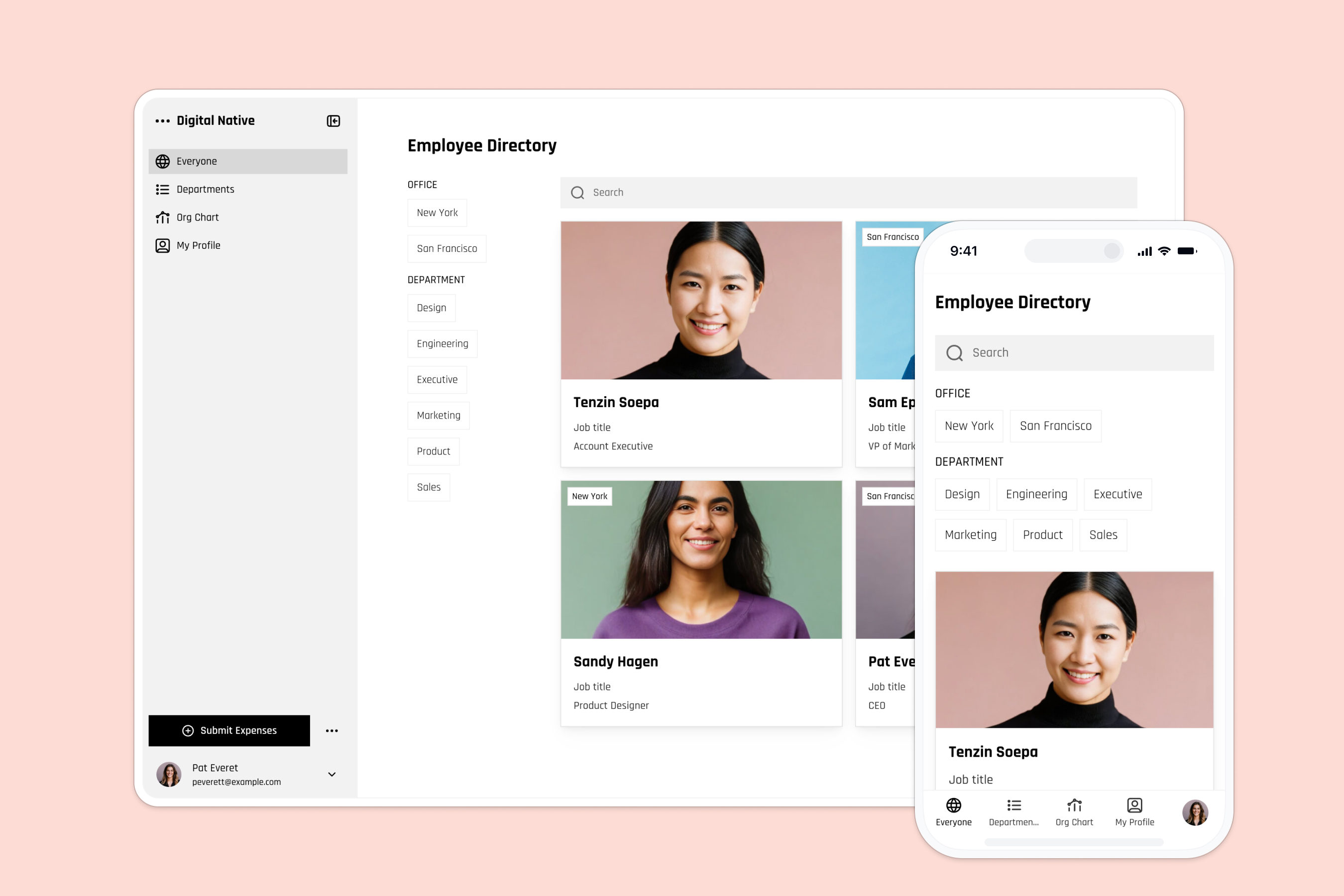
Softr is an AI-powered business app creation platform that enables operators to build custom employee portal solutions and internal tools, without writing code. Through the visual interface builder, you can launch a custom employee onboarding app tailored to your exact team processes, avoiding the high costs of rigid third-party software.
To create an app, you can describe your needs to the AI Co-Builder to automatically generate your database tables, page layouts, and access rules in minutes. Once the foundation is ready, you can move fluidly between AI assistance and manual visual editing. You can build your app on top of Softr Databases for maximum speed and security, or connect to external data sources like Airtable, Google Sheets, and HubSpot.
This hybrid build path lets you add custom logic, coordinate tasks, and deliver a personalized onboarding experience to new hires without affecting your existing operational workflows.
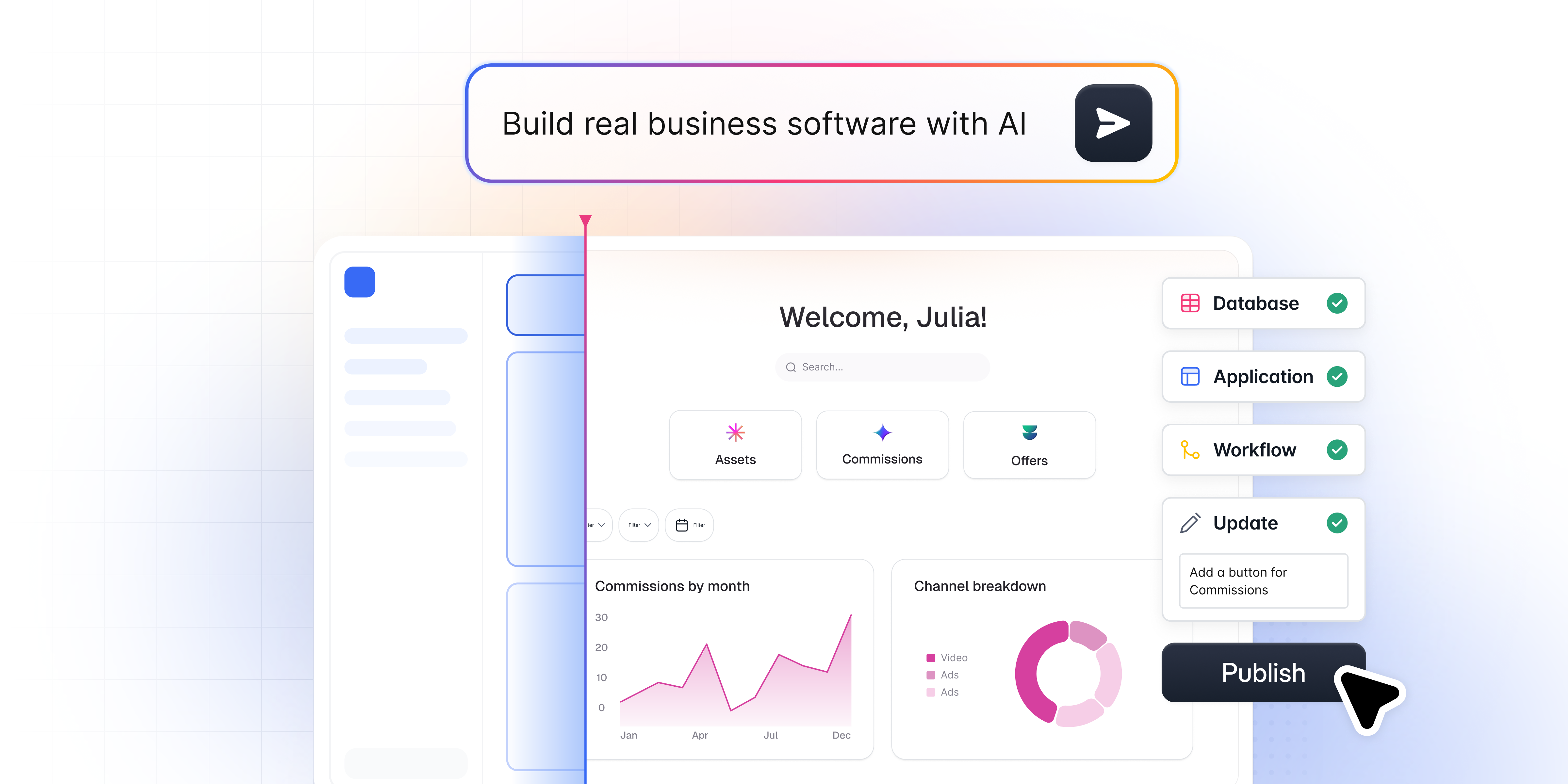
Get started for free by customizing the Employee Onboarding Template or starting from a prompt.
Softr Key Features
- Relational database center: Use Softr Databases to link employee profiles, task lists, and training files. You can configure database AI agents directly within data columns to categorize feedback or search the web for company data on autopilot.
- Dynamic user groups: Control access using strict users and permissions rules. You can create different views so that a new hire sees their onboarding checklist while a manager gets overview charts.
- Workflow automation: Use Softr Workflows to trigger instant background actions (like sending email alerts or updating a team Slack channel) directly from app actions like form submissions or button clicks.
- Ask AI data chat: Toggle the Ask AI feature on list and directory blocks to let team members chat with database records, asking questions in natural language to find details.
- Vibe coding customizations: Generate bespoke interface widgets (like custom calendar pickers or signature fields) using the Vibe Coding block, which writes secure code using AI prompts while inheriting your global app theme.
Softr Pros
- Flexible creation paths: Build with AI speed and visual control, moving between the AI Co-Builder and direct visual editing.
- Proven cost savings: Replace multiple apps (forms, directories, file storage) with a single platform. For instance, companies like EvenUp save over $6,000 per month by using Softr to build internal portals.
- No-code multi-device support: Built-in templates like the employee directory or wiki automatically adapt to any screen size, allowing field technicians and office staff to access data on the go.
- Ready-made templates: Launch apps quickly using the employee onboarding app starter templates.
- Strong security and speed: European hosting, GDPR compliance, and native database speeds ensure business data remains safe.
Softr Cons
- No native App Store files: You can install Softr apps as Progressive Web Apps (PWAs) on mobile devices, but they cannot be downloaded from the Apple App Store or Google Play Store.
- Custom scripts for edge cases: While native blocks handle most requirements, highly complex calculations or custom formatting may require using code via the Vibe Coding block.
Softr Pricing
- Free plan: Get started for free, supporting up to 5 total app users, 5,000 database records, and 500 workflow actions.
- Paid plans: Expand user counts, add custom domains, and unlock security features starting at $19 per month (paid annually).
Softr Integration and Support
Softr connects with 30+ integrations like Zapier, Make, YouTube, and Google Workspace, along with direct developer API access. Support is provided through active community forums, extensive documentation, and a highly responsive technical support team.
Softr Customer Feedback
"The ability to pull data from different bases into different blocks and display them on one page was one of the main reasons I chose Softr. It is also more user-friendly than other no-code tools." Dan Smith, Director at DS Automotive (Verified G2 Review)
"I find Softr very intuitive and easy to navigate, which is great for someone who is not a programmer by nature. It integrates very nicely with Airtable and other databases we are already using, making it nice that it just sits on top of the systems we have. I also appreciate its functionality in sending notifications, inviting users, and using magic links. I love the ability to control access globally, which is really important for data security and privacy." Natalie S., Director of Operations (Verified G2 Review)
Softr Customer Success Stories
- EvenUp (Legal Tech): The annotation department at EvenUp needed to share real-time performance data with 340+ employees and contractors. Instead of paying for expensive database seat licenses, they built a custom internal tracker using Softr and BigQuery in just 24 hours. The portal saved the team over $6,000 per month while improving feedback loops and team transparency.
- Urban's Landscaping Group: Managing 80+ employees across five companies using disconnected spreadsheets led to communication bottlenecks. By building a custom operational ERP on Softr, the group unified their employee directory, project management, and client portals in one system, resulting in a 30% reduction in administrative hours and a 25% boost in productivity.
- Celonis: The team replaced a manual and hard-to-maintain Google Slides directory with a searchable, centralized Go-To-Market knowledge base for 1,500+ team members, streamlining employee training and operational alignment.
2. Deel: Best to onboard remote employees and contractors globally

Deel HR helps you onboard remote employees and contractors across 150+ countries while maintaining necessary compliance. You can design a self-serve onboarding portal that takes care of time off, expense management, access to documents, and much more.
Deel HR is suitable for remote-first startups or businesses that want to focus on compliance and payroll aspects of employee onboarding.
Deel Key Features
- Process automation: Create unique workflow automation to suit your company’s hiring policies and hierarchical structure.
- People’s directory: Make employee information and contact accessible as required. Includes features to save, organize, and sign documents.
- Expense management: Track and automate employee and contractor payouts via payroll and expense management tools.
Deel Pros
- Dedicated solutions that simplify global HR compliance, taxation, and unified payroll requirements.
- Supports scheduling of recurring payments for global contractors and employees.
- Simple and intuitive user interface.
Deel Cons
- Slow and hierarchical support causes delays in resolution.
- The mobile app lacks features compared to Deel’s web app.
- Deel HR uses employee-based pricing, which means costs increase as your team grows. Additionally, other Deel products can be expensive for small businesses.
Deel Pricing
- Free plan: Forever free plan allows managing expenses, time-offs, organizational charts, and automation.
- Paid plan: To track employee performance, build training materials using LMS features, and design career paths, explore Deel Engage at $20/employee/month.
Deel Integration and Support
The Deel App Store provides 95+ integrations with major software across process automation, HR tools, legal, and more. You can implement custom integrations using Deel API.
Deel offers support via chat and access to its Help Center and documentation for DIY troubleshooting.
Deel Customer Feedback
"It streamlines the onboarding process and simplifies contract creation, saving time and resources. Additionally, its flexible payment solutions allow me to pay remote team members in their preferred currencies, enhancing employee satisfaction. One aspect I dislike about Deel is the potential for high fees associated with some of its services, particularly when dealing with specific countries or payment methods. While the platform offers a range of functionalities, these fees can add up and impact the overall cost-effectiveness for businesses." Kelli M., Lawyer (Verified G2 Review)
3. Workable: Best for integrating ATS and employee onboarding

Workable is an Applicant Tracking System (ATS) software that includes an employee onboarding portal solution for delivering a consistent employee experience. You can collect employee documents, get signatures, a dashboard to track employee engagement during onboarding, and more.
Workable is suitable for small businesses heavy into hiring but requires basic employee onboarding features without investing extra.
Workable Key Features
- Workflow automation: Design custom onboarding portal and workflows based on employee information like location or department.
- Templates: Create customizable templates for onboarding tasks and use dashboards to monitor progress and make sure employees complete all steps.
- Employee profiles: Centralize capture and storage of employee information, digital signatures, and documents into a detailed employee profile within the portal.
Workable Pros
- Comprehensive ATS features with candidate sourcing help streamline the overall hiring process.
- Creates organizational charts automatically as employees update their profiles.
- Provides native language options.
Workable Cons
- Limited features for employee engagement during onboarding.
- Requires using integrations for implementing advanced features like payroll or workforce management.
- Limited reporting capabilities.
- Expensive ATS and new hire onboarding tools pricing for small businesses.
Workable Pricing
- Free plan: Access and test the Workable Standard Plan for 15 days, which includes employee onboarding tools.
- Paid plan: Workable’s Starter Plan includes employee onboarding and core recruiting features at $189/month for up to 20 employees and 2 active jobs. Explore higher plans to post unlimited jobs and premium add-ons to use advanced features like assessments.
Workable Integration and Support
You can enhance Workable’s features using its 300+ integrations across payroll, background-checking software, job boards, and more.
For support, they provide a ‘Help Center’ to access documentation, chat or email support, and FAQs.
Workable Customer Feedback
"Very efficient in tracking the candidate throughout the process especially now that we are working remotely. It would be nice if it integrated with our payroll software. We are also a smaller organization so it is a bit too robust for our needs right now." Marissa G., Director of Accounting (Verified G2 Review)
4. BambooHR: Best for overall centralized HR management

BambooHR provides HR management solutions across hiring, payroll, engagement, and employee onboarding too. It includes customizable onboarding templates using which you can design onboarding tasks and organize introductions to engage newly hired employees.
BambooHR is suitable for businesses looking to streamline employee hiring, onboarding, and engagement using a single software without too many custom requirements.
BambooHR Key Features
- Onboarding templates: Use ‘New Hire Packet’ templates to design custom onboarding experiences.
- Onboarding tasks: Assign tasks to employees to improve time-to-productivity.
- Collaboration: Engage employees by making introductions and running an employee community.
BambooHR Pros
- Includes employee offboarding features.
- Mobile app for managing new and existing employees.
- Consistent and simple user interface.
BambooHR Cons
- Pricing plans with multiple add-ons make it steep and complicated for small businesses that may not require so many features.
- Inadequate design customization features.
- Limited features to implement automated approval workflows.
- Limited and complex reporting features.
BambooHR Pricing
You need to request pricing with BambooHR’s sales team.
They offer flat monthly pricing for teams under 25 employees and a monthly per-employee model for larger teams.
To access employee onboarding solutions, you can choose their Core Plan.
BambooHR Integration and Support
Integrate BambooHR with 125+ software integrations across LMS, time-tracking, payroll, and more. You can request custom integrations.
Their support includes a Help Center portal with documentation and guides with phone numbers, chat, and email address access.
BambooHR Customer Feedback
"The platform has significantly streamlined our HR processes, from onboarding to time-off tracking, making everything more efficient and easy to manage. While BambooHR offers a solid range of features, I feel it lacks customization options for reports, workflows, or dashboards. More flexibility in tailoring the platform to fit unique organizational needs would be beneficial." Michelle C., HR Coordinator (Verified G2 Review)
5. Lattice: Best employee onboarding and engagement software

Lattice is an employee engagement platform that you can use to design personalized employee onboarding experiences. You can integrate performance management strategies like OKRs or one-on-one feedback loops to optimize employee performance from the start.
Lattice is suitable for businesses that want to equip their employee onboarding with engagement and performance-tracking features.
Lattice Key Features
- Onboarding templates: Customize templates across emails and workflows to personally welcome and onboard new employees.
- Task management: Implement task lists with deadlines and tracking to ensure employees follow structured timelines.
- Onboarding feedback: Implement a continuous feedback strategy to optimize employee onboarding flows to gain insights on improvement.
Lattice Pros
- Comprehensive surveying tools to gauge employee engagement, performance, and satisfaction.
- User-friendly with intuitive interface design.
- Direct integration with performance management helps streamline expectations.
Lattice Cons
- Complex reporting workflows.
- Limited integrations.
- Limited employee onboarding features: you may need to explore add-ons or integrations to enhance functionality.
- While the per-seat pricing is cheap, Lattice requires a minimum annual contract that may deter small businesses and startups with budget constraints.
Lattice Pricing
Lattice provides annual contracts, with a minimum annual spend of $4,000. There are no free plans. However, you can request a demo.
For employee onboarding use case, choose their ‘Talent Management’ plan starting at $11/seat/month with the ‘Engagement’ and ‘Grow’ add-on priced each at $4/seat/month.
Lattice Integration and Support
Lattice provides 25+ integrations with other HR management tools like Slack, BambooHR, Jira, and more. You can request custom integrations.
Lattice provides a Help Center with guides, FAQs, Lattice University to learn the software, and chat + email support.
Lattice Customer Feedback
"Lattice's features of tracking information, creating 1-1 agendas, setting up goals, and reviewing growth areas are helping me a lot. I haven't seen a lot of \"self-onboarding\" material while using the platform. As an onboarder, I believe this is valuable to the customers because they can learn how to use the system at their own pace, and also help them clarify some topics they might need help with." Rainer F. (Verified G2 Review)
6. Connecteam: Best for onboarding in the field service industry

Connecteam is specifically designed to manage non-desk employees or contractors like remote or field workers. It handles their documentation, provides real-time access to resources, and connects with relevant teams to help them immediately get started with their jobs.
Connecteam is suitable for field service businesses that onboard talent in industries like construction, retail, manufacturing, and more.
Connecteam Key Features
- Training app: Create custom bite-sized micro training material and centralize it for on-demand access.
- Instant messaging: Add new hires to relevant and segmented chat groups to streamline communication.
- Employee timeline: Provide a transparent milestone-based timeline to incentivize workers and reduce time-to-productivity.
Connecteam Pros
- Pay what you use ‘feature hubs’ based pricing plan makes it suitable for small businesses with specific needs.
- User-friendly and easy to set up.
- Both web and mobile apps are tailored to field service requirements.
Connecteam Cons
- Limited integration options.
- No per-employee pricing: a small business pays the same price for 10 to 30 employees.
- Limited reporting capabilities.
Connecteam Pricing
Connecteam offers 3 feature ‘hubs’ for operations, communication, and HR management. For employee onboarding use case, choose the HR plan:
- Free plan: Forever free plan for small businesses allows access for up to 10 users.
- Paid plan: To launch courses, use time-off, or search/filter insights, explore HR hub’s paid plan starting at $29/month for up to 30 users ($0.5/month for additional users).
It is compulsory to explore Connecteam’s 14-day free trial which gives unrestricted access to all features.
Connecteam Integrations and Support
Connecteam provides only 5 integrations with Xero, Gusto, QuickBooks, Paychex, and Zapier.
For support, it provides video resources, a help center for guides, a community forum, and access to chat support.
Connecteam Customer Feedback
"It makes the onboarding process easy for new employees. A new employee can take 15 minutes once downloading the app and if set up properly they can not only have a solid idea of the functions but also don’t have to worry about tracking down and getting the contact information for other employees. Downsides would include the amount of features that are locked behind an additional pay option in which you may only need one or two of the features but not the entire package to make the additional price jump worth it." (Verified G2 Review)
Checklist: what to look for in onboarding software for your small business?
When choosing an employee onboarding solution for small businesses, use below checklist:
- User-friendly and intuitive software to make sure new employees do not feel overwhelmed or challenged while navigating the onboarding.
- Scalable pricing plans help avoid shocks like steep rises in prices as your headcount grows.
- Workflow automation is critical to remove manual and repetitive tasks to onboard the new employee.
- Customizable features and templates help deliver personalized onboarding without too much effort.
- Integrations help with a smooth transition by saving time and costs on data migration or syncing.
- Feedback tools help optimize your employee onboarding process.
- Task automation features help with timely document collection, scheduling training sessions, sending reminders, and more.
- Active user community and support help with successful software adoption.
5 benefits of using onboarding software for small businesses
Adopting employee onboarding software for startups and small businesses helps your HR teams focus efforts on making the most of hired employees as soon as possible due to the below benefits:
- Communicate effectively about your company’s work culture. This helps the new hires connect with their co-workers.
- Engage to create a good and professional first impression about your company with a consistent onboarding format. This helps establish trust and nurtures confidence in new hires that they will grow with the company.
- Automate and digitize the employee onboarding documentation process. For example, employee onboarding software will send necessary documents on time and remind new joiners about submissions to ensure they start work on time.
- Stay compliant with local labor laws by placing relevant workflows during onboarding that track employee productivity. For example, if you’re hiring contract workers in the construction industry, you must provide safety training and track time to determine compensation. Employee onboarding software with training and time-tracking features helps automate and track such workflows.
- Save time by automating repetitive tasks like signatures, welcome emails, password access, etc using employee onboarding software. This helps reduce time-to-productivity so that employees start contributing to the business operations as soon as possible.
Choose the right onboarding platform for your team
Selecting the best employee onboarding software comes down to finding a balance between ease of use, cost, and customizability. Off-the-shelf tools work well for standardized processes, but they can quickly become restrictive and expensive as your team grows.
If you want a secure solution tailored exactly to your workflows, try building a custom employee portal using Softr for free today.