What are GDPR-compliant form builders? The full guide



A GDPR-compliant form builder should give you more than a consent checkbox. It should help you collect personal data responsibly and give you control over how that data is stored, accessed, exported, and deleted. Look for concrete security and compliance measures, such as SOC 2 certification, rather than vague claims that a platform is simply “secure and compliant.”
Let me give you some context. In my email inbox, there’s currently a webinar invitation from a venture-backed software company based in San Francisco. I have no idea who they are. Apparently, I signed up for their product eight years ago, never used it, and am somehow still opted in to their email list to “receive special offers” and “stay informed about new features.”
While I don’t think anyone at this company made the conscious decision to spam me for eight years, it’s the inevitable outcome when you don’t ask users what communications they want to receive. And it’s exactly the sort of thing the European Union’s General Data Protection Regulation—better known as GDPR—is meant to prevent.
This guide breaks down what actually makes a form GDPR compliant, and how Softr handles each requirement.
What makes a form builder GDPR compliant
First, a quick note: most form builders (and most software in general) talk about supporting GDPR compliance rather than being GDPR compliant. This is an important distinction. Even if a form builder has all the GDPR tools you need, it’s still possible for you to mishandle user data.
GDPR-compliant form builders require users to explicitly consent to each form of communication, and they’re also built to support rules about privacy policies, data minimization, and EU data residency. Some platforms—particularly those that host and store data in the EU, like Softr—are better positioned than others to handle the full scope of GDPR requirements.
GDPR-compliant form builders handle more than just the data collection stage. In addition to opt-in checkboxes and privacy policies, they have to accommodate specific requirements for how personal data gets collected, stored, and eventually deleted.
Here are the EU data protection rules that form builders must meet:
- Lawful basis. Your form needs to be built around a lawful basis for capturing data. Often this means getting consent from users for their information to be used for “one or more specific purposes” (Article 6). Another lawful basis is the “performance of a contract,” which might come into play if a customer has proactively requested a quote from you or bought a product from you.
- Consent. In the pre-GDPR days, it was common for forms to pre-check boxes and bundle consent, or include disclaimers like “by submitting this form, you’re agreeing to receive marketing communications from us.” None of that is allowed now. Users must give consent freely and explicitly (Article 7), which means that forms need to offer separate (unchecked) consent boxes for purposes like agreeing to Terms of Service, consenting to receive marketing communications, and consenting to third-party data sharing.
- Data minimization. You’re only allowed to collect information that’s “adequate, relevant and limited to what is necessary” (Article 5). So if you’re sending a PDF to someone’s email, you can’t require a phone number and address too.
- The right to access, export, and erase. GDPR gives users the right to see what data you hold on them, get a copy of it, and ask you to delete it (Articles 15-17). Your form builder needs a practical way to find, export, and remove one person's submission.
- A signed Data Processing Agreement (DPA). Since form providers process user data on your behalf, this contract needs to be in place before you start collecting data (Article 28). Most GDPR-compliant providers handle this by providing a pre-signed agreement.
- Encryption in transit and at rest. Data must be encrypted when it’s moved from your form to storage and while it sits in your database (Article 32).
- EU-capable data handling. It’s far more straightforward to work with form builders that store the data of EU residents on EU-based servers. Storing that data elsewhere, or juggling it between different data processors in a way that pulls it out of EU jurisdiction, requires additional paperwork and compliance steps.
- Breach notification. Your form provider must notify you immediately if there’s a breach affecting the personal data they store on behalf of your users. They’ll need to share relevant information they gather about the data breach, including what sort of data may have been exposed and how many personal data records may have been affected (Article 33).
How Softr keeps your forms compliant
As an EU-based company, Softr was designed from the ground up with GDPR compliance in mind:
- SOC 2 certification. Softr is SOC 2 certified, which means an independent auditor has given a clean report after reviewing Softr’s security practices. Crucially for GDPR, auditors check specifically for unauthorized access, confidentiality, and processing integrity.
- EU data residency. Softr’s datacenter (AWS eu-central, in Frankfurt, Germany) is located inside the EU. That means when you receive form submissions from EU respondents, they’re already in the right region for storing, processing, and backups.
- A signed DPA. Some form builders require you to proactively reach out for a data processing agreement. Softr’s self-serve DPA is pre-signed and goes into effect as soon as you agree to the terms of service. You don’t need to email or call anyone, and there’s no need to go through a custom signing process before you start accepting data.
- Encryption. Data moving between your users and Softr’s infrastructure is protected (in transit and at rest) with 256-bit TLS encryption.
- Permissions. Once data reaches your Softr database, you can control exactly who has the right to see each record. It’s easy to set detailed access rules so that only the necessary people within your organization can view or export the personal data of your users.
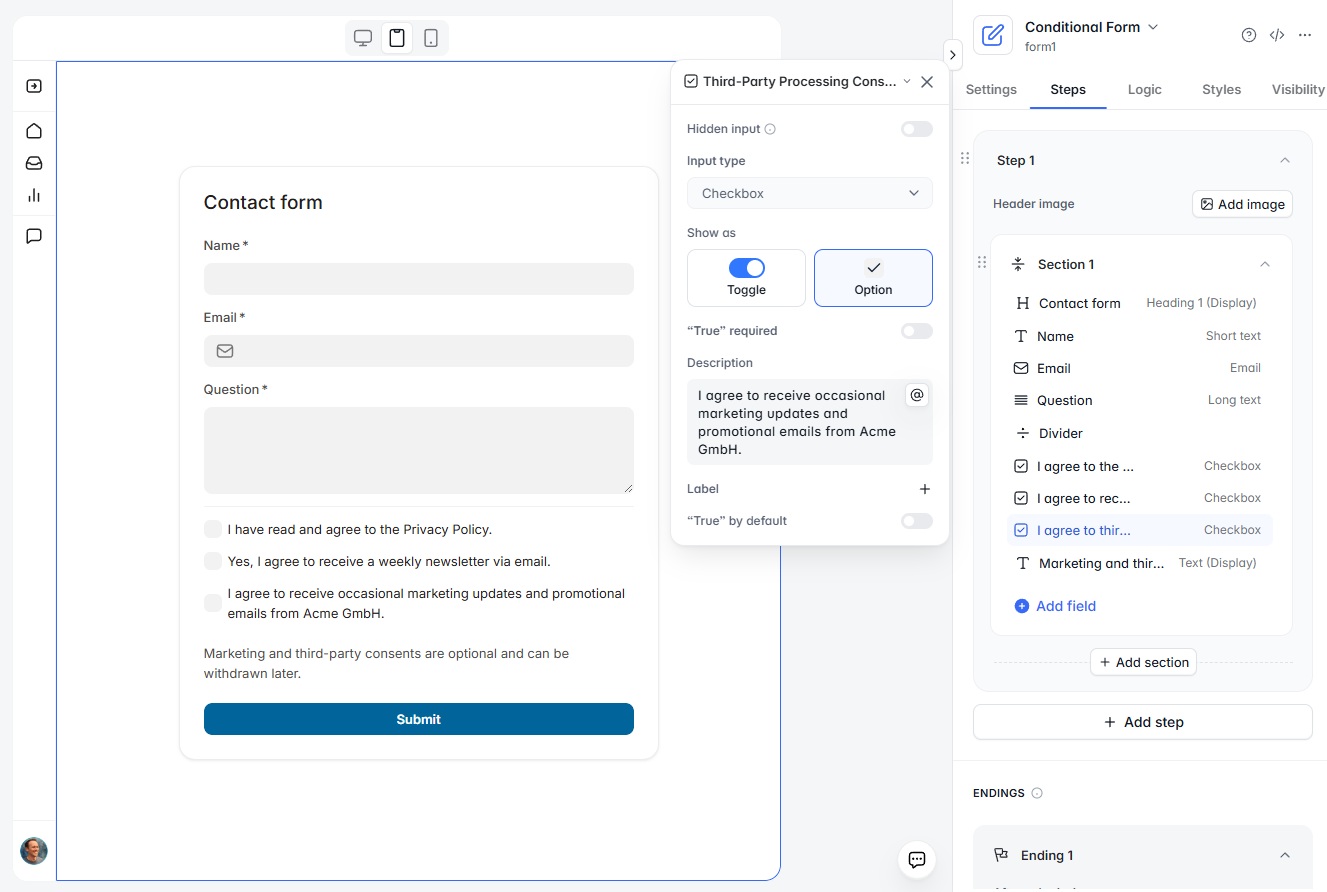
- Consent fields and configuration. You can add consent checkboxes to any form and write your own consent language, and those records get stored alongside the rest of your submission. That gives you proof of exactly what someone agreed to (and when) in case of disputes.
What happens to user data after forms are submitted?
Much of the discussion around GDPR-compliant forms focuses on how to handle consent, but that’s just the first part of your obligation under GDPR.
Once you’ve collected user data, you need to keep it secure. And regardless of how compliant your form builder is, it’s entirely possible for data to be mishandled if user records can be accessed without restriction by anyone in your organization.
When Softr collects form data, it goes directly to a Softr Database with server-side data permissions. Unlike some no-code tools—which often hide data by using app-level filters—Softr won’t pull data from the server in the first place unless the user has the necessary permissions.
You can define form data permissions with Softr’s Global Data Restrictions, which is a big step up in efficiency from setting individual block-level or page-level permissions. Instead, you can set restrictions in one place and they’ll automatically take effect across your entire app.
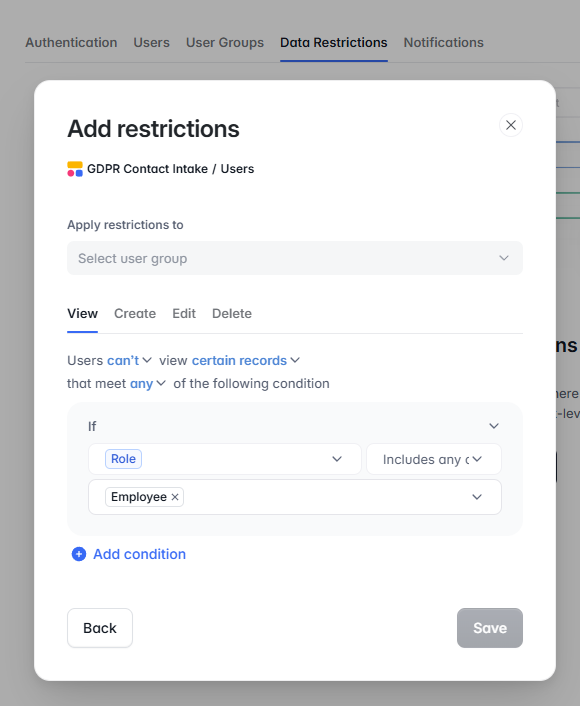
For example, with Global Data Restrictions, you can set up layers of permissions that:
- Allow clients to see only their own data
- Allow admins to see data for all clients
- Allow internal teams to see only the client data that’s required for their tasks
Note: Softr will soon allow you to define field-level data permissions globally, too. For example, if your forms include sensitive data (like a tax ID), you’ll be able to restrict the tax ID field so it can only be seen by your admins and finance team—while keeping the rest of the record accessible to everyone else.
How to handle data subject rights
When users submit a Data Subject Access Request (DSAR), you must respond within one month. If you fail to respond in time, you may be considered in breach of GDPR and subject to hefty fines.
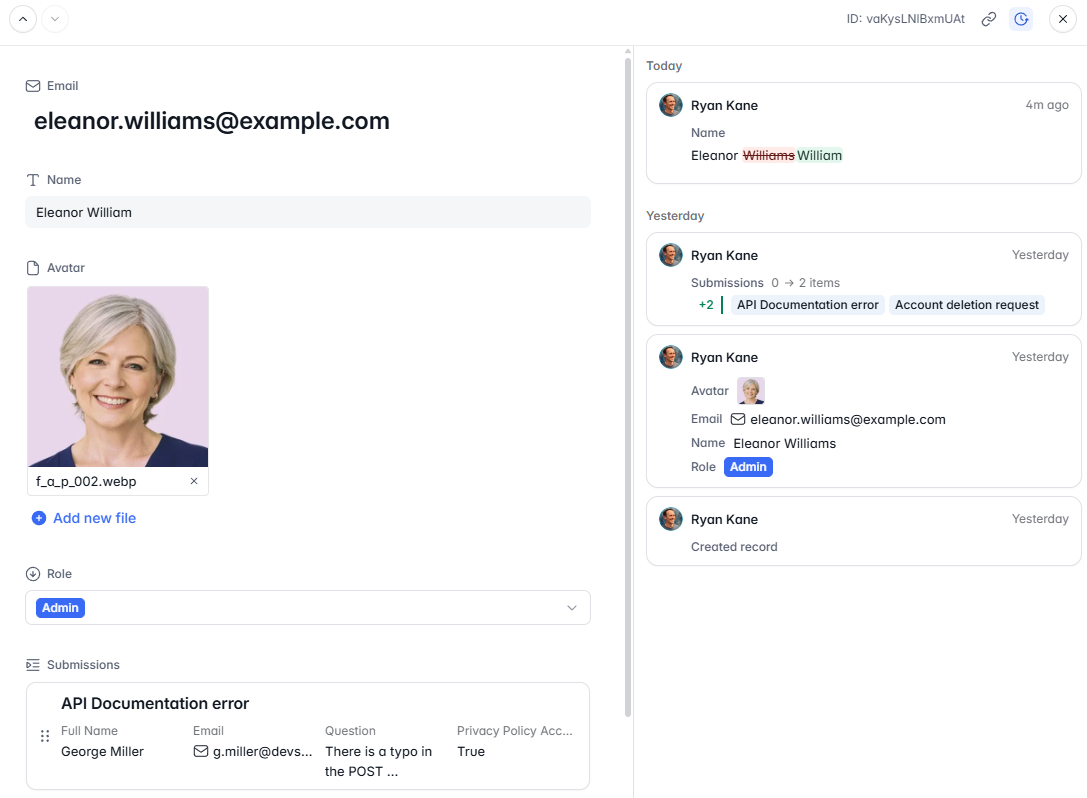
Your form builder plays a big role in this process: it affects how you locate records, export data, and edit or delete information. By storing form data in a secure, searchable database, you can quickly find, export, or delete data records upon request.
Here’s what that looks like in Softr:
- Find the record. Locate the requested records by filtering for the user’s name or email within your Softr database and pulling up their form submissions.
- Access or export request. After filtering for the user or submissions you need to export, check the box next to each record and click “Export to CSV.” If the request only covers certain fields, adjust the view before exporting.
- Rectification request. Edit the relevant field. Since your updates apply everywhere the field is referenced, there’s no need to jump between different records.
- Erasure request. Softr has a built-in deletion button that’s as simple as selecting the record and clicking “Delete.”
- Log the action. Record the action internally and send a formal response to the user. Softr includes revision history on individual records, and you can also enable audit logging if you’re on Softr’s Enterprise plan.
How to set up a GDPR-compliant form with Softr
When you build a form with Softr, you’re already a few steps ahead because you’re building on GDPR-friendly infrastructure. Softr hosts EU data in Germany, encrypts data in transit and at rest, and provides a pre-signed DPA.
That means you can focus your efforts in two areas:
Consent and data minimization. Use Softr's form builder to add the fields you need, plus consent checkboxes for each point users agree to (like terms and conditions, marketing communications, and third-party data sharing). Make sure you only ask for the specific data you need for your use case.
Permissions and data restrictions. Create a user group for each type of person who needs access. Then, set up Global Data Restrictions so people can only view records that are relevant to their role.
To learn how Softr’s forms work for your use case, sign up for a free account and get started today.
Frequently asked questions
Is Google Forms GDPR compliant?
Do I need a Data Processing Agreement for my forms?
What happens if a form respondent asks to delete their data?
Can I collect explicit consent in a form?