What is a no-code database? (And who it's actually for)


If you run any part of a business, you have almost certainly hit the same wall. A process starts in a spreadsheet, works for a while, then stops working. More people need access, the data grows, and the file that used to save you time starts slowing you down.
The tool most teams reach for next is one of the many no-code database tools now available. It is a term that gets used constantly without ever being explained clearly. So let's fix that. This guide covers what a no-code database is, how it differs from both a spreadsheet and a traditional database, who it is really for, and what you can build with it.
What a no-code database actually is
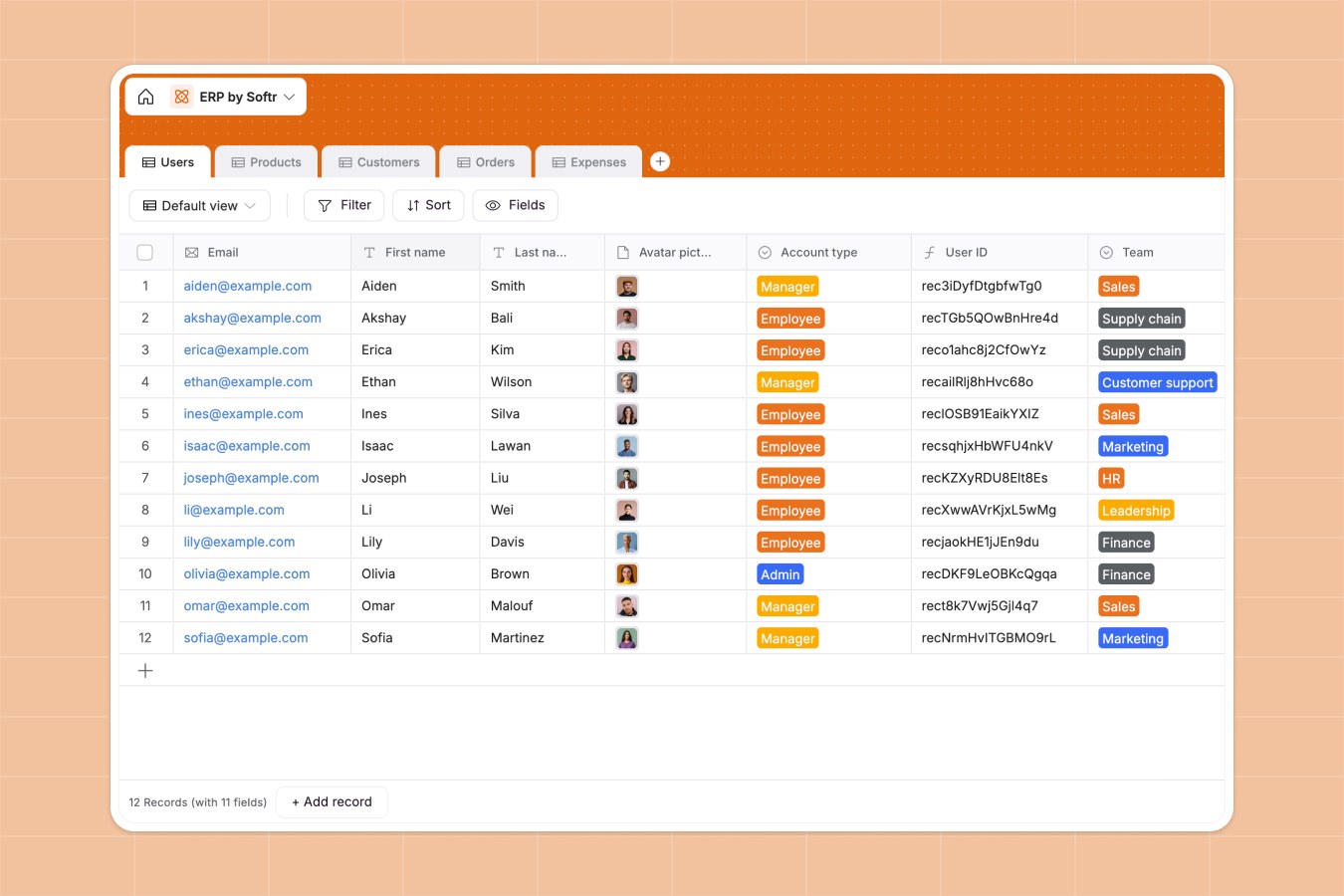
A no-code database is a system for storing and organizing structured business data that you set up visually, without writing code.
The clearest definition we've heard comes from Kai Schönberger, the engineer behind Softr Databases:
"It's more powerful than a sheet, but with much better UX than a traditional database. It gives you the power of something like a MySQL database without the hassle of a complicated interface. Instead, you have a beautiful interface where you can change the schema without going to the command line, plus APIs to easily connect it to other tools and apps." — Kai Schönberger, engineer behind Softr Databases
That single description captures the whole idea. You get the reliability and structure engineers get from a database like MySQL, but you interact with it the way you would a spreadsheet: by clicking, typing, and dragging. No syntax to memorize, no server to manage, no query language to learn.
To understand why that matters, it helps to place a no-code database between the two tools you already know.
How it differs from a spreadsheet
A spreadsheet is a big open canvas. That flexibility is exactly what makes it easy to start with, and exactly what makes it fragile over time. A no-code database is different in a few ways.
Typed fields instead of open cells
In a spreadsheet, any cell can hold anything. A column called "start date" might contain a date, a piece of text like "TBD," or a number, all mixed together. Nothing stops it.
A no-code database uses typed fields. A date field only accepts dates. A number field only accepts numbers. A single-select field only allows the options you defined. Bad data gets rejected at the point of entry, which means the formulas and views built on top of that data don't quietly break later.
Relationships instead of VLOOKUPs
This is the difference most people feel the fastest. In a spreadsheet, the only way to connect two sets of data is a VLOOKUP, and as Guillaume Duvernay from Softr puts it:
"The way you connect tables in a spreadsheet is through VLOOKUPs, which everyone struggles with, and it never feels like a proper connection." — Guillaume Duvernay, Softr
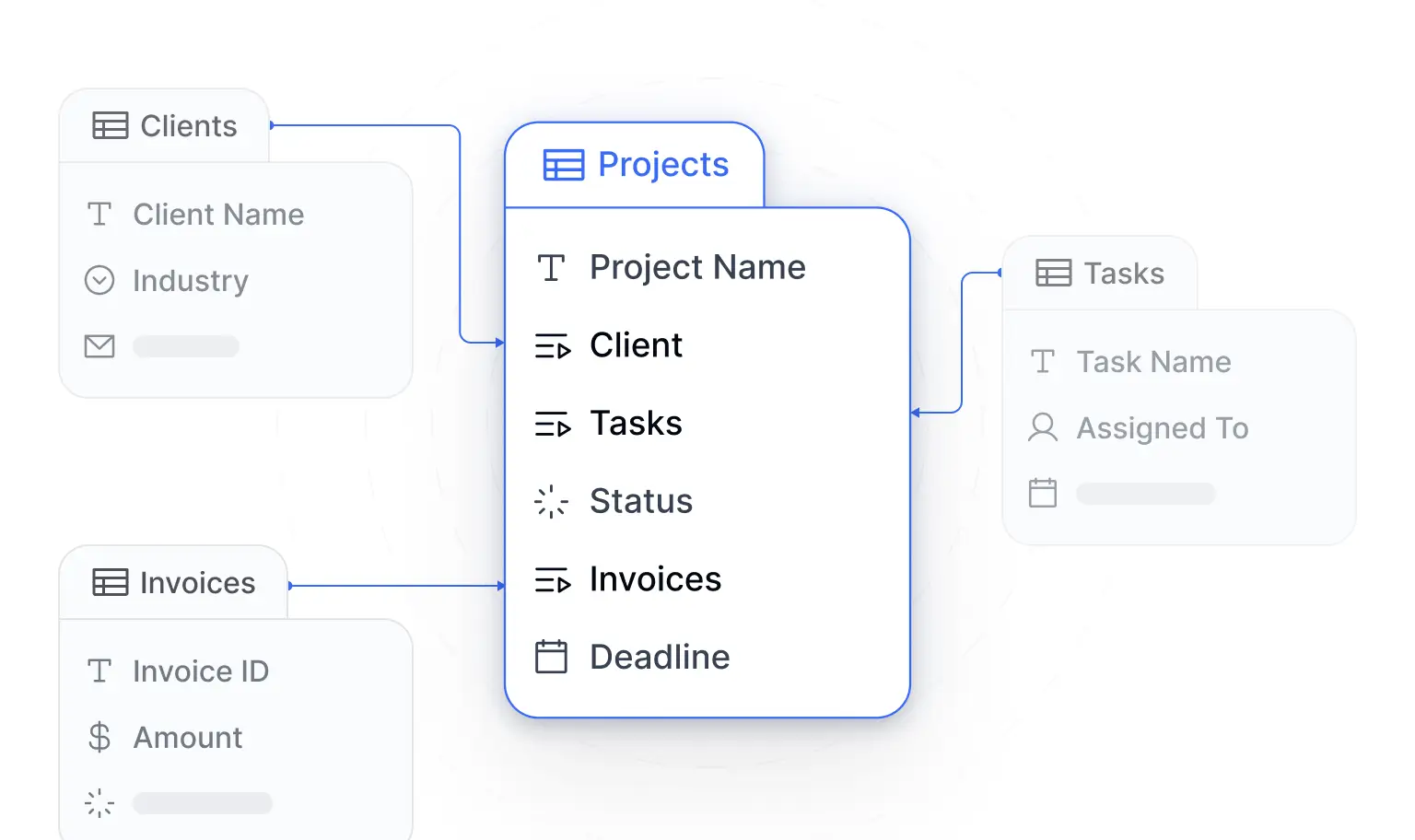
A no-code database connects tables with linked records. You might have one table for clients and one for projects, then link each project to its client. That connection is real and it works in both directions: from a client you can see all their projects, and from a project you can see its client. Rename "Acme Inc." to "Acme Corp" and every link updates automatically, because the connection is based on the record itself, not on matching a text string.
"Using related fields is the way to make your data structure as robust and scalable as possible. It is way better, way more organized and structured than Excel." — Guillaume Duvernay, Softr
Structure that teaches you to think clearly
There is a subtler benefit here, and it is one of the best reasons for a beginner to make the switch.
"As a beginner, it's very useful to start thinking the way a real database works. With a sheet you don't think in terms of entities and linking them. A no-code database introduces these concepts, and you start to understand how the database works under the hood." — Kai Schönberger, engineer behind Softr Databases
Instead of one sprawling sheet, you learn to think in entities: a table for people, a table for projects, a table for tasks, each linked to the others. That structure is not academic. It is what keeps your data clean as the business grows, and it is the foundation everything else is built on.
Permissions instead of all-or-nothing sharing
Spreadsheets share at the file level. Either someone can open the whole thing or they can't, and filters and sorting are global, so one person's view changes everyone's. Teams end up negotiating around a single file, saying "I'm using the spreadsheet right now, don't change my filters."
A no-code database controls access at the data level. Different people can see different records, edit some fields and not others, and each person gets their own independent view. This is where databases pull ahead of sheets for any team working together.
How it differs from a traditional database
If a no-code database is more structured than a spreadsheet, why not just use a traditional SQL database like the ones engineers build on?
Because a traditional database was never designed for a non-technical operator to use directly. To create a table or change a field, you write commands in a query language and run them through a command line. To get data in and out of your other tools, someone has to build and maintain an API. None of that is realistic for someone whose job is running operations, not writing code.
A no-code database keeps the good parts of that engine and removes the friction:
- You change the structure by clicking, not by writing SQL.
- APIs to connect other tools and apps are built in and ready to use, not something you have to code.
- Speed and reliability that a spreadsheet can't match come standard. As Kai noted, a native database can serve API responses in milliseconds and handle far higher request volumes than most no-code tools. That scaling headache isn't yours to manage.
In short, you get the horsepower of a real database with an interface a person can actually use.
The anatomy of a no-code database
You only need to understand a handful of building blocks to be productive.
- Base: the top-level container for a project or area you're tracking. "Invoice tracking" might be one base, holding all the tables related to invoices.
- Tables: mini databases inside a base, each representing one thing. One table for clients, one for projects, one for tasks.
- Fields: the columns of a table, each with a set type (date, single-select, currency, long text, and so on).
- Records: the rows. One record per client, one per invoice, one per task.
- Relationships: the links between tables, so a project can point to its client and its tasks.
On top of relationships, you can add small calculations without a single formula reference breaking. A rollup can count how many open tasks a project has. A formula field can subtract two dates to show how long something took. Because these calculations live on named fields rather than cell references like A2, inserting or reordering data never breaks them.
A quick reality check on scope: most operational databases are smaller than people expect. As Guillaume points out, "80% of databases have between three and five tables." If you find yourself well past six or seven, you're usually planning a much larger app.
You build apps on top of the data
Here is the part that ties everything together. A no-code database is not meant to be the place your team lives day to day. It is the structured, reliable store underneath. The real destination is an app built on top of it.
The database holds the data cleanly. The app gives your team a friendly way to work with it: a homepage that shows the right information first, forms to add records, pages to edit a customer or update a task, and views like tables, kanban boards, and calendars that beat scrolling through an infinite grid. You can add an interface builder layer so people never have to touch the raw tables.
This is also where permissions become powerful. Because you can define user groups and enforce users and permissions at the data level, an admin, an employee, and a client can all log into the same app and each see only what they should. And this is enforced properly:
"It's not just the button that's gone, the backend enforces the restriction. Not like other tools where you can hack around a missing UI button. This is enforced." — Kai Schönberger, engineer behind Softr Databases
The common tools teams build this way are familiar: CRMs to track deals and contacts, client and vendor portals, project trackers, inventory systems, and internal dashboards. The database is the same shape underneath each one. What changes is the app you put in front of it.
Who a no-code database is actually for
Despite the technical-sounding name, the audience here is not developers. It is operators, and that's why the category has grown into a wide market of user-friendly database software built for this crowd.
If you are an operations manager, a founder, a department head, or anyone at a small or mid-sized team who knows your business logic inside out but has no interest in managing code, this category was built for you. You are the person who keeps hitting the "I wish we had a tool for this" moment and settling for yet another spreadsheet because building software sounds like a six-month engineering project.
A no-code database is what closes that gap. It gives you enough structure to run real operations without requiring you to become an engineer.
You can connect to data you already keep in Airtable or Google Sheets too. We always recommend leading with Softr Databases as the native foundation for speed and reliability, but Softr connects to 21+ data sources, including Airtable, Google Sheets, HubSpot, and a REST API connector, so you're never locked in.
The AI on-ramp for getting started
The biggest hurdle used to be the blank canvas. Sitting down to build every table, field, and relationship from nothing is a lot of work when you're not sure where to start.
That is the friction the AI Co-Builder removes. You describe what you want to track in plain language, for example "my team manages projects and related tasks with urgency, description, and clients," and it scaffolds the whole thing: the tables, sensible field types, the relationships between them, and even sample data so your app looks ready to use. The Softr MCP does the same from Claude or ChatGPT, if that’s where you already work.
"When you're sitting there not knowing where to start, building all the tables and fields is a lot of work. The AI bootstraps that so you can focus on the trickier things afterward." — Kai Schönberger, engineer behind Softr Databases
This is an on-ramp, not a lock-in. Everything the AI creates, you can edit visually by hand, and anything you can do by hand, you can also ask the AI to do. You get the speed of AI to get started and full manual control to refine. The same assistance shows up inside the database for writing formulas or filters: describe what you want in words, and the Ask AI helper turns it into the correct logic.
Try building one this week
The fastest way to understand a no-code database is to make one. Pick a spreadsheet your team fights over every week, open Softr, and describe it to the AI Co-Builder, or import the sheet directly as a starting point. In a few minutes you'll have a structured database and the beginnings of a real app on top of it, and the difference from that old spreadsheet will be obvious the moment your team logs in.
Frequently asked questions
Is a no-code database the same as Airtable?
Do I need to know SQL to use a no-code database?
When should I stick with a spreadsheet instead?
Can a no-code database handle a lot of data and users?
What can I actually build on top of a no-code database?