HubSpot Service Hub pricing: A complete guide to plans in 2026


Pricing for HubSpot's Service Hub seems straightforward at first, but their pricing page doesn't tell the whole story. When I looked more closely at their seat-based model, I realized the different types of "seats" you can buy make your bill harder to predict. Then I read about the credit system, which makes things even harder. "Credits" are currency for using certain HubSpot features, especially AI-powered ones. And they can come at a steep cost.
You can look into all this stuff yourself, but the details are scattered across multiple landing pages and help docs. I did the research and compiled my findings here, so you can learn what you're really paying for with Service Hub, where costs can jump, and whether a subscription is worth it.
HubSpot Service Hub pricing at a glance
HubSpot offers a few types of paid seats. For the purposes of this article, you'll want to know about Core Seats and Service Seats, which I reference in the table below. In the next section, I'll define them in more detail.
Note: When we published this, HubSpot was discounting certain seats:
- HubSpot Service Hub Starter — $7/month per Core Seat
- HubSpot Service Hub Professional — $45/month per Core Seat and $90/month per Service Seat
- HubSpot Service Hub Enterprise — $75/month per Core Seat
Those figures reflect annual prices, but there were discounts for paying monthly, too. Check the Service Hub pricing page for the most up-to-date info.
How HubSpot Service Hub's pricing works
HubSpot's free plan acts as a sampler platter. It gives you lightweight tools from across the platform, including basic Service Hub features, like ticketing, shared conversations, and chatflows. That might be enough to run a small support operation, as long as you can work within the two-user limit and cap of 1,000 contacts.
When you need more advanced features, you can upgrade to a paid Service Hub plan. It comes in three tiers: Starter, Professional, and Enterprise.
Note: Purchasing a Service Hub plan upgrades your Service Hub access only. You'll still have basic access to the other hubs, unless you pay to upgrade those too.
If you know your organization will use multiple hubs, you've got another option. The HubSpot Customer Platform bundles the Marketing, Sales, Service, Content, and Data Hubs at a pretty meaningful discount of roughly 45% off (compared to buying all those hubs separately). And if that's not the right mix of products for you, you can check out the Create a Bundle package instead. It lets you piece together just the hubs you want. I also appreciate that that page provides a price calculator to help you predict your fees more accurately.
How seats work
The price of a seat depends on two things:
- The plan you choose
- The kind of access you need
On the Starter plan, the only seat you can buy is a Core Seat. This lets you edit records and use every feature that comes on Starter. People who only need to look at records (or dashboards, or reports) can get View-Only Seats, which are free and unlimited.
On the Professional and Enterprise tiers, you can buy Core Seats or Service Seats. A Service Seat includes everything a Core Seat has, plus advanced Service Hub features that come with whichever tier you buy.
So let's say you run a team of five support agents. If only one needs features that get unlocked at the Professional tier (like the AI-powered help desk and customer portal), you'd buy one Service Seat and four Core Seats, all at Professional prices. That works out to one seat at $100 and four at $50 each.
HubSpot Service Hub pricing breakdown
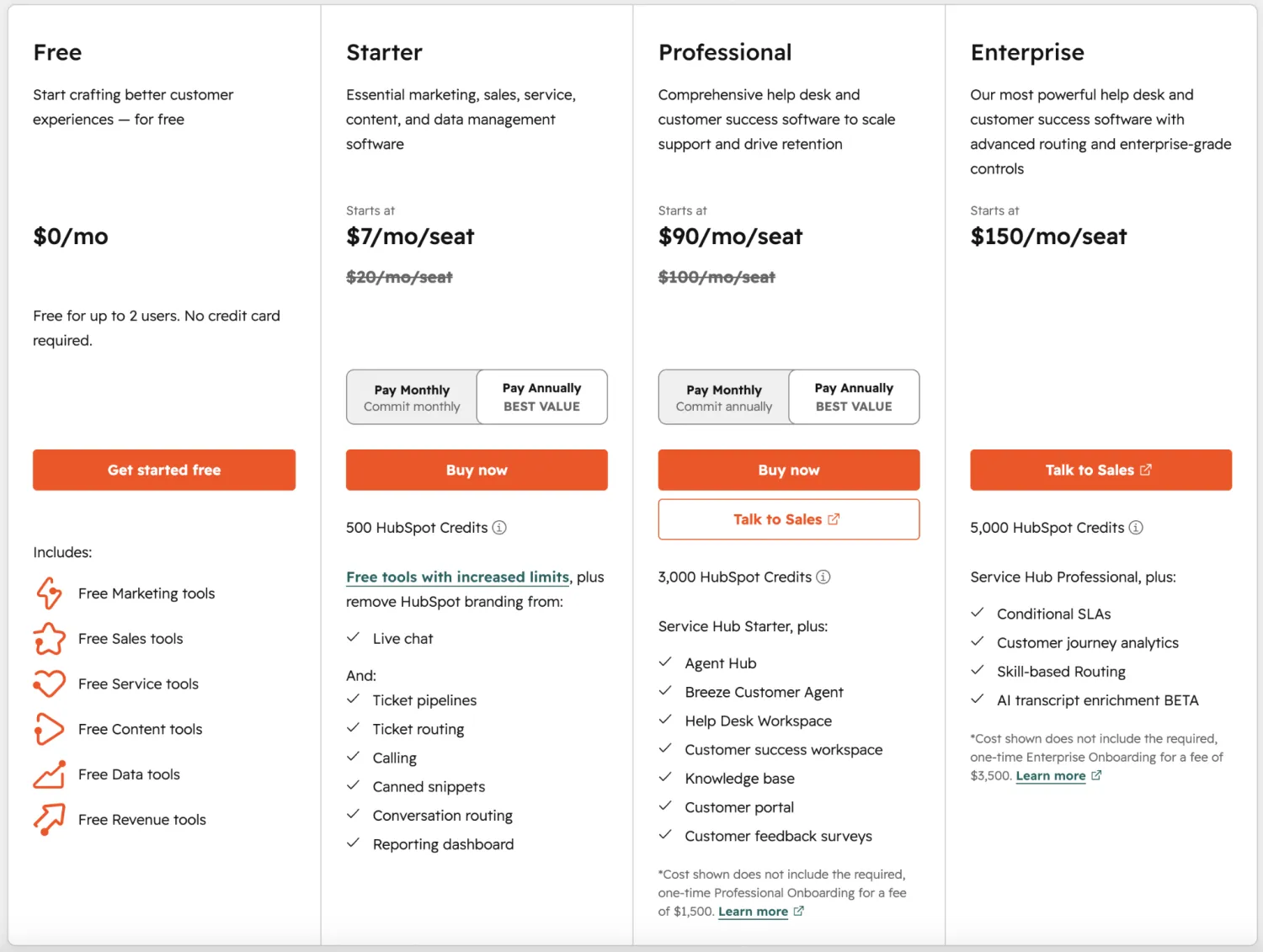
Free
- A way to test the broader HubSpot platform, not just Service Hub
- Lets two users try out basic tools across different HubSpot products
- On the Service side, you get free ticketing, shared conversations, and chatflows
Pros
- You can technically run a very small operation on this plan if you just need a lightweight setup.
- After you sign up, a guided onboarding flow walks you through how Service Hub works. It's clear and gets you started quickly.
Cons
- Only two users are included.
- You're limited to 1,000 contacts.
- You get one ticket pipeline per account (in other words, one board to share across your whole business).
- There's no automation. If a customer submits a form, you assign them a journey or move them to a column manually.
- Direct support from HubSpot isn't included. If you get stuck on a more complex issue, you're on your own.
Best for: Testing HubSpot before committing to a subscription, or for very small teams that don't mind the plan's limitations.
My verdict: Can you limp along on the free plan forever? Sure, if your operation is tiny. But with a two-user cap and no automation, you'll outgrow this fast if your team or ticket volume ever increases. I'd use this to play around with the features and see if HubSpot's ticketing works for you. Then either upgrade or explore another platform.
Starter: $20/month/seat, billed annually
- The first paid tier, and the point where HubSpot branding comes off your customer-facing assets
- Comes with two ticket pipelines, conversation routing, and basic automation
- Includes expanded calling minutes, goals, and reporting dashboards
Pros
- Your support setup feels branded and organized.
- A Core Seat on the Starter plan is the cheapest paid seat you can buy.
- You can add as many free View-Only Seats as you'd like.
- It comes with 500 HubSpot Credits.
- There's no onboarding fee, unlike Professional and Enterprise.
Cons
- You don't unlock AI agents or the AI-powered help desk yet.
- If you need more complex routing, the two ticket pipelines won't cut it.
- The automation is basic. You can handle simple stuff, like triggering automated emails, new records, and updated properties from form submissions. But fully customizable workflows beyond three actions are walled off.
- Any automation or AI action consumes credits, and credits don't roll over to the next month. Once your 500 are tapped out, you run the risk of introducing hidden costs. (More on that below.)
Best for: Small support teams that want a branded experience and aren't ready to make the big financial jump to the Professional tier.
My verdict: With Starter, you're no longer triaging everything by hand. I'd go with it if you just want organized tickets, routing, and light automation. If complexity is in order, or you need AI to do things like draft replies, deflect tickets, or power a self-service knowledge base, Starter might feel thin to you.
Professional: Starts at $100/month/seat, billed annually
- A big leap in price and capability
- Unlocks the full Help Desk Workspace, advanced ticket automation, and SLA management
- Adds a customer knowledge base, a customer portal, and CSAT and feedback surveys
- Includes HubSpot's AI agent — the Breeze Customer Agent — which consumes credits
- Offers three seat options: free View-Only Seats, Core Seats at $50/month for people who only need general CRM access, and Service Seats at $100/month for the full Professional feature set
Pros
- This tier gives you core support functions all in one place. Customers can self-serve, and tickets that do come in get automated and reported on.
- The Breeze Customer Agent is an AI-powered assistant that answers customer questions from your company's knowledge sources, freeing up your support team for other work.
Cons
- Breeze consumes credits every time it "resolves" a conversation. And I found HubSpot's definition of a resolution fairly muddled. If you do too, you'll want to keep an eye on your resolution analytics. Once you run out of credits, new conversations follow a handoff process you set up in advance. If that involves routing folks to a live agent, that'll interrupt your automation flow.
- The jump from Starter is steep at $100 per Service Seat.
- It comes with a mandatory one-time $1,500 onboarding fee.
- There are decent monthly caps on workflows, dashboards, and transcripts: you get 300 workflows, 75 dashboards (up from 30 on Starter), and 750 hours of transcription per account. But heavy users might run up against those ceilings.
Best for: Growing support teams that need automation and AI and know they're sticking with HubSpot for the long haul.
My verdict: Professional is the first plan I'd recommend for a more established operation. You'll have to juggle AI credits, three types of seats (two of them fairly pricey compared to the Starter plan), and a mandatory onboarding fee, so I'd spend some time budgeting out the total cost before assuming this plan will work for you.
Enterprise: Starts at $150/month/seat, billed annually
- The tier that, unsurprisingly, brings you the most control
- Adds advanced permissions, hierarchical teams, and custom objects
- Includes advanced routing, coaching, conversation intelligence, and journey analytics
- Uses the same seat model as Professional, with higher prices: free View-Only Seats, Core Seats at $75/month, and Service Seats at $150/month
Pros
- This is the only option for governance, permissions, and reporting at scale.
- Hierarchical teams (nested teams that mirror your org chart) and custom objects (your own record types for data that doesn't fit HubSpot's defaults) make this a good fit for more complex support teams.
- Advanced routing lets you assign tickets to agents based on rules like their specialty, language, or current workload, a big help for larger teams, where hand-assigning every ticket would take forever.
- Journey analytics track patterns across many customer interactions, not just one ticket at a time, so you can spot where customers repeatedly get stuck.
- Includes 5,000 HubSpot Credits, the most of any tier.
Cons
- As with the Professional plan, you'll need to keep an eye on your credit usage. You get more credits, but you also get more features that consume them.
- It comes with a mandatory one-time $3,500 onboarding fee.
- The customer portal lets customers log in to track their support tickets and read help articles. If you want to give them more, like the ability to see project status, documents, and invoices, or you want to provide branded views for different types of customers, HubSpot's portal is too rigid for that.
- The core customer data has to live in HubSpot's CRM. That's a constraint if your records already sit in another system, or you'd rather not lock your source of truth into HubSpot.
Best for: Larger organizations that need governance, advanced permissions, and reporting across a complex support operation
My verdict: Enterprise makes sense when you're shopping for control over how your support data gets handled. The customer-facing support tools alone are mostly the same as what you get in Professional, so if you don't need a governance layer, the price jump might be hard to justify. If you are considering it, remember to factor in the $3,500 onboarding fee and your ongoing AI credit usage before you commit.
HubSpot Service Hub pricing: What users are saying on Reddit
To me, the most frustrating part about pricing is the split between Core Seats and the Service Seats. A few Reddit users definitely share that opinion. In one thread, someone pointed out that a basic collaboration feature was locked behind a Service Seat, which only exists on Professional and Enterprise plans. Rolling out that feature across the org would mean buying Service Seats for almost everyone. The post is several months old now, but the seat model hasn't changed, so the complaint still holds.
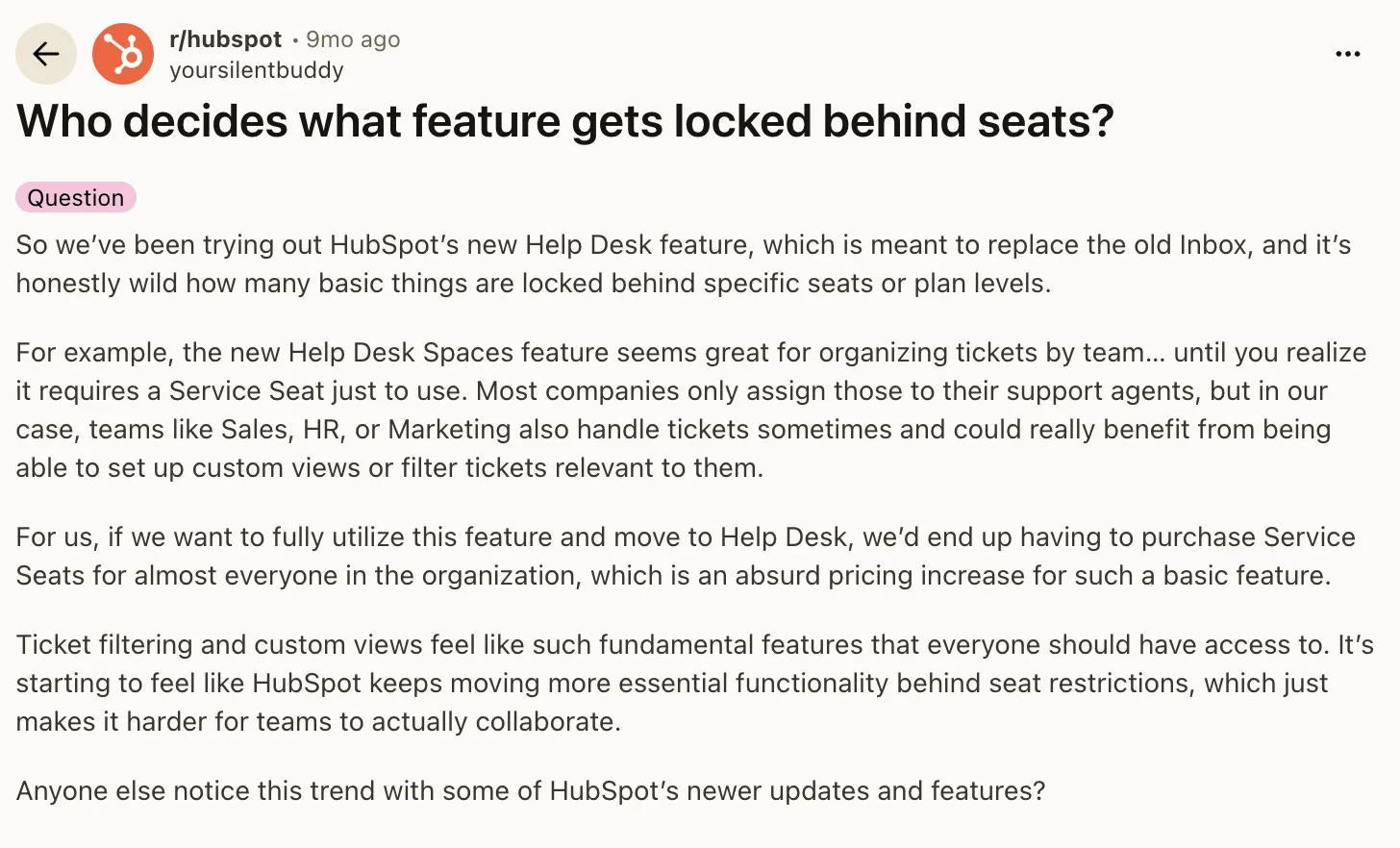
Core Seats are priced at the highest tier in your account. So the moment one person needs a Professional Service Seat, every paid Core Seat is charged at the Professional rate. Here are the numbers on that: A Core Seat costs $20/month on Starter, but more than doubles to $50/month on Professional. So you can end up paying a bucketload just to unlock one feature for one team member.
In that same thread, one person countered that gating features behind plans is just what software companies do. Fair enough. But seat creep is a real consideration now that so many lower-cost apps today let you spin up your own custom tool with AI.
Hidden costs to watch out for with HubSpot Service Hub
It's no secret that as your team grows, you'll need to buy more seats, which piles onto your monthly or annual bill. But a few other costs can catch you off guard if you're not careful.
The first is your credit usage. I read through the HubSpot credits rate sheet—not exactly a thrilling read, but knock yourself out if you'd like—and here's what they charge for their main service-related features:
- The Breeze Customer Agent, their AI assistant for customer support: 50 credits per "resolved" conversation
- Smart properties, which use AI to enrich your contact and company records: 10 credits per response, per prompt, per record
- Certain workflow triggers and actions, including all the AI-related ones (10 credits each)
HubSpot also notes that some workflow features can burn credits at a faster rate, so usage might vary.
You can track usage once you're set up with an account, and you'll get proactive alerts as you approach your plan's allotted credits. But if you go over, you can run into steep costs. HubSpot can deal with overage in one of two ways. It can automatically add a credits capacity pack to your account, which sticks with you for the rest of your contract (so if you're on an annual plan, you're committed to that pack for the year). Or you can switch on pay-as-you-go overages that bill only for what you use. Both cost roughly $10 per 1,000 credits, and unused credits don't roll over into the next month.
The second consideration is that Service Hub rarely stays an island. Because it runs on HubSpot's shared CRM, squeezing the full value from it often means you'll need to pay for other hubs, like Marketing Hub for automation, which then bills by your number of marketing contacts. So your real HubSpot cost can climb well beyond the Service Hub itself.
Finally, if you're signing up for Professional or Enterprise, don't forget the one-time onboarding fees. Professional carries a $1,500 fee, and Enterprise, $3,500. Paying this is mandatory whether or not you need or want the guided setup.
Which HubSpot Service Hub plan should you choose?
Choose Free if you're testing whether HubSpot's ticketing suits your business. It's fine for a two-person setup or a proof of concept, but the contact cap, single pipeline, and lack of automation probably won't work for a growing team.
Choose Starter if you want branded, organized support without AI. I'd select this one for small teams that need tickets, routing, and light automation, but don't yet need a help desk workspace, knowledge base, or AI agent.
Choose Professional if you need the full support platform. This is the tier for automation, SLAs, a knowledge base, a customer portal, and Breeze AI. Just budget for the $1,500 onboarding fee and the credit-based AI on top of the seat price.
Choose Enterprise if governance is a priority. Advanced permissions, hierarchical teams, custom objects, and advanced reporting are what you're paying for, along with a $3,500 onboarding fee.
You'll probably know if Free or Enterprise is right for you. The harder call is choosing between Starter and Professional. Especially if you're going with an annual plan, remember that you'll be locked in for the year, so I'd begin with Starter and move up to Professional once you feel its limits.
Is HubSpot Service Hub worth it?
It is if you're already using HubSpot CRM to store customer records. Service Hub adds ticketing on top of that, so you can give customers a better experience with tools the CRM alone doesn't have, like self-serving answers in a knowledge base, leaving feedback, or checking ticket status. And if your support team is growing, several people need editable records, or you need omnichannel service, it earns its price.
But there are real reasons to skip Service Hub, too. Look elsewhere if you:
- Can get away with running a simple help desk
- Have a small internal support team
- Just need a customer portal
- Want alternatives without high or unpredictable costs, or complicated credit systems
- Need your customer data to live somewhere other than HubSpot's CRM
- Want a portal you can shape around your business rather than a ticket-focused one
HubSpot Service Hub vs. Softr pricing: Which is better?
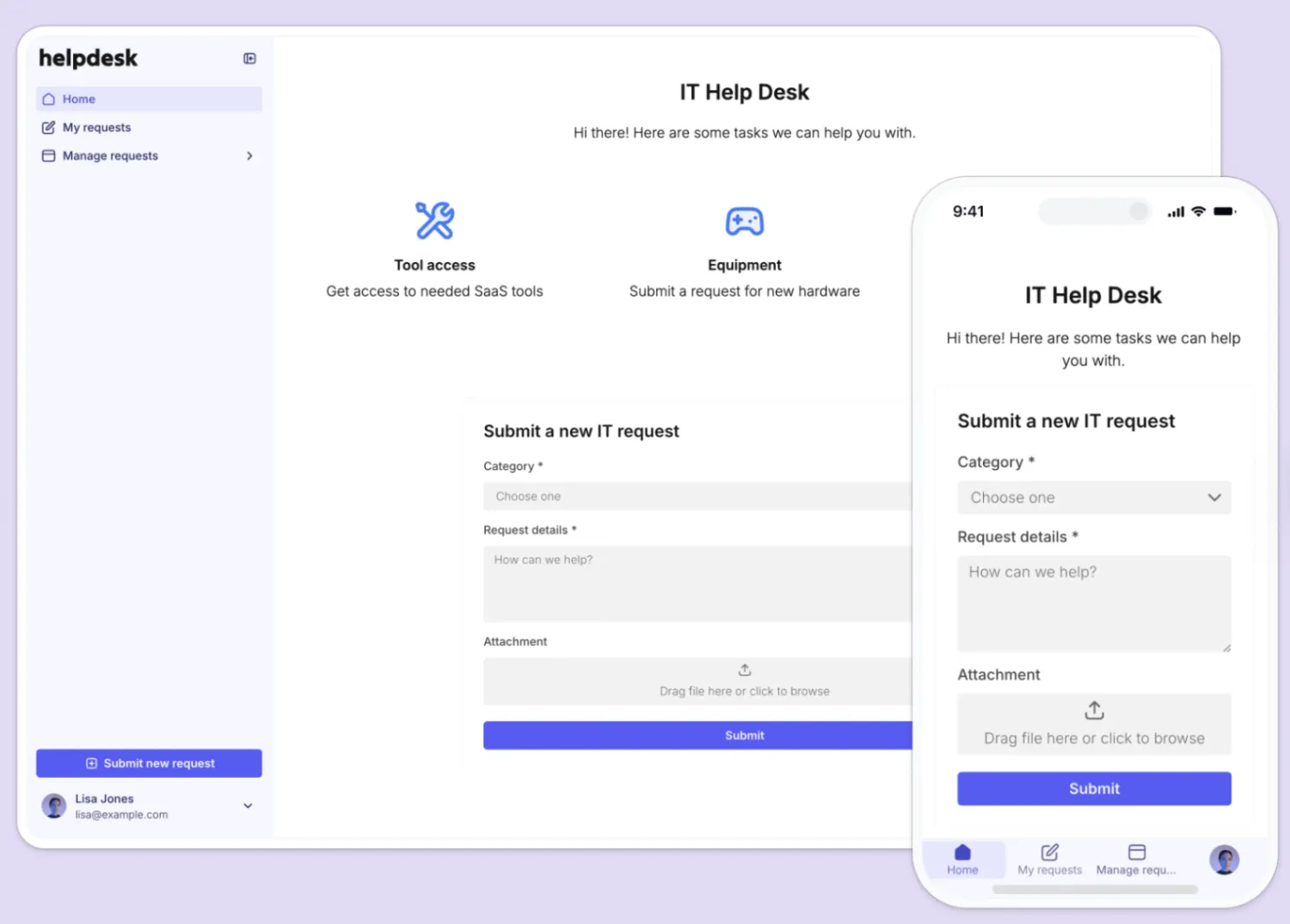
Service Hub can be the right call when you're already living in HubSpot's CRM and need deep, omnichannel ticketing. But if the main thing you want is a branded customer portal, a client or partner portal, a self-service knowledge base, or an internal support tool, Softr is built for exactly these use cases.
The pricing models are completely different. HubSpot charges per seat, layers on credit-based AI and mandatory onboarding fees, and scales further as your CRM and marketing footprint grow. Softr uses flat pricing. Every plan comes with unlimited apps and costs scale with the size of the system you're running: users, records, workflows, AI credits, permissions, data sources, and security needs.
That matters when different people need different views of the same data. With HubSpot, you count who actively works tickets and pay per seat. With Softr, you can whip up a customer portal, an internal support tool, and a knowledge base in one workspace. And then you manage cost around how many people need access, how much data you're managing, and how much automated work your apps run.
Softr pricing overview
What you get with Softr
- Easy-to-understand pricing: There are no surprises, credit meters, or onboarding fees. Softr charges a monthly rate that scales with records and users.
- As many apps as you need: Your team can run a portal, knowledge base, and internal tool together without increasing your bill.
- Pricing aligned to operational scale: Limits are tied to users, records, workflows, AI credits, user groups, and security. This aligns with how business apps actually grow: more people, more data, more permissions, and more automated work.
- Built-in database, workflows, and permissions: Softr's AI App Builder generates more than a pretty interface. It gives you an app, database, permissions, and business logic in one connected system.
- A better fit for portals and self-service: With Softr, your clients, partners, vendors, and employees can have unique views of the same data, which is exactly what a customer or support portal requires.
- AI credits come with every plan, and you're never auto-charged: Every Softr plan includes monthly AI credits, starting with Free. If you run out, the AI features just pause until they renew. Nothing gets added to your bill unless you choose it, unlike HubSpot's credit overages.
- Build on top of your existing data, including HubSpot. Softr has its own relational database and connects natively to more than 20 data sources. Beyond HubSpot, that includes Airtable, Google Sheets, Notion, SQL databases, and Supabase. If you work in AI tools like Claude and ChatGPT (or any client that works with MCP), you can connect the built-in database using Softr MCP.
- Enterprise-grade security from day one. Softr is a secure AI app builder that comes with SOC 2 and GDPR compliance, plus SSO on Enterprise.
Why teams choose Softr over HubSpot Service Hub
- Softr has simpler pricing, while HubSpot charges per seat plus credits and onboarding. You scale around records, users, and workflows instead of counting who actively works with tickets.
- Softr includes unlimited apps, while HubSpot bills per Core or Service Seat. One Softr workspace can hold your customer portal, knowledge base, and internal support tools.
- Softr is stronger for branded, permissioned portals. With user groups, you control exactly what clients, partners, vendors, or employees can see and do. HubSpot's customer portal stays ticket-focused and is harder to shape for unique audiences.
- Softr builds on top of your existing data, including HubSpot. Do you already keep records in HubSpot CRM? You can build a branded self-service portal on top of that data in Softr, rather than paying up a tier to unlock HubSpot's portal.
HubSpot Service Hub vs. Softr: Which should you choose?
If you already use (or plan to use) multiple hubs, adding Service Hub might make sense, especially if you want omnichannel service across email, chat, and phone in one place. But if you mainly need a custom, permissioned portal at a lower and more predictable cost, I'd go with Softr every time. Your team can get in there and build real business software with just the features they need, and no one needs to know how to code to do it.
Try Softr for free and build your first production-ready business app with AI today.
Frequently asked questions
How much does HubSpot Service Hub cost per month?
What is the difference between a Core Seat and a Service Seat?
Does HubSpot Service Hub have a free plan?
What are HubSpot Credits and what happens if you run out?
Is there a cheaper alternative to HubSpot Service Hub for a customer portal?