8 best HubSpot CRM alternatives for small businesses in 2026

HubSpot keeps your entire sales operation in one place. But for small to mid-sized businesses, it can quickly become expensive and frustrating. Costs rise fast once you need advanced features, customization options for landing pages and forms are limited, and users say the CRM often feels slow and clunky for their workflows. We’ve reviewed eight HubSpot CRM alternatives on ease of use, pricing, and ideal use case.
Best HubSpot alternatives at a glance
| Tool | Best for | Standout features | Pricing (starting) | |
|---|---|---|---|---|
| Softr | Building fully customizable CRMs on top of business data, wherever it lives | • Drag-and-drop CRM builder with templates • Native database to store CRM data, or connect external sources • Built-in workflows for automation • AI co-builder to create CRM pages and workflows faster • AI assistant to search and get insights from your CRM data • Role-based permissions for teams, clients, and partners | Free plan available Paid from $49/month | |
| Pipedrive | Simple sales pipeline tracking | • Visual drag-and-drop pipelines • Follow-up reminders & activities • Email integration • Basic automation | From $14/user/month | |
| Zoho CRM | Customization and automation on a budget | • Deep workflow automation • Custom pipelines and fields • Multi-channel communication (email, SMS, WhatsApp) • AI insights (Zia) | Free plan available Paid from $14/user/month | |
| Salesflare | Automated CRM with minimal data entry | • Automatic email and calendar syncing • Smart reminders • Simple deal tracking • Contact activity timelines | From $29/user/month | |
| ActiveCampaign | Email marketing and advanced automation | • Powerful automation workflows • Email campaigns and personalization • Lead scoring • Basic CRM tools | From $15/month (based on contacts) | |
| monday CRM | Visual workflows + CRM + project management | • Custom boards and pipelines • Strong automation • Connect sales with tasks/projects • AI tools | Free plan available Paid from $12/user/month | |
| Freshsales | Affordable, AI-powered sales CRM | • Built-in phone, email, chat • Freddy AI lead scoring and insights • Workflow automation • Easy setup | Free plan available Paid from €9/user/month | |
| GoHighLevel | Agencies & all-in-one automation | • CRM funnels + email + SMS • Powerful automations • Unlimited contacts/users • White-label options | From $97/month |
Why look for a HubSpot CRM alternative?
Many teams choose HubSpot because it's easy to use, connects with other tools in their tech stack, and doesn't take long to implement. The interface is intuitive enough that even if you're new to CRMs, you can start using it quickly without much training.
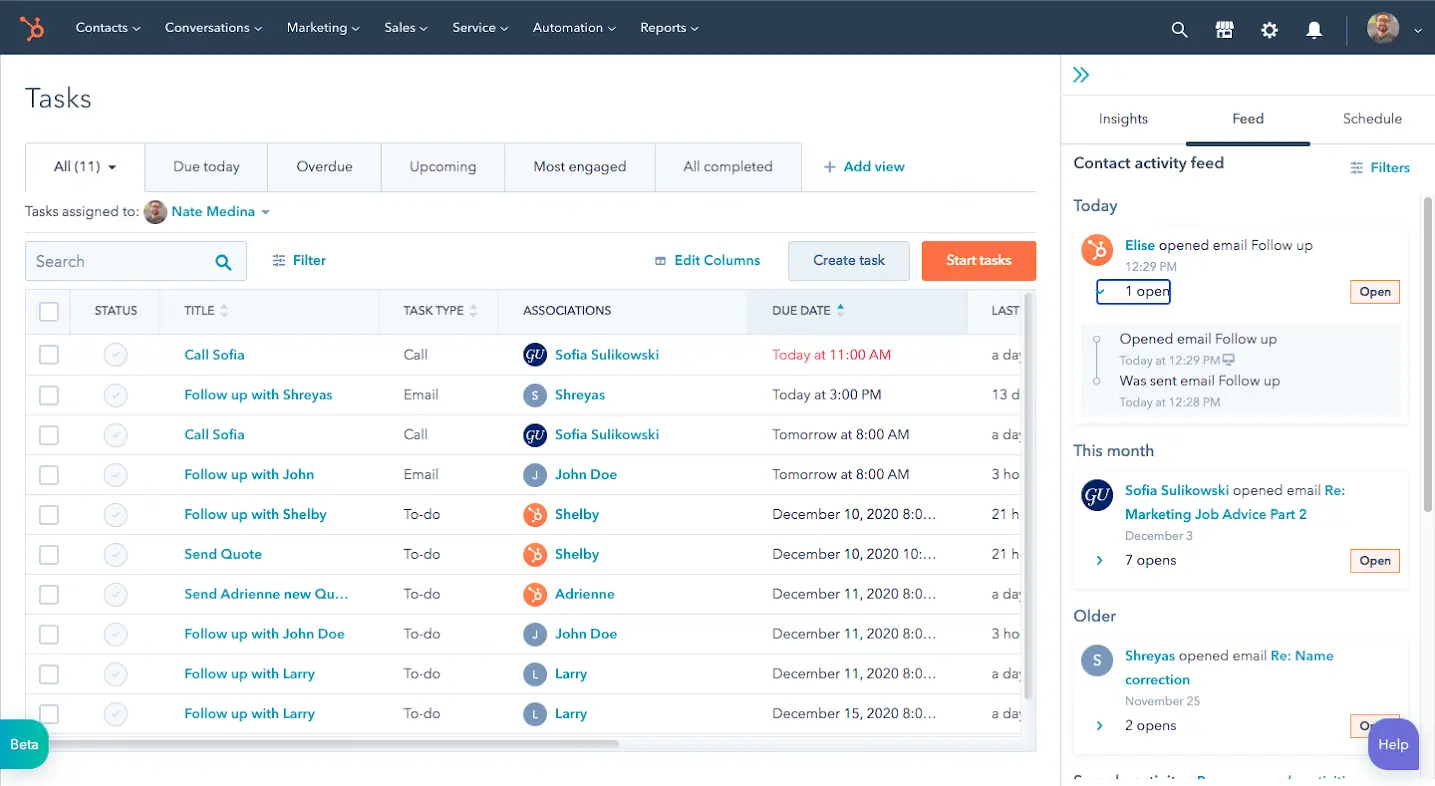
But you may want to explore alternatives if:
1. You're working with a limited budget
HubSpot starts affordable, but costs rise quickly as your contact lists grow and need advanced features. Many teams find themselves paying for more than they budgeted.
2. You only need a CRM, not the full suite
HubSpot is built to work best when you use marketing, sales, and service tools together. If you just need to manage leads and track deals, you're paying for features you won't use.
3. Setup and maintenance feel too complex
HubSpot is easy at first, but as workflows and automation grow, many teams struggle to manage them without technical help or extra training.
4. Reports don't give you the insights you need
Basic reporting works fine, but deeper analytics or custom reports usually require expensive plan upgrades.
5. Customization is limited
You can adjust HubSpot to some extent, but fitting it to your unique sales process often hits limits or requires upgrading to pricier tiers.
6. Integrations require workarounds
While HubSpot connects with many tools, certain workflows still need third-party connectors or paid add-ons to work smoothly.
What to look for in a HubSpot CRM alternative?
If you're looking for a HubSpot alternative, you don’t just want something cheaper. You want a CRM that’s easier to use, flexible enough to fit your workflow, and able to grow with your team.
Here are the key things to consider before making a move:
- Simple and predictable pricing: Choose tools with clear pricing that doesn’t suddenly increase as your team or contact list grows. This helps you avoid unexpected costs.
- Easy to set up and use: Your team should be able to start quickly without long training or complex setup. Look for simple onboarding, intuitive features, and ready-made templates.
- Strong core CRM features: The CRM should handle the basics well, including contact management, deal tracking, pipelines, and task follow-ups.
- Customization for your workflow: Every team sells differently. Pick a CRM that lets you adjust fields, pipelines, and workflows to match how you work.
- Connects with your existing tools: The CRM should integrate smoothly with your email, calendar, marketing tools, and other apps to reduce manual work.
- Automation that saves time: Look for features that automate follow-ups, lead assignment, and routine tasks so your team can focus on closing deals.
- Clear and useful reporting: You should be able to create reports that show performance and pipeline progress without paying extra just to get useful insights.
- A full view of each customer: The CRM should bring together contact details, conversations, deals, and activities in one place.
- Works beyond just sales: If you manage onboarding, invoicing, or customer success after closing deals, choose a CRM that supports the full customer journey.
- Scales smoothly as you grow: As your data and team expand, the CRM should stay fast and reliable without forcing costly upgrades.
1. Softr — best no-code HubSpot alternative for building a fully customizable CRM on top of your business data
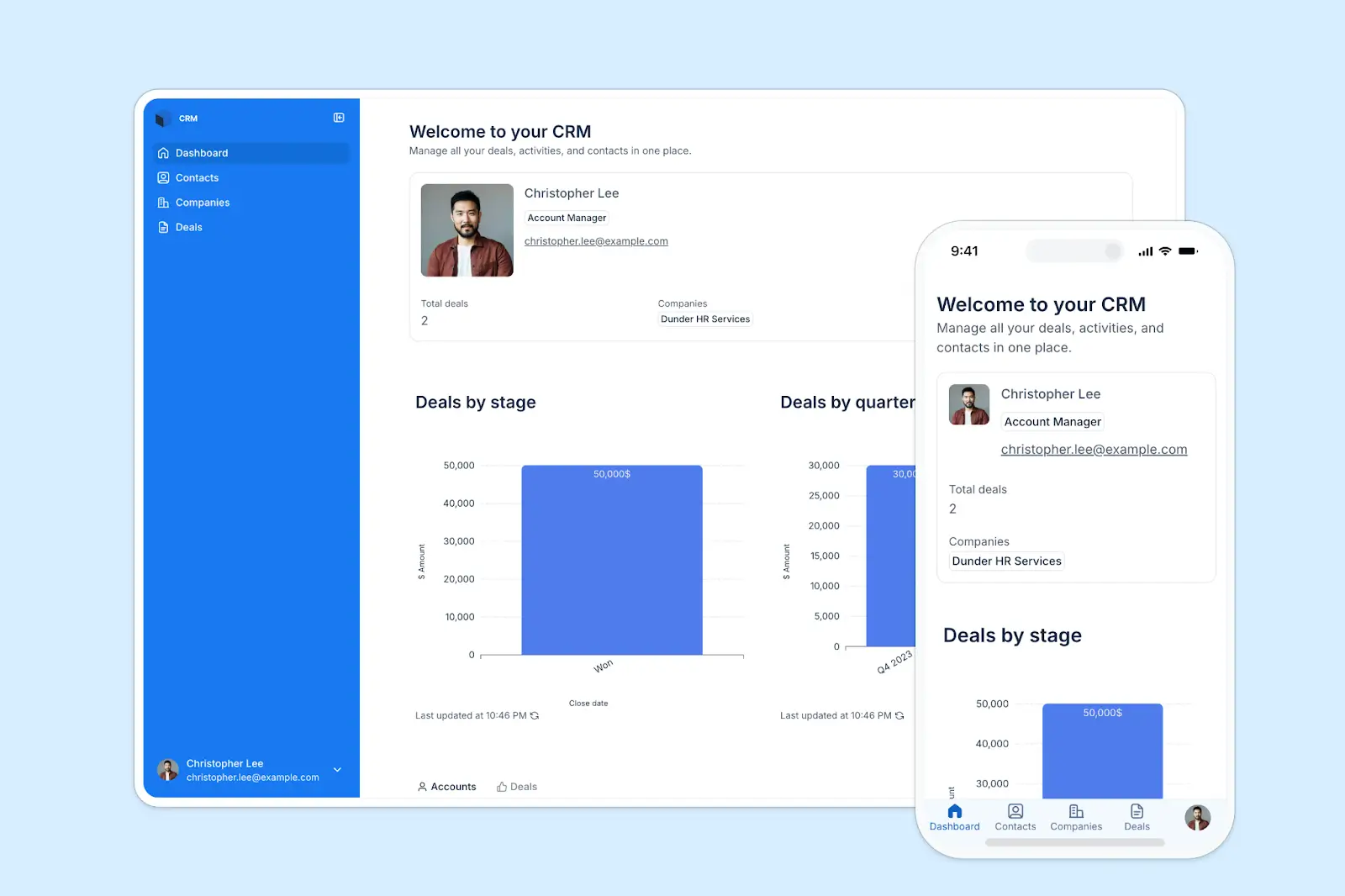
Softr is a no-code, AI app builder that lets you build custom apps on top of your real business data, wherever it lives, from Softr databases to other external tools like Google Sheets, Airtable, Notion, SQL databases, Coda, and even HubSpot.
Instead of forcing you into a fixed CRM setup, you can create a CRM based on how your team actually works. First, create relational databases with linked tables for all your CRM data, including contacts, companies, deals, and products. Then use Softr’s AI-co builder or the visual drag-and-drop builder to create interfaces and apps on top of that data so users can interact with it.
You can build CRM apps for lead capture and tracking, account and contact management, deal pipelines, and document handling—all connected to your existing data sources. Using forms, pipelines, and dashboards, teams can manage everything from quotes and invoices to customer requests and feedback, with the option to add client portals so customers can securely view documents or submit information.
Softr combines databases, workflows, permissions, and interfaces in one platform, so teams can trigger actions like assigning new leads to the right rep, sending follow-up emails when a deal moves stages, updating deal status after a form submission, or notifying sales managers when high-value opportunities are created.
Pros and cons of using Softr
Pros
- Use Softr Databases or connect to external data sources to store and manage CRM data directly in the platform.
- Build a fully custom CRM on top of your business data with an AI-co-builder, or use the intuitive drag-and-drop visual builder to further refine pages if you need to
- Turn your CRM data into operational tools like pipeline views, lead intake forms, project tracking, and inventory management.
- Flat, predictable pricing instead of per-seat or per-contact costs.
- Automate tasks like lead qualification and routing, follow-ups, updates, and notifications with Softr Workflows and AI agents.
- Set different access levels for team members, clients, and partners.
- Built-in chat assistant that helps users search CRM data and receive answers directly in your CRM without digging through database records.
Cons
- Built-in marketing automation requires connecting to other tools but this is solved with Softr Workflows to automate tasks between other apps.
Key Softr CRM features
- Flexible data connections: Connect your CRM to Google Sheets, Airtable, Notion, HubSpot data, SQL databases, or Softr's built-in database.
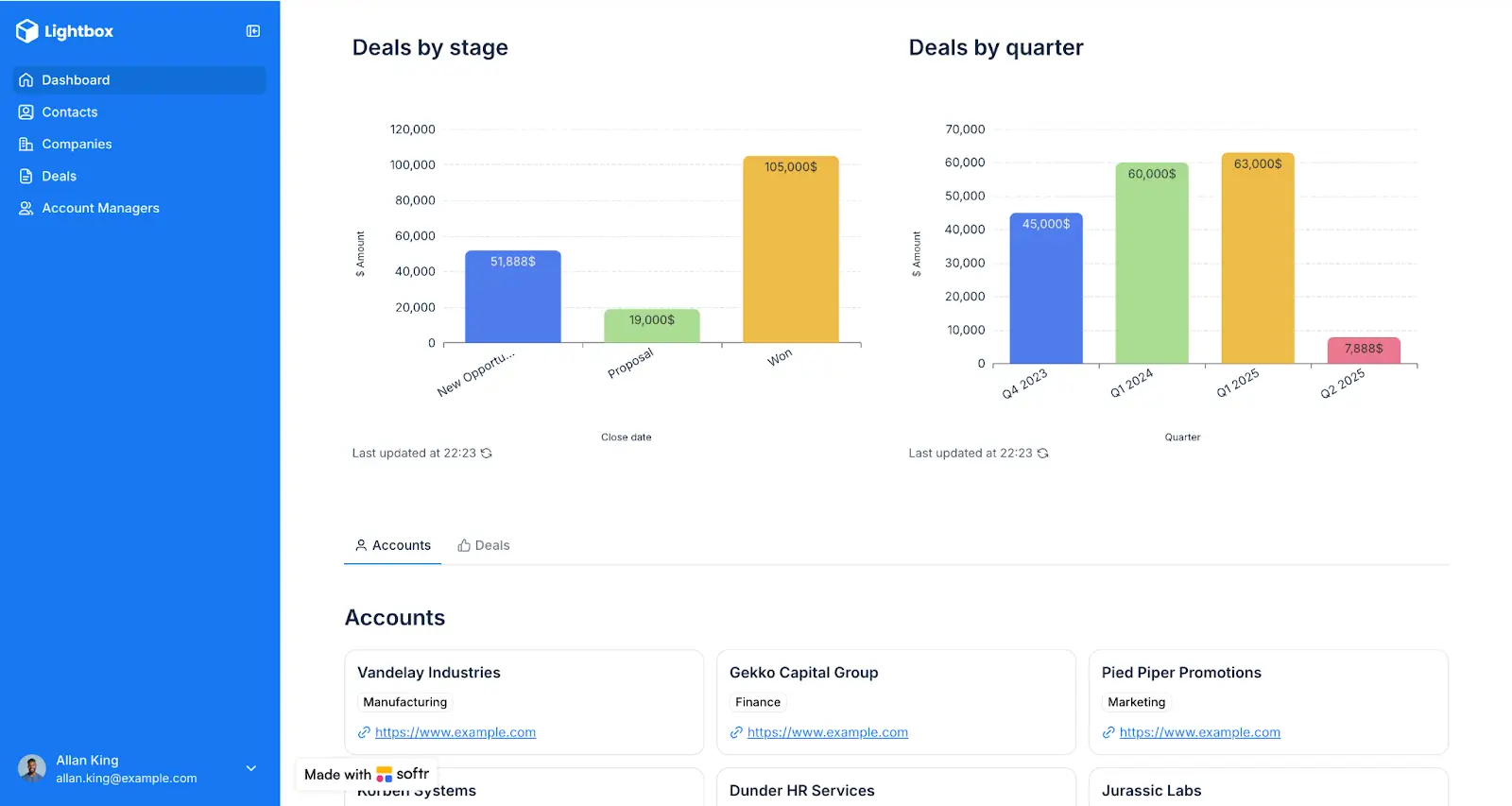
- Custom pipelines and views: Create deal stages, activity logs, and dashboards that match your sales process using the AI co-builder, then refine if you need to with a visual drag-and-drop builder.
- Advanced permissions: Customize who sees what, and which actions they can take, even at the most granular level.
- Forms and lead capture: Build smart forms with conditional logic to collect leads, support requests, or onboarding information.
- Dashboards and reporting: Track deals, performance, pipeline health, and operations in real time.
- Workflow automation: Automate follow-ups, lead routing, updates, and notifications to keep your sales pipeline running smoothly.
- AI-powered data queries: Let your team ask AI questions directly in your CRM and get instant answers from live customer and deal data — from pipeline status to account details.
Softr pricing
- Free: Unlimited apps, with access to Softr Workflows and Softr Databases, up to 5 app users, 5,000 records
- Basic ($19/month): Unlimited apps with 42+ integrations, Team: 5 + Client: 5 app users, 50,000 records
- Pro ($99/month): Unlimited apps with 45+ integrations and custom code, Team: 10 + Client: 50 app users, 500,000 records, comments
- Business ($329/month): Unlimited apps with 52+ integrations, Team: 30 + Client: 100 app users, 1 million records, two-factor authentication
- Enterprise: Custom pricing with SSO, support, and training
Who Softr is best for
- Small, mid-sized, and scaling teams that want flexibility without high costs
- Agencies, service businesses, B2B teams, and operations-focused companies
- Teams that want a CRM plus portals, databases, onboarding tools, and dashboards in one place
- Anyone tired of rigid CRM systems and rising subscription fees
Verdict: Softr vs HubSpot CRM
Choose Softr if you want a CRM that fits your team’s processes without developer help or per-seat pricing that punishes growth.
Unlike HubSpot's limited customization and rising costs, Softr gives you full control to create custom pipelines, automate workflows, and extend your CRM into client portals, onboarding systems, or operational dashboards. You connect your existing data sources (Google Sheets, Airtable, Notion, SQL, or HubSpot itself), design what you need with drag-and-drop tools and AI assistance, and pay flat monthly rates regardless of team size.
2. Pipedrive — best for simple sales tracking
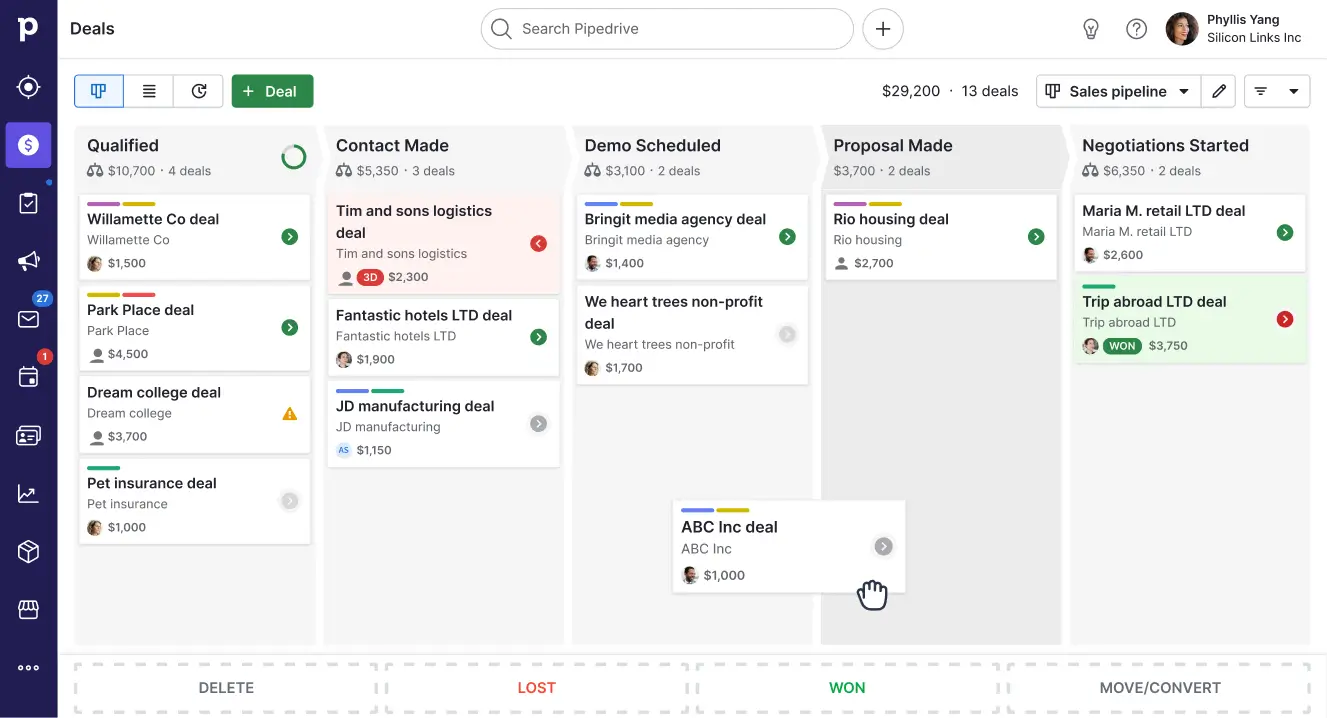
Pipedrive is a CRM built mainly for sales teams that want an easy way to manage leads, track deals, and stay on top of follow-ups.
Instead of offering a large all-in-one platform like HubSpot, Pipedrive keeps the focus on your sales pipeline. You can clearly see where every deal stands, move deals between stages, and organize daily activities in a simple, visual layout that’s easy to learn.
Pros and cons of using Pipedrive
Pros:
- Visual pipelines that make deal tracking clear and simple
- Built-in tools for follow-ups, reminders, and activity tracking
- Affordable starting plans for small teams
Cons:
- Many advanced features require higher plans or paid add-ons
- Limited built-in marketing and lead nurturing tools
- Customization options are more basic, and reporting can feel limited on lower plans
Key Pipedrive CRM features
- Visual sales pipelines: Track deals using drag-and-drop stages that show progress at a glance.
- Lead and contact management: Store customer details, notes, and communication history in one place.
- Activity and task tracking: Schedule calls, meetings, and reminders so nothing is missed.
- Email integration: Send and track emails directly inside the CRM.
- Basic automation: Automate simple actions like moving deals, assigning leads, and sending follow-ups.
- Sales reports and dashboards: View pipeline performance and deal progress with built-in reporting tools.
Pipedrive pricing
All prices shown billed annually.
- Lite: starts from $14 per user/month
- Growth: starts from $39 per user/month
- Premium: starts from $59 per user/month
- Ultimate: starts from $79 per user/month
Who Pipedrive is best for
- Small sales teams that want a simple CRM focused on deals and follow-ups
- Businesses that don’t need full marketing automation tools
- Teams looking for something easier and lighter than HubSpot
- Sales-driven companies with straightforward pipelines
Verdict: Pipedrive vs HubSpot CRM
Choose Pipedrive if you mainly need an easy-to-use CRM for managing deals and daily sales activities. HubSpot offers more tools across marketing and automation, but for small teams focused on sales pipelines, Pipedrive is a simpler, faster, and cheaper alternative to HubSpot.
3. Zoho CRM — best for customization and automation on a budget
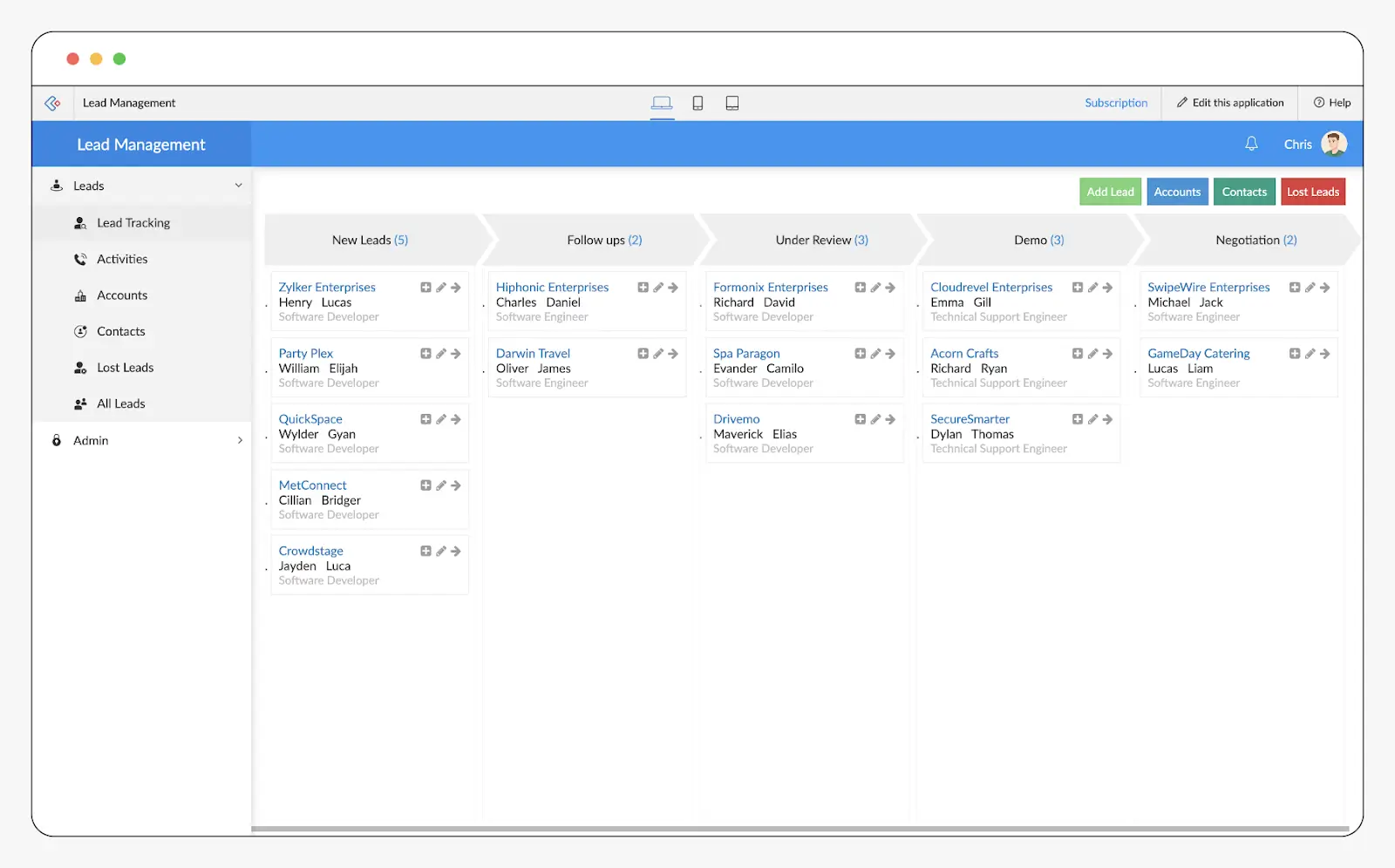
Zoho CRM is a flexible and affordable CRM built for small and mid-sized teams that want more control over how their sales system works.
Unlike HubSpot, Zoho gives you deeper customization and automation tools. You can adjust fields, workflows, and pipelines to match your exact sales process and communicate with leads across email, phone, SMS, and even WhatsApp, all from one place.
Pros and cons of using Zoho CRM
Pros:
- More affordable than HubSpot for growing teams
- Deep customization for fields, pipelines, and workflows
- Strong automation tools for sales processes
- Built-in multi-channel communication (email, phone, SMS, WhatsApp)
- Good reporting and analytics options
Cons:
- Interface can feel more complex than HubSpot or Pipedrive
- Takes more time to learn and set up properly
- Customer support may require higher plans for faster help
Key Zoho CRM features
- Custom pipelines and fields: Design your CRM to match how your sales team works
- Lead and contact management: Store customer information, interactions, and deal history in one place
- Sales automation: Automate follow-ups, lead assignments, task creation, and deal updates
- Multi-channel communication: Reach leads through email, calls, SMS, and WhatsApp directly in the CRM
- Reports and dashboards: Track sales performance, pipeline progress, and team activity
- AI-powered insights: Get predictions and suggestions to help prioritize leads and deals
Zoho CRM pricing
Zoho CRM has a free plan for up to 3 users and offers a 15-day free trial on all paid tiers:
All prices shown billed annually.
- Standard: starts from $14 per user/month
- Professional: starts from $23 per user/month
- Enterprise: starts from $40 per user/month
- Ultimate: starts from $52 per user/month
Who Zoho CRM is best for
- Small and mid-sized teams looking for an affordable CRM
- Businesses that want deep customization and automation
- Sales teams that use multiple communication channels
- Teams planning to scale without high CRM costs
Verdict: Zoho CRM vs HubSpot CRM
Choose Zoho CRM if you want a budget-friendly CRM with strong customization and automation tools. HubSpot is easier to use and better for all-in-one marketing, but Zoho CRM is a better fit for teams that want flexibility, advanced workflows, and lower costs as they grow.
4. Salesflare — best for simple, automated sales workflows
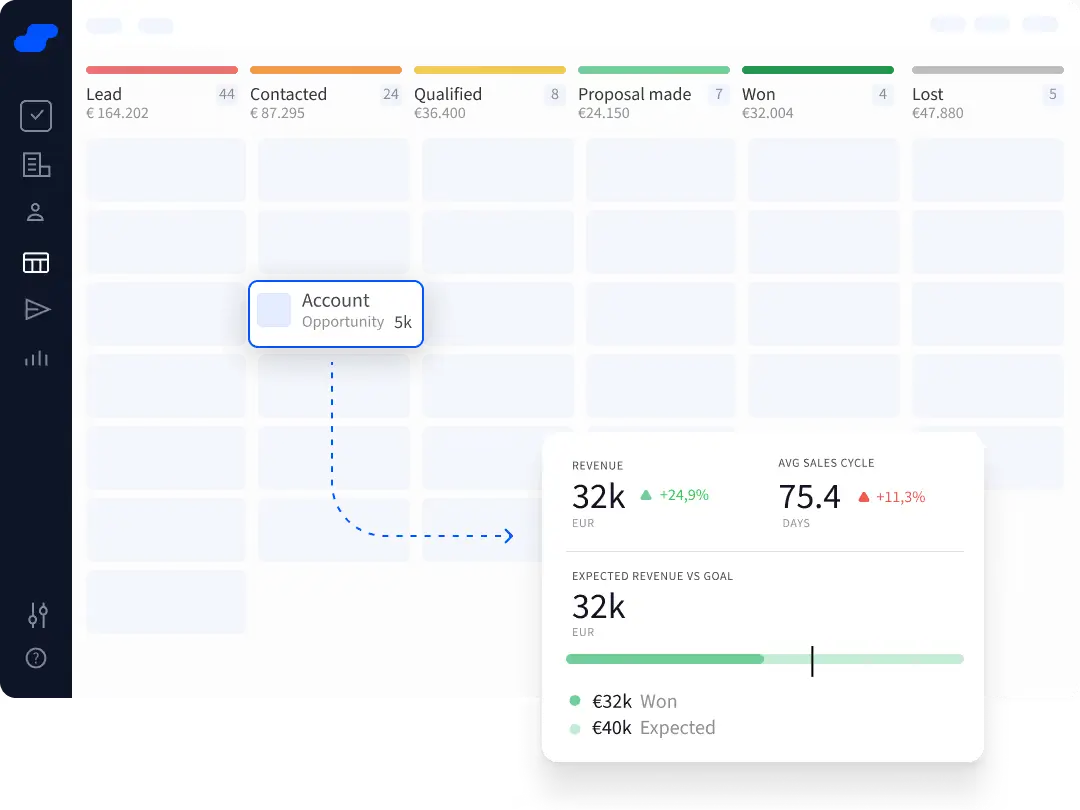
Salesflare is a CRM built to save time by automating the busy work that slows down small sales teams. Instead of manually entering contact details, logging emails, or updating deal stages, Salesflare pulls information in automatically from email, calendars, and company profiles.
Pros and cons of using Salesflare
Pros
- Automatic data capture from email and calendar
- Simple and easy CRM for small sales teams
- Clean contact and activity timelines make follow-ups clearer
- Smart reminders and suggested tasks help keep deals moving
- Integrates with email, calendar, and common sales tools
Cons
- Not built for complex custom workflows or deep automation
- Limited native marketing automation compared with HubSpot
- Pricing can feel steep for very small teams with basic needs
Key Salesflare CRM features
- Automatic contact and activity syncing: Logs emails, meetings, and notes automatically without manual entry
- Deal tracking: See which stage each opportunity is in and what actions are next
- Smart reminders and suggestions: Salesflare nudges you on when to follow up and what matters most
- Integrations with email and calendar: Sync with your inbox and calendar so records stay up to date
- Simple dashboards: Basic views that show pipeline health and activity at a glance
Salesflare pricing
All prices shown billed annually.
- Growth: starts from $29 per user/month
- Pro: starts from $49 per user/month
- Enterprise: starts from $99 per user/month (billed annually, minimum 5 users)
Who Salesflare is best for
- Small sales teams that want to eliminate manual CRM work
- Businesses that rely heavily on email and calendar activity
- Teams that want a simple, intuitive CRM experience
- Organizations that value automation over deep configuration
Verdict: Salesflare vs HubSpot CRM
Choose Salesflare if your team wants a CRM that does the heavy lifting for you—automatically capturing data and suggesting next steps—so you can focus on selling instead of logging information. HubSpot still offers more tools for marketing, reporting, and deep customization, but for lean sales teams that want speed and simplicity, Salesflare is a capable and easy option.
5. ActiveCampaign — best for email marketing and advanced automation
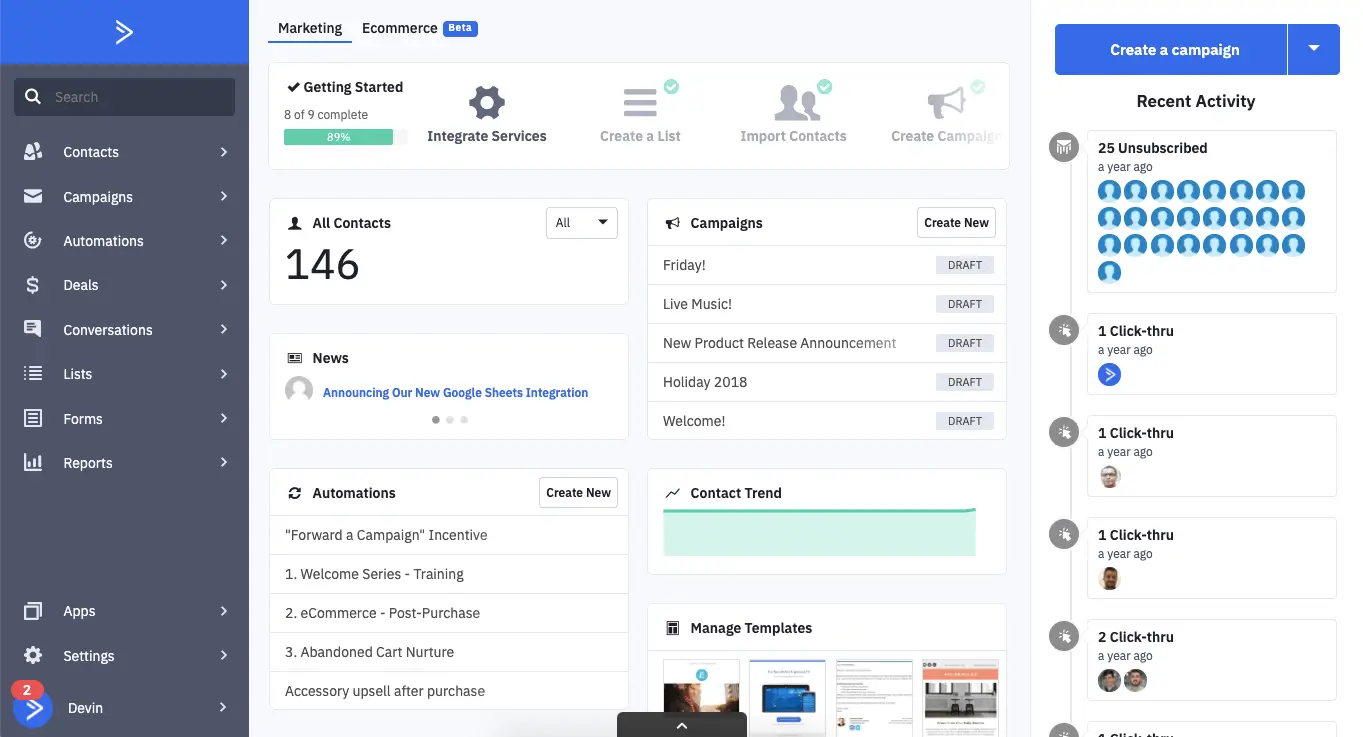
ActiveCampaign is best known for its powerful email marketing and automation tools, with basic CRM features built in to help teams manage leads and deals. Its strength come from personalized email campaigns and smart automation.
You can create detailed workflows based on how contacts behave, such as opening emails, visiting pages, or making purchases. It’s a great option if you mainly care about email marketing and automation rather than a full CRM system.
Pros and cons of using ActiveCampaign
Pros
- Very strong email marketing tools
- Advanced automation workflows for personalized follow-ups
- Good lead scoring and segmentation
- More affordable than HubSpot for small teams
- Popular with ecommerce and marketing-focused businesses
Cons
- CRM features are more basic compared to HubSpot
- Can take time to learn because of powerful automation options
- Reporting is not as deep as HubSpot’s
Key ActiveCampaign features
- Email marketing campaigns: Create and send personalized emails to different audience segments.
- Advanced automation workflows: Build smart sequences based on user actions and behavior.
- Lead scoring: Automatically rank leads based on engagement and activity.
- Basic CRM and deal tracking: Manage contacts, deals, and simple sales pipelines.
- Segmentation and personalization: Target contacts based on interests, actions, and data.
- Integrations: Connect with ecommerce platforms, websites, and other tools.
ActiveCampaign pricing
There’s no free plan, but you get a 14-day free trial.
- Starter: starts from $15/month
- Plus: starts from $49/month
- Professional: starts from $79/month
- Enterprise: starts from $145/month
Who ActiveCampaign is best for
- Small and mid-sized businesses focused on email marketing
- Teams that want powerful automation on a budget
- Ecommerce businesses needing strong email integration
- Marketers who don’t need a full CRM system
Verdict: ActiveCampaign vs HubSpot CRM
Choose ActiveCampaign if email marketing and automation are your top priorities and you want a more affordable option. HubSpot is better if you need a complete system for marketing, sales, service, and reporting. But for businesses focused on personalized campaigns and smart workflows, ActiveCampaign is a strong and cost-effective alternative.
6. monday Sales CRM — best for visual workflows and combining sales with project management
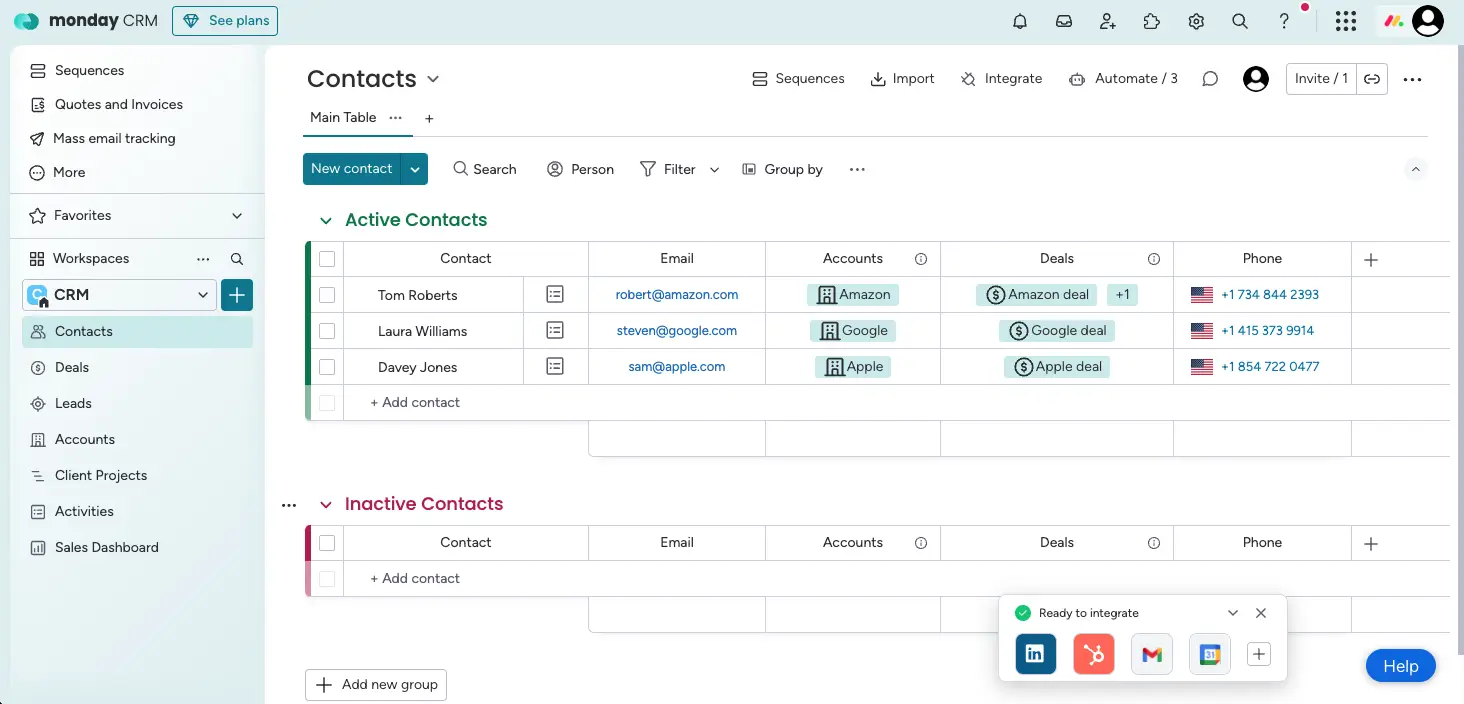
monday Sales CRM is a flexible and highly visual CRM built for teams that want to manage sales while also keeping track of tasks, projects, and internal workflows in one place.
You can use boards to track deals, contacts, activities, and projects side by side, making it easy to see progress at a glance and connect sales work with day-to-day operations.
Pros and cons of using monday Sales CRM
Pros
- Easy to use with a clean, visual interface
- Highly customizable boards, pipelines, and workflows
- Strong automation tools to reduce manual work
- Combines CRM with task and project management
- Generally more affordable than HubSpot for small teams
Cons
- Not as strong for built-in marketing automation as HubSpot
- Can feel busy if too many boards and automations are added
- Advanced features require higher plans
Key monday Sales CRM features
- Visual pipelines and boards: Track deals and leads using customizable boards and stages
- Contact and deal management: Store customer details, notes, and activity history in one place
- Workflow automation: Automate updates, assignments, reminders, and status changes
- Dashboards and reporting: Build visual dashboards to monitor sales performance and progress
- Project and task tracking: Connect sales work with delivery tasks, onboarding, or internal projects
- AI-powered tools: Use AI for writing, automations, and sales assistance
monday CRM pricing
All prices shown billed annually.
- Basic: from $12 per user/month
- Standard: from $17 per user/month
- Pro: from $28 per user/month
- Ultimate (Enterprise): Custom pricing
Who monday CRM is best for
- Small and mid-sized teams that want an easy-to-use CRM
- Businesses that want to connect sales with projects and tasks
- Teams that value visual workflows and automation
- Companies looking for a flexible and affordable HubSpot alternative
Verdict: monday CRM vs HubSpot CRM
Choose monday CRM if you want a simple, visual CRM that connects sales with daily work and offers strong customization and automation at a lower cost. HubSpot is better for deep marketing automation and all-in-one revenue tools, but monday CRM is a better fit for teams focused on efficiency, flexibility, and ease of use.
7. Freshsales — best for affordable, AI-powered sales management
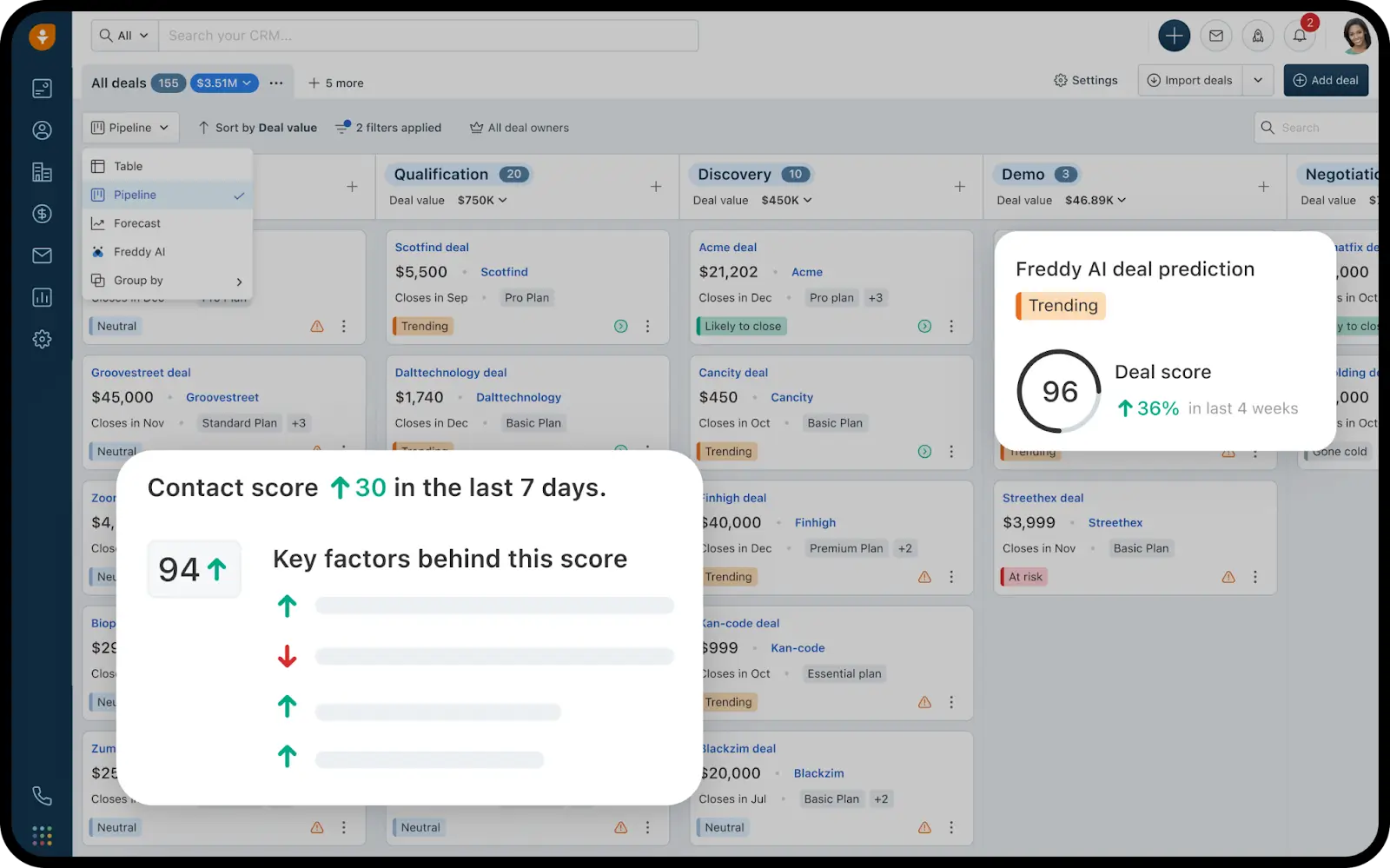
Freshsales (Freshworks CRM) is a sales-focused CRM built for growing teams that want something easy to use, affordable, and powered by AI to help close deals faster.
It comes with built-in calling, email, live chat, automation, and Freddy AI to help prioritize leads and predict deal outcomes. Many teams choose it because it feels simpler than HubSpot and costs much less as they scale.
Pros and cons of using Freshsales
Pros
- Built-in phone, email, and live chat tools
- AI that helps with lead scoring and deal insights
- Good customization for pipelines and workflows
- Strong customer support and onboarding
Cons
- Marketing automation is limited compared to HubSpot
- Best suited for sales teams, not full revenue operations
- Advanced features require higher plans
Key Freshsales CRM features
- Visual pipelines and Kanban boards: Track deals and leads in clear, easy-to-manage stages
- Built-in communication tools: Call, email, and chat with customers directly from the CRM
- AI-powered insights (Freddy AI): Score leads, predict deal success, and get smart recommendations
- Workflow automation: Automate follow-ups, lead assignments, and updates
- Custom fields and pipelines: Adjust the CRM to match your sales process
- Reports and dashboards: Monitor sales performance and pipeline health
Freshsales pricing
Freshsales offers a free plan and 21-day free trial for paid plans:
- Free: up to 3 users
- Growth: from €9 per user/month
- Pro: from €39 per user/month.
- Enterprise: from €59 per user/month
Who Freshsales is best for
- Small and mid-sized sales teams
- Businesses that want AI help without high CRM costs
- Teams that rely on calling, email, and chat to close deals
- Companies looking for a simple, sales-first CRM
Verdict: Freshsales vs HubSpot CRM
Choose Freshsales if you want an easy-to-use, AI-powered CRM focused on sales at a much lower cost. HubSpot is better for full marketing automation and all-in-one revenue tools, but for teams that mainly want strong sales features with smart automation, Freshsales offers better value and simplicity.
8. GoHighLevel — best for agencies and all-in-one marketing automation
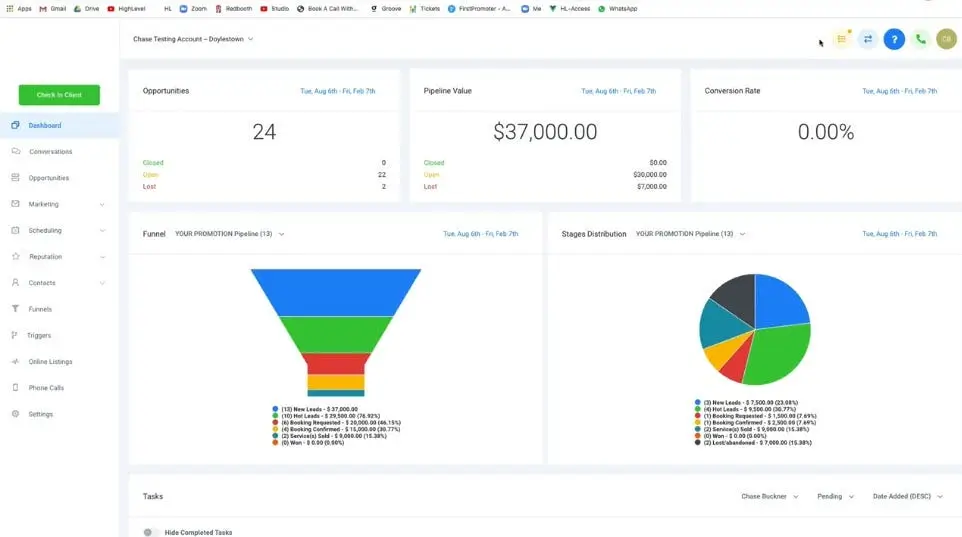
GoHighLevel is an all-in-one CRM and marketing automation platform built mainly for agencies, consultants, and service-based businesses.
It includes a CRM, funnels, email and SMS marketing, automation, and even AI tools. Many small businesses and agencies choose it because it offers unlimited contacts and flat pricing, which makes it much cheaper as you grow or manage multiple clients.
Pros and cons of using GoHighLevel
Pros
- All-in-one platform for CRM, funnels, email, SMS, and automation
- Flat pricing with unlimited contacts and users
- Great for managing multiple clients or businesses
- Strong automation for marketing and follow-ups
- White-label option for agencies to resell the platform
Cons
- Steeper learning curve than HubSpot and simpler CRMs
- Interface can feel overwhelming at first
- Reporting is not as advanced as HubSpot’s
Key GoHighLevel features
- Built-in CRM: Manage contacts, deals, and client accounts in one place
- Funnels and landing pages: Create sales funnels and lead capture pages without extra tools
- Email and SMS marketing: Run campaigns and follow-ups directly from the platform
- Automation workflows: Automate lead nurturing, booking, and communication
- White-label options: Brand the platform as your own software if you run an agency.
- Multi-account management: Manage several clients or businesses from one dashboard
GoHighLevel pricing
- Starter: $97/month
- Unlimited: $297/month
- Agency Pro: $497/month
- Enterprise: Custom pricing
Who GoHighLevel is best for
- Marketing agencies and consultants
- Businesses running lots of automation and campaigns
- Teams managing multiple clients or brands
- Companies wanting an all-in-one system at a fixed cost
Verdict: GoHighLevel vs HubSpot CRM
Choose GoHighLevel if you want a single platform for CRM, marketing automation, funnels, and client management at a predictable price. HubSpot is better for large teams that need advanced reporting, content management, and a very polished interface. But for agencies and small businesses focused on automation and cost savings, GoHighLevel is the more practical option.
Invest in the right Hubspot alternative for your team
Finding the best HubSpot alternative depends on your daily needs. For simple deal tracking and follow-ups, Pipedrive or Salesflare work well. But for deeper automation, customization, and better long-term pricing, options like Zoho CRM, Freshsales, and Softr stand out.
If your sales process connects closely with onboarding, operations, client management, or internal tools, having a flexible platform can save you from juggling multiple subscriptions. Using Softr, you can build a fully customizable CRM around your existing data, automate workflows, and even extend it into portals, onboarding tools, and internal systems all in one place. And as your business grows, Softr grows with you, without rising per-seat costs or complex setups.
Ready to build a CRM that actually fits your workflow? Start for free with Softr's sales CRM template and see how easy it is to create a system that grows with your business.
Frequently asked questions
What's the top CRM alternative to HubSpot?
Which CRM is best for beginners?
What CRM is best for small business?
Is HubSpot good for a small business?
Is there a free alternative to HubSpot CRM?