
Customer relationship management software (CRM) can be a crucial investment for law firms operating in an industry where personalized service and data privacy are critical elements to long-term success. But the right law firm CRM isn't just a database for managing contacts; it also has to be very good at case and matter management, offer robust data security, comply with legal standards, and integrate seamlessly with existing legal software.
In this guide, we'll review the 8 best CRM software for law firms in 2026, plus what to look for if you'd rather build one tailored to how your firm actually works.
Top CRM software for law firms
Before we explore each CRM in detail, here’s a brief comparison to help you get familiar with these solutions. We've compared eight leading legal CRMs to make your decision easier, highlighting their standout features and pricing.
| CRM Software | Best For | Key Features | Pricing Starts At | Security |
|---|---|---|---|---|
| Softr | No-code customization | Native database, AI Co-Builder, role-based access, 21+ integrations | Free, paid from $19/mo | GDPR compliant, AWS hosting, 256-bit TLS encryption |
| InterAction+ | Client relationship management & insights | Deep client insights, pipeline management, cloud access | Contact for pricing | Role-based access, GDPR compliant, cloud or hybrid hosting |
| Lawmatics | Client intake & marketing automation | Centralized client data, intake automation, lead scoring | Contact for pricing | 256-bit encryption, AWS hosting, role-based access |
| Law Ruler | Automation & client intake | Contact management, document automation, marketing tools | Contact for pricing | AES 256-bit encryption, Azure hosting, role-based access |
| Clio Grow | Comprehensive legal management | Case management, billing, document storage, 200+ integrations | $39/mo per user | 256-bit encryption, SOC 2 certified, GDPR & HIPAA compliant |
| PracticePanther | Affordable case management | Case tracking, billing, client portal, integrations (QuickBooks) | $49/mo per user | 256-bit encryption, IP restrictions, two-factor authentication |
| MyCase | All-in-one practice management | Case management, time tracking, billing, client portal | $39/mo per user | 256-bit encryption, role-based access, GDPR & SOC 2 compliant |
| AbacusLaw | Case management & billing | Case tracking, billing, calendaring, document automation | $69/mo per user | 256-bit encryption, self-hosted or cloud, role-based permissions |
What is legal CRM software?
Legal CRM software helps law firms effectively manage their client relationships. It centralizes and streamlines a law firm's operations, from client intake to case management and billing.
Unlike generic CRM systems, legal CRM software is customized for the workflows and needs of law firms. It focuses on managing client relationships, improving communication, automating administrative tasks, and enhancing overall client service.
Why use legal CRM software?
Legal CRM software helps law firms manage and grow their practices more effectively by automating tasks, organizing client data, and improving communication.
In the Thomson Reuters Large Law Firm Technology Survey, the majority of participants found value in Client Relationship Management (CRM) and Enterprise Relationship Management (ERM) tools: 45% considered them "extremely valuable" or "very valuable," while another 45% found them "somewhat valuable."
Here are a few of the benefits:
- Improve efficiency: Streamline workflows, reduce manual tasks, and increase productivity.
- Enhance client service: Provide better communication, tracking of case progress, and personalized service.
- Better organization: Centralizes information, making it easier to find and manage.
- Data security: Protect sensitive client data with robust network security measures.
- Improve billing and financial management: Accurately tracks time, generates invoices, and manages payments.
Related resource: Best client portal software for law firms and lawyers
What features should a legal CRM solution have?
- Client intake & lead management: Streamline the intake process for new clients by automating forms, follow-ups, and communications while also tracking potential leads.
- Task & workflow automation: Automates repetitive tasks like appointment scheduling, reminders, and follow-up emails, freeing attorneys to focus on higher-value work.
- Client management: Stores and organizes client information, including contact details, case history, and preferences.
- Case management: Tracks the progress of legal cases, sets deadlines, and assigns tasks to team members.
- Document management: Stores and manages legal documents, ensuring easy access and organization.
- Access controls: Restricts access to data based on user roles and permissions.
- Time tracking: Accurately records time spent on different tasks to facilitate billing and productivity analysis.
- Billing and invoicing: Creates and sends invoices to clients, tracks payments, and manages trust accounts.
- Client communication: Provides tools for communication with clients and colleagues through email, phone, and other channels.
- Data encryption: Protects sensitive client data with strong encryption.
- Compliance with legal standards: Ensures compliance with data privacy regulations like GDPR and HIPAA.
- Reporting & analytics: Get insights into firm performance, client interactions, and case progress through dashboards and reports.
- Marketing and lead generation: Helps law firms attract new clients through marketing campaigns and lead management.
The legal industry has specific needs when it comes to managing clients and cases. That’s why we’ve reviewed the best CRM platforms designed for law firms, giving you a head start in finding the ideal fit for your practice.
1. Softr

Softr's app builder is easy to tailor to the unique needs of legal service providers
G2 rating: 4.8/5
Capterra rating: 4.7/5
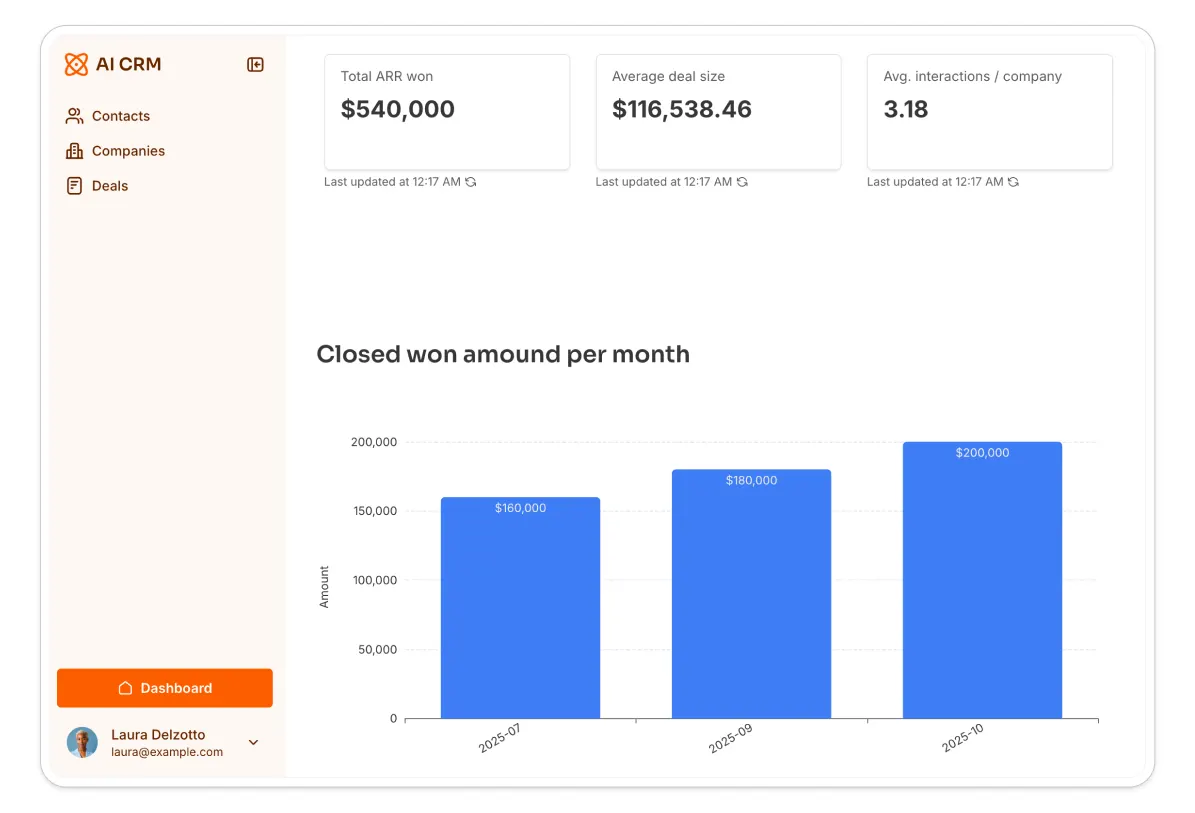
Softr is an AI app builder that enables legal professionals to create a custom CRM tailored to their firm's workflows and client management needs, built on a full-stack platform that combines an interface builder, a native database, and Softr Workflows for automation. With Softr, legal teams can build an agile CRM that evolves with the firm's changing requirements, without hiring custom developers or settling for an out-of-the-box CRM that's too rigid or too complex.
Describe the CRM you need to the AI Co-Builder and it generates a working database, pages, and permissions in minutes, or start from a legal case management template and customize it visually from there. Either way, you end up managing communication and legal documents, tracking case progress, and improving how you work with clients and partners, all in one app built around your firm's actual process.

Track cases, pending tasks, and interactions with each client and partner with Softr's legal CRM
Whether you need to manage legal documents, track case progress, or improve communication with your clients and partners, Softr's CRM offers a comprehensive solution for more strategic client relationship management.
Features
- Native database, plus 21+ integrations: Build on Softr Databases, Softr's native relational database, or connect to your existing data sources, including Airtable, Google Sheets, and HubSpot, to consolidate your contacts and deals in one user-friendly CRM.
- Modern building blocks: Make it easy for users to visualize and interact with customer data and deal flow with modern building blocks: Lists, Kanban, Charts, Forms, Inbox, and more. For anything a pre-built block can't handle, the Vibe Coding block generates a custom UI component from a plain-language description, so a unique intake form or matter timeline doesn't require a developer.
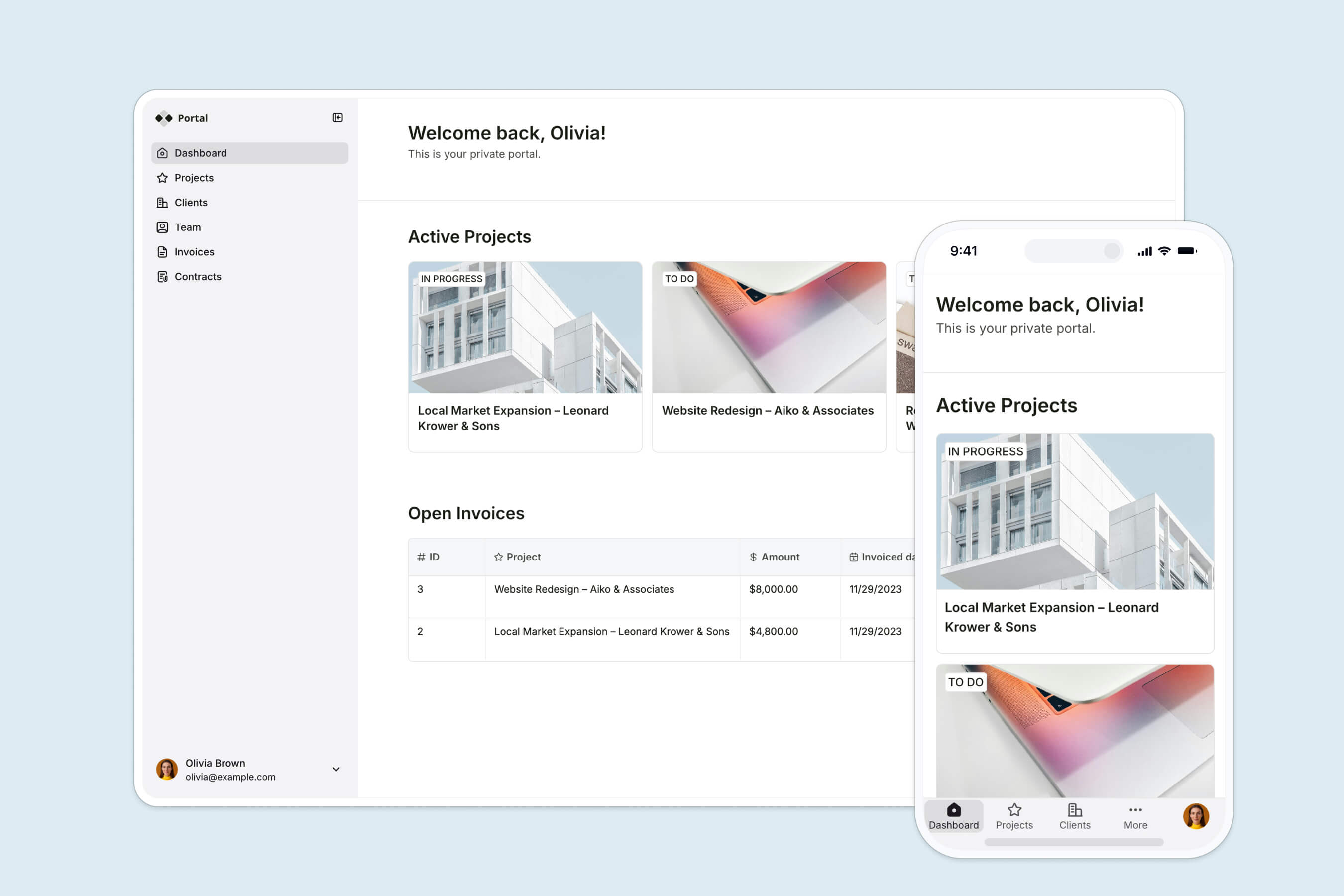
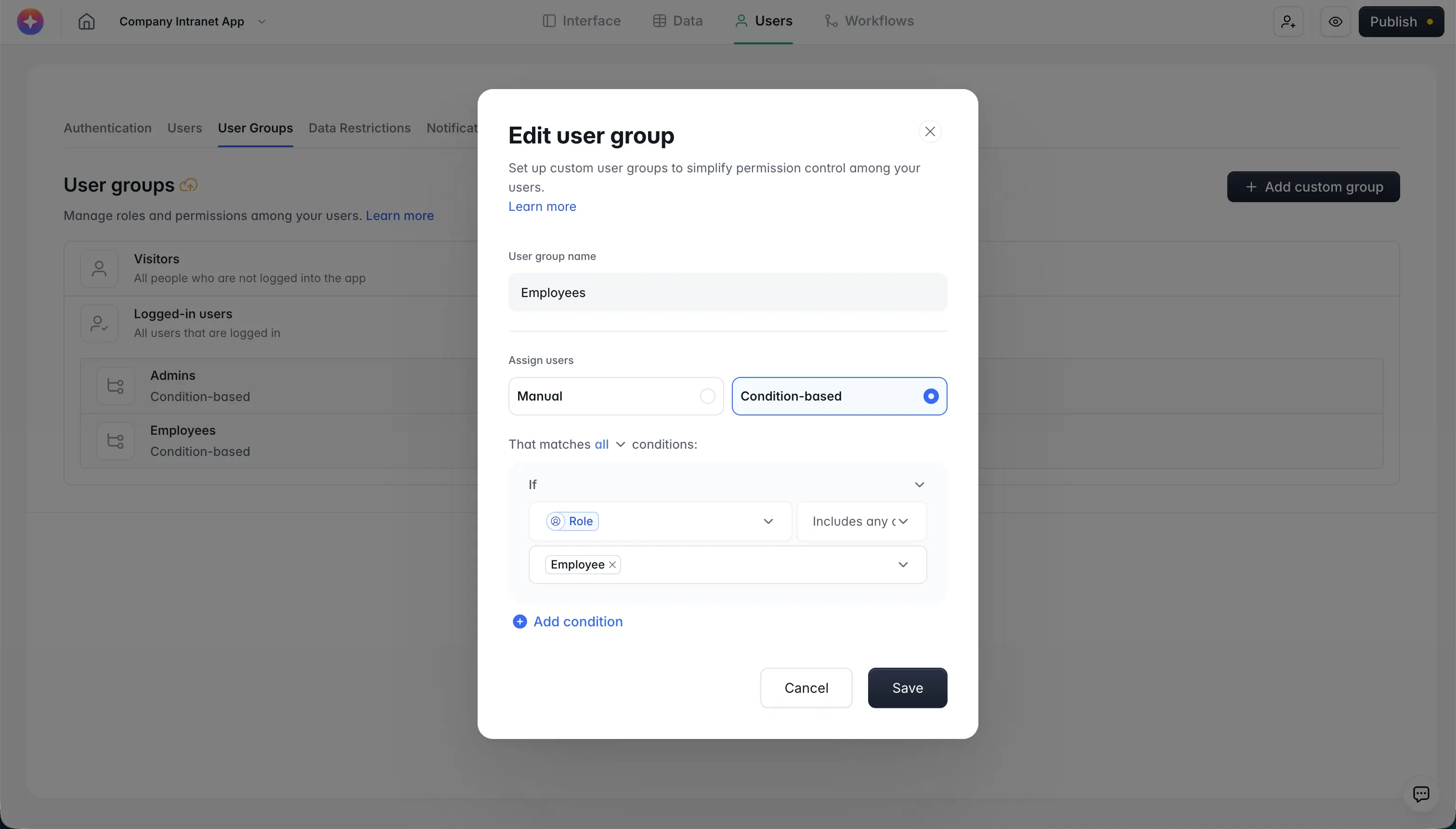
- Advanced permissions: Tailor CRM views and access for different user groups and permissions, ensuring each team member and client sees and edits only what they need for their role. Permissions are enforced on the backend, not just hidden in the interface.
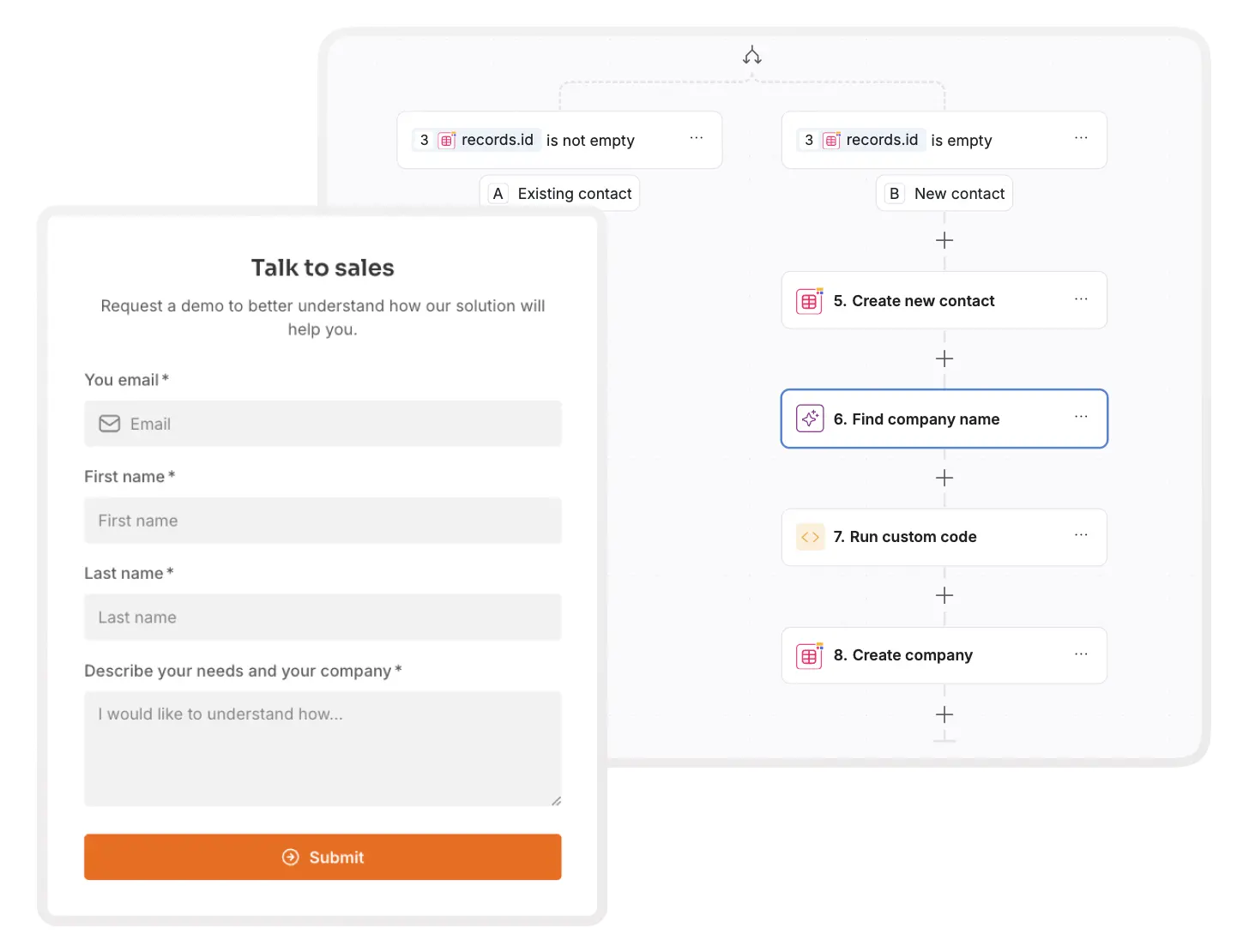
- Built-in conditional forms: Capture lead information, help desk requests, feedback, and more, no third-party tools required.
- Branding features like custom domain, form fields, styling, and native workflow automation to trigger actions when a matter status changes or a new lead comes in.
- Template library: Describe your CRM to the AI Co-Builder and it builds the database and interface for you, or start from our legal case management template (or customize a sales CRM template). We even have this step-by-step video to guide the process.
Pros
- No-code customization: Legal professionals can build and customize their CRM on top of existing data, without coding skills, and tailor it to specific workflows.
- AI Co-Builder: Describe your CRM in plain language and the AI generates the database, pages, and permissions for you, then keep editing manually whenever you want precision.
- User-friendly interface: Intuitive drag-and-drop design makes it accessible for non-technical users, reducing the learning curve.
- Flexibility and scalability: Easily adapts to the evolving needs of law firms, with features that can scale as the firm grows.
- Role-based access: Offers robust security with customizable, backend-enforced access levels, ensuring sensitive information is protected and only accessible to authorized users.
Cons
- Potential learning curve: Despite its ease of use, non-technical users might still need time to explore Softr's features and integrations.
Ease of use
Softr's drag-and-drop interface and pre-built templates make it easy for legal professionals to customize their law firm CRM without technical expertise. Easily add, remove, or modify elements, making the process of building and customizing less daunting. Extensive resources, including Softr Universe (a massive collection of community-made templates) and Softr Academy (tutorials and guides), further simplify the process.
"It was intuitive to figure out. I was able to get a fully functional client portal working in a week with minimal prior coding experience. There were not many good CRM options for our industry, except for one that cost thousands of dollars a month. Instead, I used Softr to build our own CRM that rivals the expensive ones. I do not pay for features I will not use." - Verified User, Construction (Small-Business), G2 review
Security

Powered by AWS, Softr uses server-side authentication to protect your client data.
As a German company, Softr takes data security and privacy seriously.
- Softr aligns with EU data protection standards, using AWS for secure data storage and 256-bit TLS encryption for data transmission.
- User groups and permissions, compliant with GDPR, ensure sensitive legal data is protected and enforced at the data layer, not just hidden in the UI.
- Softr is SOC 2 Type II compliant, and its data center in Germany runs 24-hour operations with enterprise-grade security, providing an additional layer of assurance.
"The Softr difference is that permissions live in a visible panel, not in generated code. Visual schemas make it simple to verify block-level visibility configurations in a visual editor rather than auditing a black box of generated code." - Artur Mkrtchyan, CTO and Co-founder of Softr
Pricing
- Free plan ($0/month): Unlimited apps and forms for up to 3 builders, with access to Softr Workflows and Softr Databases, 5 app users, 5,000 database records, and 5 AI credits.
- Basic plan ($19/month): Unlimited apps with 42+ integrations, Team: 5 + Client: 5 app users, 50,000 database records, and 10 AI credits per month.
- Pro plan ($99/month): Unlimited apps with 45+ integrations and custom code, Team: 10 + Client: 50 app users, 500,000 database records, 50 AI credits, comments, and custom user groups. Ideal for internal tools and client portals.
- Business plan ($329/month): Unlimited apps with 52+ integrations, Team: 30 + Client: 100 app users, 1 million database records, 100 AI credits, two-factor authentication, an installable mobile app, and custom user groups (up to 10).
- Enterprise plan: Everything in Business, plus custom limits, SSO, advanced security, and dedicated support for large firms.
"Easy to learn/understand, using blocks to build a website. I love that it connects to Airtable, which I use for all internal CRM tracking. Softr makes it super easy! The team is also incredibly responsive, so if you ever have a question, you can reach out and they will support you."
2. InterAction+
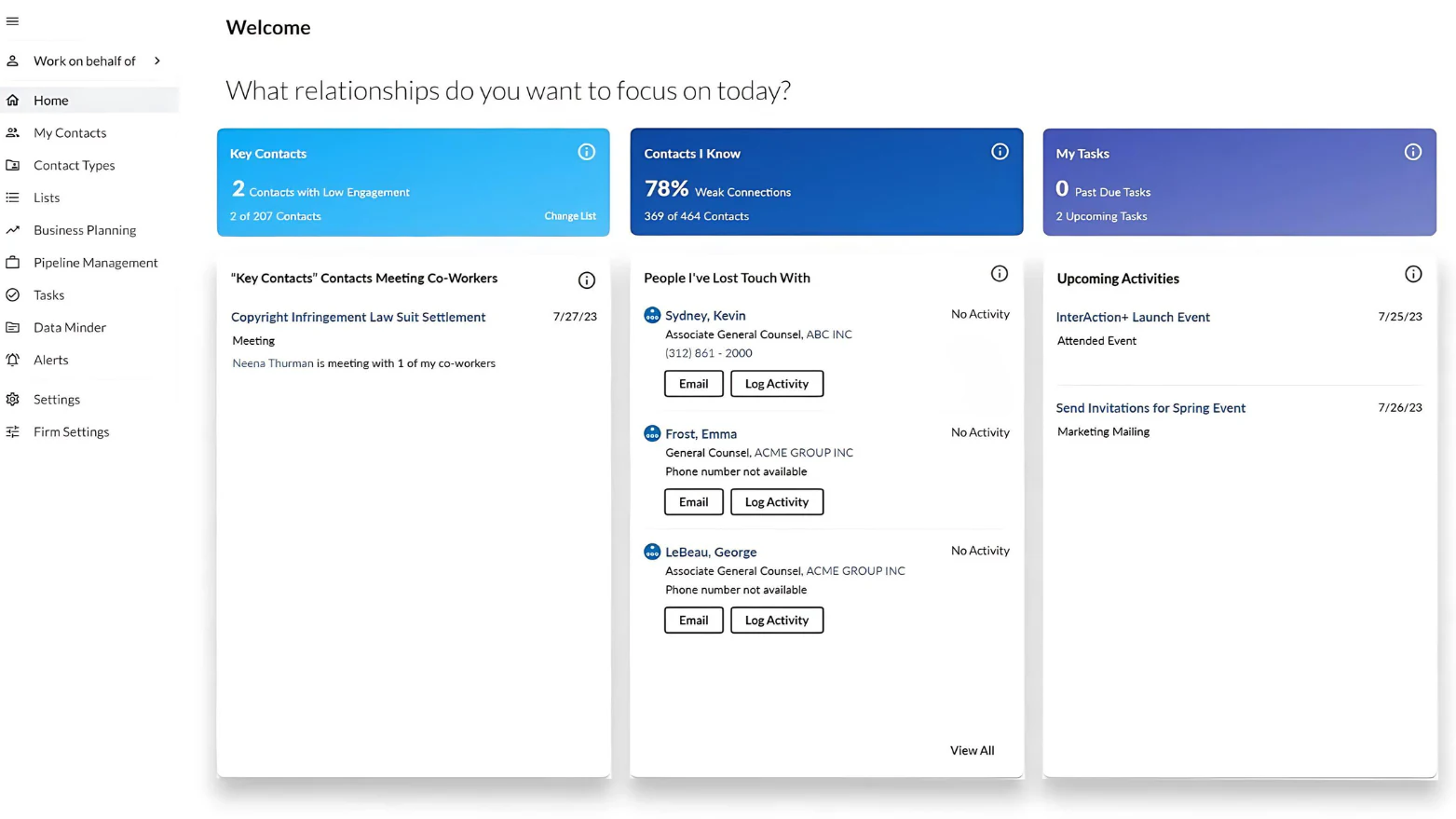
Image source: LexisNexis
G2 rating: 3.7/5
Capterra rating: N/A
InterAction+, developed by LexisNexis, is accessible to a broader spectrum of law firms, including small and mid-sized. The most recent update enhances user experience with an improved interface, actionable insights, and integrations with other LexisNexis tools.
InterAction+ is much more than a client database: it surfaces client relationship management data that helps law firms make informed business decisions. It also links business objectives to initiatives and activities for better task delegation and client retention strategies.
Features
- Client relationship management: Provides actionable client data to enhance services and identify new revenue opportunities.
- New revenue streams: Analyzes client data and trends to identify cross-sell opportunities and reveals avenues for business growth.
- Mitigate revenue loss: A standout feature is its ability to highlight at-risk clients through an at-a-glance dashboard, allowing timely action to improve retention.
- Secure cloud access to client data, with compliance to global data privacy standards.
- Daily digest: Improved interface with a daily email capturing essential tasks and activities, making navigation and task management more intuitive.
- Context integration: integration with LexisNexis's Context database provides detailed litigation data specific to clients, prospects, and competitors.
Pros
- Deep client insights: Actionable data to strengthen client relationships and inform business decisions.
- Seamless integration: Integrates well with other LexisNexis tools and popular legal software.
- User-friendly interface: Recent updates have made the platform more intuitive.
- Cloud-based access: Secure cloud access and mobile integration.
Cons
- Learning curve: New users may require time and training to fully leverage the platform.
- Cost: It may be more expensive compared to simpler CRM solutions.
- It works best with other LexisNexis products, which may require additional investment.
Ease of use
InterAction+ centralizes client data and insights with an intuitive design praised by firms like Kennedys (UK) and Gowling WLG. Features include a customizable daily email digest, mobile access, and easy contact management with a global “add” button on every page.
Security
- LexisNexis prioritizes data security, offering cloud or hybrid hosting options with 24/7 global support.
- Enhanced protection for sensitive data (e.g., Driver's License, Social Security Numbers).
- Access to sensitive information is restricted to authorized users.
- Adheres to industry standards for data privacy and allows for dispute and correction of data.
Pricing
InterAction+ offers flexible pricing models suitable for small law firms. Contact for pricing information.
“InterAction is a helpful relationship management tool to stay organized and on top of who knows whom in the legal industry. It is fairly straightforward and easy to use.”
3. Lawmatics

Image source: Lawmatics
G2 rating: 4.6/5
Capterra rating: 4.4/5
Lawmatics is a cloud-based CRM software tailored for law firms, offering comprehensive tools to manage client relationships and streamline operations.
At its core, Lawmatics offers contact and case management features to help firms organize client data in a centralized database. Built-in tools allow firms to track client interactions, appointments, tasks, documents, and more. The platform also includes customizable intake and onboarding forms to gather client information upfront.
Features
- Store and track all client information, interactions, and documents in one place.
- Client intake and onboarding: Customizable forms and workflows streamline client intake and onboarding processes.
- Calendar sync and reminders: Real-time sync with popular calendars like Outlook and Gmail ensures appointments and tasks are current.
- Marketing features like drip campaigns, lead scoring, website tracking, and analytics.
Pros
- Comprehensive legal CRM, marketing automation, and client intake in one platform.
- User-friendly interface: Intuitive design and easy-to-use features.
- Flexible, customizable intake forms and workflows to fit your unique needs.
- Workflow automation, document generation, integrated calendaring, and advanced reporting.
- Integrates with popular legal software like Clio and Rocket Matter.
Cons
- Cost: Pricing may be higher, especially for small law firms or solo practitioners.
- Learning curve: While user-friendly, the depth of features may require some time to fully explore and use effectively.
- Users may find the mobile experience limited compared to the desktop version.
Ease of use
Lawmatics' intuitive interface and visual builder for custom forms and workflows make it easy to set up automated processes. The platform provides templates and best practices tailored to the legal industry, with integration options and customer support available.
Integrations with other popular legal software simplify linking Lawmatics to existing systems.
Security
- Uses 256-bit AES encryption for data protection.
- Multi-factor authentication is required for all user logins.
- Role-based access controls are implemented to manage data visibility.
- Partnering with AWS, the platform ensures robust physical and network security, with regular audits to validate controls.
- The layered defenses align with recommendations from security frameworks like ISO 27001.
Pricing
Lawmatics offers three plans, but you'll have to contact them for pricing.
- Essential: Offers core client intake features for up to 3 users.
- Premium: Includes task and case management, document automation, and marketing tools.
- Enterprise: Full access to all features and dedicated account manager.
“Lawmatics has been great for our small law firm's intake process. Although the process has been consuming and tedious to set up, it is definitely worth it in the end.”
4. Law Ruler
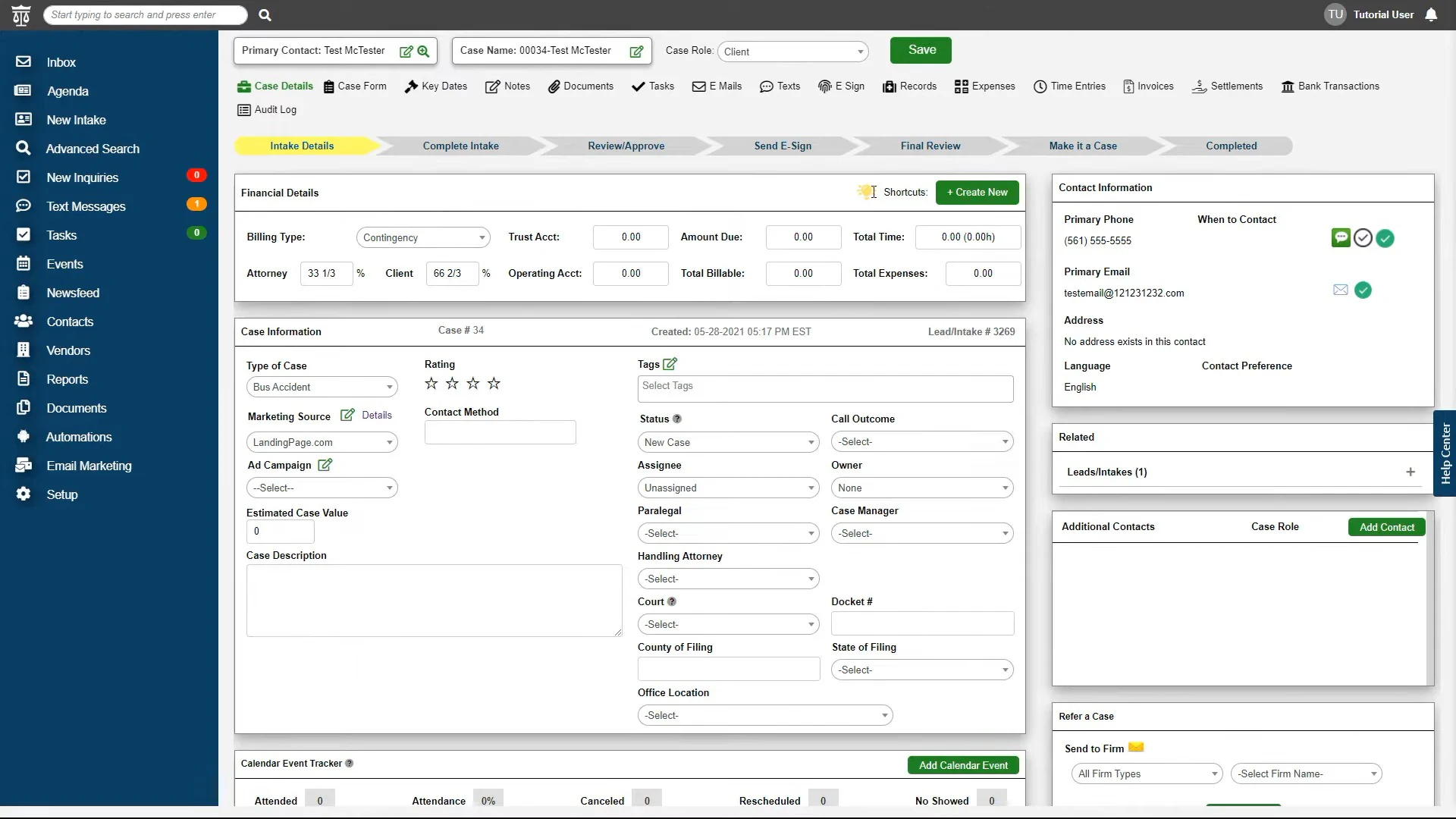
Image source: Law Ruler
G2 rating: 4.8/5
Capterra rating: 4.8/5
Law Ruler’s cloud-based legal CRM and case management solution, tailored for law firms, is designed to streamline operations and support practice growth.
Centralize client and case data with features like contact management, document automation, billing, and analytics. With a user-friendly interface and robust tools optimized for legal practices, Law Ruler helps firms capture leads, improve client retention, and automate workflows so attorneys can focus on high-impact tasks.
Law Ruler supports various practice areas, including personal injury, criminal defense, business law and more. It's an all-in-one CRM and case management solution for forward-thinking law firms looking to expand their practices.
Features
- Contact management: Centralizes client and contact data.
- Document automation: Document creation with templates, clauses, and conditional logic streamlines processes such as building retainer agreements, intake forms, and questionnaires.
- Marketing tools like lead tracking, drip campaigns, and analytics to improve client acquisition and retention.
Pros
- Combines CRM, case management, and client intake into one platform.
- User-friendly interface: Intuitive design makes it easy for legal professionals to manage client relationships and case workflows.
- Automation capability for tasks like document creation, client intake, and marketing campaigns.
- Customizable and scalable: Supports different practice areas, sizes and specialties with customizable workflows.
Cons
- Cost: Pricing might be on the higher end for smaller firms or solo practitioners, especially when adding on additional features.
- Pro and Premium plans require a one-time onboarding fee.
- Learning curve: The depth of features may require some time for new users to fully understand and utilize effectively.
Ease of use
Designed for legal professionals, Law Ruler's intuitive interface simplifies case management, offering customization, automated tools, and support options. It works across devices, ensuring easy access to client data and firm analytics on the go.
Customer support options like context-sensitive help guides, live chat, email ticketing, and phone assistance can also help you get started.
Security
- Law Ruler uses AES 256-bit encryption.
- Strict access controls govern employee authorization to client data based on the principle of least privilege.
- Law Ruler is hosted on Azure and is backed up daily to protect client data from failures, outages or natural disasters.
Pricing
Contact for a custom quote. Law Ruler offers three plans:
- Pro plan: Supports up to 3 users and 10,000 contacts.
- Premium plan: Supports up to 3 users and 15,000 contacts.
- Enterprise plan: Designed for large firms with 10+ users.
Annual payment options provide a 15% discount.
“Convenient and easy to use product. Helped streamline our intake process.”
5. Clio Grow

Image source: Clio
G2 rating: 4.6/5
Capterra rating: 4.7/5
Clio is a cloud-based legal practice management platform designed to help law firms manage their cases, clients, and billing. Tailored for legal professionals, Clio offers a comprehensive suite of tools to streamline workflows, improve client communication, and enhance firm productivity.
Features
- Client & case management: Centralized platform to manage client information, case files, and documents.
- Billing & invoicing: Automated time tracking, billing, and payment processing.
- Task & calendar management: Organize tasks, appointments, and deadlines with integrated calendar syncing.
- Document management: Securely store and share documents with easy retrieval.
- Communication tools: Email, messaging, and client portal for improved communication.
- Integrations: Connects with over 200 apps, including QuickBooks, Dropbox, and Google Workspace.
Pros
- Comprehensive suite of case management, billing, and client communication features.
- User-friendly interface with easy onboarding.
- Secure cloud-based access with mobile functionality.
Cons
- Pricing can be high for smaller firms.
- Some advanced features may require additional paid add-ons.
- Occasional lag in performance with large data sets.
Ease of use
Clio is known for its intuitive and user-friendly interface, making it easy for legal professionals to manage their practices without extensive training. The platform provides a clean, organized layout that simplifies task management, client communication, and document handling.
Security
- Clio employs two-factor authentication, encryption of data in transit and at rest, and continuous system monitoring.
- The platform is compliant with GDPR, HIPAA, and PCI standards and is SOC 2 certified.
- Role-based permissions, session tracking, and automatic backups ensure data safety.
- Law firms can choose regional data hosting options in the U.S., EU, Australia, or Canada for additional compliance.
Pricing
- 7-day free trial.
- EasyStart: $39 per user/month.
- Essentials: $79 per user/month.
- Advanced: $109 per user/month.
- Complete: $139 per user/month.
“I've recently also started to use Clio Grow which I hadn't really thought would make a whole lot of difference to me, but I couldn't have been more wrong. I enjoy the interface, the support is good, it does what I need it to.”
6. PracticePanther

Image source: PracticePanther
G2 rating: 4.2/5
Capterra rating: 4.7/5
PracticePanther’s cloud-based legal practice management software simplifies case management, billing, and client communication for law firms. Designed to be intuitive and easy to use, it caters to firms of all sizes and offers a blend of essential features and scalability.
Features
- Case & client management: Track cases, manage client information, and store documents in one place.
- Billing & invoicing: Automate time tracking, billing, and payment collection.
- Task & calendar management: Organize tasks, deadlines, and appointments with calendar syncing.
- Document automation: Create, store, and share legal documents with ease.
- Integrations: Connects with tools like QuickBooks, Zapier, and Dropbox.
Pros
- User-friendly interface with a minimal learning curve.
- Easily set role-based and IP address permissions for different access levels based on employee roles. Create permissions at the IP address level for added security.
- Client portal: Secure client portal for communication and document sharing.
Cons
- Limited advanced customization options.
- Some users report occasional bugs and slow support response times.
- Certain features, like advanced reporting, may require higher pricing tiers.
Ease of use
PracticePanther is designed to be easy to use, with a straightforward interface that minimizes the learning curve. The platform offers clear navigation and simple workflows, making it accessible even to those without extensive tech experience.
Security
- Employs 256-bit SSL encryption for data in transit and military-grade security for data storage.
- Role-based permissions, IP restrictions, and two-factor authentication add layers of protection.
- PCI-compliant payment processing ensures secure transactions, while Microsoft Azure’s Geo-Redundant Servers provide automatic backups for data safety.
Pricing
PracticePanther offers 3 pricing plans:
- 7-day free trial.
- Solo: $49 per user/month.
- Essential: $69 per user/month.
- Business: $89 per user/month.
“Excellent legal CRM, it has helped me time track and bill very easily.”
7. MyCase

Image source: MyCase
G2 rating: 4.4/5
Capterra rating: 4.7/5
MyCase is a comprehensive legal practice management software with tools for case management, time tracking, billing, and client communication. It’s designed to help law firms streamline their operations, improve efficiency, and improve client relationships.
Features
- Case management: Centralized case management with document storage, task tracking, and client communication.
- Time & billing: Integrated time tracking, invoicing, and payment processing.
- Client portal: Secure portal for client communication and document sharing.
- Calendar & task management: Manage appointments, tasks, and deadlines with calendar sync.
- Document automation: Create and manage legal documents with templates and automated workflows.
- Integrations: Integrates with tools like QuickBooks, Google Workspace, and Microsoft Office.
Pros
- All-in-one platform for managing cases, billing, and client communication.
- Easy-to-use interface with a short learning curve.
- Strong client portal for improved client interaction.
- Affordable pricing for small to mid-sized firms.
Cons
- Limited advanced features compared to more specialized legal CRM platforms.
- Some users report issues with customer support response times.
- Fewer integration options than some competitors.
Ease of use
MyCase is known for its user-friendly design, which makes it accessible for legal professionals without extensive tech expertise. The platform’s layout is simple and organized, allowing firms to get up and running quickly.
Security
- Secure data storage with 256-bit SSL encryption, role-based access controls, and compliance with GDPR and SOC 2 standards.
- Regular security updates and audits to ensure data protection.
Pricing
- 10-day free trial.
- Basic: $39 per user/month.
- Pro: $79 per user/month.
- Advanced: $99 per user/month.
“Simple and intuitive. I use it daily, both online and through the app.”
8. AbacusLaw

Image source: AbacusLaw
G2 rating: 4.0/5
Capterra rating: 3.9/5
AbacusLaw (formerly AbacusNext) is a CRM software designed for law firms, with tools for managing contacts, cases, and workflows. It centralizes client data and automates tasks like calendaring, time tracking, and billing, enhancing productivity and client relationships.
AbacusLaw syncs with email, calendars, and accounting software. Whether for solo practitioners or large firms, it provides the flexibility and mobility needed to streamline legal operations.
Features
- Contact management: Create detailed profiles and log communications for a 360-degree view of relationships.
- Dashboards and reports provide visibility into case statuses, contacts, documents, schedules, and business development opportunities.
- Automate multi-step procedures and workflows, with customization options for functions and templates.
- Track legal matters, prospective clients, current clients, opposing counsel, co-counsel, court staff, and other legal contacts.
- Reporting and analytics: Generate reports and dashboards for actionable insights into productivity and profitability.
Pros
- Simplify legal tasks like recording billable time and scheduling with automated workflows.
- Document management with encryption for stored documents.
- User-friendly interface and familiar design make it easy to navigate and use.
- Cloud-based and on-premise hosting options provide flexibility based on your needs.
- Legal-specific CRM features like matter and case management, document organization, calendaring and reminders, time tracking, and billing.
Cons
- Cost: The subscription fee may be too expensive for small law firms.
- Learning curve: The extensive feature set can require a learning curve.
- Limited customization: Some users may find customization options less flexible compared to other legal software.
- Many users have reported issues with customer service and support.
Ease of use
Since AbacusLaw serves only the legal vertical, the support team caters to industry-specific needs rather than generic inquiries.
Security
- AbacusLaw uses 256-bit AES encryption for data protection and role-based permission profiles.
- The platform offers on-premise self-hosted or fully managed private cloud deployment options.
Pricing
Contact for a custom quote.
“Abacus worked fairly well initially as a server-based small number of user platform. At the time, few systems integrated accounting with the LPM main product. New features were overpromised and half-baked.”
Choosing the right CRM for your law firm
Investing in the right law firm CRM that fits your specific workflows and legal needs sets your practice up for long-term success. Customer relationship management tools help legal professionals manage their cases, improve client relationships, and streamline operations by centralizing client data, automating workflows, and improving communication.
Each platform offers unique features tailored to different firm sizes and needs. When selecting a CRM, consider factors like ease of use, security, flexibility, and pricing to find the solution that best aligns with your firm's goals.
If none of the eight tools above matches your firm's exact process, here's why you should consider building your own with a no-code solution like Softr instead:
- Start with AI, or start from a template: Describe the CRM you need to the AI Co-Builder and it builds the database, pages, and user groups for you, or start from a template and customize manually. Either way, you're not stuck adapting your intake process to someone else's software.
- Consolidate your tools & data: Use Softr Databases as your native foundation, or connect to 21+ external data sources, including Airtable, Google Sheets, and HubSpot, to consolidate information in one user-friendly application.
- Customize to your needs: Customize apps to meet your exact business needs without being limited by predefined features or complicated workarounds. When a pre-built block isn't enough, the Vibe Coding block generates custom UI from a plain-language description.
- Keep information secure: Tailor app views and actions for different user groups with advanced permissions, ensuring they can only see and edit specific data, enforced on the backend, not just hidden in the interface.
- Launch quickly: Build and deploy apps without long development timelines. Avoid the high expenses associated with custom development and ongoing maintenance.
- Create better experiences: Use modern blocks, such as Lists, Tables, Charts, Forms, and Kanban, to turn your database into a user-friendly app, customized to your brand.
- Test and scale: Iterate and add new features, workflows, and data sources as your business grows, without the need for further development.
Frequently asked questions
What is the best CRM for small and mid-sized law firms?
Can I build a legal CRM without hiring a developer?
Is it safe to store client and case data in a no-code CRM?
What's the difference between a legal CRM and legal practice management software?
Can a law firm CRM integrate with existing tools like Outlook or QuickBooks?