5 best Claude Code alternatives for building apps in 2026



Claude Code feels simple until it’s time to turn AI-generated code into a functional business app. For teams with developer support, this isn’t a problem. But with limited technical expertise, you’ll need help testing the code, debugging errors, deploying your app, and maintaining it after launch. This guide compares five Claude Code alternatives that help you go from idea to usable app faster.
Best Claude Code alternatives at a glance
| Tool | Best for | Key features | Pricing |
|---|---|---|---|
| Softr | Building complete business apps with AI, workflows, and permissions | AI Co-Builder, relational database, workflows, role-based permissions, integrations, visual editor, Vibe Coding block, Ask AI | Free plan; paid plans start at $19/mo |
| Replit | Building and deploying apps with AI in a coding workspace | AI Agent, database, hosting, native integrations, mobile app builder | Free; paid plans start at $18/mo |
| Lovable | Creating prototypes developers can refine later | Prompt-to-app builder, React/TypeScript code export, hosting, visual editor | Free; paid plans start at $25/mo |
| Bolt.new | Creating prototypes from Figma designs, GitHub repos, or design systems | Prompt-to-app, self-correcting AI, Figma import, unlimited databases | Free; paid plans start at $25/mo |
| Bubble | Building custom mobile apps without code | AI app generation, drag-and-drop editor, native mobile apps, version control | Free; paid plans start at $29/mo |
What I look for in Claude Code alternatives
The best alternative to Claude Code depends on your team’s technical skill level, the kind of apps you want to build, and how much control you need. Here are the key features I prioritized in my search:
- End-to-end AI app building: Tools that generate the full app—including the interface, database, and logic—from text prompts instead of raw code.
- Visual editing: A drag-and-drop editor to adjust layout, content, and workflows without relying strictly on prompts.
- One-click deployment: Hosting, SSL, and URLs handled automatically, so you can ship without a developer.
- Native data connections: Built-in integrations with tools like Airtable, Google Sheets, Notion, and SQL databases so you can turn data you already have into an app.
- User access and permissions: Login systems and role-based access, so different users see only what they need.
- Workflow automation: Native automations for approvals, notifications, and status updates, with optional connections to tools like Zapier or Make.
- Custom code flexibility: Support for custom CSS or JavaScript to extend features the platform doesn't cover.
- Predictable pricing: Subscription-based pricing instead of usage-based costs that are hard to estimate.
1. Softr — best for building full-stack business apps with AI, workflows, and user permissions
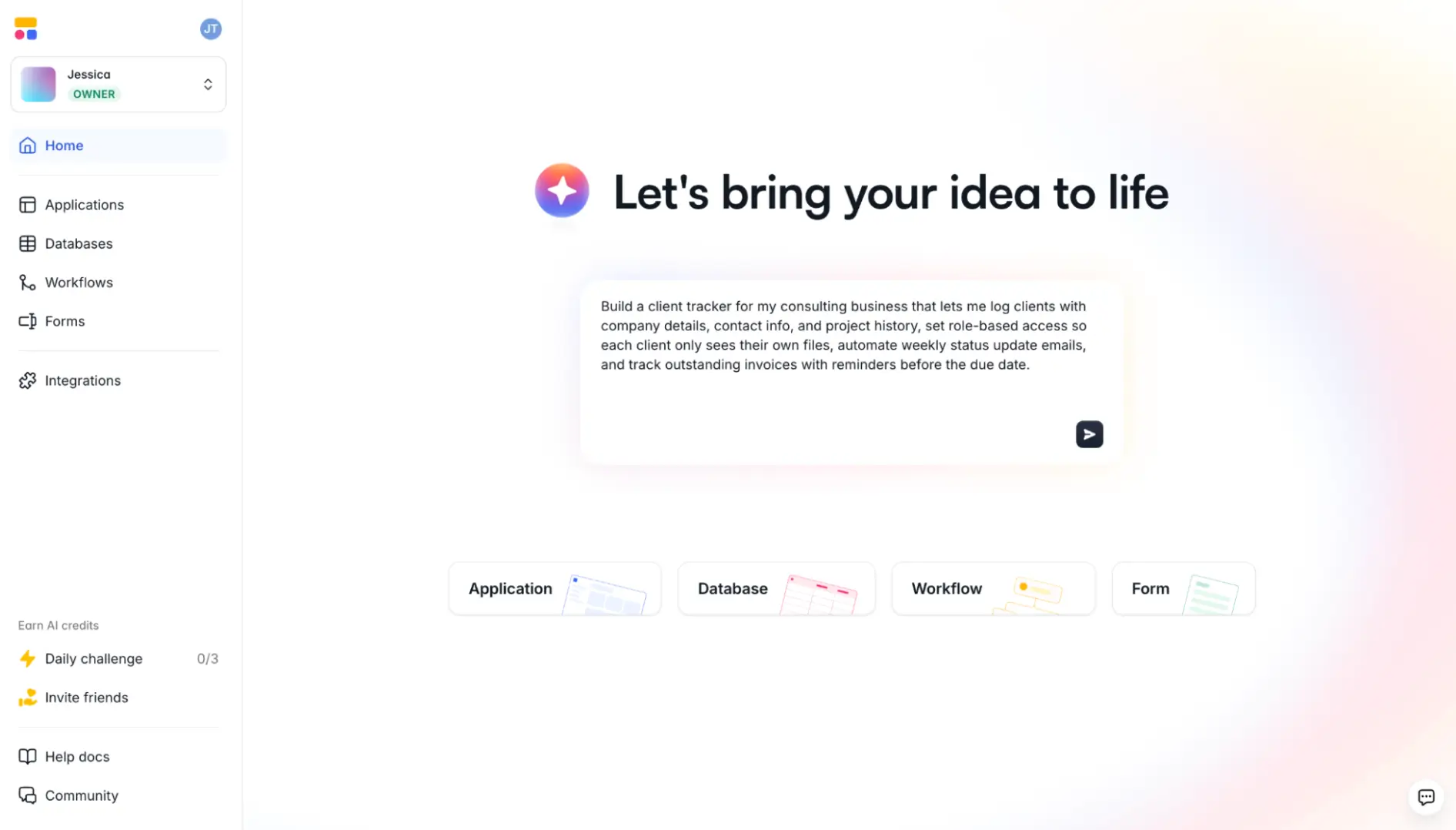
Softr is an AI-native platform that helps you build fully functional business apps— internal tools, client portals, dashboards, CRMs, and more—from a single prompt.
Unlike Claude Code, which generates code you still need to deploy and manage, Softr’s AI Co-Builder builds complete apps that are ready for real use from day one — with pages, users, permissions, data schema, and workflows already set up. It also handles hosting for you, and you can connect a custom domain when you’re ready.
Describe what you need, then confirm a few setup details, like how users will log in and what your app layout should look like. The AI Co-Builder generates your app core pages and data structure.
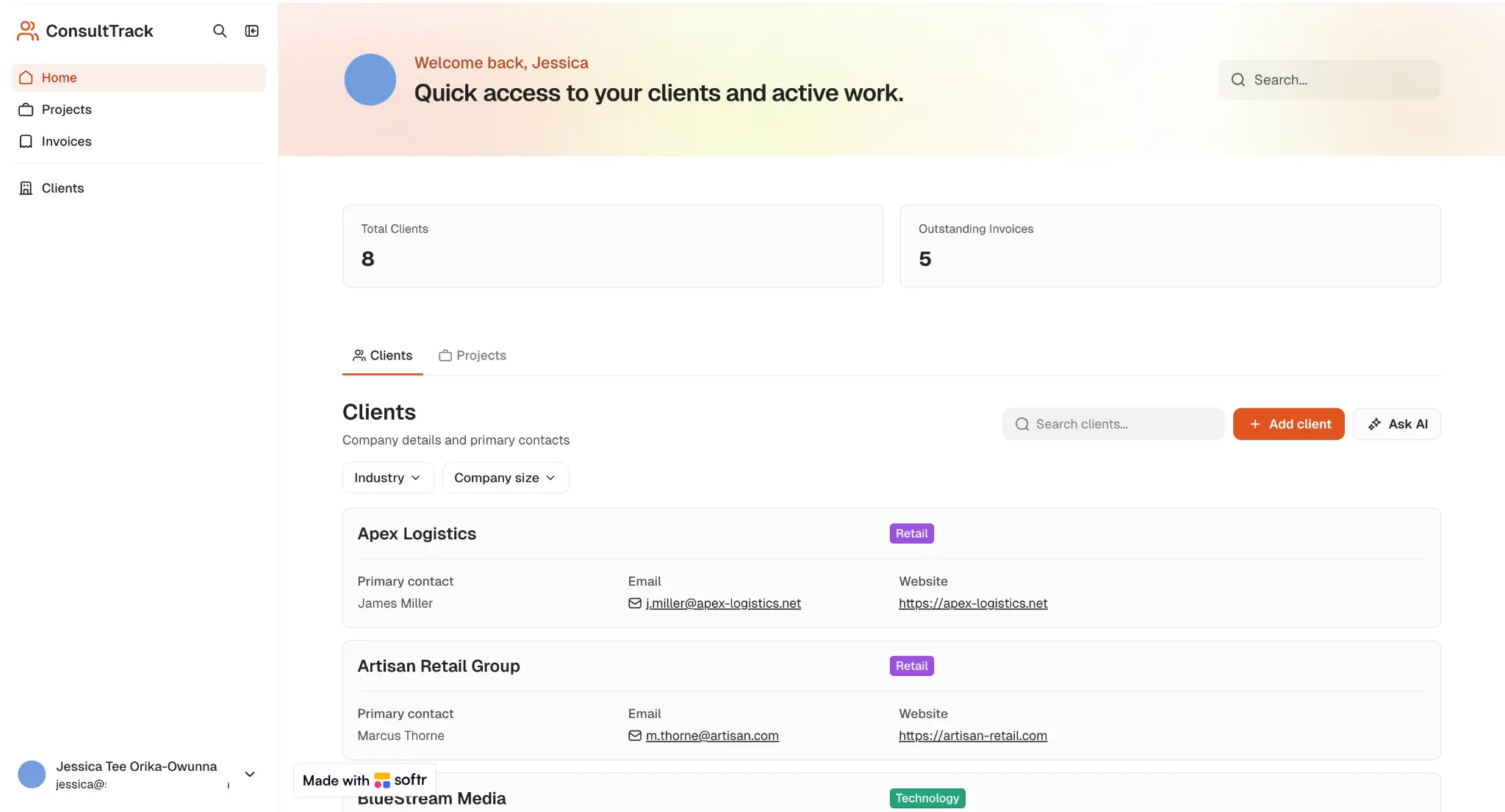
From there, edit each page manually using the visual editor (without spending AI credits), or prompt the AI to make changes for you. Or, connect Claude, Cursor, or ChatGPT through the Softr MCP and build your business app from there.
You can also use the Vibe Coding block to generate custom UI elements from plain language prompts. For example, you could vibe code a custom dashboard, pricing calculator, bulk file uploader, or an AI chatbot widget.
✨See more vibe coding examples built in Softr.
And if you have a developer on your team, they have the option to manually customize your app by adding HTML, CSS, or JavaScript through the Custom Code block.

Your data can live in Softr Databases—a native relational database—or in tools you already use (like Airtable, Google Sheets, HubSpot, or SQL databases). Updates between Softr and your source tools happen in real time, so your data stays in sync.
You can also connect more than one data source in the same app. A sales CRM can pull contact data from HubSpot and Pipedrive while tracking deal stages in Softr. Work from one app without copying the same data between tools.
Use Softr Workflows to automate recurring tasks like sending a notification when a record changes, creating a follow-up task when someone submits a form, or updating a status after approval.
For more complex processes, you can add conditions, branches, and wait steps. For example, you could build a client onboarding flow that:
→ Sends a welcome email
→ Waits for the client to complete a form
→ Assigns the right project manager based on their answers
→ Notifies the project manager in Slack
Softr's native AI assistant, Ask AI, can also be embedded directly in your app, so users can ask questions in plain language and get answers based on your live data, with permission-aware responses.
Pros and cons of Softr
Pros
- Ship quickly and confidently: Generate working apps you can share with real business users on day one.
- Hosting and technical setup handled for you: Login, permissions, security, and backend logic are built in, with the option to publish to a custom domain.
- Customization options for every skill level: Use the Visual editor for quick changes; use the Vibe Coding and Custom Code blocks for advanced builds.
- Flat monthly plans instead of per-user or token-based pricing: You aren’t forced to spend AI credits just to refine your app, debug issues, or add users.
- Build multiple apps and share data between them: Your client portal, CRM, and freelancer directory can all pull from the same database, so updates in one place show up everywhere.
- Polished, professional UI: Your app looks production-ready out of the box, even if you've never built one before.
Cons
- You can’t export the full codebase or host the app outside Softr, so it’s not the best fit if you need full engineering control over the app’s backend, infrastructure, or deployment.
Softr key features
- AI Co-Builder: Describe what you need, answer a few customization questions, and Softr generates a complete app for you.
- Softr MCP: Connect assistants like Claude or ChatGPT to manage apps, databases, and workflows directly from your chat.
- Drag-and-drop visual editor: Move blocks, swap components, and update text or colors without using AI credits.
- Vibe Coding and Custom code blocks: Generate custom components like dashboards, calculators, or schedulers from prompts. Or add HTML, CSS, or JavaScript anywhere in your app for deeper customization.
- Softr Workflows: Automate approvals, notifications, and multi-step processes with conditions, branches, loops, and AI actions.
- Softr Databases: Relational database with linked records, formulas, lookups, and rollups that stay synced across your app.
- Role-based permissions: Control what each user can view, edit, or download at the page, block, or even button level (and restrict which records they can access based on their roles).
- 21+ native data sources: Connect to tools like Airtable, Google Sheets, Notion, HubSpot, monday.com, and SQL databases.
- Progressive web app support: Turn your app into a mobile PWA users can install on their phones; no separate native build needed.
- Enterprise-grade security: Built-in authentication, data encryption, and SOC 2 and GDPR compliance support.
Softr pricing
- Free: Unlimited apps for up to 3 builders, with access to Softr Workflows and Softr Databases, 5 app users, 5,000 database records, 5 AI credits
- Basic ($19/month): Unlimited apps with 42+ integrations, Team: 5 + Client: 5 app users, 50,000 database records, 10 AI credits
- Pro ($99/month): Unlimited apps with 45+ integrations and custom code, Team: 10 + Client: 50 app users, 500,000 database records, 50 AI credits, custom user groups (up to 3)
- Business ($329/month): Unlimited apps with 52+ integrations, Team: 30 + Client: 100 app users, 1M database records, 100 AI credits, custom user groups (up to 10)
- Enterprise: Custom pricing with SSO, SOC 2 reporting, custom usage limits, dedicated success manager, and priority support
Who Softr is best for
Softr is best for non-technical teams that want to build secure, fully functional business apps without managing code, hosting, authentication, or deployment. If Claude Code’s usage limits and token-based costs keep slowing you down, Softr gives you a more predictable, secure way to build and launch quickly.
2. Replit — best for building and deploying apps with AI in a coding workspace
.webp)
Replit is an AI coding platform that helps you turn prompts into working apps from your browser. Describe what you want, and Replit Agent generates the code, sets up the project, and gives you a version you can run, test, and publish to a live URL.
Compared with Claude Code, Replit gives you an all-in-one workspace for building, editing, debugging, testing, and deploying your app. You also get hosting, a managed SQL database, and basic authentication ready to use.
Pros and cons of Replit
Pros
- Everything runs in the browser, so you skip installing tools or switching between platforms.
- You get both the working app and the underlying code, so you can build, test, and deploy from one place — or hand off to a developer.
- Replit Agent can generate code, test its work, fix errors, and search the web to keep your app current.
- Real-time collaboration lets teams build together.
Cons
- AI credits can run out fast, especially on larger tasks requiring frequent iteration.
- Expect a less polished user interface compared to apps built using Softr or Lovable.
Replit key features
- Replit Agent: Build apps from prompts, test parts of the app, apply fixes, and search the web when needed.
- Browser-based workspace: Build, edit, run, debug, and deploy apps without local setup.
- Built-in database: Add a managed SQL database with tools to organize, back up, and restore data.
- Visual editor: Update text, images, spacing, and colors from the app preview.
- Figma import: Turn Figma designs into app UI components.
- Hosting and deployment: Publish apps to a live URL with scaling options on higher plans.
- Mobile app support: Build mobile apps from prompts, preview them on your phone, and prepare app store submissions.
Replit pricing
- Starter (free): Daily Agent credits, free credits for AI integrations, 1 published app, and limited Agent intelligence
- Replit Core ($18/month): $20 in credits, up to 5 collaborators, unlimited workspaces, autonomous long builds
- Replit Pro ($90/month): $100 in credits, up to 15 collaborators, private deployments, database restore for up to 28 days
- Enterprise: Custom pricing, SSO/SAML, advanced privacy controls
Who Replit is best for
Replit is best for technical founders, product managers, and small dev teams that want to build and launch working apps without running a local development environment.
3. Lovable — best for creating prototypes developers can refine later
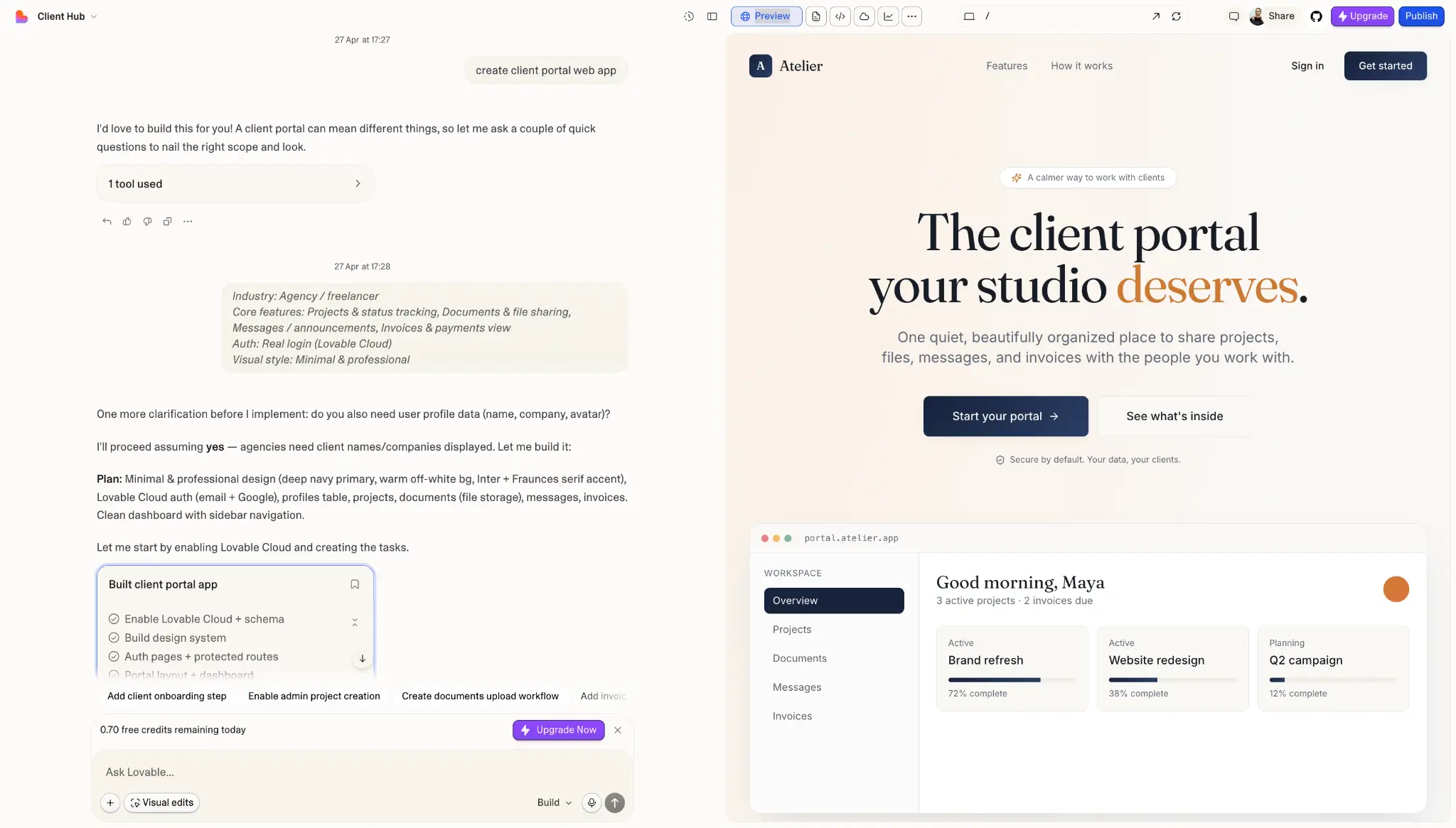
Lovable is an AI app builder for teams that want to turn an idea into a working prototype quickly, then pass it to a developer to finish or take into production. It’s a good fit for prototyping MVPs, internal tools, client portals, and other basic web apps.
Lovable supports database and authentication through Supabase, includes built-in hosting, and lets you continue building or hand the project over to a developer with code export (through transfer to GitHub).
Pros and cons of Lovable
Pros
- Generates a clean, modern-looking interface for your app.
- Lets you connect tools like Notion, Jira, or Confluence, so Lovable builds with your product docs, tickets, and project context (not just from your prompt).
- Gives you 100% ownership of the code, so you can export it to GitHub, hand it to a developer, and keep building outside of Lovable.
Cons
- Credits can burn up fast, especially when fixing errors or adjusting design.
- Limited control over the backend, so deeper customization or moving the app elsewhere typically means exporting code and rebuilding parts.
- Less structured user permissions; Lovable supports roles, but setting up detailed access control for end users can be difficult.
Lovable key features
- Prompt-to-app builder: Generate an app from plain language prompts, with a live preview as it builds.
- React and TypeScript code export: Sync to GitHub with editable code so developers can extend or migrate the app to their own stack.
- Visual editor: Make basic layout, text, and style changes directly in the preview screen.
- Connectors: Pull context from tools like Linear, Notion, Jira, Confluence, and Miro.
- Pre-publish security scans: Check generated code, dependencies, and database policies before publishing.
- Themes and brand controls: Match apps to your brand with themes, AI image generation, and visual editing.
Lovable pricing
- Free: 5 daily credits (up to 30/month), public projects, unlimited collaborators.
- Pro ($25/month): 100 monthly credits plus daily top-ups (up to 150/month), credit rollovers, custom domains, private projects, user roles.
- Business ($50/month): Adds SSO, team workspace, internal publishing, design templates, and role-based access.
- Enterprise: Custom pricing with SCIM, audit logs, and custom connectors.
Who Lovable is best for
Lovable is best for founders, product managers, and design teams that want to validate ideas fast and build prototypes to refine further or hand off to developers.
4. Bolt.new — best for building prototypes from existing designs and code assets
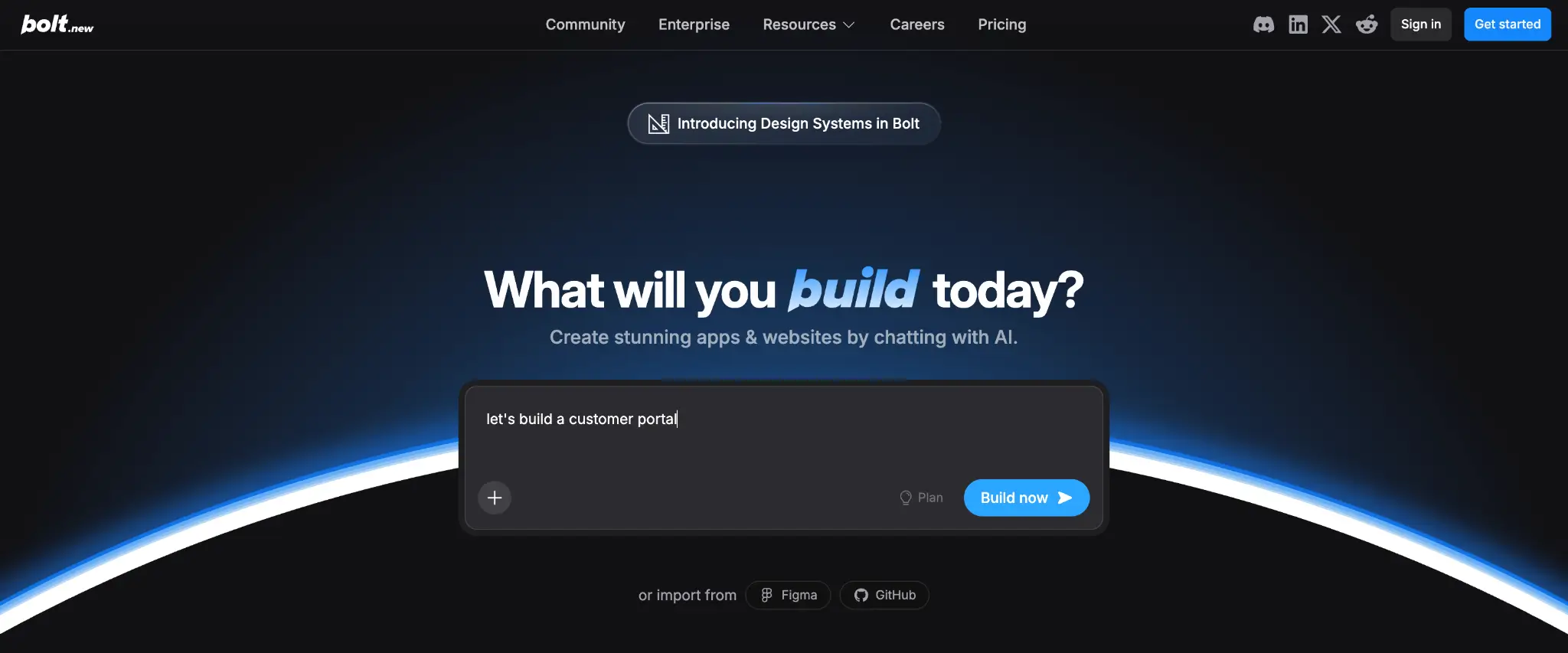
Bolt.new is an AI app builder that helps you create full-stack web apps directly in your browser, with the frontend, database setup, authentication, and hosting all set up.
What sets Bolt.new apart is that it works with assets your team already has. You can bring in your Figma designs, GitHub repos, NPM packages, or design system docs. Bolt.new uses them to build something that feels tied to your existing brand rather than a generic AI-generated layout.
Pros and cons of Bolt.new
Pros
- Unused tokens on paid plans roll over for one extra month.
- Includes hosting, databases, authentication, analytics, and custom domains.
- Bolt’s self-correcting AI agent automatically tests, refactors, and fixes errors as it builds.
Cons
- Tokens can run out really quickly on the free plan.
- Collaboration features are still developing; team workflows and controls are less mature.
- No built-in relational data layer for complex apps, so managing structured data often requires external tools or code.
Bolt.new key features
- Prompt-to-app builder: Generate apps or websites from prompts, with a live preview as it builds.
- Design system import: Bring in Figma designs, GitHub repos, NPM packages, or Storybook components so apps match your brand and existing assets.
- Bolt Cloud: Built-in hosting, unlimited databases, user management, and authentication, so you don't need separate infrastructure tools.
- Team workspace: Access centralized billing, team permissions, admin controls, and organization sharing.
- Custom domains and SEO: Pro plans include custom domains, SEO boosting, and analytics, so apps are ready for public use.
- Enterprise controls: Get SSO, audit logs, compliance support, dedicated support, and AWS or Azure deployment options.
Bolt.new pricing
- Free: 300K daily tokens, 1M monthly tokens, public/private projects
- Pro ($25/month): 10M monthly tokens, no daily limit, custom domains
- Teams ($30/month/member): Adds team-level access management and design system support
- Enterprise (custom pricing): SSO, SOC 2, AWS or Azure deployment
Who Bolt.new is best for
Bolt.new is best for product managers, marketers, agencies, and founders that want to build prototypes that match an existing brand or design system.
5. Bubble — best for building custom mobile apps without code

Bubble is a no-code platform for building web and mobile apps without writing code. Its AI can help you turn a prompt into a starting version of your app, then you can use its visual editor to customize the design, database, workflows, and logic.
Bubble also includes hosting, security features, and authentication, so you have most of the app-building setup localized in one place. While Bubble can build lightweight web apps, it really excels as a mobile app builder, letting you create functional, native iOS and Android apps. Just be aware that pricing varies across web-only, mobile-only, or web + mobile plans.
Pros and cons of Bubble
Pros
- Build once and ship to web, iOS, and Android with rich mobile features like push notifications and camera access.
- Large ecosystem of 8,000+ plugins, thousands of templates, and an active community of builders and agencies.
- Built-in version control; branches, change history, and rollback let you experiment without breaking your live app.
Cons
- Steep learning curve when implementing advanced workflows, permissions, and logic.
- Workload-based pricing makes it hard to predict your monthly bill.
- Moving away from Bubble usually means rebuilding the app from scratch, since you can export your data but not your app’s code.
Bubble key features
- AI app generation: Describe your app idea, and Bubble generates the design and logic.
- AI Agent: Chat with the AI Agent directly inside the editor to add features, edit workflows, and troubleshoot.
- Pixel-level visual editing: Customize every part of your app, from front-end design to backend logic, with pixel-level control.
- Native mobile apps: Build iOS and Android apps with native features and preview them through BubbleGo.
- Built-in database: Create custom data types, set privacy rules, and manage records, with support for bulk operations and API access.
- Plugin library: 8,000+ plugins for payments, AI, analytics, maps, and messaging, plus the API Connector for any external service.
- Security dashboard: Scan for security issues, review privacy rules, and get guidance before publishing.
Bubble pricing
Bubble charges per project (Web, Mobile, or Web + Mobile), with workload units measuring how much your app uses Bubble's servers.
- Free: 1 app editor, 50K workload units per month, development only (no live app)
- Starter ($29/month): Live app, custom domain, basic version control, 175K workload units
- Growth ($119/month): 2 editors, premium version control, 10 custom branches, 250K workload units
- Team ($349/month): 5 editors, sub apps, 25 custom branches, 500K workload units
- Enterprise: Custom pricing with dedicated servers, hosting region choice, and dedicated support
Note: Mobile-only and Web + Mobile plans are priced higher.
Who Bubble is best for
Bubble is best for non-technical founders, product teams, and agencies that want to build custom mobile apps they can submit to app stores — as long as they’re willing to invest time in learning the platform.
What's the best overall Claude Code alternative?
The right choice depends on who’s building, what you need to ship, and how much technical support you have to fall back on if (or when) things go awry:
- If you want both a working app and the underlying code in one browser-based workspace, go for Replit.
- If you want to prototype quickly and hand the code to a developer for production and deployment, choose Lovable.
- If you need prototypes that match your existing brand or Figma designs, consider Bolt.new.
- If you want to build native mobile apps with visual control, try Bubble.
- If you want a fully functional business app with the interface, database, authentication, AI features, permissions, and hosting already connected, Softr is the best overall choice.
👉 Try Softr for free and start building your business app today.
Frequently asked questions
What are some alternatives to using AI coding assistants?
What is the best Claude Code alternative for non-technical users?
Can I build a full business app without writing code?