Claude Code vs Claude Cowork: Which Anthropic AI tool is right for you in 2026?

.webp)
[.blog-callout]
✨ TL;DR:
- Choose Claude Code if you’re a developer who spends their life in the terminal and wants multi-file code development, editing, debugging, and to be able to run Git commands without lifting a finger.
- Choose Claude Cowork if you’re an everyday business user who needs help organizing files, doing research, or automating repetitive desktop tasks.
- Choose Softr if you want to build full business applications (like CRMs, client portals, and internal tools) using AI without any code.
[.blog-callout]
Anthropic has had a massive 2026. With both Claude Code and Claude Cowork available, the company has successfully become a serious enterprise AI player. And if you’ve had any conversations about “how AI will take over our jobs” or “man, this AI tool is so powerful,” odds are someone has mentioned one of the Claude AI agents.
This leaves business owners, freelancers, and company teams scratching their heads about where to put their budget. Is Cowork just Claude Code for regular business users? Or is Code just one piece of a bigger suite? The answer: both tools are “agentic.” They’ll go off and do tasks on their own, but operate in completely different worlds. One runs your terminal. The other on your desktop.
In this guide, we’ll walk through how these two tools compare, help you figure out which one fits your role, and show you when Softr might be the better answer for building the actual workspace your team lives in.
Claude Code vs Claude Cowork at a glance
| Feature | Claude Code | Claude Cowork |
|---|---|---|
| Best for | Software engineers and developers | Business users (operations, marketing, finance) and general knowledge workers |
| Environment | Terminal (CLI), VS Code, JetBrains | macOS / Windows Desktop App |
| Primary action | Create new code, edit existing code, run tests, push to GitHub | Read files, organize folders, fill spreadsheets, browse web, and generate content |
| Autonomy | High (Agent Teams can run parallel code while you work) | High (Batch processing & scheduling so you can automate without being present) |
| Access cost | Same fees; starts at $20/mo) for the Pro plans | Same fees; starts at $20/mo) for the Pro plans |
| Output quality | Known as “best in class” for handling GitHub bugs | Uses Opus 4.6 for reasoning; solid outputs with the right prompts |
What is Claude Code?
Claude Code dropped in late 2024 and took off fast. It’s Anthropic’s flagship AI developer tool that suggests, writes, and runs code for programmers. It lives right in your command-line interface (CLI). So all you need to do is give it access to your project folder, ask something like, “Refactor this authentication logic to use JWT tokens,” and it does the rest.
It’ll work on its own to find the relevant files, write the new logic, create the test structure, and run the terminal commands to verify everything works.

Claude Code pros and cons
Pros
- Scores 72.7% on SWE-bench Verified (evaluation framework that tests how well AI can solve real-world software engineering problems). It's super reliable compared to other tools and open source options.
- Full autonomy and can handle a lot without babysitting it.
- Agent Teams lets you spin up parallel sub-agents to handle frontend and backend at the same time, which saves a lot of hours.
Cons
- Terminal-centric and built only with developers in mind.
- Pricing uncertainty and volatility; Anthropic may require higher tiers in the near future
- Really complex monorepos can still confuse the AI agent.
Who is Claude Code best for?
As the name suggests, Claude Code is best for the software folks. Whether it's a team of professional software engineers or technical founders looking to get a new product off the ground, it's for those who already “live in the terminal.”
- Full-time developers who want to automate the boring stuff and focus on the interesting architecture problems.
- Solo technical founders who need to ship features fast without the costs of a full engineering team.
- DevOps engineers who want to debug CI/CD pipelines without clicking through twenty different menus.
How Claude Code works

After typing “Claude” in the terminal, the tool scans your file structure. From there, you give it a prompt like “Optimize my database queries in the reporting module” or “Add input validation to the login form and handle the edge cases,” and Claude Code takes it from there.
It figures out the plan, edits multiple files, runs the test suite, and shows you the result (usually) without you touching anything else.
Claude Code can plug right into VS Code and JetBrains natively. But the real power is in the command line. If you already know what SWE-bench is, Claude Code makes a lot of sense.
What is Claude Cowork?
Claude Cowork is like that business assistant or intern. It's a savvy desktop agent application that can go off to read, edit, create, and organize files all on its own (once you give it folder access on a Mac or PC).
Maybe you’re an accountant who wants to build expense reports from screenshot receipts. Or a freelance designer needing to organize client brand assets and generate UX copy drafts. Or an operations manager who has to bulk-process dozens of vendor contracts, but doesn’t want to open 10 apps.
No matter your need, Claude Cowork can talk to your graphical user interface (GUI). Just tell it what you need and let it run.
.webp)
Claude Cowork pros and cons
Pros
- Anyone can use it for anything on the desktop; it all runs in plain English.
- Can move data between browsers, spreadsheets, and text files for cross-platform control
- You can schedule tasks with batch processing.
Cons
- No web access; must run on a Mac or PC device as a desktop app.
- Super new; things can get a little shaky or fall short of outcome expectations from time to time
- A bad prompt could cause real damage, like a deleted file or an entire folder wiped clean.
Who is Claude Cowork best for?
Claude Cowork is built for any business user drowning in administrative busywork. This includes a massive list, like:
- Branch managers who need to consolidate reports from multiple teams without chasing people down.
- Researchers who need to go through hundreds of PDFs every week.
- Freelancers who waste hours organizing client intake forms and receipt images.
- Business owners who want to delegate daily tasks and focus on growth.
- Marketing folks who’d love to focus on creative output and not paperwork.
- Sales reps who’d rather sell than do busy work.
- Finance teams who need to pull data to update financial models without losing context between apps
The through-line here is simple: if your job involves repetitive tasks across different tools, then Cowork can take that off your plate.
How Claude Cowork works
Claude Cowork operates like other popular AI apps (like ChatGPT), you tell it what to do.
First, open the Claude Desktop app. Then give it access to the right folder(s). Type a command like: “Go through the last 50 files. Sort them into folders by date. Rename the PDFs to the vendor name found on page one” or "Look at these 20 contract PDFs, extract the renewal date and annual value, and drop everything into a spreadsheet."
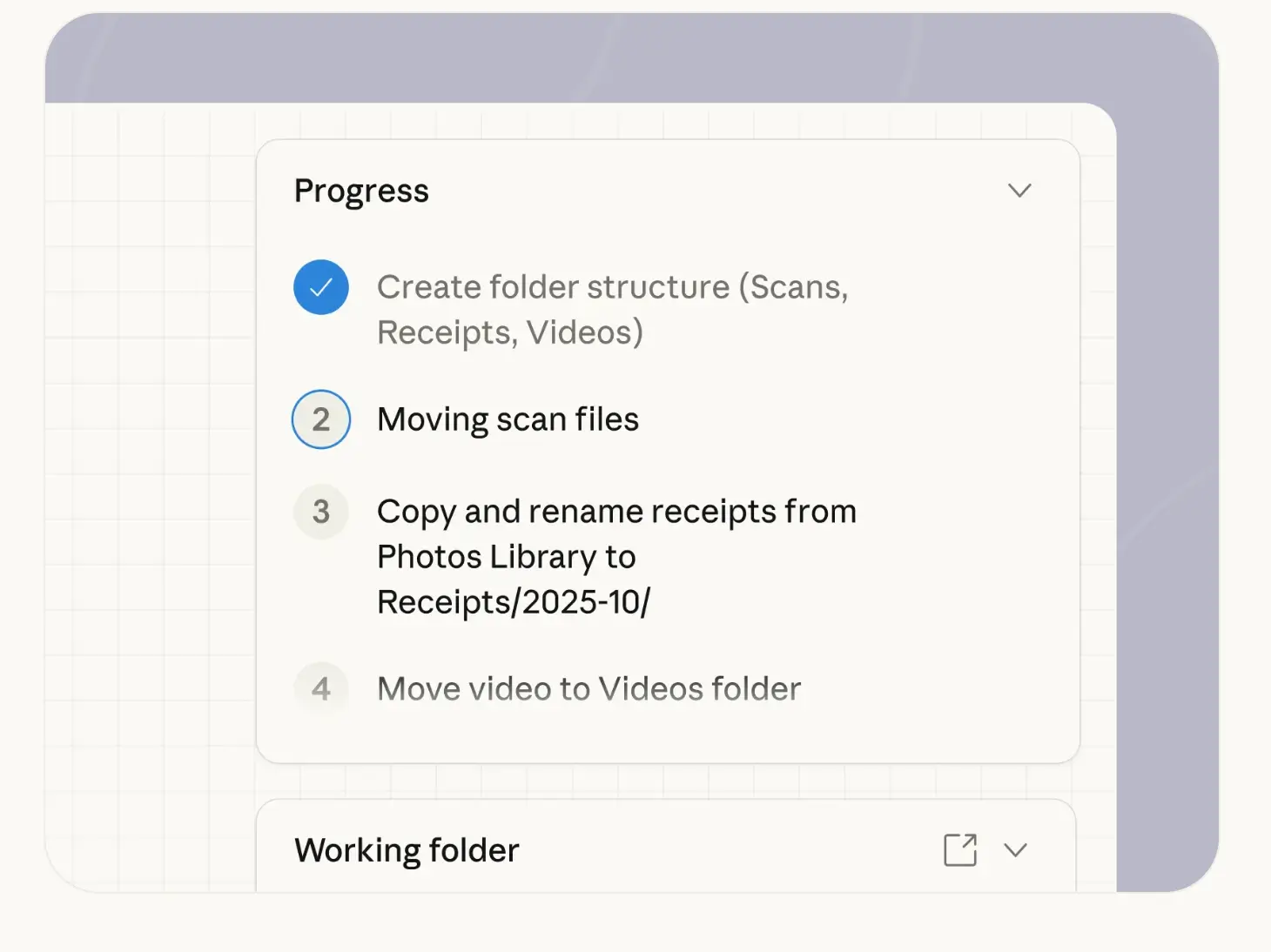
Then you walk away, come back, and the task is done.
It’s the reason people compare Claude Cowork vs Claude Code. Because Cowork is like Claude Code but without the code.
Claude Code vs Cowork: Features compared
Comparing these two isn’t exactly apples-to-apples. Same provider. But two entirely different functions. But there are a few high-level differences we can point to:
Which is more cost-effective?
Technically, you can get both Claude Code and Claude Cowork at the same price, starting at $20 per month. It gets a bit goofy, however, when you consider the pricing uncertainty that comes with Code. Anthropic has made numerous changes to its costs, and most customers expect a hike in the coming months.
Nevertheless, when you compare Claude Code pricing (even if it does increase) to hiring a developer or adopting another AI tool, the value is incomparable. You’re getting a tool that writes tests, refactors code, and debugs builds for less than a lunch order.
Verdict: Choose Claude Code for better ROI on technical work.
Which is easier to deploy and set up?
Claude Cowork takes this category pretty easily for general business teams. You install an app, point it to a folder, and start typing.
Claude Code requires Node.js, API keys (or login), and some basic comfort with terminal navigation. This means a longer setup time.
Verdict: Choose Claude Cowork if you want the whole team to actually use it and use it quickly.
Which delivers better quality outputs?
Claude Code scores 72.7% on SWE-bench Verified. Meaning if you ask it to fix a bug or write a test, it usually gets it right. Code can be version-controlled, so mistakes are easy to undo.
Claude Cowork has no benchmark. And because it's relatively new compared to its Code counterpart, it still has hiccups, especially with messy PDFs, blurry screenshots, and vague file names. Plus, it comes with the risk of accidentally deleting files (which happens more than you think).
Verdict: Choose Claude Code for predictable, verifiable outputs where quality is a must.
Popular use cases for Claude Code and Cowork
Let’s look at some real situations where each tool shines.
Best use cases for Claude Code
- Legacy code refactoring: Great for reading and migrating entire codebases for you, like when you command “Convert this entire jQuery project to React.”
- Test generation: Claude Code writes and tests code functions to make sure they pass standards. Just tell it something like “Write unit tests for all the functions in the utils folder,” and you can walk away while it writes, runs, and fixes the tests until they pass.
- CI/CD debugging: DevOps folks love Code for identifying “Why is the build failing?” or “Read the error logs and trace the root cause across the whole system."” It reads the error logs, checks the YAML config, and even suggests the fix.
- New code creation: Sometimes you just need something to get you going. Tell Claude Code, "Build me a REST API endpoint for user authentication with JWT," and you'll have working, production-ready code in seconds.
Best use cases for Claude Cowork
- Reporting: Turn data into something usable. You can tell Cowork to "Go through this month's sales folder, pull all the PDF invoices, and build a spreadsheet with customer names, dates, and totals" or "Look at these 50 expense receipts and create a categorized report for my accountant."
- Content management and migration: Handles content, assets, and files on command. For example, "Go through my Downloads folder, find all the client assets, and move them into properly named project subfolders."
- Competitive research: Quickly get intelligence when you need it, like when you want AI to "Visit these five competitor websites, grab their pricing page screenshots, and drop them into a folder called 'Competitor Intel.’”
Claude Code vs Cowork: What Reddit is saying
User sentiment centers around some pros and cons we've already identified.
For example, some Claude Code don't like the bang for your buck of the tool and feel tokens get wasted on failing prompts.
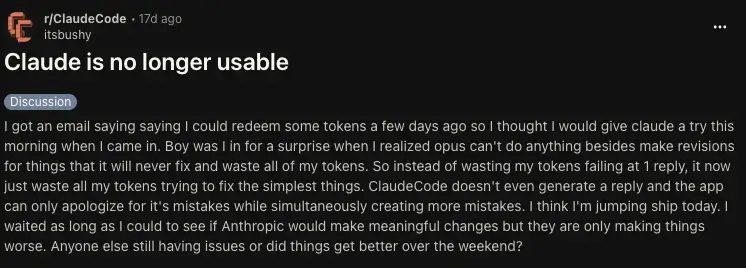
On the bright side, some software developers find Code to be nearly perfect in its outputs.

For Cowork, the issue lies in performance. Some users find it operates slow and makes a lot of output errors that ultimately could be prevented by just doing the stuff manually.

Other users show a complete 180. This particular Reddit post describes using Cowork for everything and anything, finding it super useful and easy.

How pricing compares between Claude Code and Claude Cowork
As mentioned, Claude pricing is interesting because you actually now (as of recently) have access to Claude Code on the Pro plan, meaning both are available for $20 per month. Claude Code, however, is expected to change that in the near future.
| Plan | Price (Monthly) | Includes Claude Code? | Includes Claude Cowork? |
|---|---|---|---|
| Free | $0 | No | No |
| Pro | $20 ($17 annual) | Yes (Currently) | Yes |
| Max 5x | $100 | Yes | Yes |
| Max 20x | $200 | Yes | Yes |
| Team Standard | $25/seat | Yes but minimal features | Yes |
| Team Premium | $125/seat | Yes | Yes |
Meet Softr: The best alternative for teams who want to build, not just automate

Anthropic’s tools are clearly brilliant at executing tasks inside your existing files or codebases. Claude Code can help you code a portal or tool. And Claude Cowork can organize files for that system. But neither one actually builds the app itself without code. So an everyday, non-technical business user is stuck with whatever they’re given.
That’s where Softr comes in. Softr is an AI platform where you describe the business system you need, like “a client portal for project approvals,” “a CRM with price estimation tools,” or “a dashboard for my accounts receivable,” and it generates the whole thing for you.
The database used to organize and manage your app’s data, the front-end interface, plus backend logic like user roles, permissions, and authentication, all of it (which you can configure and trust), created in seconds.

Why choose Softr over Anthropic’s agents?
In the Claude Code vs Claude Cowork debate, you’re probably looking for productivity gains and comparing which has the best ROI for your use case. But Softr is about production.
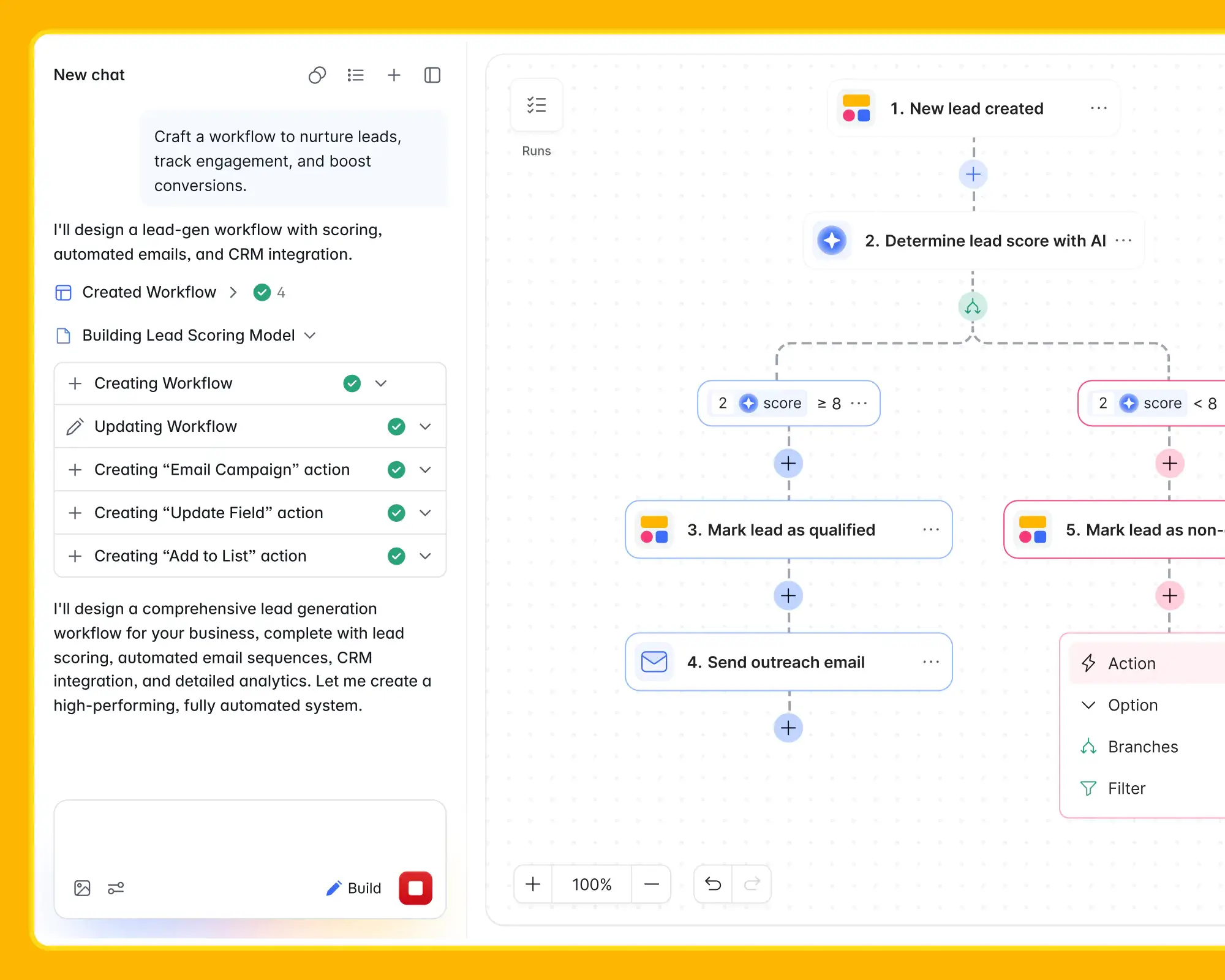
Using its AI app builder, you can skip the terminal entirely. Plain English will do. Just ask it to “Build an internal CRM to track sales leads and send follow-up emails.” And Softr builds the database, interface, list views, detail pages, and business logic without writing a single line of code.
You can refine everything visually using Softr’s drag-and-drop editor and building blocks.
AI for speed. Visual editing for control.
Unlike standalone AI agents that operate outside your business systems, Softr includes built-in workflow automation directly inside the software you create.
That means your app doesn’t just store information—it actively works for your team:
- Trigger follow-up emails automatically
- Route approvals to managers
- Notify teams when records change
- Update statuses across workflows
- Sync data with third-party tools
Instead of asking an AI assistant to manually repeat desktop tasks every day, Softr lets you automate those workflows once—inside the actual system your team uses.
And because Softr is built for the business user, you don’t have to worry about API tokens, context windows, or wondering if your agent will randomly delete 11GB of files.
Softr gives you the power of AI to build fast—paired with the structure, guardrails, and reliability of a mature no-code platform.
And when you need more flexibility, Softr’s built-in Vibe Coding block lets you extend your app with custom code—giving advanced teams the power to go beyond templates and standard blocks, without sacrificing the reliability of the platform underneath.
Softr pricing
Compared to Anthropic’s volatility, Softr’s pricing is steady and clear:
- Free: Unlimited apps, with access to Softr Workflows and Softr Databases, 5 app users, 5 AI credits and 500 workflow actions
- Basic: $19/month for unlimited apps with 42+ integrations, Team: 5 + Client: 5 app users, 10 AI credits and 2.5K workflow actions
- Pro: $99/month for unlimited apps with 45+ integrations and custom code, Team: 10 + Client: 50 app users, 50 AI credits and 10K workflow actions
- Business: $329/month for unlimited apps with 52+ integrations, Team: 30 + Client: 100 app users, 100 AI credits and 25K workflow actions
- Enterprise: Custom pricing
Claude Code vs Cowork vs Softr: Which one should you choose?
If you want something that can develop and manage code in a terminal, choose Claude Code.
If you want an app that helps the day-to-day business user on a desktop, Claude Cowork is it.
But if you want the best of both worlds: an AI platform that builds actual web applications, internal tools, databases, etc, your whole team can use to run their day-to-day, with no code or terminal, Softr is your pick.
Choose the AI platform that builds your business
AI agents like Claude Code and Claude Cowork are some of the best things to happen to developer productivity and desktop automation in 2026. They’ll save teams countless hours on specific tasks.
But a real business needs systems that work for them. That lets business users control the tech they use, helping them work better, faster, and smarter.
Instead of asking AI to help you write code or move files around, why not ask it to build your infrastructure? Try Softr for free today and see how easy it is to turn a simple prompt into a powerful solution that your team will actually use. No developers required. No coding needed.
Frequently asked questions
Should I use Claude Code, Claude Cowork, or Softr?
Is Claude Cowork just Claude Code for non-developers?
When should I choose Softr instead of Claude Code or Claude Cowork?