Manual approvals are a grind of drafting requests, following up on emails, and waiting for responses. When several departments or approvers are involved, delays are inevitable, and requests bounce between teams with no transparency. Here’s what approval workflow apps do, and how to identify the right one for your business.
Best approval workflow apps at a glance
| Approval workflow apps | Strengths | Ideal For | Pricing |
|---|---|---|---|
| Softr | - AI-powered app builder for custom approval workflow apps - Dynamic multi-step forms with built-in e-signature fields - Native workflows + integrations with Zapier, Make, and external APIs - Granular user permissions and role-based custom views -Enterprise-grade security, audit trails, and authentication - Active user community | Solopreneurs, SMBs, and Large enterprises | Free, Paid plans from $19/month |
| Kissflow | - A low-code interface for developers - Handles complex and high compliance workflows - Powerful automation features | IT businesses dealing in complex, high compliance needs | Custom pricing |
| Pipefy | - AI-powered workflow automation - 300+ integrations - Tons of templates, triggers, and action elements | Freelancers and medium to large size businesses | Free, Custom pricing |
| Trello | - Simple and easy-to-use - Integrated AI for workflow automation - Range of workflow powerups and plugins | Individual use and small to medium size businesses | Free, Paid plans from $5/user/month |
| Zapier | - Simple yet powerful automations - Integrates with 5000+ apps - Conversational AI assistant creating and optimizing workflows | Solopreneurs, SMBs, and large enterprises | Free, Paid plans from $29.99/month |
| Zoho Creator | - Low-code/ no-code workflow creation - Support complex, multi-level processes - Highly responsive mobile app | Medium to large enterprises | Paid plans from $12/user/month |
| ClickUp | - Customizable approval workflows - Integrates with third-party tools like Slack - Whiteboard for visualization | Agencies, marketing teams, and IT service providers | Free, Paid plans from $7/user/month |
| monday.com | - Highly customizable - Excellent for visual thinkers - Integrates with range of workflow apps | Agencies and large-scale marketing teams | Free, Paid plans from $12/seat/month |
| Smartsheet | - Excellent reporting and dashboards - Handles complex, multi-step approvals | Large enterprises with multi-step workflows | Paid plans from $12/user/month |
| Approvals by Microsoft | - Integrated with Microsoft ecosystem - Advanced features like multi-stage approvals, delegated approvers, and more - Easy to access from from chat (MS Team) | Enterprises and teams using the Microsoft ecosystem | Included with Microsoft 365 / Teams plans (from $6.99/user/month) |
What is an approval workflow app and why do you need one?
An approval workflow app is a digital tool that automates the process of submitting, reviewing, and signing off on documents, requests, or tasks.
At its core, approval workflow tools allow you to:
- Reduce manual intervention: Unlike traditional approval methods, these apps eliminate paperwork and in-person approvals. You can request approvals with a click, get them signed, and back with you without leaving your desk.
- Enhance visibility and approval tracking: Approval workflow tools digitalize the approval process. Built-in approval tracking software allows you to monitor live request status, ensuring transparency and identifying potential bottlenecks early in the process.
- Improve communication: Traditional approval processes make communication a nightmare. The anxiety before sending a third email asking for an update is surreal. Approval workflow platforms accompany in-app chat and notifications, enabling real-time updates on the status of your request.
Remote and hybrid work cultures have popularized cloud-based approval systems. They offer more visibility into workflows while freeing up your team for more strategic operations.
However, not all workflow apps suit your organization's approval system.
Let’s analyze different approval workflow tools and find the ideal match for your business approval automation.
10 Best approval workflow apps to prevent project delays in 2026
We’ve compiled a detailed list of the best approval workflow apps in 2026. The selection is based on easy-of-use, customizability, security, and integrations with existing tools.
Before getting into the details, here’s a quick comparison between the best approval workflow systems.
App 1: Softr—best for building custom workflow apps with AI

Softr is an AI-native platform that lets you build fully working apps replete with interfaces, databases, and workflows, trusted by 1 million+ users across the globe.
Just describe the kind of workflow app you need and the AI Co-Builder will generate a working system for you to manage requests, approvals, and tasks. (Or use the visual builder to refine or create from scratch.)
From document approvals, budget sign-offs, procurement requests, to project milestones, Softr provides a user-friendly way to design approval workflow apps that suit your business hierarchies.
At the core of each approval system is a structured database table that stores your requests, approval statuses, supporting documents, assignees, and other workflow data.
You can create custom statuses such as ‘In Progress,’ ‘Completed,’ and ‘Approved’ and define custom CRUD actions (create, read, update, delete) for user groups so they can edit project details, task status, and more based on their roles.
For the approver's convenience, add a custom e-signature field allowing them to type or draw their signature without relying on third-party plugins.
Using Softr Workflows, you can trigger automations from form submissions, button clicks, or record updates, then build multi-step approval logic with conditions, branching, notifications, scheduled actions, API calls, and integrations.
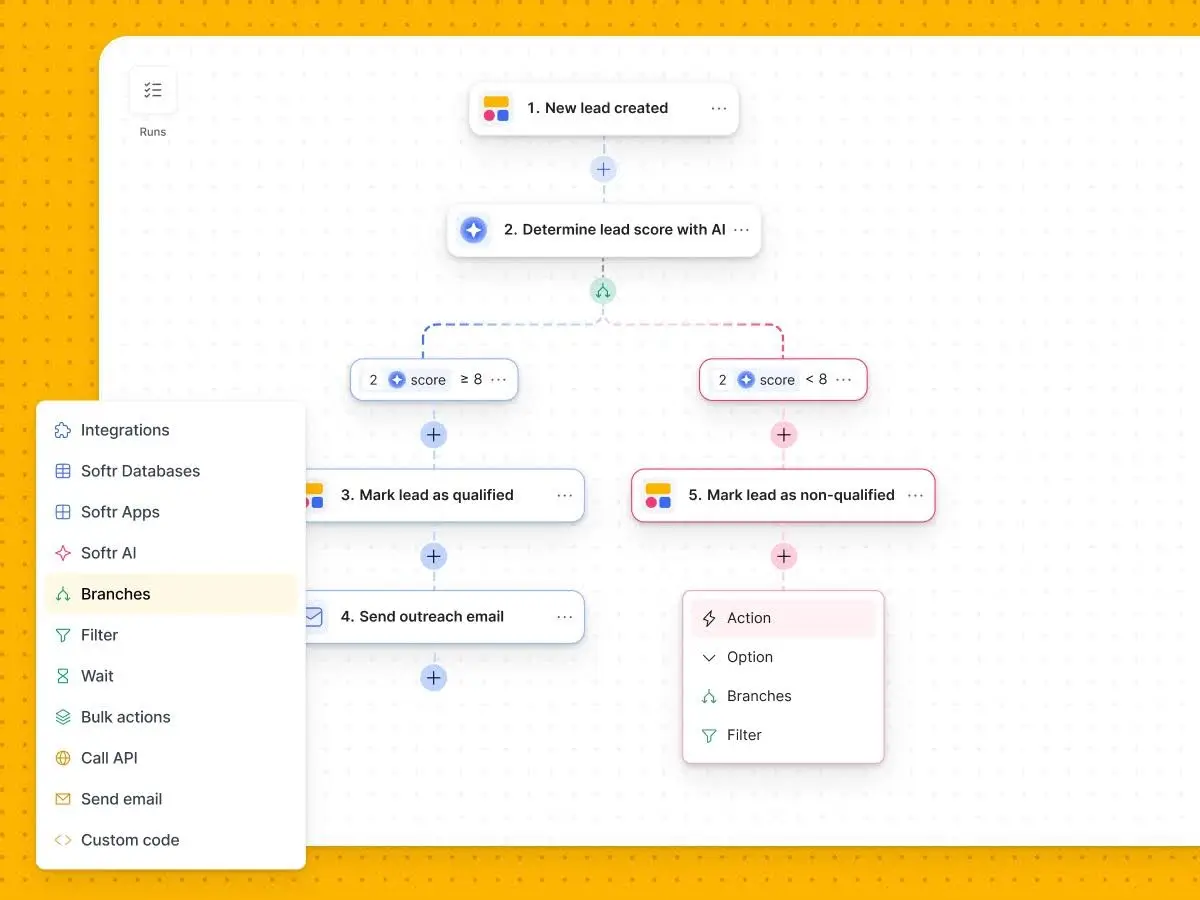
Bonus points for the in-built Form designer and ready-made form templates for service requests, reimbursements, feedback, and more that allow you to manage the entire approval process from—creating dynamic request forms to getting them approved—all under one roof.
Softr key features
- Drag-and-drop & AI Co-Builder: Describe what you need and the AI Co-Builder builds a complete app for you — or start from a template or blank canvas. Business Operators can fully customize the resulting approval apps instantly.
- Real-time alerts: Automated notifications keep all stakeholders informed about the status of their approval requests.
- Intelligent Business Apps: Embed Ask AI conversational helpers so users can ask questions directly about request histories and large datasets.
- Dynamic forms: Use conditions and logic to create multi-step forms that adjust based on user input and attributes. Great for onboarding, support requests, user feedback, and more.
- Powerful Native Workflows: Use native Softr Workflows triggered directly by user actions, or automate workflows between thousands of third-party apps via integrations with Zapier and Make.
- User access control: Use advanced AND/IF and OR conditions to show a subset of your records to one group while showing another to another group simultaneously, e.g., records relevant to each logged-in user.
- Comprehensive audit trails: Softr maintains detailed records of all approval activities, providing 100% accurate audit trails.
Softr pros and cons
✅ Excellent customer support with an active user community to quickly find solutions, learn from peers, and stay updated with the latest best practices
✅ Softr's team actively listens to community feedback, continuously improving the platform based on user suggestions
✅ Advanced user-control and enterprise-grade authentication processes ensure security for sensitive data and information
✅ Built-in Vibe Coding block provides limitless, AI-generated customization for any advanced UI component needs, meaning you are never restricted
Softr pricing
Softr offers flexible pricing with unlimited published apps on all plans, making it well-suited for teams building internal tools and approval workflows that can scale over time. Even the free plan includes access to core building features, major data source integrations, and collaboration tools.
Plans include:
- Free – Core app-building features for up to 3 builders
- Basic – From $19/month
- Pro – From $99/month
- Business – From $329/month
- Enterprise – Custom pricing
Who can use Softr?
Softr is a solid choice for all businesses—from startups to Fortune 500 companies—empowering Business Operators, Ops Managers, and Department Heads to autonomously build robust approval workflow systems without code.
- Freelancers, startups, and small businesses interested in cost-effective, flexible solutions for managing quick approvals as the business scales
- Medium-sized businesses benefit from Softr's ability to automate repetitive tasks and approval workflows while facilitating in-app collaboration with team members
- Enterprises/large organizations managing multi-departments can use Softr to create complex hierarchies involving multiple stakeholders while easily integrating with major ERPs, CRMs, and enterprise tools and offering enterprise-grade security features
App 2: Kissflow—best for IT leaders and high-compliance workflows

Kissflow is a self-serve workflow management software. It has a low-code, drag-and-drop interface that lets you create multi-step approval workflows quickly and easily.
With Kissflow, you can streamline both Board and Process workflows. You can even automate workflows between Board and Board, Board to Process, and so on, making workflow orchestration manageable and accessible to all.
Key features
- Use the built-in form builder to design approval forms, such as leave requests, new hiring approval, asset purchasing, and more
- Control who/what can start a process and what users can see or edit at each step
- Stimulate the workflow to view the process in real-time as an end-user
- Get access to ready-made reports and metrics to track workflows effectively
- Integrate processes with other systems and tools, including Salesforce, Google Workspace, Dynamics 365, Oracle, Hubspot, and Power BI
- Add notes, provide context, and log decisions within workflows
Pros and cons
✅ Simple and intuitive; decluttered UI makes it easy to navigate and use
✅ Ability to host public forms and use lookups to prefill information in form fields
✅ Excellent and reliable customer support
❌ Lacks AI integration and dynamic form-building elements
❌ Not much help for users to self-start with workflow creation
Pricing
Kissflow uses enterprise-oriented pricing designed for organizations managing complex workflow and compliance requirements.
Plans include:
- Basic – From $1,500/month
- Enterprise – Custom pricing
Ideal for
Kissflow is a good fit for IT Leaders looking for a low-code approval workflow app. Also, if your industry has high compliance needs, Kissflow offers tools and features to help standardize approval processes and minimize errors. However, solopreneurs and SMBs might try other options due to the lack of a free plan.
App 3: Pipefy—best for AI-powered procurement and process automation
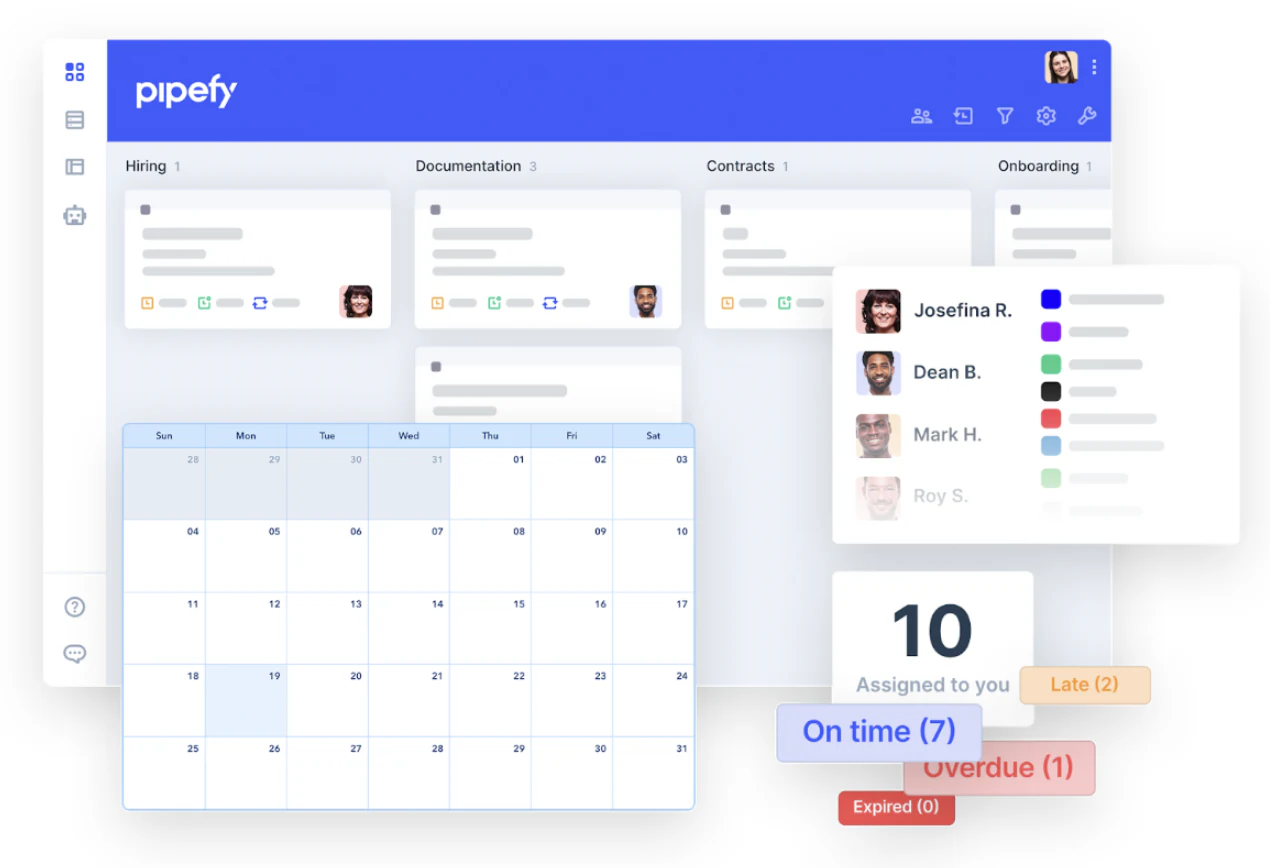
Pipefy is an AI-powered approval workflow software. It allows you to automate repetitive tasks, such as sending notifications and managing approvals, using triggers and action elements.
Key features
- Pipefy's procure-to-pay software ensures complete procurement automation—be it requests, quotes, supplier selection, approvals, or follow-ups
- Integrate with 300+ third-party apps, from spreadsheets to complex ERPs via native connectors, and extend integration capabilities using API
- Use preset rules and triggers to sort and route items through the workflow
- Has ready-made automation templates for streamlining business, finance, HR, IT, and procurement processes
- Use Pipefy AI to build approval workflows, get updates, and generate insights using natural language prompts
Pros and cons
✅ Pipefy's conversational AI helps with easy process creation, updates, and questions
✅ Easy customization and extensive integration capabilities
✅ Has templates for beginners to get started with process automation
❌ Some users have found the mobile experience to be lacking
❌ Users complain about distorted notifications, especially approval request notifications, which often land in spam
Pricing
Pipefy offers a free entry-level plan, with premium tiers available through custom quotes based on business requirements.
Plans include:
- Free
- Business – Custom pricing
- Enterprise – Custom pricing
- Unlimited – Custom pricing
Ideal for
Pipefy is a good alternative to Kissflow, with AI as a sidekick. The free plan is suitable for small teams and freelancers who need to organize their tasks, while premium plans offer scalability and security for medium and large-scale businesses.
App 4: Trello—best for lightweight task management and short approval cycles
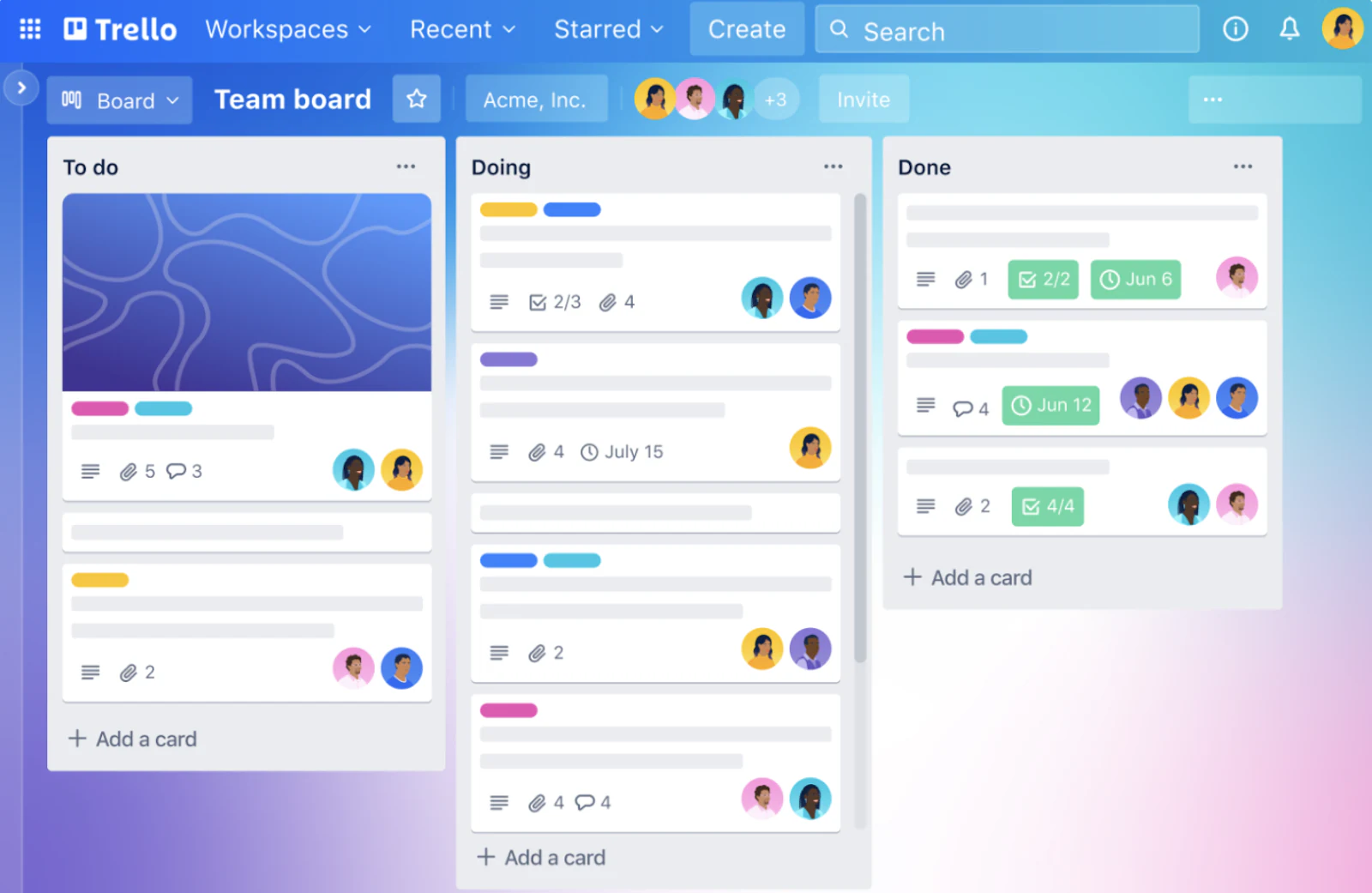
Trello is a lightweight project management tool that offers customizable boards and views for managing tasks and project workflows. It also offers native plugins (Power-Ups) to build interactive and scalable approval workflow apps.
Like Trello’s Hipporello's Approvals plugin, which requests approvals directly from Trello cards, or the Voting plugin to vote on proposals directly within Trello.
That, along with its AI-powered automation tool, Butler, eliminates the need to rely on email and instant messenger and deploy automated approvals.
Key features
- Visually organize tasks and track approvals using customizable boards and cards
- Use advanced checklists to break down tasks into smaller steps and assign team members and due dates to each
- Ask Butler to move cards in Board workflow upon approval or send notifications when a card is updated using preset rules, buttons, and commands
- Get AI-powered workflow suggestions based on past repetitive actions
- Integrates with 200+ apps, including communication apps, form builders, CRMs, and more
Pros and cons
✅ Offers a generous free plan
✅ Easy to use with not overly complicated but essential features
✅ Highly responsive mobile app for approving requests and getting updates on the go
❌ Relies on integrations for most approval workflow management
❌ Not suitable for large-scale or complex workflows
Pricing
Trello offers affordable per-user pricing, making it accessible for individuals and smaller teams.
Plans include:
- Free
- Standard – From $5/user/month
- Premium – From $10/user/month
- Enterprise – From $17.50/user/month
Ideal for
Trello is ideal for individual use and small to medium sized businesses looking to automate short approval cycles.
App 5: Zapier—best for connecting thousands of third-party apps

Zapier is a no-code automation builder that lets you integrate workflows between two or more apps, teams, and departments. When an event happens in one app, Zapier can tell another app to perform (or do) a particular action.
Whether you want to build an approval system to process software requests or one to process leads before you send them to your sales team, you can streamline every workflow.
Key features
- Offers a drag-and-drop visual canvas to plan and diagram approval processes and optimize them with AI
- Use Zapier Tables to insert a manual Approval step into automated workflows (Zaps), sticking to a human-in-the-loop approach
- Add paths and branches based on IF/THEN logic to perform different actions on different inputs
- Choose from ready-made approval workflow templates for project and budget approvals, resource allocation requests, and more
- Centralize pending approvals using Approval Inbox, allow internal and external parties to monitor and approve requests without an active Zapier account
- Build automated approval workflows with triggers and actions across 7,000+ apps
- Use Zapier AI to create automation by simply describing the approval process in plain text
Pros and cons
✅ Supports multi-step Zaps for building complex workflows
✅ Integrated AI capabilities make creating approval workflows a matter of words
✅ Has integrations with 5000+ cloud apps
❌ End-to-end automation gives you limited control over how data flows between applications
❌ Unlike Softr, Zapier depends on third-party apps for approval functions like e-sign a document
Pricing
Zapier’s pricing scales based on task usage and automation complexity.
Plans include:
- Free
- Professional – From $29.99/month
- Team – From $103.50/month
- Enterprise – Custom pricing
Ideal for
Zapier is a versatile workflow automation tool designed for all solopreneurs, startups, SMBs, and large enterprises looking to automate monotonous tasks and build interconnected workflow systems.
App 6: Zoho Creator—best for medium to large IT enterprises
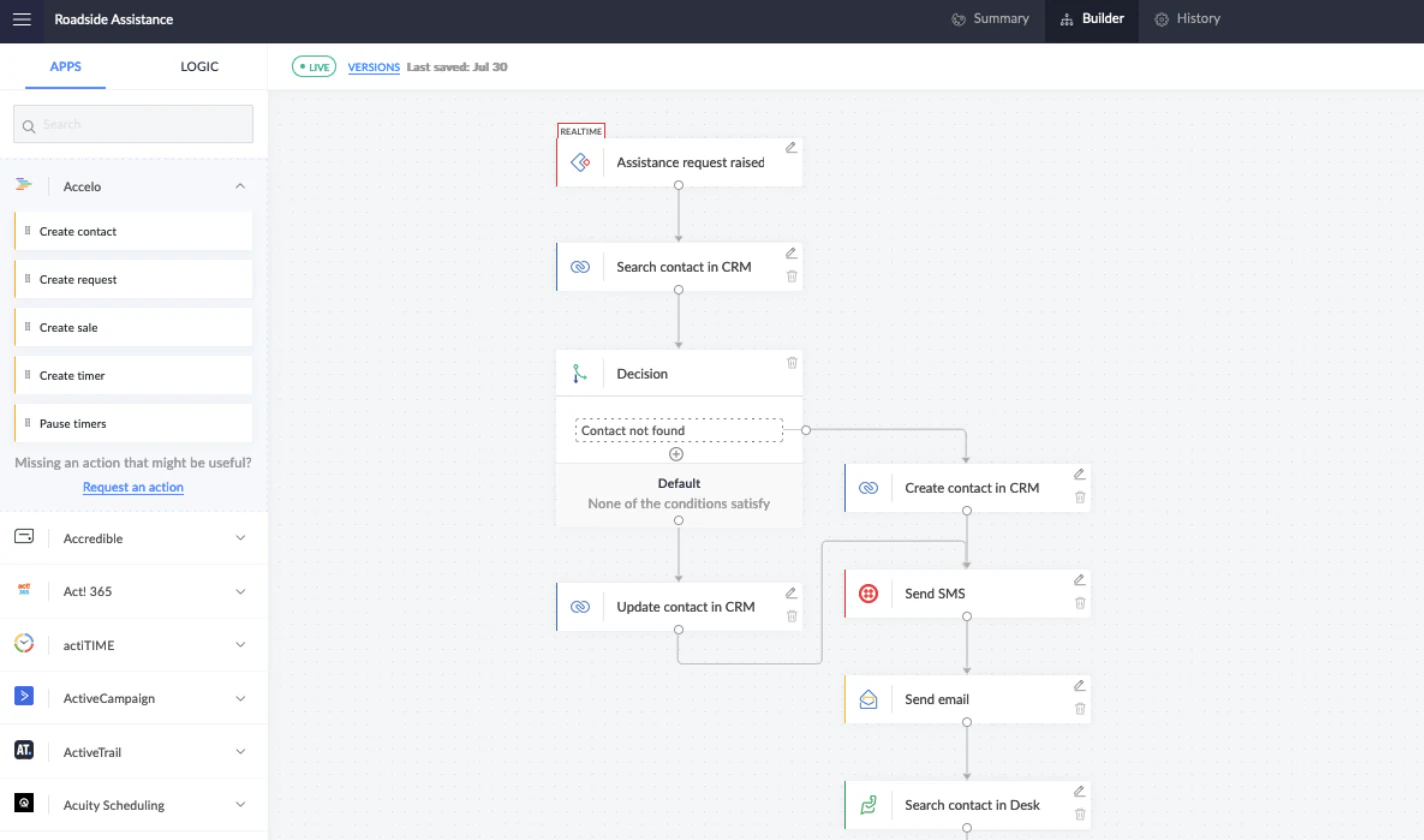
Zoho Creator is a low-code app development platform that includes a variety of features meant to reduce repetition in your work. Workflows in Zoho Creator allow you to build cloud-based approval systems that support complex, multi-level processes across departments.
Using a simple drag-and-drop interface, you can map out your approval processes—specifying each step, assigning team members, and configuring workflows to trigger upon almost any approval activity or scenario.
Key features
- Attach relevant documents, notes, and other data to any step in the approval process
- Integrates with multiple payment gateways to build approval workflows for invoices, payments, and more instantly
- Use Deluge, Zoho's proprietary programming language, to automate complicated approval scenarios using lines of code
- Integrate your workflows with 800+ tools in data security, collaboration, marketing, finance, and other apps and tools
Pros and cons
✅ Capture all notifications, tasks, and approvals on the go with Zoho mobile
✅ Well-integrated with Zoho's app ecosystem and 600+ third-party apps
✅ Maintains detailed suit logs for approval requests
❌ No free plan is available
❌ A low-code interface gives some learning curve for non-technical users
Pricing
- Standard – From $12/user/month
- Professional – From $30/user/month
- Enterprise – From $37/user/month
- Flex – Custom pricing
Ideal for
Zoho Creator is ideal for medium and large IT enterprises looking for low-code software with enterprise-grade data security and compliance.
App 7: ClickUp—best for agencies and marketing project management
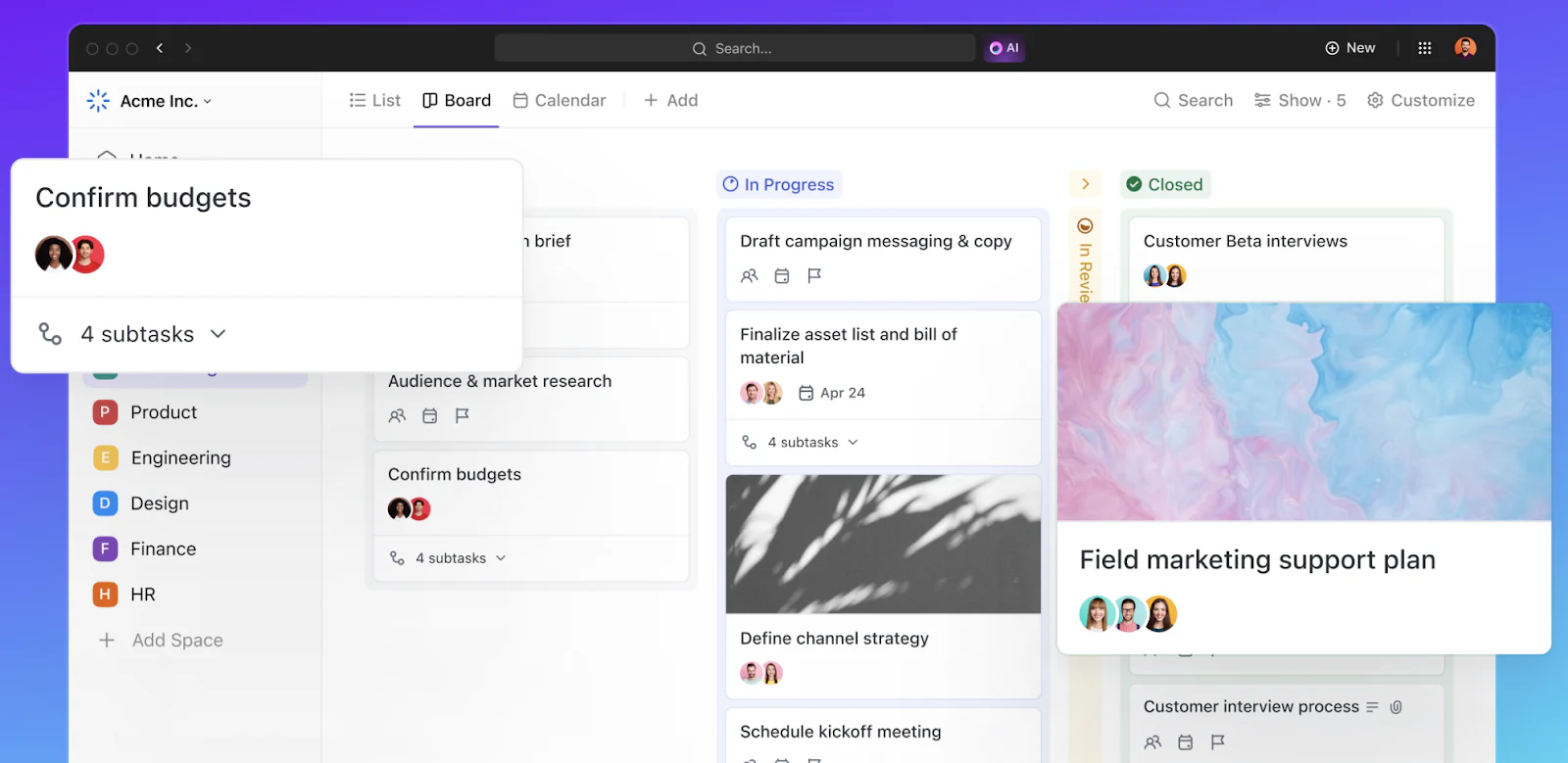
ClickUp is an all-in-one project management software. It allows you to choose from 15+ views to build a board approval workflow system with columns for 'Pending,' 'Approved,' and 'Rejected' to track task progress.
Its automation builder tool lets you automate approval process, tackle routine tasks, and manage project handoffs, keeping AI by your side.
Key features
- Use Whiteboards to visualize and diagram the approval process from start to finish while collaborating with your team members in real-time
- Over 100+ customizable approval workflow templates for project requests, document approvals, and other critical decisions
- Create approval tasks with different custom statuses to track the progress of each step in the process
- Tell ClickUp Brain(AI) what you want to automate in plain English and instantly configure workflow automation.
- Connect your workflow with 1,000+ apps, including Zapier, Make, and more
Pros and cons
✅ A generous free version
✅ User-friendly interface with a minimal learning curve
✅ Excellent customer support, with self-help resources and video tutorials available on the web
❌ Too many customization options might confuse new users
❌ Notifications can sometimes overwhelm you, with no definite alert management system in place
Pricing
ClickUp provides scalable per-user pricing suitable for teams of various sizes.
Plans include:
- Free
- Unlimited – From $7/user/month
- Business – From $12/user/month
- Business Plus – From $19/user/month
- Enterprise – Custom pricing
Ideal for
ClickUp is ideal for agencies, marketing teams, and IT service providers that manage multiple projects simultaneously and are looking for a centralized project management platform.
App 8: monday.com—best for visual project management and CRM
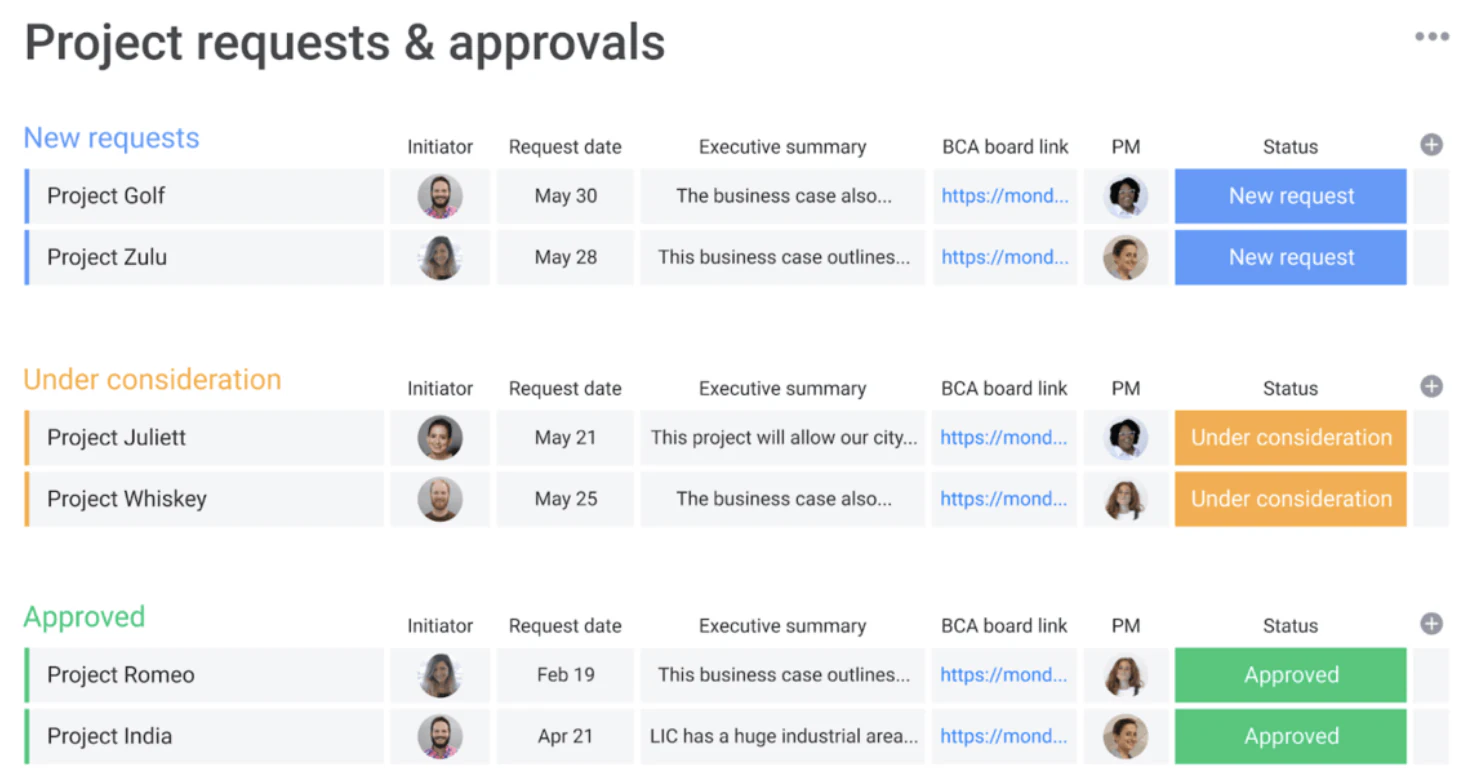
monday.com is a comprehensive task management software that allows you to manage and streamline workflows, including approval processes. With features like customizable workflows, automated notifications, and integrated communication tools, you can create, manage, and track approvals efficiently within a centralized system.
Key features
- Choose from pre-built approval form templates or create dynamic request forms using the form builder
- Use different views such as List, Timeline, Kanban boards, Calendar, and more views for end-to-end visibility into the approval process
- Choose from over 200+ ready-made workflow templates and integrations to popular tools like Slack, Gmail, MailChimp, MS Teams, and more
- Set up automation to route requests to the right people and notify team members for the final approval
- Ask AI to summarize approval requests, extract key points, and gain actionable insights to save time and move work forward
Pros and cons
✅ Offers a variety of automation and request form templates
✅ Integrated AI reduces the learning curve for new users
✅ The platform is way too much if you're just looking for approval workflow management
❌ Has minimum user requirement for paid plans
❌ Doesn't integrate with many other project management apps
Pricing
Plans include:
- Free
- Basic – From $12/seat/month
- Standard – From $14/seat/month
- Pro – From $24/seat/month
- Enterprise – Custom pricing
Ideal for
monday.com is best for agencies and large-scale marketing teams as it offers a little of everything—project management, CRM, and client campaign management. However, it's a bit pricey, and the paid plans have user limits, making it costly for SMBs simply looking for an approval workflow app.
App 9: Smartsheet—best for large enterprises with complex spreadsheet workflows

Smartsheet is a project management software built on a spreadsheet-like interface. It allows for better organization and management of tasks and business processes via task cards, multiple views, and a drag-and-drop functionality.
In addition to project management, Smartsheet offers solutions like dynamic view, bridge, and workflow automation to keep up with approvals and their completion process.
Key features
- Efficiently manage tasks and processes using different views and by moving cards across different stages in your dashboard
- Leverage Smartsheet's Dynamic Views to create multi-step approval processes including any document format and with the right people
- Streamline work requests by using a pre-built form to collect, filter, require key fields, and view any type of requests
- Use branching and low-code options with API & HTTP calls and JavaScript for building complex workflows
- Restrict editing of approved/declined rows to prevent changes
- Connect Smartsheet to popular cloud tools such as Google G-Suite, Office 365, Slack, DocuSign, and more
Pros and cons
✅ Supports both Board and Process workflows
✅ A familiar spreadsheet-like interface makes the tool friendly to use
✅ Smartsheet's paid plan provides 1TB of attachment storage
❌ No free plan is available
❌ The Pro plan is limited to 250 automation per month
Pricing
Smartsheet offers tiered per-member pricing for teams managing collaborative workflows and approval processes.
Plans include:
- Pro – From $12/member/month
- Business – From $24/member/month
- Enterprise – Custom pricing
- Advanced Work Management – Custom pricing
Ideal for
Smartsheet is ideal for large enterprises dealing with complex approval workflows on a daily basis.
App 10: Approvals in Microsoft Teams—best for teams within the Microsoft ecosystem
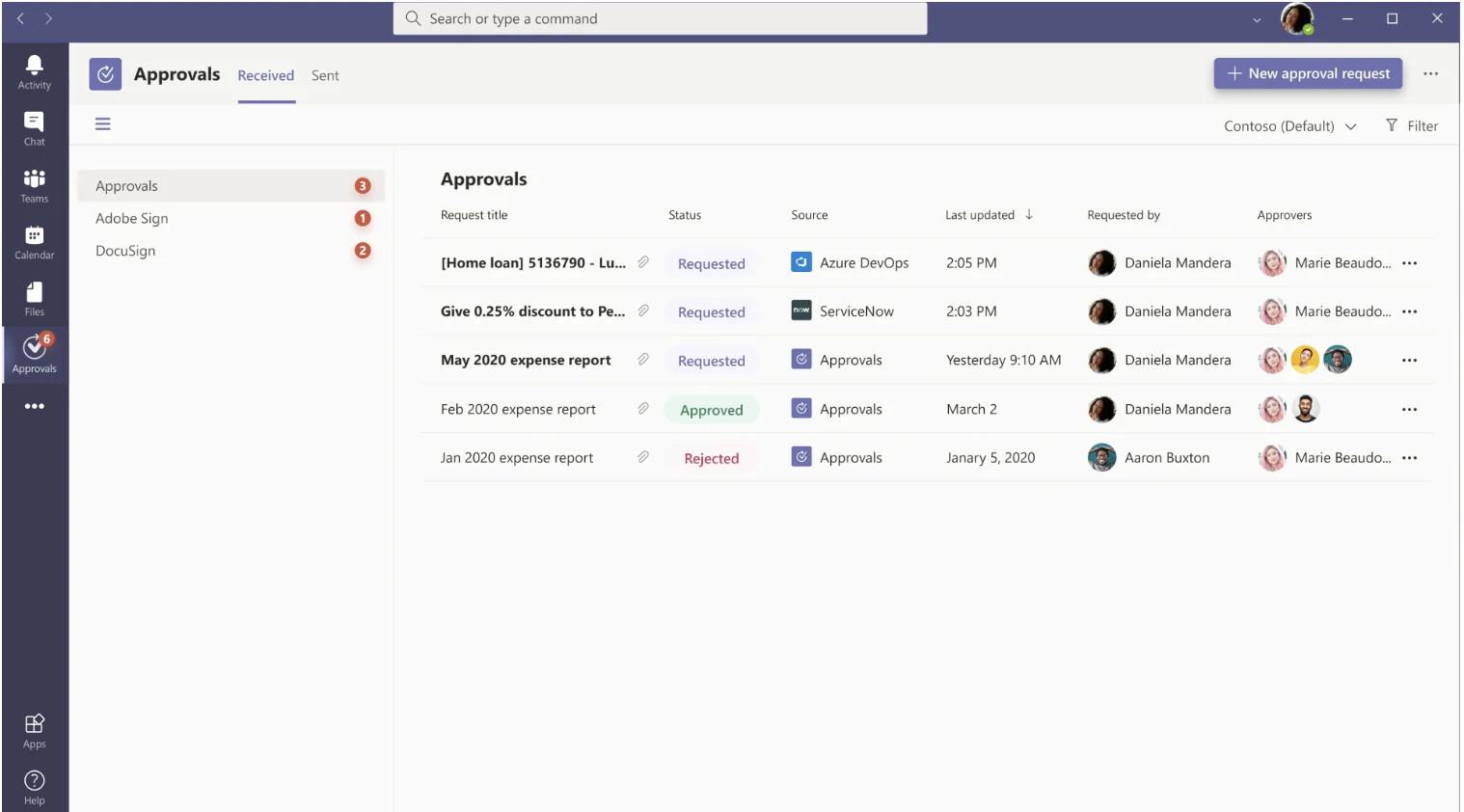
Approvals in Microsoft Teams lets you streamline and manage approvals and processes from a centralized hub. You can start an approval workflow from any of your Microsoft apps, including MS Teams, Power Automate, SharePoint, and Microsoft Dynamics 365.
Key features
- Use condition and logic to create flow sequence based on certain actions and triggers
- Initiate approval workflow from a chat, channel conversation, or the Approvals app
- Respond to requests directly from within the Teams chat or channel
- Choose from various approval request templates with preset fields like discount requests, reimbursements, or expense reports
- Approve or reject the request with the option to leave comments
Pros and cons
✅ Well orchestrated with MS app ecosystem
✅ Unlike Softr, Approvals in Microsoft has an outdated interface, making it less intuitive for users
❌ Struggles in handling complex multi-step workflows
Pricing
Microsoft Approvals is included within Microsoft Teams and Microsoft 365 plans, rather than being sold as a standalone product.
Plans include:
- Free – Included with Microsoft Teams Free
- Microsoft 365 Personal – From $6.99/month
- Microsoft 365 Family – From $9.99/month
Note: Microsoft Approvals is available as part of Microsoft Teams (free and paid plans).
Ideal for
Approvals is an excellent workflow management app for enterprises using the Microsoft ecosystem.
Key features to look for in an approval workflow app
- Customizability: Ensure the approval workflow software lets you customize workflows to fit your business processes, including the ability to define approval steps, set permissions, and customize forms as needed. Platforms like Softr and ClickUp offer decent customization options.
- Integration: Choose an approval workflow platform that can easily integrate with your existing tech stack, such as CRMs, ERPs, payments tools, and more.
- Scalability: Opt for scalable workflow apps that can handle increasing approval complexity as the business grows.
- User experience: Look for approval workflow platforms that are easy to use for all employees, from entry-level to management. Ensure the workflow app offers click-and-done functions, smooth navigation, and mobile accessibility for approving requests on the go.
- Security & compliance: Given the sensitive nature of approval processes in industries like finance and healthcare, ensure the approval system meets enterprise-grade security standards. Features like role-based access, data encryption, compliance (e.g., GDPR, HIPAA), and comprehensive audit trails are essential for tracking approvals and ensuring accountability throughout the process.
Challenges in implementing approval workflow apps (and how to overcome them)
Implementing approval workflow apps into your business operation comes with certain challenges, such as:
Lack of standardization
Consider approval workflow apps as digital versions of your already existing approval process.
If your current workflows are not defined and lack uniform methods for submitting and reviewing requests, your approval platform might reflect it and suffer accuracy.
Solution: Establish clear, consistent procedures for the approval process. Declutter your existing processes before implementing approval workflow software. This includes creating standardized forms and defining approval steps to ensure everyone is on the same page.
Resistance to change
Often, teams are reluctant to try something new because the old processes are doing just fine.
It's human nature.
Pushback and slow adoption are common among businesses, especially when the change involves learning a new tool.
Solution:
- Take a week or two to demonstrate the new approval workflow app to your team
- Roll out the entire app infrastructure in phases so it's easy to grasp and digest details
- Share its benefits and keep an open line for feedback and Q&A
Additionally, providing thorough training and support will help employees feel more comfortable with the transition.
Compatibility with existing systems
Siloed systems and disparate processes can restrict workflow app efficiency. It would require you to open and connect your business processes with other data partners and collaboration apps in your industry to form an all-inclusive approval workflow system.
Solution: Look for an approval workflow app that integrates with your existing systems and tech stack. Softr is an excellent choice if you're looking for compatibility. You can customize, configure, and, most importantly, integrate with your existing systems without a sweat.
Which is the best Approval Workflow App?
While other approval apps ask for heavy configurations, Softr allows you to build white-label approval apps that perfectly align with your business flow and suit your branding.
Approval workflow apps built using Softr come with built-in features, such as:
- Automated approval notifications
- Custom board views including Kanban, List, Grid, Table
- Built-in form builder with e-signature support
- Powerful native Softr Workflows, as well as integrations to universal workflow automation apps like Zapier and Make
- High-performance Softr Databases built natively, plus integrations with Airtable, monday.com, Google Sheets, and 30+ apps
- Enterprise-grade security features, including CRUD, SSO, and more
Interested in giving Softr a try? Manage all your approval workflows, get started for Free!