Noloco pricing: A complete guide to plans in 2026


I started researching Noloco's pricing a couple of weeks ago for this guide. At the time, I thought I had a pretty good handle on what Noloco cost and what each plan included, until I revisited my sources and realized Noloco changed its pricing.
If you're in the middle of working out what Noloco now costs, including its AI credits, this guide is for you. Most of what's currently published still describes the old plans, so I've pulled together the most up-to-date information.
This guide breaks down Noloco's current pricing, including what happens when you hit limits or run out of AI credits, hidden costs, and tips to manage usage.
Noloco pricing plans at a glance
How Noloco pricing works
Noloco replaced its old pricing tiers (Starter, Pro, and Business) with a core paid plan called Build, plus Free and Enterprise tiers. Instead of switching to a higher plan as your needs grow, you can pay for additional seats and records as you need them.
Every plan now comes with an AI credit allowance. Paid plans get a monthly allocation, and the Free plan gets 30 credits a month plus 5 more each day.
If you're already on an old plan, you keep your current plan, price, and features unless you want to switch. You now also get those monthly AI credits.
What are AI credits?
Credits measure how much work Nola, Noloco's AI co-builder and assistant, does for you.
You spend credits when Nola builds or edits something in your app. For example, creating a page, building a table, or writing a workflow. The more work Nola does, the more credits the task uses. After each action, Nola shows you how many credits the action used and how many you have left. Your whole workspace shares one credit balance. And on the Build plan, unused credits roll over for one month.
If you run out of credits before the month ends, you can buy additional credits. The extra credits are available right away, but they come as a recurring monthly charge rather than being a one-time top-up.
What counts as a seat?
Noloco has two types of seats:
- Team seats include people who use the same company email domain as your workspace, or anyone with a team member or data admin role.
- Client seats are everyone else who uses your app, such as clients, customers, partners, and contractors.
A team seat starts billing as soon as you add the person and leave the seat active, whether they log in that month or not. If you deactivate a seat, it is removed from your bill starting with your next billing period.
You also don't pay an additional per-seat charge for client seats as long as you stay within your plan's client seat limit.
What counts as a record?
A record is one row of data that your app stores or connects to. Records you create in Noloco Tables and records you sync from Airtable, Google Sheets, or a SQL database all count toward the same limit.
So if you connect an existing base with 30,000 rows, for example, you've used up the Build plan's 25,000 records before you've built anything.
Let's go over what each pricing plan includes and who it's best suited for.
Noloco pricing: Full breakdown
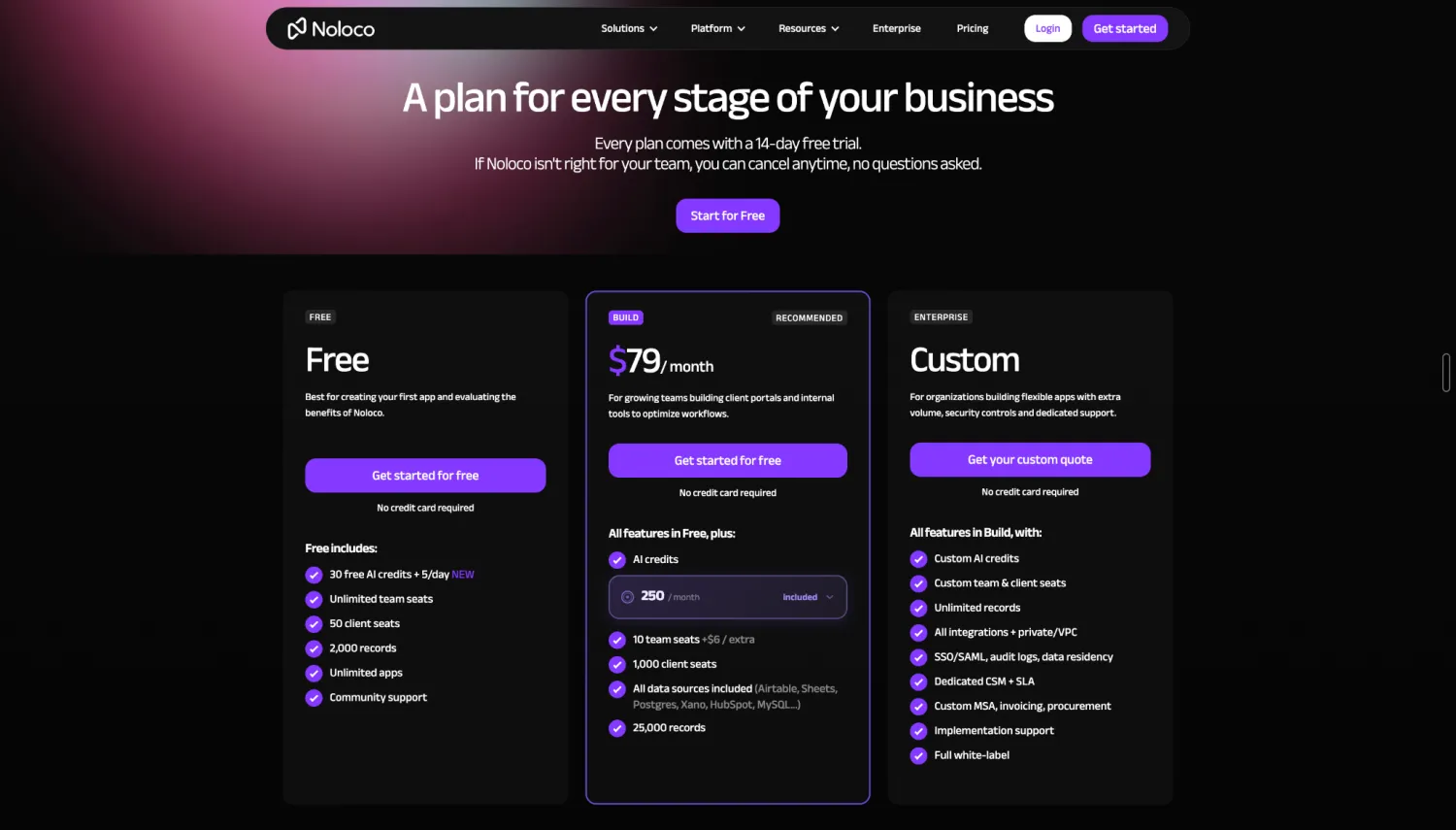
Noloco Free: $0/month
The Free plan lets you learn how Noloco works and build basic apps for your team or clients. You get:
- 30 AI credits per month + 5 daily credits
- Unlimited team seats
- 50 client seats
- 2,000 records
- 100 workflow runs per month
- Unlimited apps
- Noloco Tables as your only data source
- Community support
Pros
- Add as many team members as you need without paying for team seats
- Create as many apps as you want without paying for each one
- Put a portal in front of up to 50 clients, so you can test a client-facing app with real users
- Get AI credits to try Nola, including 5 fresh credits each day that are used before your monthly allowance
- Start with a 14-day Build trial, so you can test the full feature set before deciding whether Free is enough for your needs
Cons
- You can't connect external data sources like Airtable, Google Sheets, or PostgreSQL
- Record creation stops at 2,000; your app can keep running but it can't accept new records until you clear some space or upgrade to Build
- AI credits will run out quickly if you use Nola to build and edit your apps
- Workflows stop running once you hit 100 runs a month, so any automation that depends on them will stop until the allowance resets
- Noloco branding stays on your apps unless you upgrade
Best for: Building your first Noloco app or creating a simple internal tool that works with data stored in Noloco Tables.
My verdict: Free is a solid way to see whether Noloco fits your needs. The 14-day Build trial makes it even easier to test the platform properly. But the main dealbreaker is the data-source limit. If your business already runs on Airtable, Google Sheets, PostgreSQL, or another source, you'll need Build to connect it.
Noloco Build: $79/month
Build is Noloco's main paid plan for teams that need more data, external sources, and room to build advanced apps. You can add additional seats and records as your needs grow (up to 10,000 monthly AI credits and 59 users).
You get:
- 250 AI credits per month, with one-month rollover
- 10 team seats, then $6 per additional seat
- 1,000 client seats
- 25,000 records, with capacity expanding automatically starting at $25 per additional 25,000 records
- External data sources, including Airtable, Google Sheets, PostgreSQL, MySQL, HubSpot, Xano, and more
- Unlimited user roles, plus row- and field-level permissions
- 5,000 workflow runs per month
- Noloco branding removed
Pros
- You can add more team seats and records as your needs grow, so you're not stuck mid-project waiting for a reset or an upgrade
- Works with external data sources, so you don't have to move your existing data into Noloco just to build an app around it
- The higher limits and removal of Noloco branding make it more practical for apps you plan to put in front of customers
- Adding clients doesn't increase your bill as long as you stay within the 1,000-client allowance
Cons
- Team seats are billed whether people use them or not
- 250 credits won't be enough if you use Nola regularly. The smallest add-on brings you to 400 total credits and costs an additional $40/month, and that's a recurring cost rather than a one-time purchase
- Your bill can grow without you approving it, since records and seats expand automatically as you use them
- Synced rows count toward the same record limit as rows you create in Noloco, so an existing dataset can use up a large portion of your allowance
Best for: Growing teams that need to connect their existing data and build lightweight portals or internal tools for many clients or external users.
My verdict: Build is the plan to look at if Free is too restrictive, especially if you need to connect data and tools you already have. It's attractive for teams with lots of clients because adding users within the 1,000-client allowance doesn't increase your bill.
The trade-off is that your costs can grow with team seats, records, and AI credits. Before you commit, it's worth checking which of these you'll use most so you have a better idea of what you'll actually pay.
Noloco Enterprise: Custom pricing
Enterprise is for organizations that need more scale, security, and support than Build offers. Instead of a fixed monthly price, Noloco creates a plan based on your needs.
You get:
- Custom AI credit allowances and seat limits
- Unlimited records
- All integrations, plus private and VPC deployment
- SSO and SAML
- Audit logs
- Data residency
- A dedicated customer success manager with an SLA
- Custom MSA, invoicing, and procurement terms
- Implementation support
- Full white-labeling
Pros
- You don't have to work around Build's limits if you have a large amount of data or many users
- You get a dedicated customer success manager instead of relying mainly on self-service resources
Cons
- Procurement and security reviews can take time, so this isn't a plan you can usually set up and start using right away
- If you mainly want higher data or seat limits, you could end up paying for governance and security features you don't actually need
Best for: Large organizations that need higher limits, advanced security and compliance controls, dedicated support, or a custom agreement.
My verdict: Enterprise makes sense only when Build's limits, security requirements, or procurement process are getting in your way.
If you mainly need more records, seats, or AI credits, Build expands on its own up to a point; but it stops at 250,000 records and 1,000 client seats. Past that, Enterprise is the only route, so it's worth asking Noloco's sales team whether they'll raise a specific limit without moving you to the full package.
What happens when you run out of AI Credits on Noloco or hit a limit?
Noloco has limits on AI Credits, records, seats, and workflow runs. Here's what happens when you reach each one:
- If you run out of AI Credits: Noloco finishes an AI action that's already running, but new AI actions won't run until you have credits again. On Free, you wait for your daily or monthly credits to reset. On Build, your monthly credits reset on your renewal date. You can also move to a higher monthly credit allowance, which is available immediately but adds to your monthly bill until you change back. Or, you can keep making changes manually using Noloco's standard builder without AI credits.
- If you reach the record limit: On Free, Noloco stops new records from being added and syncing pauses. Your app keeps running but can't take in new data until you delete some records or upgrade. On Build, Noloco automatically expands your plan by another 25,000 records at $25 a month, and it keeps adding capacity in 25,000-record blocks, up to 250,000 records.
- If you reach the seat limit: On Build, you can add extra team seats when you need them. Each additional seat costs $6 per month, and Noloco charges you for these seats at the end of your billing cycle. If you deactivate someone, that seat won't be charged on your next bill. Client seats work differently: Free includes 50 client seats, while Build includes 1,000.
- If you run out of workflow runs: On Free, automated actions such as notifications, status updates, and assignments stop running until your allowance resets. Users can still access your app, but anything that depends on those automations won't happen. On Build, your workflows keep running and Noloco automatically charges you for the extra runs.
Hidden costs to watch out for with Noloco
A few parts of Noloco's pricing will increase your bill as your app grows. Here are the costs to keep in mind when estimating what you'll pay each month.
- Team seats are based on who you add, not who actively uses the app. A team member counts toward your seat limit as soon as you add them, as long as they aren't disabled. So if someone only logs in occasionally, you'll still pay for their seat. Additional seats cost $6 per month, and they're added automatically and charged at the end of your billing cycle.
- Your existing data can use up your record allowance quickly. Noloco counts both records you create in Noloco Tables and records you sync from external sources toward the same limit. So if you connect a database with 100,000 rows, those records count toward your allowance too. On Build, Noloco automatically adds another 25,000 records for $25 a month each time you reach your limit. That means connecting a 100,000-row database could add $75 a month to your bill before you build anything else.
- Extra AI credits are a recurring monthly cost. If your allowance isn't enough, you can't make a one-time purchase to cover a busy month. Instead, you move to a higher monthly allowance and keep paying for it until you change it back. The next step up is 400 credits for $40 a month, and the available allowances go up to 10,000 credits for $1,850.
- It's difficult to estimate how many AI credits you'll need upfront. Noloco doesn't publish a fixed credit cost for each AI action. You can see the cost as you work, but that makes it difficult to know whether 250 credits will be enough for your month before you start using them.
- Workflow overage costs aren't published. If you go over your monthly workflow runs on Build, Noloco keeps your workflows running and charges you for the extra runs automatically. But neither the pricing page nor the documentation says what those runs cost.
Tips for keeping your Noloco costs down
To keep your usage, and your bill, under control, here are tips drawn from Noloco's own documentation:
- Use Nola when it saves you time. Manually making changes, like changing a label or reordering a page, doesn't use AI credits. Save your credits for larger tasks where doing it manually would take a while.
- Keep an eye on your shared credit balance. AI credits belong to the whole workspace, not individual users. If several people are building with Nola, everyone uses the same pool of credits. Check your usage regularly so one person's project doesn't use more of the team's allowance than expected.
- Deactivate people who aren't using the app. Deactivated users don't count toward your seat limit, so you won't be charged for their seats in your next billing period. Since team seats are billed whether someone logs in or not, a quick check before your next bill can help you avoid unnecessary costs.
- Filter what you sync. Synced records count toward the same record limit as records you create in Noloco. If you're connecting a large database, sync only the records your app actually needs instead of the entire table.
- Archive data you no longer need. Move historical data to an external system instead of keeping it in your app. Old projects, closed tickets, and past invoices still count toward your record limit even if you rarely use them.
- Add conditions to your workflows. An "Only continue if" condition can stop a workflow before it performs unnecessary actions. Since each trigger counts as a run, even when the workflow doesn't end up doing anything useful, conditions can help reduce your total runs.
- Combine similar workflows. Multiple actions inside one workflow still count as a single run. If two workflows are triggered by the same event and perform related tasks, combining them can reduce the number of runs you use.
- Watch your Billing page and notifications. Your Billing page shows your current usage across the different limits. Since records and seats expand automatically, checking it regularly can help you spot rising usage before it turns into a bigger bill. Noloco also sends emails about record limits and in-app notifications when you hit a workflow limit.
Which Noloco plan should you choose?
- Choose Free if you want to try Noloco, build your first app, or create a simple internal tool using data stored in Noloco Tables. Every new app starts with a 14-day Build trial, so you'll see the full feature set before falling back to Free. You can't connect external data sources, and once you reach the plan's data or workflow limits, you'll need to clear space, wait for the monthly reset, or upgrade.
- Choose Build if you need to connect data you already have, build a simple portal, or run an internal tool. Keep in mind that your bill will increase as you add team seats, records, workflow runs, or AI Credits.
- Choose Enterprise if you need more than Build provides or have requirements such as SSO, SAML, audit logs, data residency, private or VPC deployment, or dedicated support. Enterprise pricing is fully custom, so what it costs you will vary.
Noloco vs Softr: Which is better?
Noloco lets users build basic internal tools and portals on top of their data using AI or its standard builder. But you need to upgrade before you can connect the data sources you already use. Plus, your bill increases automatically once you hit certain limits, which makes costs harder to predict.
If you want more control over what you pay for (and what you get), Softr is generally a better Noloco alternative. Its AI app builder turns the data you already have into secure business apps like client portals, dashboards, CRMs, and internal tools.
You can use Softr's native database to store and manage your data, or connect to Airtable, Google Sheets, Microsoft Excel, and 20+ other external data sources. And your app stays in sync (both ways) as your data changes.
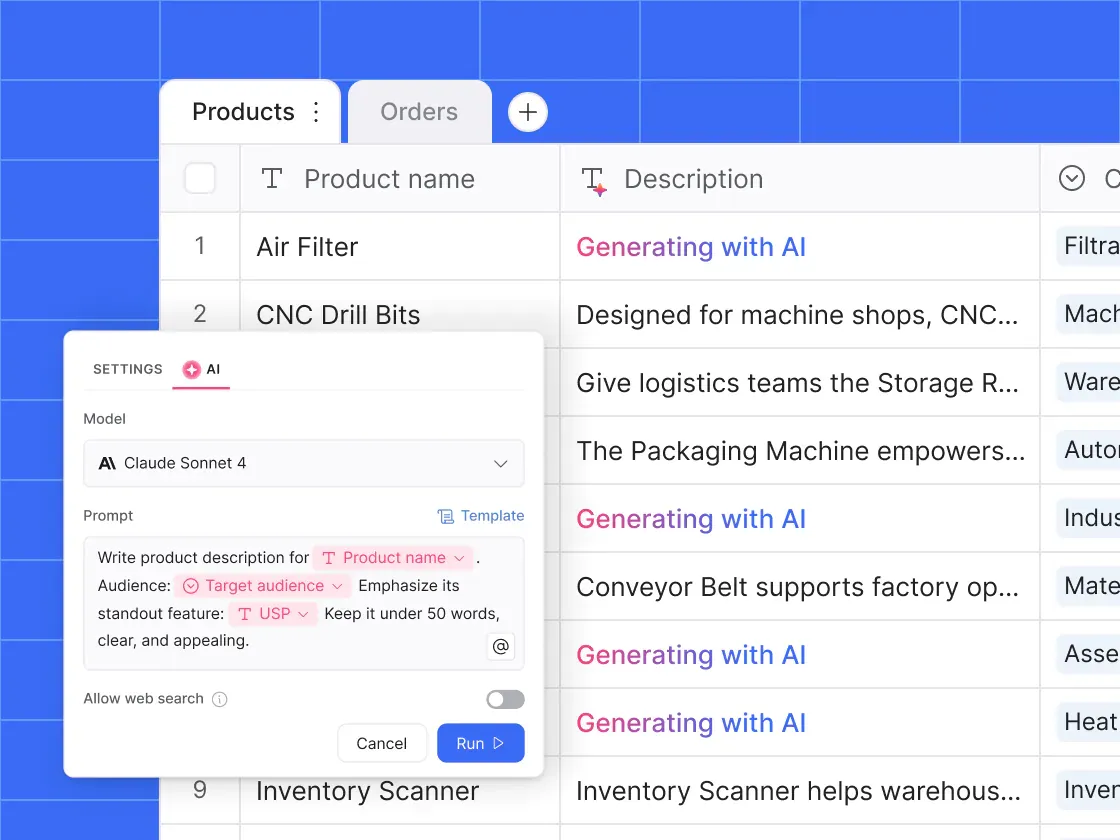
Next, describe the app you want to build on top of your data, and Softr's AI App Builder creates the pages, data structure, workflows, and user permissions for you. Security, authentication, and hosting are already built in, so you can focus on shaping the app instead of setting infrastructure up from scratch.
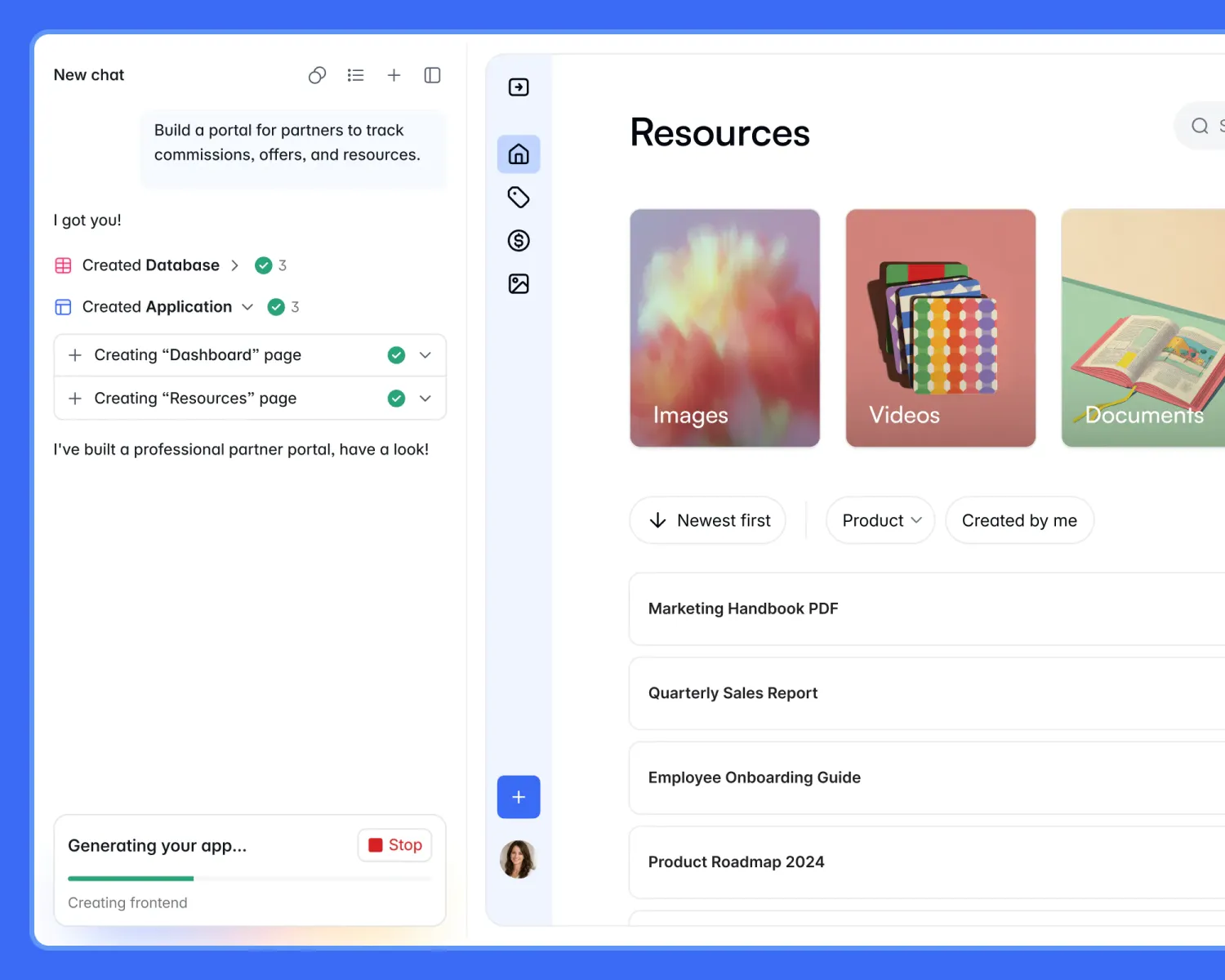
Once the app's first version is ready, you can keep refining with AI or switch to making changes yourself without spending credits:
- Use the visual editor to change pages, layouts, permissions, and workflows
- Add custom code with HTML, CSS, or JavaScript when you need more control or have developer support
- Use the Vibe Coding block to generate custom components like pricing calculators from a plain-English description
You can also set up automations using Softr Workflows for tasks like extracting data from a PDF or pulling details off a supplier's website.
Or describe the automation you want, and the Workflow AI Co-Builder creates the trigger, actions, and logic for you to review and adjust before you turn it on. You can also deploy AI agents in your workflows to take action on your behalf.
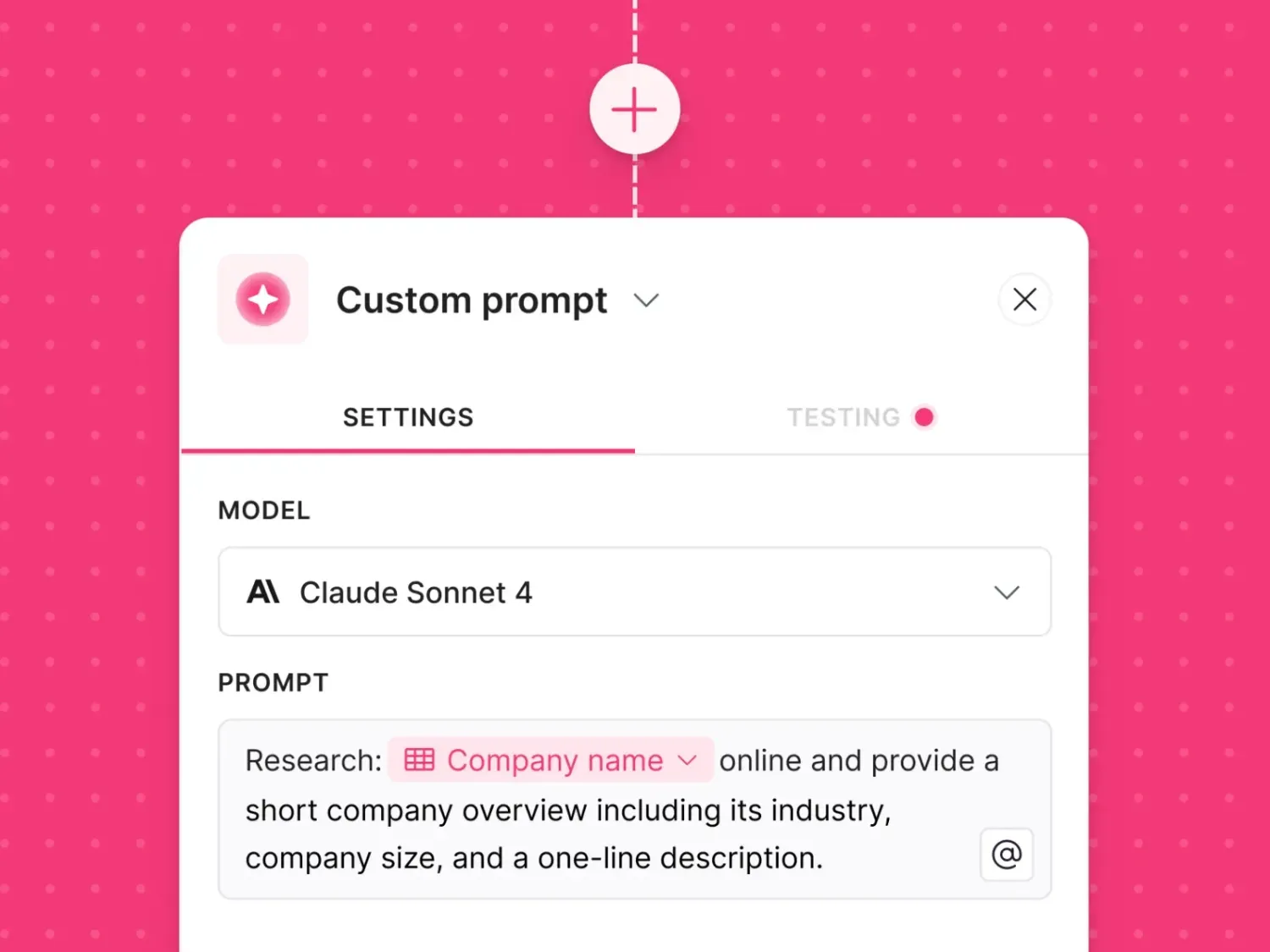
With Softr, you get:
- A free plan that works with your existing data. Softr's free plan lets you connect to data sources you already use, like Airtable and Google Sheets, so you can build an app on top of your data before paying for a plan. You can also add AI credits without upgrading, so you're not forced onto a paid plan just because you want higher AI usage.
- More room to grow your data. Softr Basic nets you 50,000 records for $19 a month, double what Noloco Build gives you, and Pro comes with 500,000. Noloco Build stops at 250,000 no matter how much you're willing to pay, so a growing dataset beyond that means upgrading to Enterprise.
- More control over your monthly bill. You can choose a plan that fits your app today and see the cost of adding more users, builders, or domains before you add them. If your app suddenly gets more users, Softr gives you seven days to adjust before charging you for the extra users.
- A discount for paying yearly. Annual billing gives you roughly two months free compared with paying month to month. Noloco only offers monthly billing, so you don't get that option to lower your overall cost by committing for a year.
- More automation without hitting the brakes. Softr includes more workflow actions than Noloco does on comparable plans, so you have extra room to run the notifications, updates, and assignments your app relies on.
- Security controls you can get without moving to Enterprise. Two-factor authentication, domain-restricted signup, filtered user sync, and global data restrictions are available on Softr Business. So, you can add the security controls your team needs without negotiating a custom Enterprise contract.
- You don't pay twice for the same person. Softr counts a user once across all your published apps, no matter how many they log into. If your team runs a client portal, an internal tool, and a partner dashboard for overlapping people, the same person counts once against your allowance rather than three times.
Softr pricing: an overview
Noloco vs Softr: Which should you choose?
Noloco is only worth considering if you're building highly structured internal tools and want the simplicity of one paid plan. Softr is a better fit than Noloco if you want to build complete apps on top of your existing data, and have more options for scaling as your data, automation, and security needs grow.
Choose Noloco if you:
- Prefer having more capacity bundled into one paid plan rather than choosing between several plans
- Want your app's capacity to expand automatically as your data or team grows, without having to manually upgrade your plan
- Don't need to match your plan to different levels of data, automation, or security as your app evolves
Choose Softr if you:
- Want to build on the business data you already have without paying for a plan first
- Want to move to a higher plan only when your app needs more capacity or advanced features
- Want more control over how increases in app usage affect your bill, with a grace period and clear published rates for additional users
- Need security controls such as two-factor authentication, domain-restricted signup, or global data restrictions without moving to Enterprise
Try Softr for free and build your first production-ready business app with AI.
Frequently asked questions
Is Noloco free?
How much does Noloco cost?
How do Noloco's AI credits work?
What happens if you go over your Noloco limits?
Is Noloco cheaper than Softr?