Transcript
Have you ever wanted to customize your app logo depending on the user that is logged in in your Softr app? Well, now with dynamic app logos, you can in Softr. Let me show you how to set this up.
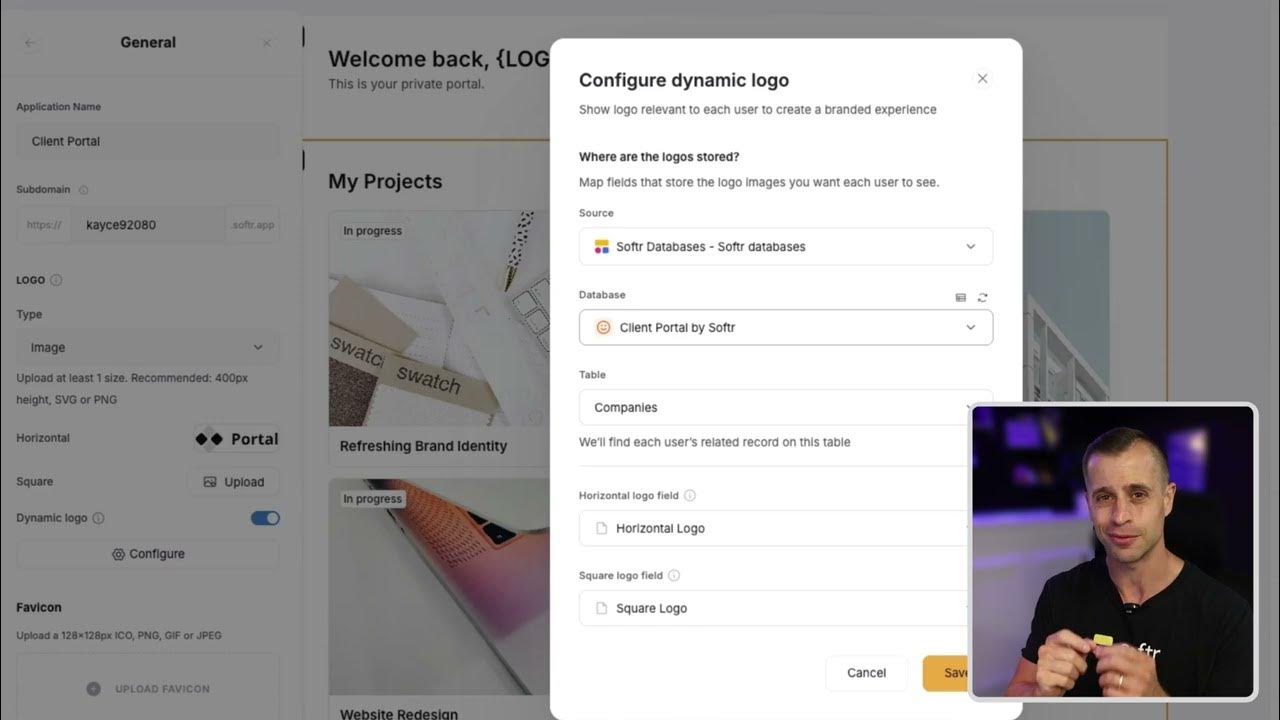
First and foremost, this is for those that are on an upper tier plan. For those that have access to it, you can go to settings, general, and then you will look at dynamic app logo right there.
You can toggle this on and then you can go to configure it. For that, you want to figure out what logo you want to showcase.
[.blog-callout]
Note from Softr: If you are just starting and need to get your user accounts and data structures ready quickly, the AI co-builder can generate your initial setup and database schemas automatically.
[.blog-callout]
In my situation, I am using a client portal template. For my client portal template, I want to showcase the company logo.
For that, I am going to pick the company table and then I am going to pick the company horizontal logo, which is what I have in my database right here.
[.blog-callout]
Note from Softr: To keep your branding assets well-organized within the platform, try using Softr Databases to store and manage your logos and company details directly.
[.blog-callout]
If I go into preview, I can see that Aiden represents or belongs to the company called Portal. But if we want to pull up Mr. Isaac, we can see that Isaac belongs to Team Softr.
Now we have dynamic app logos set up for our Softr application just as easy as that. We hope you love this new feature.
[.blog-callout]
Note from Softr: Dynamic logos are perfect for creating custom client portals where each user feels like they are using a white-labeled tool built just for them.
[.blog-callout]