Transcript
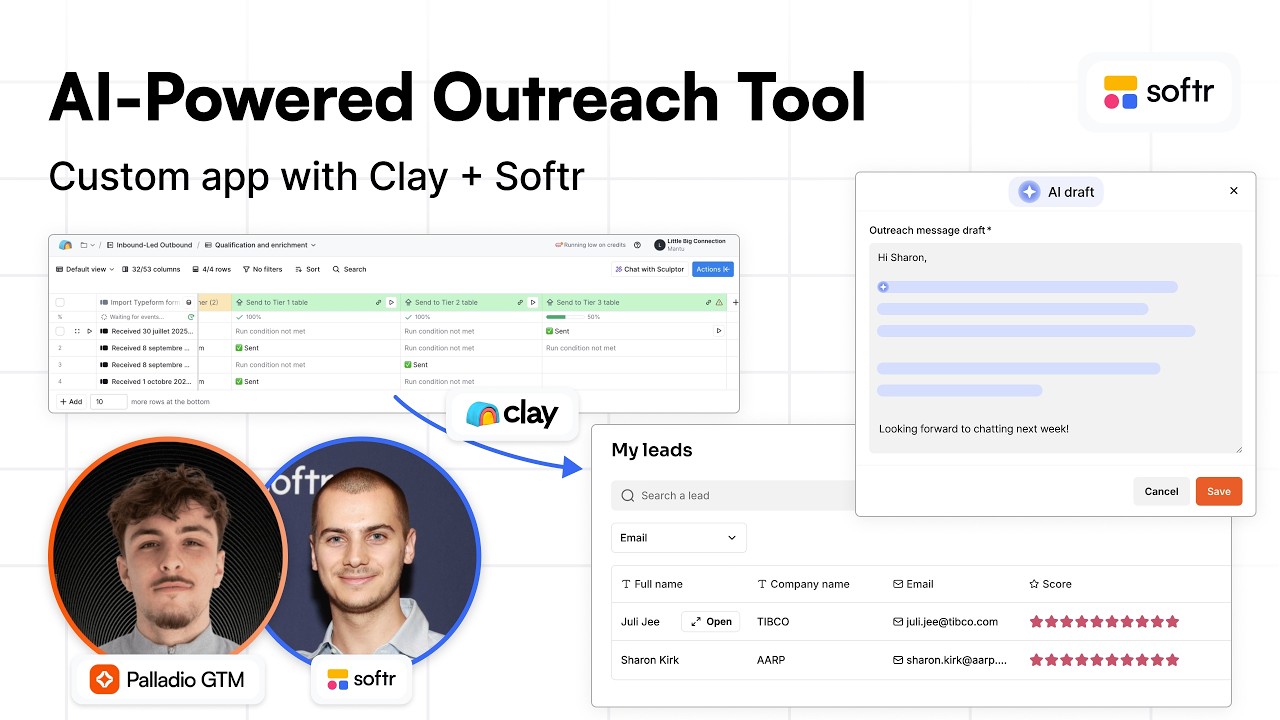
We wanted to share something we have built together with Guillaume. It is an interface where SDRs or any sales representative can have access to the high priority leads allocated to them with custom data points. They can take action on those leads within a single place without jumping between a CRM, sequencer, Clay, and n8n.
In this interface, they have all their leads and can open individual lead pages to see basic information and AI scoring. They also have custom data points relevant to the lead, such as company industry, revenue band, employee count, and tech stack—everything needed to perform outreach.
From here, they can generate AI draft emails without having to write them manually or navigate AI tables. For example, a rep can give a custom instruction to the AI, like mentioning they are both located in Paris. With one click, they can generate a draft that is sent back to a Clay table.
[.blog-callout]
Note from Softr: While you can manually trigger external workflows, a great alternative is to use the AI co-builder to instantly generate these types of sales lead pages and data structures. You can also explore the AI CRM template to get started faster.
[.blog-callout]
The AI mentions the custom instructions in the draft, and most importantly, performs value proposition matching between the enriched data points and the company's offerings. This ensures the rep has a high-quality email template that is already personalized to the prospect.
Sales reps can then edit the email to add a human touch and make it shorter, as AI is great for 80% of the work but often needs that final 10% to feel real. Once modified, they can send it to their sequencer in one click. This adds the lead to a sequence on LinkedIn or email via Lemlist, Instantly, or Smartly.
Most sales teams, especially large ones, have specific problems that can only be solved with AI. You need to build a bridge between high-level workflows built by growth teams and the end user. This is why we built this interface to ensure the data is easily activatable.
[.blog-callout]
Note from Softr: To keep your logic and data as close to your design as possible, consider using Softr Workflows. It allows you to automate internal processes directly within your app, reducing the need for multiple third-party automation tools.
[.blog-callout]
One challenge is breaking silos between marketing and sales. Marketing teams drive traffic and collect usage data that could be leveraged by salespeople. Instead of sending Slack notifications that require copy-pasting, we want that data to be actionable immediately in one place.
This approach allows reps to spend more time on high-quality leads and less on low-quality ones. While AI handles the heavy lifting, humans handle the final mile to drive reply rates and interest for target accounts. The system automatically treats lower priority leads while keeping a human-in-the-loop for tier one leads.
The goal is to ensure reps do not have to go into advanced workflows in Clay or n8n where they might break something. One single error in a JSON block can stop a workflow from working. We want a space where humans can act on AI workflows without being inside the technical backend.
In the Clay table, we start by qualifying and enriching leads coming from a form or website. We find the number of employees, category, decision-maker status, revenue band, and tech stack. This data is used for a scoring system that pushes leads into tier one, two, or three.
Tier three accounts are contacted automatically via email, and tier two receive email and LinkedIn outreach. Tier one leads are sent to the Softr interface. When a lead is assigned, the rep can receive a Slack notification and then log in to this interface to act on the lead.
[.blog-callout]
Note from Softr: If you find that standard blocks do not perfectly match your sales dashboard needs, you can use the Vibe-Coding block. Simply prompt for the exact component you want, and it will generate it and connect to your Softr Databases automatically.
[.blog-callout]
When the rep hits the button to generate an AI draft, that data—including custom instructions—is sent back to Clay. AI uses the lead context and company value proposition to write the email, which then appears back in Softr for the rep to review and send.
In the Softr database, there is a user table and a leads table. Every SDR has a different view managed by the user table, ensuring they only see the leads assigned to them. This user permission feature comes out of the box in Softr and is vital for internal apps.
[.blog-callout]
Note from Softr: Building custom tools for your team has never been easier because Softr now offers Unlimited Published Apps on all plans, including the Free plan. This is perfect for scaling project management or team intranet tools across your whole company.
[.blog-callout]
The leads table stores all enriched information from Clay. Fields like outreach message and custom instructions are dynamically updated as the rep interacts with the interface. The entire interface is designed with a drag-and-drop builder using cards and item details blocks.
We can configure what happens on click, such as opening a detail page in a modal. These pages are very customizable, allowing us to show data points or add action buttons. These buttons can send data via webhooks to other tools or update records directly in the database.
There are many other use cases for this, such as ABM hubs to track signals around target accounts or creating personalized content like landing pages for prospects. This gives the power of AI to anyone in the company without requiring them to be technical experts.
[.blog-callout]
Note from Softr: You can easily expand these internal tools into client portals. By using Forms and magic links, your prospects can log in securely to view their own data or book calls without needing a password.
[.blog-callout]
We are looking into the deal room use case next. These tools often cost a lot to implement, but the core features like sharing files and to-do lists can be built easily within Softr. We can also track when prospects log in to know when they are active.