Transcript
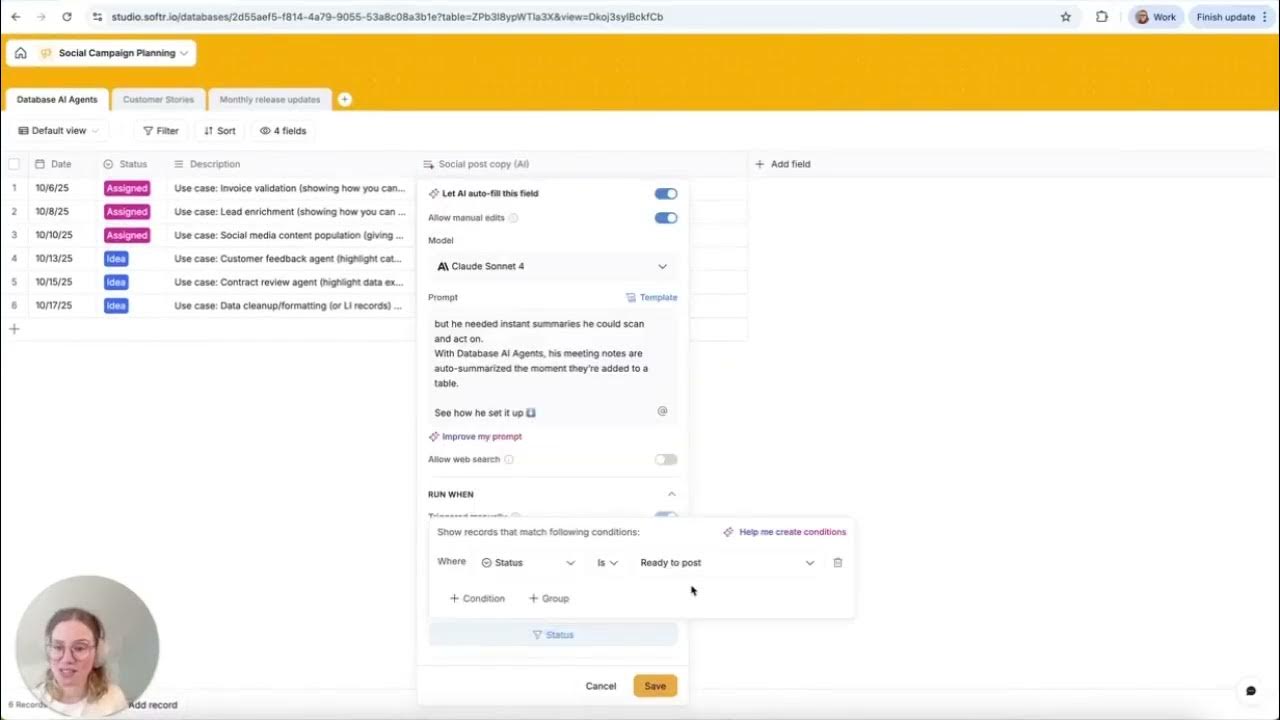
Today I am going to show you how to set up a social campaign AI agent that is going to help you write social post copy. I have gone a bit meta here in this database and set up a sample campaign we are doing for AI agents where we have different team members providing different use cases.
I have set a date field, a status, and a description, which is just describing the use case and then who is presenting the use case. Now I am going to go over and show you my AI field I have set up. This is a long text field, and I am going to use Claude Sonnet because I know this model is good for writing.
[.blog-callout]
Note from Softr: While this video shows how to build this manually, you can also use the AI co-builder to instantly generate app structures and logic for social media management tools.
[.blog-callout]
The prompt I have used is write a LinkedIn post announcing a demo of AI agents. I have referenced the description here so it has all that info, and I have also provided a sample just to have the structured format the way I want it. I am going to run this only when the status is ready to post.
That way it is not running when I just have an idea or something is assigned and not ready yet. One of my favorite features of AI agents is this preview field because it really lets you see if that prompt you have is going to generate the result you would want. I am just going to click this first entry and run.
[.blog-callout]
Note from Softr: This workflow is built natively using Softr Databases, providing a high-performance environment for managing your AI-generated content directly within your app.
[.blog-callout]
Okay, so here are the results. Content is looking good. I can also see approximately how many credits this is using up. But I noticed the formatting needs some work, so I need to add some spacing here.
I am going to go back up and add some line breaks. I am going to go back and run this again. This is exactly how I want it now, so I am clicking save, and I will show you when I turn this to ready to post.
[.blog-callout]
Note from Softr: To automate your team notifications after a post is ready, check out Softr Workflows to keep your internal processes running smoothly without external tools.
[.blog-callout]
The copy is generating for me and here it is. This is a great way to organize all your posts in one place and try different models. Every Softr plan, even the free one, comes with AI credits each month so you can try this workflow for yourself.