6 web portal examples for your business


As a professional, providing transparency to your customers and collaborators is at the top of your priority list. But when back-and-forth emails or one-to-one conversations are hard to sustain and scale, and a one-size-fits-all web page feels too impersonal, what are your options?
Web portals offer the ability to provide a platform with personalized, unique access. Whether you're trying to create an online space to nurture your business relationships, share confidential data with your team, or keep your customers in the loop about an ongoing project, a portal gives every person their own secure, relevant view.
In this article, we present the essential elements of a successful web portal, showcase live examples built by real businesses, and give a primer on the three different ways you can create your own (spoiler alert: Softr is one of them).
What is a web portal?
A web portal is an online platform aggregating and providing access to information, services, or resources for a specific group or audience. We'll get into specific examples later in the article, but to give you a practical idea, a web portal could be a platform where:
- A marketing agency updates its clients on their advertising spent
- A consulting firm keeps its customers aware of the progress of a common project
- A VC-funded startup displays monthly data to keep investors informed
The possibilities are limited only by your use cases, business needs, and imagination. And although they can take different forms, most portals provide the same core benefits:
- User experience: One of the most important benefits of using a web portal is that each collaborator can have unique access, where the data displayed is specific to their use case and, as a result, ultra-relevant.
- Increased transparency: By offering clients and collaborators access to live data, a web portal enables you to create less work on your end and more visibility on theirs. This is critical to avoid silos and miscommunication.
- Centralization: Collaborating within a web portal allows for an easier overview of everything stakeholders need to be aware of instead of having various platforms, documents, and conversations everywhere.
- Branding: As an extension of your company identity, a web portal is a great opportunity to further engage collaborators with your brand (e.g., through a custom design).
- Security: Web portals generally live behind a login access and benefit from enhanced security protocols. When sharing data, for example, a logged environment makes much more sense than spreadsheets floating around.
"Managing external partners through emails and spreadsheets is a nightmare. A portal allows you to only surface the information that is relevant to them and make approvals on the fly." — Shiran Brodie, Head of Marketing at Softr
If that sounds like something you might be interested in, let's look at some concrete examples.
6 real web portal examples built with Softr
We gathered some examples of web portals created with Softr. For each, we examine the thought process behind it, its unique characteristics, and what makes it so useful in practice. Every one of these was built by a business operator or partner, not an engineering team, and most went live in a matter of hours.
Learning community: Plan A
Learning communities are great examples of educational, interactive web portals. This one was created by Plan A, a leading carbon accounting software provider, and it helps companies decarbonise and comply with ESG reporting requirements.
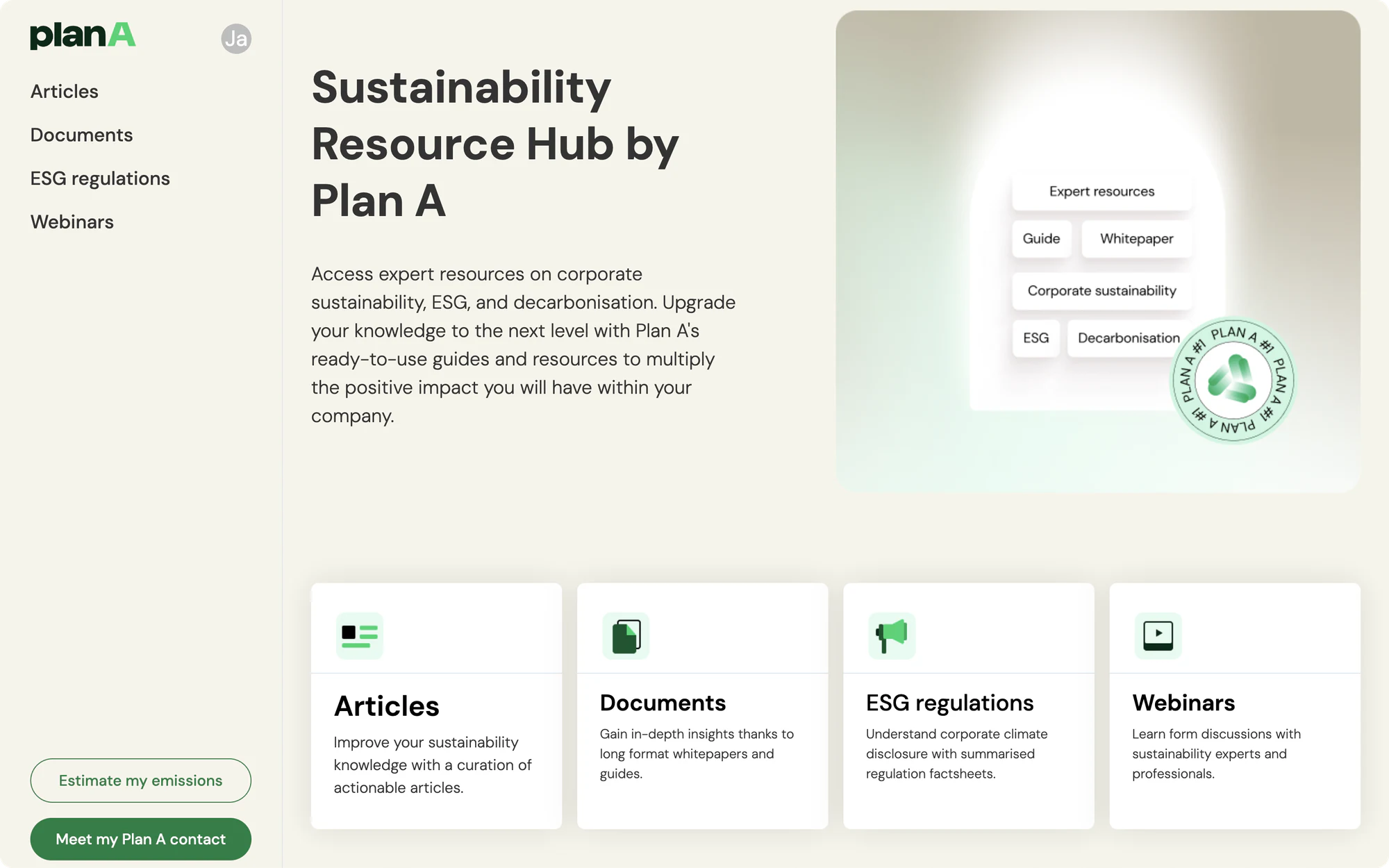
The team at Plan A initially published a newsletter to educate their audience on the importance of sustainability. However, they quickly realized that the format needed to be more flexible and that an interactive portal would have a much bigger impact. With Softr, Plan A has onboarded over 5,000 professionals through the personalized portal they created, which provides tools, resources, and even webinars.
Why we love it
We love Plan A’s mission of encouraging action through climate literacy. Often, portals focus solely on driving business efficiency or profit. This is a great example of a project that drives positive change in the world by educating business leaders on the bigger picture.
Additionally, we love that the Plan A team could create and publish their portal in such a short time (less than a week!). Head to the case study now to read the full testimony from Growth Marketer Guillaume Duvernay.
OEM partner portal: Skill IT
On the other end of the portal spectrum, an original equipment manufacturer (OEM) partner portal allows a manufacturing organization to share important product information, files, invoices, and updates with partners.
Steven, the founder of Skill IT, helps his clients achieve these tasks by offering business automation and efficiency services.
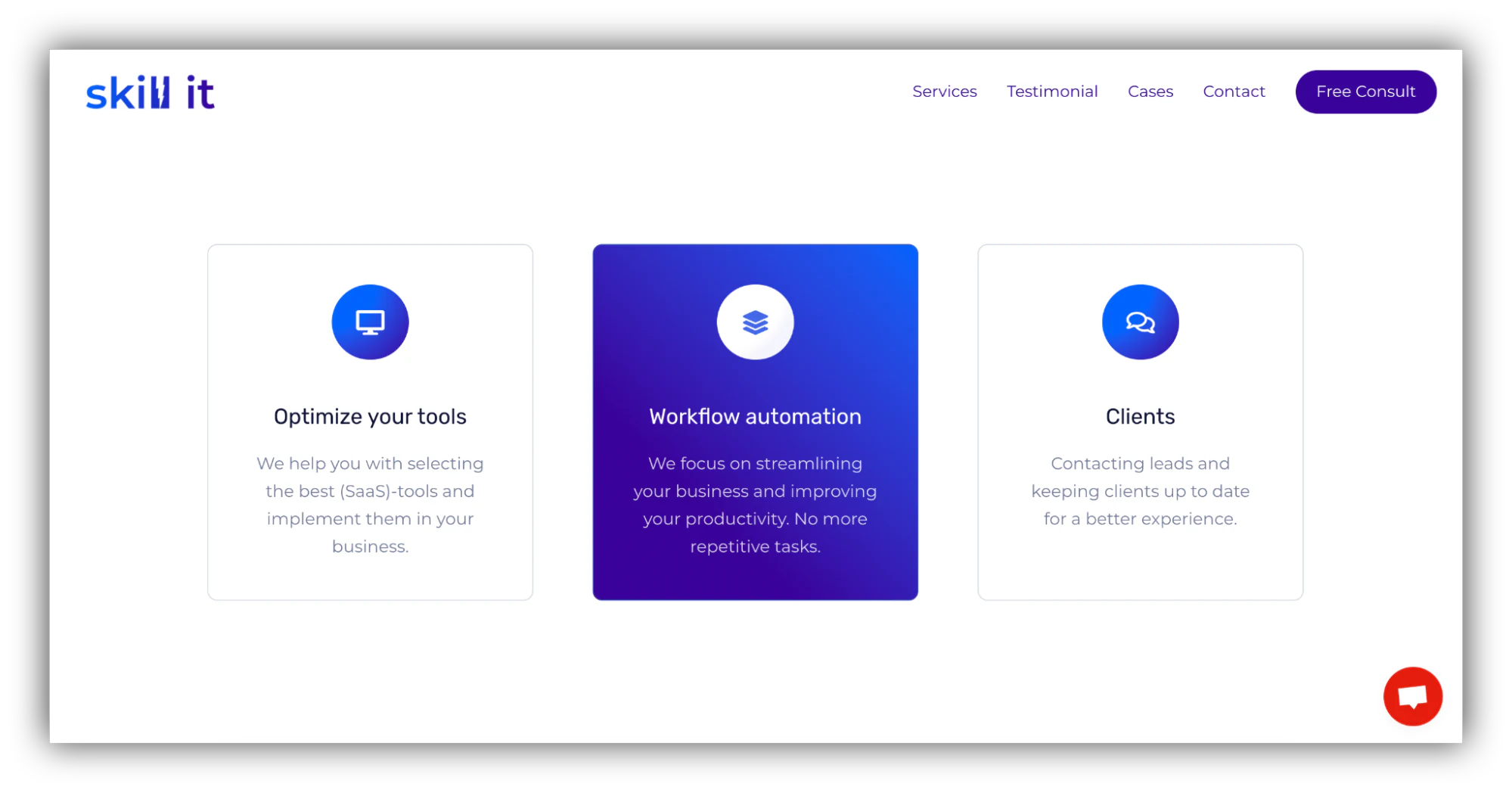
A partner portal is one of the most common reasons businesses reach for Softr. It surfaces only the products, files, deals, and collateral that each partner is allowed to see. As part of his mission to help companies choose the right tools to achieve better results and improve their processes, Steven chose Softr to create a user interface using Airtable as a data source:
"I was initially using Stacker but the amount of input required from the client side was too much. I started looking for alternatives and ended up with Softr after trying several options. It met all my requirements and is easy to use." — Steven Cornelis, Founder at Skill IT
Why we love it
We love that Steven has been using Softr as part of such a diverse set of no-code, AI, and automation tools. In the Skill IT case study, he mentions using Zapier, Integromat, ToDoist, Airtable, Dorik, and Bannerbear, among others. This is a testament to the interconnectivity and creativity in the AI no-code space.
Volunteering portal: Selfless Fiji
Some of the best use cases for web portals involve saving time and energy by streamlining repetitive tasks and reducing back-and-forth.
Selfless Fiji, a non-profit organization based in Fiji that helps connect volunteers with missions they can sign up for, was faced with difficulties managing a growing number of volunteer applications. The organization decided to work with a no-code expert, Shenal Harakh, to devise a solution.

What started off as a project to build a custom CRM turned into a fully-fledged web portal. Built on top of Airtable data, the platform fits the NGO’s requirement, complete with all required features, a mobile-friendly interface, and email automation workflows to free up time for Selfless Fiji’s team to focus on more important tasks.
Additionally, the portal allows volunteers to log in, find and register for projects, monitor their applications, and more.
Why we love it
The portal implemented at Selfless Fiji is another example of our tech used to empower an amazing cause. Since its implementation, the non-profit has been able to onboard over 800 members, which is massive considering Fiji's population.
We love that what started as a CRM turned into a complete portal, and the organization is considering expanding its use case to include donations next. Read more in our Selfless Fiji case study.
Maker portal: Massachusetts Institute of Technology (MIT)
Another example in education is the portal built at MIT's Project Manus to promote hands-on learning among the student and teaching bodies.

The makerspace allows students, technicians, faculty members, and managers to participate in experiments. Users log in securely using the university's single sign-on (SSO) system and can get involved even if they have never coded before.
Oliver Thomas, the Maker Digital Systems Architect, cited one of the benefits as the ability to easily create data-focused pages and dashboards to report on progress without having to dig deep into Airtable or another database interface. This is instrumental in empowering everyone to participate in the experiments.
"With Softr we are able to experiment and innovate 'at the speed of conversation,' which keeps everyone engaged and gives users a sense of control and ownership." — Oliver Thomas, Maker Digital Systems Architect, MIT
Why we love it
We love that building the makerspace on Softr has allowed the program to save a lot of money (the initial custom application cost over $100k to build and maintain) while empowering community engagement and democratizing digital innovation and no-code at a prestigious institution.
Now, Softr is used by over 2,800 users daily at MIT. Read the full case study to learn more.
Hiring portal: Tech Ladies
Human resources and hiring is a crowded market that often still fails to meet standards when it comes to diversity and inclusion, especially in niche markets like tech.
Tech Ladies, one of the largest communities of women in tech, aims to solve that by supporting its members in their careers and connecting them with guidance and job opportunities through a web portal built with Softr.
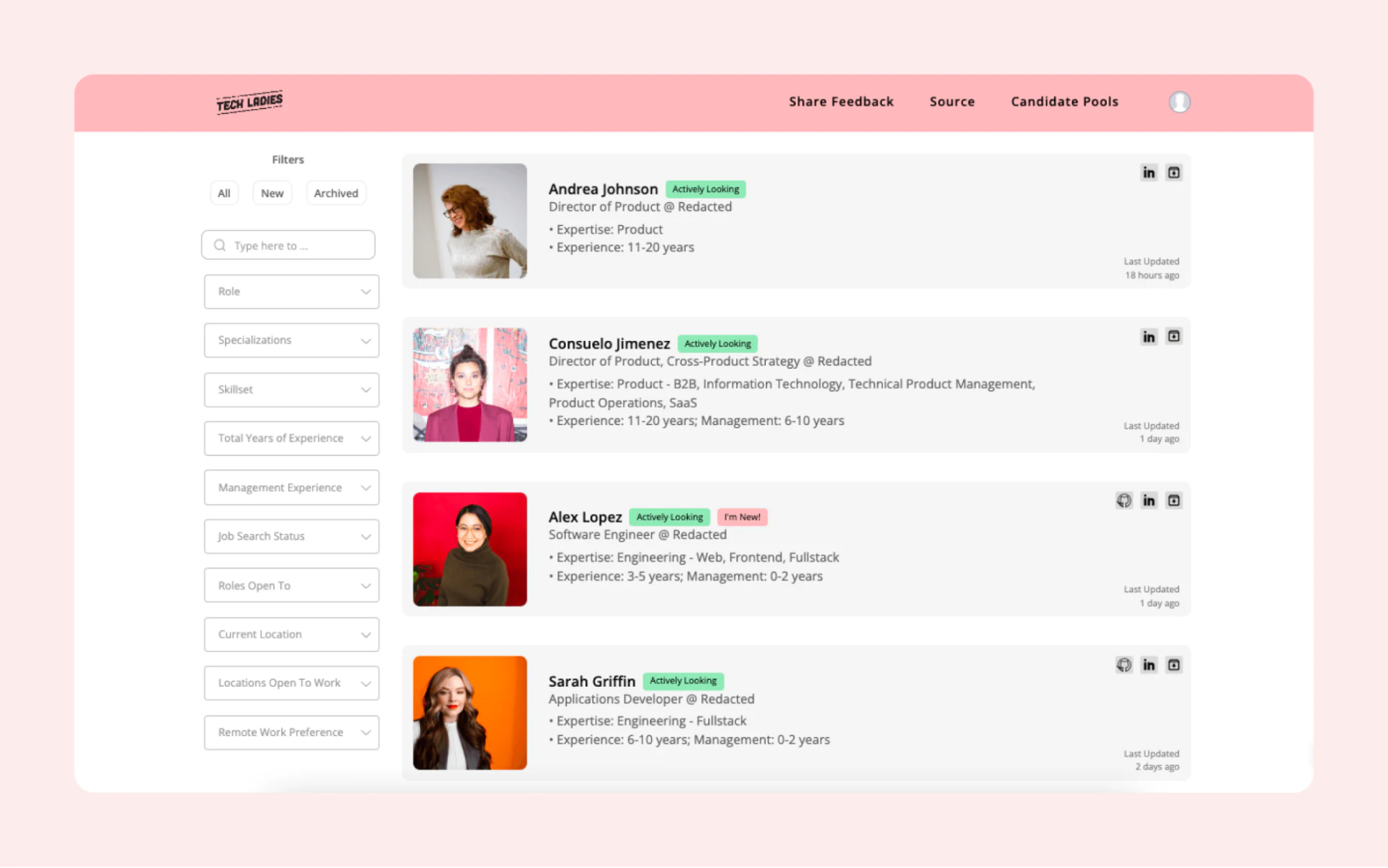
Caro Griffin, General Manager at Tech Ladies, wanted to create a scalable, easy-to-use web portal where members could fill out their profiles in detail. This would allow her team to experiment and iterate easily without any technical background.
Working with Softr allowed them to manage the project backend in Airtable. They used Softr’s drag-and-drop interface to quickly release new features, try new ideas, and build on their learnings. With this agile approach, Tech Ladies was even able to release an app version and has now grown into a seven-figure business.
Why we love it
Like other examples in this list, we love the fact that Caro and the team at Tech Ladies were able to use their web portal for a greater purpose, here, empowering women in tech and changing our industry for the better:
"The Talent Network helped us turn Tech Ladies into a 7-figure business, and that wouldn't have been possible without Softr. But maybe more importantly, it's helped dozens and dozens of women find great jobs at companies that care about building diverse and inclusive teams. That's the impact that I'm really proud of!" — Caro Griffin, General Manager at Tech Ladies
Head to the Tech Ladies case study to learn more.
Accounting client portal: Officeheads
Agencies and service companies, more than most other business models, are constantly required to keep their customers in the loop, which can quickly become a significant strain on teams and a time-consuming part of the business.
Officeheads is an accounting firm that educates and advises clients on financial strategies that can have the greatest impact on their businesses and lives. Many of the team’s communication with clients happened via email, answering repetitive questions about their services and breaking down financial reports in a non-scalable, sub-optimal way.
This led the company’s CEO, Rebecca Berneck, to seek out a client portal solution.
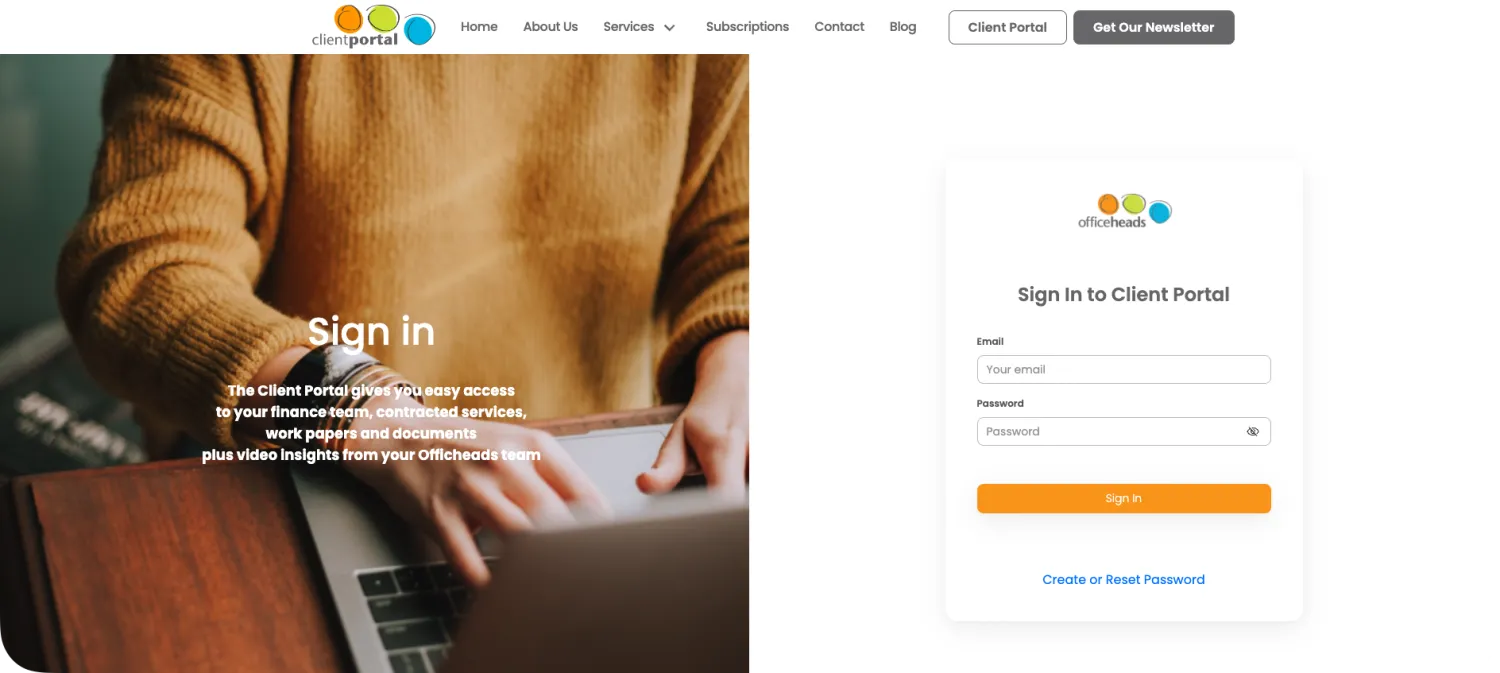
For Rebecca, a client portal was the ideal way to create a one-stop directory for Officeheads’ clients, providing access to all the necessary digital accounting tools and reports with easy-to-understand dashboards and videos (since many of the firm’s clients are non-technical). Keeping customers in the loop with up-to-date data was paramount.
"One of the things I was trying to solve was answering questions about the contract, which is a forever thing (...) Questions like: 'When are you working on my stuff? How do I get a hold of people? What are you doing for me?'" — Rebecca Berneck, CEO of Officeheads
Using Softr, Rebecca and her team could create live reporting dashboards extracted from other tools, providing tailored interfaces for each client. They can now get a live view of what the team is working on, reducing the need to reach out via email, making it a win-win for all parties involved.
Why we love it
Officehead’s web portal is an excellent example of personalization at scale. Thanks to secure access, the accounting firm’s 50+ clients can securely access their documents, dashboards, and financial insights.
But we particularly love that Rebecca and her team's personality shines through and that their portal serves as a platform to educate their clients on financial literacy with educational content such as videos their users can ask questions about. This is a testament that automation and scale do not need to rhyme with uniformization at all costs and that reaching a middle ground is possible.
Client reporting portal: FUGA
Reporting is one of the most common reasons agencies and service businesses build a portal. FUGA, a music distribution and marketing company, needed a better way to report results to record labels and artist management teams than manually exporting PDFs and sharing static spreadsheets.
The team built SCORE, a custom client portal powered by Softr Databases, Airtable, and BigQuery. Live dashboards replaced static PDF reports, conditional filters surface unique information to each user, and stock reporting that used to take two people half a day every week is now instant client self-service.
"We really appreciate how we can set user-specific visibility, clients see only what they need to see, nothing more." — SCORE team, FUGA
Why we love it
FUGA shows how a portal scales: 800+ users, four client workflows automated, and 5+ hours a week saved on reporting. The team even rolled out white-label versions for partners, including a tailored version for their Japanese market. It is a clear example of self-serve transparency replacing repetitive manual work.
How to build a web portal with Softr
The six examples above were built by operators and partners, not engineering teams. That's possible because Softr is an AI-native no-code platform: you describe the portal you need and the AI Co-Builder generates the database, the pages, and the user permissions for you. It's AI-first, not AI-only, so you can always drop into the visual editor for precise control.
You have three ways to start: generate your portal with the AI Co-Builder from a plain-language prompt, start from one of 100+ templates, or build from scratch on a blank canvas. Whichever path you choose, the apps you ship are production-ready and secure on day one, unlike the fragile, hard-to-maintain apps that pure vibe-coding tools tend to produce.
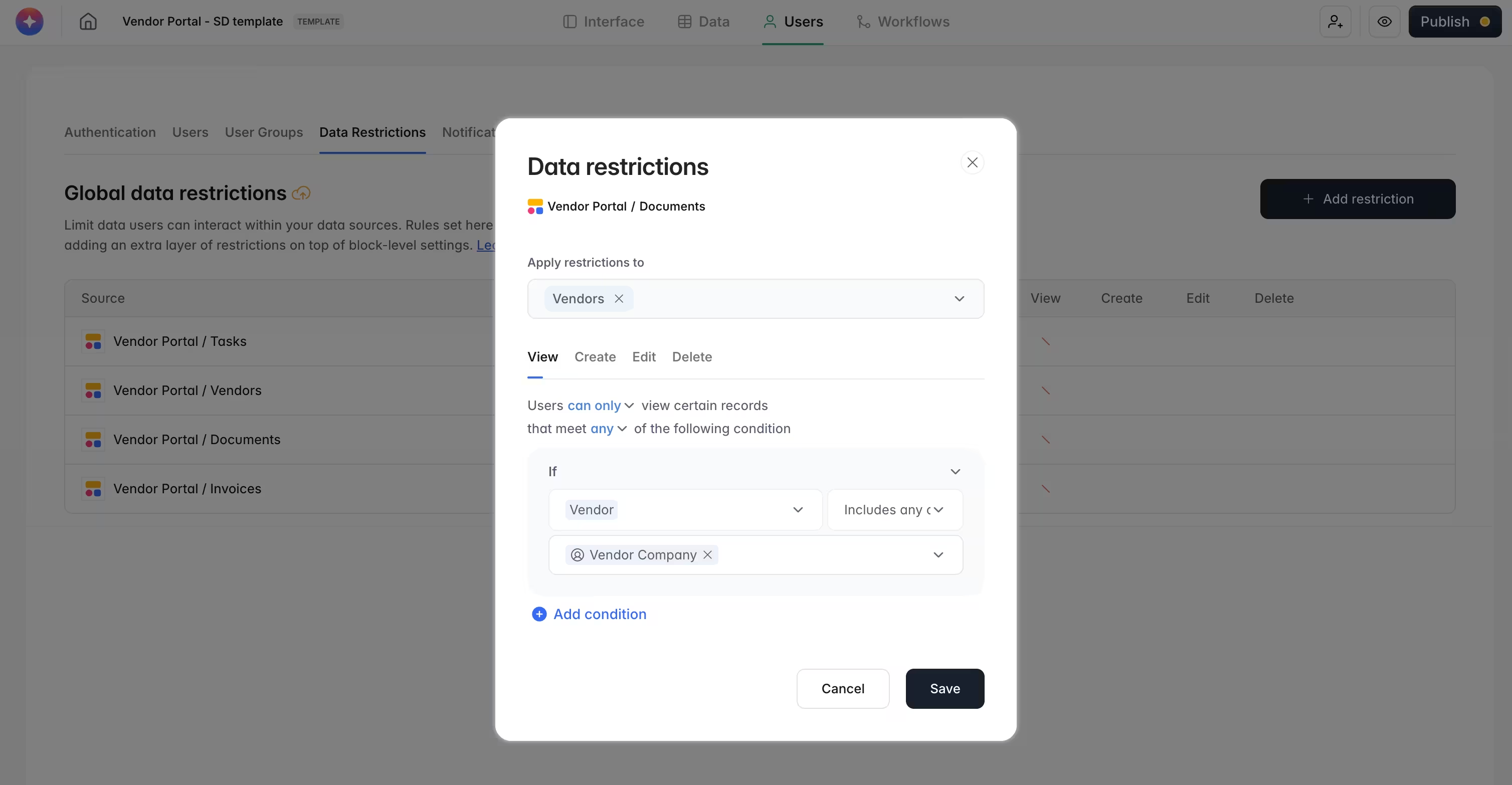
The engine that makes a portal a portal is the user-groups and data-restrictions system. You define user groups with simple conditions (for example, "Role is Client" or "Role is Partner"), then enforce row-level users and permissions globally so each person only ever sees their own records, even if a single block is misconfigured.
Here's a quick portal build checklist:
- Structure your data with Softr Databases as your native source of truth, or connect one of 21+ external sources like Airtable, Google Sheets, HubSpot, or BigQuery if your data already lives elsewhere.
- Generate the portal with the AI Co-Builder from a prompt, start from a template, or build from scratch.
- Set up user groups and data restrictions so each client, partner, or member sees only what they should.
- Build your pages: a dashboard homepage, entity pages for browsing records, and detail pages for each record.
- Automate the work with Softr Workflows triggered directly from buttons and forms in your app (onboarding emails, approvals, notifications), or connect to Zapier, Make, and n8n via native integrations if needed.
- Publish to a custom domain and invite your users.
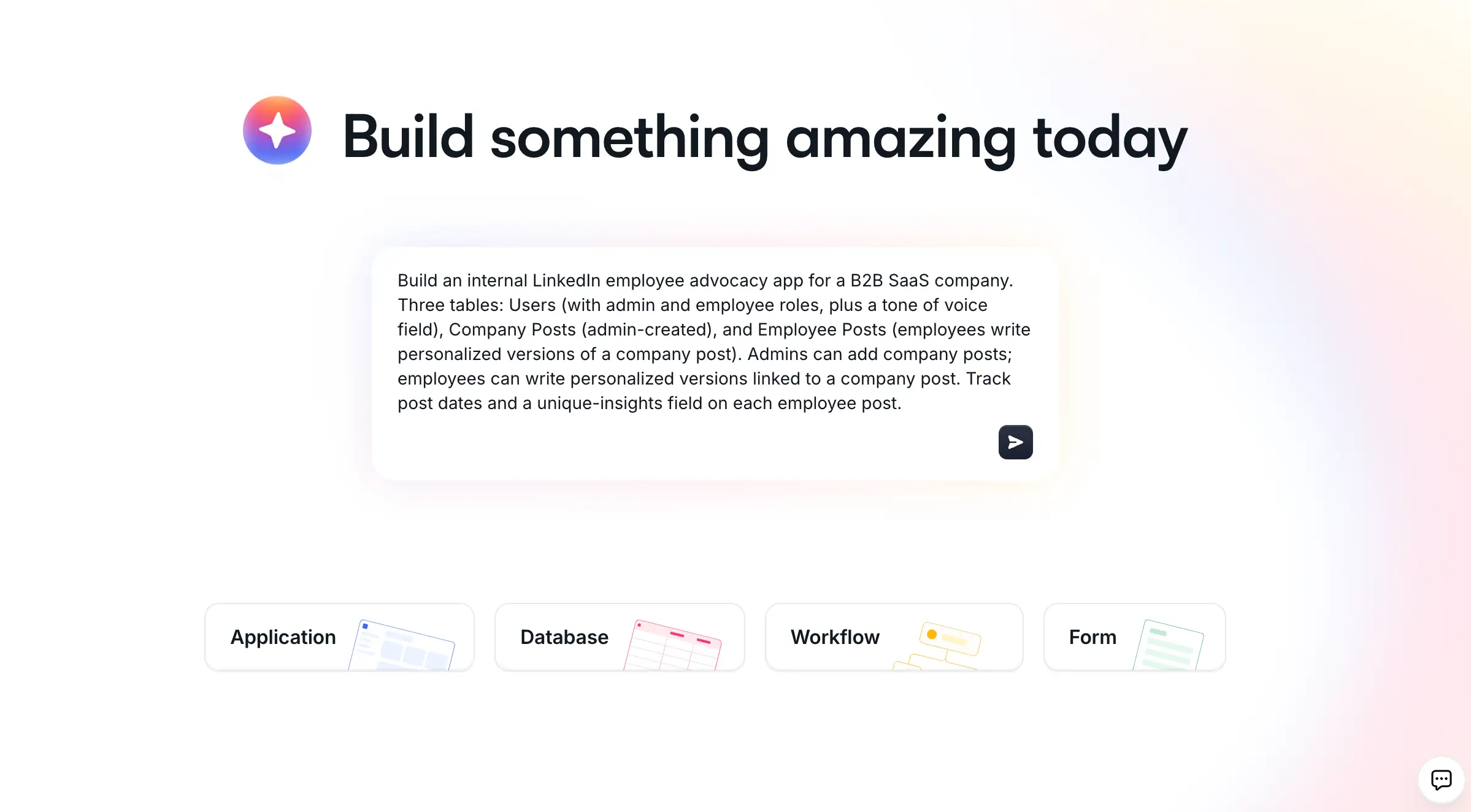
You can also keep the AI Co-Builder in the loop after launch: ask it to add a new page or block in the studio, extend your schema in the database editor, or build an automation in the workflow studio, all from a plain-language description.
Ready to build your own? Try Softr free and ship your first portal by end of day.