When to use the Vibe Coding block vs. native blocks in Softr


Life's too short to vibe-fix broken navbars.
Over the past year, millions were hooked on the promise of vibe-coding: describe what you want, get a working app. But many ended up spending days re-prompting to debug features, breaking things that used to work when asking for new functionality, burning through credits, and in some cases, facing security issues with user data.
The problem isn’t AI code generation itself. The problem is using it for everything.
Softr gives you two ways to build your app's interface: native blocks that are pre-built and ready to use, and the Vibe Coding block that lets you describe custom components in plain language and have AI generate them for you.
Both are useful, but knowing when to pick one over the other is the difference between an app that ships in a day and one that takes a week of prompting and debugging. This guide will help you make that call confidently, every time.
What is Softr?
Softr is a full-stack app builder that combines Softr Databases, an interface builder, and Softr Workflows in one platform. Teams use it to build client portals, internal tools, CRMs, vendor portals, and other custom business apps without writing code.
For the interface layer, Softr provides dozens of native blocks (tables, lists, forms, Kanban boards, charts, calendars, item details, tab containers) that cover standard business app patterns. And for when you need something truly custom, it offers the Vibe Coding block: an AI-powered code generator that creates secure, data-connected React components from a natural language description. You can also build pages and configure blocks from Claude or Cursor through the Softr MCP.
[.blog-callout]
"Combining a reliable no-code infrastructure with the creative power of Vibe-Coding is a total game-changer. It's the most effective way to build scalable, high-impact business apps in 2026." — Guillaume Duvernay, Growth Marketer at Softr.
✨ Want to try it yourself? Start building with Softr and explore both approaches.
[.blog-callout]
What you'll learn
In this guide, you will:
- Understand Softr's 80/20 philosophy: why most of your app should use native blocks.
- Learn when native blocks are the right choice and why.
- Learn when the Vibe Coding block is the right choice and why.
- See how both block types share the same infrastructure (data, permissions, theme).
- Get practical tips for iterating safely with the Vibe Coding block.
- Understand how the line between the two is getting thinner over time.
Who is this for?
This guide is for anyone building business apps with Softr:
- Operators (Ops managers, team leads) deciding how to structure their app builds.
- Builders who have used Softr's native blocks and are curious about when to introduce Vibe Coding.
- Anyone evaluating no-code vs. vibe coding tools who wants to understand how Softr combines both approaches in one platform.
The 80/20 rule
Here's the philosophy, straight from Softr's CTO Artur Mkrtchyan:
"80% of a business app doesn't need to reinvent new layouts. You need forms, you need tables, you need charts, you need a Kanban, maybe a calendar. If you need something extra custom, like drag-and-drop events on a calendar, audio capture, or a specialized visualization, then you go for the Vibe Coding block."
More than just opinion, this is a practical observation drawn from building hundreds of business apps. The vast majority (the “80%”) of what teams need already exists in a well-tested, standardized form. Reinventing a table or a login flow with AI isn’t innovation. It's unnecessary risk.
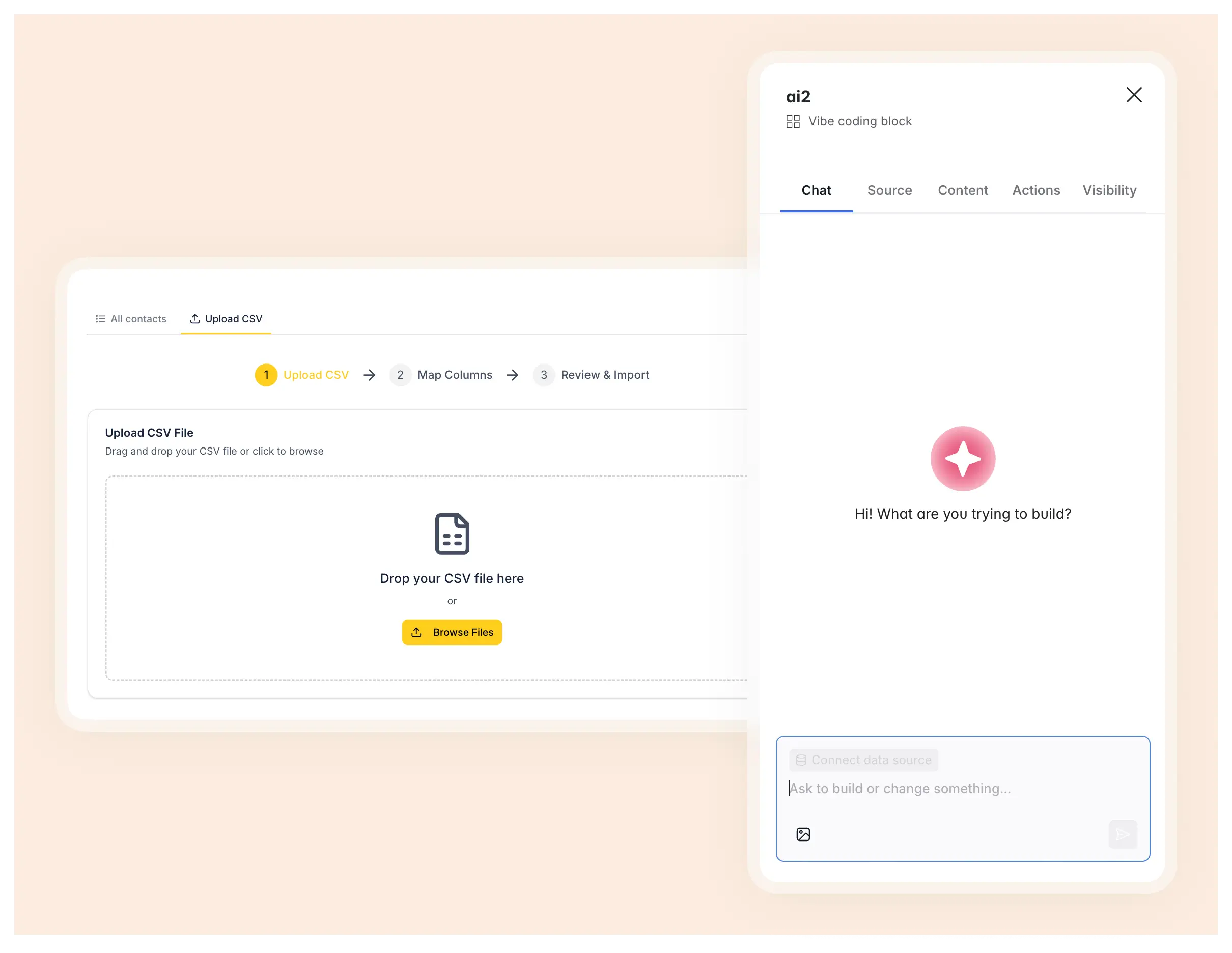
The Vibe Coding block is designed for the remaining 20%: the parts of your app where standard components genuinely fall short. Think custom data visualizations, a drag-and-drop scheduler, or a CSV importer with column mapping. These are specific behaviors that don't exist as pre-built blocks, and that's where Vibe Coding comes into play.
Infrastructure first, customization second
An infrastructure-first approach is what separates Softr from pure vibe-coding tools. In a prompt-to-app tool, every component is AI-generated—including the user system, the theme, the data connections, the login flow, and the responsive layouts—which means every component can break when you iterate.
Softr takes a fundamentally different path: it isolates AI code generation to individual, specific UI blocks rather than whole applications. Those blocks instantly inherit the app's stable, proven infrastructure:
- Your user authentication and permissions system is robust and secure.
- Your theme and design system ensures consistency across every page and device.
- Your data connections are natively integrated with your database or external sources.
- Your standard blocks (tables, forms, Kanbans, charts) are battle-tested across thousands of apps.
The Vibe Coding block sits inside this infrastructure. It's a secure, theme-aware, data-connected component that you describe with AI, but it never operates outside the platform's guardrails.
The key insight: you don't have to choose one approach over the other. The best Softr apps combine both, and the platform is built to make that combination seamless.
To put it simply, Softr sits in a different category from both traditional development and pure vibe-coding:
| Approach | How software gets built |
|---|---|
| Traditional development | Software is built by developers. Everyone else adapts. |
| Pure vibe coding | AI writes the code. Everyone still has to think like a developer. |
| Softr | Software is built with knowledge workers. Complexity disappears. |
When to use native blocks
Native blocks are your foundation. They cover the predictable, essential patterns that every business app needs.
What business apps actually need
Before we discuss which blocks to use, let's be clear about what business apps require to be production-ready:
- A solid database and CRUD operations. You need to create, read, update, and delete records reliably.
- A modern and responsive design. It needs to work on desktop, tablet, and mobile without re-prompting layouts.
- Safe connections to your business data. Your app must connect to existing data sources without fragile custom API code.
- A robust user authentication and permissions system. Different user groups need different access levels, and it must be secure.
- Integrations with your tools. Connect to Slack, Gmail, Notion, and other platforms your team already uses.
- Powerful workflows to automate the logic of your app. You need to trigger actions, automate multi-step processes, and connect systems without writing backend code.
- Easy and reliable maintenance. You need to evolve the app over time without breaking existing features.
- Simple building blocks (tables, Kanban, forms, charts) for 80% of your interface.
- More advanced building blocks (voice capture, CSV upload, custom visualizations) for the remaining 20%.
This is what separates a production app from a prototype. Vibe-coding the entire stack means reinventing all of this from scratch. Native blocks give you these fundamentals out of the box.
Native blocks available in Softr
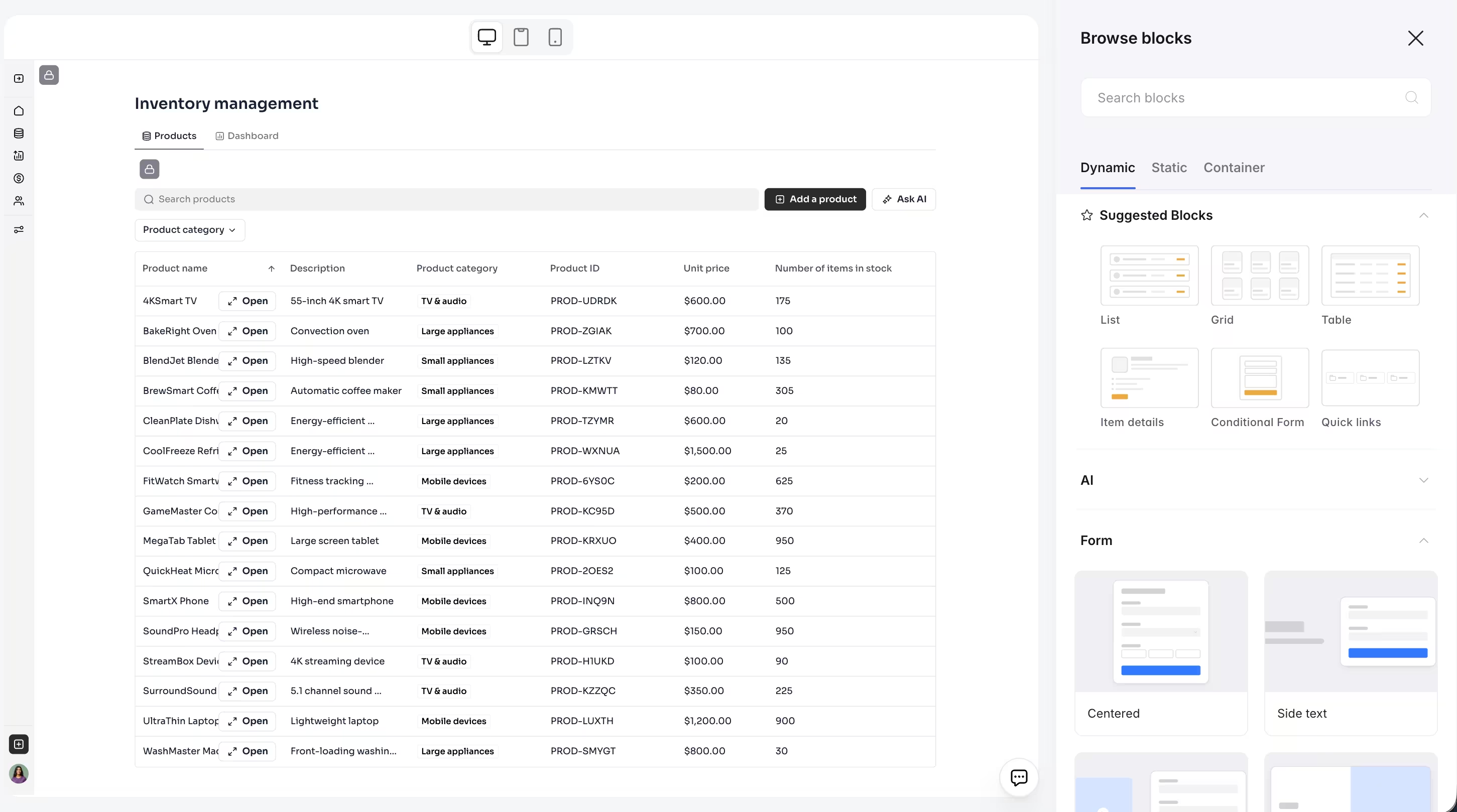
Softr provides pre-built blocks for:
- Tables for structured data display with sorting, searching, and inline filtering.
- Lists and Grids for visual record browsing with customizable card layouts.
- Kanban boards with drag-and-drop status changes.
- Charts (bar, line, pie, metrics) for dashboards and analytics.
- Forms for data collection with validation, multi-step flows, and connected workflows.
- Item Details for single-record views with editable fields.
- Tab Containers for organizing multiple blocks behind clean, switchable tabs.
- Navigation bars with per-user-group visibility.
- Features like Ask AI for conversational data queries on top of any list block.
- Commenting for collaboration directly within record details.
- Static blocks such as hero sections, calls to action, images, galleries, and quick links. (Note: the new versions of these blocks are also AI customizable!)
Why they're the right default
They're battle-tested. As Artur explains, "If you want a scalable table and you don't need a lot of customizations, you stick to Softr tables because they’re battle-tested. There are a lot of UX considerations done there, so you get a lot of value from the get-go." Edge cases around scroll behavior, pagination, mobile responsiveness, and accessibility have been solved by Softr's engineering team, not by an LLM in a single prompt.
They're responsive on mobile. A table that works perfectly on desktop but breaks on a phone screen is useless for teams in the field. Native blocks are built mobile-first.
They inherit your theme instantly. Change your accent color, font, or border radius in the Theme panel, and every native block updates in seconds. No need to re-prompt or edit CSS.
They have zero iteration cost. You connect, you configure, and you're done. There's no prompting loop, no version juggling, and no risk of a follow-up prompt breaking what already worked.
They come with built-in functionality. Search bars, filters, sorting, pagination, action buttons (add, edit, delete), item expansion, field-level visibility, commenting, Ask AI. These features are available through simple configuration toggles. Building any of these from scratch with AI would take significantly more time and produce a less reliable result.
They give you confidence as a builder. Beyond the technical advantages, native blocks provide something harder to quantify: peace of mind. As Shiran Brodie, Head of Marketing at Softr, shared during a live build session:
"The autonomy comes from the security. When I'm building something, there's not going to be any risks to the work that I'm doing to my team. I don't have that fear in the back of my mind that I'm gonna be leaking someone's data."
When infrastructure features like authentication, permissions, and data restrictions are handled natively, builders can move fast without second-guessing the safety of their work.
Real-world example: Vendor Portal
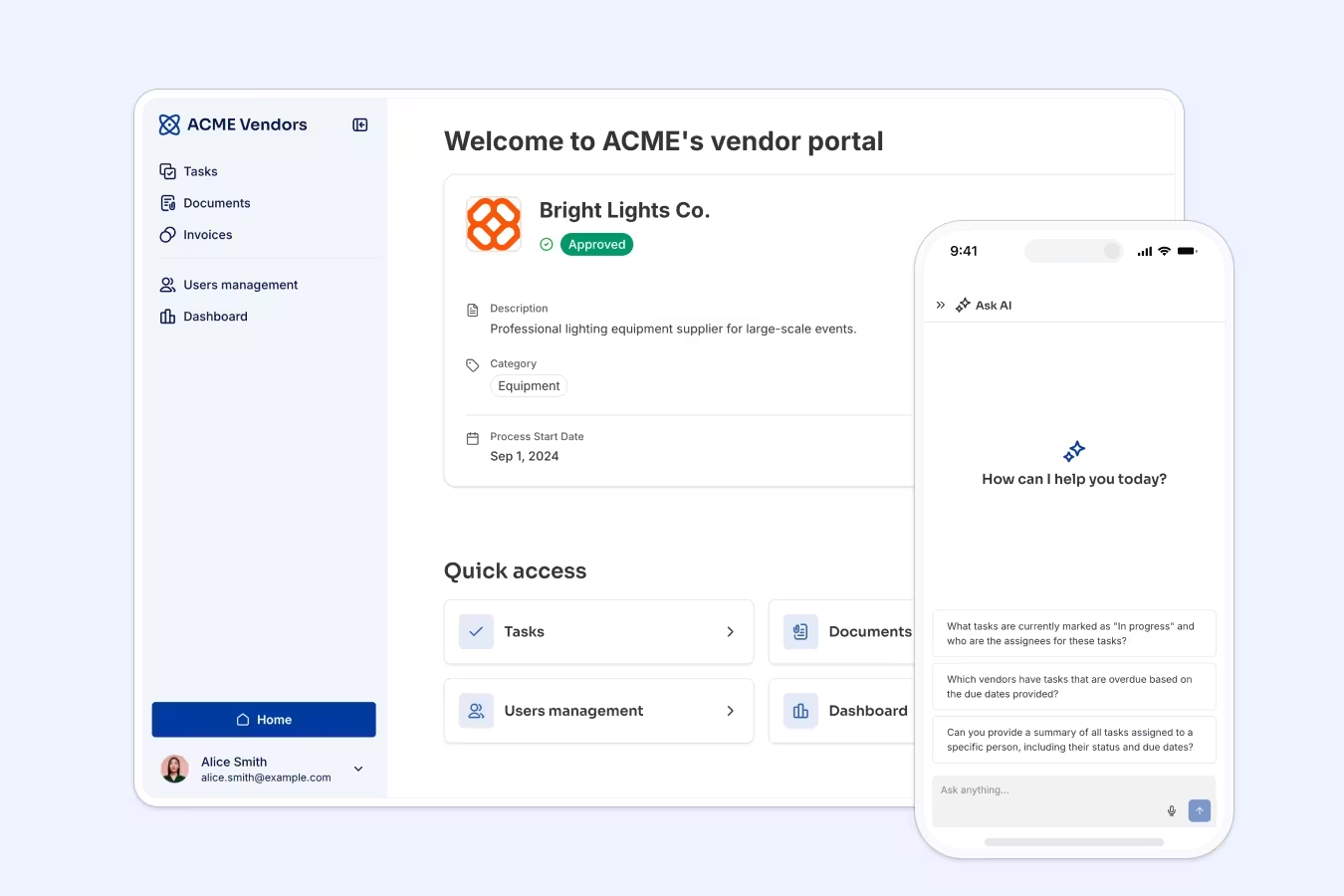
In our vendor portal tutorial, the entire admin experience is built with native blocks. Here's what we used:
| Block type | What it does in the app |
|---|---|
| Tab container | Organizes the admin homepage into three tabs: All Vendors, All Tasks, and Analytics. |
| Table | Lists all vendors with columns for status, category, team members, and approval dates. Includes search and filters. |
| Kanban | Displays tasks across status columns (To Do, In Progress, Done) with drag-and-drop to change status. |
| Charts | Dashboard tab with metric cards (total vendors, approved vendors) and bar charts (paid invoices by month). |
| Item details | Vendor detail pages with editable fields, status management, and related records. |
| Forms | Vendor onboarding flow, invoice submission (multi-step), and team member invitations with hidden inputs. |
| Grid | Document management with file upload and AI-powered document classification. |
| Ask AI | A native chatbot on the Tasks tab that lets admins query task data in natural language (e.g., "Who has the most open tasks?"). |
That's an entire admin portal: dozens of views, multiple user groups, CRUD operations, filtering, searching, commenting, AI chatbots, and analytics dashboards, all without writing a single line of code or sending a single prompt. Native blocks handled 100% of the admin side.
Real-world example: Content Management Portal

During a live build session, Softr's marketing team walked through a content management portal built entirely with native blocks in about an hour. The app lets admins assign articles to freelance writers, track deadlines, manage invoices, and share brand guidelines, all without a single email thread.
The build used Tables for assignment tracking, metric cards for dashboard analytics, user group permissions to separate admin and writer views, global data restrictions to ensure writers only see their own invoices, and embedded Notion docs for style guidelines. Shiran Brodie described the experience:
"I didn't have to sit and take any time to plan this for weeks with engineers and with product. I just did it myself. We didn't create an IT ticket."
Every feature in the portal was covered by native blocks. We didn’t need a Vibe Coding block because these use cases (listing data, filtering by user, managing statuses, and uploading files) are exactly what native blocks are designed for.
When to use the Vibe Coding block
Use the Vibe Coding block is your tool for cases where standard blocks genuinely don't cover what you need. It's the right choice when:
- A behavior is very specific and doesn't exist natively. You need something that no pre-built block offers: multi-step CSV import, drag-and-drop scheduling, audio recording, or a complex custom workflow embedded in the UI.
- You need a bespoke visualization. The native chart types (bar, line, pie, metrics) are good for standard dashboards. But if you need a custom status tracker, a progress stepper, or a data visualization tailored to your specific domain, the Vibe Coding block can generate it.
- You want interactions beyond what's configurable. Native blocks can be configured, but they don't let you invent entirely new interaction patterns. If your use case requires something like resizable time blocks, conditional UI animations, or multi-selection with batch operations, that's Vibe Coding territory.
- You need a non-standard UI element. The Vibe Coding block doesn't have to be a traditional rectangular section on your page. It can be a floating chat bubble pinned to the bottom-right of the screen, a sticky action bar, or a modal triggered by an icon. Because the generated code includes custom CSS and positioning, it can behave like a global overlay or interactive widget rather than just a static page element.
6 real-world examples of the Vibe Coding block
Here are six examples from real Softr builds, each showing a different type of problem that the Vibe Coding block solves.
1. CSV importer with column mapping
In the CSV uploader tutorial, the goal was to let sales reps bulk-import contacts from a CSV file. This requires:
- A drag-and-drop upload zone.
- A column mapping interface where the user matches CSV headers to database fields.
- Fuzzy matching to auto-map columns with similar names.
- A review stage where the user can select or deselect specific rows before importing.

No native block can handle this multi-step flow. It was built in two prompts with the Vibe Coding block and connected directly to the Contacts database.
2. Drag-and-drop task calendar
For this use case, the team needed a weekly calendar where unscheduled tasks appear in a sidebar and users can drag them onto time slots. Tasks needed to be resizable, clickable for editing, and switchable between weekly and daily views.
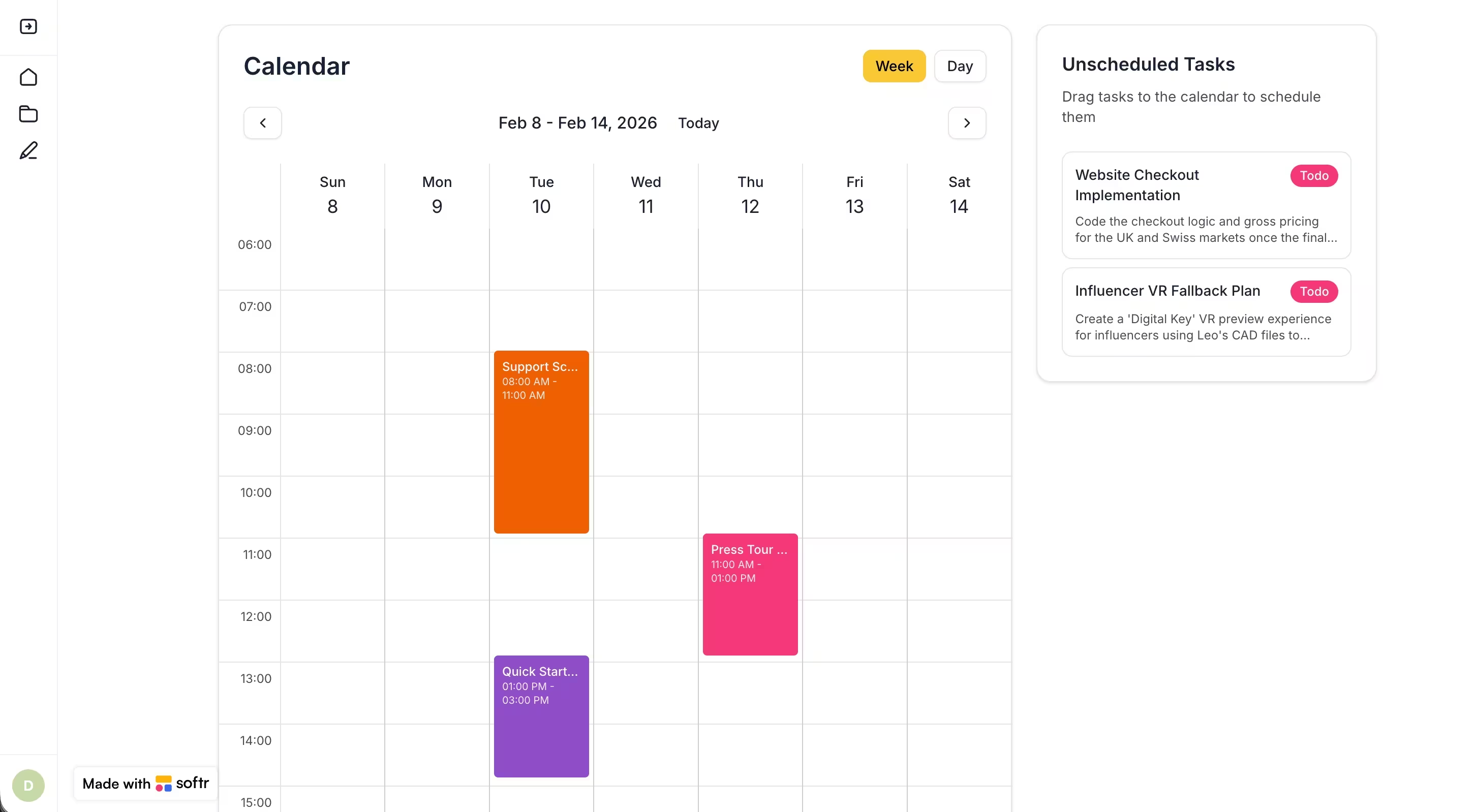
The native calendar block shows events on dates, but it doesn't support drag-and-drop from an external sidebar, resizable events, or inline editing. This custom behavior was built with the Vibe Coding block and connected to the same Tasks database used by the rest of the app.
3. Floating AI chatbot widget
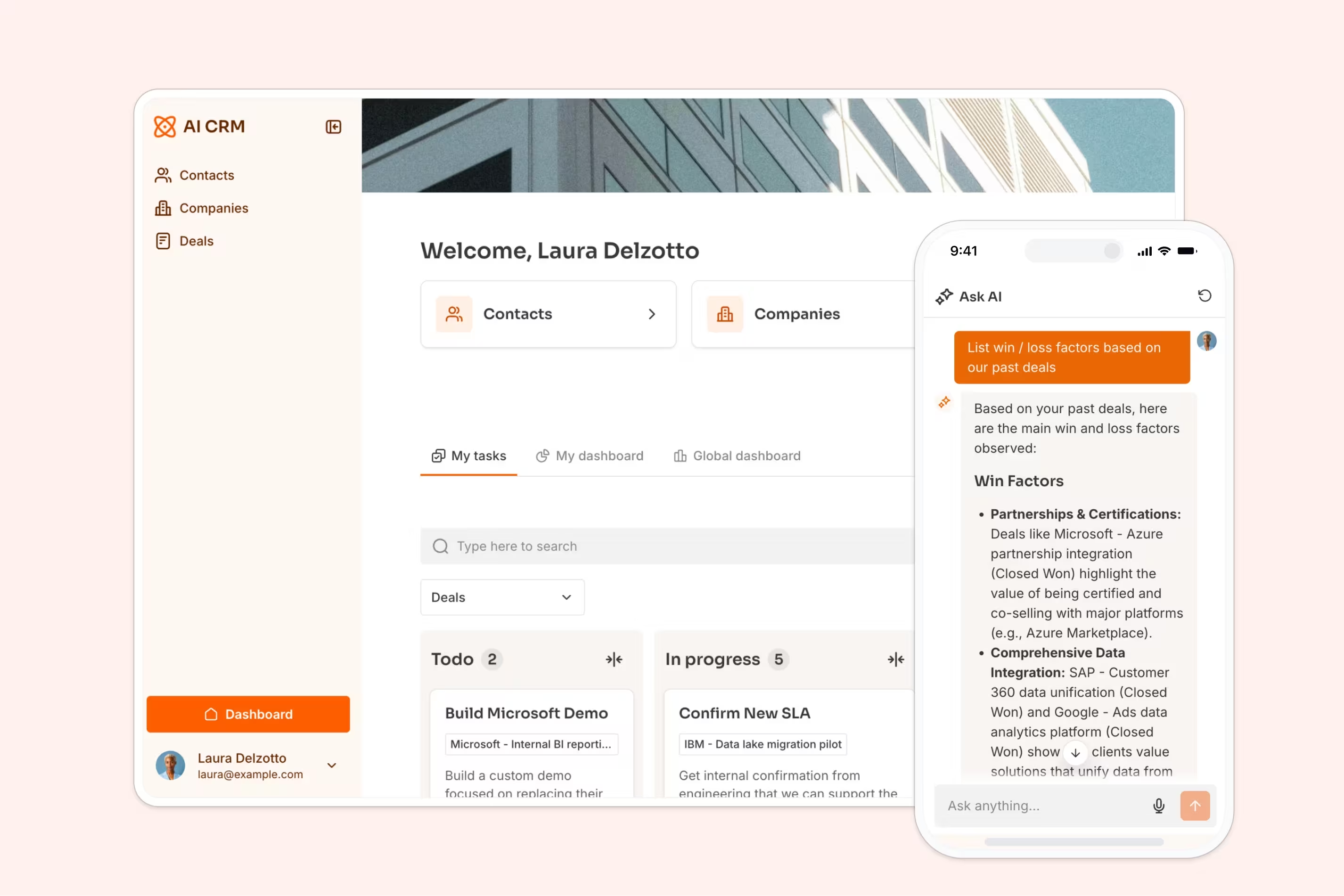
In an AI CRM build, the goal was to give users a conversational interface to query their deal data without leaving the page. Rather than generating a standard rectangular block in the middle of the screen, the Vibe Coding block generated a sticky chat bubble pinned to the bottom-right corner.
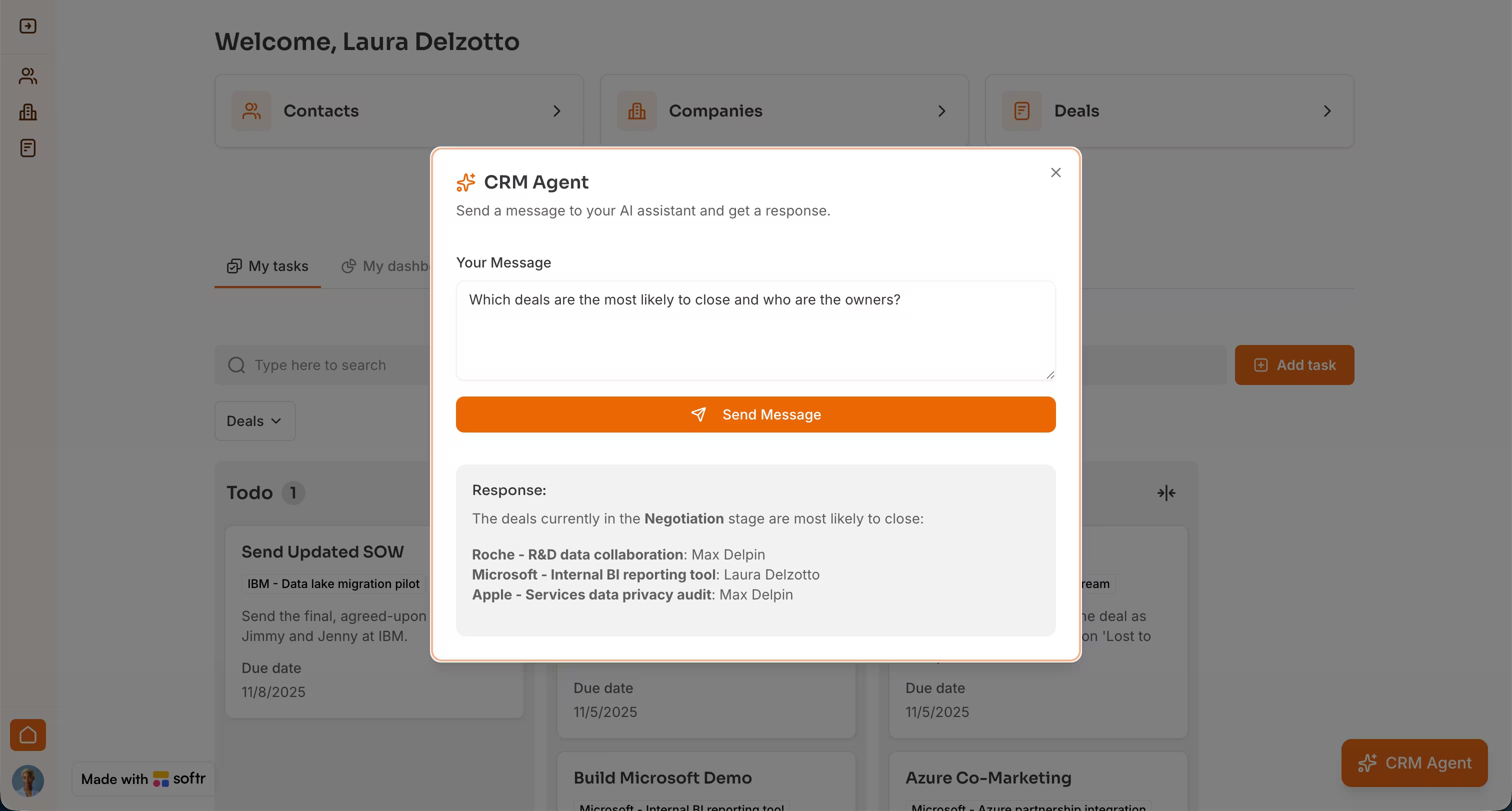
When clicked, it opens a conversational interface where users can ask questions (e.g., "Which deals are most likely to close?"). The block sends the question via webhook to a Softr Workflow, which securely queries the database with AI and returns the answer to the interface. This creates an interactive widget that persists across the page, something standard configurable blocks do not support.
4. Document diff comparison view
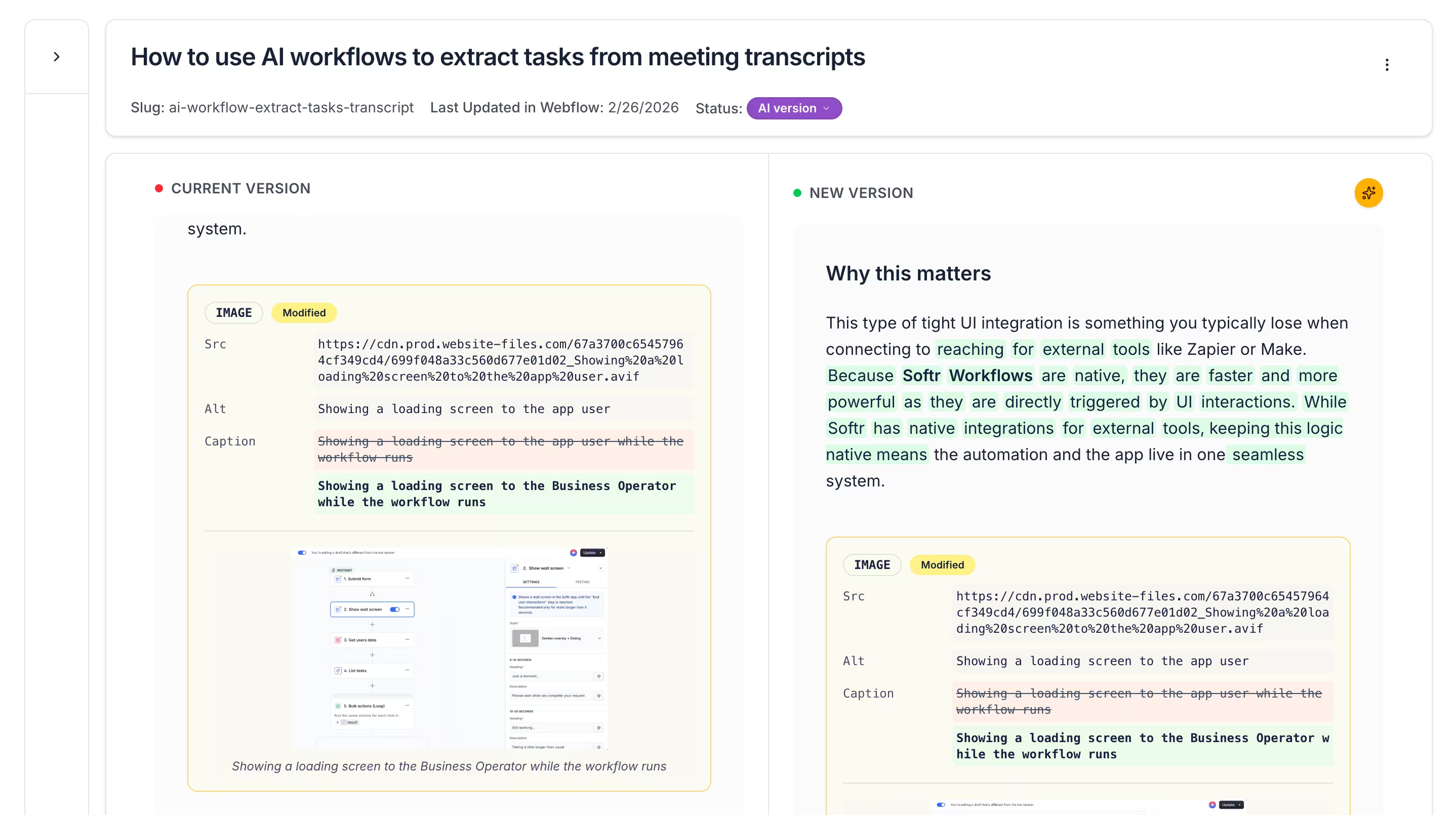
During a live build session, Guillaume demonstrated a custom block that displays two versions of a document side by side, with differences highlighted using color codes. This is a specialized visualization that no standard block can produce, as it requires parsing text, computing diffs, and rendering them with precise formatting. It's a clear case where the behavior simply doesn't exist natively.
5. Custom rich-text editor
In that same session, Guillaume also shared that he rebuilt a mini Notion-style editor using the Vibe Coding block as a weekend project. While Softr's native text fields handle standard content well, a full rich-text editor with block-level editing (text, images, code blocks, markdown rendering) requires custom UI logic that goes well beyond what configurable blocks offer.
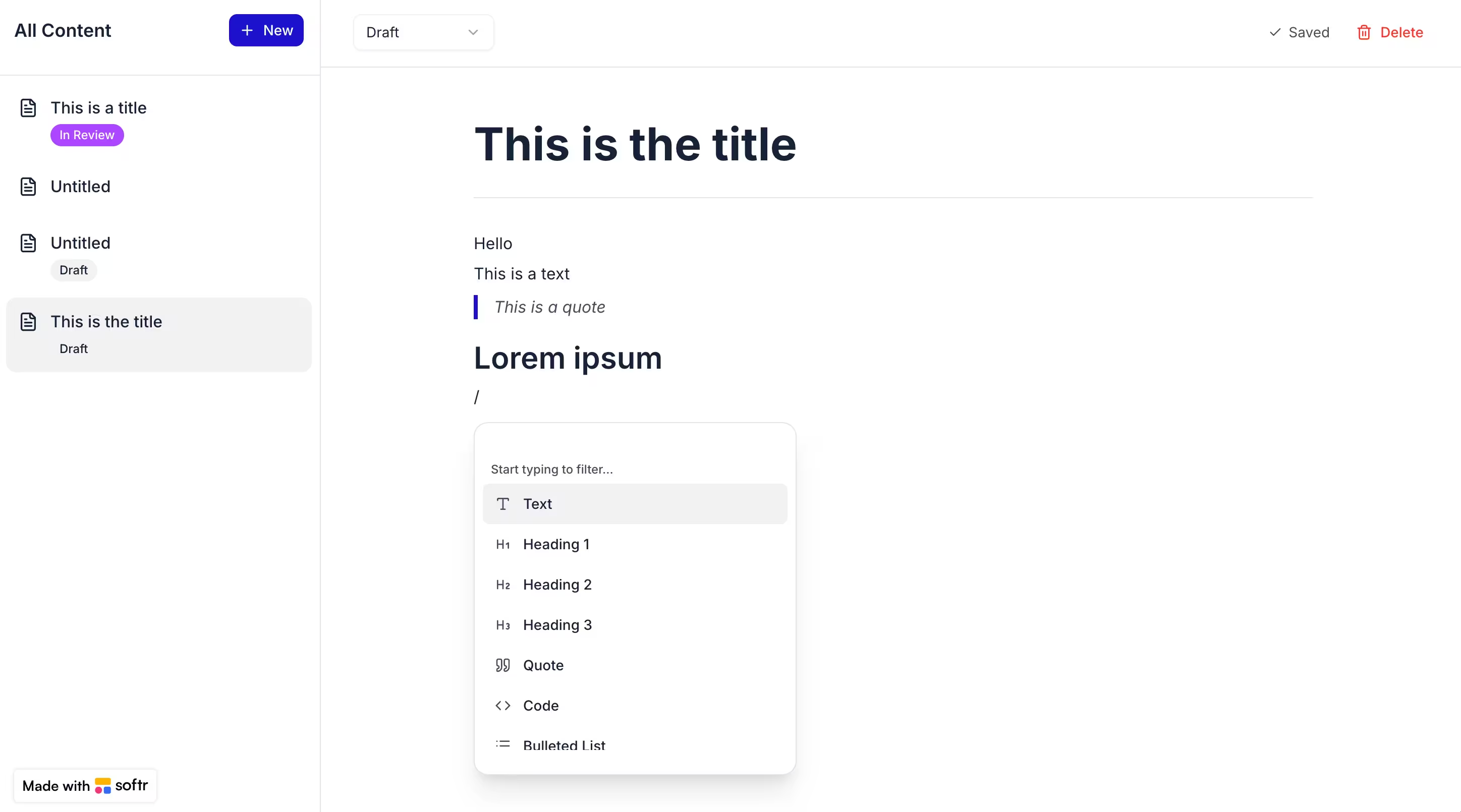
These examples share a pattern: each solves a specific interaction or visualization problem that falls outside what any reasonable set of pre-built components would cover.
6. Custom time slot picker for room booking
In a 15-minute room booking app build, the goal was to let clients select exact time slots for reservations. This requires an interface that shows available slots for a given room on specific days, and the ability to select a customized duration.
Since there is no native "Time Slot Picker" block for this precise booking flow, it was generated using the Vibe Coding block. The AI created a custom interface that lets users pick dates and durations, instantly updating to show unavailable slots while connecting directly to the bookings table.
Going further: combining the Vibe Coding block with Workflows
The Vibe Coding block can also trigger a Softr Workflow via a webhook and listen for the response, creating a round-trip between the interface and backend logic. It's all visually built and securable, so only your app can call it.
This enables human-in-the-loop AI workflows. For example, a sales rep types quick notes into a Vibe Coding block and clicks "Generate." A workflow transforms those notes into a polished email subject and body using an AI step (which can also pull context from the database). The response pre-fills a review interface where the rep edits the draft before clicking "Send." This triggers a second workflow that dispatches the email. AI does the heavy lifting, but a human always approves.

The same pattern works for other inputs: a team member records a voice memo after a meeting, a workflow transcribes it via AI, extracts action items, and stores everything in the database, eliminating the need for manual data entry.
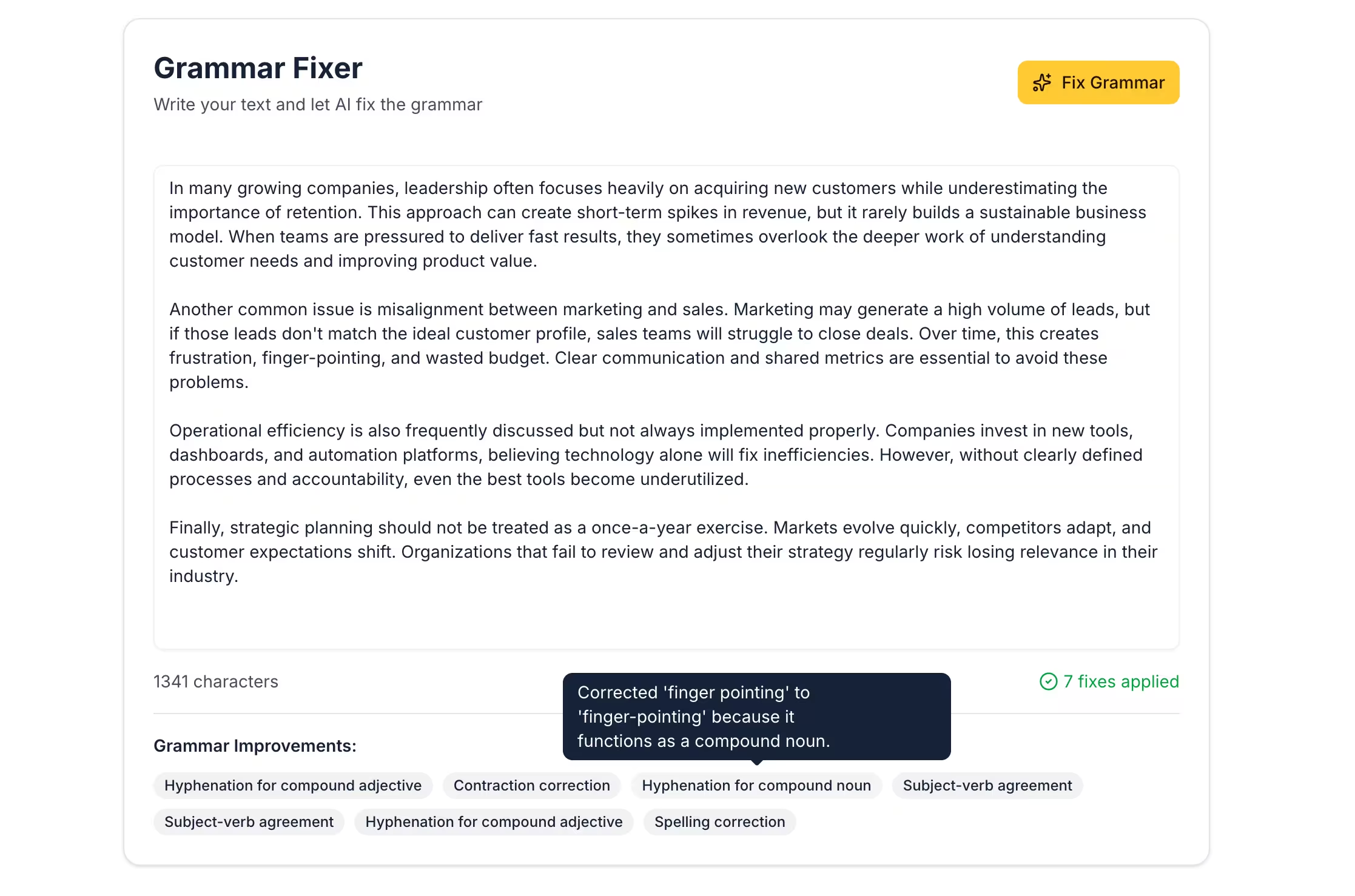
Another powerful pattern is AI-powered semantic search. In a course catalog app, Guillaume built a search bar where typing "web dev" returned relevant courses even though none contained those exact words. The Vibe Coding block sends the query to a workflow via webhook, an AI step matches it against the course database semantically, and the response is displayed in the block. This turns a simple search field into an intelligent recommendation engine, without any exact-match limitations.
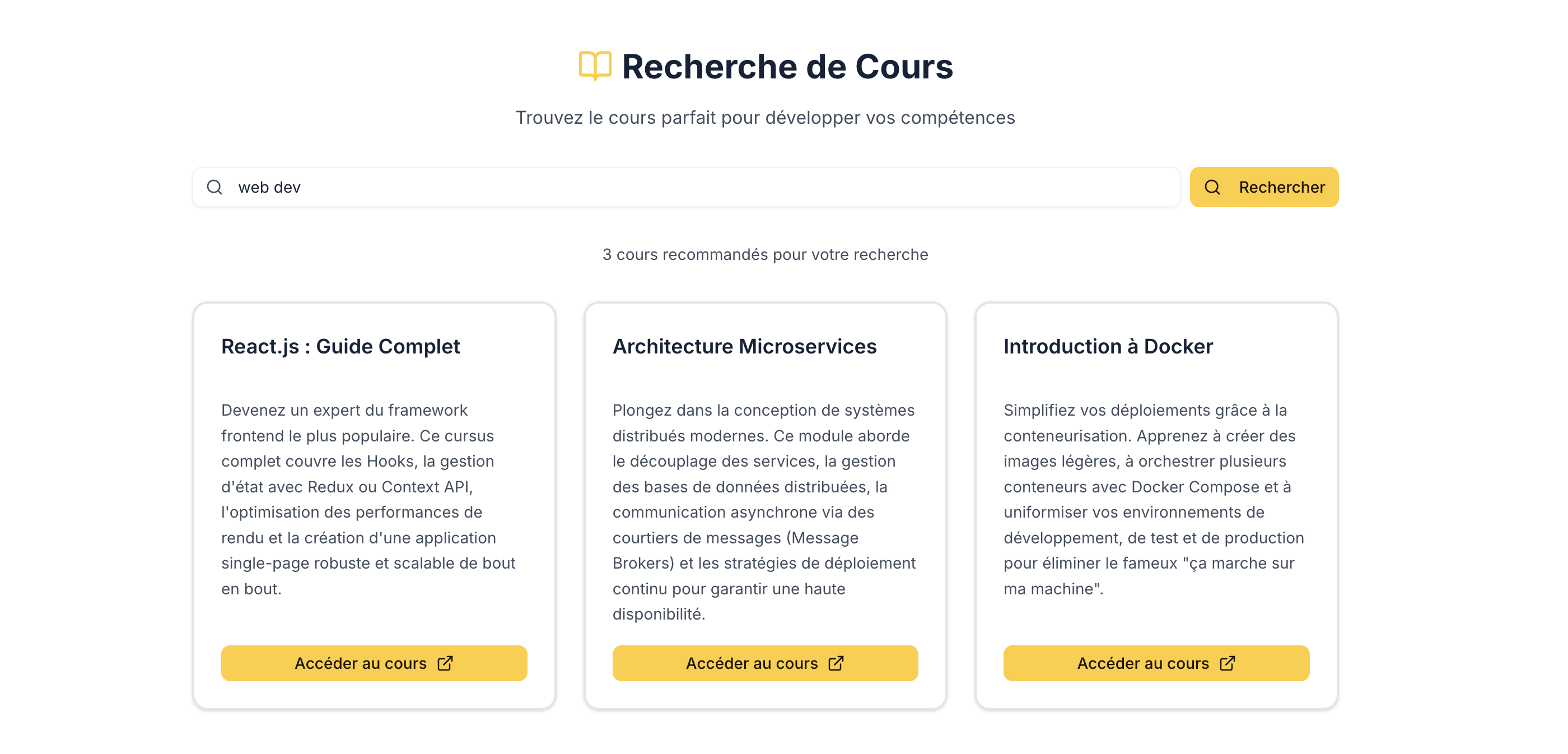
By combining Vibe Coding blocks, Workflows, and Databases, builders can create interactions that feel like custom software, entirely within Softr's visual, secure infrastructure.
What stays the same across both block types
One of the most important things about Softr's architecture is that native blocks and Vibe Coding blocks share the same infrastructure. You’re not working with two separate systems. They are two ways to render UI on top of the same platform.
Data layer
Both block types connect to the same data sources. A Vibe Coding block reads from and writes to your Softr Databases using the same connection method as a native Table or Kanban. If you drag a task onto Wednesday at 2 PM in the Vibe Coding calendar, the Start Date field updates in the same database that the native meeting details page reads from.
Permissions
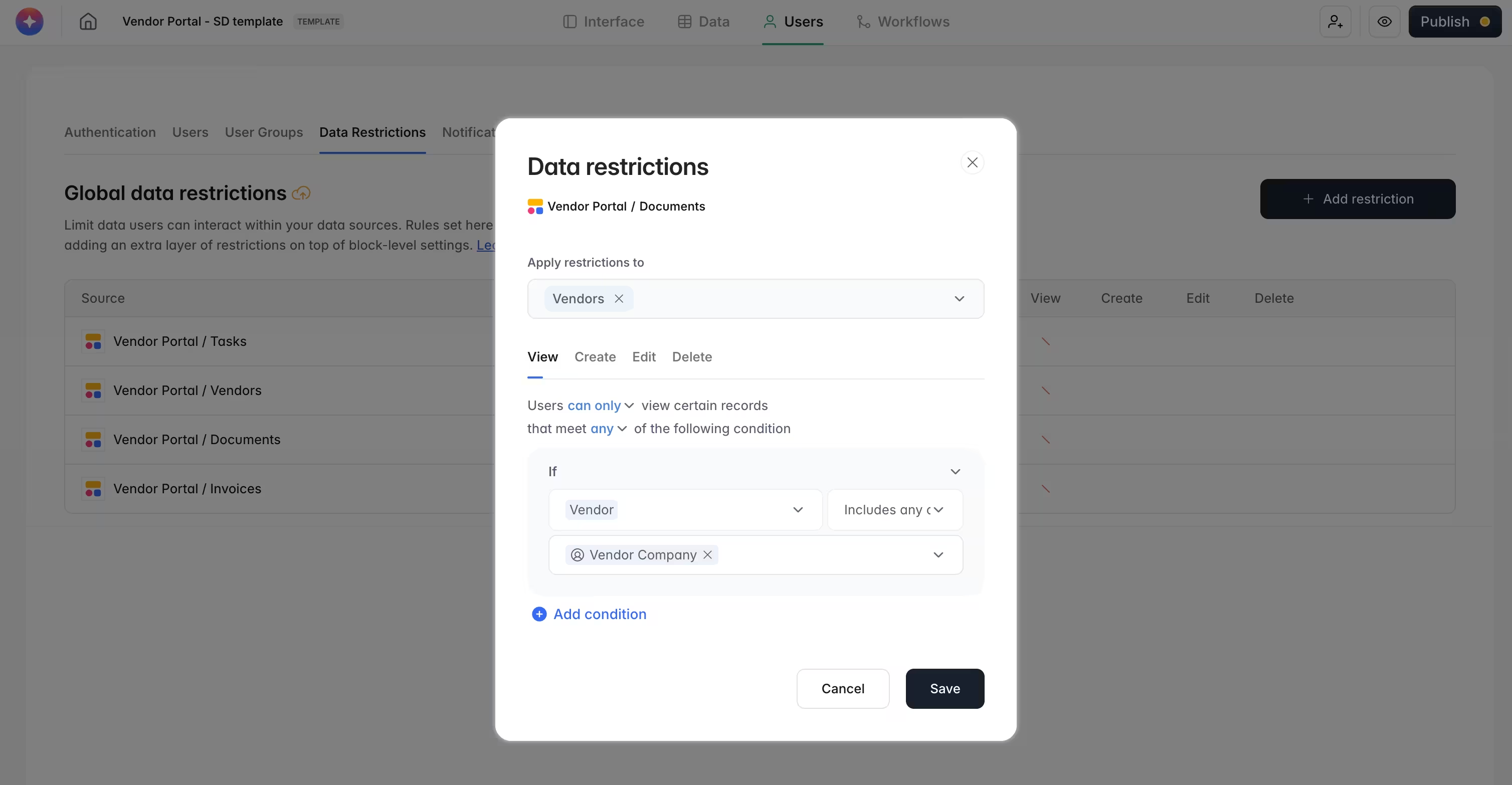
The same users and permissions rules apply everywhere. You don't implement authentication in the generated code; Softr handles that automatically. While you can add block-level conditional filters, Softr's app-wide data restrictions act as a global safety net.
If you define that clients can only see their own records, this rule is enforced across the entire app. Even if you forget to add a filter on a specific Vibe Coding block, the app-level restriction prevents data leaks. This gives you the confidence to iterate quickly on custom UI.
Theme
The Vibe Coding block inherits your app's global theme: accent color, fonts, and border radius. We saw this in every example. The CSV uploader respected a yellow accent color. The task calendar used the app's theme colors. The vendor status card matched the rest of the portal's design.
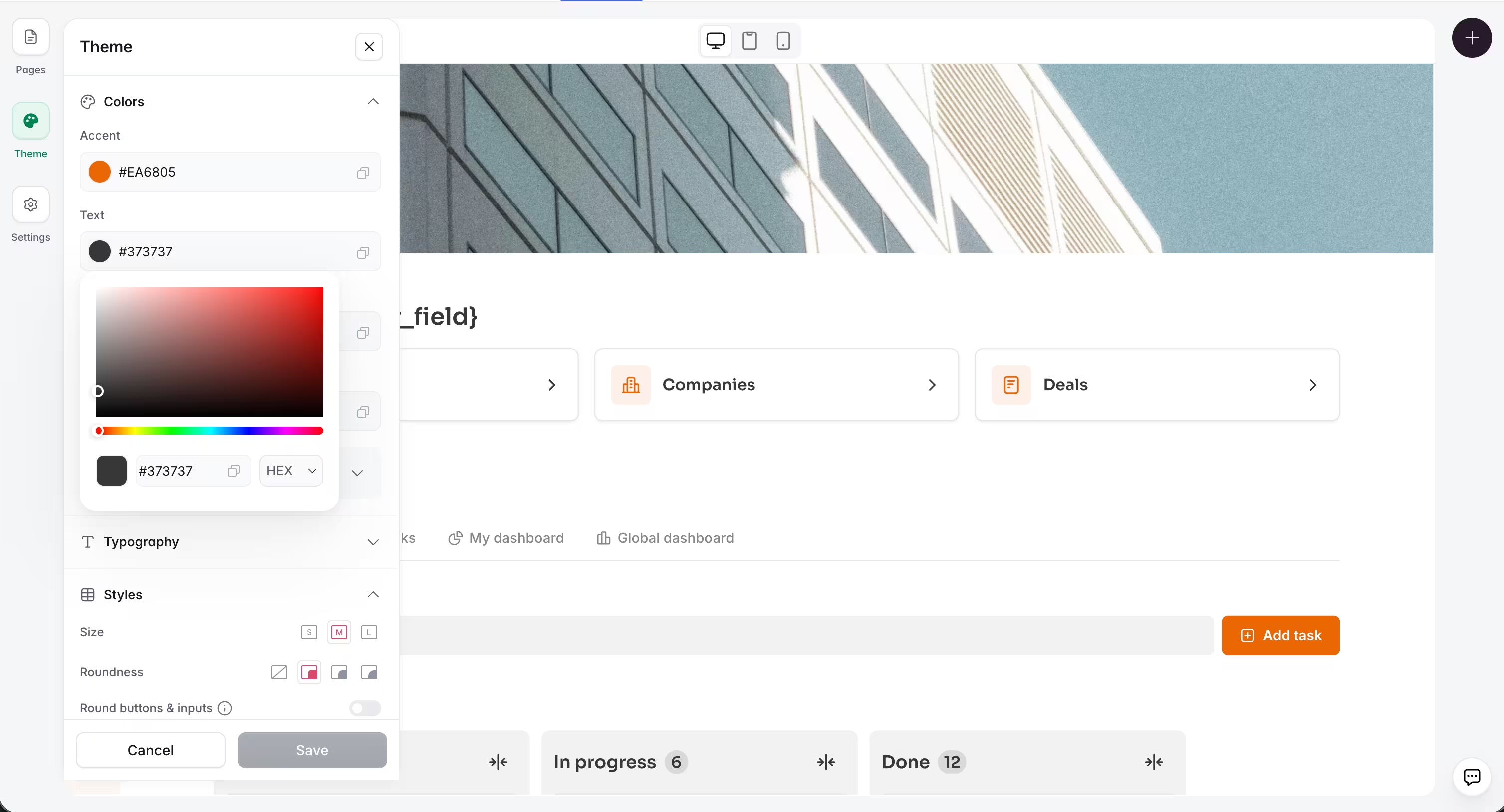
Change your theme, and both native and Vibe Coding blocks update accordingly. You don't need to re-prompt the Vibe Coding block to match a new color scheme.
CRUD operations
The Vibe Coding block supports full CRUD actions on live data. CRUD stands for Create, Read, Update, and Delete: the four fundamental operations you need to manage records in a database.
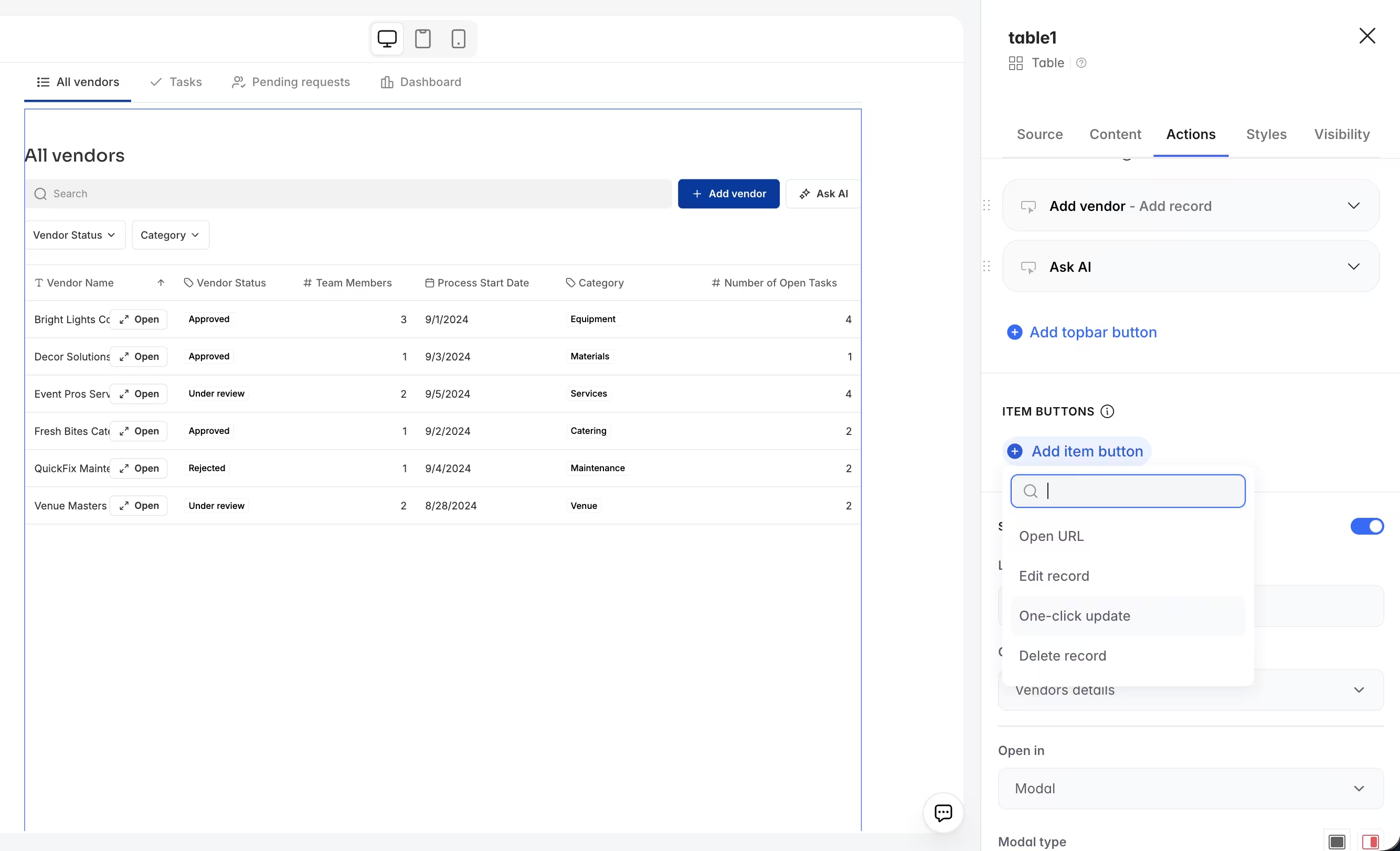
When you connect a Vibe Coding block to a data source, you can configure which CRUD operations are allowed and which user groups can perform them, the same way you would with any native block. This means your custom components can:
- Create new records (like importing contacts from a CSV file)
- Read existing records (like displaying tasks on a calendar)
- Update records (like changing a task's scheduled date by dragging it)
- Delete records (like bulk-removing selected items from a list)
This is what makes custom UI blocks practical for real business apps. A drag-and-drop calendar that can actually update the task's scheduled date in your database. A CSV importer that creates hundreds of contact records in one operation. A custom table that lets users bulk-edit statuses across multiple records. These are production tools, not just visual prototypes.
Softr gives you no-code control over AI-generated code
One of the most distinctive aspects of the Vibe Coding block is how it bridges AI-generated code back into no-code control, directly addressing a frustrating limitation of pure vibe-coding tools.
In tools that rely entirely on AI-generated code, even the simplest change—like updating a headline, swapping an image, or editing a button URL—requires a new prompt. That means added delay, extra AI credit spend, and the risk that a trivial edit breaks something that was already working. It's one of the most common friction points builders hit as they try to maintain and evolve their apps over time.
Softr solves this problem. The Vibe Coding block is designed to return manual control to you for the elements most likely to need edits after generation:
- No-code actions: The block automatically parses the generated code and extracts CRUD actions into a visual configuration panel. Builders can then apply strict user group permissions to each action—deciding who can create, edit, or delete records—without touching the code.
- No-code settings: After generation, the AI automatically identifies the elements most likely to need manual tweaks—text labels, images, icons, button URLs, colors—and surfaces them as editable fields in the Content tab of the block settings. Need to update a headline or swap a hero image? Edit it directly, no prompt required.
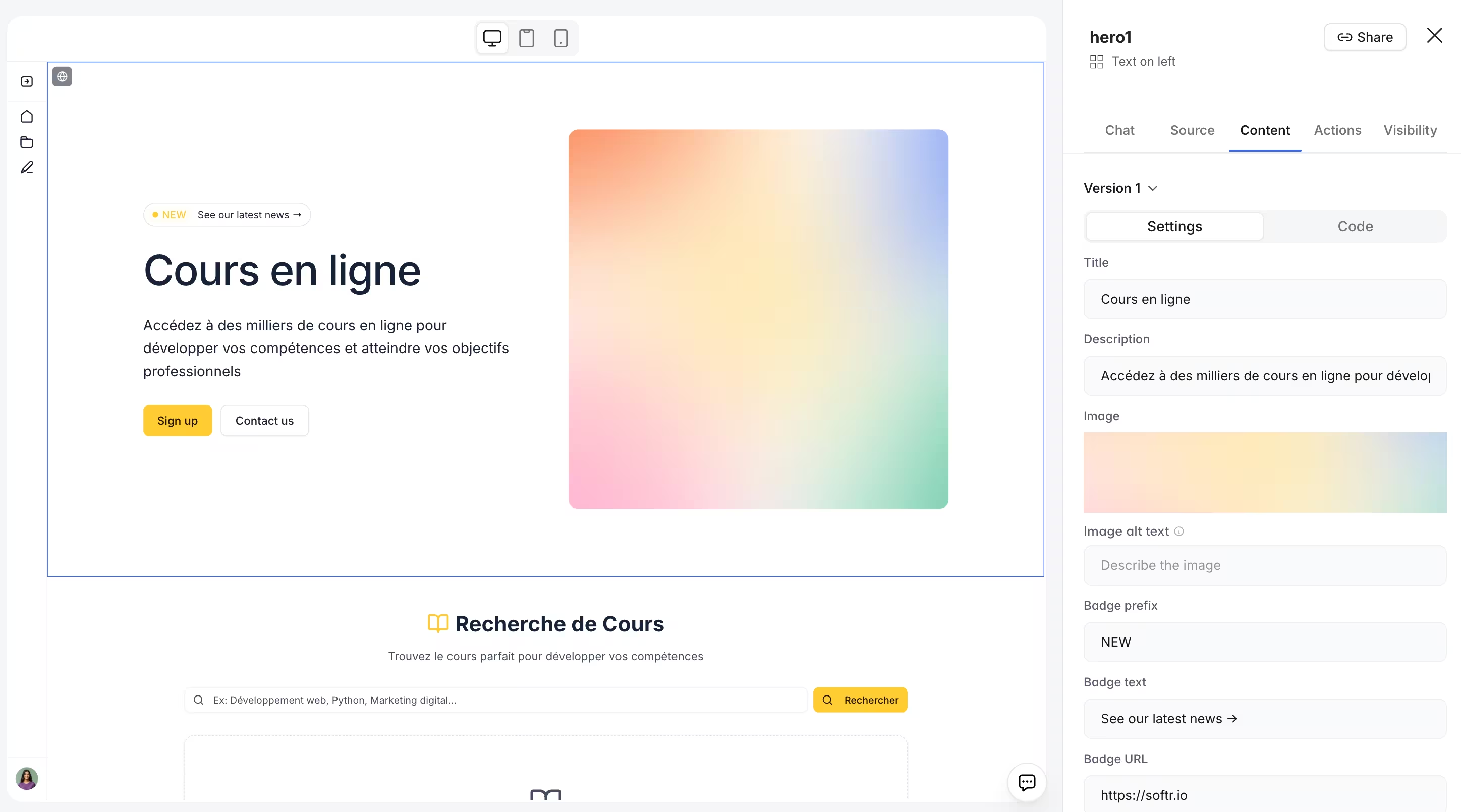
And if the default settings don't expose what you need, you can simply ask the Vibe Coding block to make specific aspects editable. It’ll understand how to do it and add them to your settings panel.
The system is also pattern-aware. If your block contains a repeating structure (for example, three feature cards or three testimonial entries), Softr will recognize the pattern and give you controls to drag and drop to reorder those items, or add a new item to the list with a single click. No re-prompting, no code edits.
This same approach now powers Softr's static blocks, such as hero sections, calls to action, gallery blocks, and more. When you pick one of these from the block library, you're not getting a static template. You get a pre-configured Vibe Coding block with editable settings already set up: change the headline, swap the image, reorder the features, all from the settings panel.
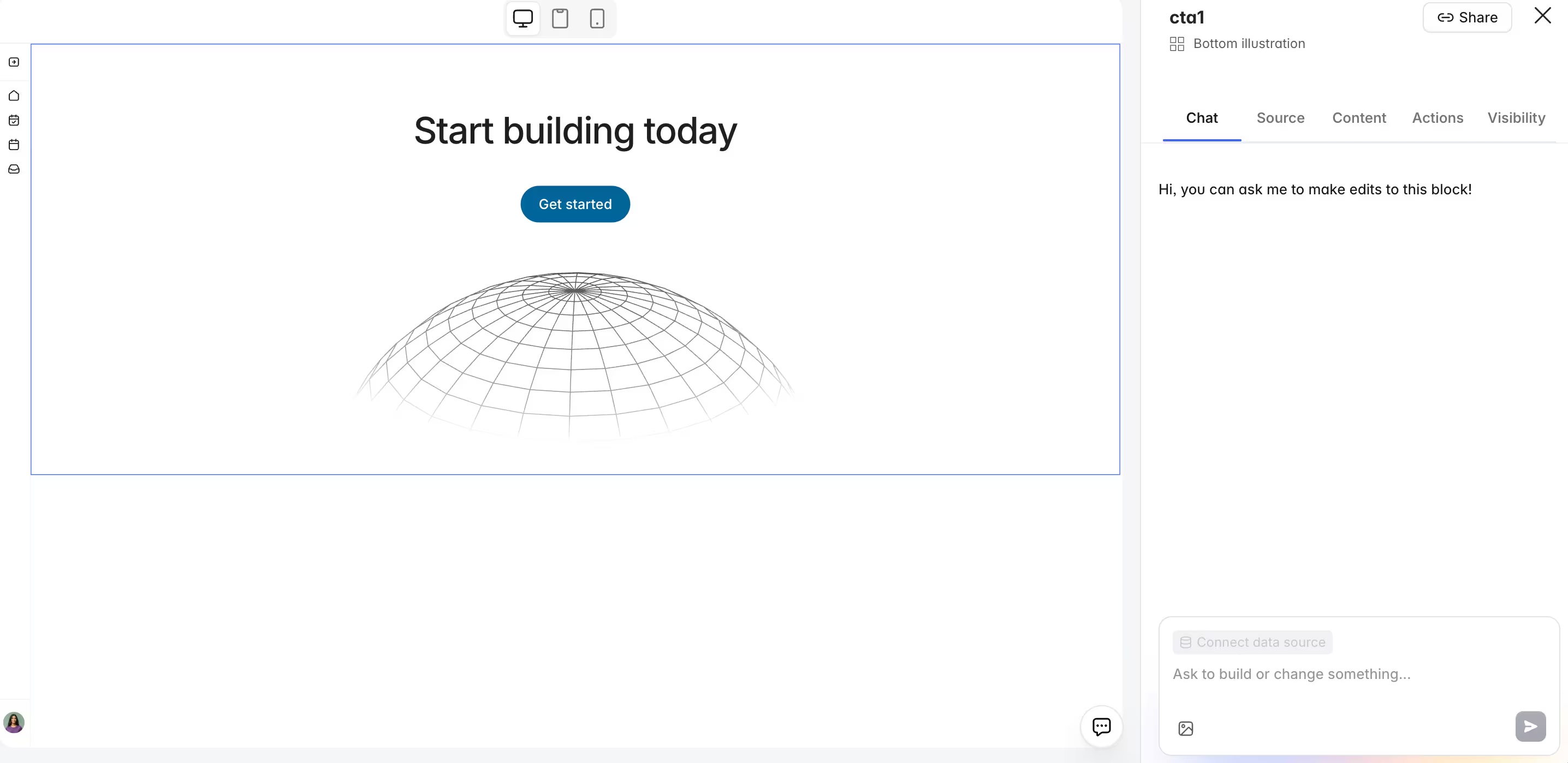
And if you want to go further, by changing the layout, adding a new section, or adjusting the design language, you can prompt the AI directly to make bigger changes.
The result is a workflow where the AI handles the complexity once, and you stay in control of the day-to-day edits without ever firing another prompt.
How to iterate safely with the Vibe Coding block
The Vibe Coding block is powerful, but it works best when you approach it methodically. Here are practical tips drawn from building real apps.
Start simple
Don't try to include every feature in your first prompt. Start by describing the core behavior and let the AI generate a first version. Then add features incrementally with follow-up prompts.
In the CSV uploader, the first prompt described three stages (upload, mapping, review). The fuzzy matching was added in a second prompt.
Solve one problem per prompt
If the grid layout is broken and the click behavior is missing, fix the grid first. Multi-problem prompts give the AI too many objectives and often produce worse results than focused, single-issue prompts.
As Artur recommends: "Go with small incremental steps. If you ask for two or three things at once, it might work, but if you go more atomic, the results are better."

He also reminds builders that customization "comes with a cost. You need to iterate it. It will not have every feature out of the gate, and every new version you need to be careful and test it. That’s the trade-off you accept for full customization."
This applies to blocks themselves, not just prompts. Keep each Vibe Coding block focused on one specialized task. If you're tempted to have a single block handle a product form, a barcode scanner, and an inventory chart, split them into separate blocks instead. As Guillaume put it:
"It's actually a bit risky to ask one block to do seven different things. If you have things that are very different, then just use different blocks to make sure each is specialized."
Use version control
Every prompt creates a new version. You can browse your version history, restore any previous version, and even duplicate a block before making a risky change. This makes experimentation safe.
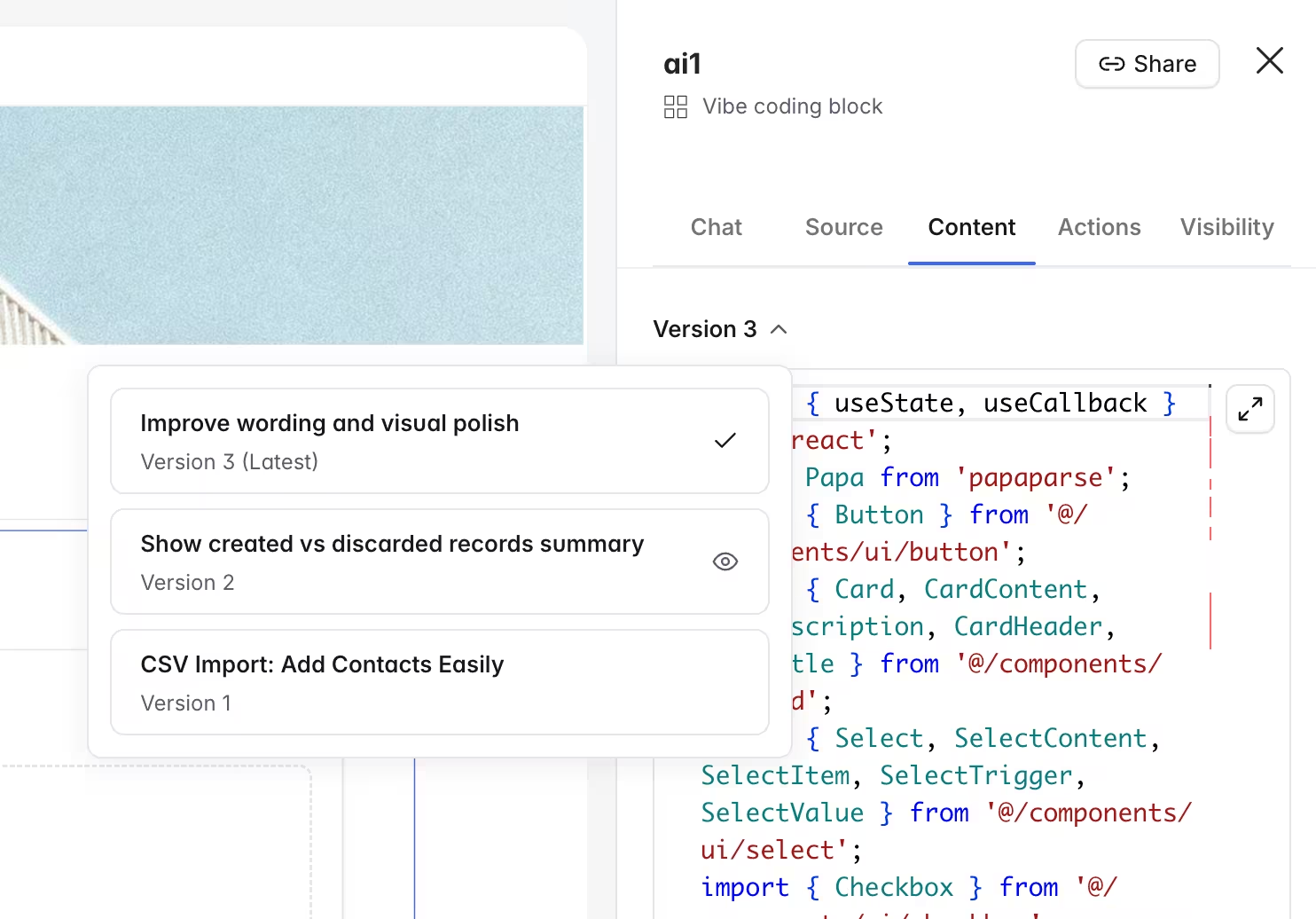
If you're comfortable with code, you can also manually edit the generated React/CSS/JS and save your changes as a new version.
Use visual references for inspiration
The Vibe Coding block supports image-to-UI generation. If you have a screenshot of a calendar, dashboard, or custom card that you want to replicate, upload it alongside your prompt. This works well for establishing the initial layout. For refinements, text prompts are more precise.
Beyond screenshots, consider browsing open-source component libraries like ShadCN, Radix, or similar React UI libraries. You can find a component you like, copy its code or use it as a reference in your prompt, and the Vibe Coding block will adapt it to your app's theme and data connections.
[.blog-callout]
💡 Pro tip: When uploading a screenshot for iteration, create a new block or a duplicate rather than modifying your working version. The AI generates new controls based on the image, which could affect your existing implementation.
[.blog-callout]
The future: bridging the two blocks
The line between native blocks and Vibe Coding blocks is getting thinner. Softr is actively working on features that bridge the gap even further:
- Converting standard blocks to Vibe blocks. If you start with a native Table or Chart and later realize you need more customization, you'll be able to convert it into a Vibe Coding block without starting from scratch. The generated code will preserve your existing configuration as a starting point.
- Expanding inline editing. The Vibe Coding block already extracts key visual elements (titles, colors, images) into no-code Settings that can be tweaked without re-prompting. Future updates will expand this to even more content types, further reducing the need to spend AI credits on simple changes.
These improvements point toward a future where the choice between native and Vibe becomes even more fluid. But the principle stays the same: use the right tool for the job, and let the platform handle the infrastructure.
Build native first, customize second
Here's the practical framework:
- Start every build with native blocks: Tables, forms, Kanban boards, charts, lists, item details. These will get you 80% of the way, and they handle mobile, theming, permissions, and edge cases for you.
- Identify the custom 20%: When you find yourself needing a behavior that no native block offers, or a visualization that requires a bespoke layout, reach for the Vibe Coding block.
- Trust the shared infrastructure: Whether it's a native Table or a Vibe Coding calendar, they connect to the same database, respect the same permissions, and inherit the same theme. Your app stays cohesive.
"The confidence to ship a business app doesn't come from how fast the AI generates code. It comes from knowing the infrastructure underneath is battle-tested, and that your users' data is safe." — Guillaume Duvernay
The best business apps aren't the ones built entirely from AI-generated components. They're the ones that use proven, reliable blocks where they're sufficient and AI-generated blocks where they add real value.
Ready to build?
Frequently asked questions
Can the Vibe Coding block connect to my database?
Is the Vibe Coding block as secure as native blocks?
Can I edit the generated code manually?
Can the Vibe Coding block trigger automation workflows?
Does the Vibe Coding block work on mobile?