


Which internal tools can your marketing team start building with no code

[.blog-callout]
TL;DR
- Marketing teams can build their own production-grade internal tools (campaign trackers, content calendars, asset libraries, dashboards, and more) without writing code or waiting on engineering.
- Custom tools beat off-the-shelf software when your workflows are specific: you only pay for and maintain what you actually use.
- With Softr, you get the full stack in one place: native databases (or connections to Airtable, Google Sheets, HubSpot, and 21+ data sources), a visual interface builder, granular permissions, and native workflow automation.
- The fastest path is the AI Co-Builder: describe the tool you need, get a working app, then refine it visually or start from a template. [.blog-callout]
Most marketing teams run on a patchwork of spreadsheets, shared docs, and half-fitting SaaS subscriptions. Every campaign brief lives somewhere different, approvals happen in email threads, and reporting means copy-pasting numbers on a Friday afternoon.
No-code platforms changed that. Instead of requesting a tool from engineering or settling for off-the-shelf software, your team can build internal tools that match your exact workflows, and run them in production with real users, permissions, and automations.
In this article, we'll walk through the internal tools marketing teams are building with no-code in 2026, from campaign trackers and content calendars to asset libraries and freelancer management platforms, and how to get your first one live this week. If you'd rather skip ahead, you can start from our Marketing Campaign Management template.
Advantages of in-house no-code tools for marketing teams
Building your own internal tools brings several concrete benefits to a marketing team:
Streamlining workflow processes
When a tool is custom-built to mirror your team's specific workflows, processes become more intuitive and less error-prone. A no-code platform lets you automate routine tasks (status updates, notifications, approval routing) and systematize how work moves through your team, so people spend less time on coordination and more on strategy and creative work.
With Softr, this automation is native: Softr Workflows can be triggered directly by actions in your app, like a button click that moves a creative asset to "Approved" and notifies the channel owner in Slack.
Personalized tool development
Marketing teams' needs vary widely by industry, audience, and company size. With no-code, you can build a lead tracker that matches your exact funnel stages, or a content calendar shaped around your actual publishing cadence. Tools designed from the ground up for your processes support them better than generic software ever will.
Potential cost savings
Traditional software development means hiring developers or outsourcing to an agency. No-code removes that cost, and it also shortens time-to-value: instead of a months-long development cycle, your first working version can be live in days. The Strupek marketing agency, for example, cut its operational and software costs by 58% after consolidating eight client workflows into a single Softr app.
Reducing dependence on external software solutions
Off-the-shelf tools often bury you in features you don't need while missing the one feature you do, and each one adds another recurring subscription. Building your own tools lets you consolidate several point solutions into one app that matches your needs and budget exactly.
Real teams doing this today
This isn't theoretical. Celonis built a GTM knowledge base on Softr that became one of the top three tools used by its 1,500+ person go-to-market team. Marketing agency Strupek replaced its content approval and reporting stack with a single client dashboard, saving 10 hours per week.
"Our users love it. They think it's the perfect way to connect knowledge we are building up across our customer interactions, structure it, and make it easily accessible." - Celonis team, on their Softr-built GTM knowledge base
Types of internal marketing tools you can build with no-code
Here are the tools marketing teams most commonly build, and what each one looks like in practice.
Campaign trackers and project management tools
Effective project management keeps marketing initiatives on time and on budget, and gives you a structured way to track progress, manage resources, and catch issues early.
With no-code, you can build a project management tool with exactly the features your team needs: task tracking, kanban boards, time logging, online time clocks, team collaboration spaces, and reporting dashboards. You might build a campaign tracker that integrates directly with your content calendar, so every task stays aligned with your publishing schedule.
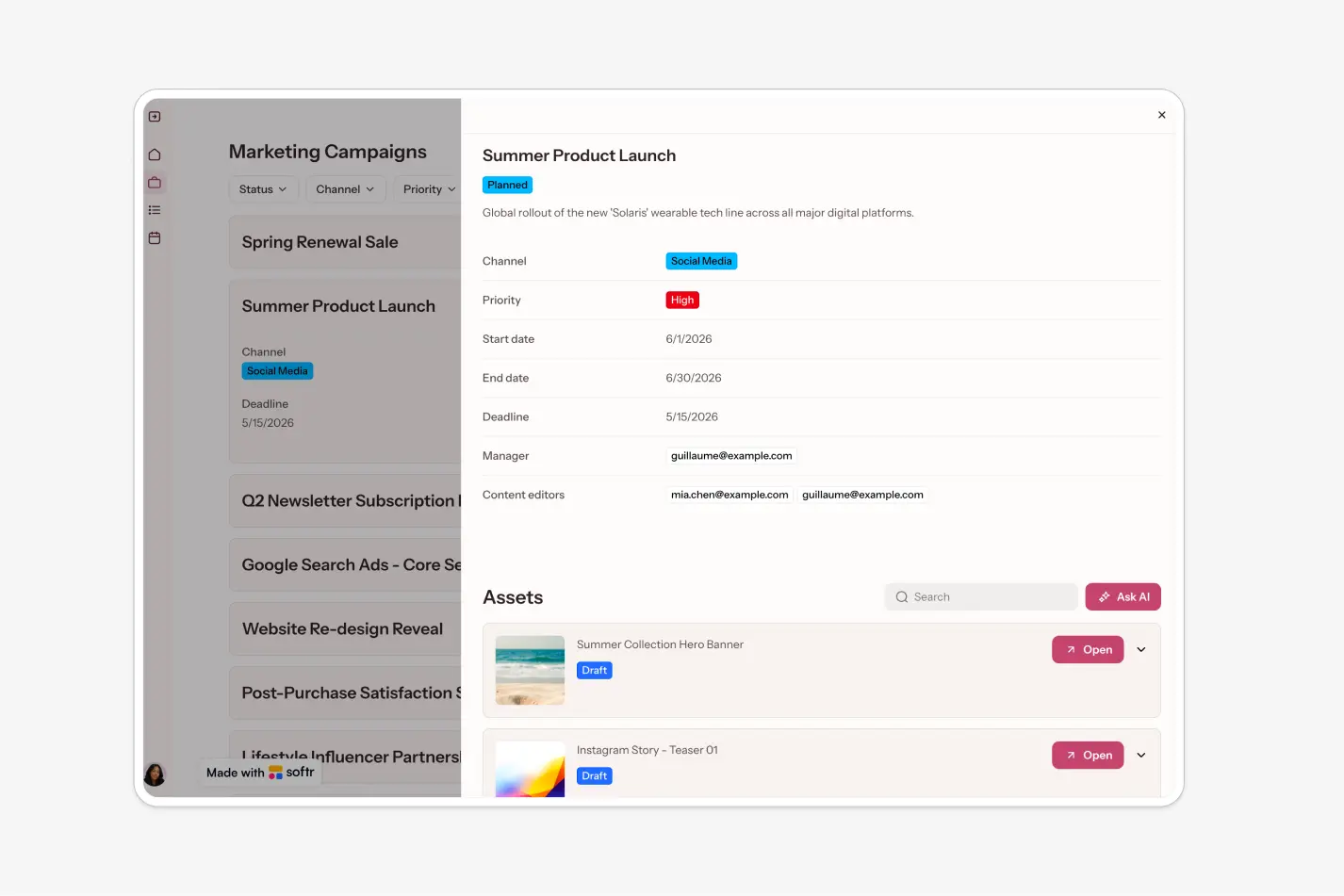
Why not just use a pre-made project management tool? Off-the-shelf options can work, but they often include unnecessary features that complicate the experience, and they rarely match your team's specific workflow or integrate cleanly with your other tools. Building your own gives you a streamlined tool that works exactly how your team does. If you want a head start, our project tracker template covers the fundamentals.
Lead tracking systems
Lead tracking follows potential customers from first contact through conversion, giving you visibility into your funnel so you can spot bottlenecks, refine nurturing, and improve conversion rates.
A custom lead tracker can capture lead information from your website, track interactions across channels, assign leads to team members, and surface real-time status updates. Because Softr connects natively to HubSpot, Airtable, and Google Sheets (among 21+ data sources), your tracker can work with live CRM data instead of duplicating it.
Content calendar applications
A well-organized content calendar is essential for planning, producing, and publishing consistently. It coordinates production across channels, aligns content with key dates, and keeps your output tied to your marketing objectives.
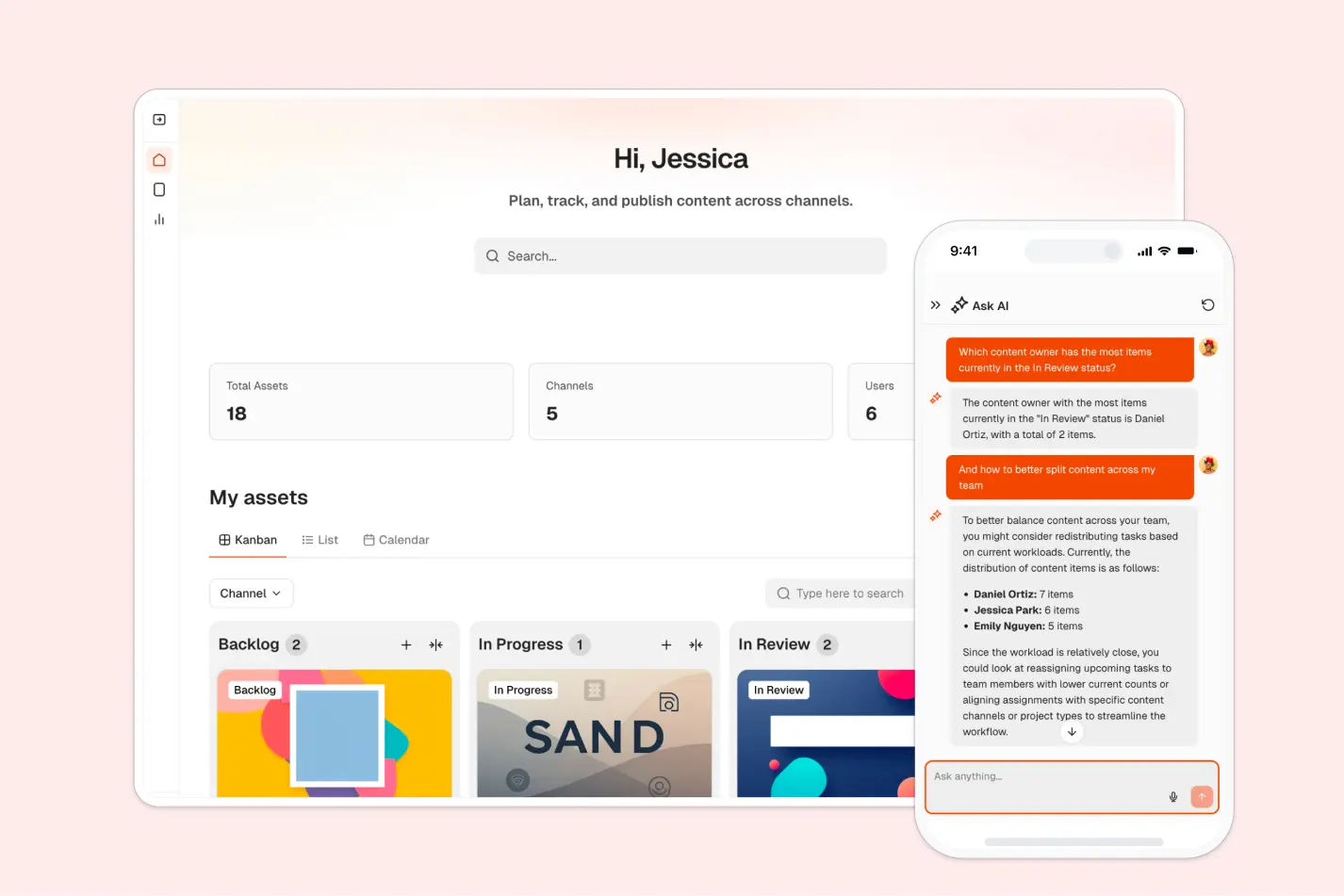
With no-code, your calendar can integrate with your project management data to track production tasks, link out to drafts and published URLs, and feed performance tracking. It stops being a scheduling spreadsheet and becomes part of your content operations. You can build one from scratch or start from our content calendar template.
Customer feedback systems
Customer feedback helps you understand needs and preferences, measure satisfaction, and identify areas for improvement.
With no-code, you can create a feedback system that fits your setup: surveys integrated with your website or email campaigns, in-product feedback forms, or a platform to manage and analyze reviews. Softr's database AI agents can even categorize and summarize incoming feedback automatically, so trends surface without manual tagging.
Internal knowledge bases
An internal knowledge base centralizes marketing insights, data, guidelines, and best practices. It promotes knowledge sharing, keeps practices consistent, and speeds up onboarding.
A no-code knowledge base is easy to navigate, update, and connect to your other tools. You can mix content types (text, video, infographics), add search, and use Ask AI so team members can query the knowledge base conversationally instead of digging through pages. This is the pattern Celonis used for its 1,500+ person GTM team.
Creative asset libraries
Campaign assets multiply fast: ad creatives, social visuals, landing page copy, video cuts. Without a system, finding the approved version of anything turns into a Slack archaeology project.
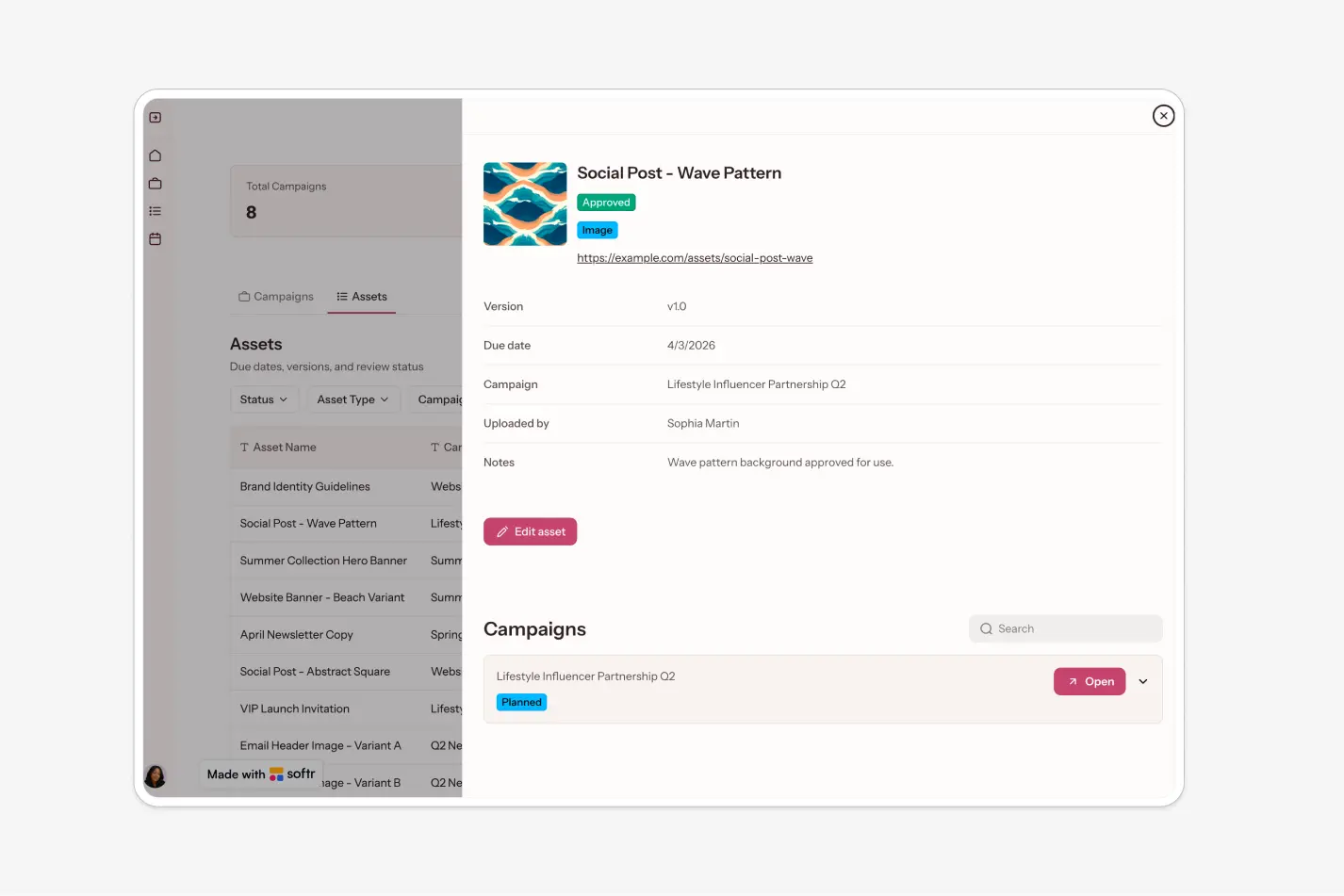
A no-code asset library tracks every creative with its status, version, owner, and linked campaign, and pairs naturally with review and approval workflows so nothing ships without sign-off.
Reporting dashboards
Marketing reporting usually means pulling numbers from five tools into one slide deck. A custom dashboard replaces that ritual with a live view: campaign performance, content output, budget tracking, and channel metrics in one place, fed by the data sources you already use.
You control exactly which metrics matter and who sees what. Give your CMO a view-only executive summary while channel owners get drill-down detail, all from the same underlying data.
Event planning tools
Events, physical or virtual, require careful coordination: venue or platform selection, registration and ticketing, attendee management, and post-event follow-up.
A custom event planning tool can manage logistics, handle registration, track attendee engagement, and trigger follow-up communications automatically through workflows. Because it integrates with your existing systems, you get a cohesive approach whether you're running a small webinar or a large conference.
Freelancer management platforms
Many marketing teams rely on freelancers for content, design, and SEO. Managing them well is crucial for consistent quality and good working relationships.
A no-code freelancer platform can track project assignments, manage payments, centralize communication, and provide a space for files and feedback. With Softr's users and permissions, each freelancer only sees their own assignments and briefs, which keeps client data and internal plans private.
By building these tools on one platform, your marketing stack works together by design: the content calendar feeds the campaign tracker, the asset library feeds approvals, and the dashboard reads from all of it.
Getting started with no-code
Getting started doesn't have to be daunting. Here's a practical sequence:
Identify your needs
What tasks eat up your team's time? Where are the bottlenecks in your current processes? Which tasks could be automated or streamlined with a custom tool? Pick the friction point that costs you the most hours per week.
Choose a no-code platform
Platforms differ widely: some focus on mobile apps, others on data-heavy applications or interface design. For internal tools, look for a full-stack platform that covers all the layers in one place. Softr gives you native Softr Databases (or connections to Airtable, Google Sheets, HubSpot, and 21+ other data sources), a visual interface builder, built-in user permissions, and native workflow automation. For a broader comparison, see our roundup of the best internal tool builders.
Start with data
Success with internal tools is 80% data structure. Before building pages, define your tables: campaigns, assets, channels, owners, statuses, and how they relate. In Softr, you can set this up manually in the database editor, or describe your data structure to the Database AI Co-Builder and it will generate the tables and fields for you.
Build your first version
You have three paths, in order of speed: describe what you need and the AI Co-Builder generates a complete app (database, pages, and logic included), start from a template, or build from a blank canvas. You can also connect Claude or ChatGPT through the Softr MCP and build your content calendar or campaign tracker from chat. Whichever you choose, you can refine everything visually afterward, and ask the AI Co-Builder to make in-editor changes (adding blocks, configuring pages, setting up charts) by describing what you want.
"The next generation of software will not be code, it is actually going to be a combination of no-code and AI. AI brings the speed and personalization, and no-code brings the guardrails and reliability." - Mariam Hakobyan, CEO and Co-founder of Softr
Set up permissions early
Treat access control as a first step, not an afterthought. Define your user groups (admins, contributors, freelancers, view-only stakeholders) and restrict what each group can see and do before inviting anyone in.
Test and iterate
No-code makes it easy to tweak and improve. Experiment, test different setups, and refine your tools as your team's needs evolve.
Get feedback
Encourage your team to weigh in on the tools you build. Their input is what turns a working app into one people actually rely on.
The goal isn't to build the perfect tool right away, but to ship something useful fast and keep improving it.
Starting small: ship a focused first version
You don't need to build your entire marketing operations suite at once. The smarter approach is to ship one focused tool, put it in front of real users, and expand from there. Unlike a throwaway prototype, a tool built on a full-stack platform is production-ready from day one: the database, permissions, and hosting are already in place, so version one can grow into your team's system of record instead of being rebuilt later.
- Identify a simple, high-impact tool your team needs. A task tracker, a content calendar, or a feedback form are all good candidates. Prioritize the essential features and leave the extras for later.
- Build it. With the AI Co-Builder, this first version can take an afternoon rather than a sprint.
- Roll it out to your team, collect feedback, and watch how it's actually used. This tells you what to improve and what to add.
- Refine and expand. Add automations, new views, or new user groups as needs become clear, without lengthy development cycles.
Celonis followed exactly this pattern: a first version of its GTM knowledge base in under five days, early-adopter testing after two weeks, and full adoption across 1,500+ team members within three months.
Advocating for no-code: how to convince your manager
Convincing your manager to invest in no-code may seem challenging, especially if they're not familiar with it. Here's how to make your case:
- Highlight the benefits: Emphasize cost savings, increased efficiency, and tools that fit your team's workflows exactly. Concrete numbers help: Strupek cut operational costs by 58% and saved 10 hours per week after consolidating its workflows into one app.
- Show the momentum: This is where the market is heading. According to Vercel, 63% of people using AI building tools are non-developers, and Writer found that 39% of employees want to build or design their own AI tools at work.
- Start small: Propose a low-risk first project as a proof of concept, like the focused first version described above. A working demo is more persuasive than any slide deck.
- Emphasize the learning opportunity: Building internal tools also upskills your team and makes it more self-sufficient, reducing future dependence on outside vendors and dev queues.
With a well-prepared case and a working proof of concept, you'll have a strong chance of winning support.
Build your first marketing tool this week
The tools your marketing team needs most are usually the ones nobody sells: the campaign tracker shaped around your funnel, the content calendar that matches your actual cadence, the asset library your approval process runs through. With a full-stack no-code platform, you can build them yourself and run them in production, with real users, permissions, and automations.
Pick the workflow that frustrates your team most, describe it to the AI Co-Builder or grab the Marketing Campaign Management template, and have a working first version live this week.
Frequently asked questions
What internal tools should a marketing team build first with no-code?
Do I need technical skills to build marketing internal tools with no-code?
Can no-code internal tools connect to the marketing data I already have?
Are no-code internal tools secure enough for company data?
How is building with no-code different from vibe coding a tool with AI?


