Glide pricing breakdown: is it worth it in 2026?



If you've checked Glide's pricing page lately, chances are you were looking at GlideOS without realizing there's another set of plans somewhere else.
In June 2026, Glide launched GlideOS, an AI builder that turns your spreadsheet into an app. It also renamed its original no-code builder Glide Classic. So now there are two Glide products, each with its own pricing plans and usage charges.
People have since asked questions like, “Can I access GlideOS with my Glide Classic subscription?” and “How much does it cost to build a project in GlideOS?” So I dug into both products to understand how each plan works and what you get.
If you're trying to work out which Glide you need and what it'll really cost you each month, this guide is for you. I’ll walk you through Glide pricing plans, hidden costs to look out for, and how to reduce spend where possible.
Glide pricing plans at a glance
*All GlideOS prices are monthly, since annual billing isn't available yet.
Glide Classic pricing
GlideOS pricing: How credits work
GlideOS runs on credits. Every action you ask it to take—from chatting with the agent and making changes to an app to running AI features inside your published apps—draws from your available credits.
The Free plan gives you a limited pool of credits that does not reset. Paid plans start at 100 credits/month, with the option to buy extra credits or wait for the next reset.
What are credits? Credits are how GlideOS keeps track of the work it does for you. You use them when you build with the agent and when AI features run inside the apps you create, which Glide calls Runtime AI.
Workflows and integrations use credits too. Workflows are charged based on the steps they run, while integrations are charged per call. So a scheduled workflow can keep using credits even when nobody is actively using the app.
What's the difference between monthly and extra credits? Monthly credits come with paid plans and reset at the start of each billing cycle. If you don’t use them, you lose them. Extra credits are top-ups you can buy at any time on a paid plan. They roll over from month to month and stay valid for 12 months.
GlideOS uses your monthly credits first, then dips into your extra credits if you run out. Once your billing cycle resets, it switches back to your new monthly allowance.
How much does one request cost? Glide doesn’t publish a fixed per-message rate, and says credit use can vary from one request to another.
The tricky part is that you don’t find out what a request costs until after the work is done. On paid plans, a credit banner in the prompt box shows how much you have left, and you can check the Usage page to see where credits are going. On the free plan, Glide doesn’t show a credit balance, so you can't tell how much you have left.
Glide Classic pricing: How updates work
Glide Classic tracks usage through updates. Paid plans come with a monthly update allowance, starting at 250 updates.
What counts as an update? Updates are how Glide counts the moments your app reaches outside itself. You use them when Glide connects to Google Sheets, Airtable, Excel, third-party integrations, Glide AI, or the Glide API, and when it syncs changes with external data sources.
Adding, editing, or deleting rows in Glide Tables and Big Tables doesn't use updates. Neither does app logic that only touches Glide's own data—unless it goes through the Glide API. On a paid plan, you can turn on Unlimited Updates to keep things running, with extra usage charged at $0.02 per update.
Now, let's break down all of the plans under GlideOS and Glide Classic and where they make sense for your use case.
GlideOS pricing: Full breakdown
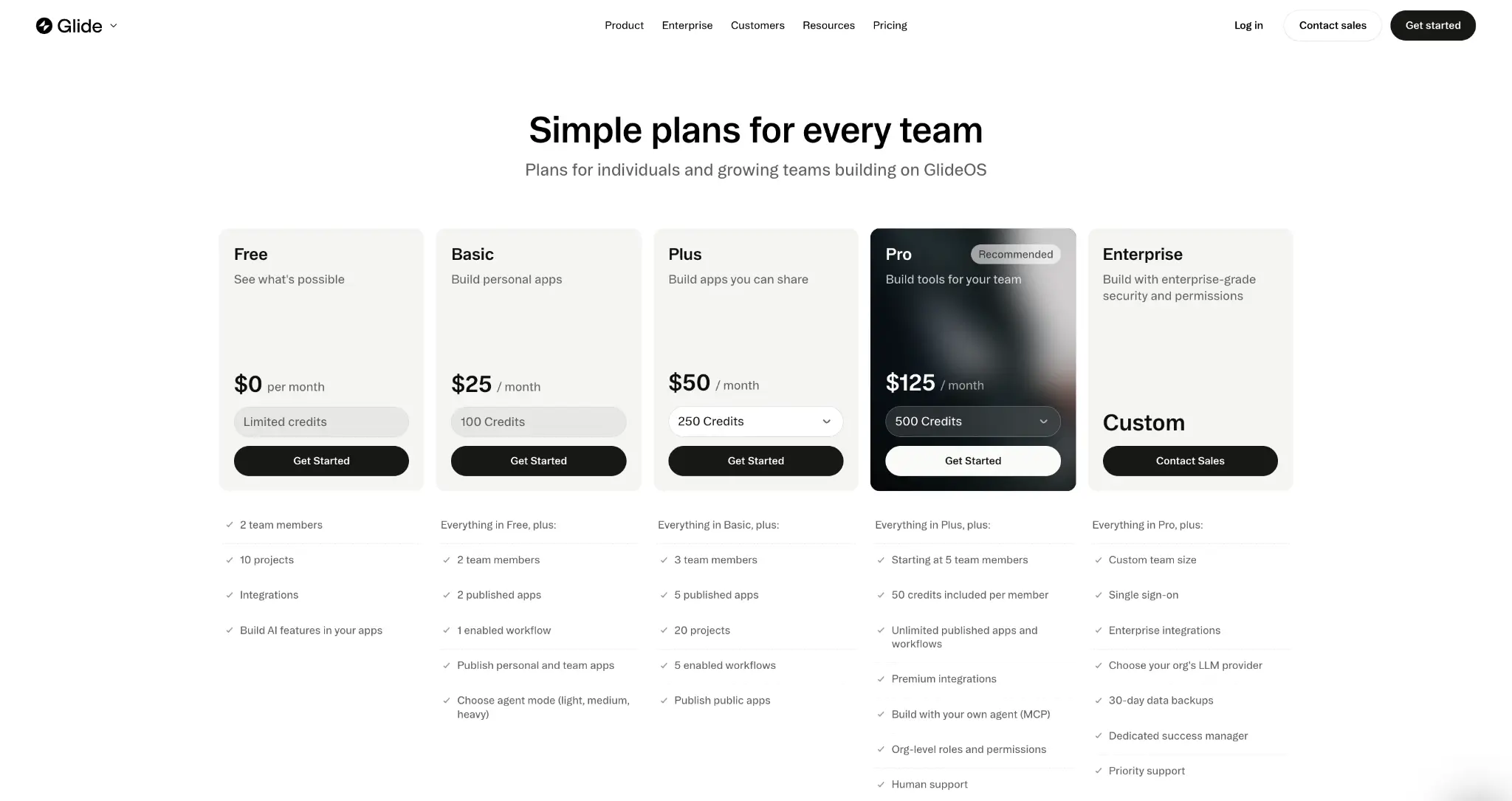
GlideOS Free: $0/month
The Free plan includes:
- 10 projects
- 1 integration
- Limited AI credits
- 2 team members
- Runtime AI (AI features inside apps you create)
- Secrets (the private values GlideOS uses to connect to an outside tool)
Note: Glide doesn’t publicly state how many credits come with the Free plan, and those credits don’t reset or renew. So it’s hard to know upfront how much building you can do before you need to upgrade.
Pros
- Lets you collaborate with another teammate
- You can build AI features inside apps you create
- Gives you enough room to experiment across multiple projects
- Includes an integration and Secrets, so you can test how GlideOS connects to external tools without paying
Cons
- Doesn’t let you publish and share the apps you build
- Extra credits aren’t available for purchase on the free plan
- Caps you at one integration, which limits how much you can experiment with connected workflows
- Doesn’t let you choose between agent modes, so you have less control over how many credits a task consumes
- Keeps more advanced features behind paid plans, including running workflows, MCP, data backups, and permission controls
Best for: Anyone who wants to explore how GlideOS works.
My verdict: The free plan gives you enough access to decide whether you like the AI-building experience. You can create projects, experiment with integrations, and add AI features to apps, but you can’t publish what you build.
GlideOS Basic: $25/month
This plan starts at 100 monthly credits and gives you everything in Free, plus:
- 2 published apps
- 1 enabled workflow
- Personal and team app publishing
- The ability to choose between agent modes (Light, Medium, and Heavy)
Pros
- Lets you publish up to two personal or team apps
- Lets you buy extra credits if your monthly allowance runs out
- Gives you one enabled workflow for automating a basic process
- Lets you match the agent mode to the task to save credits for more complex work
Cons
- You can quickly burn through your monthly credits since the same 100 credits cover building, AI features, workflows, and integrations
- The two-app limit can get restrictive quickly if you’re experimenting with multiple use cases or building separate tools for different teams
- You can’t build public-facing portals or client apps on this plan
- Unused monthly credits don’t roll over to the next billing cycle, and you can only buy extra credits once a month
Best for: Individuals building one or two personal or internal team tools.
My verdict: Basic is a good step up if you just want to build and publish up to two simple apps. But if you need more than one workflow or want to share an app publicly, you’ll have to upgrade your plan.
GlideOS Plus: starts at $50/month
The Plus plan includes everything in Basic, plus:
- 250 monthly credits to start
- 3 team members
- 5 published apps
- 20 projects
- 5 enabled workflows
- Public app publishing
Pros
- Lets you publish public-facing apps that anyone can use
- Gives you more room to build apps and automate workflows than Basic
- Lets you choose your monthly credit allowance when you select the plan
- Allows you to top up twice in a month, so you can keep building through a heavy stretch instead of waiting for your credits to reset
Cons
- Five apps and five workflows can still feel tight if you’re building separate tools for different teams or processes
- Leaves out more advanced team features, like org-level roles and human support
- Everyone on your team draws from the same credit pool, so it can run down faster when several people are actively building
Best for: Freelancers, consultants, and small businesses building up to five apps they want to share publicly.
My verdict: Plus is the better fit once you need room to build several apps, automate workflows, and share them publicly.
GlideOS Pro: starts at $125/month
The Pro plan includes everything in Plus, plus:
- Up to 100 projects
- 5 members minimum
- Unlimited published apps
- Unlimited enabled workflows
- 250 base credits plus 50 per member
- The ability to build with your own agent through MCP
- Organization-level roles and permissions
- Database connection strings
- Premium integrations
- 24-hour data backups
- Human support
Pros
- Allows you to publish unlimited apps and run unlimited workflows
- Makes it easier to control what different team members can see or do
- Gives you 24-hour backups, so you can recover data if something breaks
- Removes the top-up cap, so you can buy as many credits as you need
- Grows your monthly credit pool by 50 credits for each team member you add
Cons
- Starts with a five-person minimum, which is a stretch if only one or two people need to build in GlideOS but you need features only this plan has
- Heavy workflows can be hard to predict, because credit use depends on how many steps run and what each workflow does
- Premium integrations can add costs outside GlideOS too, since third-party services may still charge you separately for their own usage
Best for: Small teams building and managing multiple apps that need more automation, stronger permissions, and human support.
My verdict: Pro lets you build as many apps and workflows as you need, along with stronger role-based permissions and human support. But it starts at five team members, so smaller teams can end up paying for seats they don't really need.
GlideOS Enterprise: Custom pricing
The Enterprise plan gives you everything in Pro, plus:
- Custom project limits, plus unlimited published apps and workflows
- The ability to choose your organization’s LLM provider
- Custom team size and credit allowance
- Audit logs and 30-day data backups
- Project-level roles and permissions
- Publishing approval controls
- Single sign-on (SSO)
- Enterprise integrations
Pros
- Lets IT teams have more control over how apps are accessed and released
- Gives you up to 30 days to recover data if something goes wrong
- Allows you to set permissions at the project level
- Lets your organization choose its LLM provider
Cons
- No public price—you have to speak with sales before you know what it’ll cost
- Most of the upgrade is around security, governance, and support, so it can be overkill if you don’t need things like SSO, audit logs, or publishing approvals
- Enterprise doesn’t mean unlimited AI usage
Best for: Larger organizations that need tighter security, permissions, and oversight around who builds, accesses, and publishes apps.
My verdict: Enterprise makes sense when GlideOS needs to fit into your company’s existing security and IT processes. You get the controls Pro is missing, including SSO, audit logs, publishing approvals, and project-level permissions.
Glide Classic pricing
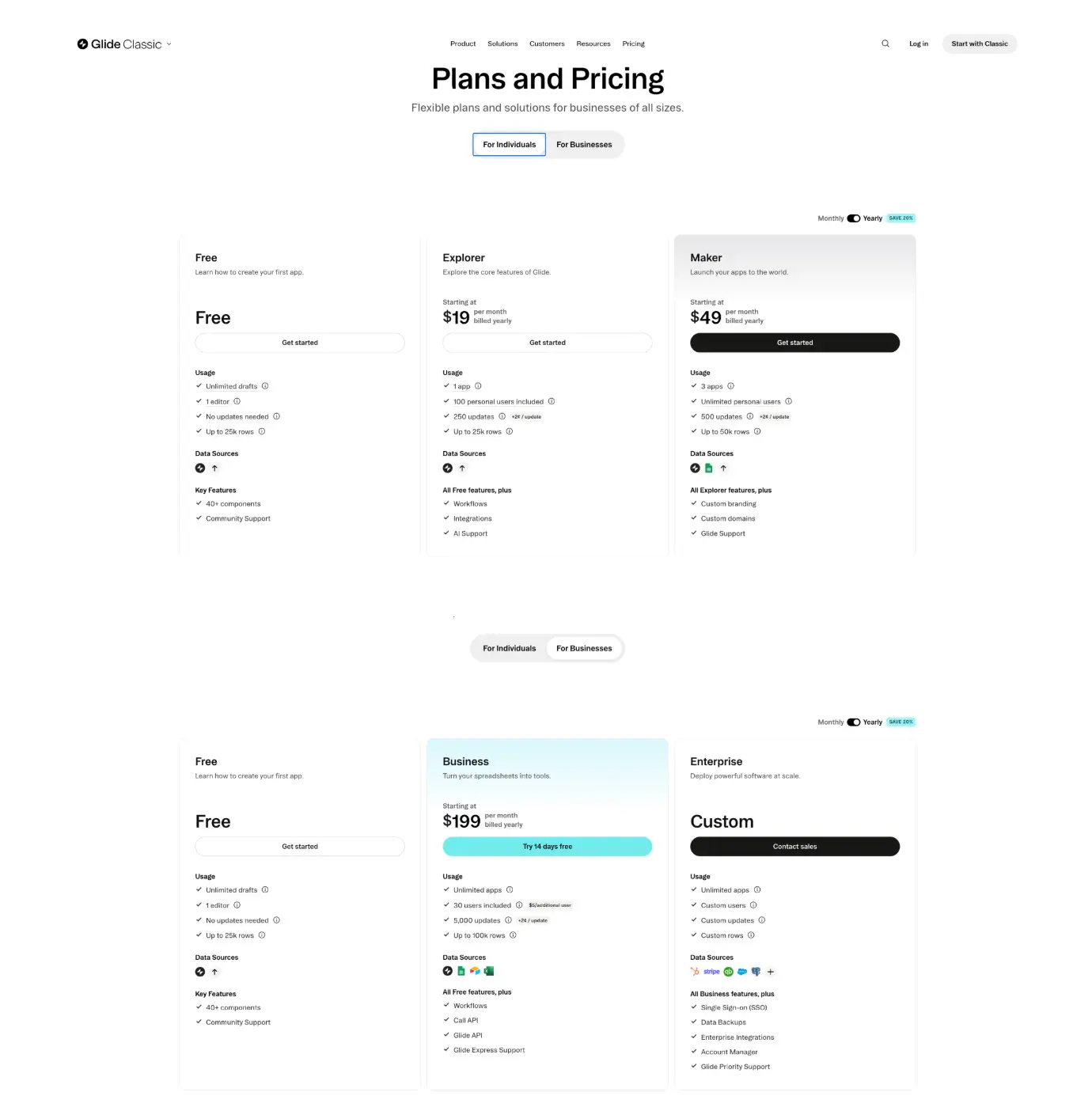
Glide Classic Free: $0/month
The Free plan includes:
- 1 editor
- Unlimited drafts
- Up to 25,000 rows
- 40+ UI components
- Glide Tables and Big Tables
- Google Sheets, CSV, and Excel imports
Pros
- Lets you test the builder to create your first app
- Doesn’t use updates, so you don’t have to worry about usage costs
- Allows you to build as many drafts as you want and experiment with real data
Cons
- Doesn't let you publish the apps you build unless you upgrade your plan
- Limits you to one editor, so you can't build or test apps alongside anyone
- Imports external data as a one-time copy, so changes in Google Sheets or Excel won't sync back into your app
Best for: Individuals learning Glide Classic or testing an app idea before paying.
My verdict: Free gives you enough to learn how Glide works and build a real prototype. But you can’t publish the apps you build.
Glide Classic Explorer: $25/month or $19/month billed yearly
The Explorer plan gives you everything in Free, plus:
- 2 editors
- 1 published app
- 100 personal users
- 250 updates a month (Extra updates cost $0.02 each)
- Workflows, third-party integrations, and Glide AI
Pros
- Gives you a low-cost way to publish and test a real app
- Gives you automation tools for simple workflows and everyday use cases
- Makes it easy to share your app with a small group and see how people actually use it
Cons
- You’re limited to one published app
- Usage can add up quickly if your app relies heavily on AI, integrations, or automations
- Only personal email addresses can sign in, so it’s not suitable for building an internal company app
Best for: Individuals building one small personal app with light AI, integrations, or automation.
My verdict: Explorer works well if you're building one small app for personal use or a limited audience. But it's easy to outgrow once your app starts using more AI, integrations, or workflows.
Glide Classic Maker: $60/month or $49/month billed annually
Maker gives you everything in Explorer, plus:
- 3 published apps
- Unlimited personal users
- 500 updates/month (Extra updates cost $0.02 each)
- Up to 50,000 rows in Big Tables
- Google Sheets syncing
- Custom domains
- Custom branding
Pros
- Lets you grow your audience without paying more for every new user
- Allows you to brand the app so it feels more like your own product
- Works well if Google Sheets is already where you manage your data
- Gives you enough room to launch a few different live projects
Cons
- Requires you to upgrade your plan if your app needs people to sign in with a work email
- Can burn through 500 updates quickly if several apps use AI, integrations, or workflows, and those features stop working once you run out
- Forces an upgrade if your setup depends on Airtable or Excel syncing
Best for: Solo builders creating community apps, personal tools, customer-facing apps, or small products for people using personal email addresses.
My verdict: Maker is the best fit if you want to launch polished apps with your own branding and grow your user base without paying per user. But it stops being a good fit once you need work-email access for employees, teams, or business users.
Glide Classic Business: $249/month or $199/month billed annually
The Business plan is for teams building internal apps that employees use for day-to-day work. It gives you everything in Maker, plus:
- 30 users
- 10 editors
- 14-day free trial
- 5,000 updates/month
- Unlimited published apps
- Up to 100,000 rows in Big Tables
- Google Sheets, Airtable, and Excel syncing
- Glide API and Call API
- Business email users
- Express Support
Note: Additional users cost $6/month on monthly billing or $5/month on annual billing, while extra updates cost $0.02 each.
Pros
- Lets you build internal tools for employees using work email addresses
- Works better for companies already using Airtable and Excel as a data source
- Gives you a much larger update allowance, so apps with frequent automations or external data syncing are less likely to hit overage charges
Cons
- Feels expensive if you only need one Business-only feature
- Adds extra cost once you go past the 30 included active users
- Can make your bill less predictable in months when update usage spikes
- Makes an Enterprise upgrade more likely if you need SQL, BigQuery, or more advanced security and access controls
Best for: Small and midsize teams building internal tools, dashboards, portals, or workflow apps for employees.
My verdict: Business is worth it if you need employees to sign in with work emails, connect Airtable or Excel, and run more active workflows. But it’s a big jump from Maker, and your bill can still rise if you go over the included users and updates.
Glide Classic Enterprise: custom pricing
Enterprise is for larger companies that need Glide to work with bigger datasets, enterprise systems, and stricter security requirements.
You get everything in Business, plus:
- Custom users, editors, and update allowances
- Higher data limits
- SQL databases
- BigQuery
- Enterprise data sources
- SSO
- Dedicated account management
- Priority support
Pros
- Lets you connect Glide to the databases and systems you already depend on
- Makes Glide more practical for company-wide use where security and access controls matter
- Gives you direct support when the apps are important enough that downtime or technical issues can’t wait
Cons
- Makes it hard to budget or compare upfront since the price isn’t live
- Requires sales conversations before you know what your package will cost
- Can bring more technical work if you’re connecting SQL databases or other large-scale systems
Best for: Larger organizations using Glide for company-wide apps, high-scale data, or enterprise systems.
My verdict: Enterprise is for companies that need SQL or BigQuery, SSO, much higher data limits, or custom usage limits. If you only need a few more users or updates than Business includes, it may be more than you need.
What users are saying about Glide pricing
GlideOS is only a few months old, so there isn't much public feedback yet. Most of what exists comes from builders within the Glide community.
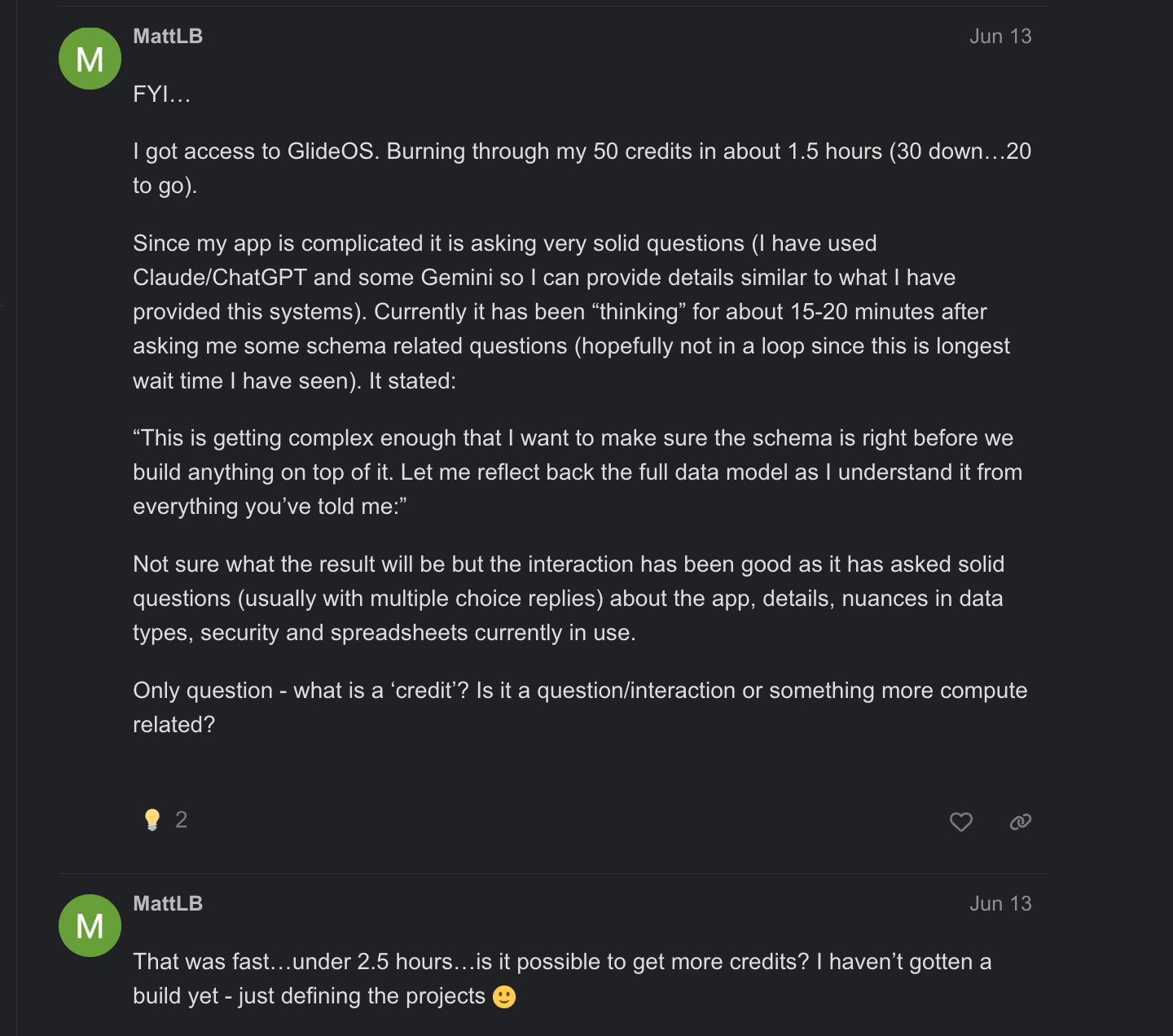
The early reaction is mixed. Some users are impressed by how much the agent can build for them, but the bigger concern is not knowing what a project will cost until the credits are already gone. One user liked what GlideOS was producing, but kept buying more credits thinking each top-up would be the last.
.webp)
Another builder said they used 50 credits in under two and a half hours and still hadn’t finished their app.
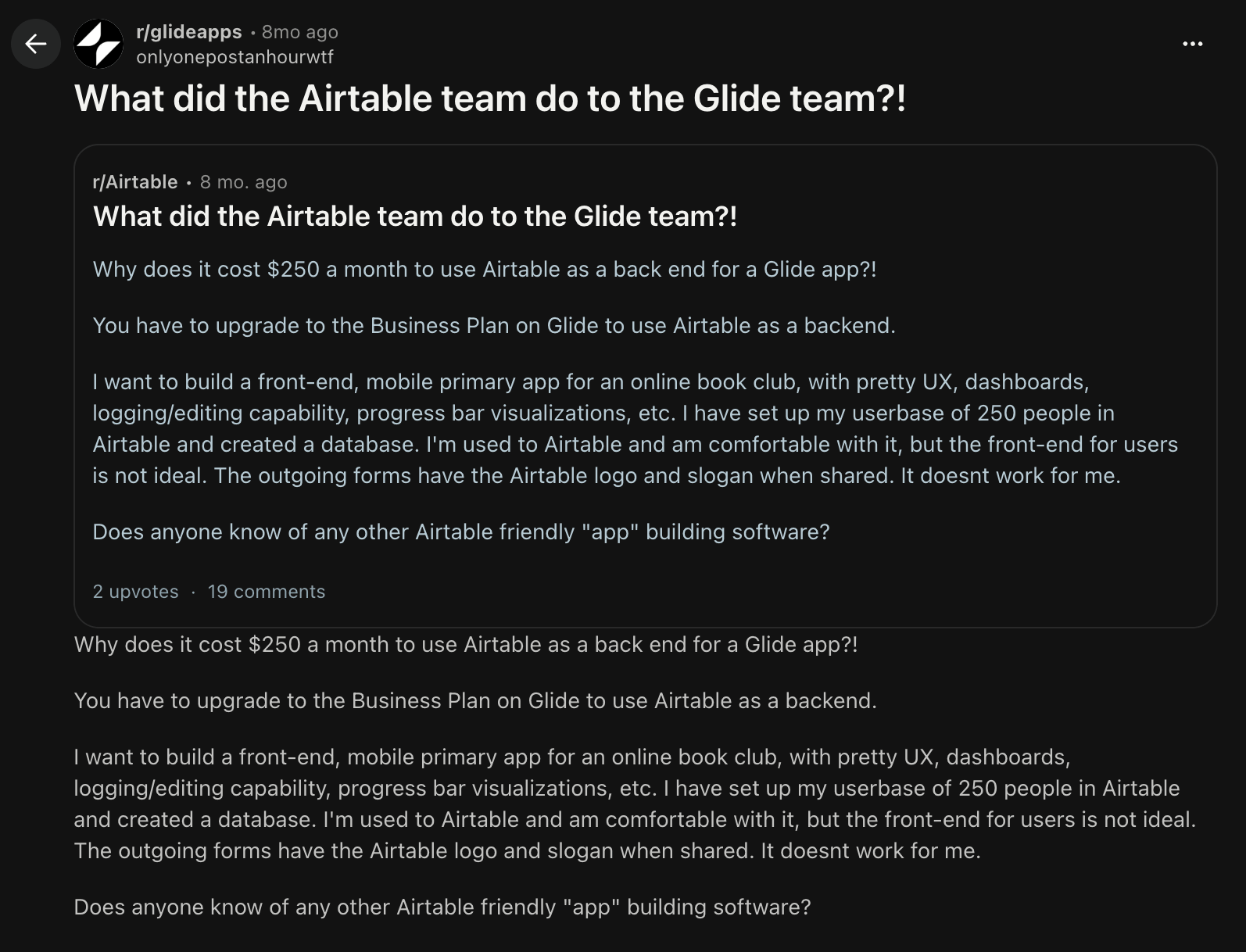
With Glide Classic, the complaints are more about how quickly one requirement can push you onto a much more expensive plan. One Reddit user questioned paying about $250/month just to keep Airtable as their backend, since Airtable syncing requires the Business plan.
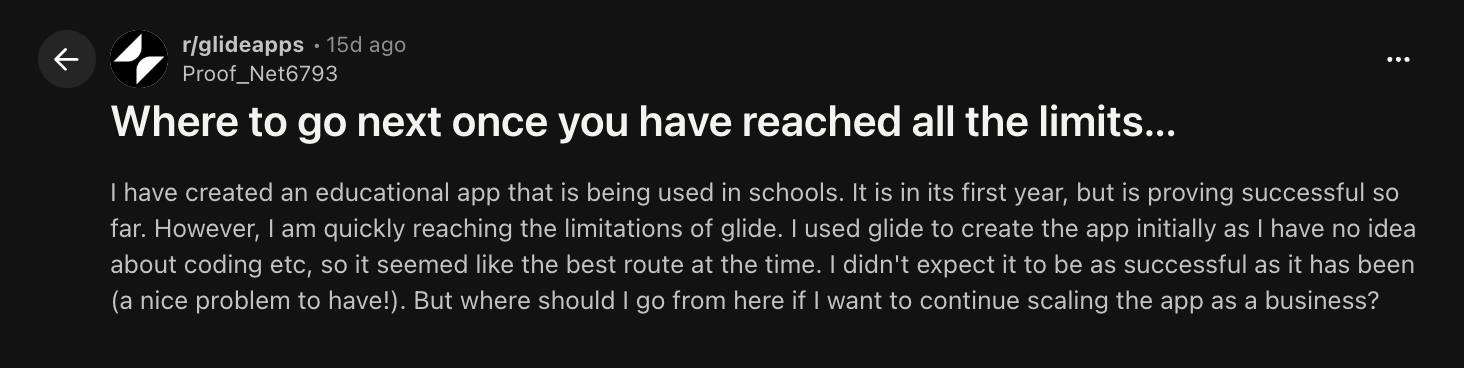
Scaling can also create the same problem. A Reddit user running an education app for around 2,000 children plus teachers said they were already running into Glide’s row limits and wondering what to do next. Other users suggested moving more data into Glide Tables or considering GlideOS—both of which have cost implications.
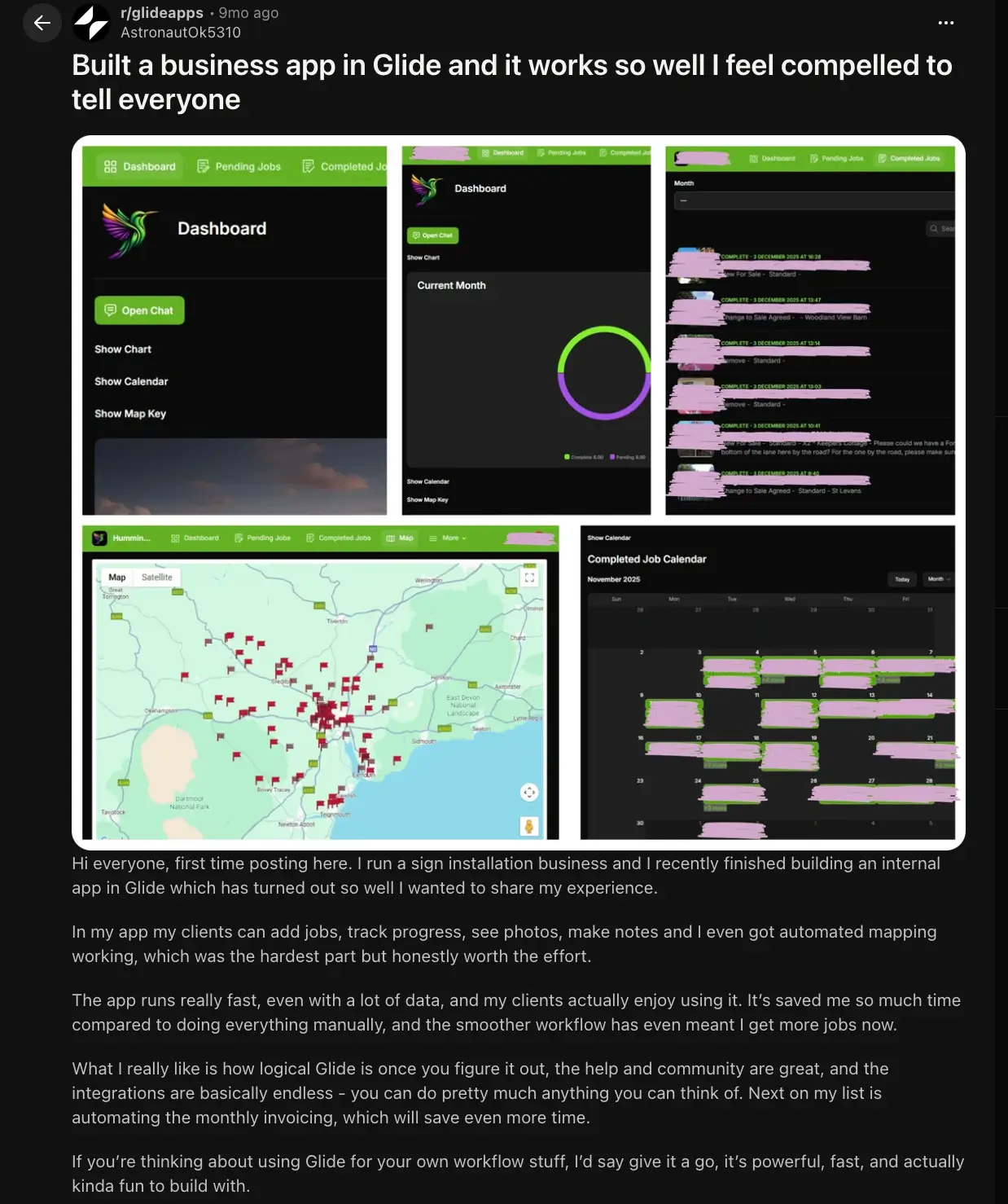
The feedback isn’t all negative though. Some users think the cost is worth it when Glide saves enough time or helps them earn more. One Maker user said their app had started bringing in more work, so it effectively paid for itself.
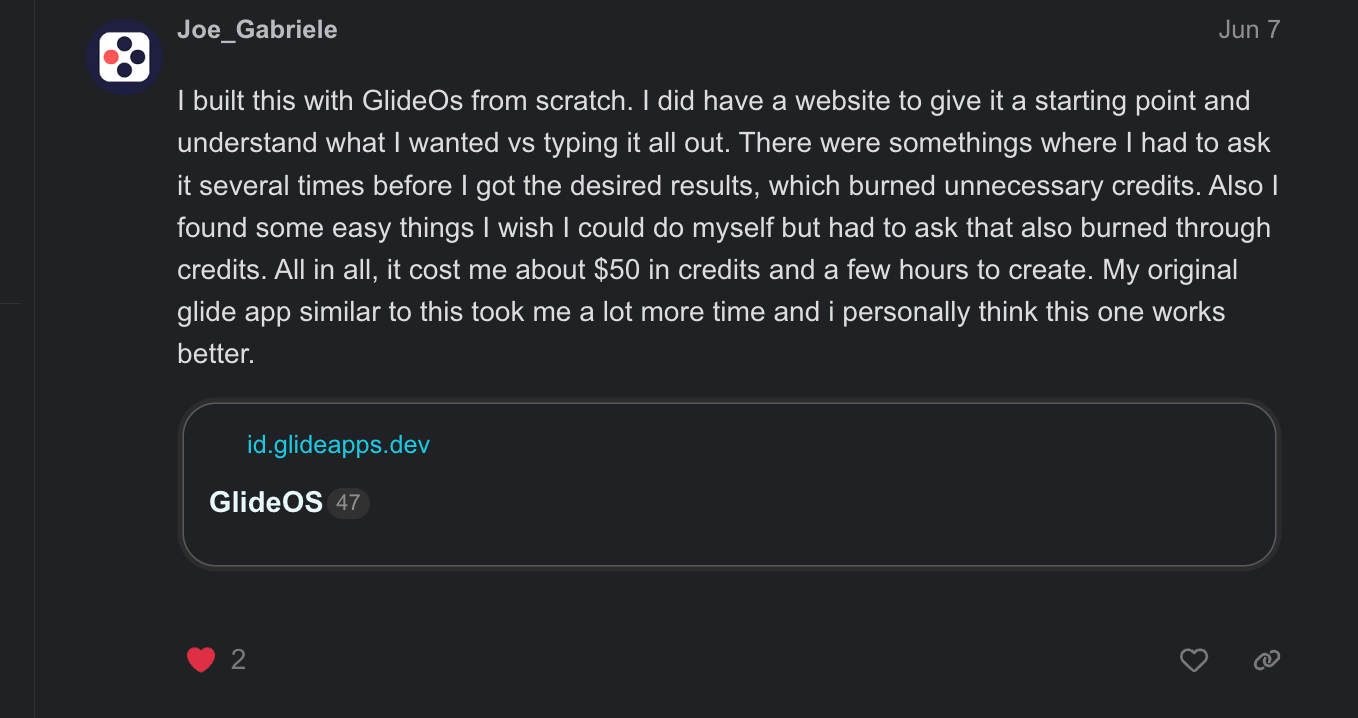
An early GlideOS user said they spent about $50 in credits to build an app in a few hours, compared with much longer in Glide Classic.
What happens if you run out of credits or updates?
With GlideOS, your published apps stay live, but you can’t keep building with the agent or run new AI work until you have more credits.
On a paid plan, you can buy extra credits or wait for your monthly allowance to reset. Free users have to upgrade to a paid plan once their credits are gone.
Hitting your update limit on Glide Classic pauses the parts of your app that rely on updates, such as workflows, integrations, Glide AI, and external data syncing. The app itself stays online, so users would only notice that the data stopped updating.
Hidden costs to watch out for with Glide
GlideOS and Glide Classic are separate subscriptions. If you use both, you pay for both. Here are other hidden costs to look out for.
GlideOS
- Extra credits add up. Workflows, Runtime AI, and integrations all use the same pool, so credits can drain even when you’re not chatting with the agent.
- Third-party tools charge you separately. Connecting a service to GlideOS doesn’t include the cost of that service. Glide credits cover Glide’s side of the integration, while the provider still bills you separately for whatever you use.
- You could end up paying for seats you don't need. GlideOS Pro has a five-member minimum, so even a two-person team that needs Pro features pays for five seats.
Glide Classic
- Unlimited Updates keeps your app running after you hit your limit, but the extra usage is added to your next bill. So a busy month can end up costing more than you expected.
- Some data sources force you onto a higher plan. For example, Google Sheets starts on Maker, Airtable and Excel on Business, and SQL and BigQuery on Enterprise.
- Business users cost extra. If people need to sign in with work email addresses, you need to upgrade to the Business plan. Plus, every user past the included allowance adds to your monthly bill.
- Row limits can force an upgrade or migration. Once you outgrow your plan’s data limits, you may need to move data or upgrade.
Tips for lowering credit usage with Glide
GlideOS charges for how much work the agent does, so how you prompt shapes your bill more than which plan you're on. Glide Classic charges for reaching outside Glide, so the savings come from where your data lives and how often it moves.
These tips, drawn from Glide's own docs, can help your credits and updates go further.
GlideOS
- Match the mode to the job. Save Medium for everyday building and Heavy for complex work, analysis, or testing, since they use roughly 3x and 5x as many credits as Light. Light uses the fewest credits per message. On paid plans, you can switch agent modes.
- Be specific about what you want changed. Instead of asking GlideOS to “improve the app,” name the part of the app you want touched. The less it has to figure out on its own, the better your chances of getting the right results.
- Use Select Mode for small changes. If you only want to change one part of an app, select that element and ask GlideOS to work on it directly.
- Start a new chat when conversations get long. GlideOS has to work with the context in your conversation, and larger context windows use more credits. Start a new chat when a thread gets too long, but ask the agent for a handoff message beforehand so it carries over relevant context.
Glide Classic
- Keep more data inside Glide when you can. Changes made directly in Glide Tables and Big Tables don't use updates.
- Avoid Extra Sync unless necessary. Extra Sync checks external data on a schedule even when nothing has changed, so it burns through updates faster.
- Test integrations and computed columns on a few rows first. Glide recommends using a small sample while you’re experimenting, because every visible row you run an action or computation on can add to your usage.
- Watch the Usage dashboard before you hit the limit. It lets you drill into individual apps, so you can spot what’s draining your allowance.
Which Glide plan should you choose?
First decide which Glide you're buying.
GlideOS is best if you want AI to build the app for you from a spreadsheet or prompt, and you’re okay with buying extra credits once your included ones run out.
Glide Classic is a better fit if you’d rather build the app yourself, need data sources like Airtable, Excel, SQL, or BigQuery, or prefer pricing based more on users and app activity than AI building.
From there, the right plan comes down to how many apps you’re publishing, who needs access, and how much usage you expect, all of which I break down above.
Is Glide worth it?
Glide is worth it if you:
- Want to turn spreadsheet data into a working app quickly
- Are happy to let AI do most of the building, or would rather build it visually yourself
- Can work with costs that move with your usage each month
- Are building for people who sign in with personal email addresses
Glide isn't worth it if you:
- Need predictable month-to-month costs
- Expect unlimited AI building on a paid plan
- Don't want to upgrade your plan to a far bigger one than you need because of a critical feature, like work email sign-ins or a specific data source
Glide vs Softr: Which is better?
Glide gives you two ways to build: GlideOS if you want AI to do most of the work, and Glide Classic if you prefer a visual no-code builder. But both have separate pricing and come with usage-based costs. GlideOS runs on credits, while Glide Classic tracks updates, so your bill changes as you build more, automate more workflows, or connect more external data.
If you want an alternative with built-in security, granular role-based user permissions, automated workflows, and pricing you can forecast, consider Softr.
Softr combines AI-powered and visual no-code building in one platform under the same pricing plans. It lets you build and launch secure business apps, like portals, CRMs, and internal tools, and automate workflows on free and paid plans.
Plus, you can buy extra AI credits on the Free plan and keep building without upgrading until you actually need more features or capacity.
Start by explaining the app you want to build, and Softr’s AI Co-Builder generates the app structure, database, pages, workflows, permissions, and business logic. Authentication, user roles, data security, and hosting are already built in, so you don’t have to set those up separately before sharing the app.
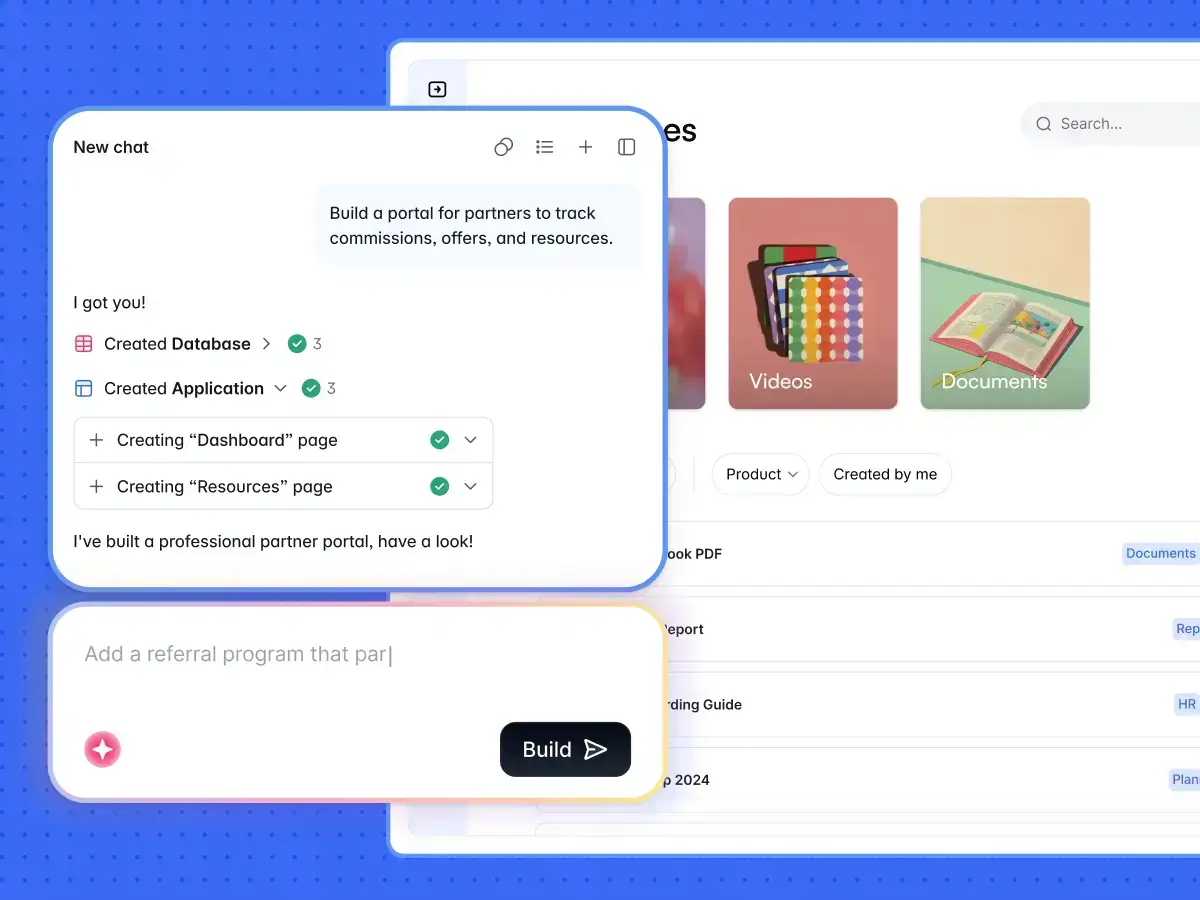
From there, you can make changes to the app using AI or use the visual editor without spending AI credits. Or use the Vibe Coding block to create custom components like calculators, dashboards, uploaders, or chatbot-style widgets.
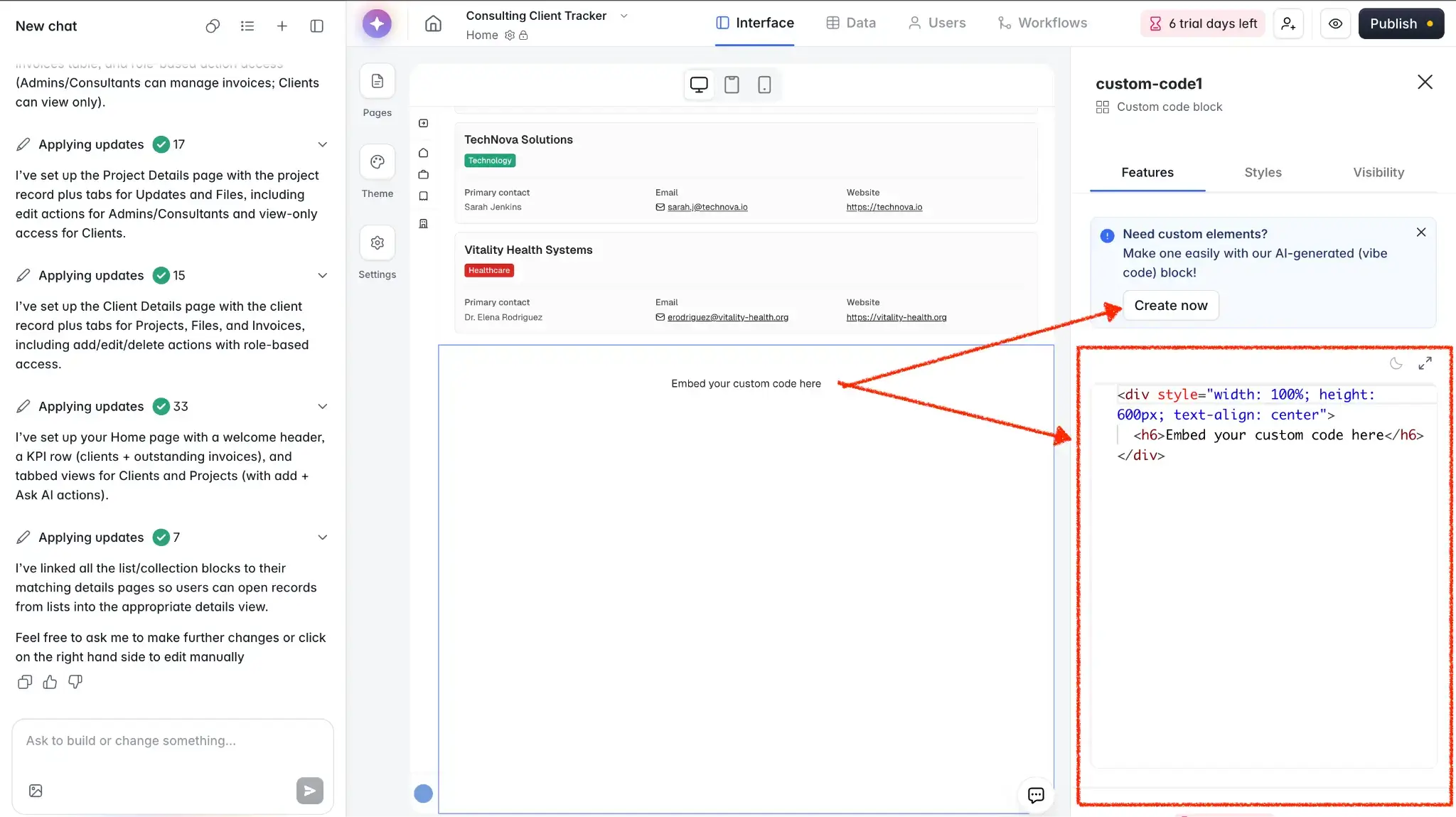
✨See more vibe coding examples built in Softr.
You can also build your app from the AI tool you already use. Softr MCP connects Claude, Codex, Cursor, and other assistants directly to your Softr workspace, so you can create databases, apps, workflows, and custom UI from chat, then refine the result in Softr. The MCP itself works on every plan and doesn’t use Softr AI credits.
And once the app is live, you can enable Softr Agents to work inside it. They work across your whole app—and the services you connect to it—to help with answering questions your app users have and running recurring tasks on a schedule.
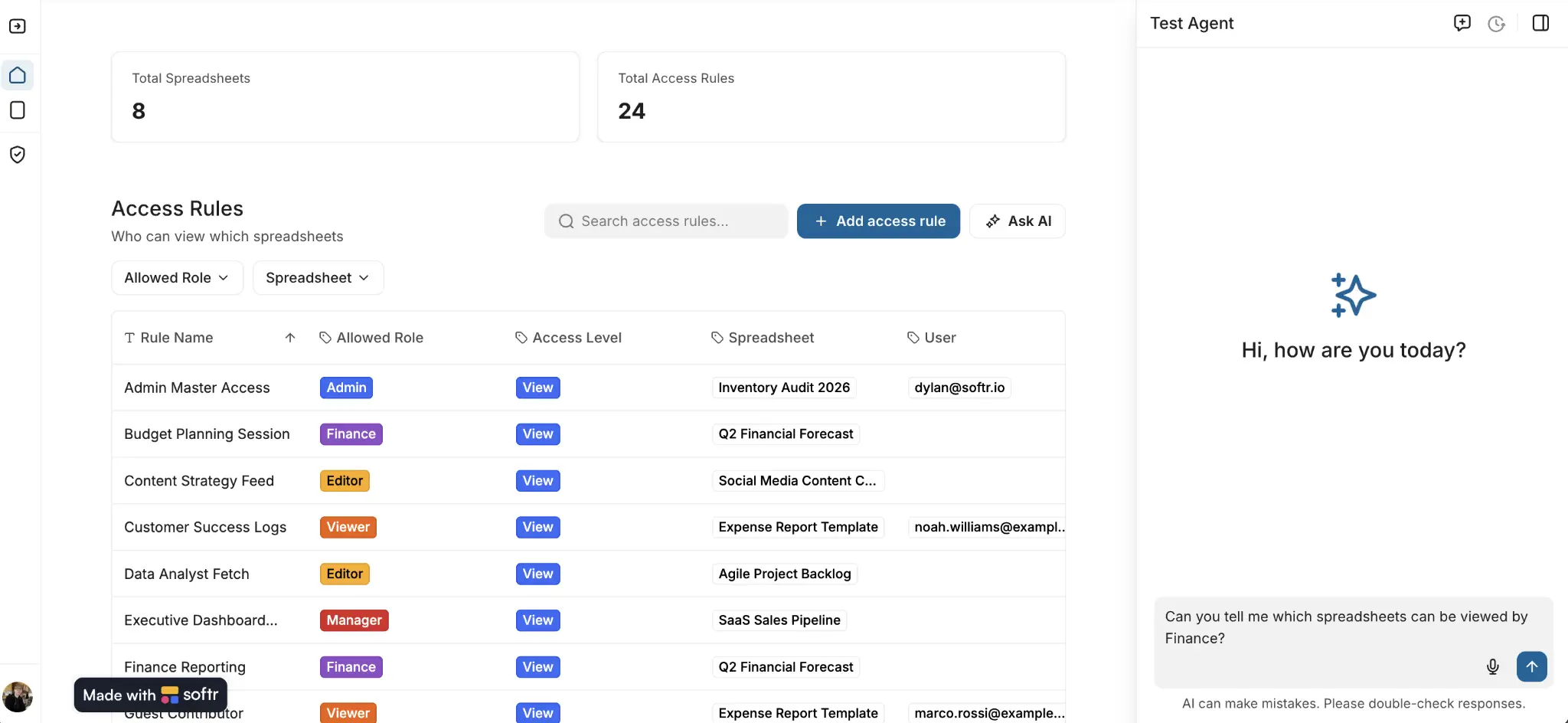
With Softr, you get:
- More than one way to build. Start with AI, build from Claude or another AI tool through MCP, or work directly in the visual editor. MCP works on every plan, including Free, and doesn't use Softr AI credits, so you're not paying twice for the same work.
- A visual fallback when AI credits run out. You can keep editing pages, workflows, permissions, and data without having to buy more AI credits.
- AI inside the finished app. Softr Agents can answer questions and take actions for users, instead of AI only helping during the build.
- Costs you can plan around. Pricing is tied to visible limits like builders, app users, records, workflow actions, and AI credits, so you can see what will make your bill increase.
- Pricing that matches how apps get used. Softr charges separately for the people who build your app and the people who use it, and splits internal team users from external client users, so a client portal doesn't cost the same as adding employees.
- Room to go over a limit without upgrading. Extra app users are billed automatically after a seven-day grace period, starting at $1 a month on Pro, so your app keeps running instead of pushing you onto a bigger plan.
- Built-in permissions and security. Authentication, user groups, and granular access rules are part of the app from the start.
- Connections to the tools you already use. Build on Softr Database or connect Airtable, Google Sheets, Notion, HubSpot, Salesforce, Excel, SQL databases, Supabase, REST APIs, and more.
Softr pricing: an overview
Glide vs Softr: Which should you choose?
I've used Softr to build apps for nearly three years now, and I spent the past few weeks digging into both Glide products. From my experience and from what users are saying, here's my final take.
Choose Glide if you:
- Want GlideOS to handle most of the build for you with AI
- Prefer Glide Classic's visual builder and usage-based pricing
- Only need one or two apps and won't hit your plan's limits soon
- Are fine with upgrading your plan to access a data source or work email sign-ins
- Are building for a community or customer base signing in with personal email addresses
Choose Softr if you:
- Want AI building and visual no-code building under the same platform and pricing structure
- Need secure portals, CRMs, dashboards, intranets, or internal tools that are ready for real users
- Want to keep editing manually even if your AI credits run out
- Need built-in logins, permissions, databases, workflows, and external data connections
- Want to build from Softr itself or from tools like Claude, Codex, or Cursor through Softr MCP
- Want AI agents inside your app to answer questions, update records, send messages, and run tasks
The biggest difference is flexibility after the first build. Glide splits AI building and visual building across two products with two bills. With Softr, you can start with AI, continue in the visual builder, or build through MCP, all on one subscription. You can also keep making changes without spending AI credits every time.
Try Softr for free and build your first business app with AI.
Frequently asked questions
How much does Glide cost?
Can I use Glide for free?
What is the difference between GlideOS and Glide Classic?
Can I access GlideOS with my Glide Classic subscription?
Which is better, Glide or Softr?