


10 best Glide alternatives for 2026: Tested and reviewed



Glide has been a top choice for teams looking to create internal business apps without writing code. Yet with recent pricing updates and an increasing number of competitors, Glide is no longer the only option, and it may not be the best fit for every use case depending on budget and project requirements. Here’s what Glide does well, where it falls short, and which competitors to consider.
The best alternatives to Glide at a glance
| Tool | Best for | Standout Features | Pricing |
|---|---|---|---|
| Softr | Building full-stack business apps, CRMs, portals, and internal tools with AI | • AI Co-Builder and Vibe Coding block • Server-side permissions and role-based access • Secure external-user management • Conditional logic, forms & Ask AI assistant | Free plan available; paid plans from $19/month |
| Adalo | Launching native mobile apps fast | • Native iOS & Android publishing • Offline use • Barcode scanning • Easy drag-and-drop builder • Built-in database | Free plan; paid plans from $36/month |
| Bubble | Building fully customized SaaS apps or marketplaces | • Pixel-level design control • Workflow automation • Plugin marketplace • Responsive web + mobile output | Free tier; paid plans from $29/month per app |
| Retool | Developer-built internal tools and dashboards | • Drag-and-drop UI with custom code • SQL & API integrations • Secure on-prem deployment | Free for 5 users; paid from $10/editor + $5/user |
| Webflow | Creating high-design marketing sites and CMSs | • Advanced visual design • CMS + ecommerce support • SEO-optimized hosting | Free starter; paid plans from $14/month |
| AppSheet | Turning Google Sheets into mobile-ready apps | • Offline sync • AI app generation • Pre-built templates • Secure Google • Workspace integration | Free for testing; paid plans from $5/user/month |
| FlutterFlow | Building polished cross-platform mobile apps | • Code export (Flutter) • Firebase & Supabase integrations • Animations • GitHub sync | Free core tier; paid plans from $30/month |
| Caspio | Managing data-heavy internal workflows | • Built-in cloud database; visual logic builder • Automation + API integrations • Unlimited users | Plans start around $100/month |
| Tadabase | Automating data-driven internal tools | • Relational database builder • Workflow automation • Unlimited users • Role-based access | Plans start around $42/month |
| SAP Build Apps | Enterprise-grade app development with deep logic | • Cross-platform web + mobile builder • Advanced logic editor • SAP & API integrations | Free community edition; enterprise pricing on request |
Why look for a Glide alternative?
Glide offers apps with a sleek and polished UI, mobile-friendly interface, and AI features, but it comes with some trade-offs, especially when it comes to external integrations, app customization, and pricing scalability.
You might want to consider other tools if:
1. You want a faster learning curve or easier onboarding
Glide’s features come with complexity. For non-technical builders, the platform can feel unintuitive, especially when working with logic, workflows, or roles. Softr is easier for teams to adopt with drag-and-drop building, intuitive permissions, and faster time to value. You can launch a working app in hours, not weeks.
2. You want clearer pricing and more user flexibility
Glide Classic’s Business plan starts at $199/month and includes 30 business users, with additional users billed at $5/month each. This can get expensive quickly, especially if you have a large user base or external collaborators. In contrast, Softr offers flat-rate pricing with flexible user limits per plan, and no charge for internal editors.
3. You’re scaling and want to future-proof your apps
Glide’s pricing and update limits can make scaling painful. Larger apps may hit performance ceilings, and you’ll need to monitor update consumption closely. Softr offers high-performance tables, pagination, and scalable workflows that grow with your team, plus usage tiers that let you expand users and records without hitting hidden walls.
4. You want more control over branding and UI layout
Glide apps look sleek out of the box, but design flexibility is limited. You’ll be working within Glide’s layout system, and making pixel-level changes or fully custom pages is tough. Softr gives you more layout options and lets you customize page structures, visibility rules, and even inject custom code for added flexibility.
5. You want more data source flexibility
Glide supports Google Sheets, Excel, Airtable, BigQuery, and SQL data sources on the Business Plan or above, and prioritizes its built-in Glide Tables as the data source to use. But if your team relies on other sources like Notion, HubSpot, SQL, BigQuery, or SmartSuite, you'll hit a wall fast.
6. You want advanced permission and access control
Glide’s visibility settings are basic and client-side, while Softr offers server-side visibility rules, SOC 2 compliance, and record-level permissions. That’s key if you manage sensitive client or partner data.
What to look for in a Glide alternative
When evaluating Glide alternatives, keep these factors in mind:
- Data source support: Can you connect to Airtable, Google Sheets, SQL, HubSpot, or other data sources?
- Internal vs. external use: Does it support login, granular permissions, and user roles?
- Design flexibility: Can you create polished, modern layouts without code?
- Mobile vs. desktop focus: Do you need native mobile features, or is responsive design enough?
- Pricing scalability: Are you charged by app, by user, or by usage limits? Is there a differentiation between user types (e.g. internal vs. external, personal vs. business)
- Collaboration features: Can multiple editors work on an app simultaneously?
- Support and community: Is there strong onboarding and expert help if you get stuck?
1. Softr – best for building full-stack apps with database, interface, and AI
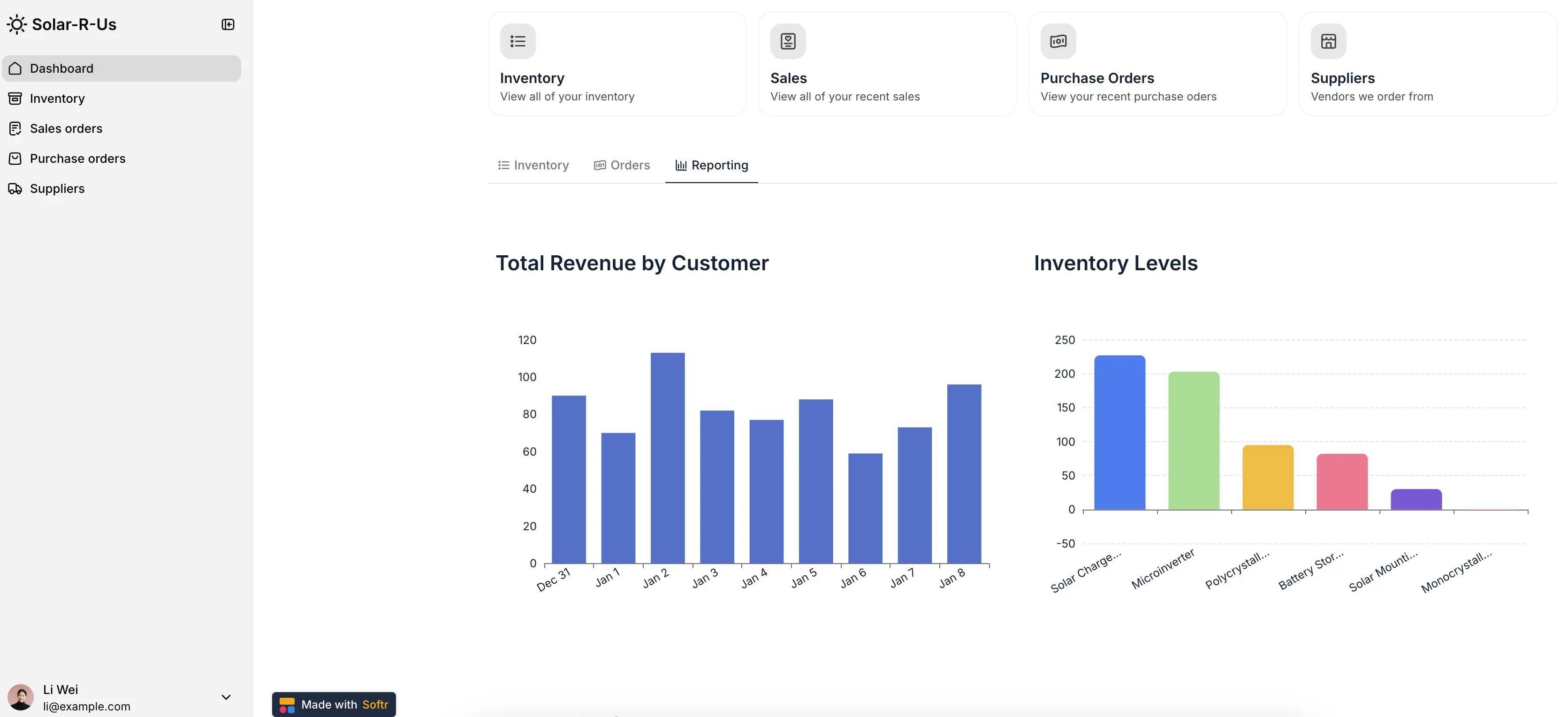
Softr is an AI-powered no-code platform for building business apps like client portals, CRMs, and internal tools without writing code. You can generate production-ready software from a prompt using the AI Co-Builder. Then, swap to the drag-and-drop editor and make changes directly instead of firing endless prompts.
Plus, you can use the Vibe Coding block to spin up bespoke interfaces and visualizations and add them to your app. Everything is secure and connected by default, whether it's a native block or one you vibe code.
Use Softr Databases to manage your data directly or connect to 21+ data sources (including Airtable, Google Sheets, HubSpot, Notion, monday.com, and SQL). With built-in permissions, conditional logic, and responsive layouts out of the box, teams can build full-stack apps that move from prototype to production faster (and more reliably) than Glide.
Softr is the strongest alternative to Glide if you’re building secure, data-driven apps for clients, partners, or internal teams, especially when permissions and external integrations matter. It combines the speed and efficiency of vibe coding with secure, battle-tested infrastructure that won't break when you introduce your app to real users.
Softr pros and cons
Pros:
- Instant app generation: Generate full apps with the AI Co-Builder, complete with business logic, utility pages, a relational database, and workflows.
- Visual drag-and-drop builder: Build with modern building blocks like Lists, Grids, Tables, Charts, Forms and more, plus 90+ app templates for CRMs, portals, and dashboards
- Connects to 21+ data sources: Native integrations with Airtable, Notion, HubSpot, Google Sheets, BigQuery, PostgreSQL, and MySQL, or use Softr Databases for all-in-one data management.
- Supports external users and client portals: Built-in user authentication, login pages, and role-based access make Softr a strong choice for client or partner-facing use cases.
- Secure server-side visibility rules: All app logic and permissions are handled server-side, keeping your data safe—even if someone inspects the front-end.
- Builder seats on every plan: Up to 3 builders on the free plan, with extra seats on paid plans from $5/month.
Cons:
- No offline access: PWA support allows app installation on mobile, but requires an internet connection.
- Limited mobile-specific features: No GPS, push notifications, or camera access.
Softr best features
- AI Co-Builder: Softr's AI app builder pairs the reliability of no-code infrastrucure with the speed of vibe coding, and generates secure, functional apps from a prompt.
- Multi-source data support: Connect to a range of data sources (Airtable, Notion, monday.com, SQL, and more) with real-time, two-way sync, or use Softr Databases to manage your data and power your apps in one place.
- Built-in workflow automations: Automate actions like sending emails, updating records, or triggering notifications directly from Softr app buttons, no Zapier or Make needed.
- Server-side permissions engine: Protect sensitive data with field-level visibility, conditional page rules, and user groups without exposing records in the browser.
- Role-based access and conditional visibility: Show or hide pages, blocks, or fields depending on user role or record values.
- Ask AI: Give app users a way to query live app data instantly (and securely) with this built-in AI assistant. Just toggle it on, and it respects your app’s permissions and visibility rules.
- Database AI Agents: Automatically enrich records, update data, or pull live insights from the web in your database.
- Conditional forms: Build advanced forms that show or hide fields based on user role or data values, ideal for intake, onboarding, or feedback workflows.
Softr pricing
Softr’s pricing is flat and predictable. Every plan includes a monthly AI credit allowance, so you can try the AI Co-builder and Vibe Coding block at no cost.
- Free: Unlimited apps, with access to Softr Workflows and Softr Databases, 5 app users, 5 AI credits, 5,000 database records, and 500 workflow actions
- Basic: $19/month for unlimited apps with 42+ integrations, Team: 5 + Client: 5 app users, 10 AI credits, 50K records, 2.5K workflow actions
- Pro: $99/month for unlimited apps with 45+ integrations and custom code, Team: 10 + Client: 50 app users, 50 AI credits, 500K records, and 10K workflow actions
- Business: $329/month for unlimited apps with 52+ integrations, Team: 30 + Client: 100 app users, 100 AI credits, 1M records, and 25K workflow actions
- Enterprise (custom pricing, contact sales)
Who is Softr best for?
Softr is ideal for non-technical teams building secure business apps for clients, partners, or employees. It’s especially useful for SMBs, agencies, and operations teams that need real-time data sync, granular permissions, and fast setup — without writing code. Use it to generate custom CRMs, portals, ERPs, project trackers, inventory systems, knowledge bases, and more.
2. Adalo – best for launching native mobile apps fast

Adalo is a no-code platform designed for mobile-first app experiences. It lets non-technical users build native iOS and Android apps using drag-and-drop components, pre-built templates, and a built-in database. You can publish apps directly to the app stores, and Adalo recently added support for connecting external data sources.
It’s a strong alternative to Glide for launching MVPs or internal tools that require barcode scanning, offline access, or native device features.
Adalo pros and cons
Pros:
- Native app publishing: Build and deploy real mobile apps to iOS and Android app stores.
- Offline functionality: Apps work without a network connection, ideal for field use.
- Built-in database: Get started fast without needing external tools.
- Drag-and-drop UI: Easy for beginners, with pre-built layouts and logic components.
Cons:
- Mobile-first focus: Less suited for desktop use or complex internal tools.
- Limited scalability: Feature set is narrower than platforms like Softr or Bubble.
- Slower performance for larger apps: Can lag when handling more data or complex logic.
Adalo best features
- App store deployment: Publish to Apple and Google directly.
- Offline support: Great for field teams or disconnected environments.
- Built-in and external database support.
- Easy onboarding: Start building in under an hour.
- Clean mobile UI templates and basic logic editor.
Adalo pricing
- Free: 1 web app, 1 editor, 1,000 app actions/month
- Starter: $36/month – 1 app, 1 editor, 5,000 app actions
- Professional: $52/month – 2 apps, 5 editors, 15,000 actions
- Team: $160/month – 5 apps, 10 editors, 50,000 actions
- Business: $200/month – 10 apps, unlimited editors, 200,000 actions
Who is Adalo best for?
Adalo is ideal for startups or solo builders who need to launch native mobile apps fast—especially when offline access, barcode scanning, or mobile device features matter. If you’re building an MVP or a mobile-first internal tool and want to publish to app stores, Adalo is a solid Glide alternative that will cost you less.
3. Bubble – best for building SaaS products, marketplaces, and MVPs

Bubble is one of the most powerful no-code platforms on the market. It lets you build responsive web and mobile apps with complete control over design, data, and workflows. Developers and advanced builders use Bubble to create fully customized apps with JavaScript, version control, and plugin support.
Compared to Glide, Bubble is better suited for builders who want full flexibility and are comfortable with a steeper learning curve.
Bubble pros and cons
Pros:
- Extreme design flexibility: Customize layouts, animations, and front-end elements.
- Advanced logic and workflows: Build custom logic, workflows, and backend operations.
- Robust plugin ecosystem: Extend your app with third-party tools and APIs.
Cons:
- Steep learning curve: Takes more time to master compared to Softr or Adalo.
- Pricing per app: Each project requires its own subscription.
- Performance concerns: Some users report slowness in responsive mode.
Bubble key features
- Fully responsive design with drag-and-drop control
- Powerful workflow editor for app logic and data manipulation
- Built-in version control
- Plugin marketplace for integrations
- Native mobile app support and collaborative editing
Bubble pricing
- Free: 1 editor, limited features for testing
- Starter: $29/month – 1 app, 175K workload units
- Growth: $119/month – 2 editors, 250K workload units
- Team: $374/month – 5 editors, 500K workload units
- Each app requires its own plan
Who is Bubble best for?
Bubble is ideal for professional builders, agencies, or product teams who want maximum control over their app’s design and functionality. It’s a strong Glide alternative if you’re building a highly customized internal tool, marketplace, or SaaS product—and are willing to invest time in learning.
4. Retool – best for internal tools built by developers
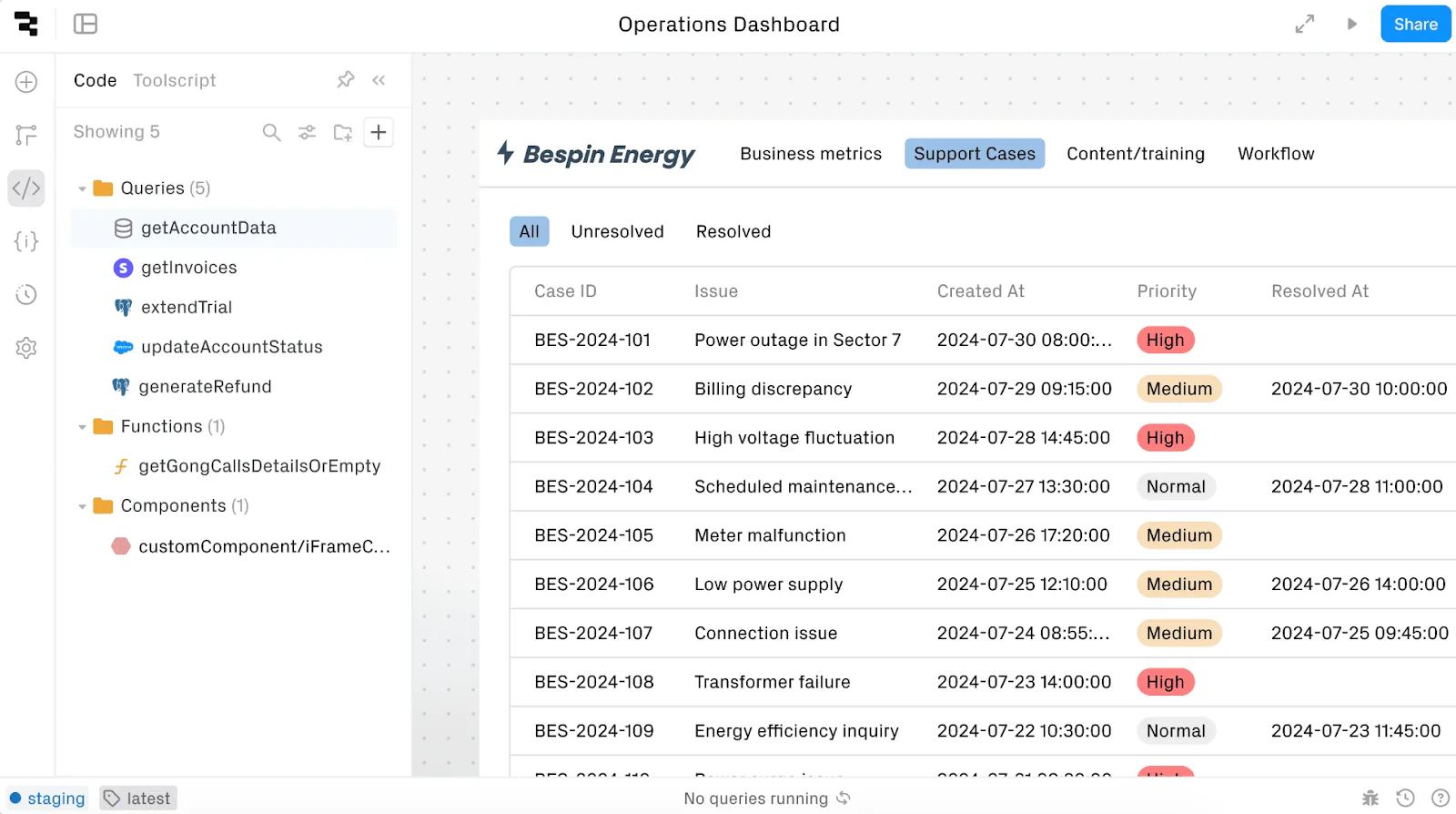
Retool is a low-code platform designed for developers who need to build powerful internal tools quickly. It blends drag-and-drop UI with JavaScript, SQL, and API support, giving dev teams full control over data, permissions, and logic.
Unlike Glide or Softr, Retool is not aimed at non-technical users. It’s best for engineering teams who want to build complex dashboards, admin panels, or data tools fast.
Retool pros and cons
Pros:
- Dev-friendly: Full support for custom code, queries, and APIs
- Security-first: Granular permissions, version control, and on-prem deployment
- Mobile support: Create native mobile apps with offline mode
Cons:
- Coding required: Not suitable for non-technical users
- Expensive per user: Billed per editor and end user
- Limited external-facing features: Not ideal for public or client-facing portals
Retool best features
- Drag-and-drop UI with custom JavaScript, SQL, REST API support
- Native mobile app builder with offline capabilities
- Built-in database and workflow engine
- Templates for admin panels, CRUD apps, and dashboards
Retool pricing
- Free: Up to 5 users, 500 workflow runs/month
- Team: $10/editor + $5/end user
- Business: $50/editor + $15/end user
- Enterprise: Custom pricing
Who is Retool best for?
Retool is best for dev teams that want to ship internal tools quickly with full control over the tech stack. If you’re building a back-office dashboard, admin tool, or ops system and have engineering resources, Retool is a powerful Glide alternative.
5. Webflow – best for designers building marketing sites
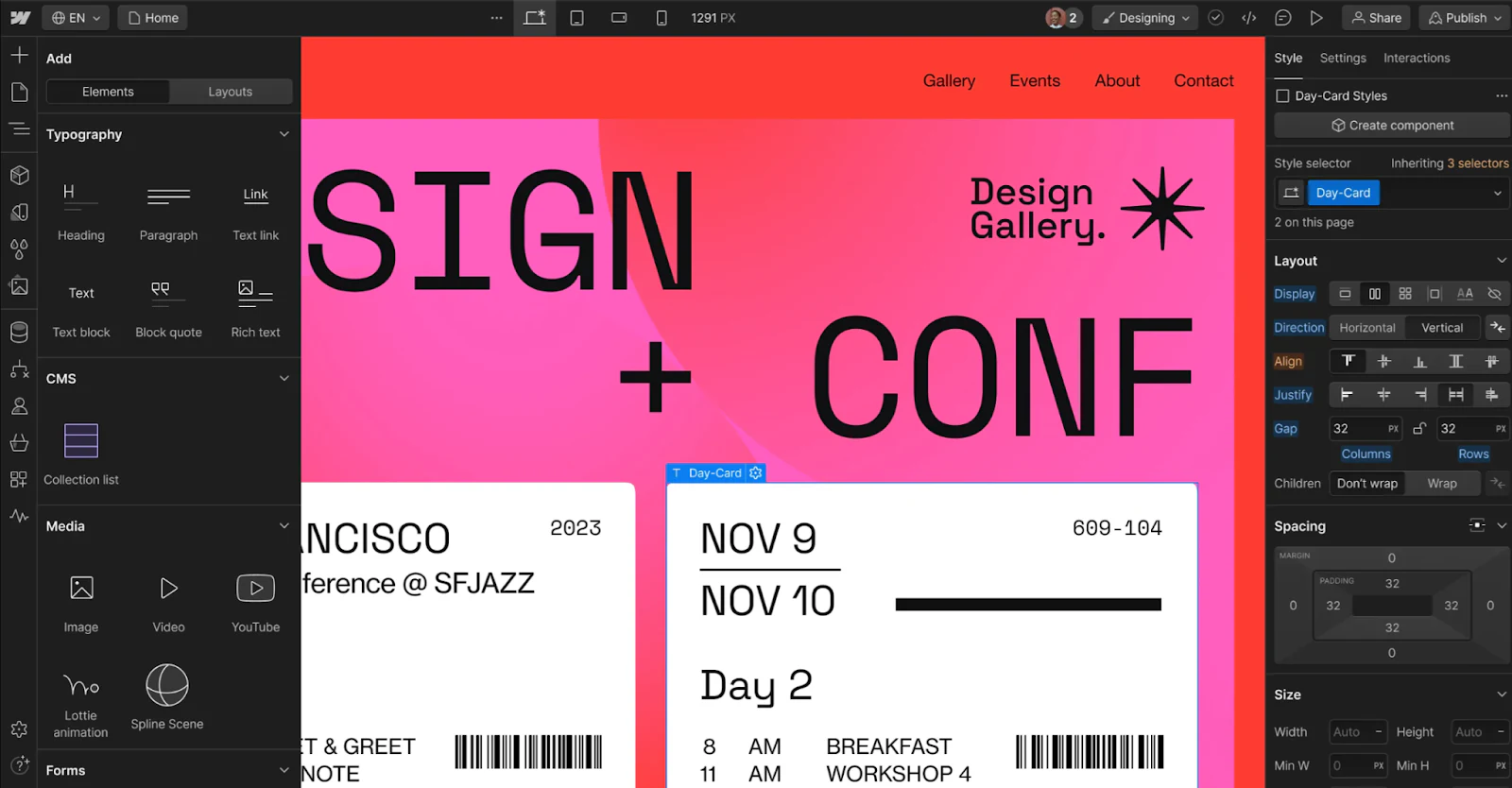
Webflow is a visual development platform for building websites and front-end experiences without code. It combines CMS features, ecommerce capabilities, and custom animations in a powerful design environment.
Compared to Glide or Softr, Webflow is not ideal for internal tools or database-driven apps. But it’s a great choice if you need a pixel-perfect marketing site with more customization than Squarespace or Wix.
Webflow pros and cons
Pros:
- Full visual control: Total freedom over layout, animations, and CSS
- Built-in CMS: Great for dynamic content like blogs or directories
- SEO-optimized: Fast loading, schema support, and semantic markup
Cons:
- Not app-focused: Lacks native app logic or permissions handling
- Learning curve for interactions: Design-heavy tools take time to master
- Complex pricing: Many features (CMS, e-commerce, hosting) are add-ons
Webflow best features
- Drag-and-drop website builder with advanced animations
- CMS for blog or content management
- Ecommerce features and Stripe integration
- Great documentation and video tutorials
- Pixel-level design control for designers
Webflow pricing
- Free: 2 pages, 100 users, 50 form submissions
- Basic: $14/month – 150 pages, 500 submissions
- CMS: $23/month – 1,000 submissions
- Business: $39/month – 2,500 submissions
- Enterprise: Custom pricing
Who is Webflow best for?
Webflow is perfect for designers, marketers, or small businesses who need full visual control over their website. It’s a strong Glide alternative for marketing teams or startups that want to build beautiful landing pages or dynamic content hubs—but not a fit for secure internal apps.
6. AppSheet – best for Google Sheets users
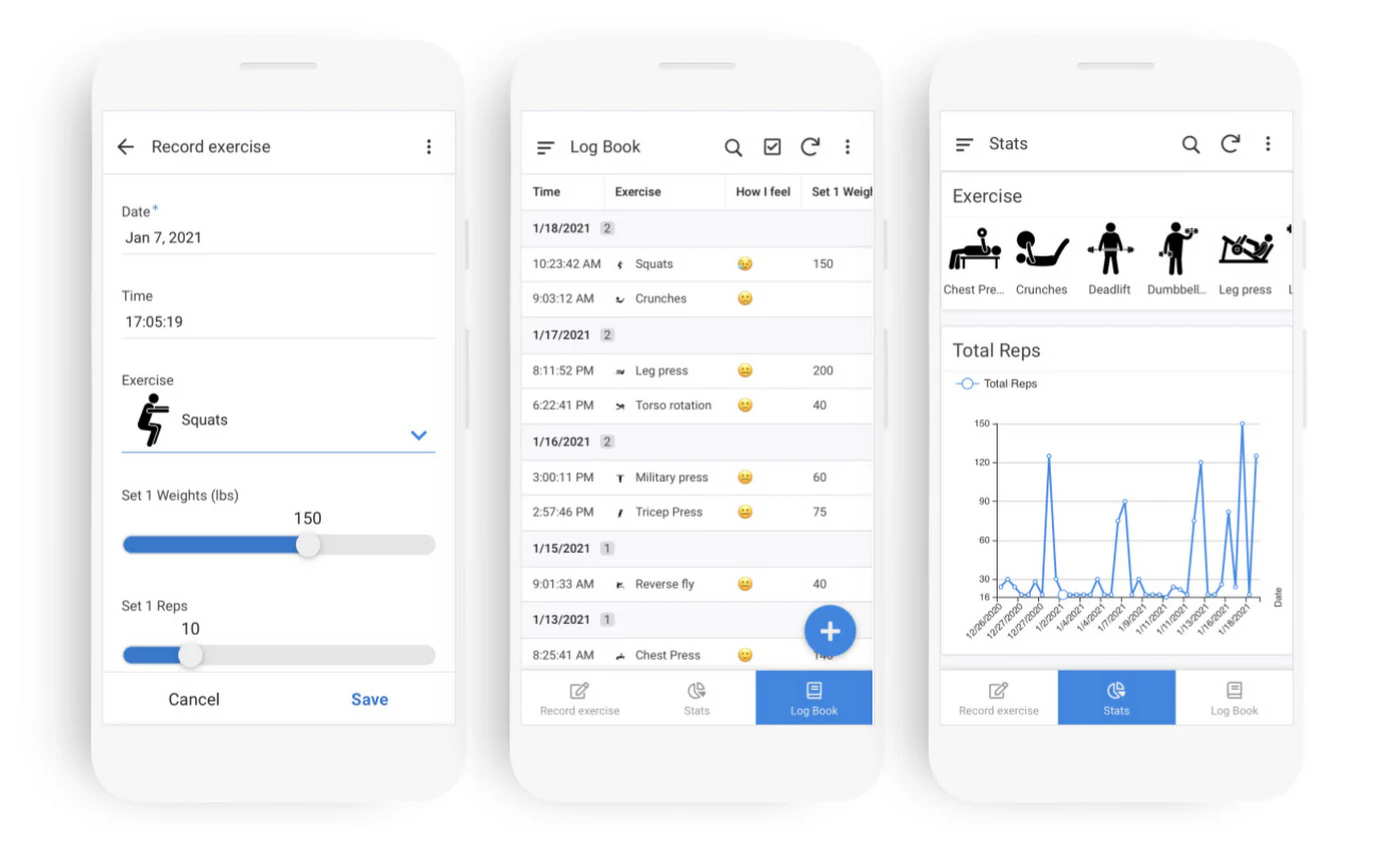
AppSheet is a no-code app builder from Google that turns your spreadsheets into mobile-ready apps. It’s especially useful for organizations already using Google Workspace, and supports offline syncing, AI assistance, and secure permissions.
Compared to Glide, AppSheet is more spreadsheet-focused and less visually customizable, but it’s a good choice for quick internal tools with data already in Sheets.
Pro tip: You can also use Softr to build apps on top of your Google Sheets data
AppSheet pros and cons
Pros:
- Great for spreadsheet workflows: Easy to turn Google Sheets into apps
- Offline syncing: Works without an internet connection
- Free for Workspace users: Many orgs already have access at no extra cost
Cons:
- Limited design control: UI is basic and not highly customizable
- Desktop support is weak: Better suited for mobile/tablet
- Some technical knowledge required: Not purely no-code
AppSheet best features
- Native integration with Google Sheets
- App templates for inventory, inspections, CRM
- AI-assisted app generation
- Offline support for mobile
- Enterprise-grade security
AppSheet pricing
- Free: Up to 10 test users
- Starter: $5/user/month – 5 AppSheet databases
- Core: $10/user/month – 10 AppSheet databases
- Enterprise Plus: $20/user/month – 200 databases
Who is AppSheet best for?
AppSheet is best for teams already using Google Workspace who want to extend their spreadsheets into mobile apps. If your workflow lives in Google Sheets and you want quick mobile access, AppSheet is a simple and cost-effective Glide alternative.
7. FlutterFlow – best for dev teams building native apps
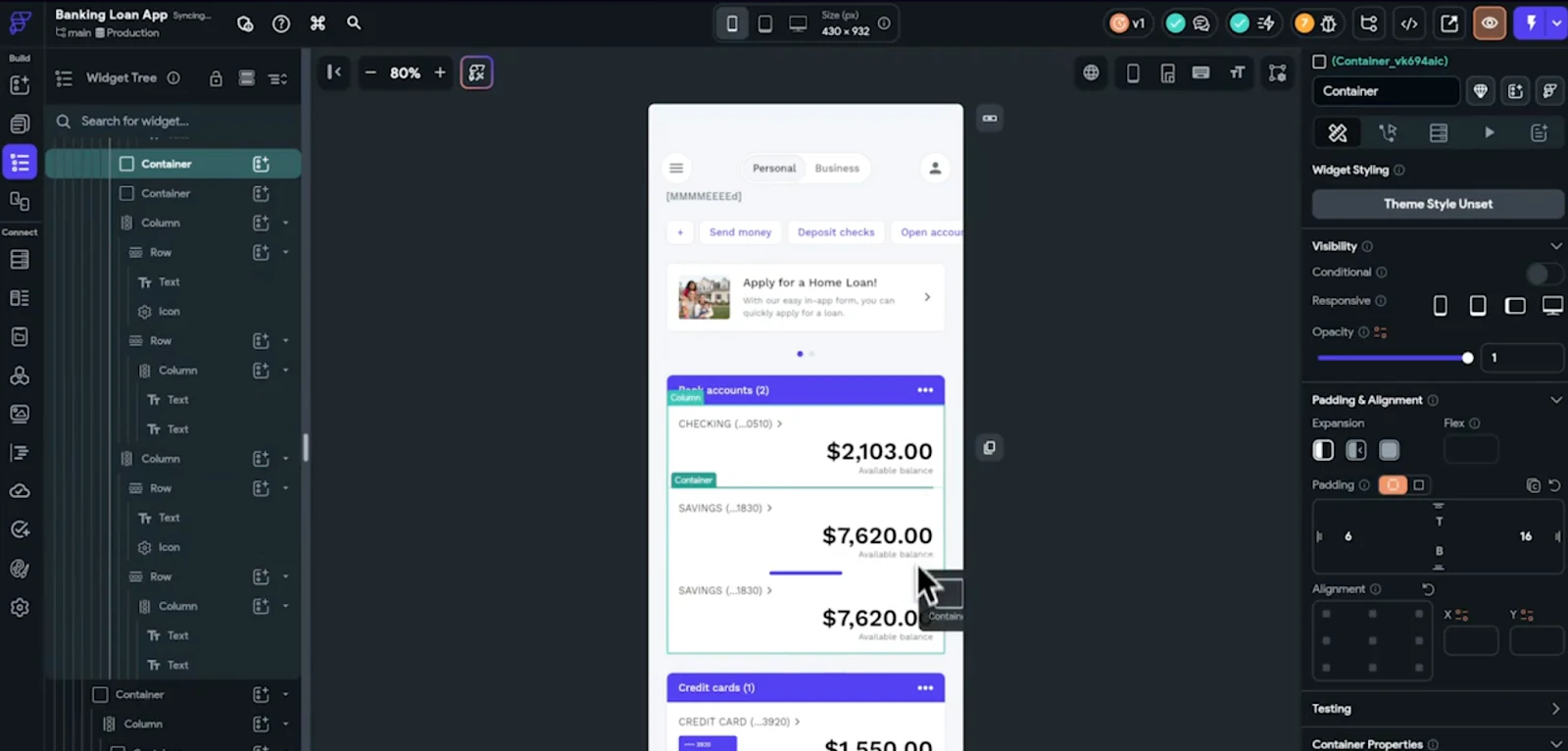
FlutterFlow is a low-code builder for native mobile and web apps built on Google’s Flutter framework. It offers drag-and-drop UI, Firebase/Supabase integrations, animation support, and access to export source code.
Compared to Glide, FlutterFlow requires more technical skills, but offers more flexibility for custom mobile experiences.
FlutterFlow pros and cons
Pros:
- Native app development: Build apps for iOS, Android, and web
- Code export: Get full access to source code for advanced customization
- Powerful animations and UI effects: Great for polished UX
Cons:
- Steeper learning curve: Requires some coding knowledge
- Performance can lag on complex apps: Especially with custom logic
- Limited built-in testing tools: Harder to QA advanced features
FlutterFlow best features
- Drag-and-drop UI with custom code support
- Firebase and Supabase integration
- Template gallery for rapid prototyping
- GitHub integration and source export
- Animations and device-native capabilities
FlutterFlow pricing
- Free: Basic builder, unlimited users/editors
- Standard: $30/month – code export, custom domain support
- Pro: $70/month – 1-click app store deployment, GitHub integration
Who is FlutterFlow best for?
FlutterFlow is best for technical teams building polished mobile or cross-platform apps that need device-native features. It’s a strong Glide alternative if you want to launch to app stores with control over both UI and underlying code.
8. Caspio — best structured data apps and process automation

Caspio is a low-code platform built for teams that manage large, structured datasets and need to streamline their internal workflows. It combines a visual app builder with its own cloud database, making it easy to turn spreadsheets or complex data tables into web-based tools that handle forms, reports, and approvals.
Caspio focuses on process automation, data integrity, and long-term scalability rather than quick app prototyping, making it a dependable choice for operations or administrative teams managing recurring, data-heavy tasks.
Caspio pros and cons
Pros:
- Unlimited end users, no per-seat charges, which simplifies scaling client or partner-facing apps.
- Built-in database with visual logic builder, automation, and integrations.
- Strong compliance standards (SOC 2, GDPR, HIPAA) make it a reliable choice for regulated industries.
Cons:
- Slightly steeper learning curve compared to simpler no-code builders.
- Higher starting price, with some advanced features limited to upper-tier plans.
Caspio best features
- Visual app builder with hosted database: Create forms, reports, and dashboards directly from structured data without writing SQL.
- Workflow automation and API integrations: Connect your app to third-party tools, trigger actions, or embed directly into existing portals.
- Unlimited user access: Scale to thousands of users without worrying about per-user costs.
- Enterprise-grade security: Includes audit trails, encryption, and multiple deployment options (multi-tenant or private cloud).
Caspio pricing
- Lite: Around $100/month – basic features with unlimited users and limited records.
- Professional: Around $300/month – adds automations, integrations, and higher data limits.
- Enterprise: Around $600/month and up – includes advanced compliance, file storage, and dedicated support.
Who is Caspio best for?
Caspio is ideal for operations teams that manage structured data and need reliable, workflow-driven tools for clients or employees. If your business is ready to move past spreadsheets but wants to stay in the no-code space, Caspio offers a balance of scalability, automation, and control that’s hard to find elsewhere.
9. Tadabase — best for data-heavy internal tools and workflow-automation apps

Tadabase is a no-code platform built for teams managing large, structured datasets and needing workflow-driven internal apps. It gives you a visual app builder, a relational database backend, and workflow automation so you can turn spreadsheets or legacy systems into live tools without writing code. It’s especially suited for operations teams in sectors like field services, manufacturing, and professional services, where tracking records, processes, and permissions matter more than sleek consumer UI.
Pros and cons
Pros:
- Flat-rate pricing and support for unlimited users, making it easier to scale external-user portals or large teams without per-seat fees.
- Strong support for relational data, role-based access, workflows, and integrations—ideal when you’re moving beyond simple lists.
- Templates and data-management tools that help you stand up apps faster than a custom build.
Cons:
- Slightly steeper learning curve compared to ultra-basic no-code tools—teams will likely need to invest time in structuring data and workflows.
- More towards internal/operational apps than consumer-grade mobile experiences—so if your priority is sleek native mobile UI, it may feel more utilitarian.
Best features:
- Visual builder + relational database: Create tables, fields, links, and dashboards in a drag-and-drop interface, with live previews.
- Workflow automation & integrations: Automate processes (e.g., task generation, notifications), and connect to APIs or external tools.
- Unlimited user model: Scale to high numbers of viewers/users without increasing cost per user—helpful for partner or vendor portals.
- Flexible deployment & security: Supports compliance-focused features, enterprise-grade hosting options, and advanced data-management controls.
Pricing:
- Starter: ~$42/month (3 apps, 30,000 records, 5 GB storage).
- Growth: ~$105/month (5 apps, 125,000 records, 10 GB storage).
- Higher tiers increase apps, records, storage and support; enterprise-grade, private-cloud plans start at thousands/month for dedicated infrastructure.
- Pricing is based on flat tiers rather than per-user fees.
Who is Tadabase best for?
If your business has structured data (clients, assets, workflows), and your goal is to transform spreadsheets, legacy tools, or disparate systems into a controlled, scalable internal application or partner portal, Tadabase offers a platform geared to that. It’s an excellent match when you’re focused on process, data integrity, and scaling access, rather than building a consumer-mobile experience from scratch.
10. SAP Build Apps — best for teams needing an enterprise-grade visual app builder
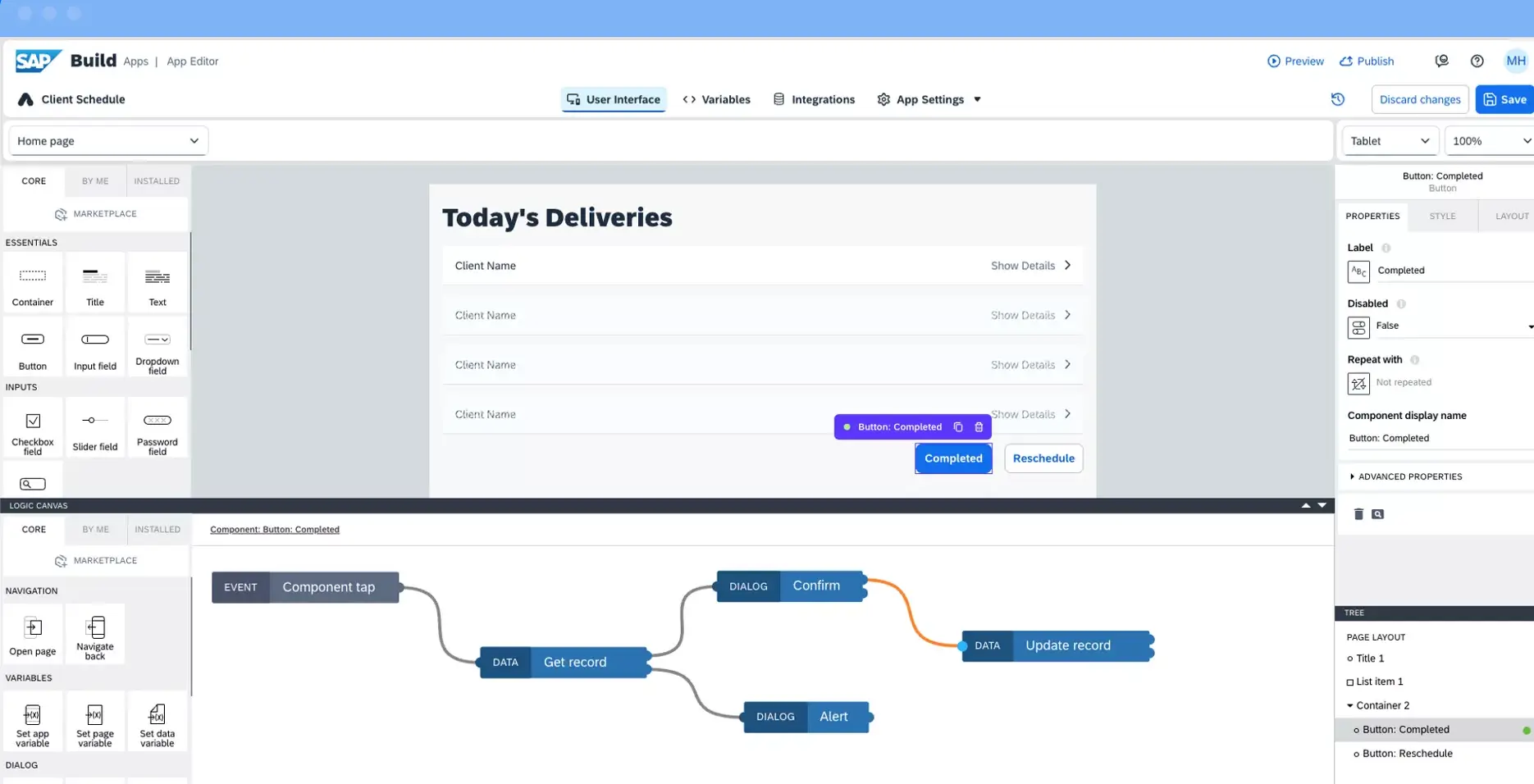
SAP Build Apps (formerly AppGyver) is a powerful no/low-code platform for building complex web and mobile applications. It offers deep logic control, rich API integrations, and multi-platform deployment, making it well-suited for organizations that need more flexibility and scalability than lightweight no-code tools provide. While more technical than Glide or Softr, it’s a strong option for teams that want to future-proof their tools.
SAP Build Apps pros and cons
Pros:
- Extremely flexible with advanced logic flows, API integrations, and mobile/web deployment.
- Scales well for enterprise or high-growth teams that need full backend control.
- Strong cross-platform support across iOS, Android, and web.
Cons:
- Steeper learning curve than typical no-code tools.
- Pricing and onboarding are less transparent; enterprise plans require direct contact with SAP.
SAP Build Apps best features
- Cross-platform builder: Create one app for web, Android, and iOS simultaneously.
- Advanced logic editor: Build detailed workflows and conditional logic visually.
- Enterprise integrations: Seamlessly connect to SAP systems or third-party databases and APIs.
SAP Build Apps pricing
- Community Edition: Free for individual or small-team use.
- Enterprise Edition: Custom pricing through SAP Build Suite.
Who is SAP Build Apps best for?
SAP Build Apps is best for teams that need enterprise-grade flexibility, complex workflows, or multi-platform deployment. It’s a great next step for companies that have outgrown Glide’s simplicity and need something more robust, while still keeping development mostly visual.
How to choose the best Glide alternative
The best Glide alternative comes down to what you’re trying to build—and how much control you want.
- Need a sleek mobile app? Adalo or FlutterFlow are solid picks for launching native apps with built-in device features.
- Want advanced logic, built-in security, or internal workflows? Softr supports advanced AI app building, including powerful automations through Softr Workflows.
- Need full design control for a SaaS product or MVP? Bubble or Webflow offer pixel-level customization and flexible front-end frameworks, depending on what you’re building.
- Building secure business apps with external users? Softr is your best bet—with server-side permissions, role-based access, and flexible pricing for users (not divided into “internal” vs. “external.”
If you’re outgrowing Glide (or need more predictable pricing), Softr makes it easy to build an app with AI, including real-time data, stronger security, and pricing that scales with your business — not your user count.
Try it free (you can even import your existing data from Glide Tables to Softr Databases to get started faster).
Frequently asked questions
What is the best Glide alternative for you?
How do I start building internal tools without code?
Where can I find free internal tools templates?
What is the open source alternative to Glide?
What is the difference between Adalo and Glide?


