



A work day means juggling Slack for chat, cloud drives for files, portals for HR policies. Finding one thing quickly turns into an investigation. An employee intranet is meant to be the single source of truth that fixes it. Here’s a compact list of the ones that work for an SMB.
Best intranet software at a glance
| Tool | Best For | Key Features | Pricing |
|---|---|---|---|
| Softr | Building a custom intranet with AI that includes apps, databases, and workflow automation | Drag-and-drop builder, relational database storage, conditional logic, granular access controls, 2-way data sync, workflow automation, AI app and database co-builder | Free; Basic $19/mo; Pro $99/mo; Business $329/mo; Enterprise (custom pricing, contact sales) |
| Google Sites | Free, simple internal pages within Google Workspace | Block-based page builder, native Google Workspace integration, shared drives, access controls, version history, real-time collaboration | Free with all Google accounts and Workspace plans |
| MyHub Intranet | SMBs that want a ready-to-launch intranet fast | Pre-built page templates, staff directory, instant messaging, document storage, built-in LMS with AI course creator, Microsoft 365 & Google integrations | Quote-based pricing |
| Connecteam | Deskless and mobile-first workforces | Mobile-first employee app, company knowledge base, team chat & announcements, scheduling & time tracking, training courses, surveys & polls | Free up to 10 users; Basic from $29/mo; Advanced from $49/mo; Expert from $99/mo (per hub); Enterprise (custom) |
| Zoho Connect | Driving employee engagement | Customizable dashboard, social feeds & peer recognition badges, knowledge base & wikis, task boards, AI assistant Zia, enterprise search, external network | Free up to 5 users; Starter $0.40/user/mo; Enterprise $1/user/mo; Ultimate $3/user/mo |
| Huler | Scaling businesses that want a clean, modern employee hub | Personalized employee hub, tool & app aggregation, internal communications with audience targeting, peer recognition (Kudos), learning resources hub | From £4/user/month (annual contract); custom quotes via sales |
What is intranet software?
Intranet software is a secure, private digital platform that acts as a hub for company information, bringing together news, documents, tools, and workflows in a single place. Employees use it to find information, complete tasks, and stay connected without jumping between apps. Modern platforms go beyond file storage, adding personalization, analytics, and automation to support how teams work today.
What to look out for in intranet software
The best company intranets share these strengths:
- Ease of setup and adoption: Can non-technical teams get it live without IT?
- Personalization: Can employees see what's relevant to them, rather than a generic company-wide feed?
- Centralized content and documents: Scattered documents and version control chaos are among the top reasons small businesses adopt an intranet.
- Communication tools: How do announcements, team newsfeeds, pulse posts, and async updates work? Think about how your team already communicates and see how each platform supports that style.
- Integration with existing tools: Does it play nicely with your stack—Google Workspace, Microsoft 365, Slack, and more—or fully replace it?
- Mobile accessibility: Essential for deskless and distributed teams.
- Workflow and automation: Can you trigger actions, approvals, or onboarding flows without a developer?
- Analytics and engagement tracking: Can you actually tell if anyone's using it? Even basic adoption metrics matter, helping you adjust the intranet to your team’s needs.
Softr — best for building a custom intranet with AI that includes apps, databases, and workflow automation

Softr is a visual full-stack platform for building modern intranets and internal tools. It combines an AI app builder, native relational database, and workflow automation in one system. Describe what you need and the AI CoBuilder generates an intranet app and relational database already connected.
Teams can build employee portals, directories, knowledge hubs, approval workflows, dashboards, and internal apps, then automate processes or, if they need to, connect data sources from tools like Airtable, Google Sheets, HubSpot, and SQL databases.
AI features are built directly into the platform. With Ask AI, employees can query company data in natural language based on what they’re allowed to access. Teams can also generate new intranet features with the Vibe Coding Block—like PTO or IT request forms, onboarding workflows, approval flows, asset or equipment requests, and internal reporting dashboards—then customize them visually without writing code.
Beyond Softr Studio and the AI Co-Builder, the Softr MCP lets your AI assistant create app pages, user groups, and visibility rules. Any published business app can also serve your employees through their own AI tools, respecting their existing permissions.
Softr pros and cons
Softr pros
- Visual drag-and-drop builder: Design intranet pages, dashboards, and multi-step request forms with conditional logic and dynamic sections. No code required.
- Build multiple apps on one source of truth: Power your intranet and internal tools from your connected data sources, so every interface stays in sync.
- Native workflow automation: Use Softr Workflows to trigger Slack alerts or update records automatically when employees submit forms or change data.
- Brandable intranet layouts: Match your company’s look with global themes and flexible block styling, and use custom code on paid plans when you need pixel‑level control.
- Built-in workflow automation and AI assistants: Database AI agents and native workflow automation help teams reduce manual work and manage processes more efficiently.
Softr cons
- Advanced data sources like SQL and REST API locked behind higher paid plans. Check your tech stack before committing.
Softr key features
- End-to-end intranet builder: Design pages, manage data, and automate processes for your teams in a single no-code platform.
- Relational database storage: Store intranet content, requests, and users in structured tables with relationships, instead of relying on disconnected spreadsheets.
- Conditional logic and dynamic sections: Show the right content and forms to the right people based on role, department, or what they enter.
- Access controls and permissions: Use user groups, email domains, and field-based rules to control exactly what each person can see or submit.
- 2-way data sync: Keep users and records in sync with tools like Airtable, Google Sheets, Notion, HubSpot, and more—no manual exports.
- Workflow automation: Trigger actions—like Slack alerts, emails, or record updates—whenever intranet data changes or meets specific conditions.
Softr pricing
Start building with a generous free plan and scale your intranet with predictable pricing tiers.
- Free: Unlimited apps, with access to Softr Workflows, Softr Databases, Softr MCP, 5 app users, unlimited forms and submissions, 5,000 records, 5 AI credits
- Basic ($19/month): Unlimited apps with 42+ integrations, Team: 5 + Client: 5 app users, unlimited forms and submissions, custom domain, 10 AI credits
- Pro ($99/month): Unlimited apps with 45+ integrations and custom code, Team: 10 + Client: 50 app users, removing Softr branding, e-signatures, 50 AI credits
- Business ($329/month): Unlimited apps with 52+ integrations, Team: 30 + Client: 100 app users, 1M records, advanced data sources, 100 AI credits
- Enterprise (custom pricing, contact sales):, SSO, dedicated success manager, tailored onboarding
Google Sites — best for free, simple internal pages within Google Workspace

If you live inside Google Workspace, you can turn a web of scattered Google Docs into a streamlined intranet experience with Google Sites. Creating a new site is very easy, with intuitive controls to set your theme, add pages, and set up visual elements within each of them. You can start from templates that cover help centers, team hubs, or a project documentation site.
Sites is free so you can jump in without budgeting. It integrates deeply with most of the other Workspace apps: you can embed your Docs and Sheets, adjusting their size to show content inline or just link out to open in a new tab. You can place Google Forms on any page too, and your team can interact and send new submissions directly from within Sites. Beyond this, it has an embed block so you can display any other tools or resources without opening more external links.
Despite the smooth experience and deep integrations, it’s not a fully-fledged intranet: there’s no built-in employee directory, org charts, social or news feeds, or any meaningful engagement analytics out of the box (you’ll have to integrate Google Analytics for that). It’s best if you’re looking to get started, but not as an upgrade if you’re already running on another platform.
Google Sites pros and cons
Google Sites pros
- Completely free: Google Sites is included with any Google account and every Google Workspace plan — there's no subscription to purchase, no per-user fee, and no limits on pages or submissions.
- Zero learning curve: If your team already uses Google Docs, they can build and publish a Site without any training. A useful internal page can go live in under an hour.
- Real-time collaboration: Multiple editors can work on the same site simultaneously, just like a Google Doc — making it easy to keep content up to date across a team.
- Reliable and secure infrastructure: Google Sites runs on Google's enterprise-grade infrastructure, with the same uptime and security standards your team already relies on across Workspace. Admins retain full oversight through the Workspace admin console.
- Mobile access: Google Sites is fully responsive out of the box, so staff can access the intranet from any device without a separate app or mobile setup.
Google Sites cons
- Design is rigid: Google Sites offers only a handful of templates and a basic theme editor — there's no custom CSS, no font freedom, and branding options are minimal. No matter how you configure it, it will look and feel like a Google product.
- No engagement features: There are no news feeds, announcement banners, push notifications, or any way to know who's read what. If you publish an important policy update, you'll need a separate channel like email or Google Chat to let people know it exists.
- Not built for dynamic content: Pages are essentially static. There's no conditional logic, no automated workflows, and no database layer, meaning Google Sites won't scale much beyond a basic document repository as your needs grow.
- Weak site search: The built-in search only covers the page you're on and won't index embedded Docs or Drive files, meaning your team can't reliably search across your intranet content. Cross-site search requires a Google Workspace Enterprise licence, which puts it out of reach for most SMBs.
- Page-level permissions don't exist: Access controls apply to the whole site, not individual pages. If you need different teams to see different content, you'll have to build and maintain separate sites.
Key features
- Drag-and-drop page builder: Google Sites uses a simple block-based editor where you can add, move, and arrange text, images, and embedded content by dragging elements into position — no code required.
- Native Google Workspace integration: Embed Docs, Sheets, Slides, Calendar, Forms, and Drive folders directly into any page, keeping everything connected without jumping between tools.
- Shared drives integration: Link to or embed folders from Google Drive so your team always has centralized, up-to-date access to the documents they need.
- Access controls: When publishing, you can restrict access to your entire domain, specific individuals or groups, or keep the site fully private — managed through the same Google account permissions your team already uses.
- Version history: Google Sites tracks every revision to your site, and you can roll back either the entire site or a single page to an earlier version at any time — similar to how version history works in Google Docs.
Pricing
- Free — included with all Google accounts and Google Workspace subscriptions
MyHub Intranet — best for SMBs that want a ready-to-launch intranet fast
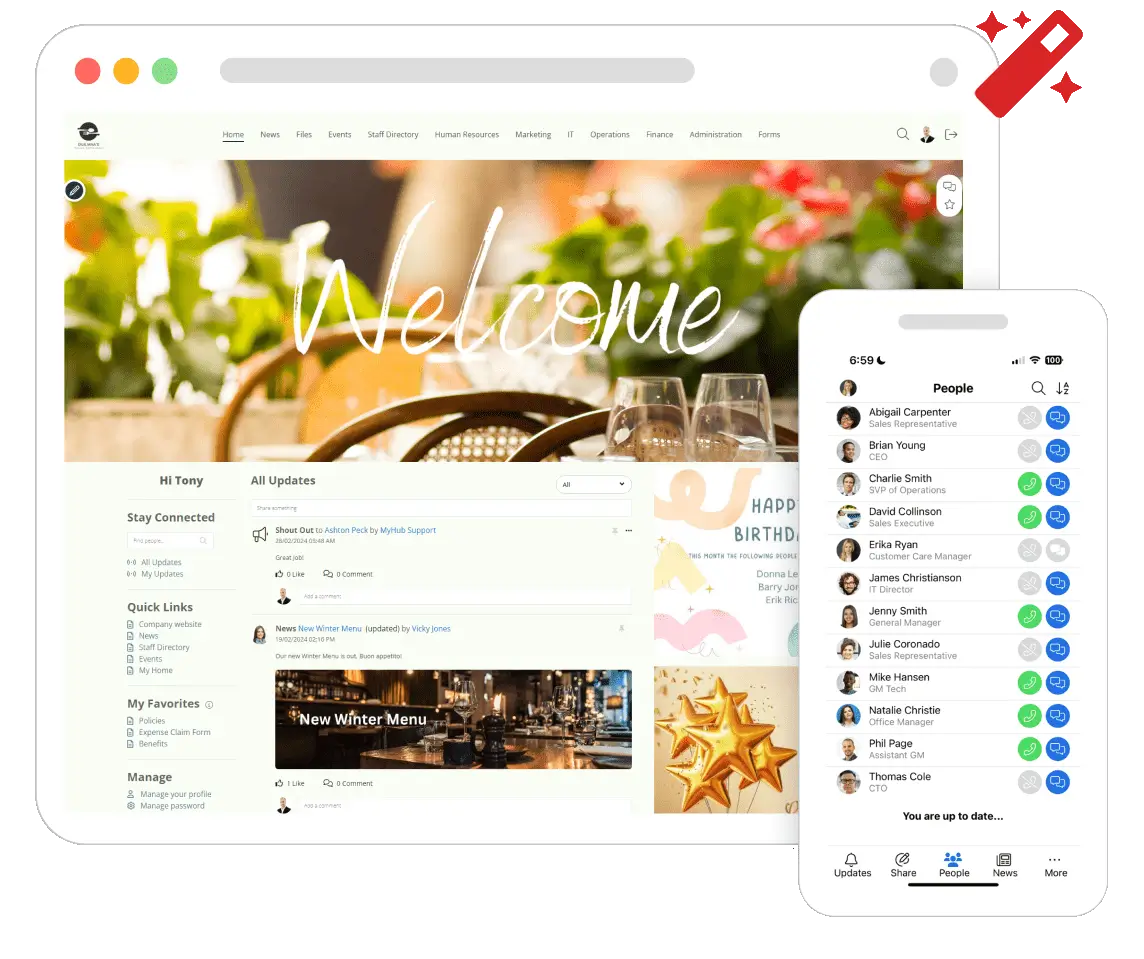
MyHub Intranet is a specialized solution for SMBs, helping you set up your knowledge hub quickly without IT. You won’t be starting from scratch: there are plenty of templates covering newsfeeds, staff directories, forums, instant messaging, and more. You can drag and drop modules into your pages, so you can launch a functional intranet with a polished feel. And if you don’t want to worry about setup at all, the MyHub team will set it up for you for free.
This speed is also true in its learning management system (LMS) tools, where you can essentially create new courses from a prompt: the AI engine will look up the content in your intranet and deliver a learning track. From that point, you can assign people or teams to each course, keeping an eye on progress and completion within the platform.
The fast launch hits a wall when you need depth: the template-driven approach means you can’t customize your intranet as much as other options. Users also flag limitations around form building, login page branding, and fine-grained design control.
MyHub Intranet pros and cons
MyHub Intranet pros
- Fast time to launch: Pre-built templates and a drag-and-drop module library mean you can have a functional, polished intranet live in days rather than weeks. Every plan also includes a free setup service so you're not figuring it out alone.
- Built-in LMS: MyHub's integrated learning management system lets you create and deliver onboarding flows, compliance training, and staff development courses directly inside the intranet.
- Mobile-first design: MyHub is fully accessible on any device, with a dedicated mobile app built for employees who aren't at a desk. This makes it a practical choice for field teams, frontline workers, or hybrid workforces on the move.
- AI content assist: MyHub's AI Assist helps admins generate pages, news posts, and policy documents from a prompt, cutting down the time it takes to keep the intranet populated with fresh, relevant content.
MyHub Intranet cons
- Custom pricing adds uncertainty: MyHub's pricing isn't clearly published on its own website, which makes it harder to compare costs upfront against competitors with transparent, self-serve pricing pages. Your best move is to request a quote directly.
- Form-building has limitations: User reviews consistently flag that MyHub's built-in form builder lacks flexibility for anything beyond basic data collection (think leave requests or simple surveys). Teams that rely on conditional logic, automated routing, or multi-step approvals may find themselves reaching for a standalone tool like JotForm or Typeform alongside it.
- Less suitable for complex workflows: MyHub is designed around communication and content newsfeeds, documents, policies, and it shows. If your intranet needs to double as a workflow engine with relational data, task dependencies, or deep process automation, you'll likely hit its ceiling faster than with a more enterprise-oriented platform.
Key features
- Pre-built page templates: A drag-and-drop builder with ready-made modules for newsfeeds, staff directories, blogs, forums, and shared calendars means you can assemble pages without writing a single line of code.
- Staff directory: Employee profiles include bios, skills, contact details, org charts, and LinkedIn links, making it easy for teams to find and connect with the right person.
- Instant messaging and chat: Channels, threads, direct messages, and @mentions are all included at no extra cost, with integration into the staff directory so you can message anyone in a click.
- Document storage: Centralise policies, files, and resources in one searchable location, with permission controls to manage who can view or edit.
- Microsoft 365 and Google integrations: MyHub connects with Microsoft 365, Google Workspace, and Salesforce — alongside 200+ other tools — though note that the Salesforce integration works via form-mapping rather than a native two-way data sync.
Pricing
Quote-based pricing tailored to your organization's size and needs.
Connecteam — best for deskless and mobile-first workforces
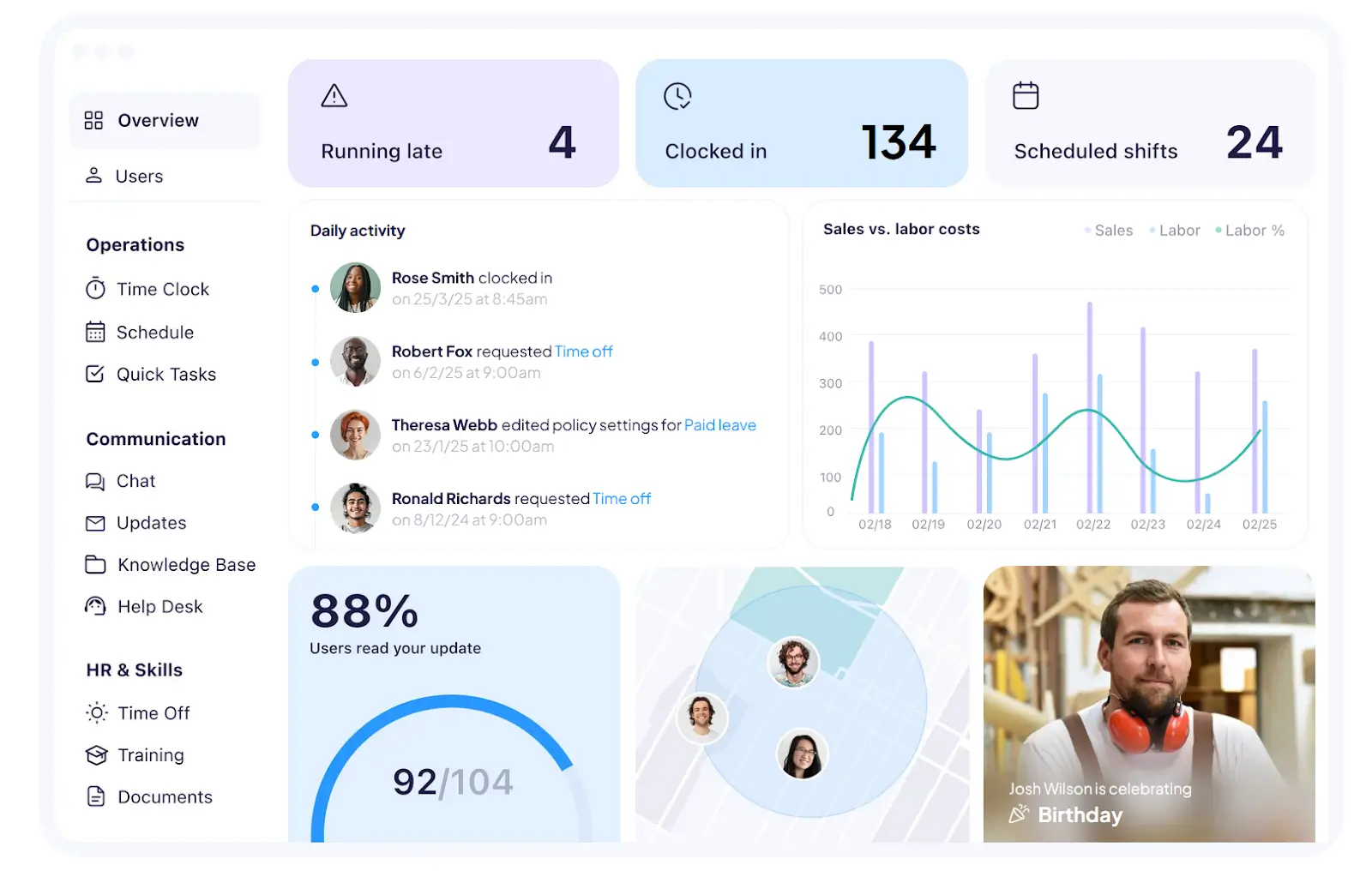
Not all work happens at a desk. Retail, logistics, healthcare, and construction workers need an intranet that’s ready to go with them where they need to be. That’s where Connecteam steps in: you can access everything you need from your phone thanks to its mobile-first design. On top of that, the free plan for up to 10 users coupled with flat rate pricing makes it easier to pick up as a small team and predictable when scaling up to 30 users.
Map your team’s day-to-day with three hubs covering operations, communications, and HR & skills. Managers can build and publish schedules, access time-tracking with GPS geofencing so employees can clock on site and access digital forms or safety checklists. The app works offline in patchy network conditions, syncing back when the device comes back online. AI is present with a course creator so you can publish training on the go and auto-scheduling features to handle the calendar complexity for you.
This laser focus on the mobile experience shows the platform’s limitations when you need richer content pages or wikis. The knowledge base feature acts as a static file library, with no support for cross-linking between sections or embedding live content. Editing is only possible on a desktop, which is a point of friction for updating information, especially if your managers are frequently mobile.
Connecteam pros and cons
Connecteam pros
- Free for up to 10 users: Connecteam's Small Business Plan gives teams of up to 10 full access to all three hubs (Operations, Communications, and HR & Skills) completely free with no time limit. Unlike most free tiers that gate core features behind a paywall, this is a genuinely usable plan for small teams getting started.
- Built for deskless workers: Connecteam is designed from the ground up for employees who don't sit at a desk—no company email is required to sign up, and the entire platform runs from a personal mobile device. That makes it a natural fit for shift-based industries like retail, logistics, hospitality, and construction, where getting everyone onto a shared tool is usually the first hurdle.
- Employee engagement tools: A social newsfeed with likes and comments, peer recognition features, polls, and surveys give managers a lightweight but effective way to keep distributed teams feeling connected. For industries with high turnover, these touchpoints can make a real difference in day-to-day morale.
- 24/7 customer support on all plans, including the free tier: Connecteam offers round-the-clock customer support on every plan, including the free tier.
Connecteam cons
- Complex pricing structure: Connecteam splits its features across three hubs, each sold as a separate subscription. Subscribing to all three at a mid-tier level can run $87+/month before you even reach 31 users, which can catch tighter budgets off guard.
- Admin dashboard is overwhelming: The manager-facing web dashboard packs in a lot of functionality, and new admins frequently report a steep learning curve navigating all of it. Teams that only need a slice of what Connecteam offers may find the interface harder to settle into than a more focused tool.
- Not completely all-in-one: Despite covering scheduling, time tracking, communications, and HR tools under one roof, Connecteam doesn't handle payroll natively. Time tracking data needs to be exported to a separate tool like Gusto or QuickBooks to actually run payroll.
Key features
- Mobile-first employee app: Connecteam runs on iOS and Android and is purpose-built for workers without desktop access.
- Company knowledge base: Create folders and sections to store policies, handbooks, SOPs, and guides in a centralised, searchable library that any team member can pull up on the go.
- Team chat and announcements: Group channels, 1:1 messaging, and a customisable company newsfeed give managers one place to coordinate daily operations and push out important updates to the whole team.
- Scheduling and time tracking: Build and publish shifts with a drag-and-drop scheduler, let employees clock in and out via GPS-enabled time clock, and export timesheet data directly to payroll tools like Gusto or QuickBooks.
- Training and onboarding courses: Build role-specific courses directly in the platform, assign them to individuals or teams, and track completion.
- Surveys and polls: Collect structured employee feedback using pre-built templates, run quick polls for operational decisions, and view results in real time from the admin dashboard.
Pricing
Please note: the prices below are per hub (Operations, Communications, HR & Skills)
- Free (Small Business Plan): Up to 10 users, full access to all features
- Basic: From $29/month for up to 30 users
- Advanced: From $49/month for up to 30 users
- Expert: From $99/month for up to 30 users
- Enterprise: Custom pricing for 201–10,000 employees, SSO, 2FA, API access
Zoho Connect — best for driving employee engagement
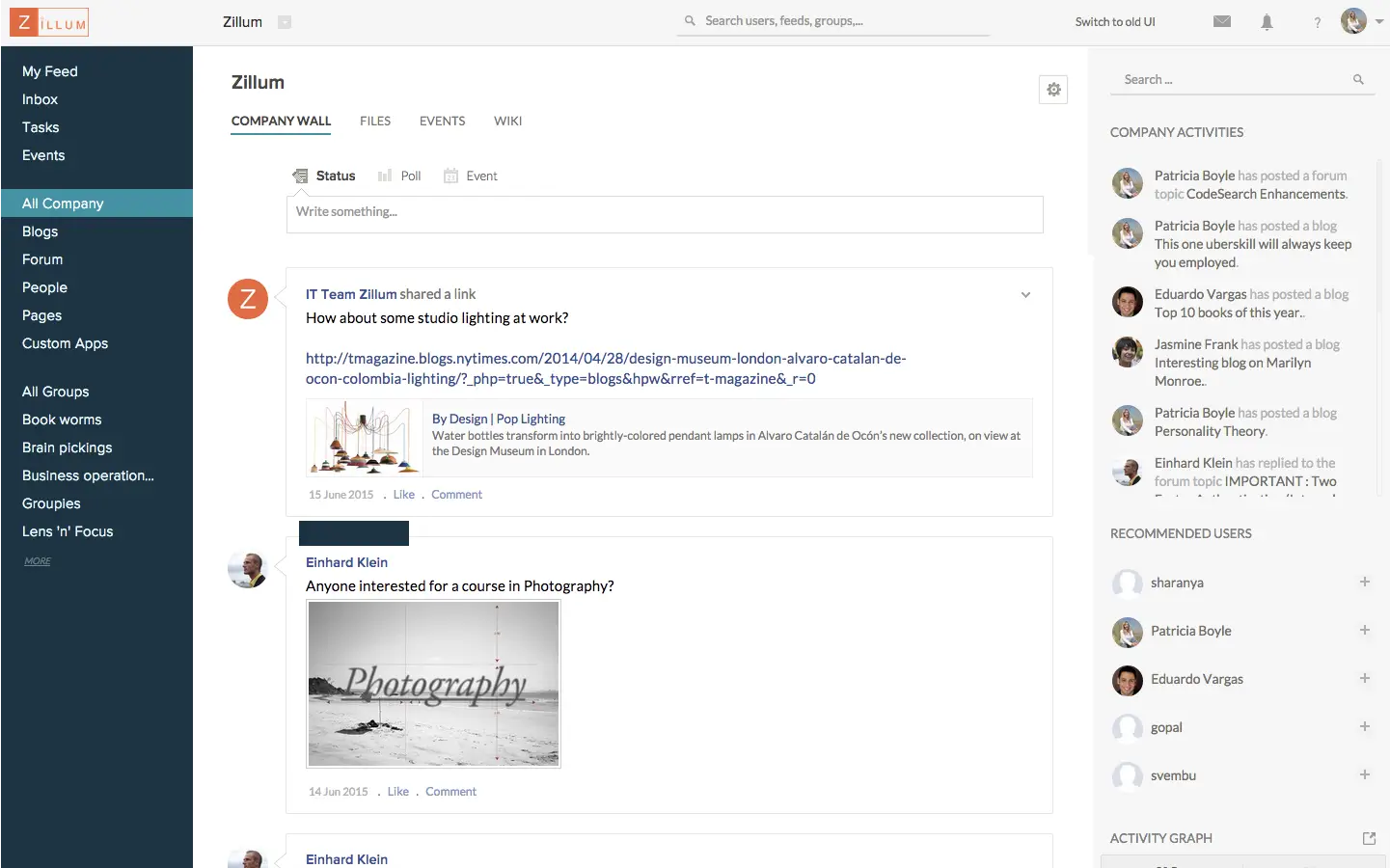
Setting up an intranet takes real effort, so you expect your team to actually use it once you publish. But if the platform isn’t built for engagement, it’ll quickly become a ghost town. Zoho Connect bridges solid knowledge hub features with tools like peer recognition and social feeds that incentivize daily check-ins. If you're looking for one of the best company intranets for employee connection, this is the pick.
Appreciating a teammate’s work is a powerful nudge: it makes them feel seen and motivates them to keep it up. Dropping a note in a DM is fine, but Zoho makes it special: anyone can send a “good job” or “thank you” badge via Connect, so the acknowledgment is public instead of quickly forgotten. These badges show up in the social feed—where announcements and updates live—turning these positive interactions into a moment the whole company can see.
That said, this isn’t a magic wand that instantly creates culture around your intranet: it’ll still require you to work with team leaders and key stakeholders to drive adoption and turn it into a habit. On another front, if your document management needs are more vital than team communication, it’s likely you’ll quickly hit a ceiling with Zoho Connect.
Zoho Connect pros and cons
Zoho Connect pros
- Excellent value for money: At $1/user/month on the Enterprise plan, Zoho Connect is one of the most affordable full-featured intranet options on the market. A free plan is also available for teams of up to 25 users.
- Deep Zoho ecosystem integration: For teams already running on Zoho, Connect acts as a natural intranet layer, pulling in data from Zoho CRM, Zoho People, Zoho Books, and more without third-party connectors. If your organization is Zoho-first, the integration is seamless out of the box.
- Employee engagement features: Beyond the basics, Zoho Connect includes polls, town halls, peer recognition badges, and employee surveys natively, giving distributed teams multiple touchpoints to stay connected and heard. No third-party integrations required to get these off the ground.
- Enterprise search: A single search bar scans across all integrated services—documents, notes, and Connect content—so employees aren't hunting across multiple apps for information. Third-party services can also be added to the search index with minimal configuration.
Zoho Connect cons
- Vendor lock-in risk: Zoho Connect's value compounds significantly when your team already uses other Zoho products. However, if you're running on Google Workspace or Microsoft 365, integrations with non-Zoho tools require more effort and workarounds.
- Mobile app needs work: User reviews across Capterra and the App Store consistently flag crashes, slow load times, and missing functionality on mobile.
- Initial complexity: Despite its clean interface, the sheer range of features and configuration options can feel overwhelming at setup.
Key features
- Customizable intranet dashboard: A fully configurable home page with drag-and-drop widgets for announcements, polls, birthdays, work anniversaries, events, and key company information.
- Feeds, town halls, and recognition: Company-wide communication tools including live video town halls with Q&A and AMA sessions, live broadcasting to 10,000+ employees, and peer appreciation badges.
- Knowledge base and manuals: Structured documentation and wikis (called Manuals in Connect) for policies, processes, and shared organizational knowledge, keeping institutional information organized and findable.
- Task boards and project spaces: Kanban-style task management and dedicated team workspaces for collaborative projects, keeping work and communication in the same place.
- AI assistant Zia: Drafts content, summarizes discussions, and helps employees surface relevant information faster
- External network: Create a separate collaboration space for clients, partners, or contractors that mirrors the internal intranet experience without giving them access to internal content.
Pricing
- Free plan: Available with limited features for up to 5 users
- Starter ($0.40/user/month): Core communication and knowledge base features, starting at 25 users
- Enterprise ($1/user/month): Town halls, surveying tools, and AI, starting at 10 users
- Ultimate ($3/user/month): Dashboards, enterprise search, and gamification, starting at 10 users
Huler — best for scaling businesses that want a clean, modern employee hub
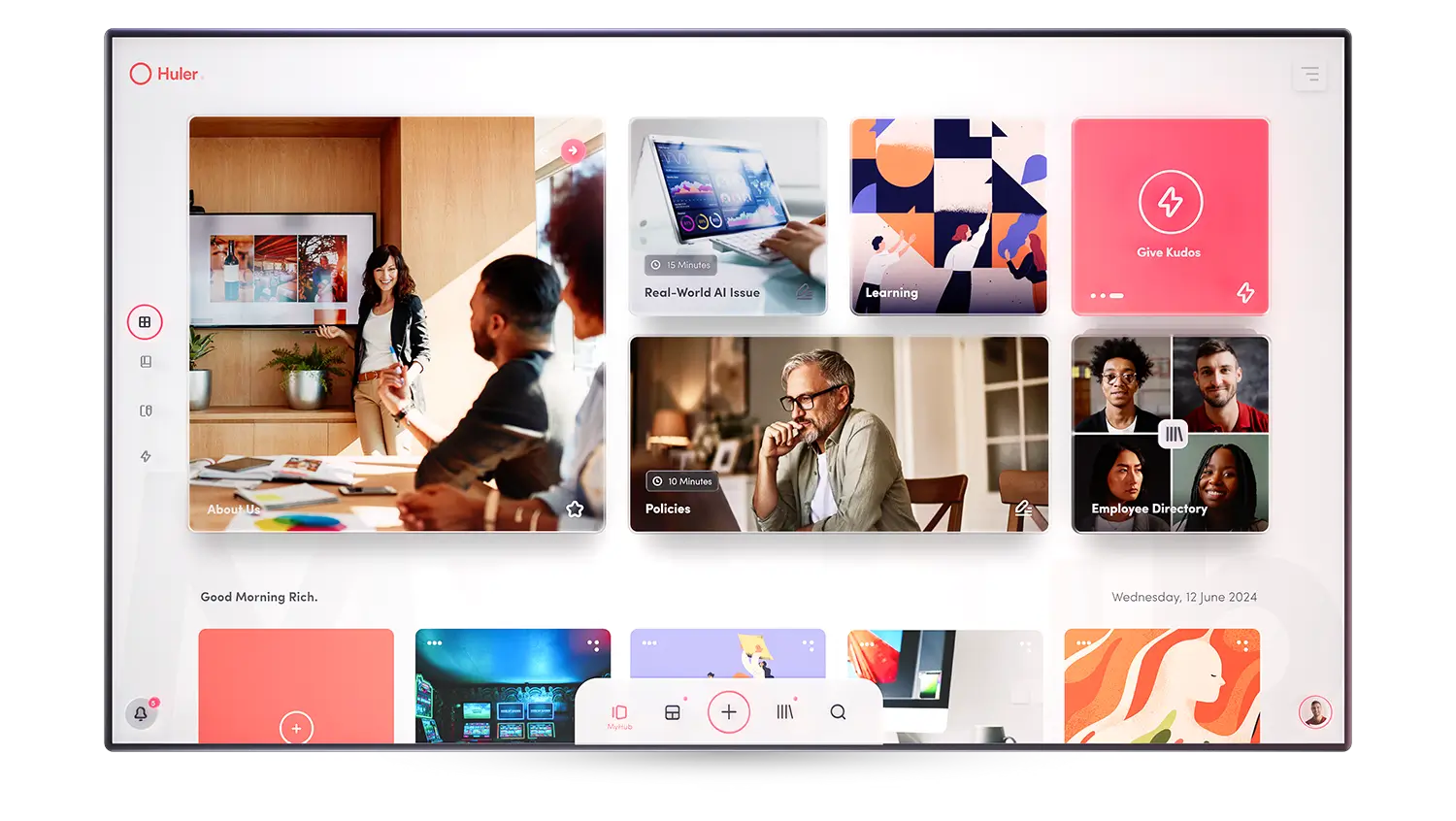
Tool fatigue is real: when your work apps are too complex to even look at, your teams operate with a cognitive tax. Huler exists for teams that don’t like clunky or bloated software, instead favoring a cleaner user experience. It’s easy to deploy, comes with a distinctly focused feature set, and it’s designed to grow with your headcount.
Once you set up your branded hub, every tool you use for work is a clickable smart tile, taking you to the app or resource you need to use. You can jump straight into Slack, a project hub, or an L&D content track. Each team has different needs, so you can build separate hubs to target what each group needs to be effective. The engagement features are strong, with kudos for appreciation and campaigns for targeted comms, pushing key targets and initiatives.
Huler is a younger platform, with its simplicity being the sharpest differentiator. That becomes an obstacle in reporting and analytics, a feature set that’s still evolving. And while the tile-based layouts work well for small, agile teams, larger companies with intricate permission rules will feel the simplicity starts working against them.
Huler pros and cons
Huler pros
- Clean, modern design: Huler is one of the most design-forward intranet platforms on this list, visually closer to a consumer app than a corporate portal. That matters because employees actually want to use it, which quietly solves the adoption problem that haunts legacy intranets from day one.
- No IT setup required: HR and Internal Comms teams can get Huler live without writing a line of code or raising a developer ticket. Setup is fast, and onboarding support is included, so the platform earns its keep before the first month is out.
- Personalized employee experience: Create hubs around roles, teams, and preferences, not a one-size-fits-all portal that treats a warehouse operative and a finance director the same way. Separate audience hubs mean each group only sees what's relevant to them.
- Recognition and engagement add-ons: Built-in Kudos lets teammates recognise each other publicly, while optional modules for learning resources and targeted campaigns layer on top of the core hub. It's enough to drive genuine engagement without turning the platform into a bloated social network.
Huler cons
- No free plan and no public detailed pricing: Pricing starts at £3/user/month on an annual contract, reasonable for what you get, but check your budget before committing.
- Less feature-dense than alternatives: Huler's minimalism is a deliberate design philosophy. However, teams that need deep workflow automation or complex multi-step approval flows may find it lacks the depth to replace more specialised tools. If your intranet needs to do heavy lifting beyond communication and aggregation, you may outgrow it.
- No offline access: Users have flagged the lack of offline access as a meaningful gap, particularly for teams operating in environments with patchy or unreliable internet connectivity.
Key features
- Personalized hubs: Each team gets a tailored dashboard with their tools, content, and updates surfaced in one place.
- Tool and app aggregation: Pin links, systems, and resources from any vendor into a single, searchable launchpad, so your team spends less time hunting and more time doing.
- Internal communications: Post company news, updates, and announcements with audience targeting built in, so the right message reaches the right people without cluttering everyone else's hub.
- Employee recognition: An optional add-on for peer-to-peer Kudos and company-wide shout-outs, making appreciation a visible, everyday habit rather than an annual review afterthought.
- Learning resources hub: An optional module to centralise and surface learning content, so development resources are one click away inside the same hub employees are already using daily.
Pricing
Plans start at £4/user/month. There are no detailed feature breakdowns per pricing plan: talk to the sales team during the demo to get a personalized quote. Huler is based in the UK: prices are in GBP.
Find the right fit for your intranet
When picking the best company intranet for you, don’t focus on just surface features like as design, template counts, or popular names. Instead, start by auditing your company’s needs: budget, current tech stack, team’s IT skills, and the laundry list of frustrating collaboration issues you consistently face.
The next step is trying a couple of tools on this list. Most have a free plan or free trial that will help you understand if they’re a good match in under an hour.
If you need your intranet to do more than just display information and fire messages back and forth, try Softr for free and build an intranet that works as hard as you do.
Frequently asked questions
Do I need an IT team to set up an intranet?
What's the difference between an intranet and tools like Slack or Google Drive?
How do I get employees to actually use the intranet after launch?