The 5 best databases for non-developers in 2026: Tested & reviewed


If you’ve hit your limit with spreadsheets, it’s time to move to a database. Databases give teams a cleaner, more functional way to organize connected data without writing code or asking developers to update every field, form, or workflow. In this guide, I’ll break down what these tools are and show how to choose one that fits the way your business runs.
The best database for non-developers at a glance
| Tool | Best for | Key features | Pricing |
|---|---|---|---|
| Softr Databases | Turning operational data into business apps | • AI Database Co-Builder • Linked records • Relational fields • Advanced conditional forms • Softr Workflows • Ask AI • Database AI Agents • Vibe Coding Block • MCP Server | Free: 5 users, 5,000 database records Basic: $19/month |
| Airtable | Spreadsheet-style databases | • Linked records • Multiple views • Forms, interfaces, automations, and AI | Free: Up to 5 editors Team: $20/seat/month |
| Notion | Docs-first databases and team knowledge workflows | • Page-based database records • Relations and rollups • Forms, charts, dashboards, automations, and AI | Free plan available Plus: $10/member/month |
| Baserow | Open-source databases for non-developers | • Linked records • Multiple views and forms • Role-based permissions and AI features | Cloud Free: 3,000 rows and 2GB storage Cloud Premium: $10/user/month |
| SmartSuite | Database-backed workflows for non-technical operations teams | • Linked records • Flexible work views • Forms and workflow automations | Free trial: 14-day Professional trial Team: $15/seat/month |
What I look for in a database for non-developers
A good database for non-developers shouldn’t just make data look more manageable; it should actually help you run your operations. I tested more than a dozen database tools over the past week, and here are the most important features I settled on:
- Easy setup without hiding the logic: The tool should feel approachable from the first table, but still make the structure clear. Non-developers don’t need SQL, but they do need to understand what each table is for, how records connect, and what happens when something changes.
- Real relationships between data: A good database should connect clients to projects, projects to tasks, vendors to orders, or assets to maintenance requests. This way, teams don’t have to copy the same information across multiple tabs.
- Views that match different workflows: Different people should be able to work from the same data in the format they need, whether that’s a Kanban board, calendar, table, filtered list, or dashboard. The point is to avoid creating separate versions of the same data.
- Permissions that are simple to manage: Access control matters for any data system. I look for clear rules around who can view, edit, submit, approve, or delete information, especially when external users are involved.
- Forms and interfaces: Most people don’t need to work inside the full database every day. Forms, portals, and simple interfaces on top of data make it easier to collect updates, manage requests, review records, or share information without exposing every table and field.
- Automations that reduce repetitive work: Automations should handle repeatable steps like notifications, status updates, assignments, record changes, and data syncing.
- Pricing that scales reasonably: A database often starts with a small internal team, then expands to collaborators, clients, or external users. I pay close attention to user limits, editor seats, record limits, automation limits, and whether external access is cost-prohibitive.
1. Softr Databases — best for turning operational data into working business apps without code

Softr is the strongest fit when your database isn’t meant to stay hidden in the background. It gives non-developers a true relational database: tables, fields, relationships, lookups, rollups, formulas, and app-ready views.
Just prompt the AI Co-Builder and it creates a database with linked records and sample data you can easily swap out. You don’t have to start from a blank slate.
With Softr Databases, you can turn your business data into secure portals, dashboards, and workflows without any code or developer help. I’d use it to build a client portal, internal HR tool, inventory tracker, CRM, or any other core business software on top of data.
To set up my database in Softr, I just described what I needed, and the Co-Builder created the database structure with linked records based on my prompt’s use case. It also builds a full interface on the frontend, complete with utility pages, layouts, and user flows.
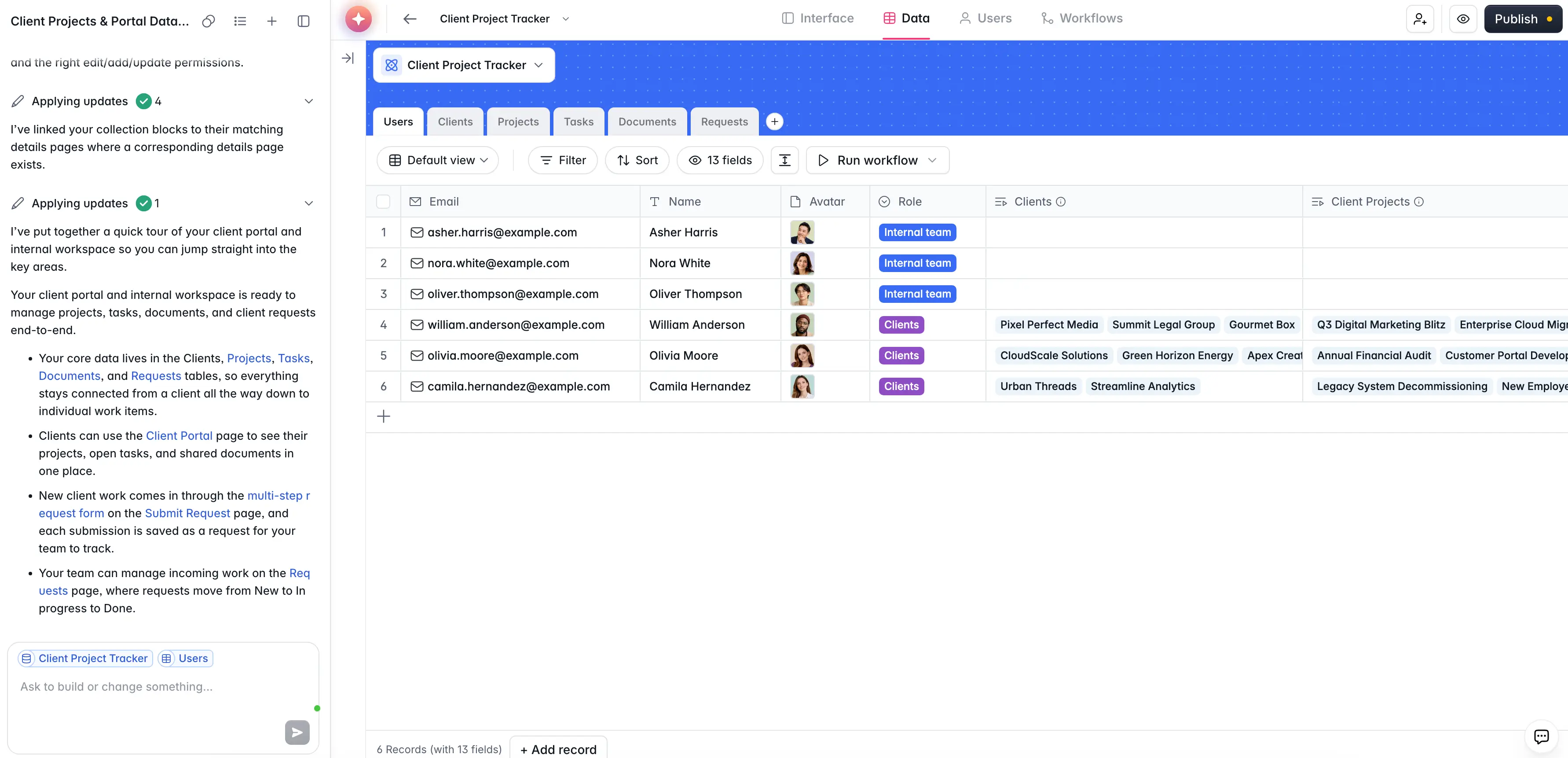
My verdict: I’d choose Softr Databases when the goal isn’t just to organize data but to turn that data into something a team, client, vendor, or partner can use. It gives non-developers a practical middle ground: more structure than a spreadsheet, but less technical overhead than building a database, backend, and front end separately.
You get a full operational layer around your database: permissions, app blocks, forms, workflows, and AI all work in the same environment. I wouldn’t use it as a pure database backend or for highly technical data infrastructure. Softr is best as a database and interface that people can log into, update, search, and use every day.
Softr Databases pros and cons
Pros:
- App-native database: Softr Databases is built directly into the app builder, so teams can move from structured data to portals, dashboards, directories, CRMs, and internal tools without exporting or rebuilding their data elsewhere.
- Clear fit for external workflows: It works especially well when clients, vendors, partners, contractors, or different teams need secure access to specific records, not full access to the whole database.
- Data freshness: Softr Databases sync natively with Softr apps, so updates appear in real time without the sync delays or API limits that often come with external databases.
- Strong permission model: Softr is built around user groups and granular access, which makes it easier to control what people can view, edit, submit, or act on across pages, blocks, and records.
- AI assistants supporting real work: Ask AI and Database AI Agents are great for helping users query live data, summarize records, classify information, extract details from files, or enrich database fields.
- Better pricing for larger groups of users: Softr’s flat pricing helps you calculate costs in advance. Its paid plans don’t charge separately per external user, which matters for portals and client-facing apps.
- Enterprise-grade security from day one: SOC2 and GDPR compliance, SSO on Enterprise, and robust infrastructure make Softr one of the most secure AI app builders.
Cons:
- Softr Databases isn’t the best choice if you need a standalone database backend, advanced developer control, or deep database administration.
- Not built for advanced backend engineering, complex custom queries, or heavy analytics workloads that require a dedicated data warehouse or BI stack.
Softr Databases best features
- Native integrations: Teams can use Softr Databases alongside other sources like Airtable, Notion, Google Sheets, HubSpot, SQL databases, and REST APIs, which helps when data is spread across tools.
- Relational fields: Softr Databases supports relationships, lookups, rollups, and formulas, so teams can connect records like clients, projects, tasks, vendors, and requests instead of duplicating data.
- Advanced conditional forms: Create forms for time-off requests, onboarding, IT tickets, or employee feedback that adapt based on conditions you set up. All submissions go straight to your Softr database.
- Softr Workflows: Teams can automate actions when records are created, updated, or changed, and they can also trigger workflows from user actions inside the app.
- Vibe Coding block: Generate custom data visualizations, calendar views, calculators, tracking interfaces, and analytical widgets using plain-language prompts.
- Softr MCP: Connect AI tools like Claude, ChatGPT, and Cursor directly to your databases, so they can query data, create records, and manage tables.
Softr pricing
Softr offers flat, predictable plans. Listed prices reflect annual billing.
- Free: Unlimited apps, with access to Softr Workflows and Softr Databases, 5 app users, 5 AI credits, and 5,000 database records
- Basic: $19/month for unlimited apps with 42+ integrations, Team: 5 + Client: 5 app users, 10 AI credits, 50K records
- Pro: $99/month for unlimited apps with 45+ integrations and custom code, Team: 10 + Client: 50 app users, 50 AI credits, and 500K records
- Business: $329/month for unlimited apps with 52+ integrations, Team: 30 + Client: 100 app users, 100 AI credits, and 1M records
- Enterprise (custom pricing, contact sales): Custom pricing
Every plan includes a monthly AI credit allowance, so you can try the AI Co-Builder and Vibe Coding block at no cost.
2. Airtable — best for spreadsheet-style databases
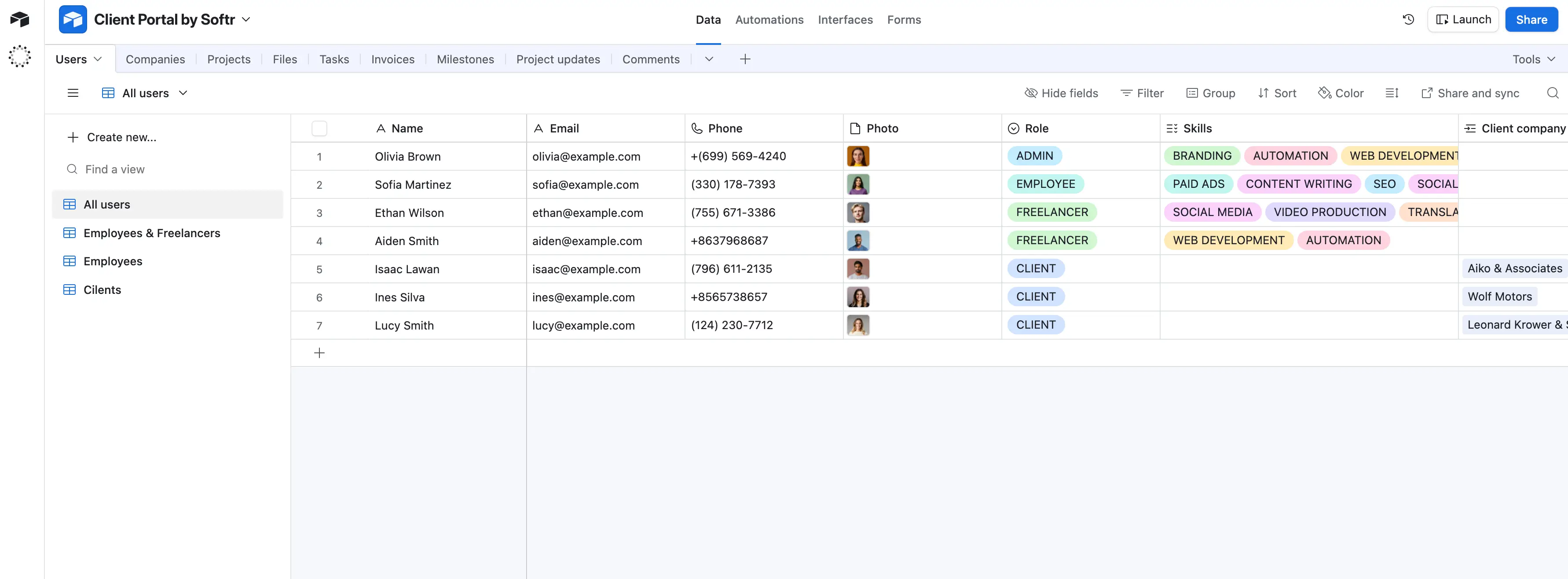
Airtable is a good fit when a team has outgrown spreadsheets but still wants a familiar way to manage shared work. I’d use it for internal workflows like content planning, vendor and project tracking, lightweight CRM, or operations tracking — cases where people need to update records, switch between views, and keep their process moving without a developer.
In practice, Airtable usually starts simple: you import a spreadsheet, clean up the fields, connect related tables, and then add forms, views, interfaces, and automations as the workflow grows.
The main tradeoff is that Airtable becomes less simple once a base becomes large or heavily connected across tables. Pricing can also add up when many people need edit access, since internal and external editor access are billed the same.
My verdict: Airtable is still one of the best spreadsheet-style databases for non-developers. However, I’d choose it for flexible, data-centered workflows that change often, not as a core enterprise database or the best app experience for a large external audience.
Airtable pros and cons
Pros:
- Easy spreadsheet-to-database transition: Airtable feels familiar enough for spreadsheet users, but gives teams more structure through records, field types, relationships, and views.
- Fast process changes: Non-technical teams can adjust tables, fields, statuses, and views directly, without waiting on developers for updates.
- Strong fit for shared internal work: It gives teams one place to track projects, requests, assets, clients, or campaigns instead of managing scattered files and trackers.
- Useful for growing workflows: Airtable works well when a simple tracker scales enough to require intake forms, approvals, dashboards, and light automation.
Cons:
- Pricing can climb quickly when many users need editing access, especially compared with tools that don’t charge for internal collaborators.
- Large or heavily connected bases can become laggy and difficult to manage.
- Airtable is not the best fit if you need a true app backend, high-volume data operations, or a polished external portal for many clients, vendors, or partners.
💡 Airtable works well as the database layer. Softr helps when that data needs to become a secure app, portal, dashboard, or internal tool. You can connect Airtable to Softr with two-way sync, or migrate all of your data directly to Softr.
Airtable best features
- Linked records: Airtable lets users connect related tables, so teams can manage clients, projects, tasks, assets, or requests without keeping everything in one flat spreadsheet.
- Multiple views: Teams can see the same data as a grid, Kanban board, calendar, timeline, Gantt view, gallery, or list, depending on how each person works.
- Forms: Users can collect structured intake requests, feedback, leads, or updates and send them directly into the right table.
- Interfaces: Teams can build pages for teammates to review, update, and act on records without exposing the full base.
- Automations and AI: Airtable can trigger updates, notifications, record changes, summaries, classifications, and other repeatable actions.
Airtable pricing
Listed prices reflect annual billing.
- Free plan available for individuals or very small teams, with up to 5 editors, 1,000 records per base, 1 GB of attachments per base, and 100 automation runs
- Team: $20/seat/month, 50,000 records per base, 25,000 automation runs, 20 GB of attachments per base, standard sync integrations, and 15,000 AI credits per paid user each month
- Business: $45/seat/month, with 125,000 records per base, 100,000 automation runs, 100 GB of attachments per base, premium sync integrations, and 20,000 AI credits per paid user each month
- Enterprise Scale: Custom pricing, with 500,000 records per base, 500,000 automation runs, 1,000 GB of attachments per base, advanced admin controls, and 25,000 AI credits per paid user each month
- Portals add-on: Starts at $120/month for 15 guests on Team and $150/month for 15 guests on Business; Enterprise portals require contacting sales
3. Notion — best for docs-first databases and team knowledge workflows
.webp)
I’d use Notion when a non-technical team needs a flexible place to organize work that doesn’t fit neatly into a spreadsheet. Its database layer works best when each record needs context around it, like briefs, meeting notes, files, tasks, decisions, or internal docs. That’s why it makes most sense for content calendars, project trackers, lightweight CRMs, research libraries, and team wikis. The experience usually starts fast: pick a template, add properties, create views, and build around the way the team already works.
The tradeoff comes later. As a database grows, Notion can feel slow, messy, and hard to govern. It’s still a solid option for docs-first internal workflows, but not when it comes to strict permissions, high-volume data, or complex data management processes.
My verdict: I’d choose Notion if the team’s “database” is really a shared workspace: part tracker, part wiki, part project hub. It’s especially useful when people need to understand the context behind each record, not just update fields. But I wouldn’t use it as the main database for core operations, external portals, or workflows that need tight permission logic.
Notion pros and cons
Pros:
- Easy starting point: Non-developers can build useful tables with templates, views, filters, and properties without learning database design first.
- Great for context-heavy work: Each database item opens into a full page, so teams can keep notes, files, comments, briefs, and decisions tied to the actual record.
- Flexible workspace setup: Teams can shape the same data into tables, boards, calendars, timelines, galleries, and dashboards depending on how they work.
- Built for internal collaboration: Notion works well when teams want projects, docs, tasks, and knowledge resources living in one shared workspace.
Cons:
- Performance can become an issue when workspaces, pages, linked databases, or records grow large.
- The blank-canvas setup gives teams freedom, but it also creates cleanup work as systems grow.
- It’s not ideal for external portals, strict record-level workflows, advanced database control, or high-volume operational data.
💡 Notion is useful for managing internal data and context, but Softr helps turn that data into a secure, branded portal or internal tool. With 2-way sync, teams can keep working in Notion while Softr handles user login, permissions, forms, dashboards, and external access.
Notion best features
- Databases with page-based records: Each item can hold structured properties while also acting as a full workspace page for notes, docs, files, and task details.
- Relations and rollups: Teams can connect projects, clients, tasks, campaigns, or resources across databases without needing a developer.
- Forms, charts, and dashboards: Notion now supports intake, simple reporting, and dashboard views directly on top of database information.
- Database automations: Users can trigger actions from database changes, which helps with simple workflow steps without leaving Notion.
- Notion AI and Notion Agent: Business and Enterprise users get AI features that can summarize, search, answer questions, and help create or update workspace content.
Notion pricing
Listed prices show annual billing.
- Free plan available with basic forms, basic sites, Notion Calendar, limited file uploads, 7-day page history, one chart, and a limited trial of Notion AI
- Plus: $10 per member/month, best for small teams, with unlimited file uploads, unlimited charts, unlimited guests, 30-day page history, custom forms, custom sites, and custom database automations
- Business: $20 per member/month, best for growing teams, with Notion Agent, AI Meeting Notes, Enterprise Search, SAML SSO, granular database permissions, private teamspaces, dashboards, conditional logic in forms, and 90-day page history
- Enterprise: Custom pricing, built for larger organizations that need SCIM, audit logs, advanced security and controls, zero data retention with LLM providers, unlimited page history, customer success support, domain management, and advanced compliance connections
- Custom Agents: Free to try, then $10 per 1,000 monthly Notion credits
- Workers: Currently in beta and free to try, with credit-based usage starting later
4. Baserow — best for open-source databases for non-developers
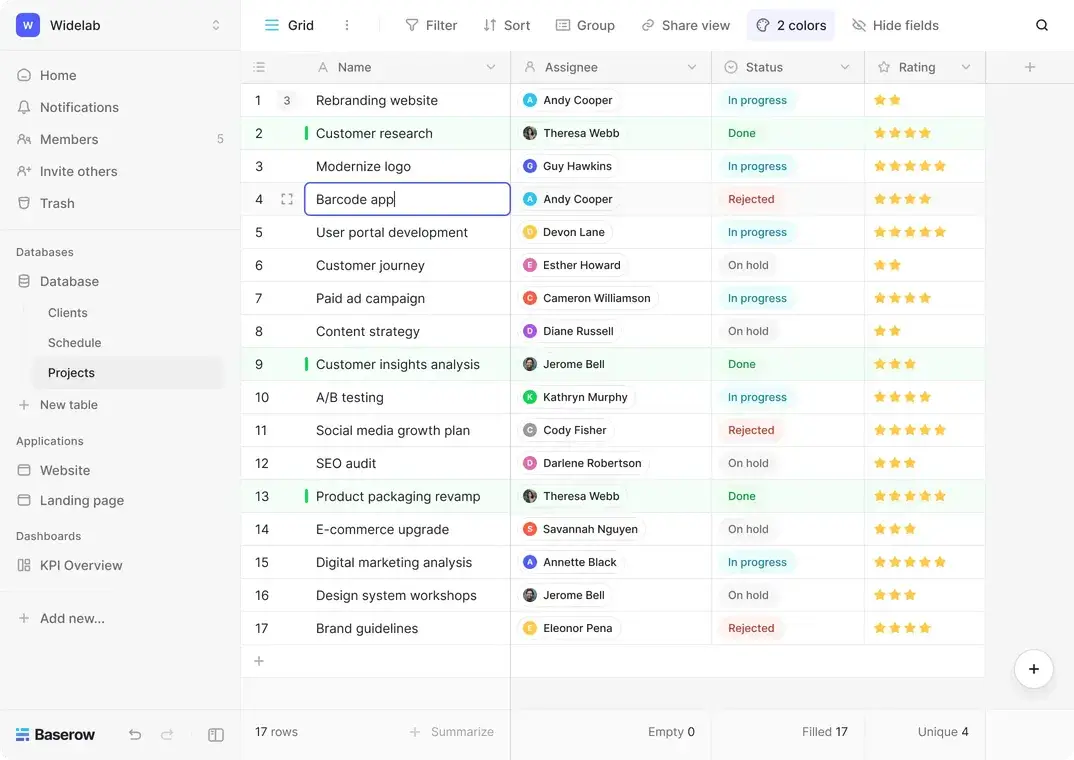
Baserow is the clearest fit when a non-developer wants an Airtable-style database but cares more about control, ownership, and flexibility than having the most polished all-in-one workspace. I’d use it for structured internal systems like project trackers, inventory records, lightweight CRMs, content databases, or operational backends where the team needs linked records, forms, filtered views, and API access without starting from code.
Baserow feels simple at first because you can start with familiar spreadsheet-style tables, then add views, forms, and linked records from there. The friction starts when the setup needs more structure: deciding how tables relate, managing permissions, building apps on top of the data, or connecting it to other tools. That’s where non-technical users may need more patience or some technical help.
My verdict: Baserow deserves its spot in this category—especially for teams replacing spreadsheets or Airtable—but it’s best for teams that want deep control and can tolerate some setup friction.
Baserow pros and cons
Pros:
- Open-source flexibility: Teams can use Baserow Cloud or self-host it, which makes it an easy choice for users who care about data ownership and avoiding vendor lock-in.
- Familiar database experience: The spreadsheet-like interface makes it easy for non-developers to build structured databases without feeling like they’re working in a technical backend.
- Strong value for growing teams: The paid plans are straightforward, and the self-hosted open-source plan includes unlimited databases, rows, and storage.
- Good fit as an operational backend: Users can structure records, connect tables, collect form submissions, and expose data through APIs for other tools or apps.
Cons:
- The app builder and automation experience still feel newer than the core database, so complex workflows may take patience.
- Baserow has fewer ready-made integrations and ecosystem depth than Softr or Airtable.
- Self-hosting is a major advantage, but it’s not beginner-friendly.
Baserow best features
- Linked records: Users can connect tables so projects, clients, tasks, assets, and requests don’t have to live in separate flat spreadsheets.
- Multiple views: Teams can work from grid, form, gallery, kanban, survey, calendar, and other views depending on the plan.
- Forms for data collection: Users can turn table fields into forms for intake, requests, applications, feedback, or inventory updates.
- Role-based permissions: Advanced plans support more controlled access, which matters when more people need to view or comment without editing everything.
Baserow pricing
Prices below reflect annual billing.
Cloud plans:
- Free plan available with unlimited databases, 3,000 rows per workspace, 2GB storage per workspace, grid/form/gallery views, and 65+ templates
- Premium: $10/user/month, with 50,000 rows per workspace, 20GB storage, kanban, survey and calendar views, row comments, coloring, and AI features
- Advanced: $18/user/month, with 250,000 rows per workspace, 100GB storage, role-based permissions, free read/comment users, and audit logs
- Enterprise: On request, with 1,000,000 rows per workspace, 1,000GB storage, 2,000,000 automation credits, invoice payment, and implementation support
Self-hosted plans:
- Open source: Always free, with unlimited databases, rows, and storage, plus grid, form, and gallery views
- Premium: $10/user/month, adding kanban, survey and calendar views, exports, row comments, personal views, and AI features
- Advanced: $18/user/month, adding role-based permissions, free read/comment users, single sign-on, audit logs, and data sync
- Enterprise: On request, adding co-branding, enhanced security, invoice payment, implementation support, and managed instance
5. SmartSuite — best for database-backed workflows for non-technical operations teams
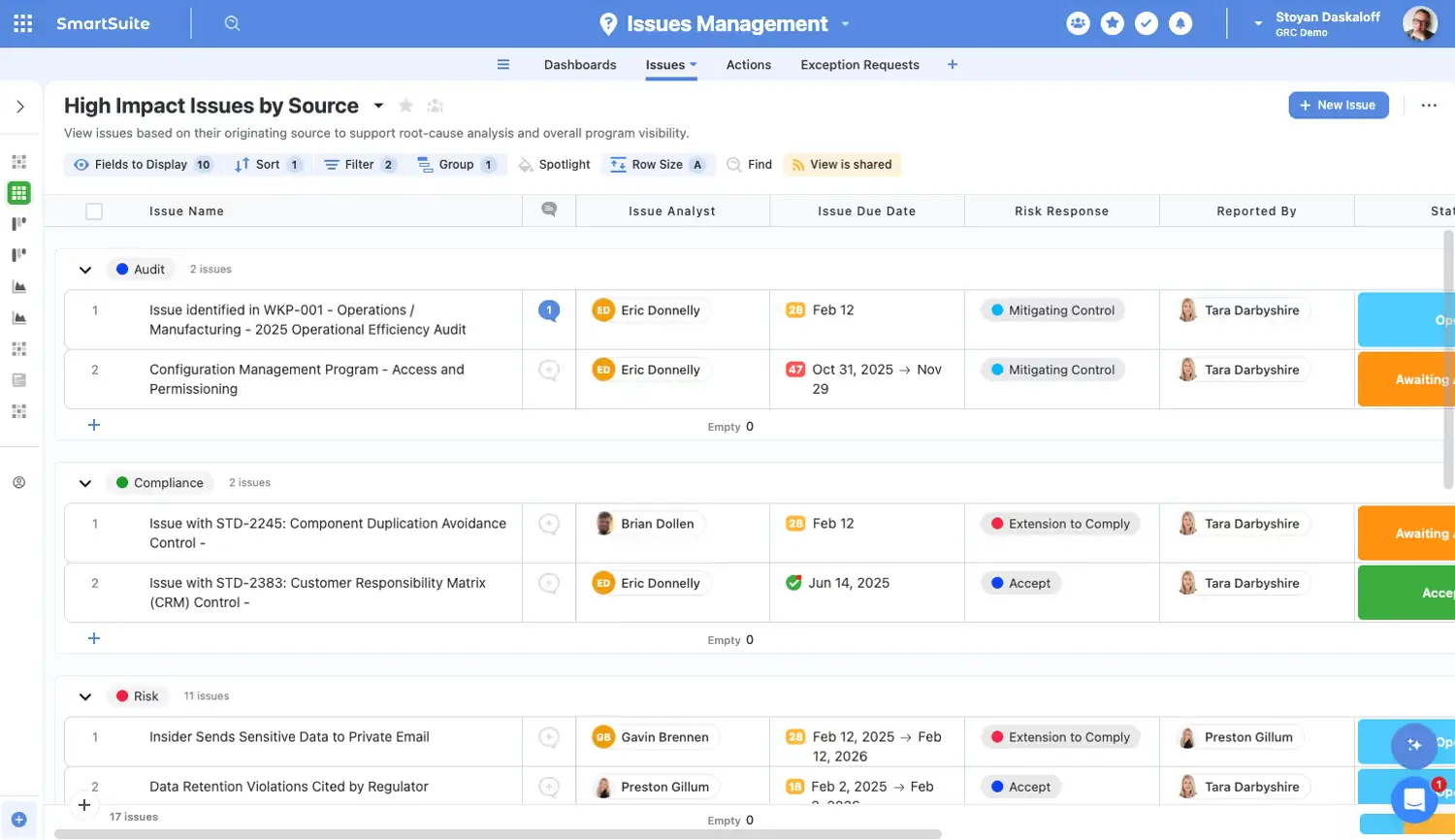
SmartSuite makes the most sense when a team doesn’t just need a database but a working system around that database. I’d use it for operations teams that have outgrown spreadsheets or scattered project tools and need one place to track clients, projects, requests, tasks, files, and approvals.
The experience is fairly approachable when you first log in: you can start with a template, build connected tables, add views for different teams, collect data through forms, and slowly automate handoffs. The tradeoff is that it still requires some database thinking, and its integrations and automation depth don’t quite match up to other platforms.
My verdict: SmartSuite is a strong database-workflow hybrid for non-developers. It’s worth considering when day-to-day process and project management matter as much as the data itself.
SmartSuite pros and cons
Pros:
- Good at operational work: SmartSuite fits teams that need to manage real workflows around their data, not just store rows in a nicer spreadsheet.
- Easy for non-technical teams to start: Templates, familiar views, and a clean interface make it easier for teams to adopt without a developer.
- Bridge between databases and project management: It works well when records, tasks, timelines, files, and team ownership need to live together.
- Strong user sentiment: Verified reviews consistently praise its flexibility, ease of use, and support, though the review base is still smaller than that of more established tools.
Cons:
- It has a learning curve if your team doesn’t understand tables, fields, records, relationships, and views.
- Automations and integrations can feel less mature than larger tools with deeper ecosystems.
- Large migrations or messy legacy spreadsheets may take real setup work before SmartSuite feels clean and reliable.
💡 Keep SmartSuite as the place where your team manages the workflow. Use Softr when that same data needs to become a secure portal, dashboard, internal tool, or project tracker with real-time two-way sync and controlled access for clients or external users. Learn how →
SmartSuite best features
- Linked records: Teams can connect related data, such as clients, projects, tasks, assets, vendors, or requests, without duplicating the same information across tables.
- Flexible work views: Grid, kanban, calendar, timeline, map, chart, form, and dashboard views let different teams work with the same data in the format that fits their job.
- Forms for intake: Teams can collect requests, updates, leads, or project details directly into structured records instead of chasing information through email.
- Workflow automations: Users can automate routine steps like assignments, status updates, reminders, and handoffs as a process moves forward.
SmartSuite pricing
Prices listed below are billed annually.
- Free trial: 14-day Professional trial, no credit card required
- Team: $15/seat/month, or $20 billed monthly, with a minimum of 3 billable users, unlimited solutions, SmartSuite AI, 5,000 records per solution, and a 30-day recycle bin
- Professional: $32/seat/month, or $36 billed monthly, with a minimum of 5 billable users, 100,000 records per solution, 100GB file storage, a 45-day recycle bin
- Enterprise: Custom pricing, with unlimited solutions, 400,000 records per solution, 500GB file storage, a 60-day recycle bin, SSO, SCIM, audit logs, IP restrictions, DLP, etc.
- Signature plan: Also available through sales for teams that need a tailored setup
Find the best database for non-developers for your business
The best database for non-developers depends on what your team needs the data to do once you store it. Airtable, Notion, Baserow, and SmartSuite all work well for organizing different kinds of internal records, but they each have limits once that data needs to become a secure tool people can actually use.
Softr solves that issue. It gives teams a way to structure their business data securely, control who sees what, automate routine steps, and turn the database into a portal, dashboard, CRM, or internal tool without rebuilding anything from scratch.
Ready to move beyond spreadsheets? Start with Softr Databases and build a secure business app your team, clients, vendors, or partners can use every day. Try prompting in Softr for free.
Frequently asked questions
What is the best database for non-developers?
What's the difference between a spreadsheet and a database?
Do I need to know SQL or coding to use a database?
When should I switch from a spreadsheet to a database?
Which database is best if clients or external users need access?