5 best AI databases for enterprise in 2026: Tested & reviewed


[.blog-callout]
💡TL;DR:
- AI databases solve different problems: Some organize live operational data, while others handle vector search, RAG, or retrieval across large content collections.
- Match the tool to the workload: Use Pinecone for dedicated vector retrieval, MongoDB Atlas Vector Search when AI needs data already stored in MongoDB, and Airtable for flexible record-based workflows.
- Control comes with maintenance: Baserow offers self-hosting and more infrastructure control, but your team must manage upgrades, backups, security, and performance.
- Softr covers the business app layer: Choose Softr when you need to turn siloed data into a permission-aware portal, CRM, dashboard, or internal tool without separately building the database, frontend, workflows, and access controls.
[.blog-callout]
Enterprise teams already have years of valuable data spread across databases, apps, documents, and workflows. The challenge is making that data useful to AI without introducing stale information, weak permissions, or disconnected systems that lead to unreliable answers and security risks.
After testing a whole host of databases, it became obvious: AI databases do provide a structured, searchable, and governed foundation — but the right choice depends on what you need AI to do, who needs access, and how much technical infrastructure your team can manage.
The best AI databases for enterprise at a glance
| Tool | Best for | Key features | Pricing |
|---|---|---|---|
| Softr | Building functional business apps on top of operational data | • AI Co-Builder • Database AI Agents • Ask AI for permission-aware data queries • Advanced conditional forms • Role-based and row-level permissions • Native workflow automation | Free: 5 users, 5,000 database records Basic: $19/month |
| Airtable | AI-assisted spreadsheet-style databases | • Omni AI assistant • Field Agents • Interfaces, automations, and synced data | Free: Up to 5 editors Team: $20/user/month |
| Baserow | Self-hosted, AI-assisted operational databases | • AI fields • Kuma AI assistant • Workflow, application, and dashboard builders | Cloud Free: 3,000 rows and 2 GB storage Cloud Premium: $10/user/month |
| Pinecone | Enterprise teams that need managed vector retrieval at scale | • Dense, sparse, and full-text indexes • Namespaces and metadata filters • Dedicated Read Nodes | Starter: Free Builder: $20/month |
| MongoDB Atlas Vector Search | Enterprise teams running AI on live operational data | • Vector and hybrid retrieval • Metadata prefiltering • Dedicated Search Nodes | Free: 512 MB storage Flex: From $0.011/hour, capped at $30/month |
What I look for in AI database tools for enterprise
Here’s what I’d evaluate when choosing an AI database that can support real enterprise use:
- Fit for your actual AI use case: Decide whether you need semantic search and RAG, an application database for an AI product, or an operational database that business teams can use directly.
- Support for structured and unstructured data: Enterprise AI often needs to work across records, documents, files, messages, and other content. Check whether the database can manage the formats your use case depends on.
- Vector and hybrid search capabilities: For semantic search, recommendations, or RAG, look for vector storage and similarity search. Hybrid search is even more useful because it combines meaning-based results with keywords and filters.
- Permission-aware access: The database should make sure AI only retrieves or acts on data each user is allowed to access.
- Security, governance, and compliance: Look for role-based access, auditability, encryption, data residency options, backups, and relevant compliance standards. Enterprise AI needs a controlled data foundation, not just a fast retrieval layer.
- Data freshness and synchronization: AI answers become unreliable when they’re based on outdated records or delayed indexes. Check how quickly changes appear in search results, apps, workflows, and AI outputs, especially when the database connects to external sources.
- Scalability and performance: Consider record volume, query speed, concurrent users, and how performance changes as the database grows. Also check whether limits apply per database, workspace, request, or API call.
- Ease of setup and maintenance: Some tools require engineers to manage schemas, vector indexes, pipelines, and infrastructure, while others are designed for business teams. Choose based on who will build, maintain, and troubleshoot the system after launch.
- Integrations, APIs, and automation: A useful AI database should connect with the rest of your stack and support actions beyond search. Look for APIs, webhooks, automations, model integrations, and ways to update records or trigger downstream processes.
1. Softr Databases — best AI database for building business apps on top of operational data

Softr Databases is a relational database for storing, structuring, and managing business data directly inside Softr apps. You can turn that data into secure portals, dashboards, and workflows without code. I’d choose it when the goal is to build a client portal, internal HR tool, inventory tracker, CRM, or any other fully functional business software on top of your data without asking developers to build the backend, frontend, permissions, and automation layer from scratch.
To set up my database in Softr, I described what I needed, and the AI Co-Builder created the database structure with linked records based on my prompt’s use case. For this setup I used this prompt: "Create a database that helps me track clients, projects, tasks, documents, requests, and team members. Include the main information I should keep for each one, show how they connect, and add a few example records so I can start building a client portal.”
Softr provides sample data that I can easily replace with my own data. On top of the database, the AI built an interface layer for the client portal app, which I can customize either with AI or visual editing.
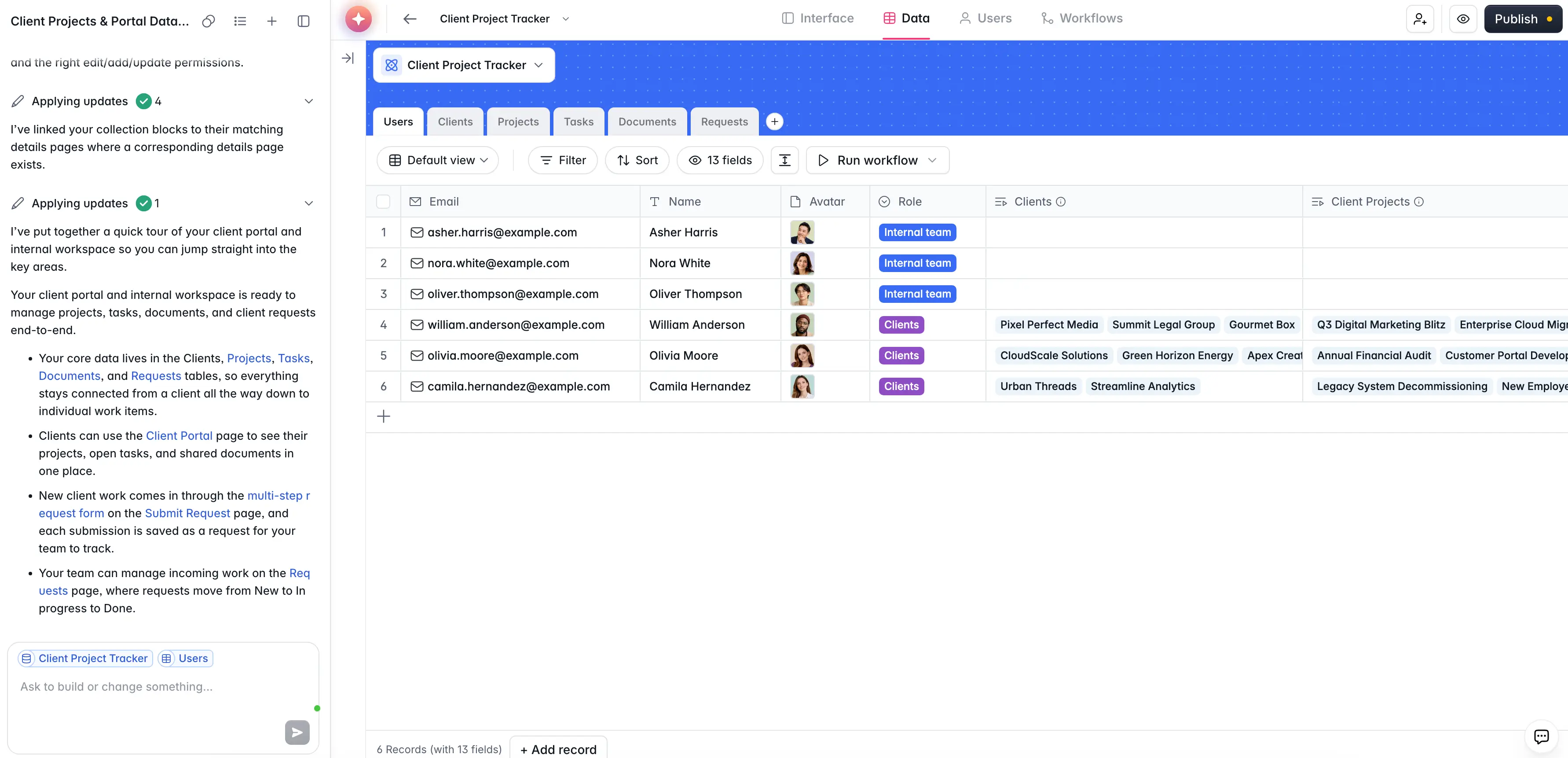
There’s also an option to create a database in Softr manually — or by using database templates available in the Databases tab at the Softr Studio. Another option is importing your data into Softr Databases via CSV or Airtable import, with more import options coming soon.
SOC2 and GDPR compliance, SSO, and battle-tested infrastructure make Softr one of the most secure platforms to build enterprise-level databases and apps.
My final verdict: I’d choose Softr when the problem is not just “where should we store this data?” but “how do we make this data usable across teams, clients, vendors, or partners without creating another messy spreadsheet system?” It lets you structure records with linked tables, custom views, formulas, filters, and rollups, then turn that data into a full-stack app.
Softr pros and cons
Pros:
- App-native database: Softr Databases is built directly into the app builder, so teams can move from structured data to portals, dashboards, directories, CRMs, and internal tools without exporting or rebuilding their data elsewhere.
- Data freshness: Because Softr Databases sync natively with Softr apps, updates appear in real time without the sync delays or API limits that often come with external databases.
- Data flexibility: Connect your data from Airtable, Google Sheets, HubSpot, Notion, SQL databases, BigQuery, and more.
- Built for internal and external collaboration: Softr makes sense when multiple teams or external users need to view, submit, update, or act on business data through permission-aware interfaces instead of editing the database directly.
- AI assistants: Softr’s AI generator and AI database agents help with setup, field generation, record enrichment, summarization, tagging, and other repetitive tasks.
- Predictable pricing: Softr’s predictable, flat pricing helps you calculate costs in advance. The free forever plan allows for 5 app users, 5,000 Softr database records, role-based permissions, AI credits, and unlimited collaborators and apps.
Cons:
- Softr is not the right choice for teams whose main AI database needs are vector search, embedding storage, or large-scale RAG infrastructure.
- Not built for advanced backend engineering, complex custom queries, or heavy analytics workloads that need a dedicated data warehouse or BI stack.
Softr's key features
- AI app builder: Softr’s AI Co-Builder can generate a working business app from a prompt, including the pages, user roles, sample data, and core structure.
- Database AI Agents: You can automate record-level work like classifying records, summarizing text, extracting details from PDFs, enriching fields with web research, or keeping records updated based on conditions.
- Ask AI: Ask the AI questions about your data, like “Which client projects are at risk of missing their deadlines this month, and what’s causing the delay?” and and it will answer based on your data (app permissions respected).
- Advanced conditional forms: Create forms for time-off requests, onboarding, IT tickets, or employee feedback that adapt based on conditions you set up. All submissions go straight to your Softr database.
- Role-based and row-level permissions: Control what internal and external users, such as different employees, clients, vendors, or partners, can view, edit, submit, or act on inside the apps built on top of your database.
- Native workflow automation: Automate tasks like approvals, notifications, assignments, updates, and follow-ups directly inside the platform. When a data field changes, workflows trigger notifications, emails, record updates, and integrations automatically.
- Vibe Coding Block: Generate custom data visualizations, calendar views, calculators, tracking interfaces, and analytical widgets using natural prompts.
- MCP Server: Connect AI tools like Claude, ChatGPT, and Cursor directly to your databases, so they can query data, create records, and manage tables.
Softr pricing
Softr offers flat, predictable pricing plans. Listed prices reflect annual billing.
- Free: Unlimited apps, with access to Softr Workflows and Softr Databases, 5 app users, 5 AI credits, and 5,000 database records
- Basic: $19/month for unlimited apps with 42+ integrations, Team: 5 + Client: 5 app users, 10 AI credits, and 50K records
- Pro: $99/month for unlimited apps with 45+ integrations and custom code, Team: 10 + Client: 50 app users, 50 AI credits, and 500K records
- Business: $329/month for unlimited apps with 52+ integrations, Team: 30 + Client: 100 app users, 100 AI credits, and 1M records
- Enterprise: Custom pricing
Every plan includes a monthly AI credit allowance, so you can try the AI Co-Builder and Vibe Coding block at no cost.
2. Airtable — best for AI-assisted spreadsheet-style databases
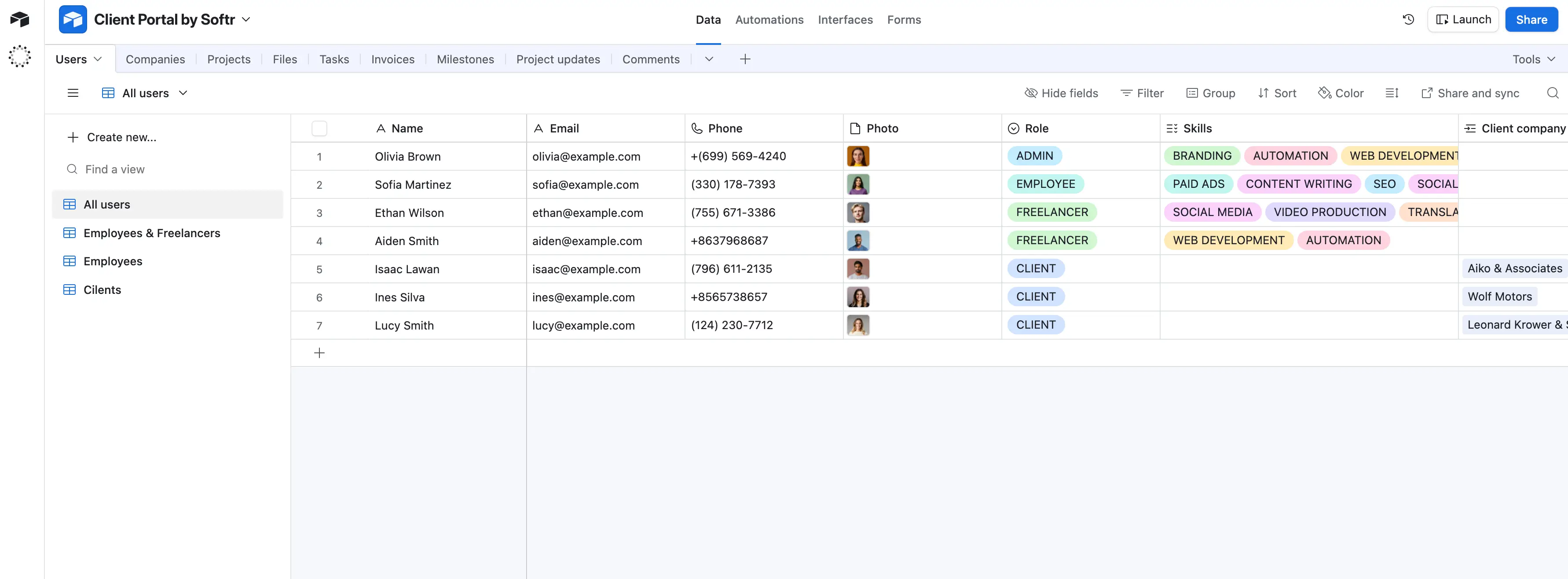
Airtable is an AI-assisted database that helps teams organize shared data, build workflows, and manage day-to-day processes. It fits processes where the same information needs to move between several people and stages, such as reviewing vendors, approving project requests, tracking campaigns, or managing customer accounts.
I’d use Airtable’s AI for iterative work tied to database records: extracting renewal dates from contracts, categorizing incoming requests, researching an account, or turning messy updates into a review summary. The output stays connected to the original record and can feed the next step in the workflow.
The tradeoff appears once bases include multiple linked tables, formulas, permissions, synced data, and automations, since someone has to understand how everything connects and keep it working. Pricing also becomes harder to ignore when more employees need editing access. Also, bases become slower and more difficult to manage as they grow in data volume.
My final verdict: I’d choose Airtable for flexible, data-centered workflows that change often, not as a core enterprise database or the cleanest overall app experience.
Airtable pros and cons
Pros:
- Fast process changes: Operations teams can add fields, connect tables, create new views, and update automation rules through Airtable’s visual builder.
- Low adoption barrier: The grid feels familiar to spreadsheet users, while interfaces let less technical employees work without editing the underlying base.
- Better cross-functional visibility: Different teams can work from the same records while using views and interfaces suited to their roles.
- Less manual data work: AI can extract document details, research information, categorize records, and generate summaries directly inside the workflow.
Cons:
- Maintenance becomes harder as linked tables, formulas, integrations, and automation exceptions accumulate.
- Per-seat pricing and separate Portal fees can become expensive when a workflow needs broad internal or external access.
- Airtable’s API rate limits, automation constraints, and performance tradeoffs make it a poor replacement for high-volume enterprise database infrastructure.
Airtable best features
- Omni: Airtable’s AI assistant can create and modify bases, interfaces, fields, and automations through natural-language instructions.
- Field Agents: AI-powered fields can retrieve, analyze, classify, or generate information for individual records, including data from documents and the web.
- Interface Designer: Builders can create role-specific dashboards and working screens without exposing every user to the underlying tables.
- Automations and synced data: Teams can trigger assignments, alerts, record updates, scripts, and connected actions as work changes state.
- Enterprise administration: Higher plans add SSO, App Sandbox, audit logs, DLP, AI controls, HyperDB, and broader governance capabilities.
Airtable pricing
Prices shown below reflect annual billing.
- Free plan available for up to 5 editors, 1,000 records per base, 500 monthly AI credits per editor, and 100 monthly automation runs
- Team: $20 with 50,000 records per base, 15,000 monthly AI credits per paid user, and 25,000 automation runs
- Business: $45 with 125,000 records per base, 20,000 monthly AI credits per paid user, 100,000 automation runs, SSO, App Sandbox, and AI admin controls
- Enterprise Scale: Custom pricing with 500,000 records per base, 25,000 monthly AI credits per paid user, 500,000 automation runs, HyperDB, audit logs, and enterprise administration
- Add-ons: Portals start at $120 per month for 15 Team guests and $150 on Business; additional AI credits start at $120 per month for 10,000 credits
3. Baserow — best for self-hosted, AI-assisted operational databases
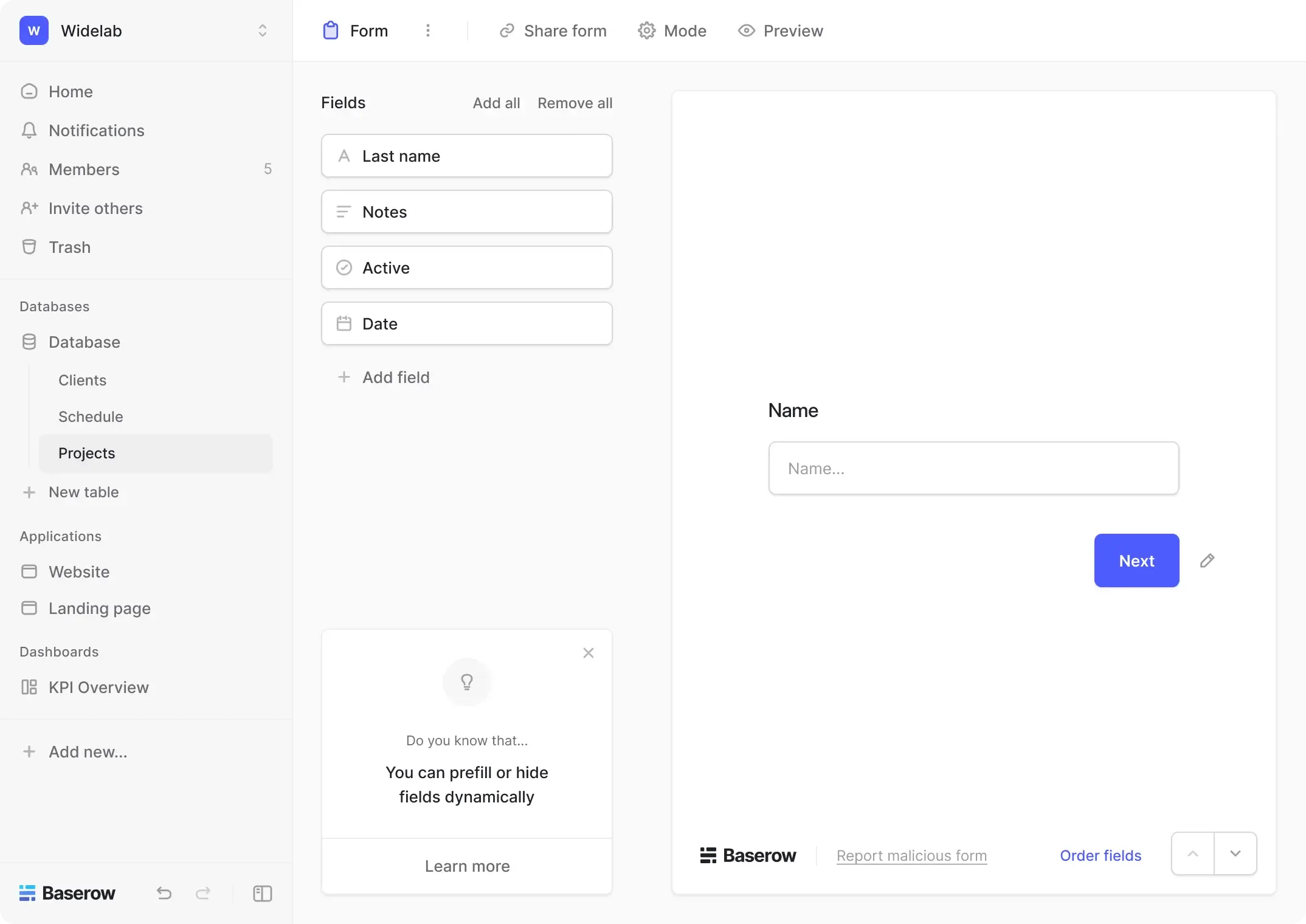
Baserow makes the most sense when an enterprise needs AI to work inside a private, structured operational system rather than across a warehouse or vector database. I’d use it for processes such as document intake, quality control, supplier management, or case tracking, where AI can extract, classify, and summarize information directly inside records. The spreadsheet-style interface is relatively easy to adopt and the first database quick to build.
The harder part comes later: large relational databases need careful schema design and performance testing, integrations often rely on middleware, and self-hosting still requires someone to manage upgrades, backups, and security.
My final verdict: In the enterprise AI database market, I’d choose Baserow as a private operational data layer, not as a vector database, warehouse, or universal AI backend.
Baserow pros and cons
Pros:
- Flexible deployment: Teams can use Baserow Cloud, self-host it, or connect local models through Ollama when data needs to remain inside their own environment.
- Easy initial adoption: The familiar grid interface lets operations teams move beyond spreadsheets without requiring every user to understand SQL or backend development.
- Well suited to controlled AI workflows: AI outputs stay attached to structured records, making them easier to review, route, and use in repeatable business processes.
- Less platform lock-in: Its open-source core, REST API, webhooks, and self-hosting options give technical teams more control than most cloud-only database tools.
Cons:
- Performance can become less predictable as tables accumulate large datasets, linked records, lookups, formulas, and complex filters.
- Self-hosting reduces vendor dependence but adds responsibility for upgrades, backups, monitoring, security patches, and scaling — all of which require deep technical expertise.
- Native integrations and the newer AI and automation tools are still less mature than those of larger, more established enterprise platforms.
Baserow best features
- AI fields: Teams can extract data from files, classify records, translate text, generate content, or summarize information within a database field.
- Kuma AI assistant: The assistant can help create and modify tables, relationships, formulas, views, applications, and workflows using natural-language instructions.
- Workflow automation: Record changes, schedules, and webhooks can trigger AI processing, database updates, notifications, and external actions.
- Application and dashboard builders: Teams can give employees role-specific interfaces instead of exposing the underlying database tables to every user.
- Enterprise access controls: Higher plans add role-based permissions, SSO, audit logs, restricted views, and field-editing controls for governed internal use.
Baserow pricing
Prices shown reflect annual billing.
- Cloud Free: available with 3,000 rows and 2 GB of storage per workspace
- Cloud Premium: $10 per user/month, with 50,000 rows and 20 GB of storage per workspace
- Cloud Advanced: $18 per user/month, with 250,000 rows, 100 GB of storage, role-based permissions, free read/comment users, and audit logs
- Self-hosted Open Source: Free, with unlimited databases, rows, and storage
- Self-hosted Premium: $10 per user/month, adding AI features, more views, exports, comments, and personal views
- Self-hosted Advanced: $18 per user/month, adding role-based permissions, SSO, audit logs, data sync, and free read/comment users
- Self-hosted Enterprise: Custom pricing, with enhanced security, implementation support, co-branding, invoicing, and managed-instance options
4. Pinecone — best for enterprise teams that need managed vector retrieval at scale
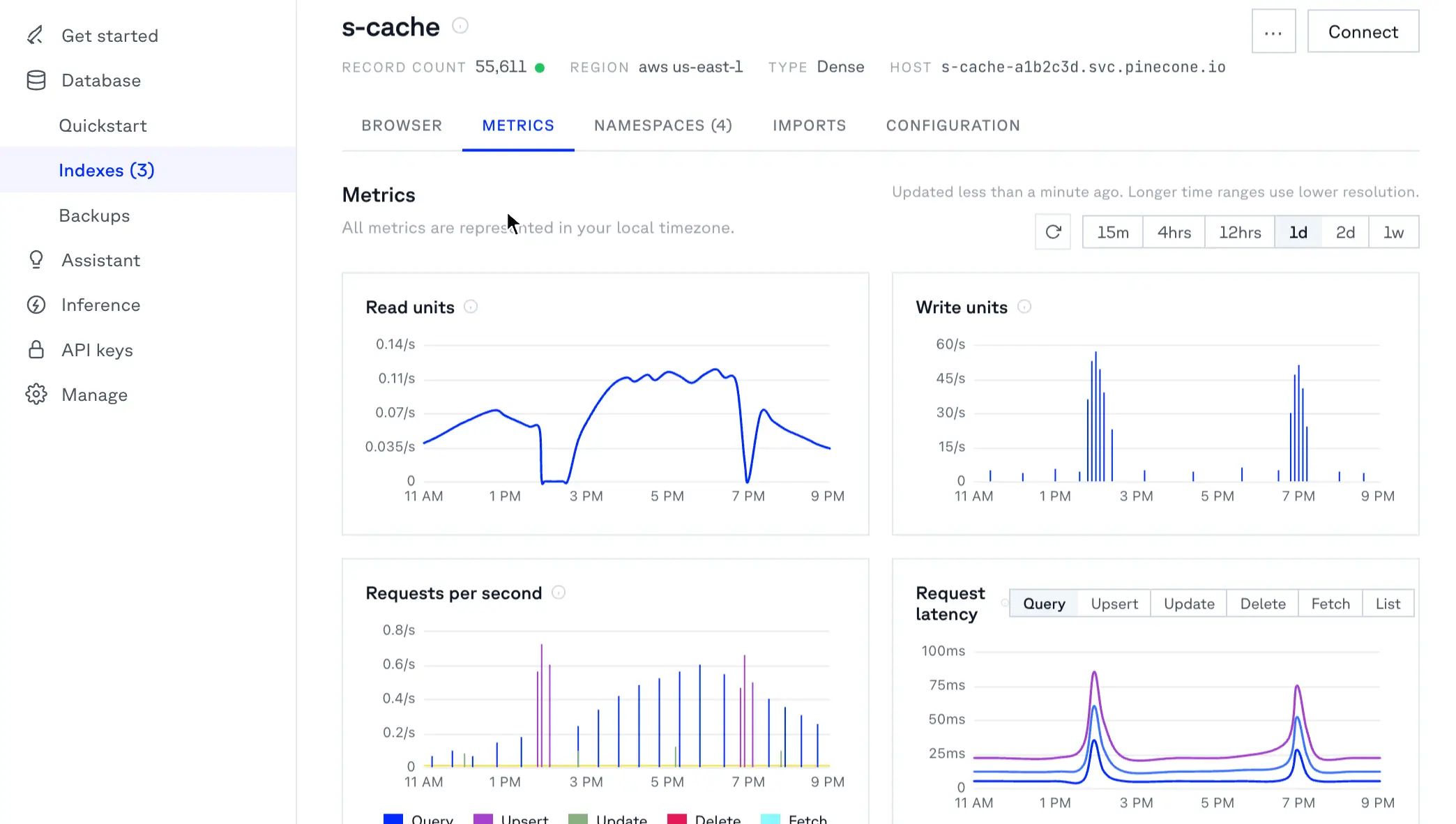
Pinecone makes the most sense when vector search is important enough to justify its own infrastructure. I’d use it for a production RAG system, knowledge assistant, recommendation engine, or semantic search product that needs to retrieve from millions of records without a team managing vector clusters.
The initial experience is straightforward: create an index, load embeddings and metadata, then query it from the application. The more frustrating work appears around Pinecone. Teams still need to clean and chunk content, synchronize changes from source systems, enforce permissions, and test retrieval quality. Cost can also become harder to predict as data and query volume grow.
My final verdict: I wouldn’t use Pinecone as the company’s primary database, but as a dedicated enterprise retrieval layer, it remains one of the most credible managed options.
Pinecone pros and cons
Pros:
- Low operational burden: Pinecone handles the underlying vector infrastructure, so teams don’t have to maintain search clusters, replicas, or index servers themselves.
- Fast path from pilot to production: Its APIs and SDKs make it relatively easy to build an initial retrieval workflow and expand it without redesigning the entire infrastructure.
- Production-ready governance: Higher plans add controls such as SAML SSO, role-based access, private networking, encryption-key management, audit logs, and service accounts.
- Suitable for demanding retrieval workloads: Teams can use on-demand capacity for variable traffic or provision Dedicated Read Nodes for sustained workloads that need isolated resources.
Cons:
- Data synchronization becomes an ongoing responsibility because Pinecone stores a searchable copy of information rather than replacing the original source systems.
- Costs can become difficult to estimate as namespace size, query volume, embeddings, reranking, imports, and other usage increase.
- Pinecone isn’t a transactional system of record, so most enterprise applications still need a relational, document, or analytical database beside it.
Pinecone best features
- Dense, sparse, and full-text indexes: Teams can support semantic, keyword, or hybrid retrieval depending on how users search their data.
- Namespaces and metadata filters: Applications can separate tenants or business units and narrow searches by attributes such as department, content type, or access group.
- Dedicated Read Nodes: Enterprises with sustained traffic can provision isolated read capacity instead of relying entirely on shared on-demand resources.
- Bulk import, backup, and restore: Large datasets can be loaded from object storage, while production indexes can be backed up and recovered.
- Built-in observability: Console metrics and integrations with Prometheus and Datadog help teams track usage, performance, and capacity.
Pinecone pricing
Pricing below reflects monthly billing.
- Starter: Free for testing and small applications, with access to Pinecone Database On-Demand, Inference, Assistant, and dense, sparse, and full-text indexes
- Builder: $20/month flat, with higher usage limits, multiple projects and users, cloud and region selection, and Prometheus and Datadog monitoring
- Standard: $50/month minimum usage, with pay-as-you-go services, Dedicated Read Nodes, imports, backups, RBAC, and SAML SSO. A three-week trial includes $300 in credits
- Enterprise: $500/month minimum usage, with a 99.95% uptime SLA, private networking, customer-managed encryption keys, audit logs, service accounts, admin APIs, HIPAA compliance, and Pro support
5. MongoDB Atlas Vector Search — best for enterprise teams running AI on live operational data
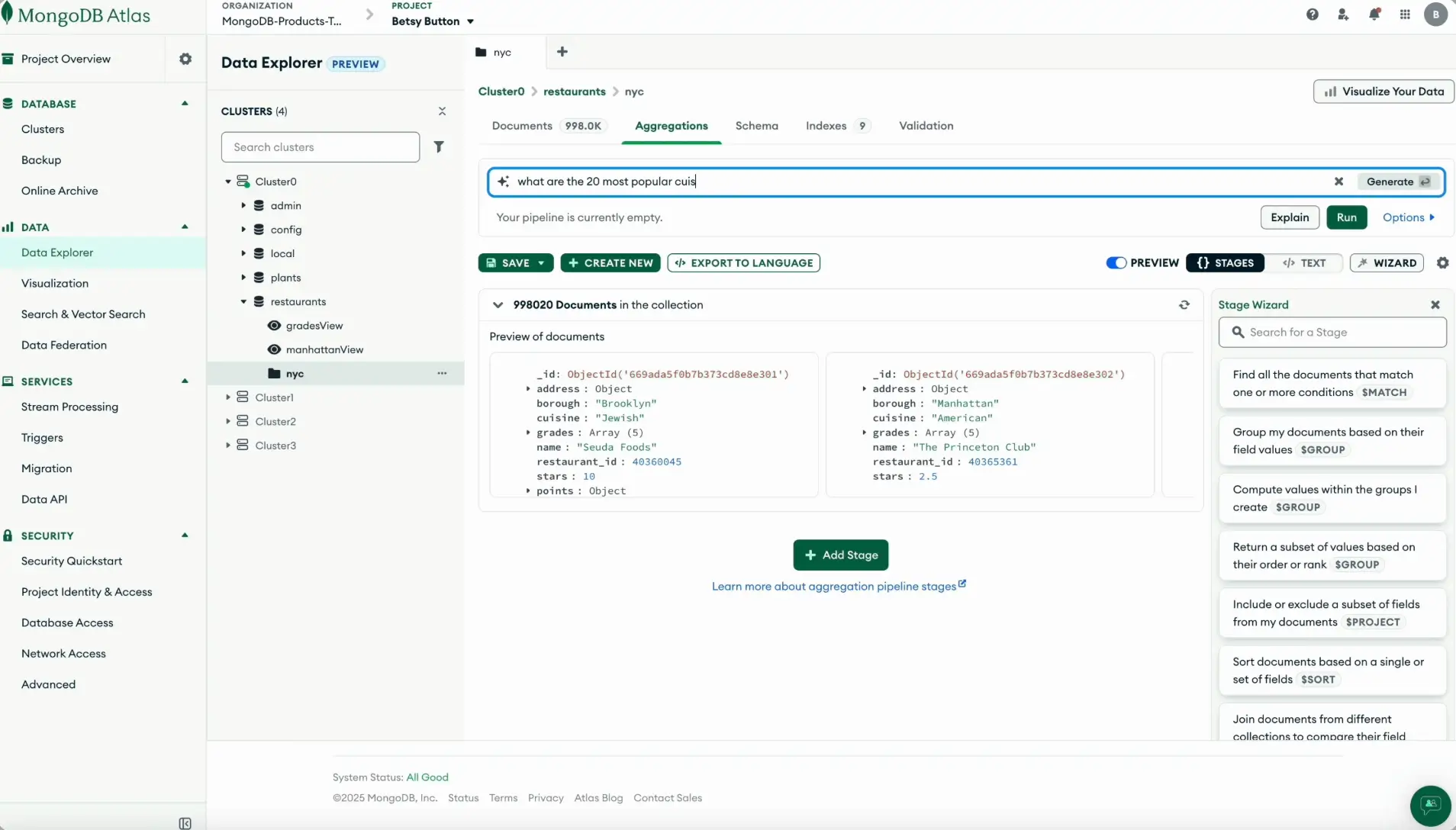
MongoDB Atlas Vector Search can be a great choice for your team when the records an AI system needs already live in MongoDB. I’d use it for RAG, semantic search, recommendations, or agentic workflows where results must reflect current customer, product, ticket, or operational data.
The experience is practical: embed records, index the fields, filter retrieval by business metadata, and continue working with the same documents after the AI returns an answer. The tradeoff is that production performance isn’t automatic. Selective filters, concurrency, memory requirements, and search-node sizing can quickly affect latency and cost.
My final verdict: I’d choose it as an integrated AI database for a MongoDB-based application, not as the default option for a vector-first system built from scratch.
MongoDB Atlas Vector Search pros and cons
Pros:
- Keeps retrieval connected to live records: AI responses can use current operational data instead of relying on a separately synchronized vector store.
- Removes an extra infrastructure layer: Teams can avoid maintaining a second database and the pipelines needed to keep vectors aligned with application data.
- Works well inside existing MongoDB applications: Developers can add semantic retrieval without rebuilding the surrounding data model or application workflows.
- Supports enterprise production environments: Teams can isolate search workloads, scale them separately, and manage them within the wider Atlas platform.
Cons:
- Production costs can be difficult to estimate because cluster size, Search Nodes, memory, vector dimensions, and query volume all affect the final bill.
- Highly selective tenant, permission, or category filters can increase latency and require more careful candidate and index tuning.
- Teams still need to manage chunking, embedding versions, recall testing, reindexing, and retrieval quality.
MongoDB Atlas Vector Search best features
- Vector and hybrid retrieval: Teams can combine semantic similarity with full-text search when queries contain both natural language and exact terms.
- Metadata prefiltering: Queries can restrict results by fields such as tenant, region, status, content type, or access level before returning matches.
- Dedicated Search Nodes: Production teams can move search compute away from normal database reads and writes.
- Vector quantization: Scalar and binary quantization help reduce the memory required for large search indexes, with different recall and latency tradeoffs.
- Aggregation pipeline support: Retrieved records can continue through MongoDB pipelines for ranking, filtering, transformations, and application logic.
MongoDB Atlas Vector Search pricing
Pricing below reflects current usage-based and hourly billing, with estimated monthly costs rather than annual plan pricing.
- Free plan available with 512 MB of storage
- Flex: From $0.011 per hour, capped at up to $30 per month, with up to 5 GB of storage
- Starter Scale M10: From $0.08 per hour or $56.94 per month, with 10 GB of storage and 2 GB of dedicated RAM
- Production Grade M30: From $0.54 per hour or $387.62 per month, with 40 GB of storage and 8 GB of dedicated RAM
Note: Dedicated Search Nodes and other production Vector Search usage may add separate costs beyond the base Atlas cluster.
Find the best AI enterprise database for your business
Before choosing a tool, ask yourself:
- Does AI need to search knowledge, work with live operational records, or power an app people will use?
- Will employees, clients, vendors, or partners need different levels of access?
- Do you need self-hosting and infrastructure control, or would you rather reduce technical maintenance?
- Can your team manage vector indexes, synchronization pipelines, and performance tuning?
- How will pricing change as your data, queries, and user base grow?
Choose Pinecone for dedicated vector retrieval, MongoDB Atlas Vector Search when your application data already lives in MongoDB, Airtable for flexible spreadsheet-style workflows, and Baserow when self-hosting matters.
Softr is the best overall pick when you need to turn your business data into a secure, fully functional app or portal without building and maintaining a separate frontend, database, and workflow layer.
Try Softr’s AI Co-Builder for free for free to create your first relational database (user interface and utility pages included) in minutes.
Frequently asked questions
What is an AI database?
What is the difference between a vector database and an operational AI database?
Which AI database should I choose for my enterprise?