Transcript
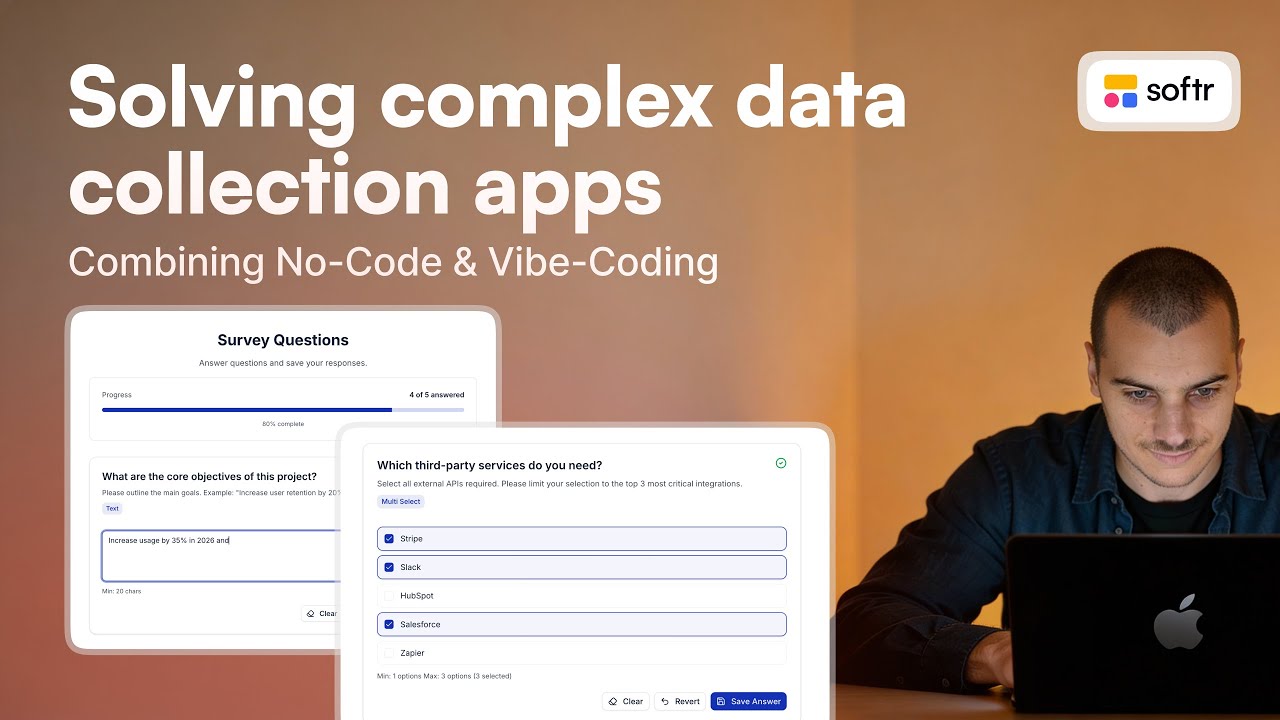
I was looking into ways to make data collection smoother within Softr apps, especially for cases involving text, number, date, single select, and multi-select inputs. I specifically wanted to handle validation, such as character maximums, while being able to display all possible values within a simple database.
The way I tackled this was by creating a database structure with fields for the question, description, and type to establish a taxonomy. I then added a config JSON field specific to each question type. For a single select, this lists all options; for a multi-select, it can define constraints like selecting a maximum of three options.
[.blog-callout]
While using a JSON config is a clever workaround for advanced validation, you can also use Softr Databases to manage your field types and constraints natively. For even faster setup, the AI co-builder can generate these database schemas for you based on a simple prompt.
[.blog-callout]
I explained this taxonomy and the possible values to a Vibe-Coding block in Softr. I provided the JSON configuration, and it was able to create an interface where I can input a number and save the answer. The interface allows me to clear the answer entirely or revert to a previously saved value if I change my mind.
[.blog-callout]
If a native block doesn't quite fit your custom data collection needs, the Vibe-Coding block allows you to prompt for the exact custom component you want. It can generate specific UI elements that connect to your data source seamlessly.
[.blog-callout]
Because the Vibe-Coding block will soon have native create, update, and delete options, I currently have it configured to send payloads for each question and answer to a Softr Workflows trigger. I set this up using a webhook to send the values directly to my database columns.
[.blog-callout]
Note from Softr: You can use Softr Workflows to handle complex logic and data updates natively. This keeps your business logic close to your design and reduces the need for third-party automation tools.
[.blog-callout]
This is a quick and simple way to create an advanced interface for handling data collection at scale. You can manage one line per question per company or even add layers for different years to repeat the process over time. I hope this setup is useful for your projects.
![How to Use Softr Templates to Make Web Apps [2026 Full Guide]](https://cdn.prod.website-files.com/67a3700c65457964cf349cd4/69fe0f1ca830a8c8c54a86fd_3a6b01e9-9bbd-49d8-a51b-4a3a79e5f7f9.jpeg)