Transcript
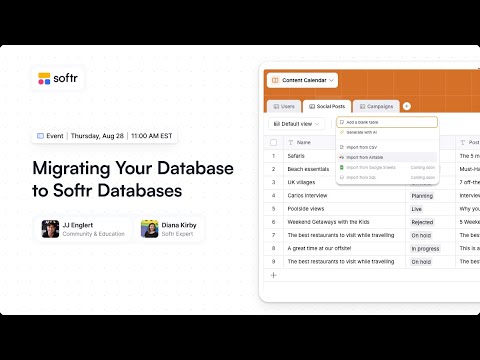
Thank you for joining our session today. I'm joined by Diana, who is a Softr expert, and we're going to be talking about migrating to Softr Databases today. We have a lot to go over, including things you should know before migrating to help with your decision-making process.
We will show you how to do it and also show you all the benefits that come with that. Generally, we'll talk about databases, setting them up, and what switching a database entails. You can ask us questions all along the way.
I have a quick poll for everyone today. We want to know what database you're using, if any, so far. Whether it is Airtable, SmartSuite, HubSpot, or something not listed, let us know.
[.blog-callout]
Note from Softr: While Softr integrates with 17+ external data sources, Softr Databases is the powerful, native way to manage data directly within Softr for maximum performance and speed.
[.blog-callout]
Diana and I will introduce ourselves quickly, and then we'll talk about what you should be thinking about before migrating to Softr Databases. We'll show you two different options: Airtable import and importing with a CSV.
We will also talk about the benefits and the pros that come with Softr Databases, including speed. I will say that since we have so many Airtable users, Airtable is currently being upgraded to our latest data source model.
For the longest time, we had a data source model that was just making API calls, which was inefficient and not as performant. Our new data model system is a unified data source caching model, which allows us to store your data in a temporary way on our servers.
This increases performance and allows us to standardize the data. That's the way we're building our future features. It allows us to do so many more things, like Ask AI and inline editing, which will be coming to the new Airtable integration soon.
Softr Databases is already set up for best performance and utilizing all of this and more. Even after Airtable is improved, I still think there is going to be a speed difference with Softr Databases being faster.
We have a ton of users using those 15 other databases, and we're still going to continue to invest in all of those other database connections. Bringing all those connections to this unified model allows us to have an investment that benefits all data sources.
I am Softr's Community and Education Lead. It's a great time to be building with Softr, especially going full stack with Softr Workflows coming soon as well.
[.blog-callout]
Note from Softr: Softr Workflows allow you to keep your logic close to your design, helping to consolidate tools and reduce reliance on third-party automation platforms.
[.blog-callout]
Diana runs her own agency and is a Softr expert. She joined the expert program, which was a turning point for her growth, allowing her to have more access to leads and people wanting to work with Softr.
Let's get into migrating to Softr Databases. If you're on Airtable or another database, what are the benefits of switching? There are some things you need to think about before you start.
The first thing is legacy blocks. If you built an application heavily reliant on legacy list blocks or map blocks, they might not work with the new data sources yet. We recommend updating your application to the latest blocks for better performance.
Also, while Softr Databases has a ton of field types, it doesn't have every single field type that Airtable has yet, such as the duration field type. Most cases, like importing a duration to Softr, would default to a text field.
[.blog-callout]
Note from Softr: If you're starting a new project, try the AI co-builder. It builds complete apps, pages, and database schemas instantly based on your prompt.
[.blog-callout]
Rich text isn't yet supported in Softr Databases. If you are heavily relying on rich text fields for automated emails or formatting, that might be a reason to hold off on transferring quite yet.
You'll also need to update the interface pages. When you transfer where your data lives, you need to be mindful of your user groups and visibility rules. You want to be methodical in your transition.
Switching databases isn't something you want to do regularly. Our pricing is competitive and the performance is great. For example, our API limit is significantly faster and greater than other providers.
If you have a lot of complex automations in Airtable, it might take time to rebuild those in Zapier, Make, or Softr Workflows. These are the pros and cons to see what fits your specific application.
Softr Databases was built as a scalable database first, using the same technology leading infrastructure is built on. It is an easy-to-use editor built on a performance backend that can handle millions of records.
Right now at the business tier, you can have 200,000 rows in your database. If you need more, you can check out our custom plans which are very cost-effective even at scale.
We have connections to Zapier and Make, and our API is very performant. Another benefit is that Softr Databases is built around IDs. If you change a field name, your interface will not break anymore.
[.blog-callout]
Note from Softr: For specific business needs, check out our AI CRM template or ERP template to see how Softr Databases can power your client portals.
[.blog-callout]
In the Softr Studio, data loads incredibly fast when using Softr Databases. This improves performance not just on your app but within the editor as well.
When importing from Airtable, we have a migration feature. It is a good process, but it is not magic. There is additional work to be done to validate that everything came through properly.
We suggest duplicating your database and duplicating your app before you start the migration. Do the migration in the duplicate to see how it works before touching your production app.
Once the import is finished, you can remap your data. You can switch the source of a block from Airtable to Softr Databases and use the auto-map feature to link the fields quickly.
You will need to update things like user groups and conditional filters. It goes by quickly if you have a side-by-side view of the original app and the new version.
We are continuing to build on this infrastructure. Softr Workflows will be launching generally next month and will complement Softr Databases similarly to how Airtable automations work.
Our goal is to meet you where your data is and bring everything together. If you want to work with an expert like Diana, you can find her in the Softr experts directory.