Transcript
We added a new feature to the roll-up field in Softr Databases, and I will show you how it works.
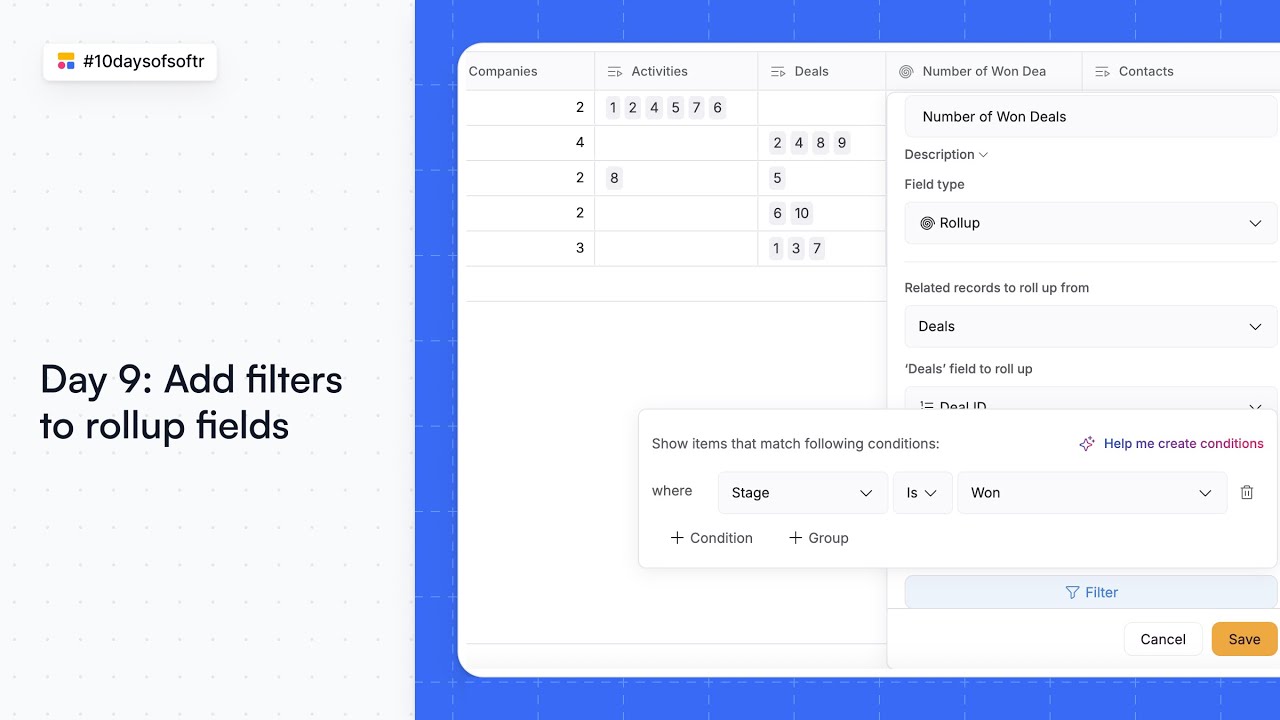
Before, we had a roll-up field in our databases which would help you filter the data, but we added a conditional filter to it. This help filter the data even further.
[.blog-callout]
Note from Softr: While you can manually configure these fields, the AI co-builder can automatically set up complex Softr Databases structures and relationships for you by simply describing your needs.
[.blog-callout]
You will need to go to the roll-up field type settings and add the conditions here. For instance, if you had the campaign budget as $10,000, as it is shown in my case, you can filter and show the budget of the campaigns that are only completed.
You need to choose the status of that campaign and then add the value as completed. And here you go, you have a filtered data.
It is showing the campaign budget that are already completed. I hope this new functionality helps you better manage your data directly within Softr.
[.blog-callout]
Note from Softr: If you find yourself needing to run logic based on these filtered totals, check out Softr Workflows to automate tasks without needing external tools like Zapier.
[.blog-callout]